Table of Contents for
Web Design Blueprints
 Web Design Blueprints
Published by
Packt Publishing, 2016
Web Design Blueprints
Published by
Packt Publishing, 2016
- Cover
- Table of Contents
- Web Design Blueprints
- Web Design Blueprints
- Credits
- About the Author
- About the Reviewer
- www.PacktPub.com
- Preface
- What you need for this book
- Who this book is for
- Conventions
- Reader feedback
- Customer support
- 1. Responsive Web Design
- Getting familiar with the basics
- Using media queries for responsive design
- Working with responsive media
- Building responsive layouts
- Summary
- 2. Flat UI
- Flat UI color
- Creating a flat UI layout
- Summary
- 3. Parallax Scrolling
- Color classes
- Using SVG font icons
- Getting the fonts
- That's no moon!
- OMG, it's full of stars!
- Clouds, birds, and airplanes
- The rocket
- Terra firma
- Next up, the CSS
- Styling the objects with CSS
- Styling the ground objects
- Writing the JavaScript effects
- Setting the row height
- Spreading the objects
- Spreading the clouds
- Loading the page functions
- Smoothening the scroll
- Updating elements on the scroller
- Collecting the moving elements
- Creating functions for the element types
- Setting the left positions
- Creating the rocket's movement function
- Finally, moving the earth
- Summary
- 4. Single Page Applications
- Getting to work
- Getting the old files
- Object and function conventions
- Creating utility functions
- Working with the home structure
- Setting up other sections
- Performing housekeeping
- Creating a callBack function for the API
- Summary
- 5. The Death Star Chapter
- Dropping in the parallax game
- Loading elements from JSON
- What can be done in the shared levels service
- Editing the home JavaScript
- Creating the other pages – credits and leaderboard
- Creating the second level
- Summary
- Index
Let's continue. Next, we will want to create a function that will spread the objects randomly up and down each row. It will be used on the stars in the space row, the clouds in the sky row, and the buildings and trees at the bottom. The next function will need you to create a new function called spreadObjects() and have it receive the variables x, vm, hm, ha, p, and e.
These variable names represent the data they will receive: x for an array of objects, vm for the vertical multiplier, hm for the horizontal multiplier, va for vertical addition, ha for horizontal addition, p for position type, and e for the extension (px or %).
With x, we will loop through the array of objects and, for each object in the loop, set its style position to the variable p, the style to be a random number multiplied by vm with va added to it, and finally, the e added to the end. We will do the same for the object style left property and vm, vh, and e. Look at this code for the function:
    function spreadObjects(x, vm, hm, va, ha, p, e){
        for (var I = 0; I < x.length; i++){
            x[i].style.position = p;
            x[i].style.top = Math.floor((Math.random()*vm)+va)+e;
            x[i].style.left = Math.floor((Math.random()*hm)+ha)+e;
        }
    }
Back to the original onload function; call spreadObjects() with the first variable being the array of the object when you get the element by the stars id attribute, and from that, get the elements by their I tag names. The subsequent variables will be 150, 100, 1, 1, fixed, and %.
Taking a look at the code, I can tell you what will happen: the function will distribute the stars throughout the element they are within 100% from the left and 150% from the top, in a fixed position.
Take a look at the function call:
spreadObjects(document.getElementById("stars").getElementsByTagNam
e("i"), 150, 100, 1, 1, "fixed", "%");
We are going to call this function a few more times now. All three of the first variables passed start with getting the element by the ground id attribute. The first will get the elements inside it that have the fa-tree class attribute.
These are only going to be distributed horizontally, not vertically, so the next variable is 0 and then 14, and then, we need some math to determine the inner height of the window, since the elements will be a few pixels from the absolute bottom, divided by 28, then 1 for the horizontal addition, with the position type relative, followed finally by px for the extension.
The next two function calls will get the elements that have the class name right from within the ground element, select the first of the array, and then get the elements that have the class name small and then large. The numbers are mostly the same, but the innerHeight values are divided by 13 and 15 respectively. I'll show this to you in the following code because I'm trying to keep the explanation brief:
spreadObjects(document.getElementById("ground").getElementsByClass
Name("fa-tree"), 0, 14, -(window.innerHeight/28), 1, "relative", "px");

spreadObjects(document.getElementById("ground").getElementsByClass
Name("right")[0].getElementsByClassName("small"), 0, 14,-
(window.innerHeight/13), 1, "relative", "px");

spreadObjects(document.getElementById("ground").getElementsByClass
Name("right")[0].getElementsByClassName("large"), 0, 14,-
(window.innerHeight/15), 1, "relative", "px");
You may be wondering why we are not creating variables and inserting them into the function calls. The answer is we could, but then our code would take up more room, and we would essentially be duplicating something that's already in the DOM, which is unnecessary bloat.
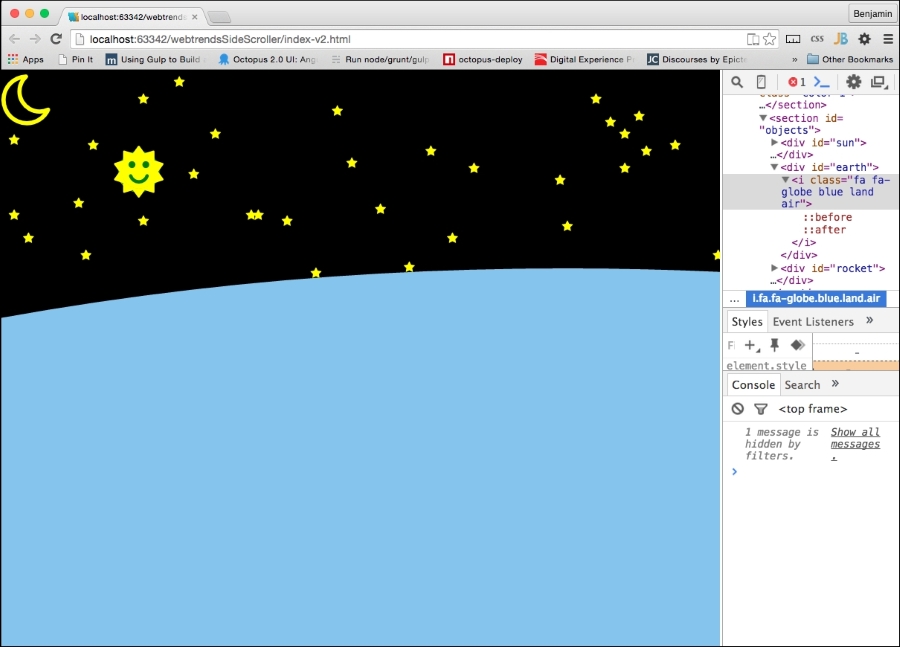
Now, look at your browser, and see how the stars have been scattered throughout space.