Table of Contents for
Web Design Blueprints
 Web Design Blueprints
Published by
Packt Publishing, 2016
Web Design Blueprints
Published by
Packt Publishing, 2016
- Cover
- Table of Contents
- Web Design Blueprints
- Web Design Blueprints
- Credits
- About the Author
- About the Reviewer
- www.PacktPub.com
- Preface
- What you need for this book
- Who this book is for
- Conventions
- Reader feedback
- Customer support
- 1. Responsive Web Design
- Getting familiar with the basics
- Using media queries for responsive design
- Working with responsive media
- Building responsive layouts
- Summary
- 2. Flat UI
- Flat UI color
- Creating a flat UI layout
- Summary
- 3. Parallax Scrolling
- Color classes
- Using SVG font icons
- Getting the fonts
- That's no moon!
- OMG, it's full of stars!
- Clouds, birds, and airplanes
- The rocket
- Terra firma
- Next up, the CSS
- Styling the objects with CSS
- Styling the ground objects
- Writing the JavaScript effects
- Setting the row height
- Spreading the objects
- Spreading the clouds
- Loading the page functions
- Smoothening the scroll
- Updating elements on the scroller
- Collecting the moving elements
- Creating functions for the element types
- Setting the left positions
- Creating the rocket's movement function
- Finally, moving the earth
- Summary
- 4. Single Page Applications
- Getting to work
- Getting the old files
- Object and function conventions
- Creating utility functions
- Working with the home structure
- Setting up other sections
- Performing housekeeping
- Creating a callBack function for the API
- Summary
- 5. The Death Star Chapter
- Dropping in the parallax game
- Loading elements from JSON
- What can be done in the shared levels service
- Editing the home JavaScript
- Creating the other pages – credits and leaderboard
- Creating the second level
- Summary
- Index
Create a new function called moveEarth and give it the variable earth. First, define the earth variable's style fontSize property to be equal to the window's innerHeight property multiplied by the number of row DIV elements, and subtract from it the element identified by the id rocket's bounding client rectangle's bottom property and then divide it by the window's innerHeight value; multiply the whole thing by 100, and then append the string vw so that the size is pinned to the viewport width. The function and its first line look like this:
    function moveEarth(earth){
        earth.style.fontSize=(((window.innerHeight * (document.getElementsByClassName("row").length) - document.getElementById("rocket").getBoundingClientRect().bottom)/window.innerHeight) * 100)+"vw";
}
The second line of the moveEarth function will set the earth's style left value to be equal to exactly the value of the fontSize previously defined, except change 100 at the end to the number of row DIV elements multiplied by 2 and instead of vw, append the string px. Take a look:
earth.style.left = (((window.innerHeight * (document.getElementsByClassName("row").length) - document.getElementById("rocket").getBoundingClientRect().bottom) / window.innerHeight) + document.getElementsByClassName("row").length * 2) + "px";The next line defines the earth's style height property. Define it as the value of the window's innerHeight property multiplied by the number of row DIV elements minus the window's pageYOffset value, and divide the result by the window's innerHeight value plus 1/2, and then append the string % to the end. This is illustrated in the following sample:
earth.style.height = (window.innerHeight * (document.getElementsByClassName("row").length)-window.pageYOffset) / window.innerHeight+.5 + '%';The rest of this function will be used to set style values of the earth's first child element identified by the tag name I. The first property to define is transform.
Start with the string rotate (and end with the string deg), and in between, the value is 15 plus the result of the window's innerHeight value multiplied by the result of the number of row elements minus the rocket element's bounding client rectangle's bottom property, which is then divided by the window's innerHeight value, and then, that result is multiplied by 4. The code looks like this:
earth.getElementsByTagName("i")[0].style.transform = "rotate(" + (15 + (((window.innerHeight * (document.getElementsByClassName("row").length) - document.getElementById("rocket").getBoundingClientRect().bottom)/window.innerHeight)) * 4) + "deg)";Next, define the right property of the style as the window's pageYOffset value divided by its innerHeight value and multiplied by the integer 45, then append the string %. Whew, that was much easier!
earth.getElementsByTagName("i")[0].style.right = (window.pageYOffset / window.innerHeight * 45) + '%';The next line defines the bottom property of the style. Its definition is the same as the left property, but change the integer 45 to 200:
earth.getElementsByTagName("i")[0].style.bottom = (window.pageYOffset / window.innerHeight * 200) + '%';The final line of code we need to write in this function just happens to be the final line of code we need to write for the application. It sets the style's opacity property of the element, and it's pretty simple compared to most of the previous. It equals 1.3 minus the product of the window's pageYOffset value divided by the window's innerHeight value, multiplied by the number of row DIV elements. And you're done, look at the code here:
earth.getElementsByTagName("i")[0].style.opacity = 1.3-(window.pageYOffset / (window.innerHeight * (document.getElementsByClassName("row").length)));
} //this closes the function you were working on.
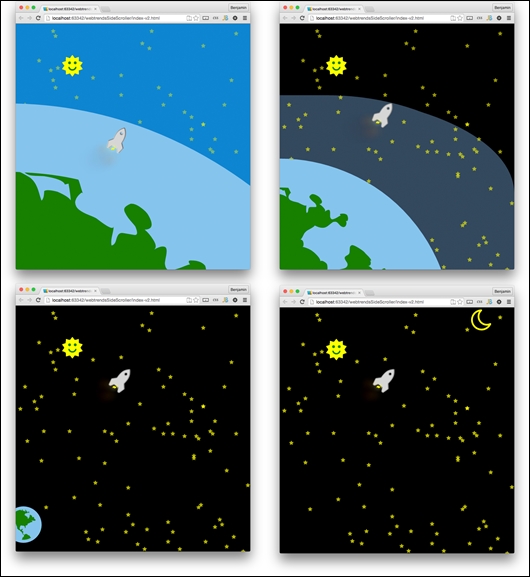
Now for the big reveal! Open the file in your browser or refresh it. You will see a number of new things happening. The biggest difference from the previous view is that the earth is no longer a big blue blob, but a big blue-and-green ball that gracefully falls away from the rocket as it exits the stratosphere. And you will see how the rocket arcs in a curve as it shoots away from the earth. In fact, there are a number of moving parts that operate as a function of the updating scrolls.
This project was tonnes of fun for me to create, as I hope it was for you. Again, like I said in the beginning of this chapter, I would like to see what you make of this code, so check out the GitHib code and fork it.