
When you send a text message from your phone, you type the text, and that's pretty much all there is to it in terms of the content's appearance. You're limited to choosing whether you want to use capital letters. If you want more control over your message, you can switch to sending an email message, which might enable you to select bold, italic, or underlined text.
If you want to send highly formatted content, text with headings, font changes, text color, bulleted lists, and so forth, you might use word processing software, such as Word, Pages, or LibreOffice.
This class of software creates what is called rich text, that is, text rich in styling, and the generic term for software capable of creating a document containing rich text is rich text editor.
Drupal 8 includes a rich text editor called CKEditor. It is a highly configurable editor with a composition area, as shown in the following screenshot, that resembles standalone word processors with formatting buttons. This type of editor is referred to as WYSIWYG, which is pronounced as wizzy-wig, which stands for What You See Is What You Get, meaning that the text it displays shows the selected formatting:
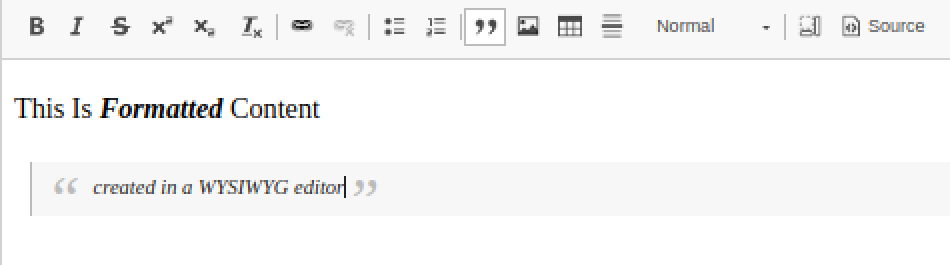
Let's create a piece of content and reproduce what is in the image. Click Content in the admin menu, then click the +Add content button. When you are presented with the list of content types, click Article.
 . If you click it, its outline will become colored, which indicates that the current page has been saved as one of your favorites. You can then navigate to the same page in the future simply by clicking Shortcuts in the admin menu and selecting the page title.
The page contains all the fields and settings necessary for creating Article content. Those fields that require an entry have an asterisk following their name, and I will also include an asterisk as we address each of the fields, in turn.