Table of Contents for
Web Mapping Illustrated
 Web Mapping Illustrated
Published by
O'Reilly Media, Inc., 2005
Web Mapping Illustrated
Published by
O'Reilly Media, Inc., 2005
- Web Mapping Illustrated
- Cover
- Web Mapping Illustrated
- A Note Regarding Supplemental Files
- Foreword
- Preface
- Youthful Exploration
- The Tools in This Book
- What This Book Covers
- Organization of This Book
- Conventions Used in This Book
- Safari Enabled
- Comments and Questions
- Acknowledgments
- 1. Introduction to Digital Mapping
- 1.1. The Power of Digital Maps
- 1.2. The Difficulties of Making Maps
- 1.3. Different Kinds of Web Mapping
- 2. Digital Mapping Tasks and Tools
- 2.1. Common Mapping Tasks
- 2.2. Common Pitfalls, Deadends, and Irritations
- 2.3. Identifying the Types of Tasks for a Project
- 3. Converting and Viewing Maps
- 3.1. Raster and Vector
- 3.2. OpenEV
- 3.3. MapServer
- 3.4. Geospatial Data Abstraction Library (GDAL)
- 3.5. OGR Simple Features Library
- 3.6. PostGIS
- 3.7. Summary of Applications
- 4. Installing MapServer
- 4.1. How MapServer Applications Operate
- 4.2. Walkthrough of the Main Components
- 4.3. Installing MapServer
- 4.4. Getting Help
- 5. Acquiring Map Data
- 5.1. Appraising Your Data Needs
- 5.2. Acquiring the Data You Need
- 6. Analyzing Map Data
- 6.1. Downloading the Demonstration Data
- 6.2. Installing Data Management Tools: GDAL and FWTools
- 6.3. Examining Data Content
- 6.4. Summarizing Information Using Other Tools
- 7. Converting Map Data
- 7.1. Converting Map Data
- 7.2. Converting Vector Data
- 7.3. Converting Raster Data to Other Formats
- 8. Visualizing Mapping Data in a Desktop Program
- 8.1. Visualization and Mapping Programs
- 8.2. Using OpenEV
- 8.3. OpenEV Basics
- 9. Create and Edit Personal Map Data
- 9.1. Planning Your Map
- 9.2. Preprocessing Data Examples
- 10. Creating Static Maps
- 10.1. MapServer Utilities
- 10.2. Sample Uses of the Command-Line Utilities
- 10.3. Setting Output Image Formats
- 11. Publishing Interactive Maps on the Web
- 11.1. Preparing and Testing MapServer
- 11.2. Create a Custom Application for a Particular Area
- 11.3. Continuing Education
- 12. Accessing Maps Through Web Services
- 12.1. Web Services for Mapping
- 12.2. What Do Web Services for Mapping Do?
- 12.3. Using MapServer with Web Services
- 12.4. Reference Map Files
- 13. Managing a Spatial Database
- 13.1. Introducing PostGIS
- 13.2. What Is a Spatial Database?
- 13.3. Downloading PostGIS Install Packages and Binaries
- 13.4. Compiling from Source Code
- 13.5. Steps for Setting Up PostGIS
- 13.6. Creating a Spatial Database
- 13.7. Load Data into the Database
- 13.8. Spatial Data Queries
- 13.9. Accessing Spatial Data from PostGIS in Other Applications
- 14. Custom Programming with MapServer’s MapScript
- 14.1. Introducing MapScript
- 14.2. Getting MapScript
- 14.3. MapScript Objects
- 14.4. MapScript Examples
- 14.5. Other Resources
- 14.6. Parallel MapScript Translations
- A. A Brief Introduction to Map Projections
- A.1. The Third Spheroid from the Sun
- A.2. Using Map Projections with MapServer
- A.3. Map Projection Examples
- A.4. Using Projections with Other Applications
- A.5. References
- B. MapServer Reference Guide for Vector Data Access
- B.1. Vector Data
- B.2. Data Format Guide
- ESRI Shapefiles (SHP)
- PostGIS/PostgreSQL Database
- MapInfo Files (TAB/MID/MIF)
- Oracle Spatial Database
- Web Feature Service (WFS)
- Geography Markup Language Files (GML)
- VirtualSpatialData (ODBC/OVF)
- TIGER/Line Files
- ESRI ArcInfo Coverage Files
- ESRI ArcSDE Database (SDE)
- Microstation Design Files (DGN)
- IHO S-57 Files
- Spatial Data Transfer Standard Files (SDTS)
- Inline MapServer Features
- National Transfer Format Files (NTF)
- About the Author
- Colophon
- Copyright
What Do Web Services for Mapping Do?
Mapping web services has been developed independently of the Web. They use similar approaches and follow some common communication protocols, but the web services for mapping are maintained independent of web services in general.
Web services for mapping are the future of web mapping. Computing and network resources have reached the level of sophistication to make this possible. As data sources continue to expand, the demand to have access to them increases. Meeting this demand will only be possible using mapping web services.
Web services for mapping essentially fill two roles: accessing remote data sources as a consumer and serving up or sharing data as a provider for others. Web services for mapping are all about sharing information.
Accessing remote data sources requires some specific knowledge about the data source. Particulars may include the server address to connect to, the data layers available, or the format the data can be sent to you in. Once you know the details, you can set up your application to request exactly what you want. MapServer will add in its own pieces of information to each request so you get something logical back on a map.
Sharing (a.k.a. publishing) your own data is relatively easy to do. A few additions to your application will allow others to query it for such things as available layers and data format options. Once you’ve made a few modifications to your map file, other users can add your layers to their applications.
Web services for mapping don’t require you to know a bunch of details about how requests are made or sent. MapServer will take care of the guts of the operation for you, such as sending HTTP or XML-based requests and receiving responses and data. You usually won’t have to read XML when using these services. However, you might occasionally need to review an XML-based document to learn more about a service.
Tip
The examples in this chapter walk you through the steps of building your own request manually. You can then incorporate this technology into your own applications. If you are just planning to have MapServer broker requests to a WMS server, then you won’t need to pay as much attention to the manual examples.
Just as telephones or CD players use common methods for sending or receiving information, so do mapping web services. Therefore, other products or applications can work together as long as they use the common standards or protocols.
Why Use These Services?
There are various reasons for sharing and accessing map data using web services. A government or large corporation may make map data available so that other divisions or departments don’t need to store their data locally. Consider the cost savings often touted for centralizing data storage. If data is centralized, the users still need to access it. Web services for mapping make the data available.
Perhaps someone is willing to share data with you but can’t allow you to have a complete copy, for whatever reason. A web service can facilitate that. Some map data, such as hurricane locations, is constantly changing. Downloading that data might not be possible or timely. Integrating a layer in your map that accesses a web service in realtime might be the answer. Some data repositories are so large that it would be unrealistic to copy them to your location. Web services can make that data available for you at the time you need it. This helps reduce the need for continual data storage upgrades. Figure 12-1 illustrates the basic function of a MapServer application accessing remote data through a web services request.
Whether sharing or accessing, it is all about making the most of our time and resources. Continually changing an application to point to new data can be inefficient. Storing large amounts of data locally may also be an unreasonable option.
Internal Versus External Needs
Some service providers sharing data will never use the information internally. For example, think of a government agency that makes mapping data available to the public. The public benefits by having free and open access to mapping information. The government benefits by successfully fulfilling their mandate. Providing web services for mapping data can require a serious commitment to openness and support for clients.
On the other end of the spectrum, a company might share data internally and never share it with the public. Web services don’t require that the data be publicly accessible. Services can be securely guarded like any other web page or internal application. Large corporations may use services internally to make data broadly accessible
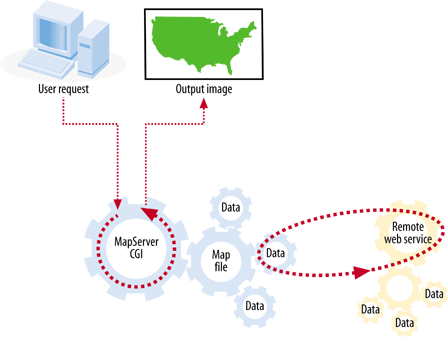
without having to maintain redundant hardware infrastructures across divisions. This can be a cost-reduction measure, but it can also improve service to users. Users need two things: access to information and access to information in the right format. The benefit of mapping services is that a data source can be made available, and how the data sources are formatted or presented can be managed as well.
Both internal and external needs scenarios can be handled equally well through web services for mapping with MapServer.