Table of Contents for
Web Mapping Illustrated
 Web Mapping Illustrated
Published by
O'Reilly Media, Inc., 2005
Web Mapping Illustrated
Published by
O'Reilly Media, Inc., 2005
- Web Mapping Illustrated
- Cover
- Web Mapping Illustrated
- A Note Regarding Supplemental Files
- Foreword
- Preface
- Youthful Exploration
- The Tools in This Book
- What This Book Covers
- Organization of This Book
- Conventions Used in This Book
- Safari Enabled
- Comments and Questions
- Acknowledgments
- 1. Introduction to Digital Mapping
- 1.1. The Power of Digital Maps
- 1.2. The Difficulties of Making Maps
- 1.3. Different Kinds of Web Mapping
- 2. Digital Mapping Tasks and Tools
- 2.1. Common Mapping Tasks
- 2.2. Common Pitfalls, Deadends, and Irritations
- 2.3. Identifying the Types of Tasks for a Project
- 3. Converting and Viewing Maps
- 3.1. Raster and Vector
- 3.2. OpenEV
- 3.3. MapServer
- 3.4. Geospatial Data Abstraction Library (GDAL)
- 3.5. OGR Simple Features Library
- 3.6. PostGIS
- 3.7. Summary of Applications
- 4. Installing MapServer
- 4.1. How MapServer Applications Operate
- 4.2. Walkthrough of the Main Components
- 4.3. Installing MapServer
- 4.4. Getting Help
- 5. Acquiring Map Data
- 5.1. Appraising Your Data Needs
- 5.2. Acquiring the Data You Need
- 6. Analyzing Map Data
- 6.1. Downloading the Demonstration Data
- 6.2. Installing Data Management Tools: GDAL and FWTools
- 6.3. Examining Data Content
- 6.4. Summarizing Information Using Other Tools
- 7. Converting Map Data
- 7.1. Converting Map Data
- 7.2. Converting Vector Data
- 7.3. Converting Raster Data to Other Formats
- 8. Visualizing Mapping Data in a Desktop Program
- 8.1. Visualization and Mapping Programs
- 8.2. Using OpenEV
- 8.3. OpenEV Basics
- 9. Create and Edit Personal Map Data
- 9.1. Planning Your Map
- 9.2. Preprocessing Data Examples
- 10. Creating Static Maps
- 10.1. MapServer Utilities
- 10.2. Sample Uses of the Command-Line Utilities
- 10.3. Setting Output Image Formats
- 11. Publishing Interactive Maps on the Web
- 11.1. Preparing and Testing MapServer
- 11.2. Create a Custom Application for a Particular Area
- 11.3. Continuing Education
- 12. Accessing Maps Through Web Services
- 12.1. Web Services for Mapping
- 12.2. What Do Web Services for Mapping Do?
- 12.3. Using MapServer with Web Services
- 12.4. Reference Map Files
- 13. Managing a Spatial Database
- 13.1. Introducing PostGIS
- 13.2. What Is a Spatial Database?
- 13.3. Downloading PostGIS Install Packages and Binaries
- 13.4. Compiling from Source Code
- 13.5. Steps for Setting Up PostGIS
- 13.6. Creating a Spatial Database
- 13.7. Load Data into the Database
- 13.8. Spatial Data Queries
- 13.9. Accessing Spatial Data from PostGIS in Other Applications
- 14. Custom Programming with MapServer’s MapScript
- 14.1. Introducing MapScript
- 14.2. Getting MapScript
- 14.3. MapScript Objects
- 14.4. MapScript Examples
- 14.5. Other Resources
- 14.6. Parallel MapScript Translations
- A. A Brief Introduction to Map Projections
- A.1. The Third Spheroid from the Sun
- A.2. Using Map Projections with MapServer
- A.3. Map Projection Examples
- A.4. Using Projections with Other Applications
- A.5. References
- B. MapServer Reference Guide for Vector Data Access
- B.1. Vector Data
- B.2. Data Format Guide
- ESRI Shapefiles (SHP)
- PostGIS/PostgreSQL Database
- MapInfo Files (TAB/MID/MIF)
- Oracle Spatial Database
- Web Feature Service (WFS)
- Geography Markup Language Files (GML)
- VirtualSpatialData (ODBC/OVF)
- TIGER/Line Files
- ESRI ArcInfo Coverage Files
- ESRI ArcSDE Database (SDE)
- Microstation Design Files (DGN)
- IHO S-57 Files
- Spatial Data Transfer Standard Files (SDTS)
- Inline MapServer Features
- National Transfer Format Files (NTF)
- About the Author
- Colophon
- Copyright
Acquiring the Data You Need
Once you have determined your mapping and data needs, you have to find the appropriate data. To find such data, you can, for example, search the Internet, trade with friends, or download from a government site. This chapter takes you through several examples from searching for premade maps to finding data to do your own mapping and conversion.
Finding Premade Maps
Sometimes all you want is a premade, basic map of the world or a specific country. The Internet can be a good place to find these. One excellent site is the CIA World Factbook at http://www.cia.gov/cia/publications/factbook/geos/ag.html. Here you will find a basic political map for every country and also a detailed demographic, cultural, and political summaries. Large-size, print-quality reference maps are also available in Portable Document Format (PDF).
Another good resource is the University of Texas Online Map Library at http://www.lib.utexas.edu/maps/. With a brief walk through some of the links, you can find diverse maps that show, for example, a street map of Baghdad or a shaded relief map of the United Kingdom, nicely showing the Scottish Highlands. The library has scanned many of these maps and made them available to the public domain.
Finding Satellite Images or Shaded Surface Maps
Premade maps from images or shaded elevation models are also available. The CIA Factbook (http://www.cia.gov/ciapublications/factbook) has small political maps for each country. Other reference maps that show more physical data (e.g., bathymetry and elevation) or even photographic examples of the earth can be found. The U.S. National Geophysical Data Center (NGDC) includes some beautiful premade gallery images of their more detailed source data; look for them at http://www.ngdc.noaa.gov/seg/topo/globegal.shtml.
Finding Map Data
The Internet contains a wealth of geographic information for your projects. It is a natural place to begin your quest for mapping data. Some government agencies make their mapping data freely available on the Internet. Certain organizations have even made it their mission to make mapping data available for others for free. Other groups have created catalogs of mapping data you can search.
Plenty of Internet map data sources are available for the United States. North American data is also widely accessible, with Canada having some excellent products. Global data is more of a challenge. International organizations such as the United Nations or even American-based organizations that observe global events, such as the National Oceanic and Atmospheric Administration (NOAA), are some of the better sources for global data.
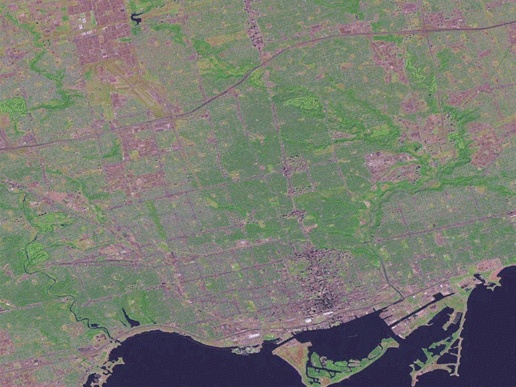
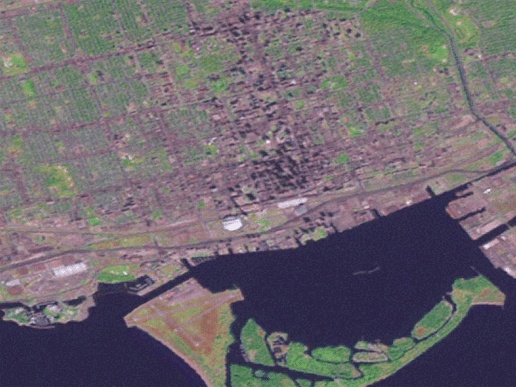
There are a variety of data repositories on the Internet to choose from, and they each have a certain target scale of application that can’t be ignored. For example, a satellite image can show pictures of where you live. Figure 5-6, for example, shows the different colors of surfaces such as roads, fields, and waterways, but only to a certain level of detail. If you hope to use it for planning a walk to the corner store, you will be sorely disappointed. However, if you want to see how your city is laid out, you will probably be satisfied. Figure 5-7 shows a closer look at the same image as Figure 5-6. The maximum amount of detail has been reached, and the image looks bad. This is an attempt to use the image beyond its intended scale of application.
There are multiple ways to hunt for good data. You can announce your search to email mailing lists or review web sites that summarize free data sources. Local mapping companies and government agencies are also a good place to start. Many states, provinces, and municipalities have their own GIS and mapping offices. Your search can also include local consulting companies, industries, or nonprofit organizations related to environmental or natural resource management and use. Just ask to speak to someone in the mapping or GIS department. Most people in these organizations
are willing to discuss what data they can share. If they can’t share the data, they can at least point you to the original source for you to seek out on your own. Table 5-1 lists a few web sites and email lists that include free map data or people who can help you find data.
There are some proactive ways to get access to data. If your project needs a certain type of data and you can help meet the objectives of the custodian as well, it might be a good idea to enter into a project together. One group puts time and effort into the project, and the other contributes data. A long-term data exchange agreement may also play a mutually beneficial role. The idea is that one party provides mapping data, and the other gets open access to it. In return, the user provides their updates of the data back to the custodian. Of course, each agreement should be negotiated to include only certain kinds of updates or sharing of only certain pieces of data (such as nonconfidential information).
This data sharing/update model is increasingly common, but at the same time many groups are making their information freely available for open use. It is important to get a broad feel for others who are also interested in, or may already have, the data you are looking for. Data can be shared without having to copy source data by using OGC web specifications. For example, the satellite image in Figure 5-6 is from a free web service and requested by a mapping application. See Chapter 12 for more about the OGC and web services.
Finding and getting access to data aren’t the only problems. Some data may be unusable or inappropriate for the task at hand. This goes beyond matters of scale and resolution, referring more to accuracy and supplementary attributes. One example is a forestry initiative of the government of British Columbia (Canada) to map certain types of pest-infected trees. Traditionally this has been mapped using a fixed-wing aircraft carrying a reconnaissance mapper who spots the trees and then draws their location on a paper map. At the office, the paper maps are digitized onto a base map in the computer. While these maps are useful for general landscape-level analysis, you would not want to depend on the map to lead you to a particular tree in the middle of a dense forest. Wise use and understanding of the appropriate application of your data will help you have realistic expectations when starting your mapping project.
The Internet isn’t the only source of mapping data. Chapter 9 discusses how to create some of your own data with map-editing tools or using coordinates taken from a GPS receiver.