Table of Contents for
Responsive Web Design Patterns
 Responsive Web Design Patterns
Published by
Packt Publishing, 2015
Responsive Web Design Patterns
Published by
Packt Publishing, 2015
- Cover
- Table of Contents
- Responsive Web Design Patterns
- Responsive Web Design Patterns
- Credits
- About the Author
- About the Reviewers
- www.PacktPub.com
- Preface
- What you need for this book
- Who this book is for
- Conventions
- Reader feedback
- Customer support
- 1. Creating a Home for Responsive Patterns
- Why and how to create a responsive site
- Breaking websites down to their patterns
- Building a home for your patterns
- Summary
- 2. The Main Stage – Building Responsive Layouts
- Most popular layout patterns
- Creating complex systems
- Summary
- 3. Make Way for Responsive Navigations
- Responsive navigation patterns
- Summary
- 4. From Static to Dynamic – Embedding Media
- Responsive image patterns
- Understanding sliders and carousels
- Implementing videos
- Summary
- 5. Gathering and Displaying Information
- Responsive table patterns
- Summary
- 6. Combining Responsive Patterns
- Continuing to look for patterns
- Your pattern library is not done yet!
- Summary
- 7. Ship It – Finalizing Your Pattern Library
- Getting ready to handoff
- Publishing your library
- Further exploration
- Summary
- Index
If you are working for a client, most of the time when you are done with a project you will just zip up the responsive pattern library and send it over. It's then the client's job to host the library and make sure the right employees have access to it. If you are working on a personal project, though, you should consider putting your library online to share. This may be intimidating, but I believe this industry is so great majorly because we are constantly sharing ideas and their execution freely.
If you choose to do this, there are many different ways you can host your library:
- Self host: The simplest version is to put the library on your own website in a subdirectory. Clients may even ask you to do this for them in some cases. Make sure you are getting compensated if you do.
- GitHub Pages: GitHub will host your simple websites for free. All you need to do is have a GitHub account and use GitHub Pages. Create a remote repository with GitHub, create a branch called gh-pages, and then push your site to it. If you go to
http://githubUsername.github.io/yourRepoName/, you will see your site live. If you haven't noticed already, this is exactly what I am using for this book's library. - CodePen.io: You can break out the patterns and put them on CodePen.io as well. This is a technique used by Brad Frost in his responsive patterns collection. He has one page (a GitHub Page too!) with a link to each pattern on CodePen.
Some clients may require their work to be password-protected. You may even want to password-protect the pattern library just as a courtesy. I personally use .htaccess to password protect my directories. It's more secure than most JavaScript solutions and fairly easy to implement. To do this, first create a file named .htpasswd in a plain text editor such as TextEdit or Notepad. Use a .htaccess password generator. You can easily Google one or go to http://www.htaccesstools.com/htpasswd-generator/. For this example, I am going to set the username to admin and the password to password too. Super secure, right?
Paste the generated password and username inside your .htpasswd file. It should look something like this:
admin:$apr1$4FDDZ0z1$OyTfGO5PAPSE7FmeCrOih/
The first part admin is the username and the string of seemingly random characters is the encrypted password. Now save that in the directory that you are password protecting. You may get a message such as "Names that begin with a dot "." are reserved for the system." This is fine. Both files need to be created; .htaccess and .htpasswd will not be visible. You may need to show hidden files to see them. A text editor, such as Sublime, will show them on its sidebar though.
Now create a .htaccess file and write the following code:
AuthType Basic
AuthName "Password Protected Area"
AuthUserFile /path/to/your/.htpasswd
Require valid-user
Change /path/to/your/.htpasswd to the path to the .htpasswd file. Then upload them to your remote directory. You should see a prompt asking for a username and password.
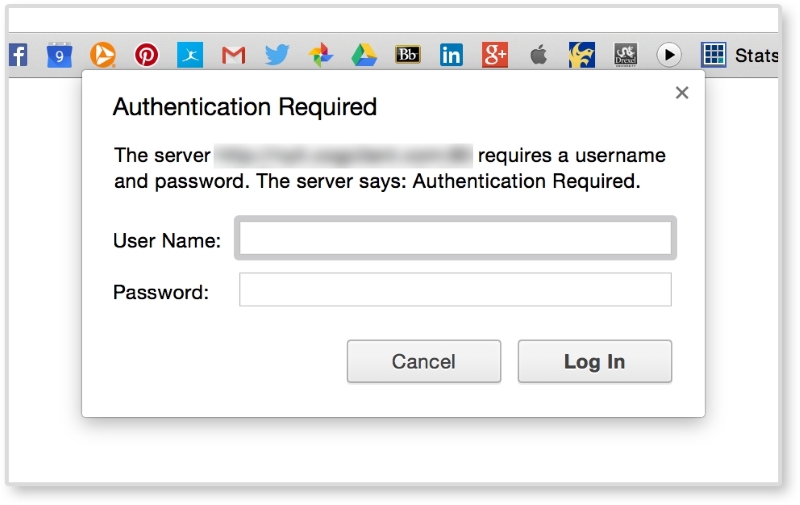
If not, make sure the path to your .htpasswd file is correct. Also, make sure that both files have no extension added from your text editor.