Table of Contents for
Responsive Web Design Patterns
 Responsive Web Design Patterns
Published by
Packt Publishing, 2015
Responsive Web Design Patterns
Published by
Packt Publishing, 2015
- Cover
- Table of Contents
- Responsive Web Design Patterns
- Responsive Web Design Patterns
- Credits
- About the Author
- About the Reviewers
- www.PacktPub.com
- Preface
- What you need for this book
- Who this book is for
- Conventions
- Reader feedback
- Customer support
- 1. Creating a Home for Responsive Patterns
- Why and how to create a responsive site
- Breaking websites down to their patterns
- Building a home for your patterns
- Summary
- 2. The Main Stage – Building Responsive Layouts
- Most popular layout patterns
- Creating complex systems
- Summary
- 3. Make Way for Responsive Navigations
- Responsive navigation patterns
- Summary
- 4. From Static to Dynamic – Embedding Media
- Responsive image patterns
- Understanding sliders and carousels
- Implementing videos
- Summary
- 5. Gathering and Displaying Information
- Responsive table patterns
- Summary
- 6. Combining Responsive Patterns
- Continuing to look for patterns
- Your pattern library is not done yet!
- Summary
- 7. Ship It – Finalizing Your Pattern Library
- Getting ready to handoff
- Publishing your library
- Further exploration
- Summary
- Index
Although the responsive pattern library accompanying this book is filled with examples, let's pretend it's filled with patterns of a client's website instead. This means our pattern library would not just be for ourselves, we would be handing it off to the client. Before this happens, our library would need a little fine-tuning.
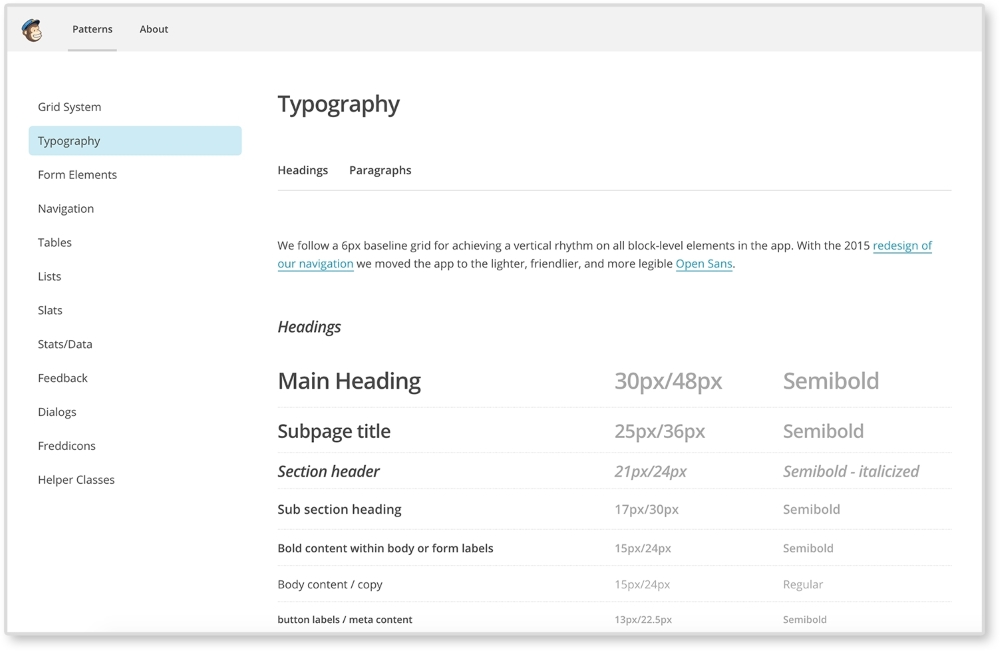
If you are creating a responsive pattern library for a client, you are pretty much digitizing their brand. Your library should already be full with their custom brand's CSS. Before handing off a pattern library, or even at the start of the project, take some time to style the library itself. This little extra bit of effort can make you seem like even more of a professional. All the CSS is already there, right? Why not make sure it is being applied to the actual library? Make sure the typography for the pages' headers, paragraphs, and lists is styled appropriately. MailChimp's pattern library does just this. You can see how the typography is being used in the library itself.

Include the client's logo in the library's header. Style the navigation in the same way it would be on the actual site. Here's a checklist of branding elements you can add:
- Logo
- Typography
- Navigation
- Brand colors
- Form styles
- Link colors and states (hover, focus, and active)
- Media query breakpoints
- Use a layout from the actual site
- Grid system
- Table styles
- Button styles (for example, PDF/PSD download buttons)
By doing this, you are providing more examples for how these patterns can be used. And your library will be even more impressive.
Quality assurance (QA) is a phase in the project when you make sure the website looks and works the same across browsers and devices. It can also be the time to make sure the site is accessible to all users. Usually the person doing QA logs tickets about bugs they see for developers to resolve. Before you ship off your library, make sure you test it. In Chapter 6, Combining Responsive Patterns, we discussed how to identify what browsers to test. Your client may have a list of browsers already prepared. Just like you would test your website, you should also test your pattern library. You cannot be sure what browser your client will be using to view your library. You don't want the main point of reference for a site to appear broken on some browsers.
You can even include your pattern library in the QA phase of the project. Being a developer who solves QA tickets, few things are more frustrating than tracking down modules or specific instances of a pattern in a huge website. Sometimes, I will get a ticket that says, "Sidebar navigation overlaps content at 700px." This just means a sidebar menu is spilling out of its container 700px. A kind "QA-er" (the person logging that ticket) would include a link to a page where I can find this. This doesn't always happen though. And most of the time you then have to sift through all the website's pages, trying to find an instance of the sidebar navigation. And when you do this multiple times over and over, it takes up a good chunk of your time. And sidebars are common. What if there was an issue with a Google Map responsive iframe pattern that you know only applies to two pages out of 40 pages? You, of course, forgot which ones. Have fun finding the pages that use that pattern.
If you QA'd using the pattern library, though, you can just check out the sidebar navigation pattern to see why this is happening. You may even have a layout with the sidebar navigation in your library. And you would definitely have the Google Map responsive iframe neatly archived and easy to find.
Visiting a website you made a while ago is a gamble. You hope it doesn't hurt you. Seeing your hard work soiled by the hands of clients is heart-breaking. You released something you care about into the wild and are now witnessing its decay. You may see some weird pattern you built for specific pages now on the homepage. "No! That doesn't go there!" you may think. But there's nothing you can do. The site launched a long time ago and it is out of your hands. The site may even be mutated past recognition.
I wish I could tell you there was a solution to this, but there isn't. Although they think otherwise, your client is not the expert; you are. And when you are out of the picture all that is left is the instructions you gave them. A good responsive pattern library is your main weapon to fight compromised designs. But even your library can become mutated and bloated. What can we do then in a fast-paced industry based on iterations with websites changing so frequently? Beef up your pattern library by writing meaningful descriptions for all your patterns.
Your responsive pattern library should not be filled with only examples of the patterns and their HTML, CSS, and/or JS, it should also be filled with meaningful descriptions of each pattern. Every pattern has its purpose. It is designed to hold specific content, look a specific way, or be on specific pages. The easiest way to make this clear to future developers editing a project is to write it down. Remember, your responsive pattern library has its own user experience for you to design. You can make it easy or hard for future developers to use your pattern library. You can even do this to yourself.
I love the "past self"/ "future self" example. Did you ever design or code something, not look at it for a long time, and look back and say, "What was I thinking?" Maybe you wrote some really complicated and unnecessary CSS that you now have to deal with. When this happens, you may think "Curse you, past self! You are so lazy." On the flip side, maybe you are creating a new layout in HTML and are including some really thoughtful comments to refer to in the future. You may find that when you revisit it, you think "Oh thanks, past self, that was so smart and helpful for present me." The point is, always think about what future you, or future self, would prefer.
Remember the full span video pattern from Chapter 6, Combining Responsive Patterns. You can look at the following image to refresh your memory. The pattern consisted of a looping video stretching across the page with text overlaid on top.
Let's write a description for it in our pattern library. The following are two descriptions showing a bad example and a good example:
- Bad: This video goes the full width of the page and has a text overlay.
- Good: This video covers the full width of the page with the company's name/logo overlaid on top, centered on the video. This pattern should only be used on the home page. Video for this pattern should have no audio and loop seamlessly. On small screens, a still image will be shown instead. This image should be a thumbnail selected from the video, highlighting its content.
The bad example states the obvious. I can tell just by looking at the pattern that it is a full span video with a text overlay. A good description will not only tell you what the pattern is, but what it should never be. It documents the decisions made about the pattern for others to understand it better as well. In our good example, we make sure to note that this pattern should only be used on the home page. We also describe important shifts that occur at different screen sizes. This description makes sure we know when, where, and how to use this pattern.
It's great when a client gives you permission to show off and claim rights to the work you have done for them. Even if you made an amazing responsive pattern library with clear thorough guidelines, clients can still mutate your work. Perhaps the client mangled your work to a point you hope no one thinks you did it. This can be a terrible situation to be in when you put so much work into a project. For this, keeping a copy of the responsive pattern library can help. If you want to show off the work you did, untouched, you can show people the original pattern library. If you have a portfolio website, you don't have to link to the live site. Pattern libraries are usually small enough you could easily host it yourself. This way you can show off the preserved patterns you made, in action.
Mutation does not only happen after a project is launched and the pattern library is handed off. It can also happen internally. Sometimes, towards the end of a project, we can start to rush and our code can suffer. Things can get a little more hectic when we are working with others. Working in with a pattern library can help reduce CSS bloat because it forces you to think modularly. Pattern libraries archive all the work done on the project. Before creating a new template or module, developers should look through the pattern library to make sure they are not doing duplicate work. Even if the pattern does not yet exist, maybe they will find a pattern similar to it and can start from there. Doing this helps reduce CSS bloat since the developer isn't starting from scratch. They are then less likely to write or overwrite CSS that already exists. This helps reduce the amount of frustrated developers that want to throw !important on the end of a CSS declaration and call it a day. Pattern libraries force you to break down a website into its pieces. Working modularly can help you save time since you have all the building blocks (patterns) already made. You just need to put them together and fill in any gaps.