You should be familiar with the process by now. It's similar to sending money and creating checks. In order to cash a check, you need to have the check ID created by the sender using the following steps:
- Prepare transaction: Here we define the check ID, amount to be cashed out, and so on.
- Sign transaction: You need to sign the transaction cryptographically with your secret key. This proves that you own this account.
- Submit transaction: Once you sign the transaction, you need to submit it to the Ripple network for validation. The check will be cashed out and the account balance will only be updated when the validators approve your transaction.
The following code uses the "CheckCash" method to prepare the transaction. The sign and submit method are similar to the one we used before. We have used the check ID that we noted down earlier. You'll need to replace the check ID with the one you noted earlier. Please note, here the sender will be the recipient of the send check transaction:
const sender = 'r42Qv8NwggeMWnpKcxMkx7qTtB23GYLHBX';
const secret = 'shMrNknuQCteaNE3XUMEBgWs1EebU';
api.prepareCheckCash(sender, {
    "checkID": "25B092AEB7966D572A0DC7BD1EFC9932F1BE081FD1F153C556132E1AAB45D153",
    "amount": {
      "currency": "XRP",
      "value": "100" // Cash for exactly 95 XRP
    }
}, options);
const {signedTransaction} = api.sign(prepared.txJSON, secret);
api.submit(signedTransaction).then(onSuccess,onFailure);
Let's see how we can use this code to cash the check:
'use strict';
const RippleAPI = require('ripple-lib').RippleAPI;
const decodeAddress = require('ripple-address-codec').decodeAddress;
const createHash = require('crypto').createHash;

const sender = 'r42Qv8NwggeMWnpKcxMkx7qTtB23GYLHBX';
const secret = 'shMrNknuQCteaNE3XUMEBgWs1EebU';
const options = {};

const api = new RippleAPI({server: 'wss://s.altnet.rippletest.net:51233'});
api.connect().then(() => {
  console.log('Connected');
  return api.prepareCheckCash(sender, {
    "checkID": "25B092AEB7966D572A0DC7BD1EFC9932F1BE081FD1F153C556132E1AAB45D153",
    "amount": {
      "currency": "XRP",
      "value": "100"
    }
  }, options);

}).then(prepared => {
  console.log("txJSON:", prepared.txJSON);
  const {signedTransaction} = api.sign(prepared.txJSON, secret);
  api.submit(signedTransaction).then(onSuccess,onFailure);
});

function onSuccess(message){
  console.log(message);
  console.log("Transaction Successfully Submitted.");
  disconnect();
}

function onFailure(message){
  console.log("Transaction Submission Failed.");
  console.log(message);
  disconnect();
}

function disconnect(){
  api.disconnect().then(()=> {
    console.log("Disconnected from test network.")
  });
}
Let's run this code using the following command:
./node_modules/.bin/babel-node cash_check.js
If everything works fine, you should see the following output:
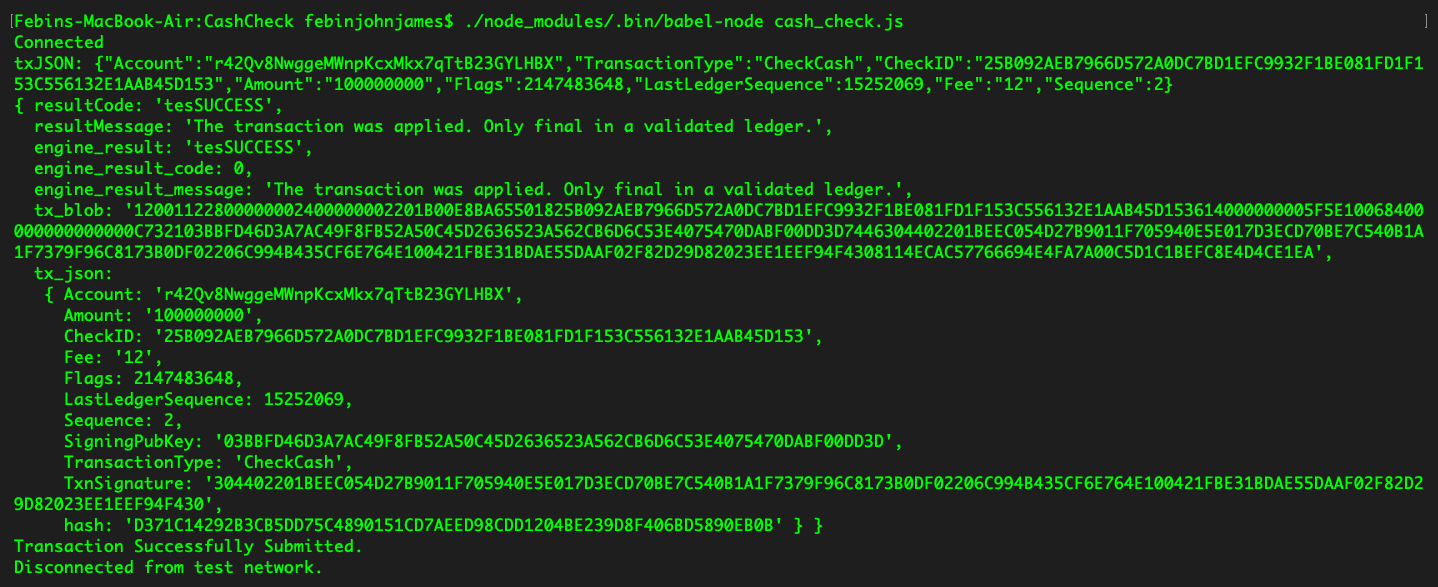
You can use the first app we created to check whether the check has been cashed out. Please note, a Ripple transaction takes 4-6 seconds to be confirmed.
Now, let's build a web app that'll provide the user with an interface to cash out the check.
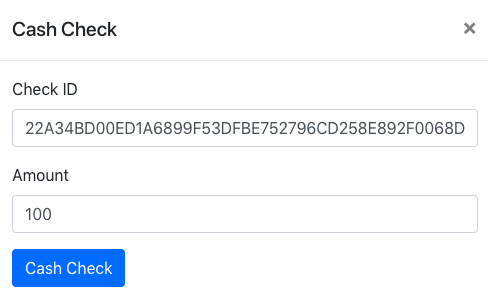
We'll create a modal that inputs the check ID and the amount to be cashed out. Here's the code for our new modal:
<div class="modal fade" id="cashCheckModal" tabindex="-1" role="dialog" aria-labelledby="cashCheckModalLabel" aria-hidden="true">
<div class="modal-dialog" role="document">
<div class="modal-content">
<div class="modal-header">
<h5 class="modal-title" id="cashCheckModalLabel">Cash Check </h5>
<button type="button" class="close" data-dismiss="modal" aria-label="Close">
<span aria-hidden="true">×</span>
</button>
</div>
<div class="modal-body">
<form>
<div class="form-group">
<label for="inputCheckId">Check ID</label>
<input type="text" class="form-control" id="inputCheckId" aria-describedby="inputCheckIdHelp" placeholder="Check ID">
</div>
<div class="form-group">
<label for="inputAmount">Amount</label>
<input type="number" class="form-control" id="inputAmount" placeholder="Amount">
</div>
<button id="cashOutButton" class="btn btn-primary">Cash Check</button>
<br/> <br/>
<div class="progress">
<div class="progress-bar progress-bar-striped bg-info" role="progressbar" style="width: 0%" aria-valuenow="0" aria-valuemin="0" aria-valuemax="100"></div>
</div>
</form>
</div>
</div>
</div>
</div>
Our cash check function is given in the following; it fetches values from the HTML form and uses the Ripple API to prepare, sign, and submit the transaction:
function cashCheck(){
    $('.progress').show();
    const instructions = {};
    const sourceAddress = localStorage.getItem('rippleAddress');
    const sourceSecret = localStorage.getItem('secret');
    const options = {};

    api.connect().then(() => {

    return api.prepareCheckCash(sourceAddress, {
      "checkID": $("#inputCheckId").val(),
      "amount": {
        "currency": "XRP",
        "value": $("#inputAmount").val()
      }
    }, options).then(prepared => {
        $('.progress-bar').css('width', 40+'%').attr('aria-valuenow', 40);
        const {signedTransaction} = api.sign(prepared.txJSON, sourceSecret);
        api.submit(signedTransaction).then(onSuccess,onFailure);
      });
    });
}
When we put everything together, here's what our JavaScript code will look like:
const RippleAPI = require('ripple-lib').RippleAPI;
const decodeAddress = require('ripple-address-codec').decodeAddress;
const createHash = require('crypto').createHash;

  var api = new RippleAPI({server:'wss://s.altnet.rippletest.net:51233'});
  var fetchBalance;
  $('document').ready(function(){
    login();
    $('.progress').hide();
    $('#cashCheckButton').click(function(){
        showCashCheckModal();
    });
    $('#logoutButton').click(function(){
        logout();
    });
    $("#loginButton").click(function(){
        storeCredentials();
    });
    $("#cashOutButton").click(function(){
      cashCheck();
    });
  });

  function login(){
    if(!localStorage.getItem("loggedIn")){
      $('#loginModal').modal('show');
    } else{
      updateAccount();
    }
  }

  function logout(){
    localStorage.clear();
    clearInterval(fetchBalance);
    location.reload();
  }

  function updateAccount(){
    $('#rippleAddress').text(localStorage.getItem('rippleAddress'));
    updateBalance();
  }

  function storeCredentials(){
    localStorage.setItem("rippleAddress", $('#inputRippleAddress').val());
    localStorage.setItem("secret", $('#inputSecret').val());
    localStorage.setItem("loggedIn", true);
    $('#loginModal').modal('hide');
    updateAccount();
  }

  $("form").submit(function(e) {
    e.preventDefault();
  });

  function updateBalance(){
    api.connect().then(() => {
      const accountAddress = localStorage.getItem("rippleAddress");
      return api.getAccountInfo(accountAddress);
    }).then(info => {
      $('#balance').text("Account Balance : " + info.xrpBalance+ " XRP");
    }).then(() => {
      return api.disconnect();
    }).catch(console.error);
  }

  function showCashCheckModal(){
    $('#cashCheckModal').modal('show');
  }

  function cashCheck(){
    $('.progress').show();
    const instructions = {};
    const sourceAddress = localStorage.getItem('rippleAddress');
    const sourceSecret = localStorage.getItem('secret');
    const options = {};

    api.connect().then(() => {

    return api.prepareCheckCash(sourceAddress, {
      "checkID": $("#inputCheckId").val(),
      "amount": {
        "currency": "XRP",
        "value": $("#inputAmount").val()
      }
    }, options).then(prepared => {
        $('.progress-bar').css('width', 40+'%').attr('aria-valuenow', 40);
        const {signedTransaction} = api.sign(prepared.txJSON, sourceSecret);
        api.submit(signedTransaction).then(onSuccess,onFailure);
      });
    });
  }


  function onSuccess(message){
    console.log(message);
    $('.progress-bar').css('width', 100+'%').attr('aria-valuenow', 100);
    bootstrap_alert.success('Transaction Submitted Successfully');
    clear();
    $('#balance').text("Fetching updated balance, please wait.");
    setTimeout(updateBalance,6000);
  }

  function onFailure(message){
    console.log(message);
    $('.progress-bar').css('width', 100+'%').attr('aria-valuenow', 100);
    bootstrap_alert.danger('Transaction Submission Failed');
    clear();
  }

  function clear(){
    disconnect();
    $('#cashCheckModal').modal('hide');
    $('.progress-bar').css('width', 0+'%').attr('aria-valuenow', 0);
    $(".progress").hide();
  }

  function disconnect(){
    api.disconnect().then(()=> {
    })
  }

  bootstrap_alert = function() {}

  bootstrap_alert.success = function(message) {
    $('#alert').html('<div role="alert" id="success-alert" class="alert alert-success"><p>'+message+'</p></div>');
    $("#success-alert").fadeTo(2000, 500).slideUp(500, function(){
        $("#success-alert").slideUp(500);
    });
  }
  bootstrap_alert.danger = function(message) {
      $('#alert').html('<div role="alert" id="danger-alert" class="alert alert-danger"><p>'+message+'</p></div>');
      $("#danger-alert").fadeTo(2000, 500).slideUp(500, function(){
    $("#danger-alert").slideUp(500);
});
}
Save this file as app.js. Let's browserify it using the following command:
browserify app.js -o bundle.js
Make sure these files are save in the js directory.
Here's what our HTML code should look like:
<!DOCTYPE html>
<html>
<title> Cash Check </title>
<head>
<link rel="stylesheet" href="css/bootstrap.min.css">
</head>
<body>
<nav class="navbar navbar-expand-lg navbar-dark bg-dark">
<a class="navbar-brand" href="#">Cash Check</a>
</nav>
<br/><br/><br/>
<center>
<p class="lead">Ripple Address : <span id="rippleAddress"> </span> </p>
<p id="balance"> Please wait, fetching account details...</p>
<button id="cashCheckButton" class="btn btn-primary">Cash Check</button>
<button id="logoutButton" class="btn btn-primary">Logout</button>
<br/>
<br/>
<br/>
<div id="checkOutput"> </div>
<div id="alert" style="width:30%"></div>
</center>
<div class="modal fade" id="loginModal" tabindex="-1" role="dialog" aria-labelledby="loginModalLabel" aria-hidden="true">
<div class="modal-dialog" role="document">
<div class="modal-content">
<div class="modal-header">
<h5 class="modal-title" id="loginModalLabel">Login</h5>
<button type="button" class="close" data-dismiss="modal" aria-label="Close">
<span aria-hidden="true">×</span>
</button>
</div>
<div class="modal-body">
<form>
<div class="form-group">
<label for="inputRippleAddress">Ripple Address</label>
<input type="text" class="form-control" id="inputRippleAddress" aria-describedby="rippleAddressHelp" placeholder="Enter Ripple Address">
</div>
<div class="form-group">
<label for="inputSecret">Secret</label>
<input type="password" class="form-control" id="inputSecret" placeholder="Secret">
</div>
<button id="loginButton" class="btn btn-primary">Login</button>
</form>
</div>
</div>
</div>
</div>
<div class="modal fade" id="cashCheckModal" tabindex="-1" role="dialog" aria-labelledby="cashCheckModalLabel" aria-hidden="true">
<div class="modal-dialog" role="document">
<div class="modal-content">
<div class="modal-header">
<h5 class="modal-title" id="cashCheckModalLabel">Cash Check </h5>
<button type="button" class="close" data-dismiss="modal" aria-label="Close">
<span aria-hidden="true">×</span>
</button>
</div>
<div class="modal-body">
<form>
<div class="form-group">
<label for="inputCheckId">Check ID</label>
<input type="text" class="form-control" id="inputCheckId" aria-describedby="inputCheckIdHelp" placeholder="Check ID">
</div>
<div class="form-group">
<label for="inputAmount">Amount</label>
<input type="number" class="form-control" id="inputAmount" placeholder="Amount">
</div>
<button id="cashOutButton" class="btn btn-primary">Cash Check</button>
<br/> <br/>
<div class="progress">
<div class="progress-bar progress-bar-striped bg-info" role="progressbar" style="width: 0%" aria-valuenow="0" aria-valuemin="0" aria-valuemax="100"></div>
</div>
</form>
</div>
</div>
</div>
</div>
</body>
<script src="js/jquery.min.js"></script>
<script src="js/bootstrap.min.js"></script>
<script src="js/bundle.js"></script>
</html>
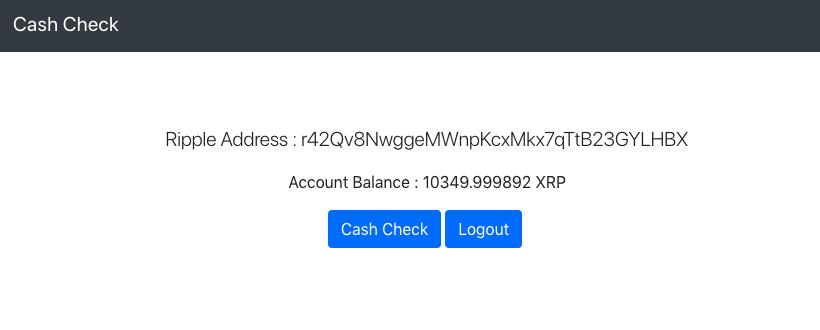
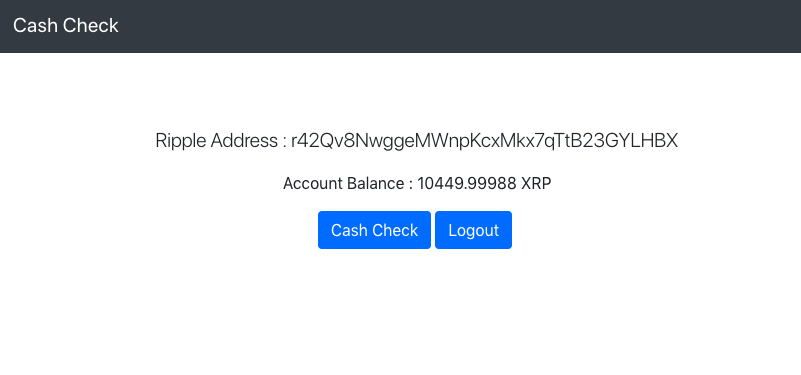
Save this as cash_check.html. We can now run this file on a browser. The home page should look like the following:
In the Cash Check form, we'll input the check ID we made note of earlier. We'll also enter the amount that should be cashed out, as shown in the following screenshot:
If everything works fine, your check will be successfully cashed out and your account balance will be updated:
Great work! We've now learned how to send and cash out checks on Ripple.