Table of Contents for
Ripple Quick Start Guide

Version ebook / Retour

Cover image for bash Cookbook, 2nd Edition Ripple Quick Start Guide by Febin John James Published by Packt Publishing, 2018
  1. Ripple Quick Start Guide
  2. Title Page
  3. Copyright and Credits
  4. Ripple Quick Start Guide
  5. Dedication
  6. About Packt
  7. Why subscribe?
  8. Packt.com
  9. Contributors
  10. About the author
  11. About the reviewer
  12. Packt is searching for authors like you
  13. Table of Contents
  14. Preface
  15. Who this book is for
  16. What this book covers
  17. To get the most out of this book
  18. Download the example code files
  19. Conventions used
  20. Get in touch
  21. Reviews
  22. Getting Started with Ripple
  23. The need for decentralization
  24. Introduction to blockchain
  25. Introduction to Bitcoin
  26. Inefficiencies in payment systems
  27. International money transfer through Bitcoin
  28. Disadvantages of Bitcoin
  29. Ripple
  30. International money transfer through Ripple
  31. The Ripple Protocol
  32. Account creation
  33. Reserve
  34. Transactions
  35. Multisigning
  36. Consensus
  37. Important properties of the consensus protocol
  38. Ledger versions
  39. Validation
  40. Advantages of Ripple
  41. Currency agnostic
  42. Simplified consensus
  43. Low fee
  44. Reduced foreign exchange cost
  45. Pathfinding algorithm
  46. Adaptable cryptography
  47. Anti-spam mechanism
  48. Potential risks of Ripple
  49. Regulatory issues
  50. Trust Issues
  51. Security vulnerabilities
  52. Problems of being an open protocol
  53. Summary
  54. Working with Ripple Currency XRP
  55. Types of wallets
  56. Online wallets
  57. Desktop/mobile wallets
  58. Offline wallets
  59. Hardware wallets
  60. Paper wallets
  61. How do I choose my wallet?
  62. Setting up a Ripple account
  63. Activating the Ripple account
  64. Making an international transfer
  65. Trading XRP
  66. Importing an existing wallet
  67. Setting up an offline wallet
  68. Protecting your Ripples
  69. Don't leave your Ripples on centralized exchanges
  70. Make backups 
  71. Use antivirus software
  72. Disable browser plugins
  73. Store Ripples in multiple wallets 
  74. For big sums, use cold wallets
  75. Use reputable wallets
  76. Important things you must remember
  77. Summary
  78. Applications of Ripple
  79. High speed and low-cost payments 
  80. xCurrent
  81. How does it work?
  82. Advanced payment applications
  83. Cross-currency payments
  84. How does it work?
  85. Checks
  86. How does it work?
  87. Payment channels
  88. How does it work?
  89. Escrow
  90. How does it work?
  91. Initial coin offering
  92. Decentralized exchange
  93. Debunking misconceptions about Ripple
  94. Ripple and XRP are not the same
  95. Funds lockup
  96. No mining
  97. Limited smart contracts
  98. Important things to remember
  99. Summary
  100. Getting Started with the Ripple API
  101. Connecting to the Ripple test network
  102. Setting up the development environment
  103. First Ripple application
  104. Sending money 
  105. Prepare transaction
  106. Sign transaction
  107. Submit transaction
  108. Summary
  109. Developing Applications Using the Ripple API
  110. Sending checks
  111. Cashing checks
  112. Creating a time-held escrow
  113. Creating a conditionally-held escrow
  114. Important things you must remember
  115. Summary
  116. Other Books You May Enjoy
  117. Leave a review - let other readers know what you think

How does it work?

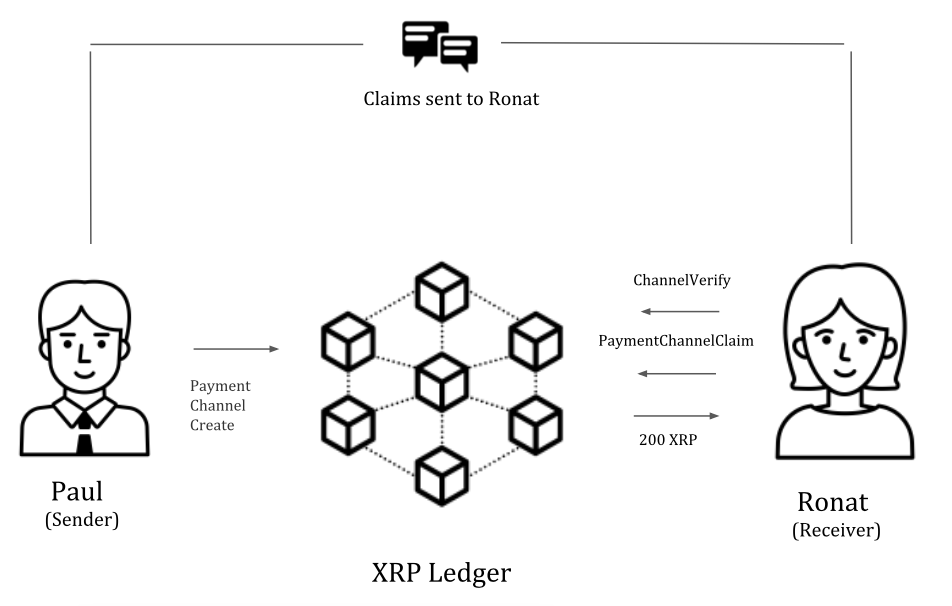
Paul started by creating a payment channel on Ripple by calling the "PaymentChannelCreate" function. He then specifies the total amount allocated (200 XRP), Ronat's Ripple address, and so on. This is submitted to Ripple's network for validation. 

Once the payment channel is validated by the Ripple network, the payee (Ronat) can check the specifics of the payment channel. She ensures that the destination account to which the payment is sent is correct. She makes sure there's enough time set for her to cash out the receipts or claims. If her wallet has a destination tag, she also ensures that it's mentioned on the payment channel. It's important for the payee to check for the specifics of the payment channel, as any error in the specifics can result in failure of payments. 

Paul now wants Ronat to blog about his gym. He creates a claim of 30 XRP and signs the claim using his private key. He sends the signed claim to Ronat using digital communication channels. Now, Ronat can verify whether the claim is valid using the "ChannelVerify" function. She ensures that the payment channel has enough balance. 

Now, she can confidently provide her service. She writes a blog post about Paul's gym. This process is repeated, and Paul will continue sending claims for more blogs and tweets from Ronat. 

Ronat is now done with her job. She can take the last claim from Paul, submit it to Ripple's network using the "PaymentChannelClaim" function to redeem her 200 XRP. 

Now that everything ended well, Paul can request Ripple network to close the payment channel.

The following diagram demonstrates how two users can send and receive payments through payment channels:
Here's an example of the "PaymentChannelCreate" JSON that would be used by the sender to open a payment channel with a balance of 200 XRP:

{
"Account": "rf1BiGeXwwQoi8Z2ueFYTEXSwuJYfV2Jpn",
"TransactionType": "PaymentChannelCreate",
"Amount": "200000000",
"Destination": "rsA2LpzuawewSBQXkiju3YQTMzW13pAAdW",
"SettleDelay": 86400,
"PublicKey": "32D2471DB72B27E3310F355BB33E339BF26F8392D5A93D3BC0FC3B566612DA0F0A",
"CancelAfter": 533171558,
"DestinationTag": 23480,
"SourceTag": 11747
}

Here's an example of the "PaymentChannelClaim" JSON that would be used by the receiver to claim 200 XRP to their account:

{
"Channel": "C1AE6DDDEEC05CF2978C0BAD6FE302948E9533691DC749DCDD3B9E5992CA6198",
"Amount": "200000000",
"Signature": "30440220718D264EF05CAED7C781FF6DE298DCAC68D002562C9BF3A07C1E721B420C0DAB02203A5A4779EF4D2CCC7BC3EF886676D803A9981B928D3B8ACA483B80ECA3CD7B9B",
"PublicKey": "32D2471DB72B27E3310F355BB33E339BF26F8392D5A93D3BC0FC3B566612DA0F0A"
}