Table of Contents for
React Quickly: Painless web apps with React, JSX, Redux, and GraphQL
 React Quickly: Painless web apps with React, JSX, Redux, and GraphQL
Published by
Manning Publications, 2017
React Quickly: Painless web apps with React, JSX, Redux, and GraphQL
Published by
Manning Publications, 2017
- Cover
- React Quickly: Painless web apps with React, JSX, Redux, and GraphQL
- Copyright
- React Quickly: Painless web apps with React, JSX, Redux, and GraphQL
- Brief Table of Contents
- Table of Contents
- Praise for React Quickly
- Foreword
- Preface
- Acknowledgments
- About This Book
- About the Author
- About the Cover
- Part 1. React foundation
- Chapter 1. Meeting React
- Chapter 2. Baby steps with React
- Chapter 3. Introduction to JSX
- Chapter 4. Making React interactive with states
- Chapter 5. React component lifecycle events
- Chapter 6. Handling events in React
- Chapter 7. Working with forms in React
- Chapter 8. Scaling React components
- Chapter 9. Project: Menu component
- Chapter 10. Project: Tooltip component
- Chapter 11. Project: Timer component
- Part 2. React architecture
- Chapter 12. The Webpack build tool
- Chapter 13. React routing
- Chapter 14. Working with data using Redux
- Chapter 15. Working with data using GraphQL
- Chapter 16. Unit testing React with Jest
- Chapter 17. React on Node and Universal JavaScript
- Chapter 18. Project: Building a bookstore with React Router
- Chapter 19. Project: Checking passwords with Jest
- Chapter 20. Project: Implementing autocomplete with Jest, Express, and MongoDB
- Appendix A. Installing applications used in this book
- Appendix B. React cheatsheet
- Appendix C. Express.js cheatsheet
- Appendix D. MongoDB and Mongoose cheatsheet
- Appendix E. ES6 for success
- React Cheatsheet
- Index
- List of Figures
- List of Tables
- List of Listings
Appendix D. MongoDB and Mongoose cheatsheet
When you develop your own projects, searching on the internet for React documentation and APIs or going back to this book’s chapters to find a single method isn’t efficient. If you’d like to save time and avoid the distractions lurking everywhere on the Net, use this MongoDB cheatsheet as a quick reference.
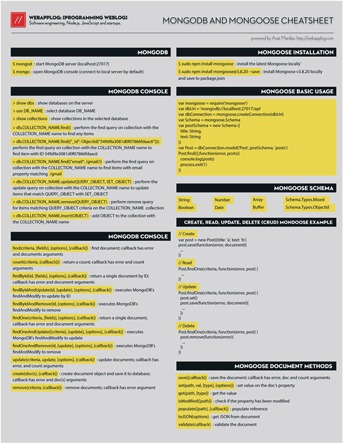
Print-ready PDF available
In addition to the text version presented here, I’ve created a free beautifully designed, print-ready PDF version of this cheatsheet. You can request this PDF at http://reactquickly.co/resources.
MongoDB
- $ mongod—Starts the MongoDB server (localhost:27017)
- $ mongo (connects to the local server by default)—Opens the MongoDB console
MongoDB console
- > show dbs—Shows databases on the server
- > use DB_NAME—Selects the database DB_NAME
- > show collections—Shows collections in the selected database
- > db.COLLECTION_NAME.find()—Performs a find query on the collection named COLLECTION_NAME to find any items
- > db.COLLECTION_NAME.find({"_id"—ObjectId("549d9a3081d0f07866fdaac6") })—Performs a find query on the collection named COLLECTION_NAME to find the item with ID 549d9a3081d0f07866fdaac6
- > db.COLLECTION_NAME.find({"email": /gmail/})—Performs a find query on the collection named COLLECTION_NAME to find items with an email property matching /gmail
- > db.COLLECTION_NAME.update(QUERY_OBJECT, SET_OBJECT)—Performs an update query on the collection named COLLECTION_NAME to update items that match QUERY_OBJECT with SET_OBJECT
- > db.COLLECTION_NAME.remove(QUERY_OBJECT)—Performs a remove query for items matching QUERY_OBJECT criteria on the COLLECTION_NAME collection
- > db.COLLECTION_NAME.insert(OBJECT)—Adds OBJECT to the collection named COLLECTION_NAME
Installing Mongoose
- $ sudo npm install mongoose—Installs the latest version of Mongoose locally
- $ sudo npm install mongoose@3.8.20 --save—Installs Mongoose v3.8.20 locally, and saves it to package.json
Mongoose basic usage
var mongoose = require('mongoose')
var dbUri = 'mongodb://localhost:27017/api'
var dbConnection = mongoose.createConnection(dbUri)
var Schema = mongoose.Schema
var postSchema = new Schema ({
  title: String,
  text: String
})
var Post = dbConnection.model('Post', postSchema, 'posts')
Post.find({},function(error, posts){
  console.log(posts)
  process.exit(1)
})
Mongoose schema
- String
- Boolean
- Number
- Date
- Array
- Buffer
- Schema.Types.Mixed
- Schema.Types.ObjectId
Create, read, update, delete (CRUD) Mongoose example
// Create
var post = new Post({title: 'a', text: 'b')
post.save(function(error, document){
  ...
})
// Read
Post.findOne(criteria, function(error, post) {
  ...
})
// Update
Post.findOne(criteria, function(error, post) {
  post.set()
  post.save(function(error, document){
    ...
  })
})
// Delete
Post.findOne(criteria, function(error, post) {
  post.remove(function(error){
    ...
  })
})
Mongoose model methods
- find(criteria, [fields], [options], [callback]), where callback has error and documents arguments—Finds a document
- count(criteria, [callback])), where callback has error and count arguments—Returns a count of documents with matching criteria
- findById(id, [fields], [options], [callback]), where callback has error and document arguments—Returns a single document by ID
- findByIdAndUpdate(id, [update], [options], [callback])—Executes MongoDB’s findAndModify() to update a document by ID
- findByIdAndRemove(id, [options], [callback])—Executes MongoDB’s findAndModify() to remove a document by ID
- findOne(criteria, [fields], [options], [callback]), where callback has error and document arguments—Returns a single document
- findOneAndUpdate([criteria], [update], [options], [callback])—Executes MongoDB’s findAndModify() to update document(s)
- findOneAndRemove(id, [update], [options], [callback])—Executes MongoDB’s findAndModify() to remove a document
- update(criteria, update, [options], [callback]), where callback has error and count arguments—Updates documents
- create(doc(s), [callback]), where callback has error and doc(s) arguments—Creates a document object, and saves it to the database
- remove(criteria, [callback]), where callback has an error argument—Removes documents
Mongoose document methods
- save([callback]), where callback has error, doc, and count arguments—Saves the document
- set(path, val, [type], [options])—Sets a value on the document’s property
- get(path, [type])—Gets the value of a property
- isModified([path])—Checks whether a property has been modified
- populate([path], [callback])—Populates a reference
- toJSON(options)—Gets JSON from the document
- validate(callback)—Validates the document