Table of Contents for
React Quickly: Painless web apps with React, JSX, Redux, and GraphQL
 React Quickly: Painless web apps with React, JSX, Redux, and GraphQL
Published by
Manning Publications, 2017
React Quickly: Painless web apps with React, JSX, Redux, and GraphQL
Published by
Manning Publications, 2017
- Cover
- React Quickly: Painless web apps with React, JSX, Redux, and GraphQL
- Copyright
- React Quickly: Painless web apps with React, JSX, Redux, and GraphQL
- Brief Table of Contents
- Table of Contents
- Praise for React Quickly
- Foreword
- Preface
- Acknowledgments
- About This Book
- About the Author
- About the Cover
- Part 1. React foundation
- Chapter 1. Meeting React
- Chapter 2. Baby steps with React
- Chapter 3. Introduction to JSX
- Chapter 4. Making React interactive with states
- Chapter 5. React component lifecycle events
- Chapter 6. Handling events in React
- Chapter 7. Working with forms in React
- Chapter 8. Scaling React components
- Chapter 9. Project: Menu component
- Chapter 10. Project: Tooltip component
- Chapter 11. Project: Timer component
- Part 2. React architecture
- Chapter 12. The Webpack build tool
- Chapter 13. React routing
- Chapter 14. Working with data using Redux
- Chapter 15. Working with data using GraphQL
- Chapter 16. Unit testing React with Jest
- Chapter 17. React on Node and Universal JavaScript
- Chapter 18. Project: Building a bookstore with React Router
- Chapter 19. Project: Checking passwords with Jest
- Chapter 20. Project: Implementing autocomplete with Jest, Express, and MongoDB
- Appendix A. Installing applications used in this book
- Appendix B. React cheatsheet
- Appendix C. Express.js cheatsheet
- Appendix D. MongoDB and Mongoose cheatsheet
- Appendix E. ES6 for success
- React Cheatsheet
- Index
- List of Figures
- List of Tables
- List of Listings
Appendix B. React cheatsheet
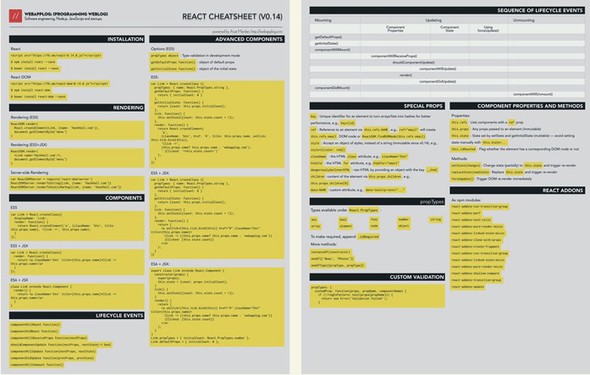
When you develop your own projects, searching on the internet for React documentation and APIs or going back to this book’s chapters to find a single method isn’t efficient. If you’d like to save time and avoid the distractions lurking everywhere on the Net, use this React cheatsheet as a quick reference.
In addition to the text version presented here, I’ve created a free beautifully designed, print-ready PDF version of this cheatsheet. You can request this PDF at http://reactquickly.co/resources.
Installation
React
- <script src="https://unpkg.com/react@15/dist/react.js"></script>
- $ npm install react --save
- $ bower install react --save
React DOM
- <script src="https://unpkg.com/react-dom@15/dist/react-dom.js"></script>
- $ npm install react-dom
- $ bower install react-dom --save
Rendering
ES5
ReactDOM.render(
    React.createElement(
      Link,
      {href: 'https://Node.University'}
    )
  ),
  document.getElementById('menu')
)
ES5+JSX
ReactDOM.render(
  <Link href='https://Node.University'/>,
  document.getElementById('menu')
)
Server-side rendering
const ReactDOMServer = require('react-dom/server')
ReactDOMServer.renderToString(Link, {href: 'https://Node.University'})
ReactDOMServer.renderToStaticMarkup(Link, {href: 'https://Node.University'})
Components
ES5
var Link = React.createClass({
  displayName: 'Link',
  render: function() {
    return React.createElement('a',
      {className: 'btn', href: this.props.href}, 'Click ->', this.props.href)
  }
})
ES5 + JSX
var Link = React.createClass({
  render: function() {
    return <a className='btn' href={this.props.href}>Click ->
      this.props.href</a>
  }
})
ES6 + JSX
class Link extends React.Component {
  render() {
    return <a className='btn' href={this.props.href}>Click ->
      this.props.href</a>
  }
}
Advanced components
Options (ES5)
- Type validation in development mode—propTypes object
- Object of default properties—getDefaultProps function()
- Object of the initial state—getInitialState function()
ES5
var Link = React.createClass ({
  propTypes: { href: React.PropTypes.string },
  getDefaultProps: function() {
    return { initialCount: 0 }
  },
  getInitialState: function() {
    return {count: this.props.initialCount}
  },
  tick: function() {
    this.setState({count: this.state.count + 1})
  },
  render: function() {
    return React.createElement(
      'a',
      {className: 'btn', href: '#', href: this.props.href,
        onClick: this.tick.bind(this)},
      'Click ->',
      (this.props.href ? this.props.href : 'https://webapplog.com'),
      ' (Clicked: ' + this.state.count+')'
    )
  }
})
ES5 + JSX
var Link = React.createClass ({
propTypes: { href: React.PropTypes.string },
getDefaultProps: function() {
return { initialCount: 0 }
},
getInitialState: function() {
return {count: this.props.initialCount};
},
tick: function() {
this.setState({count: this.state.count + 1})
},
render: function() {
return (
<a onClick={this.tick.bind(this)} href="#" className="btn"
href={this.props.href}>
Click -> {(this.props.href ? this.props.href :
 'https://webapplog.com')}
(Clicked: {this.state.count})
</a>
)
}
})
'https://webapplog.com')}
(Clicked: {this.state.count})
</a>
)
}
})
ES6 + JSX
export class Link extends React.Component {
  constructor(props) {
    super(props);
    this.state = {count: props.initialCount};
  }
  tick() {
    this.setState({count: this.state.count + 1});
  }
  render() {
    return (
      <a onClick={this.tick.bind(this)} href="#" className="btn"
        href={this.props.href}>
        Click -> {(this.props.href ? this.props.href :
          'https://webapplog.com')}
        (Clicked: {this.state.count})
      </a>
    )
  }
}
Link.propTypes = { initialCount: React.PropTypes.number }
Link.defaultProps = { initialCount: 0 }
Lifecycle events
- componentWillMount function()
- componentDidMount function()
- componentWillReceiveProps function(nextProps)
- shouldComponentUpdate function(nextProps, nextState)→ bool
- componentWillUpdate function(nextProps, nextState)
- componentDidUpdate function(prevProps, prevState)
- componentWillUnmount function()
Sequence of lifecycle events (inspired by http://react.tips)
|
Mounting |
Updating component properties |
Updating component state |
Using forceUpdate() |
Unmounting |
|---|---|---|---|---|
| getDefaultProps() | ||||
| getInitialState() | ||||
| componentWillMount() | ||||
| componentWillReceiveProps() | ||||
| shouldComponentUpdate() | shouldComponentUpdate() | |||
| componentWillUpdate() | componentWillUpdate() | componentWillUpdate() | ||
| render() | render() | render() | render() | |
| componentDidUpdate() | componentDidUpdate() | componentDidUpdate() | ||
| componentDidMount() | ||||
| componentWillUnmount() |
Special properties
- key—Unique identifier for an element to turn arrays/lists into hashes for better performance. For example: key={id}.
- ref—Reference to an element via this.refs.NAME. For example: ref="email" will create a this.refs.email DOM node or ReactDOM.findDOMNode(this.refs.email).
- style—Accepts an object for camelCased CSS styles instead of a string (immutable since v0.14). For example: style={{color: red}}.
- className—HTML class attribute. For example: className="btn".
- htmlFor—HTML for attribute. For example: htmlFor="email".
- dangerouslySetInnerHTML—Sets inner HTML to raw HTML by providing an object with the key __html.
- children—Sets the content of the element via this.props.children. For example: this.props.children[0].
- data-NAME—Custom attribute. For example: data-tooltip-text="...".
propTypes
Types available under React.PropTypes:
- any
- array
- bool
- element
- func
- node
- number
- object
- string
To make a property required (warning only), append .isRequired.
More methods:
- instanceOf(constructor)
- oneOf(['News', 'Photos'])
- oneOfType([propType, propType])
Custom validation
propTypes: {
  customProp: function(props, propName, componentName) {
    if (!/regExPattern/.test(props[propName])) {
      return new Error('Validation failed!');
    }
  }
}
Component properties and methods
Properties
- this.refs—Lists components with a ref property.
- this.props—Lists any properties passed to an element (immutable).
- this.state—Lists states set by setState and getInitialState (mutable). Avoid setting state manually with this.state=....
- this.isMounted—Flags whether the element has a corresponding DOM node.
Methods
- setState(changes)—Changes state (partially) to this.state, and triggers a rerender
- replaceState(newState)—Replaces this.state, and triggers a rerender
- forceUpdate()—Triggers an immediate DOM rerender
React add-ons
As npm modules:
- react-addons-css-transition-group (http://facebook.github.io/react/docs/animation.html)
- react-addons-perf (http://facebook.github.io/react/docs/perf.html)
- react-addons-test-utils (http://facebook.github.io/react/docs/test-utils.html)
- react-addons-pure-render-mixin (http://facebook.github.io/react/docs/pure-render-mixin.html)
- react-addons-linked-state-mixin (http://facebook.github.io/react/docs/two-way-binding-helpers.html)
- react-addons-clone-with-props
- react-addons-create-fragment
- react-addons-css-transition-group
- react-addons-linked-state-mixin
- react-addons-pure-render-mixin
- react-addons-shallow-compare
- react-addons-transition-group
- react-addons-update (http://facebook.github.io/react/docs/update.html)
React components
- Lists of React components—https://github.com/brillout/awesome-react-components and http://devarchy.com/react-components
- Material-UI—Material design React components (http://material-ui.com)
- React Toolbox—React components that implement the Google Material Design specification (http://react-toolbox.com)
- JS.Coach—Opinionated catalog of open source JS (mostly React) packages (https://js.coach)
- React Rocks—Catalog of React components (https://react.rocks)
- Khan Academy—Collection of reusable React components (https://khan.github.io/react-components)
- ReactJSX.com—Registry of React components (http://reactjsx.com)