Table of Contents for
Building PHP Applications with Symfony™, CakePHP, and Zend® Framework
 Building PHP Applications with Symfony™, CakePHP, and Zend® Framework
Published by
Wrox, 2011
Building PHP Applications with Symfony™, CakePHP, and Zend® Framework
Published by
Wrox, 2011
- Copyright
- Credits
- ABOUT THE AUTHORS
- ACKNOWLEDGMENTS
- Introduction
- 1. Introducing Symfony, CakePHP, and Zend Framework
- 2. Getting Started
- 3. Working with Databases
- 4. Your First Application in the Three Frameworks
- 5. Forms
- 6. Mailing
- 7. Searching
- 8. Security
- 9. Templates
- 10. AJAX
- 11. Making Plug-ins
- 12. Web Services
- 13. Back End
- 14. Internationalization
- 15. Testing
- 16. User Management
- 17. Performance
- 18. Summary
- A. Web Resources
- B. CodeIgniter, Lithium, and Agavi with Code Examples
- GLOSSARY OF ACRONYMS AND TECHNICAL TERMS
Let us be fully aware of all the importance of this day, because today within the generous walls of Boulogne-sur-Mer have met not French with English, nor Russians with Polish, but people with people.
WHAT'S IN THIS CHAPTER?
Introducing i18n.
Using the CLI to translate view templates.
Displaying time and date in different locales.
Translating form elements.
Using a database to store translations.
Multilingual websites are becoming increasingly popular, not only among users, but also developers and important strategic partners who want to see web apps translated into their native languages. While translating into languages transcribed using Latin-derived charsets is relatively easy, there are also multiple scripts that use completely different charsets, ideographic symbols, and right-to-left text orientation. Internationalization is not only a matter of courtesy but is also an excellent tool for tapping into the great revenue potential that an international market presents.
Web frameworks widely support internationalization. They provide useful libraries or even ready-to-use solutions. In this chapter, we show you how easy it is to extend your web applications to use multiple languages and cultural settings.
Internationalization, often abbreviated to i18n because it is a long word, goes far beyond providing a full Unicode charset. It concerns many other issues such as the following:
Text writing direction
Character collation (character order for sorting purposes)
Varying plural forms and suffixes affected by other words
Formatting of numbers, especially the decimal separator and optional thousands separator
Date and time formatting and local time display, taking into account time zones and daylight saving time
Weights, measures, and currency
Various other cultural traits, such as postal codes, addresses, titles, and academic degrees
Mapping of social institutions and government documents covering the same responsibilities, such as insurance, taxation, health care, and so on
Conformance of content with legal restrictions (for example, copyrights or alcoholic beverage advertising)
Apart from internationalization, you can also come across other terms like localization (110n) and globalization (g13n). l10n usually refers to translating the interface in to a specific language while i18n refers to offering the content in different languages. There is no strict definition for these terms, however, and they are sometimes used interchangeably.
Symfony provides, out of the box, two i18n command-line tasks: i18n:extract and i18n:find. They are both very useful. The i18n:find task allows you to locate untranslated template elements. You should be careful, though, because this task may return many false positives when parsing PHP files with text strings that are not intended to be displayed to the user. The i18n:extract task extracts all i18n strings from the given application and target culture. By default, this tool only counts the number of strings to extract; if you want to make it save them in the i18n message catalogue, use the --auto-save option:
symfony i18n:extract --auto-save application_name culture
To configure internationalization in Symfony, first create a project, an application, and a module, as shown in the following code. For this example, the module is called i18nexample:
$ symfony generate:project wroxI18N
$ symfony generate:app frontend
$ symfony generate:module frontend i18nexample
Symfony uses a parameter of the user session called culture. This parameter naturally combines the language of the user and all the cultural settings of his country. You may specify the default culture of your website in the settings.yml file:

all:
   .settings:
      default_culture: en_US
code snippet /symfony/apps/frontend/config/settings.yml
The culture called en_US uses the U.S. flavor of the English language and United States locale settings.
In the same file, you have to add the following line to make the i18n module work:
all:
    .settings:
        i18n: true
code snippet /symfony/apps/frontend/config/settings.yml
You can specify which languages will be supported by particular web pages. To do that, edit routing.yml. The following example illustrates how to provide the news module for three language versions: English (any variant), German, and Polish:
news:
    url: /:sf_culture/:page
    param:
    requirements: { sf_culture: (?:en|de|pl) }
code snippet /symfony/apps/frontend/config/routing.yml
Note that you get clean, organized URLs this way. When you have a page about cars with an English link (http://localhost/en/cars), the link of the German version will be http://localhost/de/cars. There is also the zxI18nRoutingPlugin plug-in to make it look like http://localhost/de/fahrzeuge. It may have a great effect on search engine optimization (SEO) of localized websites.
You can set the culture of a user anytime using the following method:
$this->getUser()->setCulture('en_US');The getter method is equally simple:
$culture = $this->getUser()->getCulture();
Creating a multilingual application requires a modification of your view templates. Go to the actions.class.php file and comment out the line responsible for redirection to the default module:
<?php
class i18wroxActions extends sfActions {
    public function executeIndex(sfWebRequest $request) {
   // $this->forward('default', 'module');
    }
}
code snippet /symfony/apps/frontend/modules/i18nwrox/actions/actions.class.php
This way, the indexSuccess.php template of your module will be displayed. Go to the /templates folder and edit this template:
<?php use_helper('I18N') ?>
<?php echo __('The latest news') ?>
code snippet /symfony/apps/frontend/modules/i18nwrox/templates/indexSuccess.php
Using the I18N helper gets the work done with minimal effort. All you have to do is to surround the text to localize with a double underscore and round parentheses:
<?php use_helper('I18N') ?>
<?php echo __('The latest news') ?>
<?php echo "Not translated string"; ?>
code snippet /symfony/apps/frontend/modules/i18nwrox/templates/indexSuccess.php
The bold line is important for comparison because strings in double apostrophes will not be extracted as translatable text. Try out the find command-line tool, as shown in the following code. It returns all strings that are not translated, including those you don't want to translate. The output is as follows:
$ symfony i18n:find frontend
>> i18n find non "i18n ready" strings in the "frontend" application
>> i18n strings in "/apps/frontend/modules/i18nwrox/templates/indexSuccess.php"
    I18N
    The latest news
    Not translated string
Now the extract tool can be used to prepare all relevant strings to be worked by translators. Remember to set the --auto-save option with the name of your application and culture:
$ symfony i18n:extract --auto-save frontend en_US
The output will include only 'The latest news' string that you marked for localization:
>> i18n extracting i18n strings for the "frontend" application
>> i18n found "1" new i18n strings
>> i18n found "0" old i18n strings
Now you can check your localization dictionary, messages.xml. It will contain the extracted string:
<?xml version="1.0" encoding="UTF-8"?>
<!DOCTYPE xliff PUBLIC "-//XLIFF//DTD XLIFF//EN"
  "http://www.oasis-open.org/committees/xliff/documents/xliff.dtd">
<xliff version="1.0">
  <file source-language="EN" target-language="en_US" datatype="plaintext"
       original="messages" date="2010-10-09T06:22:52Z" product-name="messages">
    <header/>
    <body>
      <trans-unit id="1">
        <source>The latest news</source>
        <target/>
      </trans-unit>
    </body>
  </file>
</xliff>
code snippet /symfony/apps/frontend/i18n/en_US/messages.xml
XML Localization Interchange File Format (XLIFF) is a recognized XML standard used in localization. It was standardized in 2002 by OASIS, a group of localization service and localization tools providers, and it is used widely in the localization industry. You can grab its full specifications at its website: http://docs.oasis-open.org/xliff/xliff-core/xliff-core.html.
The following command deletes old (no longer used) localization strings and saves the new ones:
$ symfony i18n:extract --auto-save --auto-delete frontend en_US
To add another language, just run the extract command with another target culture:
$ symfony i18n:extract --auto-save --auto-delete frontend pl_PL
You will get another source-target pair in your XLIFF dictionary. Now you can add a <target> segment with localized text just after the <source> segment. Try to do that with a language of your choice, as shown in bold in the following code:
<?xml version="1.0" encoding="UTF-8"?>
<!DOCTYPE xliff PUBLIC "-//XLIFF//DTD XLIFF//EN" "http://www.oasis-open.org/
    committees/xliff/documents/xliff.dtd">
<xliff version="1.0">
    <file source-language="EN" target-language="pl_PL" datatype="plaintext"
original="messages" date="2010-10-09T06:22:52Z" product-name="messages">
<header/>
<body>
<trans-unit id="1">
<source>The latest news</source>
<target>Najnowsze wiadomości</target>
</trans-unit>
</body>
</file>
</xliff>
code snippet /symfony/apps/frontend/i18n/pl_PL/messages.xmlNow all you have to do is to set the corresponding culture in your i18wrox action:
$this->getUser()->setCulture('pl_PL');Remember to clear your cache because Symfony may hold in its cache old translated strings, which forces it to generate new files:
$ symfony cc
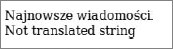
The result looks like Figure 14-1: the translatable string is displayed in Polish, and the other is not translated, just as you wanted.
There is another group of useful helpers that can do wonders with dates. It is best to display dates through an internationalization filter because they can be adjusted to user culture by default. The Date helper is shown in the following code:
<?php use_helper('Date') ?>It provides the following methods:
format_date()— Displays a formatted date. You can use predefined formats or custom ones.time_ago_in_words()— Describes in words how much time has passed since a date; for example, 2monthsformat_daterange()— Displays a formatted range of dates; for example,from 1939-09-01 to 1945-05-08distance_of_time_in_words()— Describes in words a time distance between two dates
The methods providing textual output will translate the output according to the user culture or the default culture.
There is also a specialized helper for numbers and currency:
<?php use_helper('Number') ?>It provides the following methods:
format_number()— Returns the number formatted according to user's culture. This includes the decimal separator and the thousands separator.format_currency()— Provides a string with the numeric value formatted as a chosen currency, with the currency symbol displayed to the correct side of the number.
An example of the indexSuccess.php template created for the U.S. culture is presented in the following code snippet. Figure 14-2 shows the visual output of this template. All dates, numbers, and currency are displayed using standard U.S. locale.
<?php
use_helper('Date');
use_helper('Number');
echo 'Date: '.format_date(time()).'<br />';
echo 'Date and time: '.format_datetime(time()).'<br />';
echo 'Number: '.format_number(123456.78).'<br />';
echo 'Currency: '.format_currency(12345, 'USD');
code snippet /symfony/apps/frontend/modules/i18nexample/templates/indexSuccess.php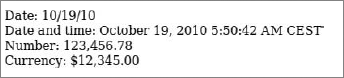
And the same file using Polish culture looks as follows:
<?php
use_helper('Date');
use_helper('Number');
echo 'Data: '.format_date(time()).'<br />';
echo 'Data i godzina: '.format_datetime(time()).'<br />';
echo 'Liczba: '.format_number(123456.78).'<br />';
echo 'Waluta: '.format_currency(12345, 'PLN');
code snippet /symfony/apps/frontend/modules/i18nexample/templates/indexSuccess.php
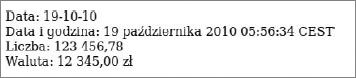
Figure 14-3 shows the output. See how everything has changed: The short date is displayed using the DD-MM-YY pattern, the long date uses the Polish month name and 24h clock, the decimal separator is changed to the comma, and the currency symbol (zł) is automatically displayed to the right of the numeric value.
Symfony's Form Helper allows you to create several useful forms. First you need to include this helper:
<?php use_helper('Form') ?>The following i18n forms are available. They allow users to choose their date and time formats as well as country, language, and other locale. There are also corresponding validators. The form names are pretty self-explanatory:
Most of these widgets, as well as forms in general, are described in detail in Chapter 5.
It is possible to display the same fields in multiple languages, using a schema. The following code illustrates this:
<?php
class NewsForm extends BaseNewsForm {
  public function configure() {
    $this->embedI18n(array('en', 'pl'));
    $this->widgetSchema->setLabel('en', 'English');
    $this->widgetSchema->setLabel('pl', 'Polski');
  }
}
code snippet /symfony/lib/form/doctrine/NewsForm.class.php
Generate an administration module:
$ symfony doctrine:generate-admin frontend news
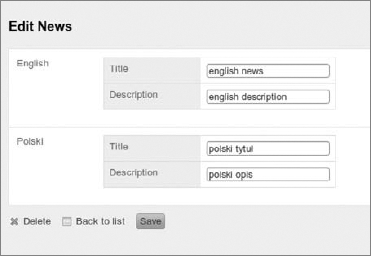
Now when you access http://localhost/index.php/news in your browser, you can manage the module. It looks like Figure 14-4.
Another advanced approach is to use a database as a repository for translated strings. This can be very efficient for larger websites. Create the following schema:
News:
  actAs:
    I18n:
      fields: [title,description]
  columns:
    title: { type: string(150) }
    description: { type: string(150) }
code snippet /symfony/config/doctrine/schema.yml
Now use the doctrine:build command-line tool to create tables based on this schema:
$ symfony doctrine:build --all
This code generates the following tables. There is the source news table that holds the EN strings and the news_translation table related to news. It holds the ID of the source, the translated string, and the language of translation. Note that the primary key is composed from ID and lang because a source sentence can be translated to multiple targets:
news table:
+-------------+--------------+------+-----+---------+----------------+
| Field          | Type         | Null | Key | Default | Extra             |
+-------------+--------------+------+-----+---------+----------------+
| id           | bigint(20)      | NO     | PRI | NULL     | auto_increment |
+-------------+--------------+------+-----+---------+----------------+
news_translation table:
+-------------+--------------+------+-----+---------+-------+
| Field          | Type         | Null | Key | Default | Extra |
+-------------+--------------+------+-----+---------+-------+
| id          | bigint(20)     | NO    | PRI | 0        |        |
| title          | varchar(150) | YES    |      | NULL    |        |
| description | varchar(150) | YES    |      | NULL    |        |
| lang          | char(2)         | NO    | PRI |            |        |
+-------------+--------------+------+-----+---------+-------+
Now you can easily get the translated data using the following code in a controller:
$this->news = Doctrine::getTable('News')->findAll();Now you can get all records and choose a specific translation. Or (even better) you can create a query that returns data for the specified language only. This is how a view that utilizes the data from the above controller could look:
<?php foreach ($news as $n): ?>
<?php echo $n['Translation']['pl']['description']; ?>
<?php echo $n['Translation']['pl']['title']; ?>
<?php echo $n['Translation']['en']['description']; ?>
<?php echo $n['Translation']['en']['title']; ?>
<?php endforeach; ?>
code snippet /symfony/apps/frontend/modules/i18nexample/templates/indexSuccess.php
It displays the title and full description in both languages.
There are several Symfony plug-ins that can speed up and ease the i18n process:
mgI18nPlugin — Adds a translation panel into the debug web panel. It displays all source-target pairs for the current page, and a form that allows you to edit the target strings:
http://www.symfony-project.org/plugins/mgI18nPluginzxI18nRoutingPlugin — A smart plug-in that allows you to translate routing paths:
http://www.symfony-project.org/plugins/zxI18nRoutingPluginsfDoctrineCultureFlagsPlugin — Automatically adds links to localized versions of your web pages and decorates them with little country flags:
http://www.symfony-project.org/plugins/sfDoctrineCultureFlagsPluginsfI18NGettextPluralPlugin — Allows support of complex plural forms of some languages. Also fixes a bug where Symfony doesn't tokenize plural forms:
http://www.symfony-project.org/plugins/sfI18NGettextPluralPluginsfFormI18nNumberPlugin — Validates numbers:
http://www.symfony-project.org/plugins/sfFormI18nNumberPlugin
There are also some language-specific plug-ins, like these two:
CakePHP has a few nice features, such as a command-line interface (CLI) tool similar to the one offered by Symfony and a database loaded from schema, although it offers no additional i18n plug-ins and it lacks in the area of forms translation.
CakePHP requires no special configuration; you can use its console tool right away:
$ cake i18n
Cake's i18n shell has the form of a wizard that guides you through the process. This friendly, straightforward approach makes it significantly easier for beginners to include internationalization in their web applications.
Welcome to CakePHP v1.2.4.x Console
---------------------------------------------------------------
App : wrox
Path: /home/wrox
---------------------------------------------------------------
I18n Shell
---------------------------------------------------------------
[E]xtract POT file from sources
[I]nitialize i18n database table
[H]elp
[Q]uit
The database initialization command will be used later in this section; for now, the focus is on extracting strings from the sources.
Run the cake i18n tool and choose [E] to start extracting translatable strings from the source files. Make sure that the path for extraction points to your application's root folder. When CakePHP asks you whether you want to merge all translations into one file, answer yes [y], and when it asks you to name the translation output file, you can leave the default or name it after your default language. For this example, the name is en.
The bold parts of the following example designate the input. If no user input is present, that means the proposed value was accepted:
What is the full path you would like to extract?
Example: /home/wrox/public_html/i18n/myapp
[Q]uit
[/home/wrox/public_html/i18n/app] >

What is the full path you would like to output?
Example: /home/wrox/public_html/i18n/app/locale
[Q]uit
[/home/wrox/public_html/i18n/app/locale] >

Extracting...
--------------------------------------------------------------- Path: /home/wrox/public_html/i18n/app Output Directory: /home/wrox/public_html/i18n/app/locale/ --------------------------------------------------------------- Would you like to merge all translations into one file? (y/n) [y] > What should we name this file? [default] >enProcessing /home/wrox/public_html/i18n/app/index.php... Processing /home/wrox/public_html/i18n/app/config/acl.ini.php... Processing /home/wrox/public_html/i18n/app/config/bootstrap.php... Processing /home/wrox/public_html/i18n/app/config/core.php... Processing /home/wrox/public_html/i18n/app/config/database.php... Processing /home/wrox/public_html/i18n/app/config/routes.php... Processing /home/wrox/public_html/i18n/app/config/schema/db_acl.php... Processing /home/wrox/public_html/i18n/app/config/schema/i18n.php... Processing /home/wrox/public_html/i18n/app/config/schema/sessions.php... Processing /home/wrox/public_html/i18n/app/webroot/css.php... Processing /home/wrox/public_html/i18n/app/webroot/index.php... Processing /home/wrox/public_html/i18n/app/webroot/test.php... Done.
You can watch the files being processed one after another. The previous code will generate the en.pot localization file, shown in the following code:
#: /webroot/test.php:88
msgid "Debug setting does not allow access to this url."
msgstr ""
code snippet /cakephp/app/locale/default.pot
The file now contains only one translatable error message from the /webroot/test.php file. Add a new controller, a model, and a view to check how CakePHP's i18n works with your classes. First, create a new dummy controller called news_controller.php:
<?php
class NewsController extends AppController {
    function index() {
    }
}
code snippet /cakephp/app/controllers/news_controller.php
Then create a dummy news.php model as well:
<?php
class News extends AppModel {
}
?>
code snippet /cakephp/app/models/news.php
Also make an index view that will contain only a string to translate. The string is surrounded by __(), just as in Symfony. Remember that there are two underscores in the front:
<?php echo __("Internationalization in CakePHP"); ?>
code snippet /cakephp/app/views/news/index.ctp
Now execute the extract command again:
$ cake i18n extract
You will be able to observe in the output the new files created by you:
Processing /home/wrox/public_html/i18n/app/controllers/news_controller.php...
Processing /home/wrox/public_html/i18n/app/models/news.php...
Processing /home/wrox/public_html/i18n/app/views/news/index.ctp...
The resulting file, default.po, will contain two entries now:
#: /views/news/index.ctp:1
msgid "I18n in CakePHP!"
msgstr ""

#: /webroot/test.php:88
msgid "Debug setting does not allow access to this url."
msgstr ""
code snippet /cakephp/app/locale/default.pot
To provide translations for other languages, copy this file into the appropriate folders inside /app/locale/. Just as /app/locale/eng/ is the folder for the English language, you need folders for the target languages. In this example, these folders are /app/locale/ind/ for Hindi and /app/locale/pol/ for Polish. Edit the msgstr "" line, inserting the Hindi phrase ("CakePHP

Now you can edit the Config.language property in the controller to change the language, as shown in the following code. The outputs for these three languages are juxtaposed in Figure 14-5.

<?php
class NewsController extends AppController {
    function index() {
        $this->Session->write('Config.language', 'pol');
    }
}
code snippet /cakephp/app/controllers/news_controller.php
You can set the default language in the core.php configuration file by adding this line at the end of this file:
Configure::write('Config.language', "pol");
code snippet /cakephp/app/config/core.phpCakePHP has some problems with forms localization. It is not really convenient, and many other frameworks have similar problems. Unfortunately, the translatable form parts must be saved as HTML and not using the $form helper. The following code is a workaround that makes it possible to have form labels translated at all. The output for this example looks like the form in Figure 14-6.
<h1><?php echo __("Add a news"); ?></h1>
<?php echo $form->create('News'); ?>
    <label for="NewsTitle"><?php echo __("Title"); ?></label>
      <?php echo $form->input('title',array('label'=>'')); ?>
    <label for="NewsDescription"><?php echo __("Description"); ?></label>
      <?php echo $form->input('description',array('label'=>'')); ?>
    <input type="submit" name="submit" value="<?php __("Add"); ?>" />
<?php echo $form->end(); ?>
code snippet /cakephp/app/views/news/index.ctp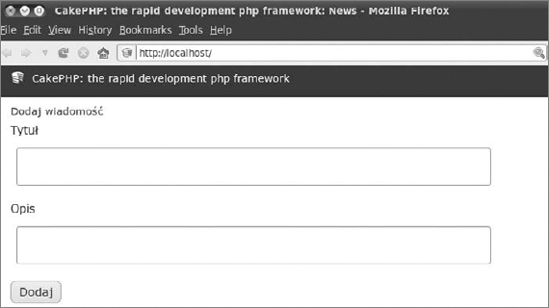
Storing translations in a database is a convenient and effective way of localizing web applications in CakePHP. First you must set up your database connection in /app/config/database.php. Then manually create the database tables. These steps were described in detail in Chapters 3 and 4. Now you are ready to generate the schema:
$ cake schema generate
The output of schema generation is the following:
Welcome to CakePHP v1.x Console
---------------------------------------------------------------
App: app
Path: /home/wrox/public_html/i18n/app
---------------------------------------------------------------
Cake Schema Shell
---------------------------------------------------------------
Generating Schema...
Schema file: schema.php generated
Well, the news.php schema was generated, but where was it saved? You can find it in /app/config/schema and it looks like this:
<?php
class newsSchema extends CakeSchema {
    var $name = 'news';
    function before($event = array()) {
        return true;
    }
    function after($event = array()) {
    }
    var $news = array(
       'id' => array('type' => 'integer', 'null' => false,
          'default' => NULL, 'length' => 5, 'key' => 'primary'),
      'title' => array('type' => 'string', 'null' => true,
          'default' => NULL, 'length' => 150),
      'description' => array('type' => 'string', 'null' => true,
          'default' => NULL, 'length' => 150),
      'indexes' => array('PRIMARY' => array('column' => 'id', 'unique' => 1))
    );
}
?>
code snippet /cakephp/app/config/schema/news.php
You can create this file manually instead. If you want to generate this file, you need to run the following command:
$ cake schema create news news
And if everything went well, you will see the following output:
Welcome to CakePHP v1.x Console
---------------------------------------------------------------
App: app
Path: /home/wrox/public_html/app
---------------------------------------------------------------
Cake Schema Shell --------------------------------------------------------------- The following table(s) will be dropped. news Are you sure you want to drop the table(s)? (y/n) [n] >yDropping table(s). news updated. The following table(s) will be created. news Are you sure you want to create the table(s)? (y/n) [y] >yCreating table(s). news updated. End create.
Additionally, you have to initialize the i18n table whether the schema was created automatically or manually. Run the following command:
$ cake i18n
The CakePHP console will ask you which i18n tasks you would like to perform. Answer [I]:
Welcome to CakePHP v1.x Console
---------------------------------------------------------------
App: app
Path: /home/wrox/public_html/app
---------------------------------------------------------------
I18n Shell
---------------------------------------------------------------
[E]xtract POT file from sources
[I]nitialize i18n database table
[H]elp
[Q]uit
What would you like to do? (E/I/H/Q)
> I
You must answer two questions, as shown in the following listing. First you are asked if you want to drop (delete) your current i18n database. Agree unless you already have some important data there. Next you are asked if you want to re-create this table. Answer yes to finish the process.
Welcome to CakePHP v1.x Console
---------------------------------------------------------------
App: app
Path: /home/wrox/public_html/app
---------------------------------------------------------------
Cake Schema Shell
---------------------------------------------------------------

The following table(s) will be dropped.
i18n
Are you sure you want to drop the table(s)? (y/n)
[n] > y
Dropping table(s).
i18n updated.
The following table(s) will be created.
i18n
Are you sure you want to create the table(s)? (y/n)
[y] > y
Creating table(s).
i18n updated.
End create.The following table will be created:
+-------------+--------------+------+-----+---------+----------------+
| Field          | Type         | Null | Key | Default | Extra             |
+-------------+--------------+------+-----+---------+----------------+
| id          | int(10)         | NO    | PRI | NULL    | auto_increment |
| locale      | varchar(6)     | NO    | MUL | NULL    |                 |
| model          | varchar(255) | NO    | MUL | NULL    |                 |
| foreign_key | int(10)         | NO    | MUL | NULL    |                 |
| field          | varchar(255) | NO    | MUL | NULL    |                 |
| content      | text         | YES    |      | NULL    |                 |
+-------------+--------------+------+-----+---------+----------------+
Before you start translating your strings, first indicate in the model which fields should be translated, as shown here:
<?php
class News extends AppModel {
    var $name = 'News';
    var $actsAs = array(
      'Translate' => array(
        'title', 'description'
      )
   );
}
?>
code snippet /cakephp/app/models/news.php
The form used for adding content was shown in Figure 14-6. The controller method that handles this form is presented here. The bold line sets the Polish locale. You can modify it to add translations for other languages.
function add() {
    if ($this->data) {
        $this->News->locale = 'pol';
        $this->News->create();
        if ($this->News->save($this->data)) {
            $this->redirect(array('action' => 'index'));
        }
    }
}
code snippet /cakephp/app/controllers/news_controller.php
Add some content using the form and the method shown in the preceding code. In this example, "nowa wiadomośść" was written into the title field, and "bardzo ważna" into description. Now when you look in the database, you can find the following data in the i18n table:
select * from i18n;
+----+--------+-------+--------------+-------------+-----------------+
| id | locale | model | foreign_key     | field       | content         |
+----+--------+-------+--------------+-------------+-----------------+
| 1     | pol      | News  | 1             | title       | nowa wiadomośść |
| 2     | pol      | News  | 1             | description | bardzo ważna |
+----+--------+-------+--------------+-------------+-----------------+
2 rows in set (0.00 sec)
As you can see, CakePHP stores the values for each translated field separately, with the field name as an identifier. If you want to get all records, you can call in a controller the find() method on a model to fill the $data variable with translated values, as shown here:
$this->set('data',$this->News->find());Then display this data in a view:
<?php print_r($data); ?>
For this example, you will see the following output, each record listed with its translations:
Array ( [News] => Array ( [id] => 1 [title] => nowa wiadomośść
[description] => bardzo ważna [locale] => pol ) )Zend Framework has two libraries designed to help you with application localization: Zend_Translate and Zend_Locale. The Zend_Translate library is focused on translating texts, while Zend_Locale deals with other aspects of localization, such as date formats or decimal separators.
You need to set the default language. Add the following line into application.ini:
resources.locale.default = "en"Zend_Locale provides a few libraries for various cultural settings, such as:
Zend_Date

Zend_Calendar

Zend_Currency
Zend_Translate is a well-developed library that provides some useful translation tools. A family of adapters is one really great solution. Both Symfony and CakePHP force you to use one or two file formats, while ZF introduces an additional layer of adapters. This allows you to choose the file format of your translations from a long list of supported formats:
Array— Just PHP arrays, good for special purposes.CSV— Simple text, comma-separated values.Gettext— Binary files with the.moextension for the Gettext GNU localization tool.INI— Text-based.inifiles.TBX— TermBase eXchange.tbxfiles. An ISO standard for storage and exchange of terminology, used by professional-grade computer aided translation (CAT) tools.TMX— Translation Memory eXchange.tmxfiles. Open XML standard used by CAT tools for the exchange of translation memories. Translation memories store whole segments of text instead of single terms.Qt— QT Linguist.tsfiles, for use with the QT programming framework.XLIFF— XLIFF.xliff/xmlfiles.XMLTM— Similar to the TMX, XML-based format.SQL— Database queries stored as.sqlfiles.
XLIFF format is used by Symfony, and sometimes stored also as .xml files. CakePHP uses a custom POT format, similar to INI. But Zend Framework, by allowing so many formats, is the true winner here.
An example for an INI adapter is shown here:
$translate = new Zend_Translate(
    array(
       'adapter' => 'ini',
       'content' => /home/wrox/public_html/application/translations/en.ini,
       'locale' => 'pl_PL'
    )
);Zend introduces the Zend_Locale library that allows setting locale time and date according to a user's culture. The following code sets two dates: one using a U.S. locale and the second one using a Polish locale:
<?php
class IndexController extends Zend_Controller_Action {
    public function init() {
    }
    public function indexAction() {
$usLoc = new Zend_Locale('en_US');
$this->view->dateUS=new Zend_Date(date("Y-m-d"), null, $usLoc);
$plLoc = new Zend_Locale('pl_PL');
$this->view->datePL=new Zend_Date(date("Y-m-d"), null, $plLoc);
}
}
code snippet /zf/application/controllers/IndexController.phpCreate the following simple view that displays these two dates. The output is presented in Figure 14-7.
<?php echo $this->dateUS; ?><br />
<?php echo $this->datePL; ?>
code snippet /zf/application/views/scripts/index/index.phtml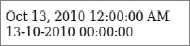
You can use the locale module directly in the view, too:
<?php
$date = new Zend_Date();
echo $date; ?><br />
ZF provides a translation library: Zend_Translate. A sample view file using a simple array adapter is presented here (while developing a real app, you should move the translation part into a controller, leaving only the presentation in the view):
<html>
<head>
<meta content="text/html; charset=UTF-8" http-equiv="content-type">
</head>
<body>
<?php
$english = array('hello' => 'Hello World!');
$polish = array('hello' => 'Witaj Świecie!');
$hindi = array('hello' => '  !');
$translate = new Zend_Translate(
array('adapter' => 'array','content' => $english,'locale' => 'en')
);
$translate->addTranslation(array('content' => $polish, 'locale' => 'pl'));
$translate->addTranslation(array('content' => $hindi, 'locale' => 'hi'));
$translate->setLocale('en');
print $translate->_("hello").' <br />';
$translate->setLocale('pl');
print $translate->_("hello").' <br />';
$translate->setLocale('hi');
!');
$translate = new Zend_Translate(
array('adapter' => 'array','content' => $english,'locale' => 'en')
);
$translate->addTranslation(array('content' => $polish, 'locale' => 'pl'));
$translate->addTranslation(array('content' => $hindi, 'locale' => 'hi'));
$translate->setLocale('en');
print $translate->_("hello").' <br />';
$translate->setLocale('pl');
print $translate->_("hello").' <br />';
$translate->setLocale('hi');print $translate->_("hello").' <br />';
?>
</body>
</html>
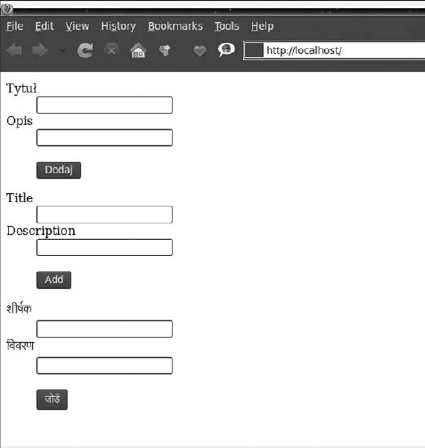
code snippet /zf/application/views/scripts/index/index.phtmlThe translation of forms works great in Zend Framework. It allows for translating form elements, which was not possible in CakePHP. The following code builds a single form and then displays it for three languages: Polish, English, and Hindi. First you need to build arrays of translations for each language. Then create an object of the Zend_Translate class. Use its addTranslation() method to feed it with the arrays for various locales. Finally you just echo the form when the chosen locale is set. You can see the results in Figure 14-8.
<html>
  <head>
    <meta content="text/html; charset=UTF-8" http-equiv="content-type">
  </head>
  <body>
    <?php
      $english = array('Title' => 'Title','Description' => 'Description',Add'
=> 'Add');
$polish = array('Title' => 'Tytuł','Description' => 'Opis',Add' => 'Dodaj');
$hindi = array('Title' => ' ', 'Description'=>'
 ','Add' => '
 ');
$translate = new Zend_Translate(
array('adapter' => 'array', 'content' => $english,'locale' => 'en')
);
$translate->addTranslation(array('content' => $polish, 'locale' => 'pl'));
$translate->addTranslation(array('content' => $hindi, 'locale' => 'hi'));
$form = new Zend_Form;
$form->setAction('/news/add')->setMethod('post');
$form->addElement('text','title',array('Label'=>'Title'));
$form->addElement('text','description',array('Label'=>'Description'));
$form->addElement('submit','add',array('Label'=>'Add'));
$form->setDefaultTranslator($translate);
$translate->setLocale('pl');
echo $form;
$translate->setLocale('en');
echo $form;
$translate->setLocale('hi');
echo $form;
?>
</body>
</html>
');
$translate = new Zend_Translate(
array('adapter' => 'array', 'content' => $english,'locale' => 'en')
);
$translate->addTranslation(array('content' => $polish, 'locale' => 'pl'));
$translate->addTranslation(array('content' => $hindi, 'locale' => 'hi'));
$form = new Zend_Form;
$form->setAction('/news/add')->setMethod('post');
$form->addElement('text','title',array('Label'=>'Title'));
$form->addElement('text','description',array('Label'=>'Description'));
$form->addElement('submit','add',array('Label'=>'Add'));
$form->setDefaultTranslator($translate);
$translate->setLocale('pl');
echo $form;
$translate->setLocale('en');
echo $form;
$translate->setLocale('hi');
echo $form;
?>
</body>
</html>
code snippet /zf/application/views/scripts/index/index.phtmlGetting translations from a database is supported by Zend Framework through an SQL adapter, but to achieve the same result as in Symfony or CakePHP you would have to write everything on your own. The approach using an SQL adapter allows you to translate static text, but it would be hard to support dynamic translations as it is presented in Symfony or CakePHP. One solution is to write a plug-in that will get the texts from a database. However, this solution requires a very large amount of code, and this book is meant to show what the frameworks can do rather than develop custom workarounds when they can't.
There is one more way to do this. Another functionality ZF lacks is a true ORM mapper. It turns out that if you integrate ZF with Doctrine, you can use Doctrine's features just as you can in Symfony. With one integration, you gain two important modules: an excellent ORM and full support for i18n databases.