Table of Contents for
Building PHP Applications with Symfony™, CakePHP, and Zend® Framework
 Building PHP Applications with Symfony™, CakePHP, and Zend® Framework
Published by
Wrox, 2011
Building PHP Applications with Symfony™, CakePHP, and Zend® Framework
Published by
Wrox, 2011
- Copyright
- Credits
- ABOUT THE AUTHORS
- ACKNOWLEDGMENTS
- Introduction
- 1. Introducing Symfony, CakePHP, and Zend Framework
- 2. Getting Started
- 3. Working with Databases
- 4. Your First Application in the Three Frameworks
- 5. Forms
- 6. Mailing
- 7. Searching
- 8. Security
- 9. Templates
- 10. AJAX
- 11. Making Plug-ins
- 12. Web Services
- 13. Back End
- 14. Internationalization
- 15. Testing
- 16. User Management
- 17. Performance
- 18. Summary
- A. Web Resources
- B. CodeIgniter, Lithium, and Agavi with Code Examples
- GLOSSARY OF ACRONYMS AND TECHNICAL TERMS
WHAT'S IN THIS CHAPTER?
Web services are commonly considered by beginner programmers as something terribly hard to learn. This is only half true, as web services are advanced technologies indeed and they are mostly on the bleeding edge of development. There are also many different standards that are compliant with different web services. So they are quite hard to learn, but still it is not rocket science and if you made it through all previous chapters of this book, you can cope with web services as well.
There are good reasons for using web services. First of all, they are incredibly trendy now, especially REST with its small learning curve, allowing for rapid web development. The popularity of SOAP is declining somewhat, but it is still a successful heavyweight enterprise solution used by many companies. With the exchange of data constantly increasing between applications over networks, you can expect that the importance of web services will continue to increase.
The second reason is much more practical. Assume that you have another application. Not a web app itself, but you need to integrate it with a web app you are developing now. Using web services is the best way to deliver such a rich, elegant interface that would allow these applications to communicate with each other.
REST stands for Representational State Transfer and any application conforming to this standard is called RESTful. It is a kind of stateless web software architecture that is based on HTTP requests such as the commonly known GET.
REST is probably the best choice to start for developers who don't have experience with web services. In this section, we will show how to develop a simple RESTful application using HTTP methods. Frameworks add-ons and features allow you to develop it easily and fast.
REST is very simple and based on HTTP request methods: GET, POST, DELETE, and PUT. You probably remember the first two methods from developing previous example applications. The last two methods are not so popular in common application development, but PUT and DELETE can be used in the same way as POST and GET. GET is used every time you use an Internet browser in the usual way to gather web content. POST is commonly used when some data needs to be sent to an application. It's used in almost all web forms. REST is based on all four methods to implement a create, read, update, and delete (CRUD) application without filling any forms, but just by simple method-invoking. Comparing REST to CRUD operations, GET would be read, POST would be create, DELETE would be delete, and PUT would be update.
cURL is tool that allows for data between miscellaneous protocols, for example http, https, ftp, telnet, or ldap. You can grab it at http://curl.haxx.se/. LibcURL is a library used also by PHP. It's installed with XAMPP under Windows and should also be available out of the box when installing PHP under UNIX systems. What you need to do is to make sure that cURL is enabled in php.ini. In Windows, there should be an entry like the following:
extension=php_curl.dll
Under Linux, you should look for something like this:
extension=curl.so
If there is no semicolon at the beginning of this line, this library should be enabled. Now you can use cURL libraries in your PHP scripts.
In this chapter, some examples will be shown using the command line curl. You can download Windows binaries from http://curl.haxx.se/ or if you use a UNIX system such as Ubuntu Linux, you can install it using a native package manager. In Ubuntu, the command that installs cURL is as follows:
# apt-get install curl
This chapter discusses enterprise solutions, and Red Hat Enterprise Linux (RHEL) and its derivatives are common production environments. To install cURL on RHEL, Fedora, and other RPM-based distributions, use the following command:
# rpm -I curl-7.15.5-*.rpm
Note that if you use Windows, you need to copy all files you have downloaded with the binaries and unpack them to C:\xampp\php\. You will invoke curl.exe directly from C:\xampp\php\. This is important because as described in Chapter 2, you need to add the C:\xampp\php\ directory to the PATH environment variable. This makes accessing it through the command line possible and not dependent on the directory where you currently invoke curl.
Let's try to use it and access google.com with the HTTP GET method:
$ curl -I http://google.com/
The I parameter returns only the header of the response. The command executed previously should give you a response that's similar to the following one:
HTTP/1.1 301 Moved Permanently
Location: http://www.google.com/
Content-Type: text/html; charset=UTF-8
Date: Sun, 12 Sep 2010 16:26:21 GMT
Expires: Tue, 12 Oct 2010 16:26:21 GMT
Cache-Control: public, max-age=2592000
Server: gws
Content-Length: 219
X-XSS-Protection: 1; mode=block
As can be seen, the response gives you the information that http://google.com/ is in fact a redirection to www.google.com. So, let's try this one:
$ curl -I http://www.google.com/
And now you can observe the expected response result, which should be similar to the following:
HTTP/1.1 200 OK
Date: Sun, 12 Sep 2010 16:26:17 GMT
Expires: −1
Cache-Control: private, max-age=0
Content-Type: text/html; charset=ISO-8859-1
Set-Cookie:
PREF=ID=36b253584c333970:TM=1284308777:LM=1284308777:
S=SD1VOPq6YCXFl8vN;expires=Tue, 11-Sep-2012 16:26:17 GMT;
path=/; domain=.google.com
Set-Cookie: NID=38=QeuwPnG5FULmdUstQvm-RCG52Q1x2TBAmynr0G5
GREXEKCmpqMCUuxVU5xxCFhqhkSXoqsVeHLMOWMr367Rn1w4bRyupJ
_Yo5tzICyhUQQ0kXrjtp2SPjZVHTN1bDHO;
expires=Mon, 14-Mar-2011 16:26:17 GMT; path=/;
domain=.google.com; HttpOnly
Server: gws
X-XSS-Protection: 1; mode=block
Transfer-Encoding: chunked
If you use the --help parameter, you will see a lot of available options. cURL is a powerful tool with many possibilities. In this section, it will be used to get information about web application responses. We use it later in this chapter to simulate the client-side application.
Symfony provides multiple plug-ins for most imaginable tasks. Symfony also delivers a few plug-ins that implement the REST architecture. The two most commonly used plug-ins are the following:
sfRestWebServicePlugin — Offers an easy interface for REST API based on your domain model:
http://www.symfony-project.org/plugins/sfRestWebServicePluginsfDoctrineRestGeneratorPlugin — An additional Doctrine's task for generating RESTful modules based on defined models:
http://www.symfony-project.org/plugins/sfDoctrineRestGeneratorPlugin
sfRestWebServicePlugin is used in this section of the chapter. The following example is about reading news through REST, so you should use a simple example model to see how it works. Let's create a simple model in schema.yml:

news:
  columns:
    title: string(50)
    description: string(50)
    content: string(255)
code snippet /rest/symfony/config/doctrine/schema.yml
Then you need to build the model, forms, and all the things related to the model:
$ symfony doctrine:build --all
The following code installs the sfRestWebServicePlugin plug-in:
$ symfony plugin:install sfRestWebServicePlugin
sfRestWebService has a few nice features. One of them implements a security enhancement that makes your REST services available only from fixed hosts. You can configure this enhancement directly in the plug-in configuration file config.yml, which is placed in the /plugins/sfRestWebServicePlugin/config directory. You can also add REST services you want to enable and define a model, which should be assigned to particular services. For the news model, config.yml could be like the following:
all:
    protected: true
    allowed: [127.0.0.1]
    protectedRoute: secure
    services:
      news:
         model: news
         methodForQuery: ~
         states:
code snippet /rest/symfony/plugins/sfRestWebServicePlugin/config/config.yml
Additionally, you can define which states should be enabled for the current service. By default, all four states are enabled. There is also a second configuration file: routing.yml, shown below, in which all available routing possibilities are presented. You can also set the default response format, which is by default set to XML.
ws_entry:
    url: /api/:service.:sf_format
    class: sfRequestRoute
    param: { module: sfRestWebService, action: entry, sf_format: xml }
    requirements:
       id: \d+
       sf_method: [GET, POST]
ws_resource:
    url: /api/:service/:id.:sf_format
    class: sfRequestRoute
    param: { module: sfRestWebService, action: resource, sf_format: xml }
    requirements:
       id: \d+
       sf_method: [GET, PUT, DELETE]
ws_search:
    url: /api/:service/search/:column/:value.:sf_format
    class: sfRequestRoute
    param: { module: sfRestWebService, action: search, sf_format: xml }
    requirements:
       id: \d+
       sf_method: [GET]
ws_500:
    url: /api/error
    param: { module: sfRestWebService, action: 500 }
code snippet /rest/symfony/plugins/sfRestWebServicePlugin/config/routing.yml
As shown here, the search action is possible for each concrete column, which in this example would be title or description. If you type /search/title/HotNews, the REST module will return all news items where the title contains HotNews.
You don't need to configure anything else. Typing the following in the command line:
$ curl -X GET http://localhost/api/news/
you should see XML output like this:
<?xml version="1.0" encoding="utf-8"?>
<objects>
  <object id="1">
    <id>1</id>
    <title>Hot news</title>
    <description>Symfony REST services works!</description>
  </object>
</objects>
This is what is expected from a REST module. Note that you had to previously add some data to the database to get these responses.
To add a news item, you need to execute a command that will send an HTTP POST request with additional POST data:
$ curl -X POST -d "title=Second&description=News" http://localhost/api/news
Adding news doesn't require providing any additional GET parameters. You should get a proper message in XML format as the response.
Updating an entry requires that you give the ID of the entry to be changed. PHP does not handle HTTP PUT requests well. In Symfony, this problem is solved by sending an HTTP POST request with the sf_method parameter set to PUT. The cURL command should look like this (the line has been broken to fit the page margins, but you should write this as a single line):
$ curl -X POST -F sf_method=PUT -F title=First -F
    description=News http://localhost/api/news/1
Note that you need to give the ID parameter of the news in the URL. As a result, you should get an XML response showing the changed row:
<?xml version="1.0" encoding="utf-8"?>
<object id="1">
    <id>1</id>
    <title>First</title>
    <description>News</description>
 </object>
Deleting entries couldn't be easier. Just invoke an HTTP DELETE request with the news ID as the parameter:
$ curl -X DELETE http://localhost/rest/index.php/api/news/1
The response should be shown as an info message like this one:
<?xml version="1.0" encoding="utf-8"?>
<object>
    Object has been deleted
</object>
CakePHP also supports REST. This example uses the same model as was used for Symfony in the previous section on the logical level only because the code will differ. CakePHP not only supports HTML as the output, but it can also easily give you an XML file. For example, if you request http://localhost/index.xml, this request is automatically properly interpreted by CakePHP as a request for an XML file instead of the default HTML. This can be done by invoking the parseExtensions() method, which is a part of the Router class.
To make it possible to access CakePHP modules through REST requests, you may also invoke a resource mapper method that maps REST methods (GET, POST, PUT, DELETE) to CakePHP's controller CRUD equivalents index(), add(), edit(), and delete(). Both sets of methods should be added in the app/config/routes.php configuration file:
Router::mapResources('news');
Router::parseExtensions();
Now you can proceed with the implementation of a controller that will handle all news requests.
Let's assume that a news controller is placed in /controllers/news_controller.php as shown in the following code for index() and view() actions:
<?php
class NewsController extends AppController {
    var $components = array('RequestHandler');
    function index() {
        $recipes = $this->News->find("all");
        $this->set(compact("news"));
    }
    function view($id) {
        $recipe = $this->News->findById($id);
        $this->set(compact("news"));
    }
}
code snippet /rest/cakephp/app/controllers/news_controller.php
It's very similar to the default controller, but note that PHP's compact() function is used to prepare an array that will be used further to display the requested XML file. This array is next serialized to be shown as an XML. Both templates, view.ctp and index.ctp, look the same:
<newss>
<?php echo $xml->serialize($news); ?>
</newss>
code snippet /rest/cakephp/app/views/news/index.ctp
Both files are placed in the /app/views/news/xml directory because we want to request an XML file, such as http://localhost/news/index.xml. CakePHP recognizes automatically that an XML file is requested and renders proper template files. When you want to get the information about just one concrete news item, you should go to http://localhost/news/1.xml. This could not be simpler. To get news entries you can use also cURL:
$ curl -I -X GET http://localhost/news/index.xml
The resulting response depends on what entries were added before invoking the preceding command, but it should be similar to the following:
<?xml version="1.0" encoding="UTF-8" ?>
<newss>
    <news id="1" title="Foo" description="Bar" />
    <news id="2" title="Hot" description="News" />
</newss>
Note that even when you request an XML file, templates are wrapped by a layout template. In this case, an XML layout template is placed in the project's /cake/libs/view/layouts/xml/default.ctp directory. That's why an array that is serialized to XML is wrapped with an XML header.
Creating new entries is done in the same way as it was in the Symfony example earlier in this chapter, through sending POST data. Unlike index or view actions, adding new entries cannot be done by a request to an XML file. That's why POST requests are sent to http://localhost/news/add. The problem is that CakePHP will not recognize this as an XML file request. This is not a proper behavior, but we could live with that. If we wanted to be more professional, then it would be nice to send the response as JSON or XML, because this is what the requester expects. The solution is to create a template just like the previous ones, but to keep it in the /app/views/news directory. To add an XML header, you need to set a proper layout path. The rest of the add() action is built like an action that handles the form submissions:
function add() {
    $this->layoutPath='xml';
    if ($this->News->save($this->data)) {
            $message = "Saved successfully";
        } else {
        $message = "Error while saving item";
        }
    $this->set('message',$message);
    $this->render('message');
}
code snippet /rest/cakephp/app/controllers/news_controller.php
Additional actions should also provide XML message answers. That's why you should create only one template and render it within an action. For example, a message template could look like this:
<message><?php echo $message; ?><message>
This template should be saved as /app/views/news/message.ctp.
To invoke an add action, you need to send data as it's done by the CakePHPs forms. Therefore, the cURL command should be as follows (again, you should write this as a single line):
$ curl -X POST -F data[News][title]=REST -F data[News][description]=Works!
http://localhost/news/addEditing entries should be done almost in the same way as creating new items:
function edit($id) {
    $this->layoutPath='xml';
    $this->News->id = $id;
    if ($this->News->save($this->data)) {
        $message = "News updated successfully";
} else {
$message = "Error while updating item";
}
$this->set('message',$message);
$this->render('message');
}
code snippet /rest/cakephp/app/controllers/news_controller.phpOne line needs to be added to let CakePHP know which news need to be updated. Unlike adding entries, in updating you need to set the news ID number in the URL:
$ curl -X POST -F data[News][title]=Brand -F data[News][description]=New
    http://localhost/cake/index.php/news/edit/1
Deleting news can be done very easily by using the news ID as a parameter to the model's delete() method:
function delete($id) {
    if($this->News->delete($id)) {
        $message = "News deleted successfully";
    } else {
        $message = "Error while deleting item";
    }
    $this->set('message',$message);
    $this->render('message');
}
code snippet /rest/cakephp/app/controllers/news_controller.php
To check out how it works, use HTTP DELETE:
$ curl -X DELETE http://localhost/cake/index.php/news/1
Zend Framework offers quite a few possibilities to implement REST, but the easiest way is to inherit a controller from Zend_Rest_Controller. But before you start adding REST functionalities, you need to add some routing rules that intercept REST-specific requests and invoke proper actions. You should add the _initRestRoute() method within the application's bootstrap /application/Bootstrap.php file:
<?php
class Bootstrap extends Zend_Application_Bootstrap_Bootstrap {
    protected function _initRestRoute() {
        $this->bootstrap('frontController');
        $frontController = Zend_Controller_Front::getInstance();
        $restRoute = new Zend_Rest_Route($frontController);
$frontController->getRouter()->addRoute('default', $restRoute);
}
}
code snippet /rest/zf/application/Bootstrap.phpThis allows you to invoke HTTP requests without sending the action's name. So instead of http://localhost/news/put, you can invoke http://localhost/news/. Because the HTTP method is known, Zend will recognize it and invoke the proper action that is dedicated for each HTTP request; for example, the putAction() method will be invoked when PUT HTTP is requested. Now, you are ready to create the controller. As mentioned before, you should inherit from Zend_Rest_Controller:
<?php
class NewsController extends Zend_Rest_Controller {
}
code snippet /rest/zf/application/controllers/NewsController.php
Save the controller as NewsController.php in the application's controller directory. When you try now to execute any action on this controller, you get an error message because you haven't added inherited methods indexAction(), getAction(), postAction(), deleteAction(), and putAction(). You need to add them before proceeding to the next steps:
public function init() {
        $this->_helper->viewRenderer->setNoRender(true);
}
code snippet /rest/zf/application/controllers/NewsController.php
If you want to respond with an XML file, you should also set the NoRender variable to true. If you do that, Zend will not include layouts while executing an action. For this example, we need to create a News model, News.php, which should be placed in the application's /model directory, as shown here.
<?php
class Application_Model_News {
    protected $_title;
    protected $_description;
    protected $_id;
    public function __construct(array $options = null) {
    }
    public function __set($name, $value) {
        $method = 'set' . $name;
        if (('mapper' == $name) || !method_exists($this, $method)) {
            throw new Exception('Invalid property');
        }
        $this->$method($value);
    }
    public function __get($name) {
       $method = 'get' . $name;
if (('mapper' == $name) || !method_exists($this, $method)) {
throw new Exception('Invalid property');
}
return $this->$method();
}
public function setOptions(array $options) {
$methods = get_class_methods($this);
foreach ($options as $key => $value) {
$method = 'set' . ucfirst($key);
if (in_array($method, $methods)) {
$this->$method($value);
}
}
return $this;
}
public function setTitle($text) {
$this->_title = (string) $text;
return $this;
}
public function getTitle() {
return $this->_title;
}
public function setDescription($text) {
$this->_description = (string) $text;
return $this;
}
public function getDescription() {
return $this->_description;
}
public function getId() {
return $this->_id;
}
public function setId($text) {
$this->_id = (int) $text;
return $this;
}
}
code snippet /rest/zf/application/models/News.phpAdditionally, as shown in the following code, you need to create a News model mapper and save it as NewsMapper.php at the same path.
<?php
class Application_Model_NewsMapper {
    protected $_dbTable;
    public function setDbTable($dbTable) {
       if (is_string($dbTable)) {
          $dbTable = new $dbTable();
       }
       if (!$dbTable instanceof Zend_Db_Table_Abstract) {
          throw new Exception('Invalid table data gateway provided');
       }
       $this->_dbTable = $dbTable;
return $this;
}
public function getDbTable() {
if (null === $this->_dbTable) {
$this->setDbTable('Application_Model_DbTable_News');
}
return $this->_dbTable;
}
public function deleteOne($id) {
$this->getDbTable()->delete('id = '. (int)$id);
}
public function save(Application_Model_News $news) {
$data = array(
'title' => $news->getTitle(),
'description' => $news->getDescription()
);
if (null === ($id = $news->getId())) {
unset($data['id']);
$id = $this->getDbTable()->insert($data);
} else {
$this->getDbTable()->update($data, array('id = ?' => $id));
}
return $id;
}
public function find($id, Application_Model_News $news) {
$result = $this->getDbTable()->find($id);
if (0 == count($result)) {
return;
}
$row = $result->current();
$news->setId($row->id)
->setTitle($row->title)
->setDescription($row->description);
}
public function fetchAll() {
$results = $this->getDbTable()->fetchAll();
$entries = array();
foreach ($results as $row) {
$entry = new Application_Model_News();
$entry->setId($row->id)
->setTitle($row->title)
->setDescription($row->description);
$entries[] = $entry;
}
return $entries;
}
}
code snippet /rest/zf/application/models/NewsMapper.phpTo finish, the DbTable model needs to be created in the /models/DbTable directory:
<?php
class Application_Model_DbTable_News extends Zend_Db_Table_Abstract {
    protected $_name = 'News';
}
code snippet /rest/zf/application/models/DbTableNews.phpTo get a list of news, you need to fetch it, as was done with the address list in Chapter 4, and generate an XML response.
public function indexAction(){
    $news = new Application_Model_NewsMapper();
    $result = $news->fetchAll();
    $xml = "<newss>";
    foreach($result as $news){
            $xml = $xml. "<news>";
            $xml = $xml. " <id>".$news->getId()."</id>";
            $xml = $xml. " <title>".$news->getTitle()."</title>";
            $xml = $xml. " <description>".$news->getDescription()."</description>";
            $xml = $xml. "</news>";
    }
    $xml = $xml."</newss>";
    $this->getResponse()
             ->setHttpResponseCode(200)
             ->setHeader('Content-Type', 'text/xml')
             ->appendBody('<?xml version="1.0" encoding="utf-8"?>')
             ->appendBody($xml);
    }
    public function getAction(){
        $this->getResponse()
             ->setHttpResponseCode(404)
             ->setHeader('Content-Type', 'text/xml')
             ->appendBody("<message>Try index action</message>");
    }
code snippet /rest/zf/application/controllers/NewsController.php
Note that getAction() is needed, but in our case, we can just redirect from it to indexAction() because both do the same thing. You don't need to create any template file because all response data is sent directly using the getResponse() method within the action. To check how the previous code works, execute the following command:
$ curl http://localhost/news
Adding news is as simple as getting a list. What you need to do is just get POST parameters and create an instance of Application_Model_News and save it. Finally, you also need to return an XML file, which should contain information on the currently added item. It should especially contain the ID number:
public function postAction(){
    $description = $this->_request->getPost('description');
    $title = $this->getRequest()->getPost('title');
    $entry = new Application_Model_News();
    $entry->setTitle($title);
    $entry->setDescription($description);
    $mapper = new Application_Model_NewsMapper();
    $id = $mapper->save($entry);
    $xml = "<newss>";
    $xml = $xml. "<news>";
    $xml = $xml. " <id>".$id."</id>";
    $xml = $xml. " <title>".$entry->getTitle()."</title>";
    $xml = $xml. " <description>".$entry->getDescription()."</description>";
    $xml = $xml. "</news>";
    $xml = $xml."</newss>"; $this->getResponse()
           ->setHttpResponseCode(201)
           ->setHeader('Content-Type', 'text/xml')
           ->appendBody($xml);
}
code snippet /rest/zf/application/controllers/NewsController.php
You can test the success of this with the following command:
$ curl -X POST -d "description=Brand&title=New" http://localhost/index.php/news
While developing REST methods in Zend, the method for updating news is the most annoying task because of some workarounds that you need to do. Normally when adding a new item, you need to send data through POST, but in this case a better way would be sending it by GET and marking the HTTP method as PUT:
public function putAction(){
    $params = $this->_getAllParams();
    $entry = new Application_Model_News();
    $entry->setTitle($params['title'];);
    $entry->setDescription($params['description'];);
    $entry->setId($params['id'];);
    $mapper = new Application_Model_NewsMapper();
    $id = $mapper->save($entry);
    $xml = "<newss>";
    $xml = $xml. "<news>";
    $xml = $xml. " <id>".$entry->getId()."</id>";
    $xml = $xml. " <title>".$entry->getTitle()."</title>";
    $xml = $xml. " <description>".$entry->getDescription()."</description>";
    $xml = $xml. "</news>";
    $xml = $xml. "</newss>";
    $this->getResponse()
->setHttpResponseCode(503)
->appendBody($xml);
}
code snippet /rest/zf/application/controllers/NewsController.phpTo get all sent parameters to your application, you can use the _getAllParams() method. The rest of the code is as in the previous add method. To test it, you should execute the cURL command like this:
$ curl -X PUT -G -d "description=Hot&title=News" http://localhost/index.php/news/1
To delete items, you need to get GET parameters with the getParam() method. The rest is done as in the usual CRUD Delete action:
public function deleteAction(){
    $id = $this->getRequest()->getParam('id');
    $news = new Application_Model_NewsMapper();
    $news->deleteOne($id);

   $this->getResponse()
        ->setHttpResponseCode(204)
        ->appendBody("<message>News deleted</message>");
}
code snippet /rest/zf/application/controllers/NewsController.php
Maybe you have noticed that in all the previous Zend examples, different response codes are used. This is the power and versatility that ZF gives to you. The following is a list of the response code meanings:
200 OK201 Created204 No Content404 Not Found503 Service Unavailable
Simple Object Access Protocol (SOAP) is a web service protocol. To work, it needs a Web Services Description Language (WSDL) method definition file. WSDL contains methods, parameters, and all other information needed to send web service requests. In fact, SOAP can be compared to invoking a server application's methods remotely.
Despite of the recent boom of REST, SOAP is still very popular and it is used in many advanced and complicated applications. It is a powerful solution and it is used mainly in enterprise solutions. In this section, you add functionality to your application that is very similar to what you added in the previous sections in this chapter, but you use SOAP.
In some cases, you will need to add the PHP SOAP extension. XAMPP delivers this extension out of the box, so you can skip this section if you are using XAMPP. In some UNIX systems, like most Linux distributions, this extension is not installed by default, but you can easily install it yourself. For example, in Ubuntu Linux you need to use a package manager to install the php-soap package:
# apt-get install php-soap
In both UNIX and Windows systems, you need to enable the SOAP extension if it's disabled in php.ini by uncommenting the proper entry:
extension=php_soap.dll

To test SOAP functionalities, soapUI is a good choice. You can download this tool from www.soapui.org (you can see its logo in Figure 12-1). It's free and available for every operating system (OS) that supports the described frameworks. Download your soapUI installer and go through the Installation Wizard steps. You should be able to run it by clicking the created icons (for example, in the Start menu in Windows) or by executing the soapUI application through the command line, as in Linux systems:
$ soapUI-3.6
SOAP is bigger and more advanced than REST. You can do the same things, or find a workaround to implement the same tasks with REST, but in some situations SOAP is just a better solution, especially when you have to deal with communicating with enterprise applications. On the other hand, there is a common opinion that SOAP is just too big, and REST would be a better solution when you are not communicating with enterprise applications.
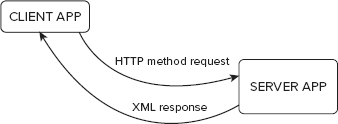
As shown in Figure 12-2, REST is just a request/response scheme. A client application submits an HTTP request and expects an XML response back.
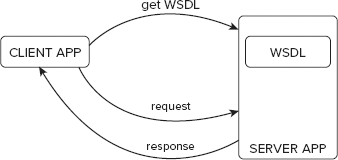
As you can see in Figure 12-3, SOAP is more complicated. In REST, there are only four methods that need to be handled. In SOAP, there can be more, and there is no limit for that. That's why a client application must get a WSDL file in which all available methods are defined with parameters that are allowed. A server application location should be also within this file because the client application needs to know where to send its requests, and it's not obvious that it's the same location where WSDL is placed.
Symfony delivers a lot of ready-to-use plug-ins. You can easily connect to different applications such as Google Picasa, LinkedIn, or Last.fm. Here are some examples of plug-ins that you can install:
sfPicasaPlugin — Gives you access to the Google Picasa API:
http://www.symfony-project.org/plugins/sfPicasaPluginsfGoogleLoginPlugin — Allows logging in to the Google account:
http://www.symfony-project.org/plugins/sfGoogleLoginPluginsfHarmonyPlugin — Library that provides SOAP communication for applications:
http://www.symfony-project.org/plugins/sfHarmonyPlugindbAmazonS3Plugin — Allows you to work with Amazon S3 through its API:
http://www.symfony-project.org/plugins/dbAmazonS3PluginsfMapFishPlugin — Allows you to integrate your Symfony application with MapFish application:
http://www.symfony-project.org/plugins/sfMapFishPluginWebPurifyPlugin — Enables securing web applications with WebPurify:
http://www.symfony-project.org/plugins/WebPurifyPluginwpLastFmPlugin — Provides tools to integrate with the Last.fm music network:
http://www.symfony-project.org/plugins/wpLastFmPluginsfNuSoapPlugin — Another library that enables SOAP communication:
http://www.symfony-project.org/plugins/sfNuSoapPluginsfLinkedinProfilePlugin — Allows you to show a LinkedIn profile on your page:
http://www.symfony-project.org/plugins/sfLinkedinProfilePluginsfFlexymfonyPlugin — Makes communication with Flex applications from Symfony side possible:
http://www.symfony-project.org/plugins/sfFlexymfonyPlugin
This section uses the ckWebService plug-in to create an application with SOAP. To install the plug-in, use the following command:
$ symfony plugin:install ckWebServicePlugin
Until the installation of this plug-in, you could use only three types of application environments: dev, prod, and test. This plug-in will add the fourth: soap. So you need to configure the soap environment in your application's app.yml file, as shown in the following code:
all:enable_soap_parameter: offsoap:enable_soap_parameter: on ck_web_service_plugin: wsdl: %SF_WEB_DIR%/NewsApi.wsdl handler: NewsApiHandler persist: <?php echoln(SOAP_PERSISTENCE_SESSION) ?> soap_options: encoding: utf-8 soap_version: <?php echoln(SOAP_1_2) ?> soap_headers: MySoapHeader: class: MySoapHeaderDataClasscode snippet /soap/symfony/apps/frontend/config/app.yml
By default, soap parameters are set to on, but you should turn them off for all application environments and enable them only for soap. Additionally, some plug-in–specific configuration needs to be set, such as the default WSDL file, encoding, SOAP version, and so on. In this example, adding news will be presented, so the NewsApi handler and definition will be further generated. It's already added in the preceding configuration. After you have completed the basic configuration of the SOAP application, you also should let Symfony know what will be the default SOAP environment's controller. You can define it in the application's factories.yml configuration file, as shown in the following code:
soap:
    controller:
       class: ckWebServiceController
code snippet /soap/symfony/apps/frontend/config/factories.yml
Finally, you need to enable SOAP applications to get parameters. Because that is done using filters you can set it in filters.yml:
rendering: ~ security: ~soap_parameter:class: ckSoapParameterFilterparam:condition: %APP_ENABLE_SOAP_PARAMETER%cache: ~ execution: ~code snippet /soap/symfony/apps/frontend/config/filters.yml
Note that in this example, the sequence of entries is important. That completes the configuration, but you still cannot add any news through SOAP now. Doctrine classes that you have used to manipulate the dates kept in the database are not available in the SOAP controller out of the box, so you need to add some hints to let everybody know that particular classes will be used in SOAP actions. You can do that easily just by adding comments before the class definitions. In case of the news class that you generated in the REST example, you need to add one line in the /lib/model/doctrine/news.class.php file:
<?php/*** @PropertyStrategy('ckDoctrinePropertyStrategy')*/class news extends Basenews { }code snippet /soap/symfony/lib/model/doctrine/news.class.php
Now you can create a module that will hold your SOAP action:
$ symfony generate:module frontend news
You are halfway finished with your Hello World SOAP application. To add a new news entry, you need to get two parameters: title and description. If you read previous chapters carefully, you should know that the add action would be like the following one:
<?php
class newsActions extends sfActions {
  public function executeAdd($request) {
    $news = new news();
    $news->title=$request->getParameter('title');
    $news->description =$request->getParameter('description');
    $news->save();
    $this->result = $news->getId();
  }
}
code snippet /soap/symfony/apps/frontend/modules/news/actions/actions.class.php
It would be nice to comment what exactly this action will do. It is important also because this way, you specify which web service should handle this action while generating a new WSDL file (@WSMethod):
<?php
class newsActions extends sfActions {
  /**
    * An action for adding news
    * @WSMethod(webservice='NewsApi')
    * @param string $title Title
    * @param string $description Description
    * @return double The result
*/
public function executeAdd($request) {
// ...
}
}
code snippet /soap/symfony/apps/frontend/modules/news/actions/actions.class.phpFinally, you need to create a /config directory in the current module path and create a module.yml configuration file. It's needed for defining parameters and responses for SOAP. You need to add the following lines (from add: to the end, it should be written as a single line) in /modules/news/config/module.yml:
soap:
  add: { parameter: [title, description],
    result: { class: ckPropertyResultAdapter, param: { property: result } } }
code snippet /soap/symfony/apps/frontend/modules/news/config/module.yml
Before testing your first SOAP module, you need to create the WSDL definition file, as it was discussed at the beginning of this chapter. This plug-in provides a nice way to generate this WSDL file based on information given in the preceding configuration file. What you need to do is just to invoke this task using Symfony's command-line interface (CLI):
$ symfony webservice:generate-wsdl frontend NewsApi http://localhost/
Note that you need to put your URL as the last parameter. The preceding task will generate the following output:
>> file+ /home/wrox/public_html/soapsymfony/web/NewsApi.php
>> tokens /home/wrox/public_html/soapsymfony/web/NewsApi.php
>> file- /home/wrox/public_html/soapsymfony/apps/frontend/lib/
        BaseNewsApiHandler.class.php
>> file+ /home/wrox/public_html/soapsymfony/apps/frontend/lib/
        BaseNewsApiHandler.class.php
>> tokens /home/wrox/public_html/soapsymfony/apps/frontend/lib/
        BaseNewsApiHandler.class.php
>> file+ /home/wrox/public_html/soapsymfony/web/NewsApi.wsdl
As shown previously, all needed files were generated. When you take a look inside NewsApi.wsdl, you will see something similar to the following code (some lines had to be broken for print; write each entry between brackets <> as a single line):
<?xml version="1.0" encoding="utf-8"?>
  <wsdl:definitions xmlns:wsdl="http://schemas.xmlsoap.org/wsdl/"
    xmlns="http://schemas.xmlsoap.org/wsdl/"
    xmlns:xsd="http://www.w3.org/2001/XMLSchema"
    xmlns:soap="http://schemas.xmlsoap.org/wsdl/soap/" name="NewsApi"
    targetNamespace="http://localhost/" xmlns:tns="http://localhost/"
    xmlns:soapenc="http://schemas.xmlsoap.org/soap/encoding/">
<wsdl:types xmlns:xsd="http://www.w3.org/2001/XMLSchema">
<xsd:schema xmlns:xsd="http://www.w3.org/2001/XMLSchema"
xmlns="http://www.w3.org/2001/XMLSchema"
targetNamespace="http://localhost/"/>
</wsdl:types>
<wsdl:portType name="NewsApiPortType">
<wsdl:operation name="news_add" parameterOrder="title description">
<wsdl:input message="tns:news_addRequest"/>
<wsdl:output message="tns:news_addResponse"/>
</wsdl:operation>
</wsdl:portType>
<wsdl:binding xmlns:soap="http://schemas.xmlsoap.org/wsdl/soap/"
name="NewsApiBinding"
type="tns:NewsApiPortType">
<soap:binding xmlns:soap="http://schemas.xmlsoap.org/wsdl/soap/" style="rpc"
transport="http://schemas.xmlsoap.org/soap/http"/>
<wsdl:operation xmlns:soap="http://schemas.xmlsoap.org/wsdl/soap/"
name="news_add">
<soap:operation xmlns:soap="http://schemas.xmlsoap.org/wsdl/soap/"
soapAction="http://localhost/news_add" style="rpc"/>
<wsdl:input xmlns:soap="http://schemas.xmlsoap.org/wsdl/soap/">
<soap:body xmlns:soap="http://schemas.xmlsoap.org/wsdl/soap/" parts="title
description" use="literal" namespace="http://localhost/"
encodingStyle="http://schemas.xmlsoap.org/soap/encoding/"/>
</wsdl:input>
<wsdl:output xmlns:soap="http://schemas.xmlsoap.org/wsdl/soap/">
<soap:body xmlns:soap="http://schemas.xmlsoap.org/wsdl/soap/"
parts="result" use="literal" namespace="http://localhost/"
encodingStyle="http://schemas.xmlsoap.org/soap/encoding/"/>
</wsdl:output>
</wsdl:operation>
</wsdl:binding>
<wsdl:message name="news_addRequest">
<wsdl:part name="title" type="xsd:string"/>
<wsdl:part name="description" type="xsd:string"/>
</wsdl:message>
<wsdl:message name="news_addResponse">
<wsdl:part name="result" type="xsd:double"/>
</wsdl:message>
<wsdl:service xmlns:soap="http://schemas.xmlsoap.org/wsdl/soap/"
name="NewsApiService">
<wsdl:port xmlns:soap="http://schemas.xmlsoap.org/wsdl/soap/"
name="NewsApiPort" binding="tns:NewsApiBinding">
<soap:address xmlns:soap="http://schemas.xmlsoap.org/wsdl/soap/"
location="http://localhost/NewsApi.php"/>
</wsdl:port>
</wsdl:service>
</wsdl:definitions>The bold text in this file listing defines the input and output of actions, the parameters, and the result. For testing your new SOAP application, you can use soapUI, as mentioned before.
Run it and choose File from the main menu; then choose New soapUI Project. You should see a new window, as shown in Figure 12-4. Browse for the WSDL file if it's on your workstation, or you can download it from a remote machine and then use it.
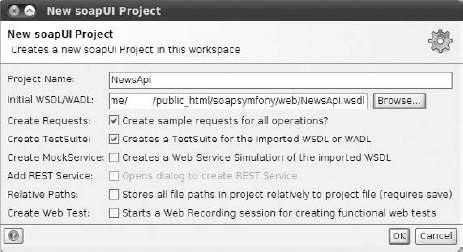
After you click OK, you are taken to the next step, shown in Figure 12-5. Notice that the action you supplied in the previous step is automatically recognized because WSDL contains information of this kind.
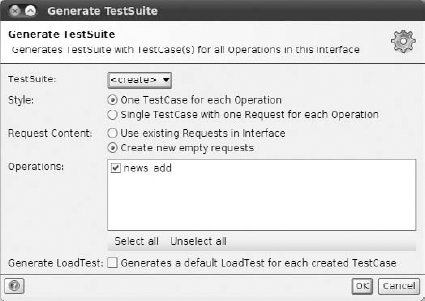
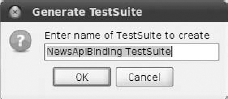
Click OK and, as the last step, you are asked to specify a proper name for the test suite (see Figure 12-6).
Click OK and a list of all created projects appears to the left in the next window displayed. It should look like Figure 12-7.
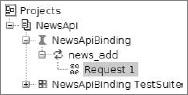
If you have followed the instructions in this chapter, clicking Request 1 opens a window with a new prepared request, as shown in Figure 12-8.
Change the question marks that you'll see to some data, as it's done in Figure 12-8. (Question marks were displayed there instead of Hot and News.)
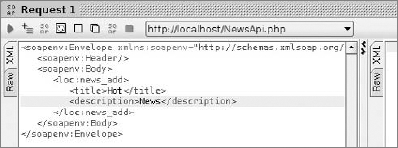
After clicking the green arrow visible in the top-left part of this window, you should see the application's response on the right, as shown in Figure 12-9.
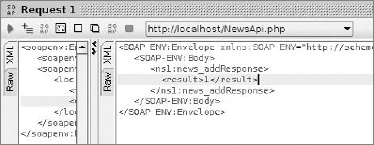
The result should contain the ID of the news you've added before. In this example, it is 1.
CakePHP SOAP implementation is more time-consuming than the other two frameworks because you need to manually set some properties, such as the WSDL response header. WSDL files in Symfony and Zend are generated automatically and based on a given class. A model needs to be created because you will operate on a News table. You should also define a new method that you will use for SOAP, such as the method shown in the following code snippet:
<?php
class News extends AppModel {
  function addNewItem($title,$description) {
    $data['News']['title']=$title;
    $data['News']['description']=$description;
    $this->save($data);
    return "News id:".$this->id;
  }
}
?>
code snippet /soap/cakephp/app/models/news.php
The returned value is a string with the information about the currently added News ID. The model shown in the preceding code should be saved as /app/models/news.php. The controller that will handle the SOAP request should be very similar to the controller presented in the "Creating New Entries" section of the "CakePHP" section of this chapter. You need a RequestHandler component, but you will need only two methods, as shown in the following code snippet. The first is used to handle SOAP requests and the second one will show the WSDL file that makes the request possible.
<?php
class NewsController extends AppController {
    var $components = array('RequestHandler');
    function service() {
        $this->layout = false;
        $this->autoRender = false;
        Configure::write('debug', 0);
        ini_set("soap.wsdl_cache_enabled", "0");
        $server = new SoapServer('http://localhost/news/wsdl');
        $server->setClass("News");
        $server->handle();
    }
    function wsdl() {
        $this->layout = false;
        header('Content-Type: text/xml');
    }
}
?>
code snippet /soap/cakephp/app/controllers/news_controller.php
The bold line assigns the News class, which is your News model class and invokes the requested method on an object of the News type. The second method generates just an XML file; that's why a proper header needs to be set. Additionally, you need to manually write a WSDL file. This can be a very annoying issue, especially for developers who haven't met SOAP before. You can use the example shown here:
<wsdl:definitions name='News'
    targetNamespace='http://localhost/'
    xmlns:tns='http://localhost/'
    xmlns:soap='http://schemas.xmlsoap.org/wsdl/soap/'
    xmlns:xsd='http://www.w3.org/2001/XMLSchema'
    xmlns:soapenc='http://schemas.xmlsoap.org/soap/encoding/'
    xmlns:wsdl='http://schemas.xmlsoap.org/wsdl/'
    xmlns='http://schemas.xmlsoap.org/wsdl/'>
<wsdl:types>
      <schema xmlns="http://www.w3.org/2001/XMLSchema"
                  targetNamespace="http://www.ecerami.com/schema"
                  xmlns:wsdl="http://schemas.xmlsoap.org/wsdl/"
                  xmlns:soapenc="http://schemas.xmlsoap.org/soap/encoding/">
         <complexType name="ArrayOfString">
            <complexContent>
               <restriction base="soapenc:Array">
                  <attribute ref="soapenc:arrayType"
                               arrayType="string[]"/>
</restriction>
</complexContent>
</complexType>
</schema>
</wsdl:types>
<message name='addNewItemRequest'>
<part name='title' type='xsd:string'/>
<part name='description' type='xsd:string'/>
</message>
<message name='addNewItemResponse'>
<part name='Result' type='xsd:string'/>
</message>
<portType name='NewsPortType'>
<operation name='addNewItem'>
<input message='tns:addNewItemRequest'/>
<output message='tns:addNewItemResponse'/>
</operation>
</portType>
<binding name='NewsBinding' type='tns:NewsPortType'>
<soap:binding style='rpc' transport='http://schemas.xmlsoap.org/soap/http'/>
<operation name='addNewItem'>
<soap:operation soapAction='urn:your-urn'/>
<input>
<soap:body use='encoded' namespace='urn:your-urn'
encodingStyle='http://schemas.xmlsoap.org/soap/encoding/'/>
</input>
<output>
<soap:body use='encoded' namespace='urn:your-urn'
encodingStyle='http://schemas.xmlsoap.org/soap/encoding/'/>
</output>
</operation>
</binding>
<service name='NewsService'>
<port name='NewsPort' binding='NewsBinding'>
<soap:address xmlns:soap="http://schemas.xmlsoap.org/wsdl/soap/"
location='http://localhost/news/service'/>
</port>
</service>
</wsdl:definitions>
code snippet /soap/cakephp/app/views/news/wsdl.ctpSave the preceding code as wsdl.ctp in the /views/news directory. Now you can test your SOAP application developed with CakePHP. In soapUI, you are also able to set a URL instead of a path to your local WSDL file in the WSDL file field. For this example, it would be http://localhost/news/wsdl if your application is on localhost.
Zend Framework delivers a lot of ready-to-use classes such as Zend_Soap_Client, Zend_Soap_Server, Zend_Soap_Wsdl, and a class for generating WSDL files, Zend_Soap_AutoDiscover. You can use the same News model files you used with the REST example. Creating a simple SOAP application is very similar to the one that was presented in the "CakePHP" section. First of all, you need to create a class to handle SOAP requests. Adding a news class can be done as follows:
<?php
require '../application/models/News.php';
require '../application/models/NewsMapper.php';
require '../application/models/DbTable/News.php';
class NewsAPI {
   /**
    * Add method
    * @param String $title
    * @param String $description
    * @return Int
    */
   public function news_add($title, $description) {
       $entry = new Application_Model_News();
       $entry->setTitle($title);
       $entry->setDescription($description);
       $mapper = new Application_Model_NewsMapper();
       $id = $mapper->save($entry);
       return $id;
    }
}
code snippet /soap/zf/library/NewsAPI.php
You need to include the necessary model files on your own, as it was already described a few times in previous chapters, particularly in Chapter 4. Next you need to define a simple method that saves the News title and description within the request. You can save it in /library as NewsAPI.php. You need to include it in the controller that you will use to handle the SOAP request. To simplify, let's use the main controller. Just as in CakePHP, two methods need to be defined: one for generating WSDL and one for handling SOAP requests:
<?php
require_once realpath(APPLICATION_PATH .'/../library/').'/NewsAPI.php';
class IndexController extends Zend_Controller_Action {
    public function wsdlAction() {
    }
    public function serviceAction() {
    }
}
code snippet /soap/zf/application/controllers/IndexController.php
To generate a WSDL file, you can use Zend_Soap_AutoDiscover:
public function wsdlAction() {
    $this->_helper->viewRenderer->setNoRender();
    $autodiscover = new Zend_Soap_AutoDiscover();
    $autodiscover->setClass('NewsAPI');
    $autodiscover->handle();
}
code snippet /soap/zf/application/controllers/IndexController.php
The preceding code generates the WSDL file based on the NewsAPI class definition. This approach needs less effort than in the case of CakePHP. Next, you need to handle the SOAP request:
public function serviceAction() {
    $this->_helper->viewRenderer->setNoRender();
    $soapServer = new Zend_Soap_Server("http://localhost/index/wsdl");
    $soapServer->setClass('NewsAPI');
    $soapServer->handle();
}
code snippet /soap/zf/application/controllers/IndexController.php
In soapUI, the WSDL file's URL would be as shown as in the preceding code. It's the parameter for the Zend_Soap_Server constructor method. As the last task, you should set http://localhost/index/service.