Table of Contents for
Building PHP Applications with Symfony™, CakePHP, and Zend® Framework
 Building PHP Applications with Symfony™, CakePHP, and Zend® Framework
Published by
Wrox, 2011
Building PHP Applications with Symfony™, CakePHP, and Zend® Framework
Published by
Wrox, 2011
- Copyright
- Credits
- ABOUT THE AUTHORS
- ACKNOWLEDGMENTS
- Introduction
- 1. Introducing Symfony, CakePHP, and Zend Framework
- 2. Getting Started
- 3. Working with Databases
- 4. Your First Application in the Three Frameworks
- 5. Forms
- 6. Mailing
- 7. Searching
- 8. Security
- 9. Templates
- 10. AJAX
- 11. Making Plug-ins
- 12. Web Services
- 13. Back End
- 14. Internationalization
- 15. Testing
- 16. User Management
- 17. Performance
- 18. Summary
- A. Web Resources
- B. CodeIgniter, Lithium, and Agavi with Code Examples
- GLOSSARY OF ACRONYMS AND TECHNICAL TERMS
WHAT'S IN THIS CHAPTER?
Understanding various approaches to object-relational mapping (ORM).
Configuring different database engines.
Writing schemas of object models.
Using the command-line interface.
In order to produce your first application, you need to know how to communicate with your database. To communicate with it, the database must be configured properly for use with your framework. And before the configuration can be made, you should know how the frameworks join with database systems and perhaps choose your preferred object-relational mapping (ORM) solution.
To help you with that before you move to coding the sample app, this chapter takes a close look at the ORM concept, which is essential for almost every PHP framework available. The rest of the chapter covers configuring various databases for chosen ORM solutions and how to communicate with them efficiently. In the next chapter, you will write an address book example in each framework. The good thing is that with ORM support, communicating with databases is really straightforward. You no longer need to write lengthy SQL queries manually nor join tables each time you need to call another object by reference. So this little bit of overhead is certainly worth the effort.
ORM is one of the core concepts of PHP frameworks. It creates an abstraction layer between relational database management systems (RDBMSs) and object-oriented business logic. There are specialized ORM-only frameworks that can be used alone in any PHP code or combined with Model-View-Controller (MVC) frameworks. The three frameworks provide the following ORM solutions:
Symfony — Versions 1.x offer Propel and Doctrine as plug-ins. Since Symfony 1.3, Doctrine has been the default ORM plug-in. Since Symfony 2.0, support for Doctrine 2.0 only is provided. Other ORMs can also be used.
CakePHP — Uses its own integrated ORM solution. Other ORMs can also be used.
Zend Framework (ZF) — Provides only some database access tools, but a full ORM third-party framework can be easily installed. Future versions will integrate Doctrine by default.
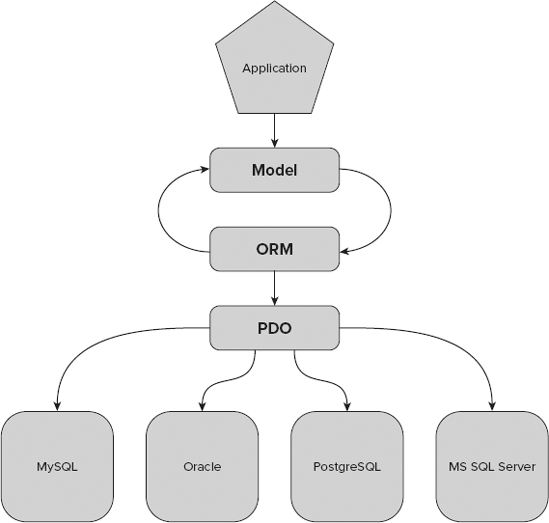
Figure 3-1 shows the structure of applications built atop an ORM tool. The application has a data model, which is used by the ORM mapper to create corresponding tables. ORM tools commonly use PHP Data Objects (PDOs) to execute particular queries.
Object-relational impedance mismatch is a term coined to encompass several difficulties related to persistence of object-oriented data in relational databases. These problems are not only technical but also conceptual and even cultural (if database administrators and software developers are seen as two different cultures). Among the most common problems are the following:
Inheritance — Relational databases do not support inheritance. There are ways to simulate inheritance in databases by using some special tricks in object-oriented programming (OOP) language classes (for example, a separate table for each subclass), but at the cost of increasing complexity of code, adding new tables, leaving large amounts of NULL cells or repeating source code, and greatly raising maintenance costs.
Encapsulation — OOP emphasizes hiding objects' private data behind interfaces provided by the objects themselves. This notion is not known to RDBMSs, in which data is accessible globally, protected only by mechanisms of user roles and permissions.
References — Relational databases never use attributing by reference (nor pointers), although it is one of the most basic properties of OOP.
Data types — There are various differences between data types used in RDBMSs and OOP. For example, String types in RDBMSs have fixed maximum length, have specified collation, and ignore trailing spaces. On the other hand, OOP string types usually have variable, unlimited length, and do not trim white spaces unless commanded otherwise. Also, they are collation-free and must be provided separately for any sorting algorithms.
Data structures — OOP uses heavily nested data structures with object lists of previously unspecified length. RDBMSs use a "flat" data model with relations characterized by primary and foreign keys. The number of fields in each row is predefined. Although some RDBMSs can dynamically add a column when needed, it is not a trivial operation.
Constrains — RDBMSs extensively use declarative constrains imposed on variables and tables. OOP languages do not provide such mechanisms; the closest things are assertions and exceptions, but they affect the application's state after certain operations instead of being an internal part of the data model.
Transactions — The closest counterpart of RDBMS transactions is data access in concurrent programming. It does not include all the subtleties of atomicity, consistency, isolation and durability (ACID), and even when it does, transaction-like behavior is ensured by the application, not by the language. OOP languages use small, low-level operations and do not need transactions. RDBMSs do need them, however, to ensure transactional persistence of objects, for example.
Conceptual differences — Relational thinking is based on sets, OO thinking is based on graphs, databases see data as interface, OOPs favor interface via actions, databases are oriented on fixed structure, OOPs are directed toward dynamic behavior, and so on. These different approaches can lead to fundamental misunderstandings between database administrators and programmers.
Responsibilities — According to the old school of computer systems design, the database schema is carefully constructed to reflect reality, and software is built on top of the database to access and modify data. ORM tools allow you to create databases that reflect only the schema of objects. This reversal often leads to poorly designed databases.
Maintenance — Introducing new classes of objects often requires changes in database schema. Database administrators who are not willing to make unnecessary changes may block development of software attempting such changes. And unreasonable requests by software developers can damage the database. Even if such extremes do not occur, the mismatch greatly increases maintenance costs.
One way to solve this impedance mismatch is to abandon OOP completely. We bet that no developer considers this solution when it comes to any serious web application, unless he has really important reasons to do so.
Object-oriented database management systems (OODBMSs) are another way to solve the problems mentioned in the preceding list. Although OODBMSs are still limited (mainly to some scientific projects), some of the world's biggest databases are object-oriented ones. However, the relational approach is still the prevailing approach in commercial web applications. Its establishment in the market is so strong that it will take years before databases fully adapt to OOP, so we will not concentrate on the OODBMS approach.
Object-relational databases are RDBMS bases that support the object-oriented data model. Although they support inheritance and by-reference behavior, they are still inferior in terms of performance. However, they may help to bridge the gap from the database side, whereas ORMs bridge it from the software side.
Introduced in 2005, Propel was the first open-source ORM solution for PHP. First it was built on top of Creole, but since version 1.2 it has used PDOs instead. Both Creole and PDO are database access application programming interfaces (APIs) that provide uniform communication with various database engines. Creole was a Propel subproject, whereas PDO is an official extension of the PHP language. That's why when PDO was introduced, it was adopted by Propel, and Creole was no longer developed.
Propel gained great popularity when it became part of Symfony — first as a core component and then as default plug-in competing with Doctrine. However, Propel's development is less active today (its abandonment is even being unofficially talked about).
Propel was inspired by and based on a Java ORM implementation: Torque. Solutions used in both Propel and Torque are simple and effective, resulting in great performance, but also have some drawbacks. One drawback is one-to-one mapping (each class is mapped to one database table). With this approach, it is necessary to create additional join tables and write some code to reflect many-to-many relations in the database.
One of the requirements for ORM in Propel is to create an XML file that describes both database schema and object model of application as well as their connections. This file can also be generated by Propel from an existing database. With the XML schema, Propel can generate PHP model classes. Propel can also generate nice visual schema diagrams.
The usage of Propel in source code is really straightforward. All you need to do is create an object and then use its save() method, as in the following code. The object is now written into a database. For more complex operations, Propel uses Criteria objects to formulate SQL statements.

<?php
   $user = new User();
   $user->setForename('Karol');
   $user->setSurname('Przystalski');
   $user->save();
?>
code snippet /examples/propel.phpThe Doctrine project was started in 2006, so it had to face the competition of already-popular Propel. Doctrine is based on one of the leading ORM solutions: Java Hibernate. Doctrine's popularity is increasing rapidly and since mid-2009 it is more frequently searched than Propel (based on the Google Insights Web Development category).
The programmer does not have to create and update the database schema in an XML file because Doctrine can generate a PHP model or a YAML Ain't Markup Language (YAML) schema, reflecting an existing database. It is also possible to create a YAML schema to specify the mapping manually.
From the perspective of PHP code, the basic syntax of Doctrine is very similar to Propel's. The configuration of a YAML schema is preferred over XML, and it can be written manually or generated by an ORM engine. The basic example of Doctrine usage in PHP code, shown in the following snippet, is the same as for Propel; however, there are differences for more advanced features, mainly searching.
<?php
   $user = new User();
   $user->setForename('Leszek');
   $user->setSurname('Nowak');
   $user->save();
?>
code snippet /examples/doctrine.php
Doctrine is now a top ORM solution mainly because it supports many-to-many relationships. Doctrine's other exclusive features include data fixtures, migration, behaviors, full text searching, and Doctrine Query Language (DQL) (based on Hibernate's HQL) for a generation of advanced SQL operations through the Doctrine_Query class. Doctrine's documentation is also a big plus.
Even though Doctrine's performance is sometimes lower than Propel's, it is now a superior ORM from the programmer's perspective, because of its advanced features like DQL language. Its development also seems faster and better organized than Propel's, which is why we use Doctrine as our default ORM.
CakePHP comes with a bundled ORM. Unfortunately, it does not support inheritance, which is a big drawback compared with other ORMs. Another weakness of this ORM is its lack of a PDO database extension layer. This is because of Cake's compatibility with PHP 4, which forbids use of extensions specific to PHP 5.
Object persistence is organized by saving arrays of data. Arrays contain pairs of field names and values. This approach is different because it resembles preparing data for individual tables rather than simple persistency of objects. It may look less object-oriented, but it is useful for web apps that get data from organized forms. The following example demonstrates this use of arrays for data persistence:
<?php
    $this->data(array('forename'=>'Bartosz',
                      'surname'=>'Porebski'));
    $this->User->save($this->data);
?>
code snippet /examples/cakeORM.phpZF provides database access tools from the Zend_Db family:
Adapter classes are created by appending one of the preceding names (uppercase first letter) to Zend_Db_Adapter. The following code is a simple example of a MySQL database adapter using PDO:
$db = new Zend_Db_Adapter_Pdo_Mysql( array(
  'host' => '127.0.0.1',
  'username' => 'user',
  'password' => 'pass',
  'dbname' => 'dbtest'
));
code snippet /examples/zendDB.php
The
Zend_Db_Profilerclass provides tools for profiling SQL queries. This is useful for inspecting recent queries and their execution time. Advanced filtering by query type and elapsed time is also provided. Specialized profilers can be made through inheritingZend_Db_Profilerby custom classes.The
Zend_Db_Statementclass, based onPDOStatementfrom the PDO extension, provides a convenient way to execute SQL statements and fetch results. It allows the use of parameterized statements, fetching single rows and columns from a result set, and fetching a row as an object by passing the row's values to a constructor of a specified class.The
Zend_Db_Selectclass enables object-oriented methods for creation of SQL SELECT queries. Here's an example:
$select = $db->select()
->from('table1')
->joinUsing('table2', 'column1')
->where('column2 = ?', 'foo');
code snippet /examples/zendDB.php
The
Zend_Db_Tableis a family of classes for creating and managing tables and relations. When you want to operate a database table, all you need to do is to simply instantiateZend_Db_Table(available since ZF 1.9) or extend theZend_Db_Table_Abstractclass. Relations may be set between table objects based on the database schema. Other classes from this family includeZend_Db_Row, Zend_Db_Rowset, andZend_Db_Table_Definition.
Generally, Zend_Db is more of a lightweight wrapper for unified PDO layers rather than a full ORM solution. Even if this set of tools can be useful and sufficient for a small to middle-sized project, you will probably need a more comprehensive approach for anything more serious. There are some experimental classes aiming for true ORM, but their development stage is still far from maturity. That's why many developers integrate Zend with a proven solution such as Propel or Doctrine. Doctrine is a prevailing choice, not only because of its recent popularity in the development community but also because of its chances of being officially integrated into Zend. The lead developer of a data mapper for ZF called Zend_Entity announced that it will be discontinued in favor of integrating Doctrine into future versions of ZF.
There are various other ORM solutions, both closed- and open-source. Among the most advanced technologies are Hibernate for Java, ActiveRecord (part of Ruby on Rails), Python framework, Django, and Microsoft's .NET. ORMs for PHP are generally younger and usually borrow the best solutions from other languages. Propel and Doctrine are the best and most successful examples to date. They are now well established and popular in the PHP community, so new ORMs must be experimental and innovative to gain some market share. Among the most interesting are the following:
RedBean — A very experimental project with high aspirations. It needs absolutely no configuration; it creates a database schema by analyzing classes in PHP code instead. It can be easily integrated into ZF and CodeIgniter.
Qcodo — A whole web application framework with an integrated ORM, inspired by .NET. Qcodo features object-relational model code generation as well as generation of web pages for object management, called Qforms. Its structure is completely object-oriented and therefore contributes to rapid development of elegant code.
php-activerecord — Inspired by Ruby on Rails Active Record architecture, it creates an object-oriented database representation that can be used by programmers.
As mentioned previously, all ORMs use PDO as a database abstraction layer. Another solution is Creole, which was used by Propel some time ago. An abstraction layer is a very useful solution that makes it possible to change a database that an application is using. Let's use a simple example to make it clear. Let's say that you need to develop a small application that will use MySQL. In pure PHP, the code should look like this:
<?php
$con = mysql_connect("localhost","wroxuser","wroxpassword") or die("cannot connect");
mysql_select_db("wroxdb") or die("database doesn't exist");
$query = "SELECT * FROM users; ";
while($row=mysql_fetch_array($response)) {
    // do a lot of things
}
mysql_close($con);
?>
code snippet /examples/mysql.php
Suppose that you use fragments of this code in many places in your application. This code may be very important, providing some crucial features of your application. Because you are almost done with your application, the product owner says that your previously approved requirements and specifications have changed. You need to switch to PostgreSQL because of a very important reason that is known only to the product owner. So you are considering how it will be done.
A trivial solution would be to change your PHP functions such as mysql_connect() to equivalents for PostgreSQL. This is a very time-consuming process and is only a theory in web application development; nobody follows this approach. From an architect's perspective, if you know that there is even the smallest chance that a database would be changed, you should think about a solution that implements a database abstraction layer idea. The idea is that you need only to change the configuration of your application, not its functions, because the functions are chosen in the lower layer of your application. As an example, let's look at the database-specific configuration of your frameworks.
Open Database Connectivity (ODBC) is an API standard that provides database management and configuration, independent of the database engine, operating system, or programming language. Let's think about ODBC as another layer between an application and the database. ODBC configuration is needed to make it possible to connect to the MS SQL Server, but can optionally be used for other databases as well. PHP uses the pdo_odbc extension to work with ODBC. Be sure that it is present in the PHP /ext directory.
ODBC is a standard created by the SQL Access Group and was developed by Microsoft for Windows, but its implementations are available for other operating systems such as Linux, MacOS, and OS/2. There are many different ODBC implementations, and among the most important open-source ones are Independent ODBC (iODBC), which is platform independent; and unixODBC, which is designed for all flavors of UNIX and Linux. There is also Java Database Connectivity (JDBC), which bridges Java-based applications to native ODBC drivers.
An important notion is a data source name (DSN) — not to be confused with a domain name system (DNS). It is a data structure that contains information on a data source (in this case, a database) in order to provide the ODBC driver all the information it needs to establish a connection to this data source. It is similar in structure to a URL address and contains the following information:
Name of driver connecting to the database
Data source address
Name of the data source
Username accessing the database
Password for user validation
An example of a valid DSN for MySQL connection is the following:
mysql://username:password@host/db_name
SQLite is supported by all major ORMs. Thanks to SQLite's lightweight embedded structure, generally all you need to do is to specify the path to the file containing the whole database. You connect to the database without a username or login, but obviously SQLite can support all modern security mechanisms.
Configuring Propel for use with SQLite is pretty much the same as with Doctrine. The only difference is another parameter in the param: section, in which you need to specify the class that Propel will use to connect with the database. Because Creole is universally replaced by PDO, we assume that it is going to be used, and set the classname: as PropelPDO.
all:
  propel:
    class:         sfPropelDatabase
    param:
      classname:   PropelPDO
      dsn:         sqlite:///<?php echo dirname(__FILE__); ?>/sample.db
code snippet /sqlite/symfony/config/database.yml
Doctrine uses PDO as the abstraction layer to connect with databases. All you need to do is edit the config/databases.yml file. In the doctrine: section, you set class: as sfDoctrineDatabase; and in the param: section, you should define the DSN for the database. The dsn: should define the path to the file containing the SQLite database, starting with sqlite:// as the resource descriptor. We assume that it is located in the same folder as the configuration file, the path to which is returned by the PHP expression <?php echo dirname(__FILE__); ?>. If the database is in another location, the path must be changed accordingly. The extension of the database file can also be .sqlite. A short example is shown here:
all:
  doctrine:
    class:      sfDoctrineDatabase
    param:
      dsn:      sqlite:///<?php echo dirname(__FILE__); ?>/sample.db
code snippet /sqlite/symfony/config/database.ymlIn CakePHP, you configure the database with the DATABASE_CONFIG class. It has a $default variable, which is an array containing all necessary information about the default environment. There can be several different environments for testing, developing, or releasing, but for now you should focus on the default one.
First, set the driver as sqlite. Note that CakePHP does not support PDO because of its backward compatibility with PHP 4. It is a big drawback, although you can try to avoid all problems that may be generated by it. The line 'persistent' => false determines whether the connection should be permanent or initialized in lazy mode, which affects performance. In the following example, you should replace <path_to_cakephp> with a full path to your CakePHP folder (or wherever SQLite is installed):
<?php
class DATABASE_CONFIG {
    var $default = array(
        'driver' => 'sqlite',
        'persistent' => false,
        'database' => '<path_to_cakephp>/sample.db'
    );
?>
code snippet /sqlite/cakephp/app/config/database.phpIn ZF, you have to choose the specific driver that Zend_Db will use. SQLite has only a PDO-dependent driver, but for other databases there may also be non-PDO variants. APPLICATION_PATH is the path to the application folder. This example is for the production environment, which we consider to be the default:
[production]
...
resources.db.adapter = "PDO_SQLITE"
resources.db.params.dbname = APPLICATION_PATH "/data/db/sample.db"
...
code snippet /sqlite/zf/application/configs/application.ini
PostgreSQL is also universally supported by ORM software. Like most client-server databases, PostgreSQL requires user authentication.
The configuration file config/databases.yml is the same as for Doctrine, but again you need to specify the classname: parameter as PropelPDO:
all:
  propel:
    class:         sfPropelDatabase
    param:
      classname:   PropelPDO
      dsn:         pgsql:dbname=sample;host=localhost
      username:    login
      password:    secret
code snippet /postgres/symfony/config/database.ymlThe DSN for a standard server database is quite different from the database in a file. Here in the param: section, you must specify the type of DSN resource along with the database name and host (localhost in this example). In the following lines, username and password are used for authentication in PostgreSQL:
all:
  propel:
    class:         sfDoctrineDatabase
    param:
      dsn:         pgsql:dbname=sample;host=localhost
      username:    login
      password:    secret
code snippet /postgres/symfony/config/database.ymlCakePHP's object-oriented approach boils down to an array of values determining the database connection in the default environment: the driver type, connection mode, database name, host name, username, and password:
<?php
class DATABASE_CONFIG {
    var $default = array(
        'driver' => 'pgsql',
        'persistent' => false,
        'database' => 'sample',
        'host' => 'localhost',
        'login' => 'login',
        'password' => 'secret'
    );
?>
code snippet /postgres/cakephp/app/config/database.phpThe PostgreSQL adapter with PDO support is used as a database abstraction layer. Then you must set four fields of connection parameters:
[production]
...
resources.db.adapter = "PDO_PGSQL"
resources.db.params.host = "localhost"
resources.db.params.username = "login"
resources.db.params.password = "secret"
resources.db.params.dbname = "dbname"
code snippet /postgres/zf/application/configs/application.ini
MySQL has two different drivers that allow connections. The first one is mysql, which is used by ORMs and provides a standard API mapped by PDO. The other driver is mysqli ("i" for "improved"), an extension that allows several improvements for communication with newer versions of MySQL (4.1.3+) from PHP 5 source code. These improvements include object-oriented interface, transaction support, prepared statements, or debugging with PHP 5 exceptions.
For Propel, there is only one single difference from PostgreSQL:
all:
  propel:
    class:        sfPropelDatabase
    param:
classname: PropelPDO
dsn: mysql: dbname=sample;host=localhost
username: login
password: secret
code snippet /mysql/symfony/config/database.ymlThe following example is the same as for PostgreSQL, except the DSN driver is changed from pgsql to mysql:
all:
  propel:
    class:         sfDoctrineDatabase
    param:
      dsn:         mysql:dbname=sample;host=localhost
      username:    login
      password:    secret
code snippet /mysql/symfony/config/database.ymlThe same is true for CakePHP as for Propel and Doctrine — the code is the same as for PostgreSQL, with the driver as the only difference:
<?php
class DATABASE_CONFIG {

    var $default = array(
        'driver' => 'mysql',
        'persistent' => false,
        'database' => 'sample',
        'host' => 'localhost',
        'login' => 'login',
        'password' => 'secret'
    );
?>
code snippet /mysql/cakephp/app/config/database.phpThe driver used for Zend_Db is PDO_MYSQL:
[production]
...
resources.db.adapter = "PDO_MYSQL"
resources.db.params.host = "localhost"
resources.db.params.username = "login"
resources.db.params.password = "secret"
resources.db.params.dbname = "dbname"
code snippet /mysql/zf/application/configs/application.ini
Microsoft SQL Server runs only on the Windows platform. So in order to connect to this database, the best solution is to configure it using ODBC. The following steps walk you through the various windows that will collect the same data as were previously written into configuration files.
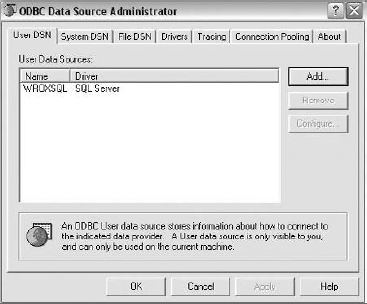
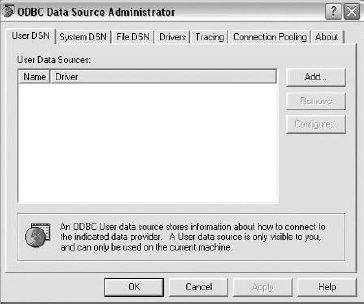
To access the ODBC Data Source Administrator under Windows, simply open Data Sources (ODBC) in Control Panel. You should see the ODBC Data Source Administrator window shown in Figure 3-2.
Note
This screenshots in this section were created using Windows XP SP2. This process will work on Windows 7 and Windows Vista as well, although the windows will look slightly different.
The User DSN and Drivers tabs are the most important for you. The User DSN tab shows defined DSNs for your databases, and the Drivers tab shows available drivers. Click Add to create a new data source.
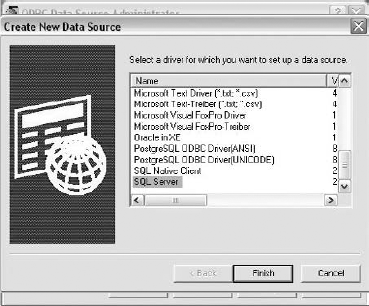
The window shown in Figure 3-3 will display with a list of drivers for different database engines. Select SQL Server and click Finish.
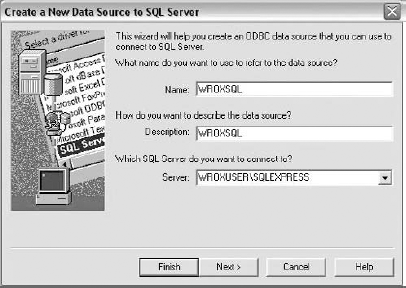
The Create a New Data Source to SQL Server window will appear (see Figure 3-4). Type a name and a brief description for the data source. From the drop-down list, select the server you want to connect to.
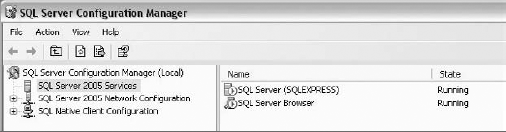
To access a SQL Server (refer to Figure 3-4), two services must be running. The first, SQL Server (SQLEXPRESS), is working by default, but the second, SQL Server Browser, may be set to be activated manually from the SQL Server Configuration Manager (see Figure 3-5).
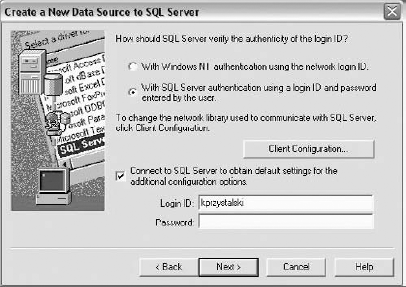
Next is user authentication, shown in Figure 3-6. Type your login ID and password for the server.
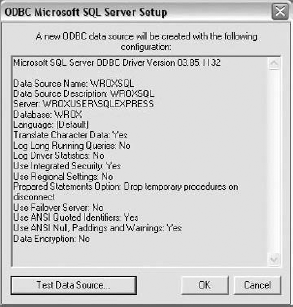
Click Next two times. Figure 3-7 lists all properties of the created data source.
If you see an entry like the one shown in Figure 3-8, the new data source has been successfully added.
As usual, the only difference between Propel and Doctrine is classname: PropelPDO:
all:
  propel:
    class:         sfPropelDatabase
    param:
      classname:   PropelPDO
      dsn:         odbc:WROXSQL
      username:    login
      password:    secret
code snippet /mssql/symfony/config/database.ymlWhen the data source is properly installed, configuring Doctrine is even simpler than before. All properties of the connection are stored in ODBC, so all you need to do is to add your username and password. Note that the name you have given to the ODBC data source is now the only identifier for the ODBC driver.
all:
  propel:
    class:        sfDoctrineDatabase
    param:
      dsn:        odbc:WROXSQL
      username:   login
      password:   secret
code snippet /mssql/symfony/config/database.ymlJust point to ODBC as the driver. You don't need to specify the host because that information is already stored in ODBC.
<?php
class DATABASE_CONFIG {
    var $default = array(
        'driver' => 'odbc',
        'persistent' => false,
        'database' => 'WROXSQL',
        'login' => 'login',
        'password' => 'secret'
    );
?>
code snippet /mssql/cakephp/app/config/database.phpJust point to the PDO_ODBC adapter and then specify the login name, password, and database name.
[production]
...
resources.db.adapter = "PDO_ODBC"
resources.db.params.username = "login"
resources.db.params.password = "secret"
resources.db.params.dbname = "WROXSQL"
code snippet /mssql/zf/application/configs/application.ini
Oracle has its own ODBC-like solution, called Oracle Call Interface (OCI). It provides a PHP interface for database communication. You can also connect to Oracle by ODBC, but here you use this native driver instead.
Propel is the same as in Doctrine, except for the addition of the classname parameter.
all:
  propel:
    class:         sfPropelDatabase
    param:
      classname:   PropelPDO
      dsn:         oci:host=localhost
      username:    login
      password:    secret
code snippet /oracle/symfony/config/database.ymlThe IP address you have used is an equivalent for localhost hostname.
all:
  propel:
    class:          sfDoctrineDatabase
    param:
      dsn:          oci:host=127.0.0.1
      username:     login
      password:     secret
code snippet /oracle/symfony/config/database.ymlThe IBM DB2 database is officially supported only by ZF and CakePHP, which is a disadvantage of using Symfony. DB2 can be accessed with ODBC, however, so you could use it with Propel and Doctrine, as in the MS SQL example, and it should work fine.
CakePHP provides support for DB2, so you can set a native driver and general configuration as in all the other cases:
<?php
class DATABASE_CONFIG {
    var $default = array(
        'driver' => 'db2',
        'persistent' => false,
        'database' => 'WROX',
        'host' => 'localhost',
        'login' => 'login',
        'password' => 'secret'
    );
?>
code snippet /db2/cakephp/app/config/database.phpIn ZF, you can configure DB2 support by native PDO_IBM and IBM_DB2 adapters or through the PDO_ODBC adapter after configuring the data source. Here we demonstrate the second approach. In this case, WROX is not the name of the database; it's a DSN name created with ODBC config.
[production]
...
resources.db.adapter = "PDO_ODBC"
resources.db.params.host = "localhost"
resources.db.params.username = "login"
resources.db.params.password = "secret"
resources.db.params.dbname = "WROX"
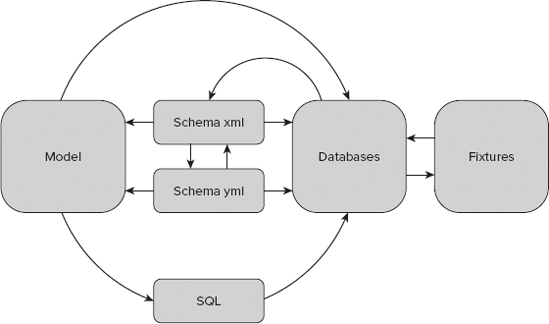
code snippet /db2/zf/application/configs/application.iniEvery web framework should deliver enhancements that are normally included as scaffolding tools. Some of these enhancements are intended for databases and can be divided into five classes:
Schema — Represents the database structure
Fixtures — Sample data that is used mostly in testing
SQL — Language for communicating with databases
CLI — Command-line interface tools
Model — Database model representing your database in the OO approach
The relationships between these enhancements are shown in Figure 3-9.
Every ORM is, or should be, designed so that the database structure is not dedicated for only one specific database engine such as MySQL or PostgreSQL. That's why schemas were invented. A schema describes a database blueprint for ORMs that describes the database in ORM known types.
A different approach to writing a schema is proposed in Propel. Java developers probably appreciate this approach because XML is used here. It looks like this:
<?xml version="1.0" encoding="UTF-8"?>
  <database name="propel" defaultIdMethod="native" noXsd="true" package="lib.model">
    <table name="users" phpName="Users">
      <column name="id" type="integer" required="true" primaryKey="true"
         autoIncrement="true" />
      <column name="surname" type="varchar" size="255" />
      <column name="forename" type="varchar" size="255" />
      <column name="created_at" type="timestamp" />
    </table>
  </database>
code snippet /communication/symfony/config/schema.xml
This code demonstrates Propel's advantage. At the beginning, you declare an XML-specific header. The next line provides the database name (in this example, it is propel, but it could be named any other name). The DefaultIdMethod tells you about currently used ID incrementation methods that are specific for every database. For example, MySQL uses auto_increment, and PostgreSQL uses sequences. The native keyword says that Propel should use database native methods. Set noXsd to true if you don't want your schema to be validated before generating the model. table has two attributes: name is for the database name, and phpName is the name that will be used in your PHP code. This is the name that your class for that table will have. Declaring columns is mostly obvious.
Propel 1.5 provides these types: boolean, numeric, tinyint, smallint, integer, bigint, double, decimal, float, real, double, char, varchar, longvarchar, clob, binary, varbinary, longvarbinary, blob, date, time, and timestamp. Each field type also has some attributes such as size, primaryKey, and autoIncrement. These attributes are well known from database structure on MySQL 5. These types have equivalents for other databases. We will describe these types in later chapters as we will be using them in practical solutions.
A schema represents a database structure, as described in an XML or a YAML file. Let's look at an example:
Users:
  actAs: { Timestampable: ~ }
  columns:
    forename: string(30)
    lastname: string(30)
code snippet /communication/symfony/config/doctrine/schema.yml
This is a Doctrine schema. First, it describes that you want a table named Users with 2 columns that are an array of 30 chars. By default, Doctrine adds an ID field that is a primary key. The second line says what you also want to have. Timestampable is an attribute that adds a created_at column. This feature is used often in all kinds of applications because it is very practical.
A schema in Doctrine is described in the schema.yml file. YAML is also used in Propel. This is a good language for describing a schema, but it's very frustrating for beginners because of tab characters. Tabs are not allowed in YAML and should be replaced with spaces. This is important because in case of an error, no proper message is shown.
Doctrine provides a lot of data types: boolean, integer, decimal, float, timestamp, time, date, blob, clob, string, array, object, enum, and gzip. Additionally, integer is divided into integer(1), integer(2)...(5). This division corresponds to MySQL tinyint, smallint, mediumint, int, and bigint types. The same is true for blob(255), which corresponds to MySQL tinyblob/tinytext, blob(65532) to blob/text, and blob(16777215) to mediumblob/mediumtext. The gzip type is very interesting because it compresses a string in the database. Each type and table has some behaviors that you can set in your schema file: geographical, i18n, nestedset, searchable, sluggable, softdelete, timstampable, and versionable. We will use these types in later chapters.
This solution is placed between ZF and Symfony in terms of schema creation and utilization. It is far less complex and useful than in Symfony, but also more advanced than in ZF. You use PHP code to declare a schema. Here's an example:
<?php
class AppSchema extends CakeSchema
{
    var $name = 'App';
    function before($event = array())
        {
        return true;
        }
    function after($event = array())
        {
        }
    var $user = array(
        'id' => array('type' => 'integer', 'null' => false, 'default' => NULL,
           'key' => 'primary'),
        'forename' => array('type' => 'string', 'null' => false, 'default' => NULL,
           'length' => 25),
        'surname' => array('type' => 'string', 'null' => true, 'default' => NULL,
           'length' => 25),
        'created' => array('type' => 'datetime', 'null' => false, 'default' =>
           NULL),
        'indexes' => array('PRIMARY' => array('column' => 'id', 'unique' => 1))
    );
}
?>
code snippet /communication/cakephp/app/config/schema/schema.php
It is possible to declare only some basic types of data, such as string, text, integer, datetime, date, and so on. Developers are free to use the before() and after() methods to implement code before and after callback to the schema. The variable $user is the name of the table that you want to operate on.
Both solutions described previously represent an approach that depends on command-line tools. The next solution shows a manual way of developing models. Zend and CakePHP frameworks assume that models should be written from scratch instead of being generated, as they were in Symfony. Regardless, Doctrine and Propel can also be installed on Zend and CakePHP instead of their native solutions. The following example is a ZF model, which is equivalent to the Doctrine schema you saw earlier in this section:
<?php
class Application_Model_User
{
   protected $_forename;
   protected $_surname;
   protected $_created;
   protected $_email;
   protected $_id;

   public function __construct(array $options = null) {
}
public function __set($name, $value) {
}
public function __get($name) {
}
public function setForename($text) {
$this->_forename = (string) $text;
return $this;
}
public function getForename() {
return $this->_forename;
}
/**
* here should be also methods for each column,
*/
public function getId() {
return $this->_id;
}
public function setId($text) {
$this->_id = (int) $id;
return $this'
}
}
code snippet /communication/zf/application/models/User.phpTable columns are protected fields. They are available only by using table model class methods. That's why you need each field to declare a setter and getter method. This pattern is commonly used. A class constructor should also be defined as well as default getter and setter methods.
You should add a relationship between your model and DbTable by creating a file in your models directory (in the DbTable directory). This file should be called as your database table. In this example, it will be User.php, and it should look like this:
<?php
class Application_Model_DbTable_User extends Zend_Db_Table_Abstract {
  protected $_name = 'User';
}
code snippet /communication/zf/application/models/DbTable/User.php
You have just one important line that describes your database table. This can be done quickly by using ZF's command-line tools. We will describe these tools later in this chapter.
The primary functionality of ORM is to map relationships between tables and deliver them as objects that are easier to use for developers. To make this mapping possible, you need to write this mapper class manually in Zend. This can be a boring process if you do it for a lot of tables. Unfortunately, ZF's command-line tools provide only some basic facilities. The following code is an example of User table mapping.
<?php
class Application_Model_UserMapper {

          protected $_dbTable;

          public function setDbTable($dbTable) {
              if (is_string($dbTable)) {
                  $dbTable = new $dbTable();
              }
              if (!$dbTable instanceof Zend_Db_Table_Abstract) {
                  throw new Exception('Invalid table data gateway provided');
              }
              $this->_dbTable = $dbTable;
              return $this;
          }

          public function getDbTable() {
              if (null === $this->_dbTable) {
                  $this->setDbTable('Application_Model_DbTable_User');
              }
              return $this->_dbTable;
          }

          public function save(Application_Model_User $user) {
              $data = array(
                  'forename' => $user->getForename(),
                  'surname' => $user->getSurname(),
          'email' => $user->getEmail(),
                  'created' => date('Y-m-d H:i:s'),
              );

              if (null === ($id = $user->getId())) {
                  unset($data['id']);
                  $this->getDbTable()->insert($data);
              } else {
                  $this->getDbTable()->update($data, array('id = ?' => $id));
              }
          }

          public function find($id, Application_Model_User $user) {
              $result = $this->getDbTable()->find($id);
              if (0 == count($result)) {
                  return;
              }
              $row = $result->current();
              $user->setId($row->id)
                        ->setForename($row->forename)
                        ->setSurname($row->surname)
                        ->setEmail($row->email)
                        ->setCreated($row->created);
          }
public function fetchAll() {
$resultSet = $this->getDbTable()->fetchAll();
$entries = array();
foreach ($resultSet as $row) {
$entry = new Application_Model_User();
$entry->setId($row->id)
->setForename($row->forename)
->setSurname($row->surname)
->setEmail($row->email)
->setCreated($row->created);
$entries[] = $entry;
}
return $entries;
}
}
code snippet /communication/zf/application/models/UserMapper.phpThe setDbTable() and getDbTable() methods make clear which model is currently being used. The next three methods are just simple methods for manipulating with database data. The save(), find(), and fetchAll() methods are using some methods that you have previously defined in your model.
The last thing we'll discuss related to ZF's schema is how the database is built. Unfortunately, ZF prefers a database schema in the form of a SQL query. This pattern is not really useful because it makes your application database-dependent. For MySQL 5 it looks like the following:
CREATE TABLE users (
  id INTEGER NOT NULL PRIMARY KEY AUTO_INCREMENT,
  forename VARCHAR(25) NULL,
  surname VARCHAR(25) NULL,
  email VARCHAR(32) NOT NULL,
  created DATETIME NOT NULL
);
code snippet /communication/zf/library/sql/User.sql
Fixtures in computer science are sample data pieces that can often be used for testing purposes. They can also be useful when you want to show some sample data in your application (for example, to show added products in an e-commerce website). Each framework takes a different approach to this problem, just like ORMs.
Symfony prefers YAML in schemas. That's why Symfony fixtures are more legible and more independent from currently used databases. An exemplary fixture for a user table looks like the following:
User:
  kprzystalski:
    forename: Karol
    surname: Przystalski
    email: karol.przystalski@wrox.com
code snippet /communication/symfony/data/fixtures/fixtures.ymlCompared with Zend and Symfony, CakePHP prefers more coding than configuring. Looked at as an advantage, it's a very good practice when a developer can't work with the command line — for example, when using file transfer protocol (FTP) and Secure Shell (SSH) is not allowed. In other cases it results in more code than in Symfony though. Another advantage of this approach is its friendly OO approach.
<?php
class UserTestFixture extends CakeTestFixture {
   var $name = 'UserTest';

   var $fields = array(
      'id' => array('type' => 'integer', 'key' => 'primary'),
      'forename' => array('type' => 'string', 'length' => 25, 'null' => false),
      'surname' => array('type' => 'string', 'length' => 25, 'null' => false),
      'email' => array('type' => 'string', 'length' => 25, 'null' => false),
      'created' => 'datetime');

   var $records = array(
      array (
           'id' => 1,
           'forename' => 'Karol',
           'surname' => 'Przystalski',
           'email' => 'karol.przystalski@wrox.com',
           'created' => '2010-10-01 10:39:23'));
}
?>
code snippet /communication/cakephp/app/tests/fixtures/user_test_fixture.php
Zend prefers pure SQL files. This is not an approach that we recommend for these fixtures because this solution depends on specific database behavior (for example, differences between the enum type in MySQL and PostgreSQL). This simple example works fine on MySQL and PostgreSQL:
INSERT INTO users (forename,surname, email, created) VALUES
('Karol', 'Przystalski','karol.przystalski@wrox.com',
DATETIME('NOW'));

INSERT INTO users (forename,surname, email, created) VALUES
('Bartosz', 'Porebski','bartosz.porebski@wrox.com',
DATETIME('NOW'));
INSERT INTO users (forename,surname, email, created) VALUES
('Leszek', 'Nowak','leszek.nowak@wrox.com',
DATETIME('NOW'));
code snippet /communication/zf/library/sql/User.sqlThere are two ways to load fixtures in Zend: copy and paste the SQL code or use the console.
$ mysql -u user -p < data.mysql.sql
A completely different approach is to write a script, as shown in the following code:
// Initialize the application path and autoloading
defined('APPLICATION_PATH')
    || define('APPLICATION_PATH', realpath(dirname(__FILE__) . '/../application'));
set_include_path(implode(PATH_SEPARATOR, array(
    APPLICATION_PATH . '/../library',
    get_include_path(),
)));

require_once 'Zend/Loader/Autoloader.php';
Zend_Loader_Autoloader::getInstance();

$getopt = new Zend_Console_Getopt(array(
    'withdata|w' => 'Load database with sample data',
    'env|e-s' => 'Application environment for which to create database (defaults
        to development)',
    'help|h' => 'Help -- usage message',));

try {
    $getopt->parse();
} catch (Zend_Console_Getopt_Exception $e) {
    // Bad options passed: report usage
    echo $e->getUsageMessage();
    return false;
}

if ($getopt->getOption('h')) {
    echo $getopt->getUsageMessage();
    return true;
}

$withData = $getopt->getOption('w');
$env = $getopt->getOption('e');
defined('APPLICATION_ENV')
    || define('APPLICATION_ENV', (null === $env) ? 'development' : $env);

$application = new Zend_Application(
    APPLICATION_ENV,
    APPLICATION_PATH . '/configs/application.ini'
);
// Initialize and retrieve DB resource
$bootstrap = $application->getBootstrap();
$bootstrap->bootstrap('db');
$dbAdapter = $bootstrap->getResource('db');
if ('testing' != APPLICATION_ENV) {
echo 'Writing Database Guestbook in (control-c to cancel): ' . PHP_EOL;
for ($x = 5; $x > 0; $x--) {
echo $x . "\r"; sleep(1);
}
}
$options = $bootstrap->getOption('resources');
$dbFile = $options['db']['params']['dbname'];
if (file_exists($dbFile)) {
unlink($dbFile);
}
try {
$schemaSql = file_get_contents(dirname(__FILE__) . '/schema.sqlite.sql'); //
important line
$dbAdapter->getConnection()->exec($schemaSql);
chmod($dbFile, 0666);
if ('testing' != APPLICATION_ENV) {
echo PHP_EOL;
echo 'Database Created';
echo PHP_EOL;
}
if ($withData) {
$dataSql = file_get_contents(dirname(__FILE__) . '/data.sqlite.sql'); //
important line
// use the connection directly to load sql in batches
$dbAdapter->getConnection()->exec($dataSql);
if ('testing' != APPLICATION_ENV) {
echo 'Data Loaded.';
echo PHP_EOL;
}
}
} catch (Exception $e) {
echo 'AN ERROR HAS OCCURED:' . PHP_EOL;
echo $e->getMessage() . PHP_EOL;
return false;
}
return true;
code snippet /communication/zf/library/scripts/load.sqlite.phpThis code is described on the ZF web page. To be honest, we don't know why this code is not included out of the box. There are two very important lines in which you should set your database schema and data files:
$schemaSql = file_get_contents(dirname(__FILE__) . '/schema.sqlite.sql');
$dataSql = file_get_contents(dirname(__FILE__) . '/data.sqlite.sql');
To run this script to load your fixtures into a database, run it with the --withdata parameter.
$ php scripts/load.sqlite.php --withdata
CLI tools are very useful because they generate code automatically and save a lot of time, so an application can be developed significantly faster. It's important when time is money.
Propel, just like Doctrine, provides a strong CLI. As mentioned earlier, your schema can be written in two file types: YAML and XML. That's why there are two special commands available to convert both schemas (schema-to-xml and schema-to-yml).
The following are the CLI commands provided by Propel:
propel
         :build
         :build-all
         :build-all-load
         :build-filters
         :build-forms
         :build-model
         :build-schema
         :build-sql
         :data-dump
         :data-load
         :graphviz
         :insert-sql
         :schema-to-xml
         :schema-to-yml
Another new command is build-all, which is equivalent to the build --all command in Doctrine. This task also has an extension that loads defined fixture data: build-all-load. Build-schema is a command we did not describe in the Doctrine discussion, but it's available there as well. With this task, you can build a schema from an existing database. This is very useful when you switch from a legacy application that was written in a different framework, language, and so on.
Another great feature that Propel offers is the ability to generate graphs from a model. Just create a schema, build a model, and then table relationships can be built. To do this, you should use the graphviz command, which will generate a .dot file in the /graph directory. To convert .dot to .png, you can use the graphviz tool, which is available for free from www.graphviz.org. Use the following command to convert it to PNG:
$ cd graph/
$ dot -Tpng -oGraph.png propel.schema.dot
For a simple schema with two tables and a simple relationship, you should see a picture similar to Figure 3-10.
The following are the CLI commands provided by Doctrine:
doctrine
           :build
           :build-db
           :build-filters
           :build-forms
           :build-model
           :build-schema
           :build-sql
           :clean-model-files
           :create-model-tables
           :data-dump
           :data-load
           :delete-model-files
           :dql
           :drop-db
           :insert-sql
As mentioned before, Doctrine's architecture is inspired by Hibernate. Hibernate uses Hibernate Query Language (HQL) and so Doctrine uses very similar Doctrine Query Language (DQL), a specific language used only by Doctrine. It can be executed directly from the command line:
$ symfony doctrine:dql "FROM User"
This command returns a list of users added previously. Use this query only if you have few users in the database, otherwise you will get your console flooded. Thanks to DQL, developers can work with databases without knowing details. In complicated projects, it's likely that using specific database tools and features will be necessary.
The most important Doctrine console command is build. This is an all-in-one command, a compilation of all other tasks that begin with build and will probably be the command you use most if Doctrine is the right ORM for you.
The following command builds a model from your schema; a database is based on that model:
$ symfony doctrine:build --all
Forms, filters, and SQL files are also generated by this command. (We will discuss more about forms and filters in later chapters.) Forms, filters, and models are stored in the /lib directory; SQL is stored in the /data directory.
While developing an application, your tables can change; some may need to be deleted; others have to be added. If you remove tables from your schema, to keep your code clean you can use the clean-model-files command to delete no-longer-used models. To delete all model files, use delete-model-files; to delete a database, use drop-db. The last "cleaning" command is create-model-table, which deletes existing tables and creates a new one for your model. Doctrine also provides a command for executing a SQL query (insert-sql) that is used with the build or build-sql command. You can also add some specific SQL queries by editing the .sql file in /data/sql/schema.sql.
The last tasks that we want to show are designed to operate on fixtures. data-load loads your fixture YAML files into a database. You can also do it in another way (data-dump), exporting data from a database to a YAML fixture.
Cake gives developers two main branches of basic but necessary command-line tools: bake and schema.
cake bake
cake schema
       schema view
       schema generate
       schema dump <filename>
       schema run create <schema> <table>
       schema run update <schema> <table>
The first branch, bake, provides some basic options such as creating a model, controller, view, project, or other database configuration-related tasks. They are asked as questions after executing bake, so there are no specific options for this command.
From the command line, type d for database configuration, and Cake will ask a series of questions about database details, as shown in the following code:
Name:
[default] >
Driver: (db2/firebird/mssql/mysql/mysqli/odbc/oracle/postgres/sqlite/sybase)
[mysql] >
Persistent Connection? (y/n)
[n] >
Database Host:
[localhost] >
Port?
[n] >
User:
[root] >
Password:
>
Database Name:
[cake] >
Table Prefix?
[n] >
Table encoding?
[n] >
Next you are asked to confirm all database information. If confirmed, Cake will save it into database.php. If not confirmed, you will be asked again or default values will be assumed. You can then connect to the database. You need to make sure that all environments (development, testing, production) have been configured, not just the default one. To configure other environments, just change the proposed [default] to another one.
As mentioned earlier, Cake provides some tools for working with a schema. The simplest one is view, which just prints your schema.php file. You can manipulate a schema in two ways. generate option allows you to build a schema file from a database. It's useful if you have designed the database manually. A different approach is available with the run option. Both create and update parameters can create new tables, if they are not present, otherwise they will just update tables already existing in the database. With the -s parameter of the run command, you can make snapshots of schema changes. This is useful if you want to do a dry run of a new schema (the -dry parameter should be used). An example of using -dry to simulate creating users table from users schema looks as follows:
$ cake schema run create users users -dry
The last option is dump, which generates a .sql file. It contains all queries needed to build the database structure. Like all files related to a schema, .sql files are stored in the /app/config/sql directory.
Each framework has its CLI tools that offer some scaffolding enhancements. Although you can work without these tools, they let you save a lot of time. There are many kinds of enhancements, but we want to show here only those that are applicable to databases. ZF offers two simple commands, shown in the following snippet:
$ zf configure db-adapter dsn section-name[=production]

$ zf create db-table name actual-table-name module force-overwrite
The first command adds db-adapter configuration in application.ini. This can be done very quickly (also manually). Here's an example of how it should be used:
$ zf configure db-adapter "adapter=PDO_MYSQL&dbname=WROX&username=wroxuser&password
   =secret&hostname=127.0.0.1" -s production
The above command will add the line below into application.ini.
[production]
...
resources.db.adapter = "PDO_MYSQL"
resources.db.params.dbname = "WROX"
resources.db.params.username = "wroxuser"
resources.db.params.password = "secret"
resources.db.params.hostname = "127.0.0.1"
code snippet /communication/zf/application/configs/application.ini
Database settings should be made separately for each of the three environments: production, testing, and development. In most cases, different databases are used for each environment.
The following command generates db-table files, which can be done in two different ways. The simplest method is to generate a DbTable file for a given model and database table:
$ zf create db-table users Users
The second method is to generate these files from database tables (the database should be configured before running this method):
$ zf create db-table.from-database
Both methods prepare only basic files without any methods for manipulating data. This is a disadvantage, but gives developers flexibility while developing applications, especially complex ones.