
Before you learn how to load the data from PostGIS, we will first cover how to draw multiple points, convert them to a feature, add them to a layer, then load the layer to the map. The following code will walk you through the process.
Start by creating a memory layer as shown in the code:
theLayer=QgsVectorLayer('Point?crs=epsg:4326','SomePoints','memory')
The previous code creates a vector layer and assigns it to the variable theLayer. The parameters are the type and coordinate reference system of the layer, the name for the layer panel, and we specified that it is a memory layer.
Next, you need to create the features:
from qgis.PyQt.QtCore import *
theFeatures=theLayer.dataProvider()
theFeatures.addAttributes([QgsField("ID", QVariant.Int),QgsField("Name", Qvariant.String)])
The previous code imports qgis.PyQtCore. You need the library for the QVariant. First, you call the data provider for the layer and pass it to the features. Next, you add the attributes and their types to the features. In the following code, you create a point and add it to the features:
 p=QgsFeature()
 point=QgsPoint(-106.3463,34.9685)
 p.setGeometry(QgsGeometry.fromPoint(point))
 p.setAttributes([123,"Paul"])
 theFeatures.addFeatures([p])
 theLayer.updateExtents()
 theLayer.updateFields()
The previous code creates a p variable and makes it a QgsFeature. It then creates a point p and passes longitude and latitude coordinates. The feature is assigned geometry from the point. Next, you assign the attributes to the feature. Now you have a feature with geometry and attributes. In the next line, you pass the feature to the features array using addFeature(). Lastly, you update the layer extents and fields.
Repeat the block of code a second time and assign the point different coordinates, (-106.4540,34.9553), and then add the layer to the map as in the earlier section of this chapter, shown in the following code:
QgsMapLayerRegistry.instance().addMapLayers([theLayer])
You will now have a map with two points as shown in the following screenshot:
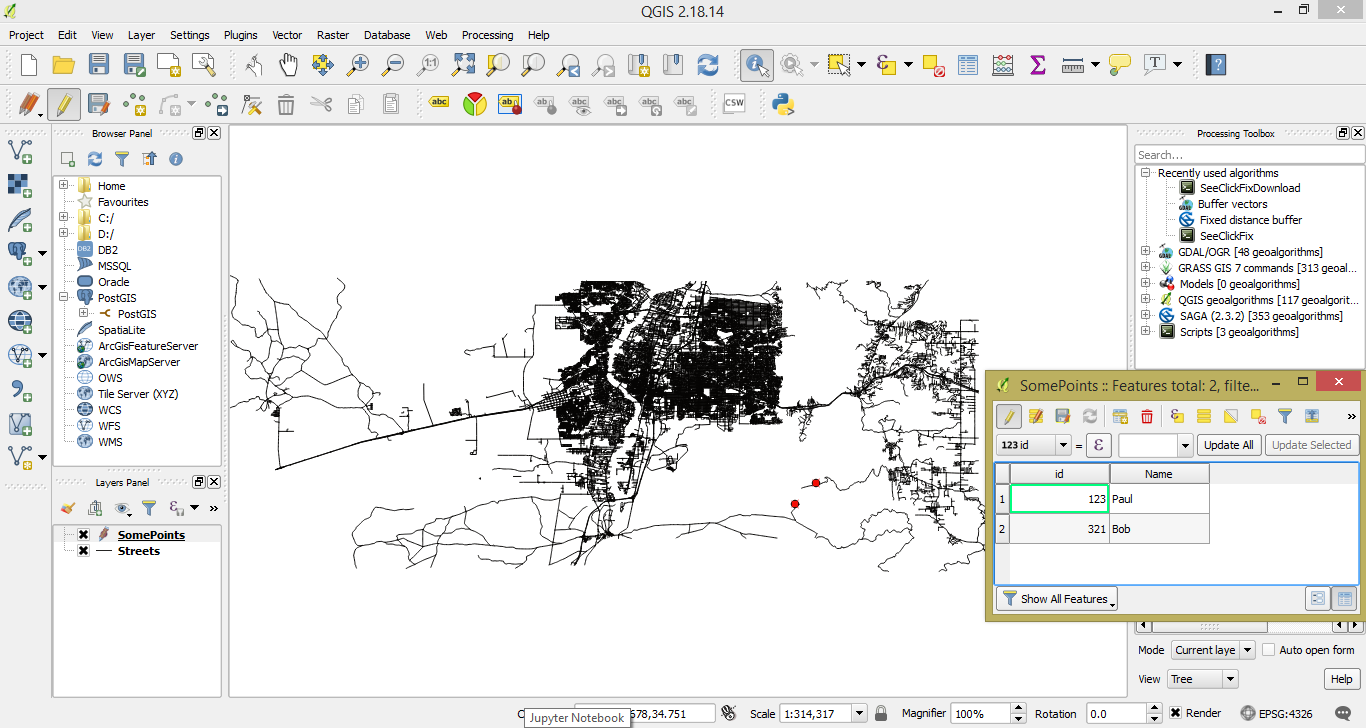
You can see in the Layers Panel that the layer is named SomePoints. In the attribute table, you can see two fields, ID and Name for two features. Now that you know how to create features from geometry, add attributes, add the features to a layer, and display the layer on the map, we will add PostGIS to the mix and loop through the process mentioned earlier.