
To add data to a layer, you first need to load the layer. Start by loading a subset of some SeeClickFix data for Albuquerque as shown in the following code:
scf = iface.addVectorLayer(r'C:\Users\Paul\Desktop\PythonBook\CHP8\SCF.shp', "SeeClickFix","ogr")
The previous code loads and displays the layer on the map. It is the same code from the first section of this chapter.
Now that you have the layer loaded you can use capabilitiesString() to see what operations the provider allows on the data. The following code shows the results on the loaded layer:
scf.dataProvider().capabilitiesString()

u'Add Features, Delete Features, Change Attribute Values, Add Attributes, Delete Attributes, Rename Attributes, Create Spatial Index, Create Attribute Indexes, Fast Access to Features at ID, Change Geometries'
Since Add Features is a capability, you can add a new feature as shown in the following code:
feat = QgsFeature(scf.pendingFields())
feat.setAttribute('fid',911)
feat.setAttribute('ID',311)
feat.setAttribute('Type','Pothole')
feat.setAttribute('Status','Pending')
feat.setGeometry(QgsGeometry.fromPoint(QgsPoint(-106.65897,35.07743)))
scf.dataProvider().addFeatures([feat])
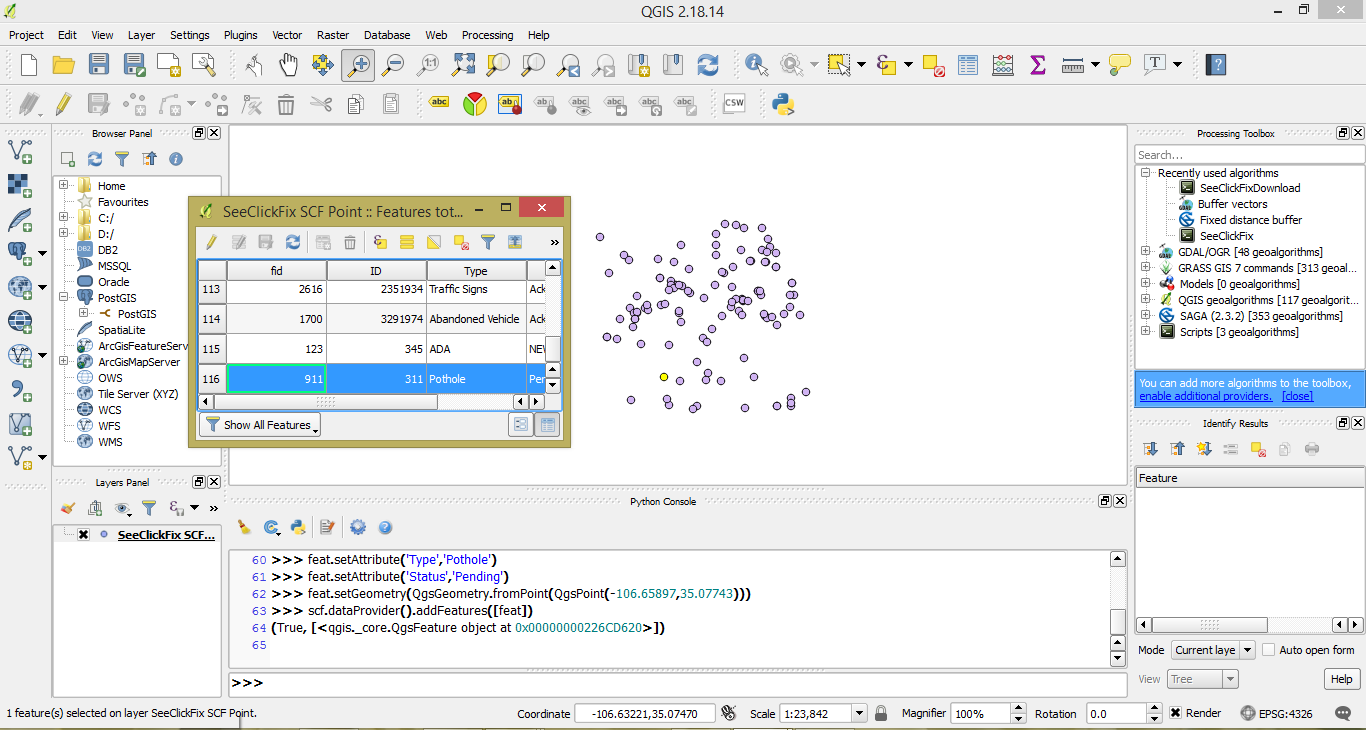
The previous code creates a feature and gets the fields from the loaded layer. It then sets each of the attributes. Next, it sets the geometry from a point. Lastly, the feature is added to the layer. When you call addFeatures() there are two return values you can assign to variables—the result and the feature. The result of addFeature() will be either true or false. The returned feature is a list of features. It may be convenient to hold the feature if you need to perform more operations with it.
The results are a new point and record in the attributes table as shown in the following screenshot:
You can simplify the previous code by passing all the attributes in a single line using a list. The following code shows you how:
feat.setAttributes([912,312,"Other","Closed"])
The previous code writes the attributes using a list and setAttributes() instead of the singular setAttribute(). If you want to remember the field names when reading your code later, the more verbose version is clearer. But if the efficiency of the code is your goal, the latter version is more appropriate.
What if we made a mistake, or have records we do not need? The next section will show you how to delete a feature.