Table of Contents for
Modern Assembly Language Programming with the ARM Processor
 Modern Assembly Language Programming with the ARM Processor
Published by
Newnes, 2016
Modern Assembly Language Programming with the ARM Processor
Published by
Newnes, 2016
- Modern Assembly Language Programming with the ARM Processor
- Cover image
- Title page
- Table of Contents
- Copyright
- List of Tables
- List of Figures
- List of Listings
- Preface
- Companion Website
- Acknowledgments
- Part I: Assembly as a Language
- Chapter 1: Introduction
- Chapter 2: GNU Assembly Syntax
- Chapter 3: Load/Store and Branch Instructions
- Chapter 4: Data Processing and Other Instructions
- Chapter 5: Structured Programming
- Chapter 6: Abstract Data Types
- Part II: Performance Mathematics
- Chapter 7: Integer Mathematics
- Chapter 8: Non-Integral Mathematics
- Chapter 9: The ARM Vector Floating Point Coprocessor
- Chapter 10: The ARM NEON Extensions
- 10.10 Multiplication and Division
- Part III: Accessing Devices
- Chapter 11: Devices
- Chapter 12: Pulse Modulation
- Chapter 13: Common System Devices
- Chapter 14: Running Without an Operating System
- Index
10.9.8 Count Bits
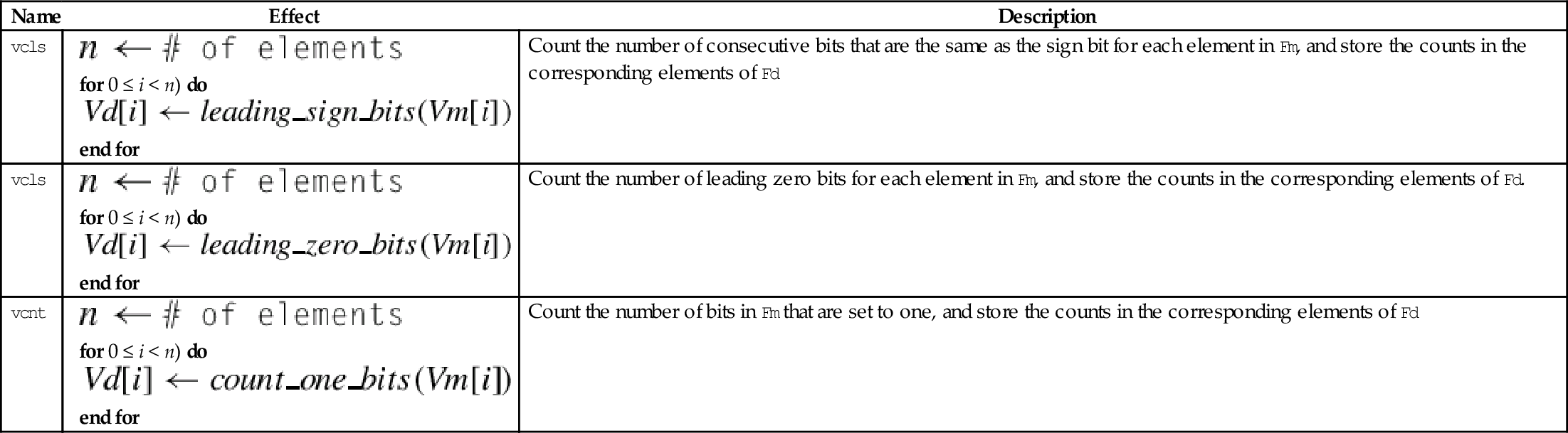
These instructions can be used to count leading sign bits or zeros, or to count the number of bits that are set for each element in a vector:
vclz Count Leading Zero Bits
vcnt Count Set Bits
Syntax
• <op> is either cls, clz or cnt.
• The valid choices for <type> are given in the following table:
Operations
| Name | Effect | Description |
| vcls |
for 0 ≤ i < n) do end for | Count the number of consecutive bits that are the same as the sign bit for each element in Fm, and store the counts in the corresponding elements of Fd |
| vcls |
for 0 ≤ i < n) do end for | Count the number of leading zero bits for each element in Fm, and store the counts in the corresponding elements of Fd. |
| vcnt |
for 0 ≤ i < n) do end for | Count the number of bits in Fm that are set to one, and store the counts in the corresponding elements of Fd |




Examples

10.10 Multiplication and Division
There is no vector divide instruction in NEON. Division is accomplished with multiplication by the reciprocals of the divisors. The reciprocals are found by making an initial estimate, then using the Newton-Raphson method to improve the approximation. This can actually be faster than using a hardware divider. NEON supports single precision floating point and unsigned fixed point reciprocal calculation. Fixed point reciprocals provide higher precision. Division using the NEON reciprocal method may not provide the best precision possible. If the best possible precision is required, then the VFP divide instruction should be used.
10.10.1 Multiply
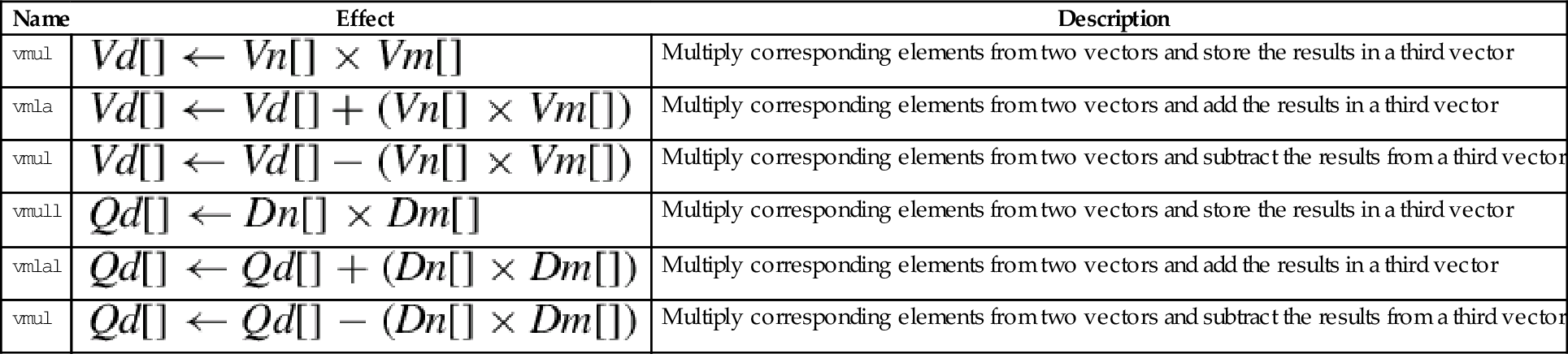
These instructions are used to multiply the corresponding elements from two vectors:
vmla Multiply Accumulate
vmls Multiply Subtract
vmull Multiply Long
vmlal Multiply Accumulate Long
vmlsl Multiply Subtract Long
The long versions can be used to avoid overflow.
Syntax
• <op> is either mul, mla. or mls.
• The valid choices for <type> are given in the following table:
Operations
| Name | Effect | Description |
| vmul | Multiply corresponding elements from two vectors and store the results in a third vector | |
| vmla | Multiply corresponding elements from two vectors and add the results in a third vector | |
| vmul | Multiply corresponding elements from two vectors and subtract the results from a third vector | |
| vmull | Multiply corresponding elements from two vectors and store the results in a third vector | |
| vmlal | Multiply corresponding elements from two vectors and add the results in a third vector | |
| vmul | Multiply corresponding elements from two vectors and subtract the results from a third vector |






Examples

10.10.2 Multiply by Scalar
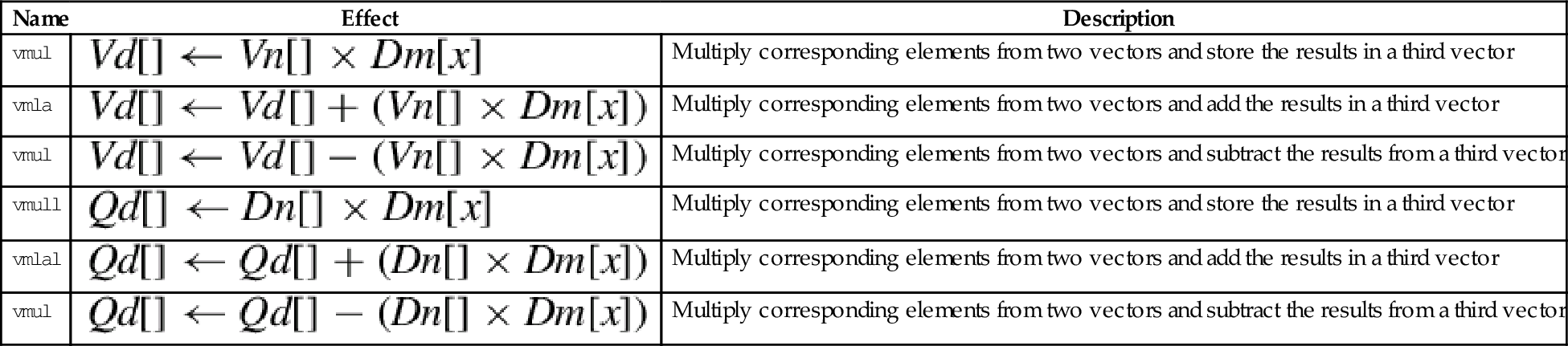
These instructions are used to multiply each element in a vector by a scalar:
vmla Multiply Accumulate by Scalar
vmls Multiply Subtract by Scalar
vmull Multiply Long by Scalar
vmlal Multiply Accumulate Long by Scalar
vmlsl Multiply Subtract Long by Scalar
The long versions can be used to avoid overflow.
Syntax
• <op> is either mul, mla. or mls.
• The valid choices for <type> are given in the following table:
| Opcode | Valid Types |
| vmul | i16, i32, or f32 |
| vmla | i16, i32, or f32 |
| vmls | i16, i32, or f32 |
| vmull | s16, s32, u16, or u32 |
| vmlal | s16, s32, u16, or u32 |
| vmlsl | s16, s32, u16, or u32 |
• x must be valid for the chosen <type>.
Operations
| Name | Effect | Description |
| vmul | Multiply corresponding elements from two vectors and store the results in a third vector | |
| vmla | Multiply corresponding elements from two vectors and add the results in a third vector | |
| vmul | Multiply corresponding elements from two vectors and subtract the results from a third vector | |
| vmull | Multiply corresponding elements from two vectors and store the results in a third vector | |
| vmlal | Multiply corresponding elements from two vectors and add the results in a third vector | |
| vmul | Multiply corresponding elements from two vectors and subtract the results from a third vector |






Examples

10.10.3 Fused Multiply Accumulate
A fused multiply accumulate operation does not perform rounding between the multiply and add operations. The two operations are fused into one. NEON provides the following fused multiply accumulate instructions:
vfma Fused Multiply Accumulate
vfnma Fused Negate Multiply Accumulate
vfms Fused Multiply Subtract
vfnms Fused Negate Multiply Subtract
Using the fused multiply accumulate can result in improved speed and accuracy for many computations that involve the accumulation of products.
Syntax
<op> is one of vfma, vfnma, vfms, or vfnms.
<cond> is an optional condition code.
<prec> may be either f32 or f64.
Operations




Examples

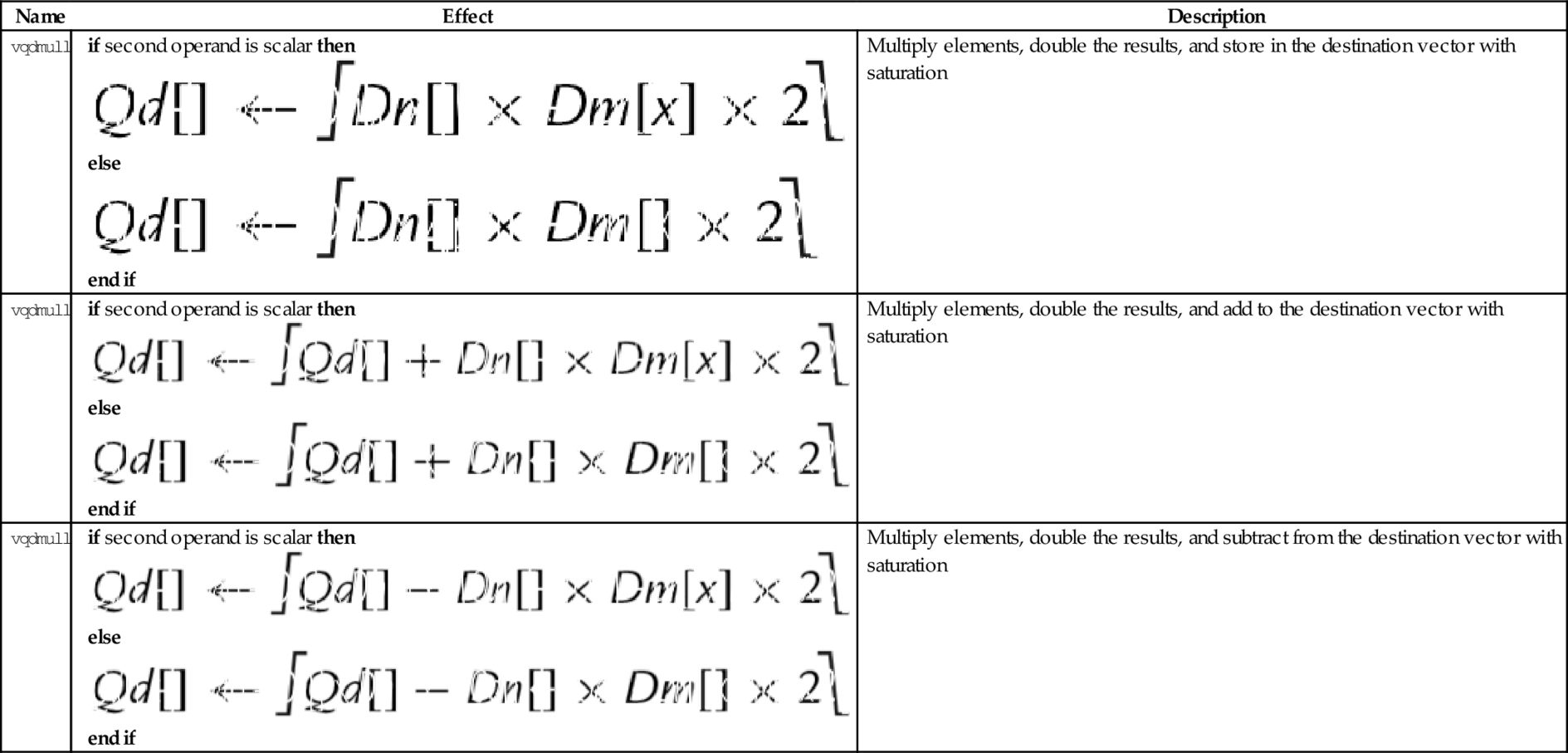
10.10.4 Saturating Multiply and Double (Low)
These instructions perform multiplication, double the results, and perform saturation:
vqdmull Saturating Multiply Double (Low)
vqdmlal Saturating Multiply Double Accumulate (Low)
vqdmlsl Saturating Multiply Double Subtract (Low)
Syntax
• <op> is either mul, mla. or mls.
• <type> must be either s16 or s32.
Operations






Examples

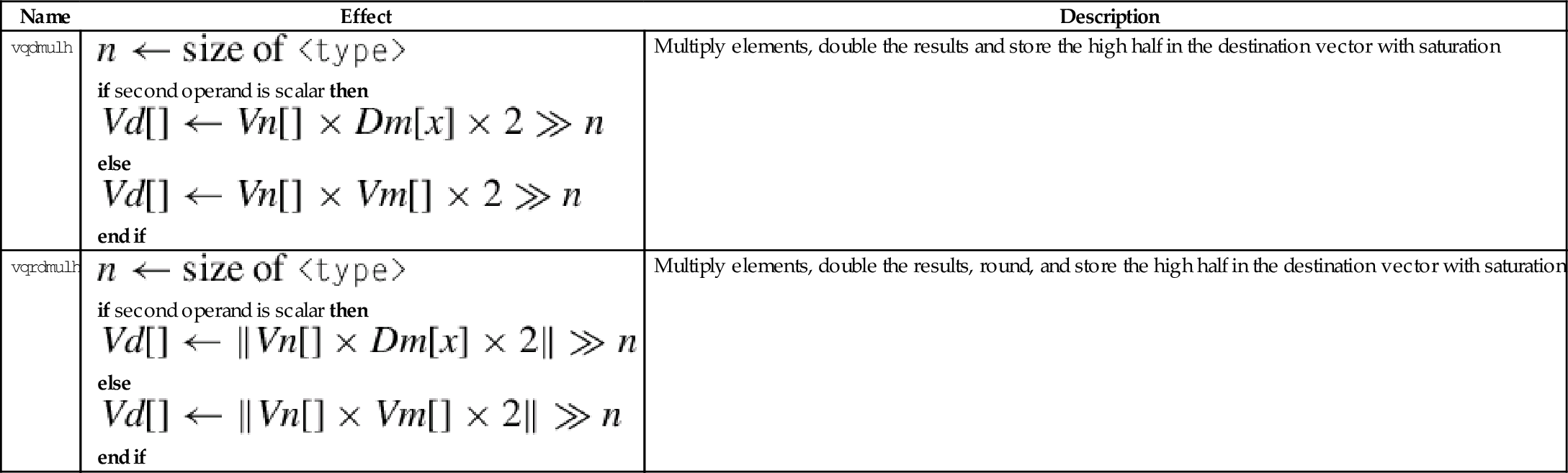
10.10.5 Saturating Multiply and Double (High)
These instructions perform multiplication, double the results, perform saturation, and store the high half of the results:
vqdmulh Saturating Multiply Double (High)
vqrdmulh Saturating Multiply Double (High) and Round
Syntax
Operations
| Name | Effect | Description |
| vqdmulh |
if second operand is scalar then else end if | Multiply elements, double the results and store the high half in the destination vector with saturation |
| vqrdmulh |
if second operand is scalar then else end if | Multiply elements, double the results, round, and store the high half in the destination vector with saturation |





Examples

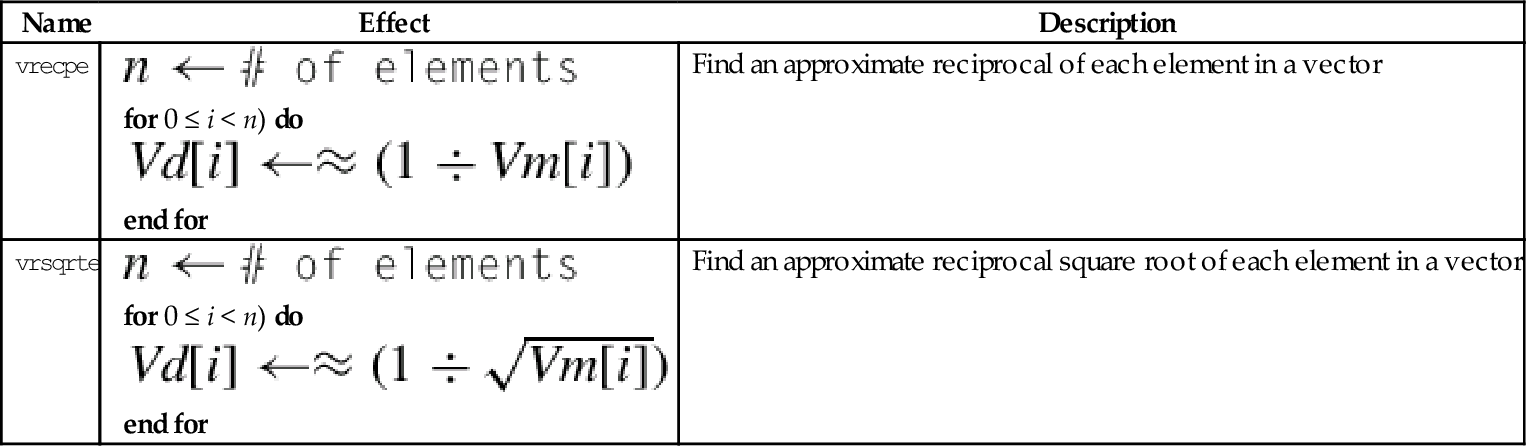
10.10.6 Estimate Reciprocals
These instructions perform the initial estimates of the reciprocal values:
vrsqrte Reciprocal Square Root Estimate
These work on floating point and unsigned fixed point vectors. The estimates from this instruction are accurate to within about eight bits. If higher accuracy is desired, then the Newton-Raphson method can be used to improve the initial estimates. For more information, see the Reciprocal Step instruction.
Syntax
• <op> is either recpe or rsqrte.
• <type> must be either u32, or f32.
• If <type> is u32, then the elements are assumed to be U(1,31) fixed point numbers, and the most significant fraction bit (bit 30) must be 1, and the integer part must be zero. The vclz and shift by variable instructions can be used to put the data in the correct format.
• The result elements are always f32.
Operations


Examples

10.10.7 Reciprocal Step
These instructions are used to perform one Newton-Raphson step for improving the reciprocal estimates:
vrsqrts Reciprocal Square Root Step
For each element in the vector, the following equation can be used to improve the estimates of the reciprocals:

where xn is the estimated reciprocal from the previous step, and d is the number for which the reciprocal is desired. This equation converges to  if x0 is obtained using vrecpe on d. The vrecps instruction computes

so one additional multiplication is required to complete the update step. The initial estimate x0 must be obtained using the vrecpe instruction.
For each element in the vector, the following equation can be used to improve the estimates of the reciprocals of the square roots:
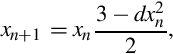
where xn is the estimated reciprocal from the previous step, and d is the number for which the reciprocal is desired. This equation converges to  if x0 is obtained using vrsqrte on d. The vrsqrts instruction computes
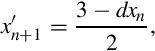
so two additional multiplications are required to complete the update step. The initial estimate x0 must be obtained using the vrsqrte instruction.
Syntax
• <op> is either recps or rsqrts.
• <type> must be either u32, or f32.
Operations


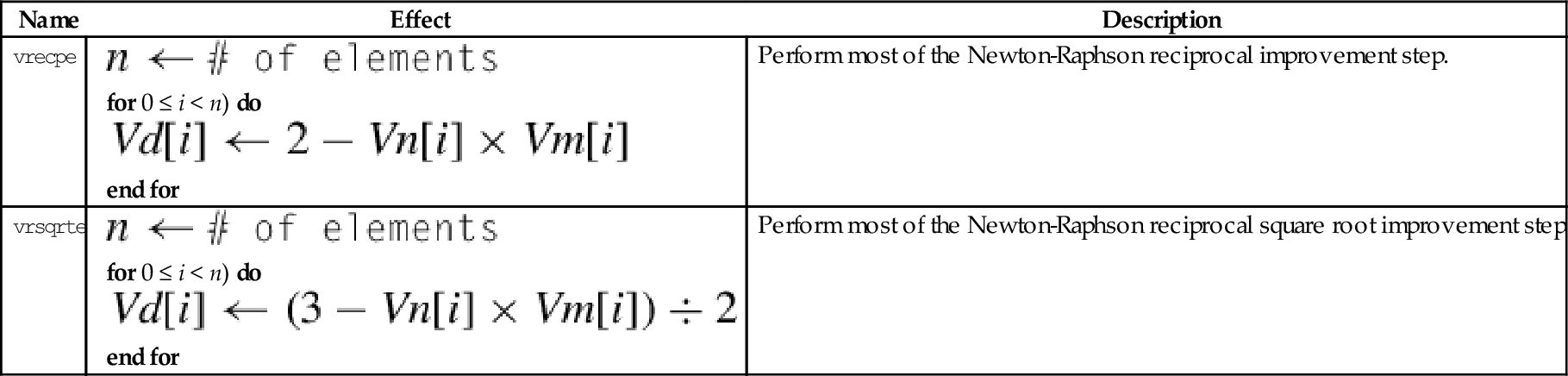
Examples
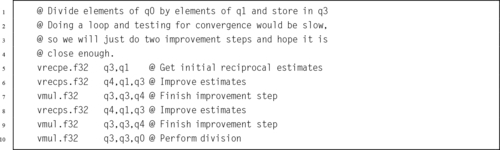
10.11 Pseudo-Instructions
The GNU assembler supports five pseudo-instructions for NEON. Two of them are vcle and vclt, which were covered in Section 10.6.1. The other three are explained in the following sections.
10.11.1 Load Constant
This pseudo-instruction loads a constant value into every element of a NEON vector, or into a VFP single-precision or double-precision register:
This pseudo-instruction will use vmov if possible. Otherwise, it will create an entry in the literal pool and use vldr.
Syntax
• <cond> is an optional condition code.
• <type> must be one of i8, i16, i32, i64, s8, s16, s32, s64, u8, u16, u32, u64, f32, or f64.
• <imm> is a value appropriate for the specified <type>.
Operations


Examples

10.11.2 Bitwise Logical Operations with Immediate Data
It is often useful to clear and/or set specific bits in a register. The following pseudo-instructions can provide bitwise logical operations:
vorn Bitwise Complement and OR Immediate
Syntax
• <op> must be either and, or orn.
• V must be either q or d to specify whether the operation involves quadwords or doublewords.
• <type> must be i8, i16, i32, or i64.
• <imm> is a 16-bit or 32-bit immediate value, which is interpreted as a pattern for filling the immediate operand. The following table shows acceptable patterns for <imm>, based on what was chosen for <type>:
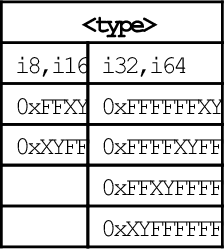
Operations


Examples

10.11.3 Vector Absolute Compare
The following pseudo-instructions perform comparisons between the absolute values of all of the corresponding elements of two vectors in parallel:
vacle Absolute Compare Less Than or Equal
vaclt Absolute Compare Less Than
The vector absolute compare instruction compares the absolute value of each element of a vector with the absolute value of the corresponding element in a second vector, and sets an element in the destination vector for each comparison. If the comparison is true, then all bits in the result element are set to one. Otherwise, all bits in the result element are set to zero. Note that summing the elements of the result vector (as signed integers) will give the two’s complement of the number of comparisons which were true.
Syntax
• <op> must be either lt or lt.
• V can be d or q.
• The operand element type must be f32.
• The result element type is i32.
Operations



Examples

10.12 Performance Mathematics: A Final Look at Sine
In Chapter 9, four versions of the sine function were given. Those implementations used scalar and VFP vector modes for single-precision and double-precision. Those previous implementations are already faster than the implementations provided by GCC, However, it may be possible to gain a little more performance by taking advantage of the NEON architecture. All versions of NEON are guaranteed to have a very large register set, and that fact can be used to attain better performance.
10.12.1 Single Precision
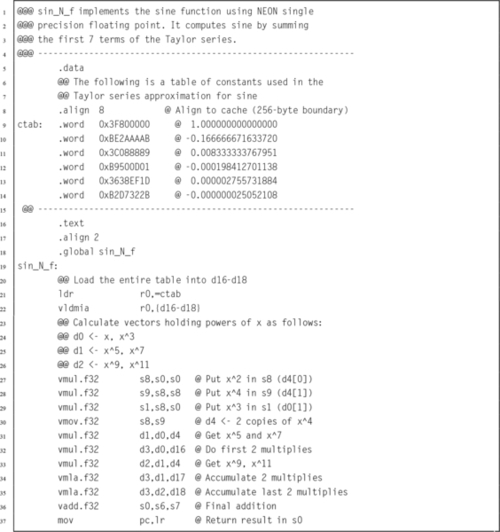
Listing 10.1 shows a single precision floating point implementation of the sine function, using the ARM NEON instruction set. It performs the same operations as the previous implementations of the sine function, but performs many of the calculations in parallel. This implementation is slightly faster than the previous version.
10.12.2 Double Precision
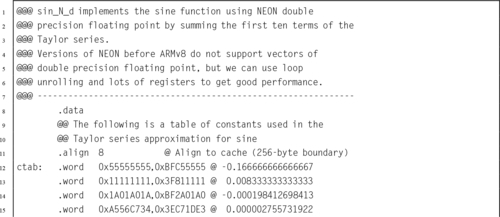
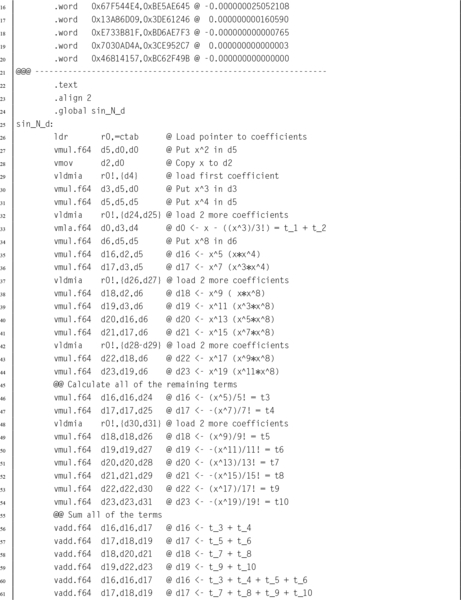
Listing 10.2 shows a double precision floating point implementation of the sine function. This code is intended to run on ARMv7 and earlier NEON/VFP systems with the full set of 32 double-precision registers. NEON systems prior to ARMv8 do not have NEON SIMD instructions for double precision operations. This implementation is faster than Listing 9.4 because it uses a large number of registers, does not contain a loop, and is written carefully so that multiple instructions can be at different stages in the pipeline at the same time. This technique of gaining performance is known as loop unrolling.

10.12.3 Performance Comparison
Table 10.4 compares the implementations from Listings 10.1 and 10.2 with the VFP vector implementations from Chapter 9 and the sine function provided by GCC. Notice that in every case, using vector mode VFP instructions is slower than the scalar VFP version. As mentioned previously, vector mode is deprecated on NEON processors. On NEON systems, vector mode is emulated in software. Although vector mode is supported, using it will result in reduced performance, because each vector instruction causes the operating system to take over and substitute a series of scalar floating point operations on-the-fly. A great deal of time was spent by the operating system software in emulating the VFP hardware vector mode.
Table 10.4
Performance of sine function with various implementations
| Optimization | Implementation | CPU seconds |
| None | Single Precision VFP scalar Assembly | 1.74 |
| Single Precision VFP vector Assembly | 27.09 | |
| Single Precision NEON Assembly | 1.32 | |
| Single Precision C | 4.36 | |
| Double Precision VFP scalar Assembly | 2.83 | |
| Double Precision VFP vector Assembly | 106.46 | |
| Double Precision NEON Assembly | 2.24 | |
| Double Precision C | 4.59 | |
| Full | Single Precision VFP scalar Assembly | 1.11 |
| Single Precision VFP vector Assembly | 27.15 | |
| Single Precision NEON Assembly | 0.96 | |
| Single Precision C | 1.69 | |
| Double Precision VFP scalar Assembly | 2.56 | |
| Double Precision VFP vector Assembly | 107.5.53 | |
| Double Precision NEON Assembly | 2.05 | |
| Double Precision C | 4.27 |
When compiler optimization is not used, the single precision scalar VFP implementation achieves a speedup of about 2.51, and the NEON implementation achieves a speedup of about 3.30 compared to the GCC implementation. The double precision scalar VFP implementation achieves a speedup of about 1.62, and the loop-unrolled NEON implementation achieves a speedup of about 2.05 compared to the GCC implementation.
When the best possible compiler optimization is used (-Ofast), the single precision scalar VFP implementation achieves a speedup of about 1.52, and the NEON implementation achieves a speedup of about 1.76 compared to the GCC implementation. The double precision scalar VFP implementation achieves a speedup of about 1.67, and the loop-unrolled NEON implementation achieves a speedup of about 2.08 compared to the GCC implementation. The single precision NEON version was 1.16 times as fast as the VFP scalar version and the double precision NEON implementation was 1.25 times as fast as the VFP scalar implementation.
Although the VFP versions of the sine function ran without modification on the NEON processor, re-writing them for NEON resulted in significant performance improvement. Performance of the vectorized VFP code running on a NEON processor was abysmal. The take-away lesson is that a programmer can improve performance by writing some functions in assembly that are specifically targeted to run on an specific platform. However, assembly code which improves performance on one platform may actually result in very poor performance on a different platform. To achieve optimal or near-optimal performance, it is important for the programmer to be aware of exactly which hardware platform is being used.
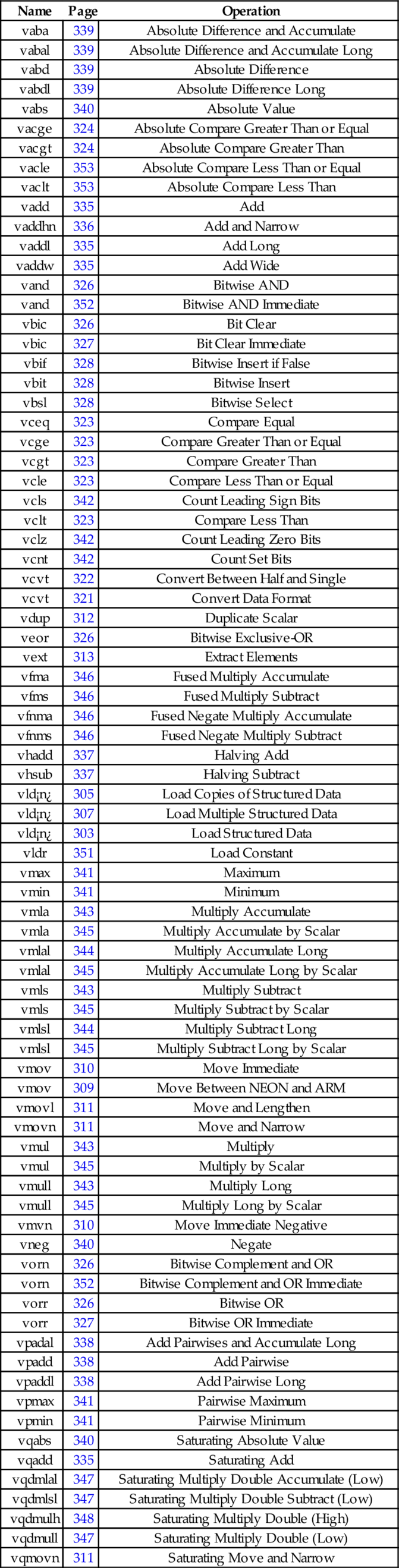
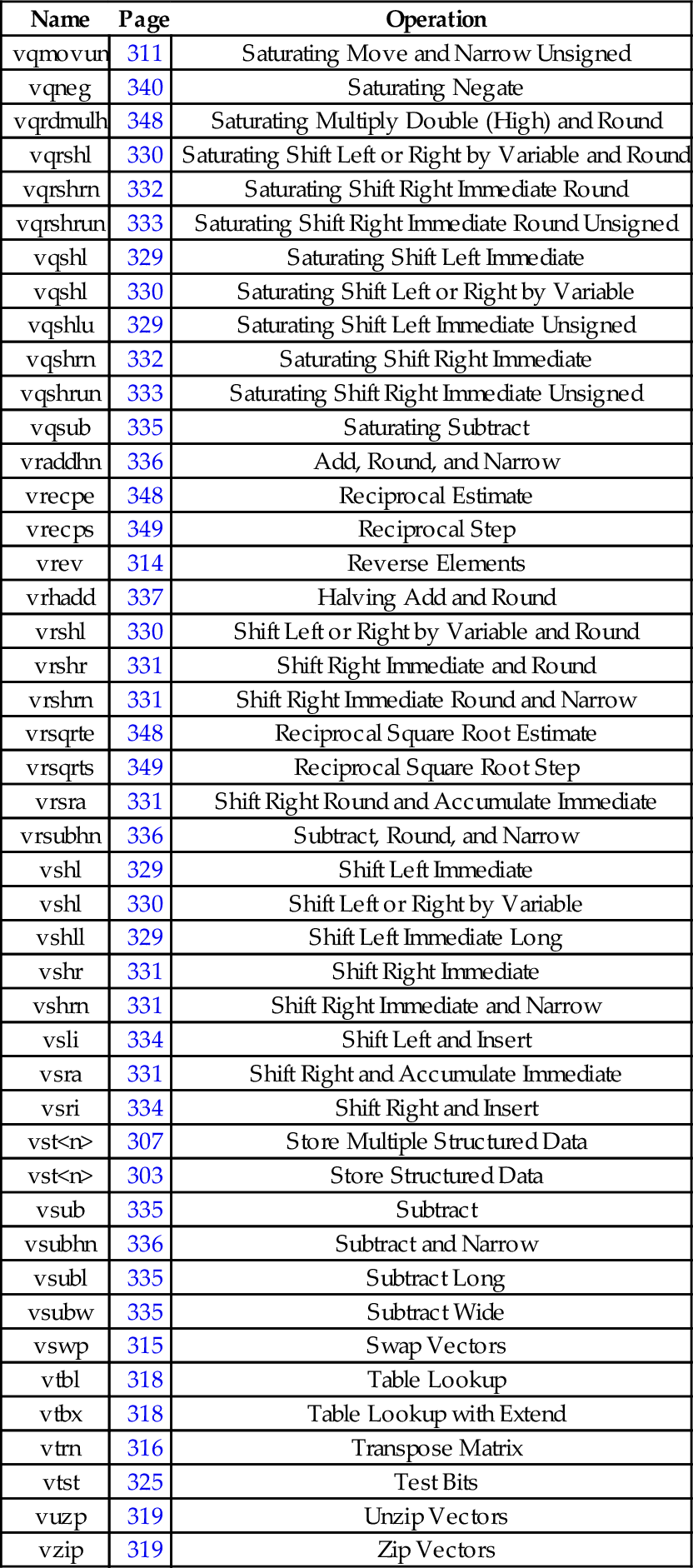
10.13 Alphabetized List of NEON Instructions
| Name | Page | Operation |
| vaba | 339 | Absolute Difference and Accumulate |
| vabal | 339 | Absolute Difference and Accumulate Long |
| vabd | 339 | Absolute Difference |
| vabdl | 339 | Absolute Difference Long |
| vabs | 340 | Absolute Value |
| vacge | 324 | Absolute Compare Greater Than or Equal |
| vacgt | 324 | Absolute Compare Greater Than |
| vacle | 353 | Absolute Compare Less Than or Equal |
| vaclt | 353 | Absolute Compare Less Than |
| vadd | 335 | Add |
| vaddhn | 336 | Add and Narrow |
| vaddl | 335 | Add Long |
| vaddw | 335 | Add Wide |
| vand | 326 | Bitwise AND |
| vand | 352 | Bitwise AND Immediate |
| vbic | 326 | Bit Clear |
| vbic | 327 | Bit Clear Immediate |
| vbif | 328 | Bitwise Insert if False |
| vbit | 328 | Bitwise Insert |
| vbsl | 328 | Bitwise Select |
| vceq | 323 | Compare Equal |
| vcge | 323 | Compare Greater Than or Equal |
| vcgt | 323 | Compare Greater Than |
| vcle | 323 | Compare Less Than or Equal |
| vcls | 342 | Count Leading Sign Bits |
| vclt | 323 | Compare Less Than |
| vclz | 342 | Count Leading Zero Bits |
| vcnt | 342 | Count Set Bits |
| vcvt | 322 | Convert Between Half and Single |
| vcvt | 321 | Convert Data Format |
| vdup | 312 | Duplicate Scalar |
| veor | 326 | Bitwise Exclusive-OR |
| vext | 313 | Extract Elements |
| vfma | 346 | Fused Multiply Accumulate |
| vfms | 346 | Fused Multiply Subtract |
| vfnma | 346 | Fused Negate Multiply Accumulate |
| vfnms | 346 | Fused Negate Multiply Subtract |
| vhadd | 337 | Halving Add |
| vhsub | 337 | Halving Subtract |
| vld¡n¿ | 305 | Load Copies of Structured Data |
| vld¡n¿ | 307 | Load Multiple Structured Data |
| vld¡n¿ | 303 | Load Structured Data |
| vldr | 351 | Load Constant |
| vmax | 341 | Maximum |
| vmin | 341 | Minimum |
| vmla | 343 | Multiply Accumulate |
| vmla | 345 | Multiply Accumulate by Scalar |
| vmlal | 344 | Multiply Accumulate Long |
| vmlal | 345 | Multiply Accumulate Long by Scalar |
| vmls | 343 | Multiply Subtract |
| vmls | 345 | Multiply Subtract by Scalar |
| vmlsl | 344 | Multiply Subtract Long |
| vmlsl | 345 | Multiply Subtract Long by Scalar |
| vmov | 310 | Move Immediate |
| vmov | 309 | Move Between NEON and ARM |
| vmovl | 311 | Move and Lengthen |
| vmovn | 311 | Move and Narrow |
| vmul | 343 | Multiply |
| vmul | 345 | Multiply by Scalar |
| vmull | 343 | Multiply Long |
| vmull | 345 | Multiply Long by Scalar |
| vmvn | 310 | Move Immediate Negative |
| vneg | 340 | Negate |
| vorn | 326 | Bitwise Complement and OR |
| vorn | 352 | Bitwise Complement and OR Immediate |
| vorr | 326 | Bitwise OR |
| vorr | 327 | Bitwise OR Immediate |
| vpadal | 338 | Add Pairwises and Accumulate Long |
| vpadd | 338 | Add Pairwise |
| vpaddl | 338 | Add Pairwise Long |
| vpmax | 341 | Pairwise Maximum |
| vpmin | 341 | Pairwise Minimum |
| vqabs | 340 | Saturating Absolute Value |
| vqadd | 335 | Saturating Add |
| vqdmlal | 347 | Saturating Multiply Double Accumulate (Low) |
| vqdmlsl | 347 | Saturating Multiply Double Subtract (Low) |
| vqdmulh | 348 | Saturating Multiply Double (High) |
| vqdmull | 347 | Saturating Multiply Double (Low) |
| vqmovn | 311 | Saturating Move and Narrow |
| vqmovun | 311 | Saturating Move and Narrow Unsigned |
| vqneg | 340 | Saturating Negate |
| vqrdmulh | 348 | Saturating Multiply Double (High) and Round |
| vqrshl | 330 | Saturating Shift Left or Right by Variable and Round |
| vqrshrn | 332 | Saturating Shift Right Immediate Round |
| vqrshrun | 333 | Saturating Shift Right Immediate Round Unsigned |
| vqshl | 329 | Saturating Shift Left Immediate |
| vqshl | 330 | Saturating Shift Left or Right by Variable |
| vqshlu | 329 | Saturating Shift Left Immediate Unsigned |
| vqshrn | 332 | Saturating Shift Right Immediate |
| vqshrun | 333 | Saturating Shift Right Immediate Unsigned |
| vqsub | 335 | Saturating Subtract |
| vraddhn | 336 | Add, Round, and Narrow |
| vrecpe | 348 | Reciprocal Estimate |
| vrecps | 349 | Reciprocal Step |
| vrev | 314 | Reverse Elements |
| vrhadd | 337 | Halving Add and Round |
| vrshl | 330 | Shift Left or Right by Variable and Round |
| vrshr | 331 | Shift Right Immediate and Round |
| vrshrn | 331 | Shift Right Immediate Round and Narrow |
| vrsqrte | 348 | Reciprocal Square Root Estimate |
| vrsqrts | 349 | Reciprocal Square Root Step |
| vrsra | 331 | Shift Right Round and Accumulate Immediate |
| vrsubhn | 336 | Subtract, Round, and Narrow |
| vshl | 329 | Shift Left Immediate |
| vshl | 330 | Shift Left or Right by Variable |
| vshll | 329 | Shift Left Immediate Long |
| vshr | 331 | Shift Right Immediate |
| vshrn | 331 | Shift Right Immediate and Narrow |
| vsli | 334 | Shift Left and Insert |
| vsra | 331 | Shift Right and Accumulate Immediate |
| vsri | 334 | Shift Right and Insert |
| vst<n> | 307 | Store Multiple Structured Data |
| vst<n> | 303 | Store Structured Data |
| vsub | 335 | Subtract |
| vsubhn | 336 | Subtract and Narrow |
| vsubl | 335 | Subtract Long |
| vsubw | 335 | Subtract Wide |
| vswp | 315 | Swap Vectors |
| vtbl | 318 | Table Lookup |
| vtbx | 318 | Table Lookup with Extend |
| vtrn | 316 | Transpose Matrix |
| vtst | 325 | Test Bits |
| vuzp | 319 | Unzip Vectors |
| vzip | 319 | Zip Vectors |
10.14 Chapter Summary
NEON can dramatically improve performance of algorithms that can take advantage of data parallelism. However, compiler support for automatically vectorizing and using NEON instructions is still immature. NEON intrinsics allow C and C++ programmers to access NEON instructions, by making them look like C functions. It is usually just as easy and more concise to write NEON assembly code as it is to use the intrinsics functions. A careful assembly language programmer can usually beat the compiler, sometimes by a wide margin. The greatest gains usually come from converting an algorithm to avoid floating point, and taking advantage of data parallelism.
Exercises
10.1 What is the advantage of using IEEE half-precision? What is the disadvantage?
10.2 NEON achieved relatively modest performance gains on the sine function, when compared to VFP.
(b) List some tasks for which NEON could significantly outperform VFP.
10.3 There are some limitations on the size of the structure that can be loaded or stored using the vld<n> and vst<n> instructions. What are the limitations?
10.4 The sine function in Listing 10.2 uses a technique known as “loop unrolling” to achieve higher performance. Name at least three reasons why this code is more efficient than using a loop?
10.5 Reimplement the fixed-point sine function from Listing 8.7 using NEON instructions. Hint: you should not need to use a loop. Compare the performance of your NEON implementation with the performance of the original implementation.
10.6 Reimplement Exercise 9.10 using NEON instructions.
10.7 Fixed point operations may be faster than floating point operations. Modify your code from the previous example so that it uses the following definitions for points and transformation matrices:

Use saturating instructions and/or any other techniques necessary to prevent overflow. Compare the performance of the two implementations.