Table of Contents for
SSH, The Secure Shell: The Definitive Guide, 2nd Edition
 SSH, The Secure Shell: The Definitive Guide, 2nd Edition
Published by
O'Reilly Media, Inc., 2005
SSH, The Secure Shell: The Definitive Guide, 2nd Edition
Published by
O'Reilly Media, Inc., 2005
- Cover
- SSH, the Secure Shell, 2nd Edition
- Preface
- Protect Your Network with SSH
- Intended Audience
- Reading This Book
- Our Approach
- Which Chapters Are for You?
- Supported Platforms
- Disclaimers
- Conventions Used in This Book
- Comments and Questions
- Safari Enabled
- Acknowledgments
- 1. Introduction to SSH
- What Is SSH?
- What SSH Is Not
- The SSH Protocol
- Overview of SSH Features
- History of SSH
- Related Technologies
- Summary
- 2. Basic Client Use
- A Running Example
- Remote Terminal Sessions with ssh
- Adding Complexity to the Example
- Authentication by Cryptographic Key
- The SSH Agent
- Connecting Without a Password or Passphrase
- Miscellaneous Clients
- Summary
- 3. Inside SSH
- Overview of Features
- A Cryptography Primer
- The Architecture of an SSH System
- Inside SSH-2
- Inside SSH-1
- Implementation Issues
- SSH and File Transfers (scp and sftp)
- Algorithms Used by SSH
- Threats SSH Can Counter
- Threats SSH Doesn’t Prevent
- Threats Caused by SSH
- Summary
- 4. Installation and Compile-Time Configuration
- Overview
- Installing OpenSSH
- Installing Tectia
- Software Inventory
- Replacing r-Commands with SSH
- Summary
- 5. Serverwide Configuration
- Running the Server
- Server Configuration: An Overview
- Getting Ready: Initial Setup
- Authentication: Verifying Identities
- Access Control: Letting People In
- User Logins and Accounts
- Forwarding
- Subsystems
- Logging and Debugging
- Compatibility Between SSH-1 and SSH-2 Servers
- Summary
- 6. Key Management and Agents
- What Is an Identity?
- Creating an Identity
- SSH Agents
- Multiple Identities
- PGP Authentication in Tectia
- Tectia External Keys
- Summary
- 7. Advanced Client Use
- How to Configure Clients
- Precedence
- Introduction to Verbose Mode
- Client Configuration in Depth
- Secure Copy with scp
- Secure, Interactive Copy with sftp
- Summary
- 8. Per-Account Server Configuration
- Limits of This Technique
- Public-Key-Based Configuration
- Hostbased Access Control
- The User rc File
- Summary
- 9. Port Forwarding and X Forwarding
- What Is Forwarding?
- Port Forwarding
- Dynamic Port Forwarding
- X Forwarding
- Forwarding Security: TCP-Wrappers and libwrap
- Summary
- 10. A Recommended Setup
- The Basics
- Compile-Time Configuration
- Serverwide Configuration
- Per-Account Configuration
- Key Management
- Client Configuration
- Remote Home Directories (NFS, AFS)
- Summary
- 11. Case Studies
- Unattended SSH: Batch or cron Jobs
- FTP and SSH
- Pine, IMAP, and SSH
- Connecting Through a Gateway Host
- Scalable Authentication for SSH
- Tectia Extensions to Server Configuration Files
- Tectia Plugins
- 12. Troubleshooting and FAQ
- Debug Messages: Your First Line of Defense
- Problems and Solutions
- Other SSH Resources
- 13. Overview of Other Implementations
- Common Features
- Covered Products
- Other SSH Products
- 14. OpenSSH for Windows
- Installation
- Using the SSH Clients
- Setting Up the SSH Server
- Public-Key Authentication
- Troubleshooting
- Summary
- 15. OpenSSH for Macintosh
- Using the SSH Clients
- Using the OpenSSH Server
- 16. Tectia for Windows
- Obtaining and Installing
- Basic Client Use
- Key Management
- Accession Lite
- Advanced Client Use
- Port Forwarding
- Connector
- File Transfers
- Command-Line Programs
- Troubleshooting
- Server
- 17. SecureCRT and SecureFX for Windows
- Obtaining and Installing
- Basic Client Use
- Key Management
- Advanced Client Use
- Forwarding
- Command-Line Client Programs
- File Transfer
- Troubleshooting
- VShell
- Summary
- 18. PuTTY for Windows
- Obtaining and Installing
- Basic Client Use
- File Transfer
- Key Management
- Advanced Client Use
- Forwarding
- Summary
- A. OpenSSH 4.0 New Features
- Server Features: sshd
- Client Features: ssh, scp, and sftp
- ssh-keygen
- B. Tectia Manpage for sshregex
- Regex Syntax: Egrep Patterns
- Regex Syntax: ZSH_FILEGLOB (or Traditional) Patterns
- Character Sets for Egrep and ZSH_FILEGLOB
- Regex Syntax: SSH Patterns
- Authors
- See Also
- C. Tectia Module Names for Debugging
- D. SSH-1 Features of OpenSSH and Tectia
- OpenSSH Features
- Tectia Features
- E. SSH Quick Reference
- Legend
- sshd Options
- sshd Keywords
- ssh Options
- scp Options
- ssh and scp Keywords
- ssh-keygen Options
- ssh-agent Options
- ssh-add Options
- Identity and Authorization Files, OpenSSH
- Identity and Authorization Files, Tectia
- Environment Variables
- Index
- Index
- Index
- Index
- Index
- Index
- Index
- Index
- Index
- Index
- Index
- Index
- Index
- Index
- Index
- Index
- Index
- Index
- Index
- Index
- Index
- Index
- Index
- Index
- Index
- Index
- About the Authors
- Colophon
- Copyright
Forwarding (or tunneling) is the use of SSH to protect another network service. We discuss it in detail in Chapter 9, but here we describe the available serverwide configuration options.
SSH’s forwarding (or tunneling) features protect other TCP/IP-based applications by encrypting their connections. We cover forwarding in great detail in Chapter 9, but we introduce here the serverwide configuration keywords for controlling it.
TCP port forwarding can be enabled or disabled by the keyword AllowTcpForwarding, with the value yes (the default) or no:
AllowTcpForwarding no
Tectia can specify this more selectively for particular users or
Unix groups, with the keywords AllowTcpForwardingForUsers, AllowTcpForwardingForGroups, DenyTcpForwardingForUsers, and DenyTcpForwardingForGroups:
    # Tectia
    AllowTcpForwardingForUsers smith
    AllowTcpForwardingForGroups students
    DenyTcpForwardingForUsers evildoer
    DenyTcpForwardingForGroups badguys
The values for these keywords use the same syntax as for
AllowUsers, AllowGroups, DenyUsers, and DenyGroups, respectively: [5.5.1] [5.5.2]
    # Tectia with zsh_fileglob or traditional regex syntax
    AllowTcpForwardingForUsers good*@*.friendly.org,*@\i10.1.2.*,12[[:digit:]]
    DenyTcpForwardingForGroups bad*,33[[:digit:]]

    # Tectia with egrep regex syntax
    AllowTcpForwardingForUsers good.*@.*\.friendly\.org,.*@\i10\.1\.2\.*,12[[:digit:]]
    DenyTcpForwardingForGroups bad.*,33[[:digit:]]
Tectia’s ForwardACL keyword
provides the most precise access control for specific
forwardings.[78] Its use is complicated but it provides great
flexibility. It uses multiple values (separated by whitespace), with
the general format:
    # Tectia
    ForwardACL access direction client forward [originator]
The values stand for:
- access
Either
allowordeny, indicating the type of control to be applied.- direction
Either
localorremote, specifying the kind of forwarding being controlled.[79]- client
A pattern describing the SSH client, with the same syntax as the
UserSpecificConfigkeyword, with the components user[%group][@chost]: [11.6.2]- user
Matches the username requested by the client
- group
(Optional) Matches any of the groups that claim the user as a member
- chost
(Optional) Matches the machine from which the SSH connection originates, i.e., where the SSH client program runs
- forward
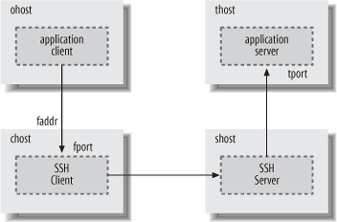
For local forwardings, a pattern that matches the forwarding target, where the application server runs, as shown in Figure 5-3, which illustrates the result of running the command:[80]
chost$ ssh -L[
faddr:]fport:thost:tportshostThe local forward value has the form thost
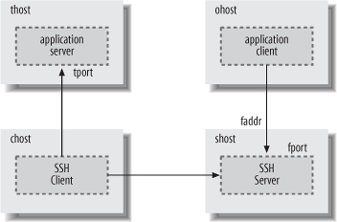
[%tport], where the thost component uses the same syntax as theAllowHostkeyword, and matches either the hostname provided by the SSH client, or the address resulting from the hostname lookup that is performed by the SSH server for the forwarding. The optional tport is a pattern matching the numeric value of the port on which the application server is listening, and to which the SSH server connects for the forwarding. If the port is not specified, then the access control applies to all ports.For remote forwardings, the forward value matches the address and (optionally) the port on which the SSH server listens for forwarded connections, as shown in Figure 5-4, which illustrates the result of running the command:
chost$ ssh -R[
faddr:]fport:thost:tportshostThe remote forward value uses the same syntax as for local forwardings, with the components faddr[%fport].
- originator
(Optional) A pattern that matches the source address used by the application client to connect to the forwarded port, labeled
ohostin Figures 5-3 and 5-4. This is most useful for remote forwarding, since the source address can be directly determined by the SSH server when it accepts the forwarded connection.For local forwarding, the SSH server must rely on the SSH client to provide the source address, and a malicious client might forge the address, so it really can’t be trusted as a basis for granting access. In addition, the source address reported by the SSH client might belong to private address space that is not meaningful to the SSH server, e.g., if network address translation (NAT) is used.
The
ForwardACLkeyword is one of the most complex keywords available for configuring Tectia, because so many parameters are needed to describe forwarded connections fully. The reward for conquering this complexity is precision. For example, to allow any user in the trusted group to use local forwarding when initiating SSH connections from any machine in the friendly.org domain, but only to forward IMAP connections (port 143) to the internal server mail.example.com, use:# Tectia with zsh_fileglob or traditional regex syntax ForwardACL allow local *%trusted@*.friendly.org mail.example.com%143 # Tectia with egrep regex syntax ForwardACL allow local .*%trusted@.*\.friendly\.org mail\.example\.com%143
A trusted user could then run her SSH client on somewhere.friendly.org as:
$ ssh -L2001:mail.example.com:143 ssh.example.com
where ssh.example.com is the host that runs the SSH server. Note that no restrictions are imposed on the listening port for local forwardings (2001 in this case); the SSH server has no reason to care about that, and no way to verify it anyway.
To allow guest users (i.e., those whose usernames start with “guest”) initiating SSH connections from a range of addresses described by the netmask 10.1.2.0/24 to use remote forwarding, but only listening on the localhost interface and accepting forwarded connections on a range of ports 7000-7009:
    # Tectia with zsh_fileglob or traditional regex syntax
    ForwardACL allow remote guest*@\m10.1.2.0/24 localhost:700[[:digit:]]

    # Tectia with egrep regex syntax
    ForwardACL allow remote guest.*@\m10.1.2.0/24 localhost:700[[:digit:]]
The user guest33 could then run his SSH client on a host with address 10.1.2.3 as:
    # Tectia
    $ ssh -Rlocalhost:7005:server.elsewhere.net:8080 ssh.example.com
Note that there are no restrictions on the target for the forwarding (port 8080 on server.elsewhere.net); the SSH server again neither knows nor cares about the forwarded connection on the SSH client side.
To relax this access control, allowing the SSH server to accept connections on any listening address, but only from application clients originating forwarded connections from hosts in the outbound.example.com domain, replace the localhost component in the previous forward pattern with a “match anything” wildcard, and add a fifth originator pattern:
    # Tectia with zsh_fileglob or traditional regex syntax
    ForwardACL allow remote guest*@\m10.1.2.0/24 *:700[[:digit:]] *.outbound.example.com

    # Tectia with egrep regex syntax
    ForwardACL allow remote guest.*@\m10.1.2.0/24 .*:700[[:digit:]] .*\.outbound\.example\.com
ForwardACL restrictions for
local and remote forwardings are completely independent. If any
ForwardACL keywords allow specific,
limited access for either kind of forwarding, then all other access
for that kind of forwarding will be denied.
Tectia uses the most restrictive interpretation for forwarding
access control: if multiple ForwardACL keywords match a requested
forwarding, and any of them deny access, then the forwarding is
rejected. This can be useful for creating exceptions. For example, to
allow local forwarding to any port on any target host in the
example.com domain, but not to any port on the
database server db.example.com, or to http
servers (port 80) on any example.com
hosts:
    # Tectia with zsh_fileglob or traditional regex syntax
    ForwardACL allow local  *  *.example.com
    ForwardACL deny  local  * db.example.com
    ForwardACL deny  local  *  *.example.com%80

    # Tectia with egrep regex syntax
    ForwardACL allow local .* .*\.example\.com
    ForwardACL deny  local .* db\.example\.com
    ForwardACL deny  local .* .*\.example\.com%80
Furthermore, ForwardACL
keywords cannot override restrictions imposed by the other forwarding
access control keywords (AllowTcpForwardingForUsers, AllowTcpForwardingForGroups, DenyTcpForwardingForUsers, DenyTcpForwardingForGroups, or AllowTcpForwarding): if any of these
applicable keywords deny access for a requested forwarding, then the
forwarding is forbidden.
Forwarding for X, the popular Window System, can be
separately enabled or disabled with the keyword X11Forwarding:[81]
X11Forwarding no
OpenSSH automatically disables X11Forwarding if UseLogin is enabled. [5.4.10]
Administrators may wish to disable forwarding for users who are not trusted to have forwarding securely configured on the client side. For example, it is usually desirable to avoid SSH clients that indiscriminately accept connections from anywhere, and then forward them across SSH tunnels to trusted servers. Similarly, misconfigured X servers (which run on the SSH client side) can expose X client programs running on the SSH server side to attack, if the X server access is overly permissive.
Disabling forwarding isn’t effective for users who are granted shell access to run arbitrary commands, because such users can use their own programs to set up equivalent forwarding functionality. For better control, set up special-purpose accounts that use carefully written, restricted programs instead of standard shells, and consider using subsystems. [5.8]
Agent forwarding permits a series of SSH connections (from one
machine to another to another, ...) to operate seamlessly using a
single agent. [6.3.5]
Agent forwarding may be enabled or disabled in the Tectia server using
the keyword AllowAgentForwarding
with a value of yes (the default)
or no:[82]
    # Tectia
    AllowAgentForwarding no
It may also be enabled or disabled by OpenSSH and Tectia clients. [6.3.5.3]
Agent forwarding is convenient, but in a security-sensitive environment, it might be appropriate to disable this feature. Because forwarded agent connections are implemented as Unix domain sockets, an attacker can conceivably gain access to them. These sockets are just nodes in the filesystem, protected only by file permissions that can be compromised.
For example, suppose you maintain a network of exposed, untrusted machines that you access from a more secure network using SSH. You might consider disabling agent forwarding on the untrusted machines. Otherwise, an attacker can compromise an untrusted machine; take control of a forwarded agent from a legitimate, incoming SSH connection; and use the agent’s loaded keys to gain access to the secure network via SSH. (The attacker can’t retrieve the keys themselves in this way, however.)
[78] ACL stands for “access control list.”
[79] These keywords are case-insensitive, but the documentation mentions only lowercase, so we recommend it.
[80] Only Tectia SSH clients allow the listening address
faddr to be specified with the
forwarding command-line options -L and
-R.
[81] Tectia supports the keywords ForwardX11 and AllowX11Forwarding as synonyms for
X11Forwarding.
[82] The keyword ForwardAgent
is also supported as a synonym for backward compatibility.