Table of Contents for
SSH, The Secure Shell: The Definitive Guide, 2nd Edition
 SSH, The Secure Shell: The Definitive Guide, 2nd Edition
Published by
O'Reilly Media, Inc., 2005
SSH, The Secure Shell: The Definitive Guide, 2nd Edition
Published by
O'Reilly Media, Inc., 2005
- Cover
- SSH, the Secure Shell, 2nd Edition
- Preface
- Protect Your Network with SSH
- Intended Audience
- Reading This Book
- Our Approach
- Which Chapters Are for You?
- Supported Platforms
- Disclaimers
- Conventions Used in This Book
- Comments and Questions
- Safari Enabled
- Acknowledgments
- 1. Introduction to SSH
- What Is SSH?
- What SSH Is Not
- The SSH Protocol
- Overview of SSH Features
- History of SSH
- Related Technologies
- Summary
- 2. Basic Client Use
- A Running Example
- Remote Terminal Sessions with ssh
- Adding Complexity to the Example
- Authentication by Cryptographic Key
- The SSH Agent
- Connecting Without a Password or Passphrase
- Miscellaneous Clients
- Summary
- 3. Inside SSH
- Overview of Features
- A Cryptography Primer
- The Architecture of an SSH System
- Inside SSH-2
- Inside SSH-1
- Implementation Issues
- SSH and File Transfers (scp and sftp)
- Algorithms Used by SSH
- Threats SSH Can Counter
- Threats SSH Doesn’t Prevent
- Threats Caused by SSH
- Summary
- 4. Installation and Compile-Time Configuration
- Overview
- Installing OpenSSH
- Installing Tectia
- Software Inventory
- Replacing r-Commands with SSH
- Summary
- 5. Serverwide Configuration
- Running the Server
- Server Configuration: An Overview
- Getting Ready: Initial Setup
- Authentication: Verifying Identities
- Access Control: Letting People In
- User Logins and Accounts
- Forwarding
- Subsystems
- Logging and Debugging
- Compatibility Between SSH-1 and SSH-2 Servers
- Summary
- 6. Key Management and Agents
- What Is an Identity?
- Creating an Identity
- SSH Agents
- Multiple Identities
- PGP Authentication in Tectia
- Tectia External Keys
- Summary
- 7. Advanced Client Use
- How to Configure Clients
- Precedence
- Introduction to Verbose Mode
- Client Configuration in Depth
- Secure Copy with scp
- Secure, Interactive Copy with sftp
- Summary
- 8. Per-Account Server Configuration
- Limits of This Technique
- Public-Key-Based Configuration
- Hostbased Access Control
- The User rc File
- Summary
- 9. Port Forwarding and X Forwarding
- What Is Forwarding?
- Port Forwarding
- Dynamic Port Forwarding
- X Forwarding
- Forwarding Security: TCP-Wrappers and libwrap
- Summary
- 10. A Recommended Setup
- The Basics
- Compile-Time Configuration
- Serverwide Configuration
- Per-Account Configuration
- Key Management
- Client Configuration
- Remote Home Directories (NFS, AFS)
- Summary
- 11. Case Studies
- Unattended SSH: Batch or cron Jobs
- FTP and SSH
- Pine, IMAP, and SSH
- Connecting Through a Gateway Host
- Scalable Authentication for SSH
- Tectia Extensions to Server Configuration Files
- Tectia Plugins
- 12. Troubleshooting and FAQ
- Debug Messages: Your First Line of Defense
- Problems and Solutions
- Other SSH Resources
- 13. Overview of Other Implementations
- Common Features
- Covered Products
- Other SSH Products
- 14. OpenSSH for Windows
- Installation
- Using the SSH Clients
- Setting Up the SSH Server
- Public-Key Authentication
- Troubleshooting
- Summary
- 15. OpenSSH for Macintosh
- Using the SSH Clients
- Using the OpenSSH Server
- 16. Tectia for Windows
- Obtaining and Installing
- Basic Client Use
- Key Management
- Accession Lite
- Advanced Client Use
- Port Forwarding
- Connector
- File Transfers
- Command-Line Programs
- Troubleshooting
- Server
- 17. SecureCRT and SecureFX for Windows
- Obtaining and Installing
- Basic Client Use
- Key Management
- Advanced Client Use
- Forwarding
- Command-Line Client Programs
- File Transfer
- Troubleshooting
- VShell
- Summary
- 18. PuTTY for Windows
- Obtaining and Installing
- Basic Client Use
- File Transfer
- Key Management
- Advanced Client Use
- Forwarding
- Summary
- A. OpenSSH 4.0 New Features
- Server Features: sshd
- Client Features: ssh, scp, and sftp
- ssh-keygen
- B. Tectia Manpage for sshregex
- Regex Syntax: Egrep Patterns
- Regex Syntax: ZSH_FILEGLOB (or Traditional) Patterns
- Character Sets for Egrep and ZSH_FILEGLOB
- Regex Syntax: SSH Patterns
- Authors
- See Also
- C. Tectia Module Names for Debugging
- D. SSH-1 Features of OpenSSH and Tectia
- OpenSSH Features
- Tectia Features
- E. SSH Quick Reference
- Legend
- sshd Options
- sshd Keywords
- ssh Options
- scp Options
- ssh and scp Keywords
- ssh-keygen Options
- ssh-agent Options
- ssh-add Options
- Identity and Authorization Files, OpenSSH
- Identity and Authorization Files, Tectia
- Environment Variables
- Index
- Index
- Index
- Index
- Index
- Index
- Index
- Index
- Index
- Index
- Index
- Index
- Index
- Index
- Index
- Index
- Index
- Index
- Index
- Index
- Index
- Index
- Index
- Index
- Index
- Index
- About the Authors
- Colophon
- Copyright
SSH has about a dozen distinct, interacting components that produce the features we’ve covered. [3.1] Figure 3-1 illustrates the major components and their relationships to one another.
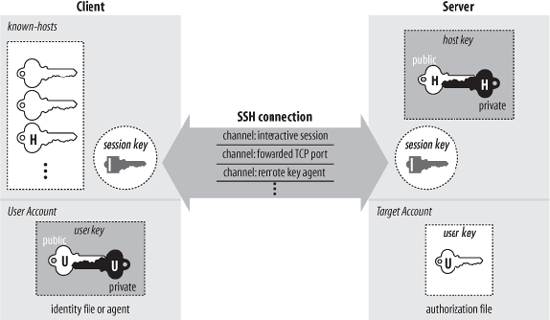
By “component” we don’t necessarily mean “program”: SSH also has keys, sessions, and other fun things. In this section we provide a brief overview of all the components, so you can begin to get the big picture of SSH:
- Server
A program that allows incoming SSH connections to a machine, handling authentication, authorization, and so forth. In most Unix SSH implementations, the server is sshd.
- Client
A program that connects to SSH servers and makes requests, such as “log me in” or “copy this file.” In OpenSSH and Tectia, the major clients are ssh, scp, and sftp.
- Session
An ongoing connection between a client and a server. It begins after the client successfully authenticates to a server and ends when the connection terminates. Sessions may be interactive or batch.
- Key
A relatively small amount of data, generally from tens of to 1,000 or 2,000 bits, used as a parameter to cryptographic algorithms such as encryption or message authentication. The key binds the algorithm operation in some way to the key holder: in encryption, it ensures that only someone else holding that key (or a related one) can decrypt the message; in authentication, it allows you to verify later that the key holder actually signed the message. There are two kinds of keys : symmetric or secret key, and asymmetric or public key. [3.2.2] An asymmetric key has two parts: the public and private components. SSH has several types of keys, as summarized in Table 3-1.
- User key
A persistent, asymmetric key used by clients as proof of a user’s identity. (A single user may have many keys/identities.)
- Host key
A persistent, asymmetric key used by a server as proof of its identity, as well as by a client when proving its host’s identity as part of hostbased authentication. [3.4.3.6] If a machine runs a single SSH server, the host key also uniquely identifies the machine. (If a machine is running multiple SSH servers, each may have a different host key, or they may share.)
- Session key
A randomly generated, symmetric key for encrypting the communication between an SSH client and server. It is shared by the two parties in a secure manner during the SSH connection setup so that an eavesdropper can’t discover it. Both sides then have the session key, which they use to encrypt their communications. When the SSH session ends, the key is destroyed.
Tip
An SSH connection has several session keys: each direction (server to client, and client to server) has keys for encryption and others for integrity checking. In our discussions we treat all the session keys as a unit and speak of “the session key” for convenience; they are all derived from a single master secret, anyway. If the context requires it, we identify the individual key we mean.
- Key generator
A program that creates persistent keys (user keys and host keys) for SSH. OpenSSH and Tectia have the program ssh-keygen.
- Known-hosts database
A collection of host keys. Clients and servers refer to this database to authenticate one another.
- Agent
A program that caches user keys in memory, so users needn’t keep retyping their passphrases. The agent responds to requests for key-related operations, such as signing an authenticator, but it doesn’t disclose the keys themselves. It is a convenience feature. OpenSSH and Tectia have the agent ssh-agent, and the program ssh-add loads and unloads the key cache.
- Signer
A program that signs hostbased authentication packets. We explain this in our discussion of hostbased authentication. [3.4.3.6]
- Random seed
A pool of random data used by SSH components to initialize software pseudo-random number generators.
- Configuration file
A collection of settings to tailor the behavior of an SSH client or server.
Not all these components are required in an implementation of SSH. Certainly servers, clients, and keys are mandatory, but many implementations don’t have an agent, and some don’t even include a key generator.