Table of Contents for
Python Web Penetration Testing Cookbook
 Python Web Penetration Testing Cookbook
Published by
Packt Publishing, 2015
Python Web Penetration Testing Cookbook
Published by
Packt Publishing, 2015
- Cover
- Table of Contents
- Python Web Penetration Testing Cookbook
- Python Web Penetration Testing Cookbook
- Credits
- About the Authors
- About the Reviewers
- www.PacktPub.com
- Disclamer
- Preface
- What you need for this book
- Who this book is for
- Sections
- Conventions
- Reader feedback
- Customer support
- 1. Gathering Open Source Intelligence
- Gathering information using the Shodan API
- Scripting a Google+ API search
- Downloading profile pictures using the Google+ API
- Harvesting additional results from the Google+ API using pagination
- Getting screenshots of websites with QtWebKit
- Screenshots based on a port list
- Spidering websites
- 2. Enumeration
- Performing a ping sweep with Scapy
- Scanning with Scapy
- Checking username validity
- Brute forcing usernames
- Enumerating files
- Brute forcing passwords
- Generating e-mail addresses from names
- Finding e-mail addresses from web pages
- Finding comments in source code
- 3. Vulnerability Identification
- Automated URL-based Directory Traversal
- Automated URL-based Cross-site scripting
- Automated parameter-based Cross-site scripting
- Automated fuzzing
- jQuery checking
- Header-based Cross-site scripting
- Shellshock checking
- 4. SQL Injection
- Checking jitter
- Identifying URL-based SQLi
- Exploiting Boolean SQLi
- Exploiting Blind SQL Injection
- Encoding payloads
- 5. Web Header Manipulation
- Testing HTTP methods
- Fingerprinting servers through HTTP headers
- Testing for insecure headers
- Brute forcing login through the Authorization header
- Testing for clickjacking vulnerabilities
- Identifying alternative sites by spoofing user agents
- Testing for insecure cookie flags
- Session fixation through a cookie injection
- 6. Image Analysis and Manipulation
- Hiding a message using LSB steganography
- Extracting messages hidden in LSB
- Hiding text in images
- Extracting text from images
- Enabling command and control using steganography
- 7. Encryption and Encoding
- Generating an MD5 hash
- Generating an SHA 1/128/256 hash
- Implementing SHA and MD5 hashes together
- Implementing SHA in a real-world scenario
- Generating a Bcrypt hash
- Cracking an MD5 hash
- Encoding with Base64
- Encoding with ROT13
- Cracking a substitution cipher
- Cracking the Atbash cipher
- Attacking one-time pad reuse
- Predicting a linear congruential generator
- Identifying hashes
- 8. Payloads and Shells
- Extracting data through HTTP requests
- Creating an HTTP C2
- Creating an FTP C2
- Creating an Twitter C2
- Creating a simple Netcat shell
- 9. Reporting
- Converting Nmap XML to CSV
- Extracting links from a URL to Maltego
- Extracting e-mails to Maltego
- Parsing Sslscan into CSV
- Generating graphs using plot.ly
- Index
Clickjacking is a technique used to trick users into performing actions on a target site without them realizing. This is done by a malicious user placing a hidden overlay on top of a legitimate website, so when the victim thinks they are interacting with the legitimate site, they are really clicking on hidden items on the hidden top overlay. This attack can be crafted in such a way that it causes the victim to type in credentials or click and drag on items without realizing they are being attacked. These attacks can be used against banking sites to trick victims into transferring funds and were also common among social networking sites in an attempt to gain more followers or likes, although most have defensive measures in place now.
There are two main ways websites can prevent clickjacking: either by setting an X-FRAME-OPTIONS header, which tells the browser not to render the site if it's inside a frame, or by using JavaScript to escape out of frames (commonly known as frame-busting). This recipe will show you how to detect both defenses so that you can identify websites that have neither:
import requests
from ghost import Ghost
import logging
import os

URL = 'http://packtpub.com'
req = requests.get(URL)

try:
    xframe = req.headers['x-frame-options']
    print 'X-FRAME-OPTIONS:', xframe , 'present, clickjacking not likely possible'
except:
    print 'X-FRAME-OPTIONS missing'

print 'Attempting clickjacking...'

html = '''
<html>
<body>
<iframe src="'''+URL+'''" height='600px' width='800px'></iframe>
</body>
</html>'''

html_filename = 'clickjack.html'
f = open(html_filename, 'w+')
f.write(html)
f.close()

log_filename = 'test.log'
fh = logging.FileHandler(log_filename)
ghost = Ghost(log_level=logging.INFO, log_handler=fh)
page, resources = ghost.open(html_filename)

l = open(log_filename, 'r')
if 'forbidden by X-Frame-Options.' in l.read():
    print 'Clickjacking mitigated via X-FRAME-OPTIONS'
else:
    href = ghost.evaluate('document.location.href')[0]
    if html_filename not in href:
        print 'Frame busting detected'
    else:
        print 'Frame busting not detected, page is likely vulnerable to clickjacking'
l.close()

logging.getLogger('ghost').handlers[0].close()
os.unlink(log_filename)
os.unlink(html_filename)The first part of this script checks for the first clickjacking defense, the X-FRAME-OPTIONS header, in a similar fashion as we've seen in the previous recipe. X-FRAME-OPTIONS takes three values: DENY, SAMEORIGIN, or ALLOW-FROM <url>. Each of these values give a different level of protection against clickjacking, so, in this recipe, we are attempting to detect the lack of any:
try:
    xframe = req.headers['x-frame-options']
    print 'X-FRAME-OPTIONS:', xframe , 'present, clickjacking not likely possible'
except:
    print 'X-FRAME-OPTIONS missing'
The next part of the code creates a local html clickjack.html file, containing a few very simple lines of HTML code, and saves them into a local clickjack.html file:
html = '''
<html>
<body>
<iframe src="'''+URL+'''" height='600px' width='800px'></iframe>
</body>
</html>'''

html_filename = 'clickjack.html'
f = open(html_filename, 'w+')
f.write(html)
f.close()
This HTML code creates an iframe with the source set to the target website. The HTML file will be loaded into ghost in an attempt to render the website and detect if the target site is loaded in the iframe. Ghost is a WebKit rendering engine, so it should be similar to what would happen if the site is loaded in a Chrome browser.
The next part sets up ghost logging to redirect to a local log file (the default is printing to stdout):
log_filename = 'test.log'
fh = logging.FileHandler(log_filename)
ghost = Ghost(log_level=logging.INFO, log_handler=fh)
The next line renders the local HTML page in ghost and contain any extra resources that were requested by the target page:
page, resources = ghost.open(html_filename)
We then open the log file and check for the X-FRAME-OPTIONS error:
l = open(log_filename, 'r')
if 'forbidden by X-Frame-Options.' in l.read():
    print 'Clickjacking mitigated via X-FRAME-OPTIONS'
The next part of the script checks for framebusting; if the iframe has JavaScript code to detect it's being loaded inside an iframe it will break out of the frame, causing the page to redirect to the target website. We can detect this by executing JavaScript in ghost with ghost.evaluate and reading the current location:
href = ghost.evaluate('document.location.href')[0]The final part of code is for clean-up, closing any open files or any open logging handlers, and deleting the temporary HTML and log files:
l.close()

logging.getLogger('ghost').handlers[0].close()
os.unlink(log_filename)
os.unlink(html_filename)
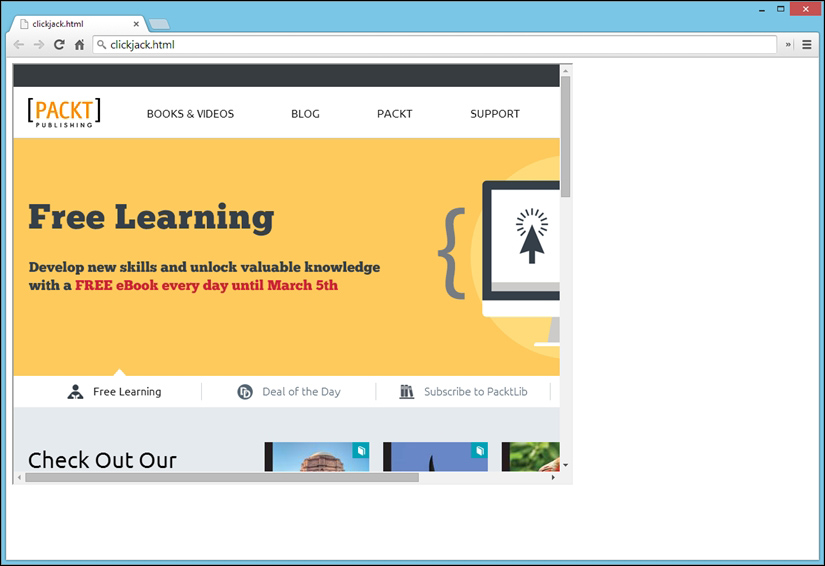
If the script outputs Frame busting not detected, page is likely vulnerable to clickjacking, then the target website can be rendered inside a hidden iframe and used in a clickjacking attack. An example of the log from a vulnerable site is shown in the following screenshot:

If you view the generating clickjack.html file in a web browser, it will confirm that the target web server can be loaded in an iframe and is therefore susceptible to clickjacking, as shown in the following screenshot: