Table of Contents for
Python Web Penetration Testing Cookbook
 Python Web Penetration Testing Cookbook
Published by
Packt Publishing, 2015
Python Web Penetration Testing Cookbook
Published by
Packt Publishing, 2015
- Cover
- Table of Contents
- Python Web Penetration Testing Cookbook
- Python Web Penetration Testing Cookbook
- Credits
- About the Authors
- About the Reviewers
- www.PacktPub.com
- Disclamer
- Preface
- What you need for this book
- Who this book is for
- Sections
- Conventions
- Reader feedback
- Customer support
- 1. Gathering Open Source Intelligence
- Gathering information using the Shodan API
- Scripting a Google+ API search
- Downloading profile pictures using the Google+ API
- Harvesting additional results from the Google+ API using pagination
- Getting screenshots of websites with QtWebKit
- Screenshots based on a port list
- Spidering websites
- 2. Enumeration
- Performing a ping sweep with Scapy
- Scanning with Scapy
- Checking username validity
- Brute forcing usernames
- Enumerating files
- Brute forcing passwords
- Generating e-mail addresses from names
- Finding e-mail addresses from web pages
- Finding comments in source code
- 3. Vulnerability Identification
- Automated URL-based Directory Traversal
- Automated URL-based Cross-site scripting
- Automated parameter-based Cross-site scripting
- Automated fuzzing
- jQuery checking
- Header-based Cross-site scripting
- Shellshock checking
- 4. SQL Injection
- Checking jitter
- Identifying URL-based SQLi
- Exploiting Boolean SQLi
- Exploiting Blind SQL Injection
- Encoding payloads
- 5. Web Header Manipulation
- Testing HTTP methods
- Fingerprinting servers through HTTP headers
- Testing for insecure headers
- Brute forcing login through the Authorization header
- Testing for clickjacking vulnerabilities
- Identifying alternative sites by spoofing user agents
- Testing for insecure cookie flags
- Session fixation through a cookie injection
- 6. Image Analysis and Manipulation
- Hiding a message using LSB steganography
- Extracting messages hidden in LSB
- Hiding text in images
- Extracting text from images
- Enabling command and control using steganography
- 7. Encryption and Encoding
- Generating an MD5 hash
- Generating an SHA 1/128/256 hash
- Implementing SHA and MD5 hashes together
- Implementing SHA in a real-world scenario
- Generating a Bcrypt hash
- Cracking an MD5 hash
- Encoding with Base64
- Encoding with ROT13
- Cracking a substitution cipher
- Cracking the Atbash cipher
- Attacking one-time pad reuse
- Predicting a linear congruential generator
- Identifying hashes
- 8. Payloads and Shells
- Extracting data through HTTP requests
- Creating an HTTP C2
- Creating an FTP C2
- Creating an Twitter C2
- Creating a simple Netcat shell
- 9. Reporting
- Converting Nmap XML to CSV
- Extracting links from a URL to Maltego
- Extracting e-mails to Maltego
- Parsing Sslscan into CSV
- Generating graphs using plot.ly
- Index
In the previous recipe, we saw how to hide text in the RGBA values of an image. This recipe will let us extract that data out.
We saw in the previous recipe that we split up a characters byte into 8 bits and spread them over the LSBs of two pixels. Here's that diagram again as a refresher:
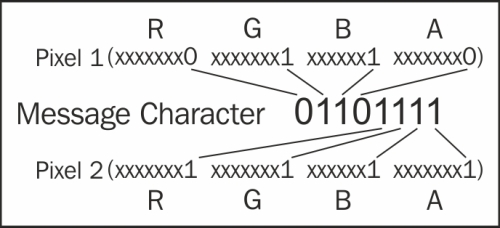
The following is the script that will do the extraction:
from PIL import Image
from itertools import izip

def get_pixel_pairs(iterable):
    a = iter(iterable)
    return izip(a, a)


def get_LSB(value):
    if value & 1 == 0:
        return '0'
    else:
        return '1'

def extract_message(carrier):
    c_image = Image.open(carrier)
    pixel_list = list(c_image.getdata())
    message = ""

    for pix1, pix2 in get_pixel_pairs(pixel_list):
        message_byte = "0b"
        for p in pix1:
            message_byte += get_LSB(p)

        for p in pix2:
            message_byte += get_LSB(p)

        if message_byte == "0b00000000":
            break

        message += chr(int(message_byte,2))
    return message

print extract_message('messagehidden.png')First, we import the Image module from PIL; we also import the izip module from itertools. The izip module will be used to return pairs of pixels:
from PIL import Image
from itertools import izip
Next, we create two helper functions. The get_pixel_pairs function takes in our pixel list and returns the pairs back; as each message character was split over two pixels, this makes extraction easier. The other helper function get_LSB will take in an R, G, B, or A value and use a bit mask to get the LSB value and return it in a string format:
def get_pixel_pairs(iterable):
    a = iter(iterable)
    return izip(a, a)


def get_LSB(value):
    if value & 1 == 0:
        return '0'
    else:
        return '1'
Next, we have our main extract_message function. This takes in the filename of our carrier image:
def extract_message(carrier):
We then create an image object from the filename passed in and then create an array of pixels from the image data. We also create an empty string called message; this will hold our extracted text:
c_image = Image.open(carrier)
pixel_list = list(c_image.getdata())
message = ""
Next, we create a for loop that will iterate over all of the pixel pairs returned using our helper function get_pixel_pairs; we set the returned pairs to pix1 and pix2:
for pix1, pix2 in get_pixel_pairs(pixel_list):
The next part of code that we will create is a string variable that will hold our binary string. Python knows that it'll be the binary representation of a string by the 0b prefix. We then iterate over the RGBA values in each pixel (pix1 and pix2) and pass that value to our helper function, get_LSB, the value that's returned is appended onto our binary string:
message_byte = "0b"
for p in pix1:
    message_byte += get_LSB(p)
for p in pix2:
    message_byte += get_LSB(p)
When the preceding code runs, we will get a string representation of the binary for the character that was hidden. The string will look like this 0b01100111, we placed a stop character at the end of the message that was hidden that will be 0x00, when this is outputted by the extraction part we need to break out of the for loop as we know we have hit the end of the hidden text. The next part does that check for us:
if message_byte == "0b00000000":
            break
If it's not our stop byte, then we can convert the byte to its original character and append it onto the end of our message string:
message += chr(int(message_byte,2))
All that's left to do is return the complete message string back from the function.
Now that we have our hide and extract functions, we can put them together into a class that we will use for the next recipe. We will add a check to test if the class has been used by another or if it is being run on its own. The whole script looks like the following. The hide and extract functions have been modified slightly to accept an image URL; this script will be used in the C2 example in Chapter 8, Payloads and Shells:
#!/usr/bin/env python

import sys
import urllib
import cStringIO

from optparse import OptionParser
from PIL import Image
from itertools import izip

def get_pixel_pairs(iterable):
    a = iter(iterable)
    return izip(a, a)

def set_LSB(value, bit):
    if bit == '0':
        value = value & 254
    else:
        value = value | 1
    return value

def get_LSB(value):
    if value & 1 == 0:
        return '0'
    else:
        return '1'

def extract_message(carrier, from_url=False):
    if from_url:
        f = cStringIO.StringIO(urllib.urlopen(carrier).read())
        c_image = Image.open(f)
    else:
        c_image = Image.open(carrier)

    pixel_list = list(c_image.getdata())
    message = ""

    for pix1, pix2 in get_pixel_pairs(pixel_list):
        message_byte = "0b"
        for p in pix1:
            message_byte += get_LSB(p)

        for p in pix2:
            message_byte += get_LSB(p)

        if message_byte == "0b00000000":
            break

        message += chr(int(message_byte,2))
    return message

def hide_message(carrier, message, outfile, from_url=False):
    message += chr(0)
    if from_url:
        f = cStringIO.StringIO(urllib.urlopen(carrier).read())
        c_image = Image.open(f)
    else:
        c_image = Image.open(carrier)

    c_image = c_image.convert('RGBA')

    out = Image.new(c_image.mode, c_image.size)
    width, height = c_image.size
    pixList = list(c_image.getdata())
    newArray = []

    for i in range(len(message)):
        charInt = ord(message[i])
        cb = str(bin(charInt))[2:].zfill(8)
        pix1 = pixList[i*2]
        pix2 = pixList[(i*2)+1]
        newpix1 = []
        newpix2 = []

        for j in range(0,4):
            newpix1.append(set_LSB(pix1[j], cb[j]))
            newpix2.append(set_LSB(pix2[j], cb[j+4]))

        newArray.append(tuple(newpix1))
        newArray.append(tuple(newpix2))

    newArray.extend(pixList[len(message)*2:])

    out.putdata(newArray)
    out.save(outfile)
    return outfile


if __name__ == "__main__":


    usage = "usage: %prog [options] arg1 arg2"
    parser = OptionParser(usage=usage)
    parser.add_option("-c", "--carrier", dest="carrier",
                help="The filename of the image used as the carrier.",
                metavar="FILE")
    parser.add_option("-m", "--message", dest="message",
                help="The text to be hidden.",
                metavar="FILE")
    parser.add_option("-o", "--output", dest="output",
                help="The filename the output file.",
                metavar="FILE")
    parser.add_option("-e", "--extract",
                action="store_true", dest="extract", default=False,
                help="Extract hidden message from carrier and save to output filename.")
    parser.add_option("-u", "--url",
                action="store_true", dest="from_url", default=False,
                help="Extract hidden message from carrier and save to output filename.")

    (options, args) = parser.parse_args()
    if len(sys.argv) == 1:
        print "TEST MODE\nHide Function Test Starting ..."
        print hide_message('carrier.png', 'The quick brown fox jumps over the lazy dogs back.', 'messagehidden.png')
        print "Hide test passed, testing message extraction ..."
        print extract_message('messagehidden.png')
    else:
        if options.extract == True:
            if options.carrier is None:
                parser.error("a carrier filename -c is required for extraction")
            else:
                print extract_message(options.carrier, options.from_url)
        else:
            if options.carrier is None or options.message is None or options.output is None:
                parser.error("a carrier filename -c, message filename -m and output filename -o are required for steg")
            else:
                hide_message(options.carrier, options.message, options.output, options.from_url)