Table of Contents for
Python Web Penetration Testing Cookbook
 Python Web Penetration Testing Cookbook
Published by
Packt Publishing, 2015
Python Web Penetration Testing Cookbook
Published by
Packt Publishing, 2015
- Cover
- Table of Contents
- Python Web Penetration Testing Cookbook
- Python Web Penetration Testing Cookbook
- Credits
- About the Authors
- About the Reviewers
- www.PacktPub.com
- Disclamer
- Preface
- What you need for this book
- Who this book is for
- Sections
- Conventions
- Reader feedback
- Customer support
- 1. Gathering Open Source Intelligence
- Gathering information using the Shodan API
- Scripting a Google+ API search
- Downloading profile pictures using the Google+ API
- Harvesting additional results from the Google+ API using pagination
- Getting screenshots of websites with QtWebKit
- Screenshots based on a port list
- Spidering websites
- 2. Enumeration
- Performing a ping sweep with Scapy
- Scanning with Scapy
- Checking username validity
- Brute forcing usernames
- Enumerating files
- Brute forcing passwords
- Generating e-mail addresses from names
- Finding e-mail addresses from web pages
- Finding comments in source code
- 3. Vulnerability Identification
- Automated URL-based Directory Traversal
- Automated URL-based Cross-site scripting
- Automated parameter-based Cross-site scripting
- Automated fuzzing
- jQuery checking
- Header-based Cross-site scripting
- Shellshock checking
- 4. SQL Injection
- Checking jitter
- Identifying URL-based SQLi
- Exploiting Boolean SQLi
- Exploiting Blind SQL Injection
- Encoding payloads
- 5. Web Header Manipulation
- Testing HTTP methods
- Fingerprinting servers through HTTP headers
- Testing for insecure headers
- Brute forcing login through the Authorization header
- Testing for clickjacking vulnerabilities
- Identifying alternative sites by spoofing user agents
- Testing for insecure cookie flags
- Session fixation through a cookie injection
- 6. Image Analysis and Manipulation
- Hiding a message using LSB steganography
- Extracting messages hidden in LSB
- Hiding text in images
- Extracting text from images
- Enabling command and control using steganography
- 7. Encryption and Encoding
- Generating an MD5 hash
- Generating an SHA 1/128/256 hash
- Implementing SHA and MD5 hashes together
- Implementing SHA in a real-world scenario
- Generating a Bcrypt hash
- Cracking an MD5 hash
- Encoding with Base64
- Encoding with ROT13
- Cracking a substitution cipher
- Cracking the Atbash cipher
- Attacking one-time pad reuse
- Predicting a linear congruential generator
- Identifying hashes
- 8. Payloads and Shells
- Extracting data through HTTP requests
- Creating an HTTP C2
- Creating an FTP C2
- Creating an Twitter C2
- Creating a simple Netcat shell
- 9. Reporting
- Converting Nmap XML to CSV
- Extracting links from a URL to Maltego
- Extracting e-mails to Maltego
- Parsing Sslscan into CSV
- Generating graphs using plot.ly
- Index
The next topic of interest from the HTTP protocol is cookies. As HTTP is a stateless protocol, cookies provide a way to store persistent data on the client side. This allows a web server to have session management by persisting data to the cookie for the length of the session.
Cookies are set from the web server in the HTTP response using a Set-Cookie header. They are then sent back to the server through the Cookie header. This recipe will look at ways to audit the cookies being set by a website to verify if they have secure attributes or not.
The following is a recipe to enumerate through each of the cookies set on a target site and flag any insecure settings that are present:
import requests

req = requests.get('http://www.packtpub.com')
for cookie in req.cookies:
  print 'Name:', cookie.name
  print 'Value:', cookie.value

  if not cookie.secure:
    cookie.secure = '\x1b[31mFalse\x1b[39;49m'
  print 'Secure:', cookie.secure

  if 'httponly' in cookie._rest.keys():
    cookie.httponly = 'True'
  else:
    cookie.httponly = '\x1b[31mFalse\x1b[39;49m'
  print 'HTTPOnly:', cookie.httponly

  if cookie.domain_initial_dot:
    cookie.domain_initial_dot = '\x1b[31mTrue\x1b[39;49m'
print 'Loosly defined domain:', cookie.domain_initial_dot, '\n'We enumerate each cookie sent from the web server and check their attributes. The first two attributes are the name and value of the cookie:
  print 'Name:', cookie.name
  print 'Value:', cookie.value
We then check for the secure flag on the cookie:
if not cookie.secure:
    cookie.secure = '\x1b[31mFalse\x1b[39;49m'
  print 'Secure:', cookie.secure
The Secure flag on a cookies means it is only sent over HTTPS. This is good for cookies used for authentication because it means they can't be sniffed over the wire if, for example, someone is monitoring open network traffic.
Also note that the \x1b[31m code is a special ANSI escape code used to change the color of the terminal font. Here, we've highlighted the headers that are insecure in red. The \x1b[39;49m code resets the color back to default. See the Wikipedia page on ANSI for more information at http://en.wikipedia.org/wiki/ANSI_escape_code.
The next check is for the httponly attribute:
  if 'httponly' in cookie._rest.keys():
    cookie.httponly = 'True'
  else:
    cookie.httponly = '\x1b[31mFalse\x1b[39;49m'
  print 'HTTPOnly:', cookie.httponly
If this is set to True, it means JavaScript cannot access the contents of the cookie, and it is sent to the browser and can only be read by the browser. This is used to mitigate against XSS attempts, so when penetration testing, the lack of this cookie attribute is a good thing.
We finally check for the domain in the cookie, to see if it starts with a dot:
if cookie.domain_initial_dot:
    cookie.domain_initial_dot = '\x1b[31mTrue\x1b[39;49m'
  print 'Loosly defined domain:', cookie.domain_initial_dot, '\n'
If the domain attribute of the cookie starts with a dot, it indicates the cookie is used across all subdomains and therefore possibly visible beyond the intended scope.
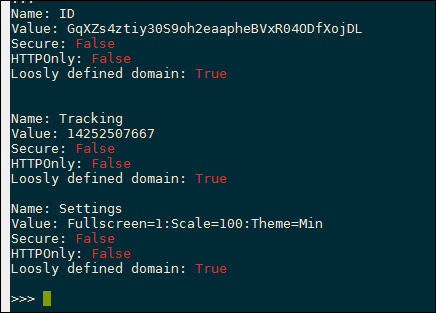
The following screenshot shows how the insecure flags are highlighted in red for the target website:
We've previously seen how to enumerate the technologies used to serve a website by extracting the headers. Certain frameworks also store information in the cookie, for example, PHP creates a cookies called PHPSESSION , which is used to store session data. Therefore, the presence of this data indicates the use of PHP, and the server can then be enumerated further in an attempt to test it for known PHP vulnerabilities.