Table of Contents for
Python Web Penetration Testing Cookbook
 Python Web Penetration Testing Cookbook
Published by
Packt Publishing, 2015
Python Web Penetration Testing Cookbook
Published by
Packt Publishing, 2015
- Cover
- Table of Contents
- Python Web Penetration Testing Cookbook
- Python Web Penetration Testing Cookbook
- Credits
- About the Authors
- About the Reviewers
- www.PacktPub.com
- Disclamer
- Preface
- What you need for this book
- Who this book is for
- Sections
- Conventions
- Reader feedback
- Customer support
- 1. Gathering Open Source Intelligence
- Gathering information using the Shodan API
- Scripting a Google+ API search
- Downloading profile pictures using the Google+ API
- Harvesting additional results from the Google+ API using pagination
- Getting screenshots of websites with QtWebKit
- Screenshots based on a port list
- Spidering websites
- 2. Enumeration
- Performing a ping sweep with Scapy
- Scanning with Scapy
- Checking username validity
- Brute forcing usernames
- Enumerating files
- Brute forcing passwords
- Generating e-mail addresses from names
- Finding e-mail addresses from web pages
- Finding comments in source code
- 3. Vulnerability Identification
- Automated URL-based Directory Traversal
- Automated URL-based Cross-site scripting
- Automated parameter-based Cross-site scripting
- Automated fuzzing
- jQuery checking
- Header-based Cross-site scripting
- Shellshock checking
- 4. SQL Injection
- Checking jitter
- Identifying URL-based SQLi
- Exploiting Boolean SQLi
- Exploiting Blind SQL Injection
- Encoding payloads
- 5. Web Header Manipulation
- Testing HTTP methods
- Fingerprinting servers through HTTP headers
- Testing for insecure headers
- Brute forcing login through the Authorization header
- Testing for clickjacking vulnerabilities
- Identifying alternative sites by spoofing user agents
- Testing for insecure cookie flags
- Session fixation through a cookie injection
- 6. Image Analysis and Manipulation
- Hiding a message using LSB steganography
- Extracting messages hidden in LSB
- Hiding text in images
- Extracting text from images
- Enabling command and control using steganography
- 7. Encryption and Encoding
- Generating an MD5 hash
- Generating an SHA 1/128/256 hash
- Implementing SHA and MD5 hashes together
- Implementing SHA in a real-world scenario
- Generating a Bcrypt hash
- Cracking an MD5 hash
- Encoding with Base64
- Encoding with ROT13
- Cracking a substitution cipher
- Cracking the Atbash cipher
- Attacking one-time pad reuse
- Predicting a linear congruential generator
- Identifying hashes
- 8. Payloads and Shells
- Extracting data through HTTP requests
- Creating an HTTP C2
- Creating an FTP C2
- Creating an Twitter C2
- Creating a simple Netcat shell
- 9. Reporting
- Converting Nmap XML to CSV
- Extracting links from a URL to Maltego
- Extracting e-mails to Maltego
- Parsing Sslscan into CSV
- Generating graphs using plot.ly
- Index
The next part of the HTTP protocol that we will be concentrating on are the HTTP headers. Found in both the requests and responses from the web server, these carry extra information between the client and server. Any area with extra data makes a great place to parse information about the servers and to look for potential issues.
The following is a simple header grabbing script that will parse the response headers in an attempt to identify the web server technology in use:
import requests

req = requests.get('http://packtpub.com')
headers = ['Server', 'Date', 'Via', 'X-Powered-By', 'X-Country-Code']

for header in headers:
    try:
  result = req.headers[header]
        print '%s: %s' % (header, result)
    except Exception, error:
print '%s: Not found' % headerThe first part of the script makes a simple GET request to the target web server, through the familiar requests library:
req = requests.get('http://packtpub.com')Next, we generate an array of headers to look out for:
headers = ['Server', 'Date', 'Via', 'X-Powered-By', 'X-Country- Code']
In this script, we have used a try/except block around the main code:
try:
  result = req.headers[header]
        print '%s: %s' % (header, result)
except:
print '%s: Not found' % header
We need this error handling because headers are not mandatory; therefore, if we tried to retrieve a key from the array for a header that didn't exist, Python would raise an exception. To overcome this, we simply print out Not found if the specified header wasn't present in the response.
The following is a screenshot of the output from running the script against the target server in this example:
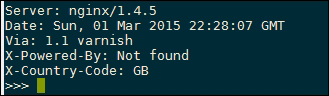
The first output line show the Server header, which displays the underlying web server technology. This is a great place for finding vulnerable web server versions, but be aware that it is possible to disable and also spoof this header, so don't explicitly rely on this for guessing the target server platform.
The Date header contains useful information that can be used to guess where the server is located. For example, you can figure out the time difference relative to your local time zone to give a rough indication of where it is.
The Via header is used by proxies, both outgoing and incoming, and will display the proxy name, in this case 1.1 varnish.
The X-Powered-By is a standard header used in common web frameworks such as PHP. A default PHP installation will respond with PHP and the version number, making it another great target for reconnaissance.
The final line prints the X-Country-Code short code, another useful piece of information to identify where the server is located.
Be aware that all these headers can be set or overridden on the server side, so do not rely on this information explicitly and be wary of parsing data directly from remote servers; even these headers could contain malicious values.
This script currently contain the version of the server, but it could then be extended further to query online CVE databases, such as https://cve.mitre.org/cve/, looking for vulnerabilities affecting the web server version.
Another technique that can be used to increase the confidence of fingerprinting is to check the order of the response headers. For example, Microsoft IIS returns the Server header before the Date header, whereas Apache returns Date and then Server. This slightly different ordering can be used to verify any server versions that you may have deduced from the header values in this recipe.