Table of Contents for
X86 Assembly Language and C Fundamentals
 X86 Assembly Language and C Fundamentals
Published by
CRC Press, 2015
X86 Assembly Language and C Fundamentals
Published by
CRC Press, 2015
- X86 Assembly Language and C Fundamentals
- Preliminaries
- By the same Author
- X86 Assembly Language and C Fundamentals
- X86 Assembly Language and C Fundamentals
- Preface
- Chapter 1 Number Systems and Number Representations
- Chapter 2 X86 Processor Architecture
- Chapter 3 Addressing Modes
- Chapter 4 C Programming Fundamentals
- Chapter 5 Data Transfer Instructions
- Chapter 6 Branching and Looping Instructions
- Chapter 7 Stack Operations
- Chapter 8 Logical, Bit, Shift, and Rotate Instructions
- Chapter 9 Fixed-Point Arithmetic Instructions
- Chapter 10 Binary-Coded Decimal Arithmetic Instructions
- Chapter 11 Floating-Point Arithmetic Instructions
- Chapter 12 Procedures
- Chapter 13 String Instructions
- Chapter 14 Arrays
- Chapter 15 Macros
- Chapter 16 Interrupts and Input/Output Operations
- Chapter 17 Additional Programming Examples
- Appendix A ASCII Character Codes
- Appendix B Answers to Select Problems
Appendix B
Answers to Select Problems
Chapter 1 Number Systems and Number Representations
1.5 Convert the octal number 173.258 to decimal.
1.9 Add the following binary numbers to yield a 12-bit sum:
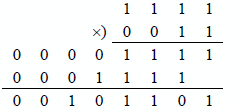
1.16 Multiply the unsigned binary numbers 11112 and 00112.
1.19 The numbers shown below are in sign-magnitude representation. Convert the numbers to 2s complement representation for radix 2 with the same numerical value using eight bits.
Sign magnitude
2s complement
1001 1001
– 25
1110 0111
0001 0000
+ 16
0001 0000
1011 1111
– 63
1100 0001
1.21 Add the following BCD numbers:
Chapter 2 X86 Processor Architecture
2.3 The 7-bit code words shown below are received using Hamming code with odd parity. Determine the syndrome word for each received code word.
(a)
(b)
2.7 Obtain the code word using the Hamming code with odd parity for the following message word: 1 1 0 1 0 1 0 1 1 1 1.
1
2
3
4
5
6
7
8
9
10
11
12
13
14
15
0
0
1
1
1
0
1
0
0
1
0
1
1
1
1
2.13 A fraction and the bits to be deleted (low-order three bits) are shown below. Determine the rounded results using truncation (round toward zero), adder-based rounding (round to nearest), and von Neumann rounding.
Fraction
.
0
0
1
0
1
0
0
1
1
0
1
Chapter 3 Addressing Modes
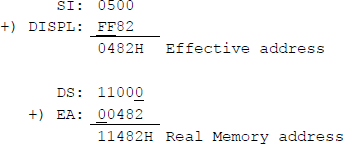
3.3 Let DS = 1100H, DISPL = –126, and SI = 0500H. Using the real addressing mode with a 20-bit address, determine the physical memory address for the instruction shown below.
MOV DISPL[SI], DX
3.6 Differentiate between the operation of the following two move instructions:
(a) MOV EBX, 1234ABCDH(b) MOV [EBX], 1234H(a) Moves the immediate value of 1234ABCDH to register EBX.
(b) Moves the immediate value of 1234H to the address pointed to by register EBX.
Chapter 4 C Programming Fundamentals
4.3 Write a program to change the following Fahrenheit temperatures to centigrade temperatures: 32.0, 100.0, and 85.0. Then print the results.
//fahr_to_cent.cpp//change Fahrenheit to centigrade
#include "stdafx.h"
int main (void){float fahr1 = 32.0;float fahr2 = 100.0;float fahr3 = 85.0;
float cent1, cent2, cent3;
cent1 = (fahr1 - 32) * (5.0/9.0);cent2 = (fahr2 - 32) * (5.0/9.0);cent3 = (fahr3 - 32) * (5.0/9.0);
printf ("fahrenheit 32.0 = centigrade %f\n",cent1);printf ("fahrenheit 100.0 = centigrade %f\n",cent2);printf ("fahrenheit 85.0 = centigrade %f\n\n",cent3);
return 0;}Fahrenheit 32.0 = centigrade 0.000000Fahrenheit 100.0 = centigrade 37.777779Fahrenheit 85.0 = centigrade 29.444445
Press any key to continue . . . _4.7 Write a program to illustrate the difference between integer division and floating-point division regarding the remainder, using the following dividends and divisors: 742 ÷ 16 and 1756 ÷ 24. For the floating-point result, let the integer be two digits and the fraction be four digits.
//div_int_flp.cpp//show difference between integer division and//floating-point division regarding the remainder#include "stdafx.h"
int main (void){printf ("Integer division: %d\n", 742/16);printf ("Floating-point division:%2.4f\n\n", 742.0/16.0);
printf ("Integer division: %d\n", 1756/24);printf ("Floating-point division:%2.4f\n\n", 1756.0/24.0);return 0;}Integer division: 46Floating-point division: 46.3750Integer division: 73Floating-point division: 73.1667
Press any key to continue . . . _4.10 Indicate the value to which each of the following expressions evaluate.
(a) (1 + * 3)
Evaluates to 7.
(b) 10 % 3 * 3 – (1 + 2)
Evaluates to 0 (* and % same precedence).
(c) ((1 + 2) * 3)
Evaluates to 9 (1 + 2) first.
(d) (5 = = 5)
Evaluates to true (1)
(e) (5 = 5)
Evaluates to 5.
4.18 To what does the expression evaluate?
Rewrite the expression, adding parentheses, so that it evaluates to 16.
//evaluate_expr.cpp//evaluate expression without parentheses,//then with parentheses#include "stdafx.h"int main (void){int result1, result2;result1 = 5 + 3 * 8 / 2 + 2;result2 = (5 + 3) * 8 / (2 + 2);
printf ("Result1 = %d \nResult2 = %d\n\n",result1, result2);return 0;}Result1 = 19Result2 = 16
Press any key to continue . . . _4.22 Given the program shown below, obtain the outputs for variables a and b after the program has executed.
//pre_post_incr4.cpp//example to illustrate pre- and post-increment#include "stdafx.h"int main (void){int a, b;int c = 0;a = ++c;b = c++;
printf ("%d %d %d\n\n", a, b, ++c);return 0;}1 1 3
Press any key to continue . . . _4.30 Use a for () loop to count from 10 to 100 in increments of 10. Display the numbers on a single line.
//for_loop4.cpp//use a for loop to count from 10 to 100//in increments of 10#include "stdafx.h"int main (void){int int1;
for (int1 = 10; int1 < 110; int1 = int1 + 10)printf ("%d ", int1);
printf ("\n\n");return 0;}10 20 30 40 50 60 70 80 90 100
Press any key to continue . . . _4.33 Determine the number of As that are printed by the program shown below.
//for_loop_nested.cpp//nested for loop to yield multiple outputs#include "stdafx.h"int main (void){int x, y;
for (x = 0; x < 5; x++)for (y = 5; y > 0; y--)printf ("A");
printf ("\n\n");
return 0;}AAAAAAAAAAAAAAAAAAAAAAAAA
Press any key to continue . . . _4.36 Write a program that defines a string, then prints the string. Then reverse the order of the original string and print the new string.
//string_cpy_len.cpp//print a string in reverse order
#include "stdafx.h"
#include "string.h"
int main (void)
{char string[15];int i;
strcpy (string, "54321 edcba");
for (i=0; string[i]; i++)printf ("%c", string[i]);
printf ("\n\n");
for (i=strlen(string)-1; i>=0; i--)printf ("%c", string[i]);
printf ("\n\n");
return 0;}54321 edcba
abcde 12345
Press any key to continue . . . _4.38 Write a program to illustrate pointer postincrement. Assign an integer int1 a value of 50 and assign a pointer variable the address of int1.
//ptr_incr.cpp//program to illustrate pointer postincrement
#include "stdafx.h"
int main (void){int int1 = 50;int *pointer = &int1;
int1++;(*pointer)++;
printf ("int1 = %d\n\n", *pointer);
return 0;}int1 = 52
Press any key to continue . . . _
Chapter 5 Data Transfer Instructions
5.3 The sign-magnitude notation for a positive number is represented by the equation shown below, where the sign bit of 0 indicates a positive number.
The sign-magnitude notation for a negative number is represented by the equation shown below, where the sign bit is the radix minus 1. In sign-magnitude notation, the positive version differs from the negative version only in the sign digit position. The magnitude portion an–2 an–3 ... a1a0 is identical for both positive and negative numbers of the same absolute value.
The numbers shown below are in sign-magnitude representation for radix 2. Convert the numbers to 2s complement representation with the same numerical value using eight bits.
Sign-magnitude
2s Complement
(a)
0111 1111
0111 1111
(b)
1111 1111
1000 0001
(c)
0000 1111
0000 1111
(d)
1000 1111
1111 0001
(e)
1001 0000
1111 0000
5.4 Convert the positive 2s complement numbers shown below to negative numbers in 2s complement representation.
5.7 Write a program using C and assembly language that shows the application of the conditional move greater than or equal (CMOVGE) instruction for signed operands.
//mov_cond3.cpp//uses cmovge (greater than or equal); sf xor of = 0.//if signed user-entered x is greater than or equal to//user-entered y, then print x; otherwise, print y.//if integers are equal, then print x
#include "stdafx.h"
int main (void){//define variablesint x, y, rslt;
printf ("Enter two signed integers: \n");scanf ("%d %d", &x, &y);
//switch to assembly_asm{MOV EAX, xMOV EBX, y
// move ebx to rslt if conditional move failsMOV EDX, EBXCMP EAX, EBX //set flags
//if eax >= ebx, move eax to rslt;//otherwise, move ebx to resultCMOVGE EDX, EAXMOV rslt, EDX}
printf ("Result = %d\n\n", rslt);
return 0;}Enter two signed integers:–256 –128Result = –128
Press any key to continue . . . _------------------------------------------------------Enter two signed integers:555 444Result = 555
Press any key to continue . . . _------------------------------------------------------Enter two signed integers:–400 400Result = 400
Press any key to continue . . . _------------------------------------------------------Enter two signed integers:750 750Result = 750
Press any key to continue . . . _------------------------------------------------------Enter two signed integers:–800 –800Result = –800
Press any key to continue . . . _------------------------------------------------------Enter two signed integers:–100 –101Result = –100
Press any key to continue . . . _5.10 Write a program using C and assembly language that shows the application of the conditional move sign (CMOVS) instruction for signed operands. The compare instruction subtracts the second source operand from the first source operand and the state of the sign flag is set to either 0 or 1, depending on the sign of the result. If the sign of the difference is negative (SF = 1), then the move operation is executed.
//mov_cond7.cpp//uses cmovs (sign is neg); sf = 1.//signed user-entered x is compared to user-entered y.//If sign flag is set, print x; otherwise, print y.
#include "stdafx.h"
int main (void){//define variablesint x, y, rslt;printf ("Enter two signed integers: \n");scanf ("%d %d", &x, &y);
//switch to assembly_asm{MOV EAX, xMOV EBX, y//move ebx to rslt if conditional move fails
MOV EDX, EBXCMP EAX, EBX //set flags//if sf = 1 (sign is neg), move eax to rslt;//otherwise, move ebx to result
CMOVS EDX, EAXMOV rslt, EDX}printf ("Result = %d\n\n", rslt);
return 0;}Enter two signed integers:20000 2000 //4E20H 07D0HResult = 2000 //Difference = 4650H//Sign is positive
Press any key to continue . . . _-----------------------------------------------------Enter two signed integers:28000 30000 //6D60H 7530HResult = 2800 //Difference = F830H//Sign is negative
Press any key to continue . . . _-----------------------------------------------------Enter two signed integers:-4500 -6000 //EE6CH E890HResult = -6000 //Difference = 05DCH//Sign is positive
Press any key to continue . . . _-----------------------------------------------------Enter two signed integers:-6000 -4500 //E890H EE6CHResult = -6000 //Difference = FA24H//Sign is negative
Press any key to continue . . . _-----------------------------------------------------Enter two signed integers:750 -600 //02EEH FDA8HResult = -600 //Difference = 0546H//Sign is positive
Press any key to continue . . . _-----------------------------------------------------Enter two signed integers:-600 750 //FDA8H 02EEHResult = -600 //Difference = FABAH//Sign is negative
Press any key to continue . . .
Chapter 6 Branching and Looping Instructions
6.3 Determine if an overflow occurs for the operation shown below. The operands are signed numbers in 2s complement representation.
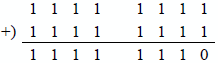
No overflow, because
6.7 Determine whether the conditional jump instructions shown below will cause a jump to DEST.
(a) 004FH + 200D JS DEST
004FH + 00C8H = 0117H
Sign is positive; therefore no jump.
(b) FF38H + 200D JZ DEST
FF38H + 00C8H = 1 ← 0000H
Result is zero; therefore, a jump will occur.
6.11 Let AX = –405D. Determine whether the conditional jump instruction shown below will cause a jump to BRANCH_ADDR.
CMP AX, FE6CHJGE BRANCH_ADDRFor signed operands, a jump will not occur, because FE6CH (–404D)
is greater than –405D (FE6BH).
6.13 Determine the number of times the following program segment executes the body of the loop:
MOV CX, –1LP1: ...LOOP LP1 65,535 times.
Chapter 7 Stack Operations
7.3 Determine the result of each instruction for the following program segment:
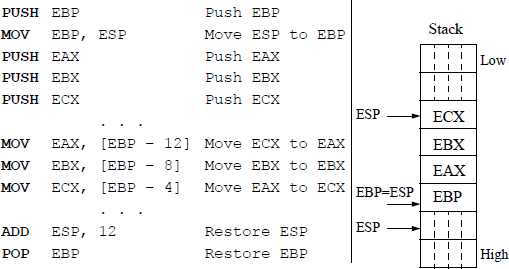
7.5 The partial contents of a stack are shown below before execution of the program segment listed below. Determine the contents of the stack after the program has been executed and indicate the new top of stack.
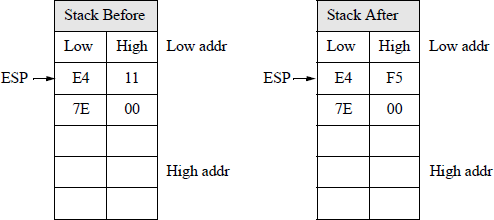
POP BX ;BX = 11 E4 HMOV AH, BH ;AX = 11 _ HADD AH, BL ;AX = F5 _ (E4 + 11 = F5)MOV BH, AH ;BX = F5 E4 H BL = E4PUSH BX ;Stack = E4 F5 H Low addr = E47.8 Write an assembly language program — using the PUSH and POP instructions — that adds four decimal integers, then displays their sum. Embed the assembly module in a C program. The decimal integers are entered from the keyboard.
//push_pop_add_int.cpp//add four decimal integers using push and pop
#include "stdafx.h"int main (void){//define variablesint dec1, dec2, dec3, dec4, sum_1234;
printf ("Enter four decimal integers: \n");scanf ("%d %d %d %d", &dec1, &dec2, &dec3, &dec4);
//switch to assembly_asm{MOV EAX, dec1MOV EBX, dec2ADD EAX, EBX ;dec1 + dec2 -> EAXPUSH EAX ;push dec1 + dec2
MOV EAX, dec3MOV EBX, dec4ADD EAX, EBX ;dec3 + dec4 -> EAX
POP EBX ;pop dec1 + dec2ADD EAX, EBX ;total sum -> EAX
MOV sum_1234, EAX ;move sum to result area}
printf ("\nsum of four integers = %d\n\n",sum_1234);
return 0;}Enter four decimal integers:1 2 3 4
sum of four integers = 10
Press any key to continue . . . _-----------------------------------------------------Enter four decimal integers:25 50 75 100
sum of four integers = 250
Press any key to continue . . . _-----------------------------------------------------Enter four decimal integers:1000 2000 3000 4000
sum of four integers = 10000
Press any key to continue . . . _-----------------------------------------------------Enter four decimal integers:37 1200 750 875
sum of four integers = 2862
Press any key to continue . . . _
Chapter 8 Logical, Bit, Shift, and Rotate Instructions
8.3 Using only logic instructions, write one instruction for each of the following parts that will perform the indicated operations.
(a) Set the low-order four bits of register AX.
OR AX, 000FH(b) Reset the high-order three bits of register AX.
AND AX, 1FFFH(c) Invert bits 7, 8, and 9 of register AX.
XOR AX, 0380H
8.8 Write an assembly language module embedded in a C program that uses the bit scan forward (BSF) instruction to detect whether the first bit detected is in the low-order half or the high-order half of a 32-bit operand. Do not determine the bit position.
//bsf_if_struc.cpp//determine if first bit is in position <= 15 or > 15//using an if structure
#include "stdafx.h"int main (void){//define variablesint bsf_src_opnd;
printf ("Enter an 8-digit hexadecimal number: \n");scanf ("%X", &bsf_src_opnd);//switch to assembly_asm{MOV EBX, bsf_src_opndCMP EBX, 0JZ NO_ONESBSF EAX, EBXCMP EAX, 15JBE LESS_THAN_16JMP GREATER_THAN_15}
NO_ONES:printf ("\nBSF opnd has no 1s\n\n");goto end;
LESS_THAN_16:printf ("\nBit is in position 15 -- 0\n\n");goto end;
GREATER_THAN_15:printf ("\nBit is in position 31 -- 16\n\n");
end:return 0;}Enter an 8-digit hexadecimal number:00A07000
Bit is in position 15 -- 0
Press any key to continue . . . _------------------------------------------------------Enter an 8-digit hexadecimal number:7BC68000
Bit is in position 15 -- 0
Press any key to continue . . . _------------------------------------------------------Enter an 8-digit hexadecimal number:FFFF0001
Bit is in position 15 -- 0
Press any key to continue . . . _------------------------------------------------------Enter an 8-digit hexadecimal number:80D10000
Bit is in position 31 -- 16
Press any key to continue . . . _------------------------------------------------------Enter an 8-digit hexadecimal number:0DC00000
Bit is in position 31 -- 16
Press any key to continue . . . _------------------------------------------------------Enter an 8-digit hexadecimal number:80000000
Bit is in position 31 -- 16
Press any key to continue . . . _------------------------------------------------------Enter an 8-digit hexadecimal number:00000000
BSF opnd has no 1s
Press any key to continue . . . _8.12 Determine the contents of register EBX and the flags register after execution of the program segment shown below. Then write an assembly language module embedded in a C program to verify the results.
MOV EBX, 0FFFFA85BHSAL EBX, 20MOV EBX, 0FFFFA85BHSAR EBX, 20SAL result = 85B00000
SAR result = FFFFFFFF
SAL flags = 86
SAR flags = 87
//sal_sar.cpp//program to illustrate shift arithmetic left//and shift arithmetic right instructions//for the same operand
#include "stdafx.h"int main (void){//define variablesint dst_opnd, sal_rslt, sar_rslt;unsigned char sal_flags, sar_flags;
printf ("Enter an 8-digit hexadecimal number: \n");scanf ("%X", &dst_opnd);
//switch to assembly_asm{//SAL instructionMOV EBX, dst_opndSAL EBX, 20MOV sal_rslt, EBXLAHFMOV sal_flags, AH
//SAR instructionMOV EBX, dst_opndSAR EBX, 20MOV sar_rslt, EBXLAHFMOV sar_flags, AH}
printf ("\nSAL result = %X\nSAL flags = %X\n\n",sal_rslt, sal_flags);
printf ("\nSAR result = %X\nSAR flags = %X\n\n",sar_rslt, sar_flags);
return 0;}Enter an 8-digit hexadecimal number:FFFFA85B
SAL result = 85B00000SAL flags = 86
SAR result = FFFFFFFFSAR flags = 87
Press any key to continue . . . _8.14 Write an assembly language module embedded in a C program that will multiply and divide a decimal number by eight using arithmetic shift instructions. When dividing, some numbers will have the fraction truncated.
//sal_sar_2.cpp//shifting positive and negative numbers//using SAL and SAR instructions
#include "stdafx.h"
int main (void){//define variablesint dst_opnd, sal_rslt, sar_rslt;
printf ("Enter a decimal number: \n");scanf ("%d", &dst_opnd);
//switch to assembly_asm{//SAL instructionMOV EAX, dst_opndSAL EAX, 3MOV sal_rslt, EAX//SAR instructionMOV EAX, dst_opndSAR EAX, 3MOV sar_rslt, EAX}
printf ("\nSAL result = %d\n", sal_rslt);
printf ("SAR result = %d\n\n", sar_rslt);
return 0;}Enter a decimal number:8
SAL result = 64SAR result = 1
Press any key to continue . . . _------------------------------------------------------Enter a decimal number:–8
SAL result = –64SAR result = –1
Press any key to continue . . . _------------------------------------------------------Enter a decimal number:–10
SAL result = –80SAR result = –2 //1.25; 1111 ... 1111 0110//1111 ... 1111 1110Press any key to continue . . . _------------------------------------------------------Enter a decimal number:25
SAL result = 200SAR result = 3 //3.125; 0000 ... 0001 1001//0000 ... 0000 0011Press any key to continue . . . _------------------------------------------------------Enter a decimal number:–25
SAL result = –200SAR result = –4 //–3.125; 1111 ... 1110 0111//1111 ... 1111 1100Press any key to continue . . . _------------------------------------------------------Enter a decimal number:500
SAL result = 4000SAR result = 62 //62.5; 0000 ... 0001 1111 0100//0000 ... 0000 0011 1110Press any key to continue . . . _------------------------------------------------------Enter a decimal number:1000
SAL result = 8000SAR result = 125
Press any key to continue . . . _8.16 Let register EAX contain AD3E14B5H and the carry flag be set. Determine the contents of register EAX after the following instruction is executed:
CF
RCL EAX, 6
1
1010
1101
0011
1110
0001
0100
1011
0101
1
0101
1010
0111
1100
0010
1001
0110
1011
After 1 shift
0
1011
0100
1111
1000
0101
0010
1101
0111
After 2 shifts
1
0110
1001
1111
0000
1010
0101
1010
1110
After 3 shifts
0
1101
0011
1110
0001
0100
1011
0101
1101
After 4 shifts
1
1010
0111
1100
0010
1001
0110
1011
1010
After 5 shifts
1
0100
1111
1000
0101
0010
1101
0111
0101
After 6 shifts
Chapter 9 Fixed-Point Arithmetic Instructions
9.3 Indicate whether an overflow occurs for the operation shown below. The numbers are in radix complementation for radix 3.

No overflow, because a positive and negative number are being added.
The sign for a positive number is 0.
The sign for a negative number is .
9.6 Determine the contents of registers AL and BL after the program segment shown below has executed. Then write an assembly language module embedded in a C program to verify the results.
AL BL
AL BL
AL BL
AL BL
AL BL
MOV
AL, 00H
0
MOV
BL, -5
0
L00P1:
ADD
BL, 2
0 -3
1 -2
2 -1
3 0
4 1
INC
AL
1 -3
2 -2
3 -1
4 0
5 1
ADD
BL, -1
1 -4
2 -3
3 -2
4 -1
5 0
JNZ
LOOP1
//inc_al_dec_bl.cpp//program to determine the contents of registers//AL and BL after a program has executed#include "stdafx.h"int main (void){//define variableschar al_sum, bl_sum;//switch to assembly_asm{MOV AL, 00HMOV BL, -5LOOP1: ADD BL, 2INC ALADD BL, -1JNZ LOOP1MOV al_sum, ALMOV bl_sum, BL}printf ("\nAL = %d\nBL = %d\n\n", al_sum, bl_sum);return 0;}AL = 5BL = 0
Press any key to continue . . . _9.9 Write an assembly language program — not embedded in a C program — that removes all nonletters from a string of characters that are entered from the keyboard.
PAGE 66, 80;non letters.asm;----------------------------------------------------.STACK
;----------------------------------------------------.DATAPARLST LABEL BYTEMAXLEN DB 40ACTLEN DB ?OPFLD DB 40 DUP(?)PRMPT DB 0DH, 0AH, 'Enter text $'RSLT DB 0DH, 0AH, 'Result = $'
;----------------------------------------------------.CODEBEGIN PROC FAR
;set up pgm dsMOV AX, @DATAMOV DS, AX
;read promptMOV AH, 9LEA DX, PRMPTINT 21H
;kybd rtn to enter charactersMOV AH, 0AHLEA DX, PARLSTINT 21H
MOV CL, ACTLEN ;get # of chars enteredMOV CH, 0
LEA SI, OPFLD ;source addr to siLEA DI, RSLT + 11 ;destination addr to di
LP1: MOV AL, [SI] ;get char in opfldCMP AL, 41H ;compare to uppercase AJL LP2 ;if < A, jumpCMP AL, 5AH ;compare to uppercase ZJLE LP4 ;if between A and Z, jump
CMP AL, 7AH ;compare to lowercase zJG LP2 ;if > z, jumpCMP AL, 61H ;compare to lowercase aJL LP2 ;if < a, jump
LP4: MOV [DI], AL ;move valid char to dstINC DI ;inc di to next dst
LP2: INC SI ;addr of next characterLOOP LP1 ;jump, get char in opfld
;display resultMOV AH, 09HLEA DX, RSLTINT 21H
BEGIN ENDPEND BEGINEnter text: the6h7hResult = the------------------------------------------------------Enter text: 7HD3e23klResult = HDekl------------------------------------------------------Enter text: 1234567879AResult = A------------------------------------------------------Enter text: ABcdEF7Result = ABcdEF------------------------------------------------------Enter text: abcdefghijResult = abcdefghij------------------------------------------------------Enter text: 123456789Result =9.17 Let register AL = 61H (9710). Then execute the instruction shown below to obtain the difference and the state of the following flags: OF, SF, ZF, AF, PF, and CF.
SUB AL, 65H ;65H = 10110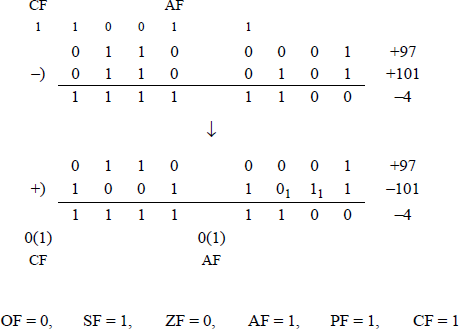
9.21 Write an assembly language program — not embedded in a C program — to reverse the order and change to uppercase all letters that are entered from the keyboard. The letters that are entered may be lowercase or uppercase.
;reverse uppercasePAGE 66, 80;-----------------------------------------------------.STACK;-----------------------------------------------------.DATAPARLST LABEL BYTEMAXLEN DB 40ACTLEN DB ?OPFLD DB 40 DUP(?)PRMPT DB 0DH, 0AH, 'Enter characters: $'RSLT DB 0DH, 0AH, 'Result = $'
.CODEBEGIN PROC FAR
;setup pgm dsMOV AX, @DATA ;get addr of data segMOV DS, AX ;move addr to ds
;read promptMOV AH, 09H ;display stringLEA DX, PRMPT ;put addr of prompt in dxINT 21H ;dos interrupt
;keyboard request rtn to enter charactersMOV AH, 0AH ;buffered keyboard inputLEA DX, PARLST ;put addr of parlst in dxINT 21H ;dos interrupt
;setup count and addressesMOV CL, ACTLEN ;number of charactersMOV CH, 0 ;... enteredMOV BX, CX ;bx is displacementDEC BXLEA SI, OPFLD[BX] ;addr of last characterLEA DI, RSLT + 11 ;setup destination addr
;change to uppercase and reverse orderSWAP: MOV AL, [SI] ;move character to alCMP AL, 61H ;compare to lowercaseJL UPPER ;jump if uppercaseSUB AL, 20H ;if lowercase, change to;uppercaseUPPER: MOV [DI], AL ;move char to result areaDEC SIINC DILOOP SWAP ;loop if cx !=0
;display resultMOV AH, 09H ;display stringLEA DX, RSLT ;put addr of rslt in dxINT 21H ;dos interrupt
BEGIN ENDPEND BEGINEnter characters: aBCdeFGhResult = HGFEDCBA------------------------------------------------------Enter characters: ihgfedcbaResult = ABCDEFGHI------------------------------------------------------Enter characters: ABCDEFGHIJResult = JIHGFEDCBA9.23 Write an assembly language program — not embedded in a C program — to sort n single-digit numbers in ascending numerical order that are entered from the keyboard. A simple exchange sort is sufficient for this program. The technique is slow, but appropriate for sorting small lists. The method is as follows:
Search the list to find the smallest number.
After finding the smallest number, exchange this number with the first number.
Search the list again to find the next smallest number, starting with the second number.
Then exchange this (second smallest) number with the second number.
Repeat this process, starting with the third number, then the fourth number, etc.
;sort n numbers2.asm
;-----------------------------------------------------.STACK;-----------------------------------------------------.DATAPARLST LABEL BYTEMAXLEN DB 15ACTLEN DB ?OPFLD DB 15 DUP(?)PRMPT DB 0DH, 0AH, ‘Enter numbers: $’RSLT DB 0DH, 0AH, ‘Sorted numbers = $’
;-----------------------------------------------------.CODEBEGIN PROC FAR
;set up pgm dsMOV AX, @DATA ;get addr of data segMOV DS, AX ;move addr to ds
;read promptMOV AH, 09H ;display stringLEA DX, PRMPT ;put addr of prompt in dxINT 21H ;dos interrupt
;keyboard request rtn to enter charactersMOV AH, 0AH ;buffered keyboard inputLEA DX, PARLST ;put addr of parlst in dxINT 21H ;dos interrupt
;sort numbersLEA SI, OPFLD ;addr of first byte to siMOV DL, ACTLEN ;# of bytes to dxMOV DH, 00H ;... as loop ctrDEC DX ;loop ctr - 1
LP1: MOV CX, DX ;cx is loop2 ctr
LP2: MOV AL, [SI] ;number to alMOV BX, CX ;bx is base addrCMP AL, [BX+SI] ;is number <= to al?JBE NEXT ;number is <=; get next #XCHG AL, [BX+SI] ;number is !<=; put in alMOV [SI], AL ;put # in input buffer
NEXT: LOOP LP2 ;loop until #s comparedINC SI ;point to next numberDEC DX ;dec internal loop ctrJNZ LP1 ;compare remaining #s
;set up src (opfld) and dst (rslt)LEA SI, OPFLDLEA DI, RSLT+20MOV CL, ACTLENMOV CH, 00H ;cx is counter
;move sorted numbers to input bufferINP_BUFF:MOV BL, [SI] ;opfld to blMOV [DI], BL ;byte to result areaINC SIINC DILOOP INP_BUFF
;display sorted numbersMOV AH, 09H ;display stringLEA DX, RSLT ;put addr of rslt in dxINT 21H ;dos interrupt
BEGIN ENDPEND BEGINEnter numbers: 7658943034Sorted numbers = 0334456789------------------------------------------------------Enter numbers: 7548391235Sorted numbers = 1233455789------------------------------------------------------Enter numbers: 9876543210Sorted numbers = 01234567899.27 Determine the hexadecimal contents of register AX after the following program segment has been executed:
MOV CX, 3MOV AX, 2 ;AX = 2LP1: MUL AX ;AX = 4 16 256LOOP LP1 ;CX = 3 2 1
AX = 0000 0001 0000 00009.30 Write an assembly language module embedded in a C program that uses the three-operand form for signed multiplication. Enter a signed decimal multiplicand from the keyboard and assign an immediate multiplier for the IMUL operation. Display the multiplicand, the multiplier, and the product.
//imul_3_opnds.cpp//signed decimal multiplication using 3 operands
#include "stdafx.h"int main (void){//define variableslong mpcnd, product;
printf ("Enter a signed decimal multiplicand: \n");scanf ("%d", &mpcnd);
//switch to assembly_asm{MOV EBX, mpcndIMUL EAX, EBX, 10 ;EAX = EBX x 10MOV product, EAX}
printf ("\nMultiplicand = %d", mpcnd);printf ("\nMultiplier = 10");printf ("\nProduct = %d\n\n", product);
return 0;}Enter a signed decimal multiplicand:450
Multiplicand = 450Multiplier = 10Product = 4500
Press any key to continue . . . _------------------------------------------------------Enter a signed decimal multiplicand:–5
Multiplicand = –5Multiplier = 10Product = –50
Press any key to continue . . . _------------------------------------------------------Enter a signed decimal multiplicand:6000
Multiplicand = 6000Multiplier = 10Product = 60000
Press any key to continue . . . _------------------------------------------------------Enter a signed decimal multiplicand:–6000
Multiplicand = –6000Multiplier = 10Product = –60000
Press any key to continue . . . _------------------------------------------------------Enter a signed decimal multiplicand:65535
Multiplicand = 65535Multiplier = 10Product = 655350
Press any key to continue . . . _------------------------------------------------------Enter a signed decimal multiplicand:–65535
Multiplicand = –65535Multiplier = 10Product = –655350
Press any key to continue . . . _9.34 Write an assembly language module embedded in a C program to perform unsigned division (DIV) on two decimal integers that are entered from the keyboard. Print the dividend, divisor, quotient, and remainder.
//div.cpp//unsigned division of two integers#include "stdafx.h"int main (void){//define variablesunsigned short dvdnd, dvsr, quot, rem;
printf ("Enter a decimal dividend and divisor: \n");scanf ("%d %d", &dvdnd, &dvsr);
//switch to assembly_asm{MOV AX, dvdndCWDDIV dvsrMOV quot, AXMOV rem, DX}printf ("\nDividend = %d\nDivisor = %d\n",dvdnd, dvsr);printf ("\nQuotient = %d\nRemainder = %d\n\n",quot, rem);return 0;}Enter a decimal dividend and divisor:450 20
Dividend = 450Divisor = 20
Quotient = 22Remainder = 10
Press any key to continue . . . _------------------------------------------------------Enter a decimal dividend and divisor:25000 250
Dividend = 25000Divisor = 250
Quotient = 100Remainder = 0
Press any key to continue . . . _------------------------------------------------------Enter a decimal dividend and divisor:25000 30
Dividend = 25000Divisor = 30
Quotient = 833Remainder = 10
Press any key to continue . . . _------------------------------------------------------Enter a decimal dividend and divisor:4660 86
Dividend = 4660Divisor = 86
Quotient = 54Remainder = 16
Press any key to continue . . . _9.38 Write an assembly language module embedded in a C program that evaluates the expression shown below, where , , , and .
//solve_eqn.cpp//use imul, add, sub, and idiv to solve the equation://[V - (X x Y + Z - 500)]/X
#include "stdafx.h"
int main (void){//define variablesshort x, y, z, v, quot, rem;
x = 0x0190;y = 0x0005;z = 0x03E8;v = 0x0FA0;
//switch to assembly_asm{//X x YMOV AX, xIMUL yMOV CX, AXMOV BX, DX
//+ZMOV AX, zCWDADD CX, AXADC BX, DX
//-500SUB CX, 01F4H //500SBB BX, 0
//V-()MOV AX, vCWDSUB AX, CXSBB DX, BX
///400IDIV x
//move ax to quotient and dx to remainderMOV quot, AXMOV rem, DX}
printf ("\nQuotient = %X, Remainder = %X\n\n",quot, rem);return 0;}Quotient = 3, Remainder = 12C
Press any key to continue . . . _
Chapter 10 Binary-Coded Decimal Arithmetic Instructions
10.5 In each part below, assume that the following instructions are executed:
ADD AL, BLDAA(a) Give the values of AL after the ADD instruction has been executed, but before the DAA instruction has been executed for the indicated register values shown below.
(b) Give the values of AL, the carry flag (CF), and the auxiliary carry flag (AF) after the DAA instruction has been executed for the indicated register values shown below.
After ADD
After DAA
CF
AF
(1) AL = 35H, BL = 48H
Sum = 7DH
Sum = 83
0
1
(2) AL = 47H, BL = 61H
Sum = A8H
Sum = 08
1
0
(3) AL = 75H, BL = 46H
Sum = BBH
Sum = 21
1
1
Then write an assembly language module embedded in a C program to verify the results.
//daa3.cpp//illustrates the use of the daa instruction#include "stdafx.h"
int main (void){//define variablesunsigned char augend, addend, add_sum, daa_sum,flags;
printf ("Enter two 2-digit hexadecimal numbers:\n");scanf ("%X %X", &augend, &addend);//switch to assembly_asm{//obtain sumMOV AL, augendADD AL, addendMOV add_sum, ALDAAMOV daa_sum, AL//save flagsPUSHFPOP AXMOV flags, AL}printf ("\nAugend = %X, Addend = %X\n",augend, addend);printf ("\nADD sum = %X, DAA sum = %X\n",add_sum, daa_sum);printf ("Flags = %X\n\n", flags);return 0;}Enter two 2-digit hexadecimal numbers:35 48
Augend = 35, Addend = 48
ADD sum = 7D, DAA sum = 83 //DAA sum = 083Flags = 92 //SF, AF
Press any key to continue . . . _------------------------------------------------------------------------------------------------------------Enter two 2-digit hexadecimal numbers:47 61
Augend = 47, Addend = 61
ADD sum = A8, DAA sum = 8 //DAA sum = 108Flags = 3 //CF
Press any key to continue . . . _------------------------------------------------------Enter two 2-digit hexadecimal numbers:75 46
Augend = 75, Addend = 46
ADD sum = BB, DAA sum = 21 //DAA sum = 121Flags = 17 //AF, PF, CF
Press any key to continue . . . _10.8 Perform a subtraction and adjustment of the following two operands: 07 – 09. Show the details of the subtraction and adjustment.
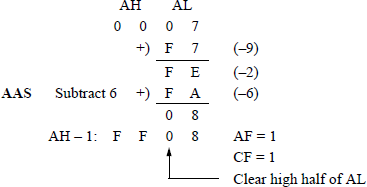
10.17 Write an assembly language program — not embedded in a C program — that multiplies a five-digit multiplicand by a one-digit multiplier using the MUL instruction in combination with the AAM instruction. The ADD instruction and the AAA instruction will also be used in implementing the program.
The five-digit multiplicand and the one-digit multiplier are entered from the keyboard and stored in the OPFLD, as shown below using a multiplicand of 12345 and a multiplier of 6. Enter several different multiplicands and multipliers, then display the operands and the resulting product.

The paper-and-pencil example shown below may help to illustrate the algorithm used in the program.
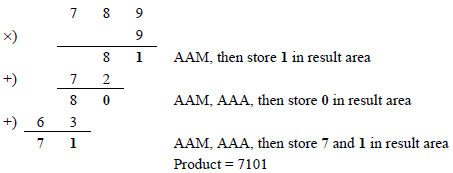
;aam4.asm;obtain the product of a 5-digit multiplicand;and a 1-digit multiplier; -----------------------------------------------------.STACK
; -----------------------------------------------------.DATAPARLST LABEL BYTEMAXLEN DB 10ACTLEN DB ?OPFLD DB 10 DUP(?)PRMPT DB 0DH, 0AH, 'Enter 5-digit mpcnd and1-digit mplyr: $'RSLT DB 0DH, 0AH, 'Product = $'.CODEBEGIN PROC FAR
;set up pgm dsMOV AX, @DATA ;get addr of data segMOV DS, AX ;move addr to ds
;read promptMOV AH, 09H ;display stringLEA DX, PRMPT ;put addr of prompt in dxINT 21H ;dos interrupt
;keyboard request rtn to enter charactersMOV AH, 0AH ;buffered keyboard inputLEA DX, PARLST ;put addr of parlst in dxINT 21H ;dos interrupt
; -----------------------------------------------------;perform the multiplicationMOV CX, 05 ;five loops
LEA SI, OPFLD+4 ;si = addr of low-order;mpcnd digitLEA DI, RSLT+17 ;di = addr of low-order;product digitAND OPFLD+5, 0FH ;unpack multiplier
LP1: MOV AL, [SI] ;get next low-order;mpcnd digitAND AL, 0FH ;unpack itMUL OPFLD+5 ;multiply by the mplyrAAM ;adjust the productADD AL, [DI] ;add low-order product;digit to alAAA ;adjust the sumOR AL, 30H ;add ascii biasMOV [DI], AL ;move to low-order;result areaDEC DI ;get addr of next;low-order result areaOR AH, 30H ;add ascii biasMOV [DI], AH ;move to next low-order;result area
DEC SI ;address next high-order;mpcnd digitLOOP LP1 ;loop if cx != 0;display productMOV AH, 09H ;display stringLEA DX, RSLT ;addr of product in dxINT 21H ;dos interruptBEGIN ENDPEND BEGINEnter 5-digit mpcnd and 1-digit mplyr: 123456Product = 074070------------------------------------------------------Enter 5-digit mpcnd and 1-digit mplyr: 007899Product = 007101------------------------------------------------------Enter 5-digit mpcnd and 1-digit mplyr: 999999Product = 899991------------------------------------------------------Enter 5-digit mpcnd and 1-digit mplyr: 556667Product = 389662------------------------------------------------------Enter 5-digit mpcnd and 1-digit mplyr: 111118Product = 088888------------------------------------------------------Enter 5-digit mpcnd and 1-digit mplyr: 765432Product = 15308610.19 Repeat Problem 10.18, this time using an assembly language module embedded in a C program. Note the simplicity of this program. There is no requirement to remove the ASCII bias for the numbers that are entered from the keyboard, or to restore the ASCII bias before displaying the hours, minutes, and seconds. It is also not necessary to establish stack or data segments. The range is the same: 10,000 to 60,000 seconds.
//hrs_min_sec.cpp//given a 5-digit number of seconds, calculate the//equivalent number of hours, minutes, and seconds#include "stdafx.h"int main (void){unsigned short seconds, hrs, min, sec;
printf ("Enter 5-digit #: range 10000 -- 60000:\n");scanf ("%d", &seconds);//switch to assembly_asm{MOV DX, 0MOV AX, secondsMOV BX, 3600DIV BXMOV hrs, AXMOV AX, DXMOV DX, 0MOV BX, 60DIV BXMOV min, AXMOV sec, DX}
printf ("\nHours = %d", hrs);printf ("\nMinutes = %d", min);printf ("\nSeconds = %d\n\n", sec);
return 0;}Enter 5-digit #: range 10000 -- 60000:43210
Hours = 12Minutes = 0Seconds = 10
Press any key to continue . . . _------------------------------------------------------Enter 5-digit #: range 10000 -- 60000:10000
Hours = 2Minutes = 46Seconds = 40
Press any key to continue . . . _------------------------------------------------------
Enter 5-digit #: range 10000 -- 60000:00060
Hours = 0Minutes = 1Seconds = 0
Press any key to continue . . . _------------------------------------------------------Enter 5-digit #:range 10000 -- 60000:00059
Hours = 0Minutes = 0Seconds = 59
Press any key to continue . . . _------------------------------------------------------Enter 5-digit #:range 10000 -- 60000:20000
Hours = 5Minutes = 33Seconds = 20
Press any key to continue . . . _------------------------------------------------------Enter 5-digit #: range 10000 -- 60000:39760
Hours = 11Minutes = 2Seconds = 40
Press any key to continue . . . _10.20 Write an assembly language program to repeat Problem 10.18 — not embedded in a C program — that calculates the number of hours, minutes, and seconds from a number of seconds that are entered from the keyboard. This time use a loop to calculate the sum that is represented by the digits that are entered from the keyboard. The number of seconds entered ranges from 10,000 to 60,000. Enter several different 5-digit numbers of seconds. This program will use the MUL, DIV, and AAM instructions.
;hrs_min_sec2.asm;given a 5-digit number of seconds,;calculate the equivalent number of;hours, minutes, and seconds
; ----------------------------------------------------.STACK
; ----------------------------------------------------.DATAPARLST LABEL BYTEMAXLEN DB 10ACTLEN DB ?OPFLD DB 10 DUP(?)PRMPT DB 0DH, 0AH, 'Enter 5-digit #:range 10000 -- 60000: $'SUM DW 8 DUP(0)HOURS DB 0DH, 0AH, ‘Hours = $’MINUTES DB 0DH, 0AH, ‘Minutes = $’SECONDS DB 0DH, 0AH, ‘Seconds = $’
; ----------------------------------------------------.CODEBEGIN PROC FAR
; ----------------------------------------------------;set up pgm dsMOV AX, @DATA ;get addr of data segMOV DS, AX ;move addr to ds
;read promptMOV AH, 09H ;display stringLEA DX, PRMPT ;put addr of prompt in dxINT 21H ;dos interrupt
;keyboard request rtn to enter charactersMOV AH, 0AH ;buffered keyboard inputLEA DX, PARLST ;put addr of parlst in dxINT 21H ;dos interrupt
; ----------------------------------------------------;obtain the 5-digit number as a sumLEA SI, OPFLD ;addr of first digitMOV BX, 10000 ;bx = 2710hMOV CX, 5 ;five loopsLP1: MOV AL, [SI] ;get next digitAND AL, 0FH ;unpack itMOV AH, 00H ;ax = 00 alMUL BX ;dx ax = productADD SUM, AX ;accumulate sum
MOV AX, BX ;move multiply amount;to ax for divideMOV DX, 00H ;dx ax = 00 axMOV DI, 10 ;10 is the divisorDIV DI ;divide bx (ax) by 10MOV BX, AX ;move quot in ax to bxINC SI ;si points to next digitLOOP LP1 ;loop if cx != 0; ----------------------------------------------------
;calculate the hoursMOV DX, 0 ;clear dxMOV AX, SUM ;move sum to axMOV BX, 3600 ;to divide ax for hoursDIV BX ;quot (hrs) in ax;;rem (min) in dxAAM ;2 unpacked bcd #s in axOR AX, 3030H ;add ascii biasMOV HOURS+10, AH ;move units hoursMOV HOURS+11, AL ;move tens hours
;calculate the minutesMOV AX, DX ;move rem (min) to axMOV DX, 0 ;clear dxMOV BX, 60 ;to divide ax for minDIV BX ;quot (min) in ax;;rem (sec) in dxAAM ;2 unpacked bcd #s in axOR AX, 3030H ;add ascii biasMOV MINUTES+12, AH ;move units minutesMOV MINUTES+13, AL ;move tens minutes
;calculate the secondsMOV AX, DX ;move rem (sec) to axMOV DX, 0 ;clear dxAAM ;2 unpacked bcd #s in axOR AX, 3030H ;add ascii biasMOV SECONDS+12, AH ;move units secondsMOV SECONDS+13, AL ;move tens seconds; ----------------------------------------------------;display hoursMOV AH, 09H ;display stringLEA DX, HOURS ;put addr of hours in dxINT 21H ;dos interrupt
;display minutesMOV AH, 09H ;display stringLEA DX, MINUTES ;put addr of min in dxINT 21H ;dos interrupt
;display secondsMOV AH, 09H ;display stringLEA DX, SECONDS ;put addr of sec in dxINT 21H ;dos interrupt
; ----------------------------------------------------BEGIN ENDPEND BEGINEnter 5-digit #: range 10000 -- 60000: 43210Hours = 12Minutes = 00Seconds = 10------------------------------------------------------Enter 5-digit #: range 10000 -- 60000: 10000Hours = 02Minutes = 46Seconds = 40------------------------------------------------------Enter 5-digit #: range 10000 -- 60000: 12345Hours = 03Minutes = 25Seconds = 45------------------------------------------------------Enter 5-digit #: range 10000 -- 60000: 00060Hours = 00Minutes = 01Seconds = 00------------------------------------------------------Enter 5-digit #: range 10000 -- 60000: 00059Hours = 00Minutes = 00Seconds = 59------------------------------------------------------Enter 5-digit #: range 10000 -- 60000: 20000Hours = 05Minutes = 33Seconds = 20------------------------------------------------------Enter 5-digit #: range 10000 -- 60000: 39760Hours = 11Minutes = 02Seconds = 40------------------------------------------------------Enter 5-digit #: range 10000 -- 60000: 60000Hours = 16Minutes = 40Seconds = 00------------------------------------------------------Enter 5-digit #: range 10000 -- 60000: 50000Hours = 13Minutes = 53Seconds = 20
Chapter 11 Floating-Point Arithmetic Instructions
11.4 The floating-point number shown below has an unbiased exponent and an unnormalized fraction. Show the same floating-point number with a biased exponent and a normalized fraction in the single-precision floating-point format.

Add bias: (for unnormalized fraction) Normalize: shift fraction left 4 to yield an implied 1

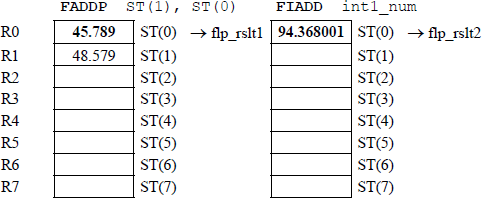
11.10 Write an assembly language module embedded in a C program that uses the add (FADDP) instruction and the add (FIADD) instruction. For the FADDP instruction, use the FADDP ST(i), ST(0) version. Enter three floating-point numbers and one integer number from the keyboard. Display the results of the program and show the register stack for each sequence of the program.
//fadd_versions2.cpp//show the use of the FADDP and FIADD instructions
#include "stdafx.h"
int main (void){//define variablesfloat flp1_num, flp2_num, flp3_num, int1_num,flp_rslt1, flp_rslt2, flp_rslt3;
int int1_num;
printf ("Enter 3 floating-point numbersand 1 integer: \n");
scanf ("%f %f %f %d", &flp1_num, &flp2_num,&flp3_num, &int1_num);
//switch to assembly_asm{FLD flp1_num //flp1_num -> ST(0)FLD flp2_num //flp2_num -> ST(0)//flp1_num -> ST(1)FLD flp3_num //flp3_num -> ST(0)//fld2_num -> ST(1)//fld1_num -> ST(2)
FADDP ST(2), ST(0)//ST(0) + ST(2) -> ST(2),//popFST flp_rslt1 //ST(0) -> flp_rslt1
FADDP ST(1), ST(0)//ST(0) + ST(1) -> ST(1),//pop
FST flp_rslt2 //ST(0) -> flp_rslt2FIADD int1_num //ST(0) + int1_num -> ST(0)FST flp_rslt3 //ST(0) -> flp_rslt3}
//print resultprintf ("\nflp_rslt1 = %f\n", flp_rslt1);
printf ("flp_rslt2 = %f\n", flp_rslt2);
printf ("flp_rslt3 = %f\n\n", flp_rslt3);
return 0;}Enter 3 floating-point numbers and 1 integer:1.2 2.3 3.4 5
flp_rslt1 = 2.300000flp_rslt2 = 6.900000flp_rslt3 = 11.900000
Press any key to continue . . . _------------------------------------------------------Enter 3 floating-point numbers and 1 integer:32.456 45.789 16.123 10
flp_rslt1 = 45.789001flp_rslt2 = 94.368004flp_rslt3 = 104.368004
Press any key to continue . . . _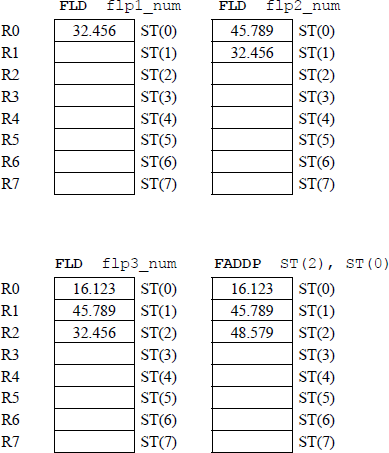
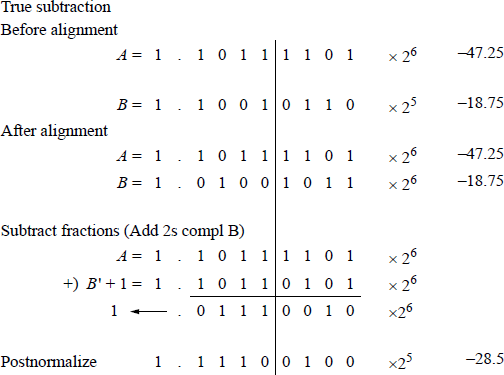
11.20 Perform the following operation on the two operands: (–47.25) – (–18.75).
11.22 Write an assembly language module embedded in a C program that uses the mul (FMULP) and the mul (FIMUL) instructions. For the FMULP instruction, use the FMULP ST(i), ST(0) version. Use the three sequences shown below to execute the FMULP, FMULP, and FIMUL instructions in that order and display the results of the program. Show the register stack for the third sequence of the program.
+1.200 +2.300 +3.400 +5+32.400 +45.700 +16.100 +10–23.600 +28.500 –27.400 –12//fmul_versions2.cpp//show the use of the FMULP and FIMUL instructions#include "stdafx.h"int main (void){//define variablesfloat flp1_num, flp2_num, flp3_num,flp_rslt1, flp_rslt2, flp_rslt3;int int1_num;
printf ("Enter 3 floating-point numbers and1 integer: \n");scanf ("%f %f %f %d", &flp1_num, &flp2_num,&flp3_num, &int1_num);
//switch to assembly_asm{FLD flp1_num //flp1_num -> ST(0)FLD flp2_num //flp2_num -> ST(0)//flp1_num -> ST(1)FLD flp3_num //flp3_num -> ST(0)//fld2_num -> ST(1)//fld1_num -> ST(2)//----------------------------------------------------FMULP ST(2), ST(0)//ST(2) × ST(0)->ST(2), popFST flp_rslt1 //ST(0) -> flp_rslt1//----------------------------------------------------FMULP ST(1), ST(0)//ST(1) × ST(0)->ST(1), popFST flp_rslt2 //ST(0) -> flp_rslt2//----------------------------------------------------//----------------------------------------------------FIMUL int1_num //ST(0) × int1_num->ST(0)FST flp_rslt3 //ST(0) -> flp_rslt3//----------------------------------------------------}
//print resultprintf ("\nflp_rslt1 = %f\n", flp_rslt1);printf ("flp_rslt2 = %f\n", flp_rslt2);printf ("flp_rslt3 = %f\n\n", flp_rslt3);
return 0;}Enter 3 floating-point numbers and 1 integer:1.2 2.3 3.4 5
flp_rslt1 = 2.300000flp_rslt2 = 9.384001flp_rslt3 = 46.920002
Press any key to continue . . . _------------------------------------------------------Enter 3 floating-point numbers and 1 integer:32.4 45.7 16.1 10
flp_rslt1 = 45.700001flp_rslt2 = 23838.949219flp_rslt3 = 238389.500000
Press any key to continue . . . _------------------------------------------------------Enter 3 floating-point numbers and 1 integer:–23.6 +28.5 –27.4 –12
flp_rslt1 = 28.500000flp_rslt2 = 18429.240234flp_rslt3 = –221150.875000
Press any key to continue . . . _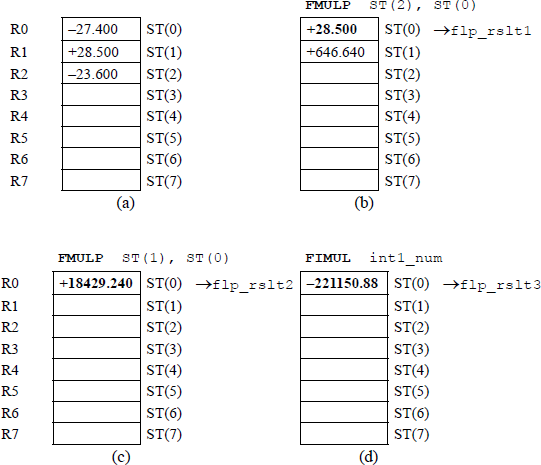
11.28 A resistor is one of four passive circuit elements: resistor, capacitor, inductor, and the recently discovered memristor. The equivalent resistance Req — specified in ohms — of resistors connected in series is the sum of the resistor values. However, the equivalent resistance of resistors connected in parallel is shown in the equation below.
The value of Req is smaller than the resistance of the smallest resistor in the parallel circuit. The circuit shown below contains three parallel resistors.
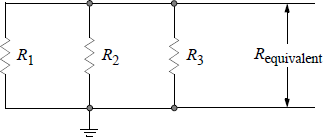
Write an assembly language module embedded in a C program that calculates the equivalent resistance of a three-resistor parallel network. Enter four sets of values for the resistors and display the equivalent resistance.
//parallel_resistors.cpp//find the equivalent resistance of a//three-resistor parallel network
#include "stdafx.h"
int main (void){float res1, res2, res3,res1_inv, res2_inv, res3_inv,resn_sum, res_equiv;
printf ("Enter three resistor values: \n");
scanf ("%f %f %f", &res1, &res2, &res3);//switch to assembly_asm{//----------------------------------------------------//calculations for resistor 1FLD1 //+1.0 -> ST(0)FLD res1 //res1 -> ST(0)//+1.0 -> ST(1)FDIVP ST(1), ST(0)//+1.0 / res1 -> ST(1), popFST res1_inv //ST(0) (+1.0 / res1) ->//res1_inv//----------------------------------------------------//calculations for resistor 2FLD1 //+1.0 -> ST(0)//+1.0 / res1 -> ST(1)FLD res2 //res2 -> ST(0)//+1.0 -> ST(1)//+1.0 / res1 -> ST(2)FDIVP ST(1), ST(0)//+1.0 / res2 -> ST(1), popFST res2_inv //ST(0) (+1.0 / res2) ->//res2_inv//----------------------------------------------------//calculations for resistor 3FLD1 //+1.0 -> ST(0)//+1.0 / res2 -> ST(1)//+1.0 / res1 -> ST(2)FLD res3 //res3 -> ST(0)//+1.0 -> ST(1)//+1.0 / res2 -> ST(2)//+1.0 / res1 -> ST(3)FDIVP ST(1), ST(0)//+1.0 /res3 -> ST(1), popFST res3_inv //ST(0) (+1.0 / res3) ->//res3_inv//----------------------------------------------------//calculate the sum of the inverted resistorsFADD ST(0), ST(1)//(+1.0 / res3) +//(+1.0 / res2) -> ST(0)FADD ST(0), ST(2)//ST(0) + (+1.0 / res1) ->//ST(0). Sum of inverted//resistors -> ST(0)FST resn_sum //sum of inverted resistors//-> resn_sum//----------------------------------------------------//----------------------------------------------------//calculate the equivalent resistanceFLD1 //+1.0 -> ST(0)FDIV resn_sum //+1.0 / resn_sum -> ST(0)FST res_equiv //ST(0) -> equivalent//resistance//----------------------------------------------------}
//print resultprintf ("\nEquivalent resistance = %f ohms\n\n",res_equiv);return 0;}Enter three resistor values:1000.0 1000.0 1000.0
Equivalent resistance = 333.333344 ohms
Press any key to continue . . . _------------------------------------------------------Enter three resistor values:72.25 1000 64.38
Equivalent resistance = 32.923325 ohms
Press any key to continue . . . _------------------------------------------------------Enter three resistor values:750.0 75000.0 3600.0
Equivalent resistance = 615.595032 ohms
Press any key to continue . . . _------------------------------------------------------Enter three resistor values:1.0 2.0 3.0
Equivalent resistance = 0.545455 ohms
Press any key to continue . . . _11.33 Write an assembly language module embedded in a C program that calculates the result of the expression shown below for different values of the floating-point variables flp1 and flp2.
//square_root.cpp//uses FMUL, FSQRT, FLDPI, FLD1, FDIV instructions#include "stdafx.h"int main (void){float flp1, flp2, denom_rslt, flp_rslt;float two;two = 2.0;
printf ("Enter two floating-point numbers: \n");scanf ("%f %f", &flp1, &flp2);
//switch to assembly_asm{FLD flp1 //flp1 -> ST(0)FMUL flp2 //flp1 x flp2 -> ST(0)FSQRT //sq root of ST(0) -> ST(0)FMUL two //sq root of ST(0) x 2.0 ->//ST(0)FLDPI //pi -> ST(0)//sq root of ST(0) x 2.0 ->//ST(1)FMUL ST(0), ST(1)//2.0 x sq root x pi ->//ST(0)FSTP denom_rslt //denominator ->//denom_rslt, pop stackFLD1 //1.0 -> ST(0)FDIV denom_rslt //1.0 / denom_rslt -> ST(0)FST flp_rslt //result -> flp_rslt area}//print resultprintf ("\nResult = %f\n\n", flp_rslt);
return 0;}Enter two floating-point numbers:10.0 10.0
Result = 0.015915
Press any key to continue . . . _------------------------------------------------------Enter two floating-point numbers:20.0 30.0
Result = 0.006497
Press any key to continue . . . _------------------------------------------------------Enter two floating-point numbers:0.5 0.5
Result = 0.318310
Press any key to continue . . . _------------------------------------------------------Enter two floating-point numbers:0.05 0.08
Result = 2.516461
Press any key to continue . . . _------------------------------------------------------Enter two floating-point numbers:0.05 0.05
Result = 3.183099
Press any key to continue . . . _
Chapter 12 Procedures
12.1 Write an assembly language program — not embedded in a C program — that uses a procedure to multiply two single-digit operands. Enter several operands for the multiplicand and multiplier and display the products.
;mul_proc.asm; -----------------------------------------------------.STACK; -----------------------------------------------------.DATAPARLST LABEL BYTEMAXLEN DB 5ACTLEN DB ?OPFLD DB 5 DUP(?)PRMPT DB 0DH, 0AH, 'Enter two single-digit integers: $'RSLT DB 0DH, 0AH, 'Product = $'; -----------------------------------------------------.CODEBEGIN PROC FAR
;set up pgm dsMOV AX, @DATA ;get addr of data segMOV DS, AX;read promptMOV AH, 09H ;display stringLEA DX, PRMPTINT 21H ;dos interrupt;kybd rtn to enter charsMOV AH, 0AH ;buffered kybd inputLEA DX, PARLSTINT 21H;get the two integersMOV AL, OPFLD ;get 1st digit (mpcnd) fm opfldAND AL, 0FH ;remove ascii biasMOV AH, 00H ;clear ahPUSH AXMOV BL, OPFLD+1 ;get 2nd digit (mplyr) fm opfldAND BL, 0FH ;remove ascii biasMOV BH, 00H ;clear bhPUSH BX
CALLCALC ;push ip. call calc rtn;return to here after calc procedure;move the sum to resultMOV RSLT+12, AHMOV RSLT+13, AL;display the resulting sumMOV AH, 09H ;display stringLEA DX, RSLTINT 21HBEGIN ENDP; -----------------------------------------------------CALC PROC NEARPUSH BP ;bp will be usedMOV BP, SP ;bp points to tosMOV AX, [BP+4] ;get opnd a (mpcnd)MUL [BP+6] ;mul opnd b (mplyr). prod to axAAM ;ascii adjust for mulOR AX, 3030H ;convert to asciiPOP BP ;restore bpRET 4 ;pop ip. add 4 to sp so that;sp points to initial locationCALC ENDPEND BEGINEnter two single-digit integers: 23Product = 6------------------------------------------------------Enter two single-digit integers: 91Product = 09------------------------------------------------------Enter two single-digit integers: 54Product = 20------------------------------------------------------Enter two single-digit integers: 78Product = 56------------------------------------------------------Enter two single-digit integers: 98Product = 72------------------------------------------------------Enter two single-digit integers: 99Product = 81------------------------------------------------------Enter two single-digit integers: 90Product = 0012.4 Write an assembly language program — not embedded in a C program — that uses a procedure to exclusive-OR six hexadecimal characters that are entered from the keyboard. The following characters are exclusive-ORed: the first and third; the second and fourth; the third and fifth; and the fourth and sixth. The keyboard data can be any hexadecimal characters; for example, 2T/}b*.
;xor_proc.asm;exclusive-OR characters;opfld xor opfld2;opfld2 xor opfld4;opfld3 xor opfld5;opfld4 xor opfld6; -----------------------------------------------------.STACK; -----------------------------------------------------.DATAPARLST LABEL BYTEMAXLEN DB 10ACTLEN DB ?OPFLD DB 10 DUP(?)PRMPT DB 0DH, 0AH, 'Enter six hexadecimalcharacters: $'RSLT DB 0DH, 0AH, 'Result = $'; -----------------------------------------------------.CODEBEGIN PROC FAR
;set up pgm dsMOV AX, @DATAMOV DS, AX;read promptMOV AH, 09HLEA DX, PRMPTINT 21H;keyboard request rtn to enter charactersMOV AH, 0AHLEA DX, PARLSTINT 21H;set up addressesLEA SI, OPFLD ;1st numberLEA DI, OPFLD+2 ;3rd numberLEA BX, RSLT+12 ;result areaCALL EXOR ;push ip. call exor rtn; ----------------------------------------------------;return to here after exor procedure;display resultMOV AH, 09H ;display stringLEA DX, RSLTINT 21H
BEGIN ENDP
; ----------------------------------------------------EXOR PROC NEARMOV CX, 4 ;loop controlLP1: MOV AL, [SI]MOV AH, [DI]XOR AL, AHOR AL, 30HMOV [BX], ALINC SIINC DIINC BXLOOP LP1RETEXOR ENDP
; ----------------------------------------------------END BEGINEnter six hexadecimal characters: 123456Result = 2662------------------------------------------------------Enter six hexadecimal characters: F0E2CFResult = 326t------------------------------------------------------Enter six hexadecimal characters: B67dMtResult = urz0------------------------------------------------------Enter six hexadecimal characters: F05urMResult = suw8------------------------------------------------------Enter six hexadecimal characters: :/<?]+Result = 60q4
Chapter 13 String Instructions
13.2 Determine the contents of RSLT after execution of the following program:
;movs_byte5.asm; -----------------------------------------------------.STACK
; -----------------------------------------------------.DATARSLT DB 0DH, 0AH, '123456789 $'
; -----------------------------------------------------.CODEBEGIN PROC FAR
;set up pgm dsMOV AX, @DATA ;get addr of data segMOV DS, AX ;move addr to dsMOV ES, AX ;move addr to es
; -----------------------------------------------------;move string elementsCLDMOV CX, 4 ;count in cxLEA SI, RSLT+2 ;addr of rslt+2 -> si as srcLEA DI, RSLT+4 ;addr of rslt+4 -> di as dst
REP MOVSB ;move bytes to dst
; -----------------------------------------------------;display resultMOV AH, 09H ;display stringLEA DX, RSLT ;put addr of rslt in dxINT 21H ;dos interrupt
BEGIN ENDPEND BEGIN; -----------------------------------------------------//12121278913.8 Given the program segment shown below, determine the contents of the count in register CL and the ZF flag after the program has been executed. Then write an assembly language program — not embedded in a C program — to verify the results.
. . ..DATASTR1 DB 'ABCDEF $'STR2 DB 'AB1234 $'CL_RSLT DB 0DH, 0AH, 'CL = $'FLAGS DB 0DH, 0AH, 'ZF flag = $'
; -----------------------------------------------------.CODEBEGIN PROC FAR
;set up pgm ds and esMOV AX, @DATA ;get addr of data segMOV DS, AX ;move addr to dsMOV ES, AX ;move addr to es
; -----------------------------------------------------LEA SI, STR1 ;addr of str1 -> siLEA DI, STR2 ;addr of str2 -> diCLD ;left-to-rightMOV CL, 6 ;count in clREPNECMPSB ;compare strings while not equal. . .CL = 5ZF flag = 1;cmps_repne.asm;use cmps with repne prefix; -----------------------------------------------------.STACK; -----------------------------------------------------.DATASTR1 DB 'ABCDEF $'STR2 DB 'AB1234 $'CL_RSLT DB 0DH, 0AH, 'CL = $'FLAGS DB 0DH, 0AH, 'ZF flag = $'; -----------------------------------------------------.CODEBEGIN PROC FAR
;set up pgm ds and esMOV AX, @DATA ;get addr of data segMOV DS, AX ;move addr to dsMOV ES, AX ;move addr to es; -----------------------------------------------------LEA SI, STR1 ;addr of str1 -> siLEA DI, STR2 ;addr of str2 -> diCLD ;left-to-rightMOV CL, 6 ;count in clREPNECMPSB ;comp while not equalPUSHF ;push flagsPOP AXAND AL, 40H ;isolate zfSHR AL, 6 ;shift right logical 6OR AL, 30H ;add ascii biasMOV FLAGS+12, AL ;move zf to flag area; -----------------------------------------------------;display residual countOR CL, 30H ;add ascii biasMOV CL_RSLT+7, CL ;move to result areaMOV AH, 09H ;display stringLEA DX, CL_RSLT ;addr of cl_rslt -> dxINT 21H ;dos interrupt; -----------------------------------------------------;display flagsMOV AH, 09H ;display stringLEA DX, FLAGS ;addr of flags -> dxINT 21H ;dos interruptBEGIN ENDPEND BEGIN13.9 Given the program segment shown below, obtain the count in register CL after the program executes.
.DATASTR DB 'ABCDEFGHI $'CL_RSLT DB 0DH, 'CL = $'FLAGS DB 0DH, 0AH, 'ZF flag = $'
; -----------------------------------------------------.CODEBEGIN PROC FAR
;set up pgm ds and esMOV AX, @DATA ;get addr of data segMOV DS, AX ;move addr to dsMOV ES, AX ;move addr to es; -----------------------------------------------------MOV AL, 'G'LEA DI, STR ;addr of str2 -> diCLD ;left-to-rightMOV CL, 9 ;count in cl
REPNESCASB ;compare char while ≠. . .; -----------------------------------------------------CL = 1; -----------------------------------------------------
Chapter 14 Arrays
14.3 Write an assembly language module embedded in a C program that adds, subtracts, and multiplies two select floating-point numbers. Three positive and three negative floating-point numbers are to be defined, then used in the calculations. Perform two calculations on each arithmetic operation and display the corresponding results.
//array_flp2.cpp//add, sub, and mul two floating-point numbers#include "stdafx.h"int main (void)
{//define variablesdouble flp1 = 72.5,flp2 = -104.8,flp3 = -56.7,flp4 = 110.5,flp5 = -255.3,flp6 = 30.6;double sum1, sum2,diff1, diff2,prod1, prod2;//switch to assembly_asm{//addition -------------------------------------------FLD flp2 //(-104.8) -> ST(0)FADD flp3 //(-104.8) + (-56.7)//= (-161.5) -> ST(0)FST sum1 //(-161.5) -> sum1
FLD flp4 //(110.5) -> ST(0)FADD flp5 //(110.5) +(-255.3)//= (-144.8) -> ST(0)FST sum2 //(-144.8) -> sum2//subtraction ----------------------------------------FLD flp5 //(-255.3) -> ST(0)FSUB flp4 //(-255.3) - (110.5)//= (-365.8) - > ST(0)FST diff1 //(-365.8) -> diff1FLD flp6 //(30.6) -> ST(0)FSUBflp2 //(30.6) - (-104.8)//= (135.4) - > ST(0)FST diff2 //(135.4) -> diff2//multiplication -------------------------------------FLD flp2 //(-104.8) -> ST(0)FMUL flp5 //(-104.8) x (-255.3)//= 26755.44 -> ST(0)FST prod1 //(26755.44) -> prod1
FLD flp3 //(-56.7) -> ST(0)FMUL flp4 //(-56.7) x (110.5)//= -6265.35 -> ST(0)FST prod2 //(-6265.35) -> prod2}//display resultsprintf ("(-104.8) + (-56.7) = %f\n", sum1);printf ("(110.5) + (-255.3) = %f\n\n", sum2);printf ("(-255.3) - (110.5) = %f\n", diff1);printf ("(30.6) - (-104.8) = %f\n\n", diff2);printf ("(-104.8) x (-255.3) = %f\n", prod1);printf ("(-56.7) x (110.5) = %f\n\n", prod2);return 0;}(-104.8) + (-56.7) = -161.500000(110.5) + (-255.3) = -144.800000
(-255.3) - (110.5) = -365.800000(30.6) - (-104.8) = 135.400000
(-104.8) x (-255.3) = 26755.440000(-56.7) x (110.5) = -6265.350000
Press any key to continue . . . _14.5 Write a C program that calculates the cubes of the integers 1 through 10 using an array, where array [0] contains a value of 1.
//array_cubes.cpp//obtain the cubes of numbers 1 through 10
#include "stdafx.h"int main (void){int cubes[10]; //declare an array of 10 elementsint i; //declare an integer to count
//initialize and print the arrayfor (i=1; i<11; i++){cubes[i-1] = i*i*i;printf ("cubes[%d] = %d\n", i-1, cubes[i-1]);}
printf ("\n");return 0;}cubes[0] = 1cubes[1] = 8cubes[2] = 27cubes[3] = 64cubes[4] = 125cubes[5] = 216cubes[6] = 343cubes[7] = 512cubes[8] = 729cubes[9] = 1000
Press any key to continue . . . _14.8 Write a C program that loads a 3 × 4 array with the products of the indices, then display the array in a row–column format.
//array_mul_indices.cpp//load a 3 x 4 array with the products of the indices,//then display the array in a row-column format
#include "stdafx.h"
int main (void){int array_mul[3][4];int i, j;
for (i=0;i<3; i++) //i is row indexfor (j=0; j<4; j++) //j is column indexarray_mul[i][j] = i*j;
for (i=0; i<3; i++){for (j=0; j<4; j++)printf ("%4d", array_mul[i][j]);printf ("\n");}printf ("\n");return 0;}0 0 0 00 1 2 30 2 4 6Press any key to continue . . . _
Chapter 15 Macros
15.2 Write an assembly language program using a macro that sorts from two to ten single-digit integers in ascending numerical order that are entered from the keyboard. Enter several different sets of integers ranging from two integers to ten integers and display the results.
;macro_sort2.asm;sort 2 -- 10 single-digit integers;in ascending numerical order; -----------------------------------------------------;define the sort macroSORT MACROLEA SI, OPFLD ;addr of first byte -> siMOV DL, ACTLEN ;# of bytes -> dxMOV DH, 00H ;... as loop ctrDEC DX ;decrement loop ctr
LP1: MOV CX, DX ;cx is loop2 ctr
LP2: MOV AL, [SI] ;number -> alMOV BX, CX ;bx is base addrCMP AL, [BX+SI] ;is the number <= to al?JBE NEXT ;yes, get next numberXCHG AL, [BX+SI] ;# is !<=; put # in alMOV [SI], AL ;put small # in opfld
NEXT: LOOP LP2 ;loop until all #s;... are comparedINC SI ;si points to next numberDEC DX ;decrement loop ctrJNZ LP1 ;compare remaining;... numbersENDM; -----------------------------------------------------.STACK; -----------------------------------------------------.DATAPARLST LABEL BYTEMAXLEN DB 15ACTLEN DB ?OPFLD DB 15 DUP(?)PRMPT DB 0DH, 0AH, ‘Enter numbers: $’RSLT DB 0DH, 0AH, ‘Sorted numbers = $’; -----------------------------------------------------; -----------------------------------------------------.CODEBEGIN PROC FAR
;set up pgm dsMOV AX, @DATA ;addr of data seg -> axMOV DS, AX ;move addr to ds;read promptMOV AH, 09H ;display stringLEA DX, PRMPT ;put addr of prompt in dxINT 21H ;dos interrupt
;keyboard request rtn to enter charactersMOV AH, 0AH ;buffered keyboard inputLEA DX, PARLST ;put addr of parlst in dxINT 21H ;dos interrupt
; -----------------------------------------------------;call sort macroSORT
; -----------------------------------------------------;set up src (opfld) and dst (rslt)LEA SI, OPFLDLEA DI, RSLT+19MOV CL, ACTLENMOV CH, 00H
;move sorted numbers to result areaRSLT_AREA:MOV BL, [SI] ;opfld number to blMOV [DI], BL ;number to result areaINC SI ;set up next sourceINC DI ;set up next destinationLOOP RSLT_AREA ;loop if cl != 0
;display sorted numbersMOV AH, 09H ;display stringLEA DX, RSLT ;put addr of rslt in dxINT 21H ;dos interruptBEGIN ENDPEND BEGINEnter numbers: 73 Sorted numbers = 37------------------------------------------------------Enter numbers: 360 Sorted numbers = 036------------------------------------------------------Enter numbers: 9845 Sorted numbers = 4589------------------------------------------------------Enter numbers: 48632 Sorted numbers = 23468------------------------------------------------------Enter numbers: 130474 Sorted numbers = 013447------------------------------------------------------Enter numbers: 9766347 Sorted numbers = 3466779------------------------------------------------------Enter numbers: 47589001 Sorted numbers = 00145789------------------------------------------------------Enter numbers: 354657685 Sorted numbers = 345556678------------------------------------------------------Enter numbers: 9876543210 Sorted numbers = 012345678915.5 Write a program that uses two macros. One macro generates an odd parity bit for an 8-bit code word that is entered from the keyboard. If the parity is odd, then display a 0; if the parity is even, then display a 1. The other macro removes all nonletters from data that are entered from the keyboard.
;macro_parity_ltrs2.asm;use a macro to generate a parity bit for 8 bits;... if parity is odd, display 0;... if parity is even, display 1;use a macro to remove all nonletters from data;... entered from the keyboard
; -----------------------------------------------------;define the parity macroPARITY MACRONEXTB:MOV AL, [SI] ;bit -> alCMP AL, 31H ;is bit = 1?JNE ZERO ;if bit = 0, jumpXOR BL, 01H ;if bit = 1, toggle parityZERO: INC SI ;si points to next bitLOOP NEXTB ;is cx != 0, get next bitENDM
; -----------------------------------------------------;define ltrs (remove nonletters) macroLTRS MACRONEXTL:MOV AL, [SI] ;opfld char -> alCMP AL, 41H ;compare to uppercase AJL LP1 ;if < A, jump to LP1CMP AL, 5AH ;compare to uppercase ZJLE LP2 ;if >= A & <= Z, jump to LP2
CMP AL, 7AH ;compare to lowercase zJG LP1 ;if > z, jump to LP1CMP AL, 61H ;compare to lowercase aJL LP1 ;if < a, jump to LP1
LP2: MOV [DI], AL ;valid character -> dstINC DI ;di -> next dst
LP1: INC SI ;get next char in opfldLOOP NEXTLENDM
; -----------------------------------------------------.STACK; -----------------------------------------------------.DATAPARLST LABEL BYTEMAXLEN DB 40ACTLEN DB ?OPFLD DB 40 DUP(?)PRMPT DB 0DH, 0AH, 'Enter characters: $'RSLTP DB 0DH, 0AH, 'Parity bit = $'RSLTL DB 0DH, 0AH, 'Letters = $'
; -----------------------------------------------------.CODEBEGIN PROC FAR
;set up pgm dsMOV AX, @DATA ;addr of data seg -> axMOV DS, AX ;move addr to ds
;*****************************************************;set up for the parity macro;read promptMOV AH, 09H ;display stringLEA DX, PRMPT ;addr of prompt -> dxINT 21H ;dos interrupt
;keyboard request to enter charactersMOV AH, 0AH ;buffered keyboard inputLEA DX, PARLST ;addr of parlst -> dxINT 21H ;dos interrupt; -----------------------------------------------------;initialize parity flag to 1 and count in cx to 8;initialize source (si) and destination (di) addrMOV BL, 01H ;set parity in bl to 1MOV CX, 08H ;number of bits is 8LEA SI, OPFLD ;addr of opfld -> siLEA DI, RSLTP+11 ;addr of result -> di
; -----------------------------------------------------;call parity macroPARITY; -----------------------------------------------------OR BL, 30H ;add ascii bias to parityMOV [DI], BL ;parity -> result area; -----------------------------------------------------;display resultMOV AH, 09H ;display stringLEA DX, RSLTP ;addr of result -> dxINT 21H ;dos interrupt;*****************************************************;set up for the ltrs (remove nonletters) macro;read promptMOV AH, 09H ;display stringLEA DX, PRMPT ;addr of prompt -> dxINT 21H ;dos interrupt
;keyboard request to enter charactersMOV AH, 0AH ;buffered keyboard inputLEA DX, PARLST ;addr of parlst -> dxINT 21H ;dos interrupt
;get number of characters enteredMOV CL, ACTLEN ;# of characters -> clMOV CH, 00H ;cx = 00 actlen
;set up source (opfld) and destination (rslt) addrLEA SI, OPFLD ;source addr -> siLEA DI, RSLTL+11 ;destination addr -> di; -----------------------------------------------------;call ltrs (remove nonletters) macroLTRS
; -----------------------------------------------------;display resultMOV AH, 09H ;display stringLEA DX, RSLTL ;addr of result -> dxINT 21H ;dos interruptBEGIN ENDPEND BEGINEnter characters: 11001010 //parity is evenParity bit = 1Enter characters: ab34deFG7HLetters = abdeFGH------------------------------------------------------Enter characters: 01100111 //parity is oddParity bit = 0Enter characters: A678Fth9jk0LmLetters = AFthjkLm------------------------------------------------------Enter characters: 01111111 //parity is oddParity bit = 0Enter characters: 65abcdef89GH------------------------------------------------------Enter characters: 00000000 //parity is evenParity bit = 1Enter characters: 1mno56PQr3Letters = mnoPQr------------------------------------------------------Enter characters: 11110000 //parity is evenParity bit = 1Enter characters: 1a23455678Letters = a------------------------------------------------------Enter characters: 00011111 //parity is oddParity bit = 0Enter characters: 1234567890BLetters = B------------------------------------------------------Enter characters: 00111100 //parity is evenParity bit = 1Enter characters: 54689v7675t99Letters = vt------------------------------------------------------Enter characters: 10101010 //parity is evenParity bit = 1Enter characters: 456h8996Letters = h------------------------------------------------------Enter characters: 00110011 //parity is evenParity bit = 1Enter characters: 1234567890Letters =------------------------------------------------------Enter characters: 00011100 //parity is oddParity bit = 0Enter characters: 6Letters =------------------------------------------------------Enter characters: 11100000 //parity is oddParity bit = 0Enter characters: 23vB^&JK(tLetters = vBJKt15.8 Write a program using a macro with no parameters that multiplies two single-digit integers that are entered from the keyboard. Enter several integers and display the results.
;macro_mul2.asm;obtain the product of two single-digit integers
; -----------------------------------------------------;define the mult macroMULT MACROMOV AL, OPFLD ;get multiplicandAND AL, 0FH ;remove ascii biasMOV AH, OPFLD+1 ;get multiplierAND AH, 0FH ;remove ascii bias
;multiply the #s, adjust using aam, add ascii biasMUL AH ;ax = al x ahAAM ;ax = 0d 0dOR AX, 3030H ;add ascii biasMOV RSLT+12, AH ;high product -> rsltMOV RSLT+13, AL ;low product -> rsltENDM
; -----------------------------------------------------.STACK
; -----------------------------------------------------.DATAPARLST LABEL BYTEMAXLEN DB 5ACTLEN DB ?OPFLD DB 5 DUP(?)PRMPT DB 0DH, 0AH, 'Enter two 1-digit integers: $'RSLT DB 0DH, 0AH, 'Product = $'
; -----------------------------------------------------.CODEBEGIN PROC FAR
;set up pgm dsMOV AX, @DATA ;addr of data seg -> axMOV DS, AX ;move addr to ds;read promptMOV AH, 09H ;display stringLEA DX, PRMPT ;put addr of prompt in dxINT 21H ;dos interrupt
;keyboard request rtn to enter charactersMOV AH, 0AH ;buffered keyboard inputLEA DX, PARLST ;put addr of parlst in dxINT 21H ;dos interrupt
; -----------------------------------------------------;call mult macroMULT; -----------------------------------------------------;display productMOV AH, 09H ;display stringLEA DX, RSLT ;addr of rslt -> dxINT 21H ;dos interruptBEGIN ENDPEND BEGINEnter two single-digit integers: 99Product = 81------------------------------------------------------Enter two single-digit integers: 87Product = 56------------------------------------------------------Enter two single-digit integers: 39Product = 27------------------------------------------------------Enter two single-digit integers: 73Product = 21------------------------------------------------------Enter two single-digit integers: 08Product = 00------------------------------------------------------Enter two single-digit integers: 60Product = 00------------------------------------------------------Enter two single-digit integers: 45Product = 20
Chapter 16 Interrupts and Input/Output Operations
16.3 Explain why interrupt breakpoints occur only at the end of an instruction cycle.
If interrupt breakpoints occurred during an instruction cycle, for example, at the end of a CPU cycle, then control would be transferred to the ISR and the current instruction would not be completed. Therefore, interrupt breakpoints occur only at the end of an instruction cycle, that is, when the current instruction has completed execution.
16.7 Explain why DMA access to main memory has a higher priority than central processing units access to main memory.
Input/output devices equipped with DMA hardware have highest priority over central processing units when transferring data to or from main memory, because they are inherently slower and cannot have the data transfer stopped temporarily. Thus, data would be lost. Disk drives and tape drives are examples of I/O subsystems in this category.
Chapter 17 Additional Programming Examples
17.2 Write a program in assembly language — not embedded in a C program — that counts the number of times that a number occurs in an array of eight numbers. The first number entered from the keyboard is the number that is being compared to the remaining eight numbers. Display the result.
;count_occurrence2.asm;count the number of times that a number;occurs in an array of eight numbers.;the first number entered from the keyboard;is the number that is being compared to;the remaining eight numbers; -----------------------------------------------------.STACK
; -----------------------------------------------------.DATAPARLST LABEL BYTEMAXLEN DB 12ACTLEN DB ?OPFLD DB 12 DUP(?)PRMPT DB 0DH, 0AH, 'Enter 9 single-digit integers: $'RSLT DB 0DH, 0AH, 'Occurs = times $'
; -----------------------------------------------------.CODEBEGIN PROC FAR
;set up pgm dsMOV AX, @DATA ;addr of data seg -> axMOV DS, AX ;put addr in dsLEA DI, RSLT + 11 ;put addr of rslt in di
;read promptMOV AH, 09H ;display stringLEA DX, PRMPT ;addr of prmpt -> dxINT 21H ;dos interrupt;keyboard rtn to enter charactersMOV AH, 0AH ;buffered keyboard inputLEA DX, PARLST ;load addr of parlstINT 21H ;dos interrupt;keyboard rtn to enter charactersMOV AH, 0AH ;buffered keyboard inputLEA DX, PARLST ;load addr of parlstINT 21H ;dos interrupt; -----------------------------------------------------MOV DL, OPFLD ;number to compare -> dlLEA SI, OPFLD + 1 ;put addr of list in siMOV CX, 8 ;qty of #s to comp -> cxMOV AH, 30H ;init # of occurrences
LP1: MOV AL, [SI] ;move number to alCMP DL, AL ;compare dl to alJE INC_COUNT ;if equal, jumpINC SI ;point to next numberLOOP LP1 ;loop to compare next #JMP MOVE_COUNT ;comparison is finished
INC_COUNT:INC AH ;incr the occurrencesINC SI ;point to next numberLOOP LP1 ;if cx != 0,;compare next number
MOVE_COUNT:MOV [DI], AH ;# of occurrences;-> result area; ---- -------------------------------------------------;display resultMOV AH, 09H ;display stringLEA DX, RSLT ;put addr of rslt in dxINT 21H ;dos interrupt
BEGIN ENDPEND BEGINEnter 9 single-digit integers; 612634656Occurs = 3 times------------------------------------------------------Enter 9 single-digit integers; 123151611Occurs = 4 times------------------------------------------------------Enter 9 single-digit integers; 912345679Occurs = 1 times------------------------------------------------------Enter 9 single-digit integers; 712345689Occurs = 0 times------------------------------------------------------Enter 9 single-digit integers; 222222222Occurs = 8 times------------------------------------------------------Enter 9 single-digit integers; 412344544Occurs = 4 times17.6 Write an assembly language module embedded in a C program to obtain the sum of cubes for the numbers 1 through 5. Display the resulting sum of cubes.
//sum_of_cubes7.cpp//obtain the sum of cubes for numbers 1 through 5#include "stdafx.h" int main (void){//define variablesunsigned charn, sum;n = 1;sum = 1;
//switch to assembly_asm{// ----------------------------------------------------LP1: INC nMOV CX, 2MOV AL, nLP2: MUL nLOOP LP2ADD sum, ALCMP n, 5JB LP1}//print sumprintf ("Sum of cubes 1 through 5 = %d\n\n", sum);return 0;}Sum of cubes 1 through 5 = 225
Press any key to continue . . .17.9 Write an assembly language module embedded in a C program to evaluate the expression shown below for Y using a floating-point number for the variable X. The range for X is –3.0 ≤ X ≤ +3.0. Enter several numbers for X and display the corresponding results.
//eval_expr8.cpp//evaluate the following expression for Y using a//floating-point number for the variable X://Y = X^3 -10X^2 + 20X + 30, where X has a//range of -3.0 <= X <= +3.0
#include "stdafx.h"
int main (void){//define variablesfloat flp_x, flp_rslt_x3, flp_rslt_10x2,flp_rslt_20x, flp_rslt_y;
int ten;ten = 10;
int twenty;twenty = 20;
int thirty;thirty = 30;printf ("Enter a floating-point number for x: \n");scanf ("%f", &flp_x);
//switch to assembly_asm{//calculate X^3FLD flp_x //X -> ST(0)FMUL flp_x //X^2 -> ST(0)FMUL flp_x //X^3 -> ST(0)FST flp_rslt_x3 //ST(0) (X^3)//-> flp_rslt_x3//calculate 10X^2FLD flp_x //X -> ST(0)FMUL flp_x //X^2 -> ST(0)FIMUL ten //(10) x X^2 -> ST(0)FST flp_rslt_10x2 //ST(0) (10X^2)//-> flp_rslt_10x2
//calculate 20XFLD flp_x //X -> ST(0)FIMUL twenty //(20) x X -> ST(0)FST flp_rslt_20x //ST(0) (20X)//-> flp_rslt_20x
//calculate YFLD flp_rslt_x3 //(X^3) -> ST(0)FSUB flp_rslt_10x2 //(X^3) - (10X^2)//-> ST(0)FADD flp_rslt_20x //(X^3) - (10X^2)//+ (20X) -> ST(0)FIADD thirty //(X^3) - (10X^2)//+ (20X) + (30)//-> ST(0)FST flp_rslt_y //ST(0) (Y)//-> flp_rslt_y}//printf resultsprintf("\nResult X^3 = %f\n\n", flp_rslt_x3);
printf("\nResult 10X^2 = %f\n\n", flp_rslt_10x2) ;
printf("\nResult 20X = %f\n\n", flp_rslt_20x);
printf ("\nResult Y = %f\n\n", flp_rslt_y);
return 0;}Enter a floating-point number for x:–1.0Result X^3 = –1.000000Result 10X^2 = 10.000000Result 20X = –20.000000Result Y = –1.000000Press any key to continue . . . _-------------------------------------------------Enter a floating-point number for x:–2.0Result X^3 = –8.000000Result 10X^2 = 40.000000Result 20X = –40.000000Result Y = –58.000000Press any key to continue . . . _-------------------------------------------------Enter a floating-point number for x:–3.0Result X^3 = –27.000000Result 10X^2 = 90.000000Result 20X = –60.000000Result Y = –147.000000Press any key to continue . . . _-------------------------------------------------Enter a floating-point number for x:+1.0Result X^3 = 1.000000Result 10X^2 = 10.000000Result 20X = 20.000000Result Y = 41.000000Press any key to continue . . . _-------------------------------------------------Enter a floating-point number for x:+2.0Result X^3 = 8.000000Result 10X^2 = 40.000000Result 20X = 40.000000Result Y = 38.000000Press any key to continue . . . _-------------------------------------------------Enter a floating-point number for x:+3.0Result X^3 = 27.000000Result 10X^2 = 90.000000Result 20X = 60.000000Result Y = 27.000000Press any key to continue . . . _-------------------------------------------------Enter a floating-point number for x:-1.125Result X^3 = -1.423828Result 10X^2 = 12.656250Result 20X = -22.500000Result Y = -6.580078Press any key to continue . . . _-------------------------------------------------Enter a floating-point number for x:+2.75Result X^3 = 20.796875Result 10X^2 = 75.625000Result 20X = 55.000000Result Y = 30.171875Press any key to continue . . . _17.12 Given the program segment shown below, obtain the results for the following floating-point numbers:
flp_num1 = 125.0, flp_num2 = 245.0flp_num1 = 650.0, flp_num2 = 375.0flp_num1 = 755.125, flp_num2 = 575.150. . .FLD flp_num1FSQRTFLD flp_num2FSQRTFSUBP ST(1), ST(0) FST rslt. . .flp_num1 = 125.0, flp_num2 = 245.0Result = -4.472136flp_num1 = 650.0, flp_num2 = 375.0Result = 6.130181flp_num1 = 755.125, flp_num2 = 575.150Result = 3.49725217.14 Write an assembly language module embedded in a C program to calculate the tangent of the following angles using the sine and cosine of the angles:
//tan.cpp//calculate the tangent of the following angles://30 deg, 45 deg, and 60 deg//using the sine and cosine of the angles//tangent = sine/cosine
#include "stdafx.h"
int main (void)
{//define angles in radiansdouble angle_30, angle_45, angle_60,rslt_30, rslt_45, rslt_60;angle_30 = 0.523598775; //30 deg must be//in radiansangle_45 = 0.785398163; //45 deg must be//in radiansangle_60 = 1.047197551; //60 deg must be//in radians//switch to assembly_asm{//calculate the tangent of 30 degreesFLD angle_30 //30 deg -> ST(0)FSIN //sine 30 -> ST(0)
FLD angle_30 //30 deg -> ST(0)//sine 30 -> ST(1)FCOS //cos 30 -> ST(0)FDIVP ST(1), ST(0 //sine 30 / cos 30//-> ST(1), pop//sine 30 / cos 30//-> ST(0)FST rslt_30 //store tangent 30
//calculate the tangent of 45 degreesFLD angle_45 //45 deg -> ST(0)FSIN //sine 45 -> ST(0)FLD angle_45 //45 deg -> ST(0)//sine 45 -> ST(1)FCOS //cos 45 -> ST(0)FDIVP ST(1), ST(0) //sine 45 / cos 45//-> ST(1), pop//sine 45 / cos 45//-> ST(0)FST rslt_45 //store tangent 45
//calculate the tangent of 60 degreesFLD angle_60 //60 deg -> ST(0)FSIN //sine 60 -> ST(0)
FLD angle_60 //60 deg -> ST(0)//sine 60 -> ST(1)FCOS //cos 60 -> ST(0)FDIVP ST(1), ST(0) //sine 60 / cos 60//-> ST(1), pop//sine 60 / cos 60//-> ST(0)FST rslt_60 //store tangent 60}//display resultsprintf ("Tangent_30 = %f\n\n", rslt_30);
printf ("Tangent_45 = %f\n\n", rslt_45);
printf ("Tangent_60 = %f\n\n", rslt_60);
return 0;}Tangent 30 = 0.577350
Tangent 45 = 1.000000
Tangent 60 = 1.732051
Press any key to continue . . . _