Table of Contents for
X86 Assembly Language and C Fundamentals
 X86 Assembly Language and C Fundamentals
Published by
CRC Press, 2015
X86 Assembly Language and C Fundamentals
Published by
CRC Press, 2015
- X86 Assembly Language and C Fundamentals
- Preliminaries
- By the same Author
- X86 Assembly Language and C Fundamentals
- X86 Assembly Language and C Fundamentals
- Preface
- Chapter 1 Number Systems and Number Representations
- Chapter 2 X86 Processor Architecture
- Chapter 3 Addressing Modes
- Chapter 4 C Programming Fundamentals
- Chapter 5 Data Transfer Instructions
- Chapter 6 Branching and Looping Instructions
- Chapter 7 Stack Operations
- Chapter 8 Logical, Bit, Shift, and Rotate Instructions
- Chapter 9 Fixed-Point Arithmetic Instructions
- Chapter 10 Binary-Coded Decimal Arithmetic Instructions
- Chapter 11 Floating-Point Arithmetic Instructions
- Chapter 12 Procedures
- Chapter 13 String Instructions
- Chapter 14 Arrays
- Chapter 15 Macros
- Chapter 16 Interrupts and Input/Output Operations
- Chapter 17 Additional Programming Examples
- Appendix A ASCII Character Codes
- Appendix B Answers to Select Problems
Chapter 14
Arrays
An array is a data structure that contains a list of elements of the same data type (homogeneous) with a common name whose elements can be accessed individually. Arrays are also synonymous with tables and can be utilized to implement other data structures, such as strings and lists. An array can consist of characters, integers, floatingpoint numbers, or any other data types; however, the data types cannot be mixed. Array elements are usually stored in contiguous locations in memory, allowing easier access to the array elements. There are two main types of arrays: one-dimensional arrays and multi-dimensional arrays.
14.1 One-Dimensional Arrays
A one-dimensional array — also called a linear array — is an array that is accessed by a single index. A one-dimensional array is shown in Figure 14.1, which contains a list of ten characters: a through j. The array elements are accessed by an index — also called an offset or a subscript — beginning with the first array element. The base address of the array is the address of the first element — in the location whose offset is zero. Thus, the first element (a), in Figure 14.1, is addressed by array_name [0], the fourth array element (d) is addressed by array_name [3], and the last array element (j) is addressed by array_name [9]. In X86 assembly language, arrays are defined by directives, such as define byte (DB) and define word (DW), followed by the list of elements.

The name of the array is the symbolic name of the memory address that specifies the first element of the array — in Figure 14.1 this would be array_name. This type of addressing is referred to as register indirect addressing and uses a register that contains the address of the data, rather than the actual data to be accessed.
Register indirect addressing uses the general-purpose registers within brackets; for example, [BX], [BP], [EAX], [EBX], etc., where the brackets specify that the indicated register contains an offset that points to the data within a specific segment; that is, the value in the register is added to the base address of the array. For example, the following instruction moves the contents of register AL into the array labelled array_name at a location specified by the contents of register BX, which are added to the base address of array_name:
MOV array_name [BX], AL
The registers contain values for indexing — or subscripting — into an array, such as (E)BX, (E)SI, and (E)DI, which contain offsets for processing operands in the data segment; for example, DS:BX, DS:ESI, and DS:DI. Register (E)BP is used to reference data in the stack segment, such as SS:EBP.
Data stored in an array is organized as bytes, words, doublewords, or quadwords. A byte array and a word array can be defined as shown below for arrays of 20 elements in which the array elements are undefined.
array_byte DB 20 DUP(?)
array_word DW 20 DUP(?)
Assumed that register BX is used as the index into both arrays. Then the byte array elements can be accessed by incrementing or decrementing register BX by one; the word array elements can be accessed by incrementing or decrementing register BX by two.
A stack can be considered as a one-dimensional array. The base register can point to the stack top; the contents of the base register plus the displacement points to the beginning of the array. The index register then selects elements in the array. The effective address (EA) is calculated as shown below.
EA = EBP + displacement + ESI
One-dimensional arrays can be combined to generate a one-dimensional array that consists of contiguous one-dimensional arrays, as shown in Figure 14.2. Accessing elements in this type of array can be achieved by the base plus index times scale factor plus displacement addressing mode, as shown below, where the scale is 1, 2, 4, or 8.

A typical example of a one-dimensional (linear) array composed of contiguous linear arrays is a list of elements of the same type with the same length. An array of numbers is representative of this type of array. Since the numbers are of different lengths, spaces are added to certain numbers in order to make them the same length as the longest number. This can be considered as an array of arrays.
The array of numbers can be declared either in one of two ways:
array_number DB 'TWELVE'
. . .
DB 'ONE '
or
array_number DB 'TWELVE',
. . .
'ONE '
To select a particular number, a 2-digit number (01 — 12) is entered from the keyboard, then the corresponding number is displayed (ONE — TWELVE). The number is stored as equivalent hexadecimal numbers in the OPERAND field (OPFLD and OPFLD + 1) locations of the parameter list (PARLST), as shown in Figure 14.3 for the number SIX.

Figure 14.4 lists an assembly language program — not embedded in a C program — that illustrates this concept. The first digit (30H), for the number SIX, is moved to register AH to remove the ASCII bias of 3H; then the second digit is moved to register AL to remove the ASCII bias. The ASCII adjust AX before division (AAD) instruction is then executed. Recall that the AAD instruction converts two unpacked digits in register AX — high-order digit in register AH and low-order digit in register AL — to an equivalent binary value, stores the result in register AL, and resets register AH.
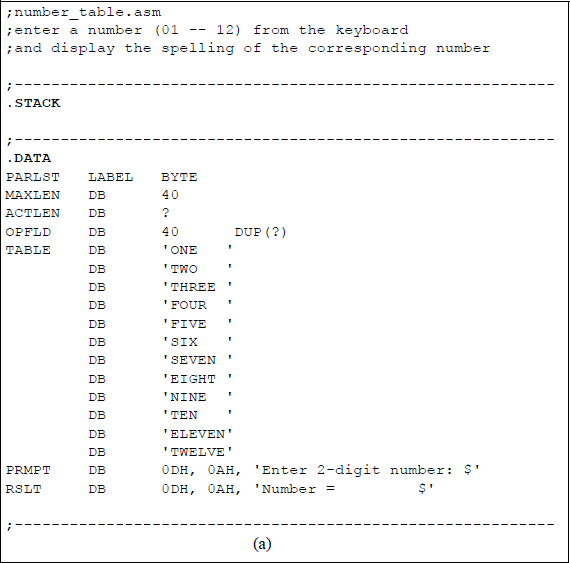
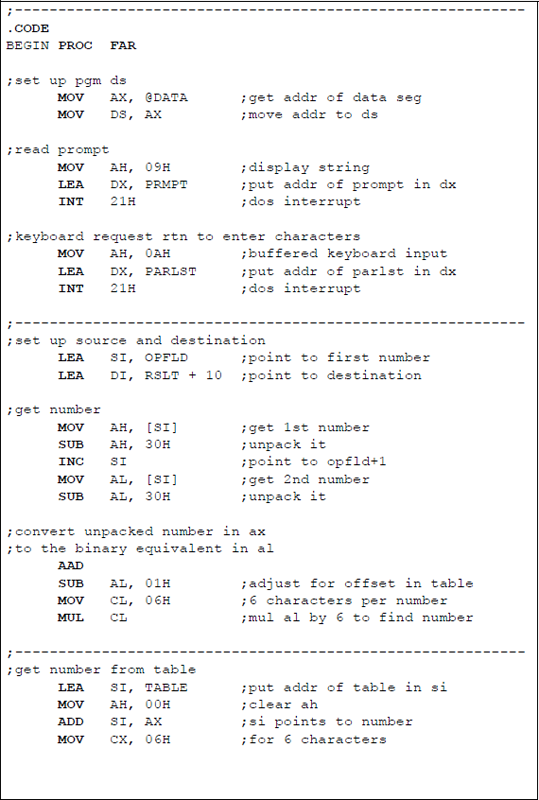
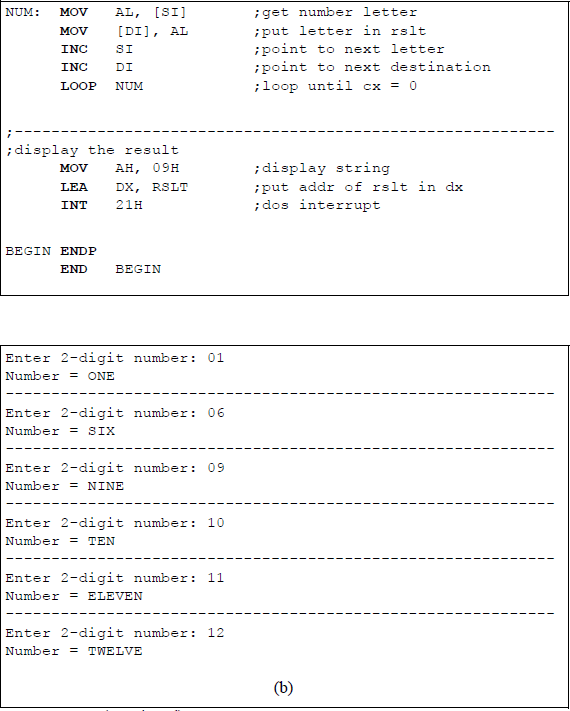
Program to illustrate selecting a number from the keyboard to be spelled and displayed: (a) the program and (b) the outputs.
Then a value of 1 is subtracted from register AL to adjust for the offset in the array labelled TABLE. A value of 6 is moved to register CL, because there are six characters per number. Register AL is then multiplied by 6, allowing the first letter in SIX to be accessed. A loop instruction then moves the addressed number one letter at a time to the result (RSLT) area to be displayed.
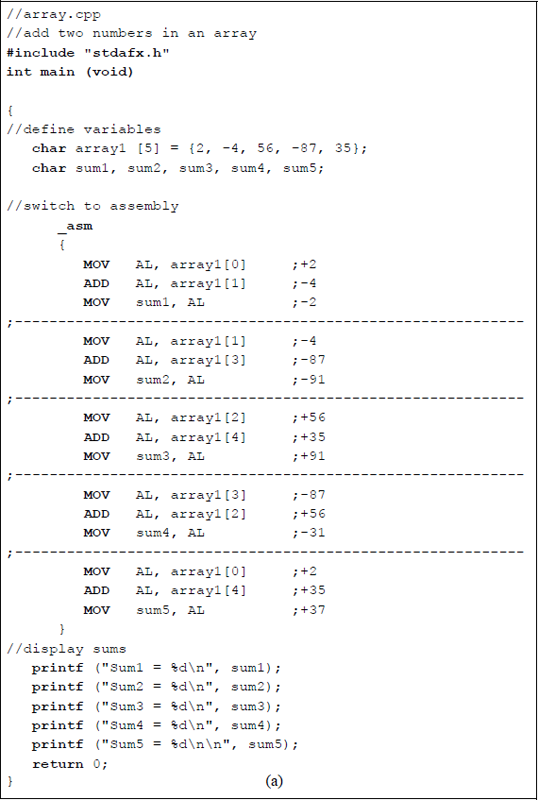
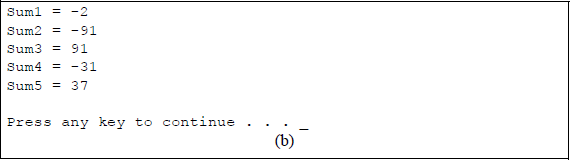
Figure 14.5 illustrates an assembly language module embedded in a C program that adds select integers in an array and displays the resulting sums. The array is declared as a char data type with five elements containing both positive and negative integers. A char type array specifies elements of one byte with a range from –128 to +127.
14.1.1 One-Dimensional Arrays in C
An array can be initialized by simply listing the array elements, as shown below. The type can be char, int, float, double, or any valid C type. An array is a sequence of constants of the same data type enclosed in braces. The size of the array does not have to be specified, also shown below.
int array[5] = {1, 4, 9, 16, 25};
char array[3] = {'A', 'B', 'C'};int array_odd[] = {1, 3, 5, 7, 9, 11);
The length of the array is one element longer than the size of the array — the compiler supplies the null terminator, also called the null zero (\ 0). The null character is a special character indicating the end of the array. An automatic array is defined inside the main () function; an external array is defined outside a function, usually before the main () function.
Figure 14.6 illustrates program to obtain the sum of six positive and negative floating-point numbers in an array labelled array_ flp. The keyword double is a double-precision floating-point data type containing eight bytes for very large values. The operator + = is an arithmetic assignment operator defined as follows:
a + = b;
is equivalent to
a = a + b;
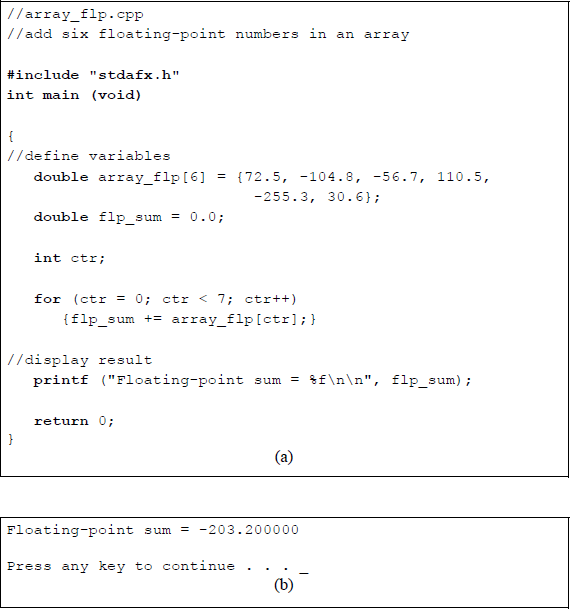
Program to illustrate adding consecutive floating-point numbers in an array: (a) the program and (b) the outputs.
The for loop in the program repeats a statement or block of statements a specific number of times. When the for loop has completed the final loop, the program exits the loop and transfers control to the first statement following the block of statements. The syntax for the for loop is shown below.
for (initialization; conditional test; increment)
{one or more statements}
Another example of initializing and operating on arrays in C is shown in Figure 14.7. Two 5-element arrays are initialized using two different methods: method one uses the assignment operator (=) to establish floating-point values to the individual elements of array1[0] through array1[4]; method two assigns floating-point values to the elements of array2[0] through array2[4] using a for loop.
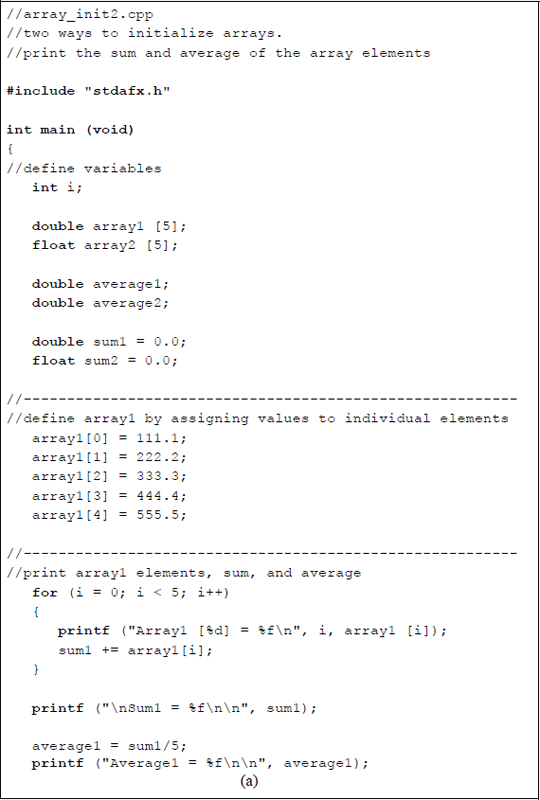
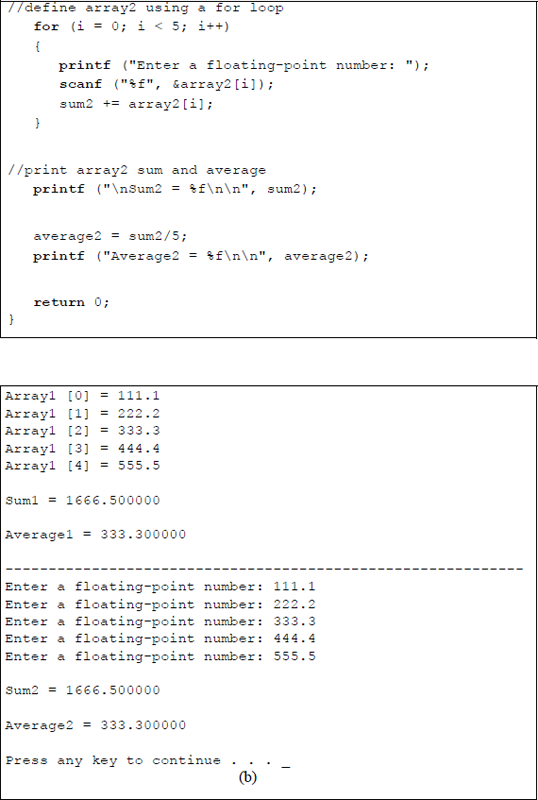
Program to initialize two arrays and obtain the sum of the array elements and the average: (a) the program and (b) the outputs.
The sum of each array is then printed together with the average of the values in each array. The arithmetic assignment operator (+ =) is utilized to obtain the sum of the array elements in both arrays. The average of the array elements is obtained by dividing the sum by the number of elements.
14.2 Multi-Dimensional Arrays
A two-dimensional array — also called a multi-dimensional array — is an array that is accessed by two subscripts, as shown below in C for an array of integers consisting of three rows and three columns (3 × 3) labelled array_int1.
int array_int1 [3] [3];
Arrays can be initialized in C by a variety of ways, as shown below for a 3 × 3 array. The initialized array is shown in Figure 14.8.
int array_int2 [3][3] = {1, 2, 3, 4, 5, 6, 7, 8, 9};int array_int2 [3][3] =
{
1, 2, 3,
4, 5, 6,
7, 8, 9
};int array_int2 [3][3] ={{1, 2, 3}, {4, 5, 6}, {7, 8, 9}};
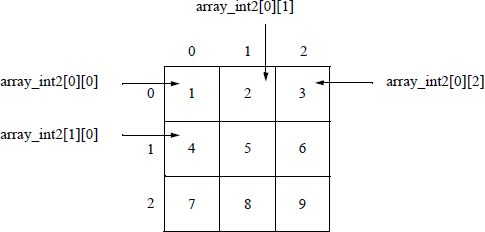
Figure 14.9 illustrates a C program that initializes a 5 × 8 array — labelled array_int3 — to the products of the indices, then prints the resulting array. Two for loops are utilized: one to address the row index and one to address the column index. Note that in the first printf () instruction, the notation "%4d" represents a format specifier. All format specifiers begin with the percent sign (%). In this case, the notation "%4d" is a minimum-field-width specifier, where the 4 represents the minimum distance from the end of the previous column of digits to the end of the next column of digits, allowing for right-aligned columns. The minimum field width of 4 is inserted after the percent sign and before the format specifier (d), which indiicates a signed decimal integer.
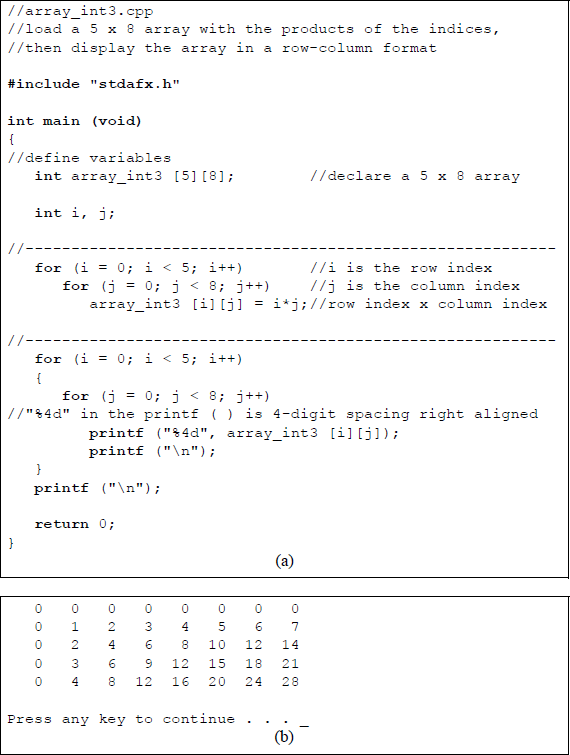
Program to initialize a 5 × 8 array to the product of the indices then print the array: (a) the program and (b) the outputs.
A C program will now be presented that demonstrates the four arithmetic operations of addition, subtraction, multiplication, and division on floating-point array elements. A 2 × 3 array is defined as shown below. Figure 14.10 illustrates the C program for the four arithmetic floating-point operations.
float array_flp_arith [2][3] = {
110.2, 75.5, 50.8,
45.6, 80.7, 120.0
};
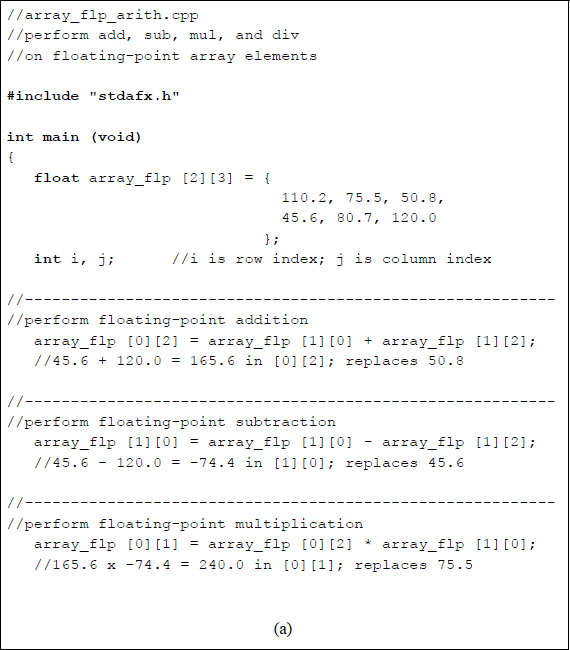
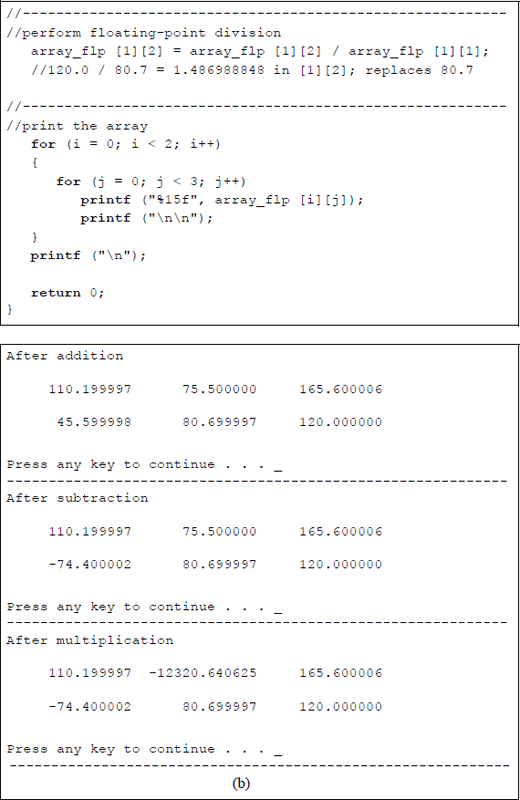
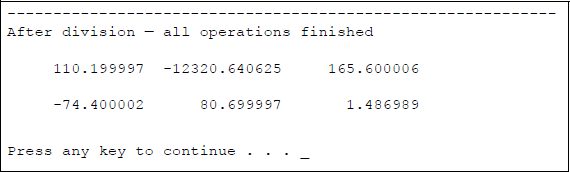
Program to illustrate floating-point arithmetic operations on a 2 × 3 array: (a) the program and (b) the outputs.
14.3 Problems
14.1 Write an assembly language module embedded in a C program that defines an array of five positive and negative integers. Then calculate the cumulative sum of the five integers and display the resulting sum.
14.2 A table can be considered as a restructured one-dimensional array. Define an array of this type using six floating-point positive and negative numbers. Then write an assembly language module embedded in a C program to calculate the cumulative sum of the six floating-point numbers and display the resulting sum.
14.3 Write an assembly language module embedded in a C program that adds, subtracts, and multiplies two select floating-point numbers. Three positive and three negative floating-point numbers are to be defined, then used in the calculations. Perform two calculations on each arithmetic operation and display the corresponding results.
14.4 Write an assembly language module embedded in a C program that performs floating-point division on positive and negative floating-point numbers. Provide two examples for each of the following divide instructions, then display the corresponding results:
FDIV memoryFDIV ST(0), ST(i)14.5 Write a C program that calculates the cubes of the integers 1 through 10 using an array, where array [0] contains a value of 1.
14.6 Write a C program that multiplies one 4-element array of integers by another 4-element array of integers one element at a time, as shown below. Then display the resulting products.
multiplier[0] x multiplicand[0] — [3], thenmultiplier[1] x multiplicand[0] — [3], thenmultiplier[2] x multiplicand[0] — [3], thenmultiplier[3] x multiplicand[0] — [3]14.7 Write a C program that multiplies a 5-element array of integers by a single integer, then display resulting array.
14.8 Write a C program that loads a 3 × 4 array with the products of the indices, then display the array in a row-column format.
14.9 Define a 3 × 5 integer array as shown below. Then write a C program to perform addition, subtraction, multiplication, and division on select elements of the array and display the modified array.
long array_int = {10, 20, 30, 40, 50,60, 70, 80, 90, 100,200, 300, 400, 500, 600};