Table of Contents for
X86 Assembly Language and C Fundamentals
 X86 Assembly Language and C Fundamentals
Published by
CRC Press, 2015
X86 Assembly Language and C Fundamentals
Published by
CRC Press, 2015
- X86 Assembly Language and C Fundamentals
- Preliminaries
- By the same Author
- X86 Assembly Language and C Fundamentals
- X86 Assembly Language and C Fundamentals
- Preface
- Chapter 1 Number Systems and Number Representations
- Chapter 2 X86 Processor Architecture
- Chapter 3 Addressing Modes
- Chapter 4 C Programming Fundamentals
- Chapter 5 Data Transfer Instructions
- Chapter 6 Branching and Looping Instructions
- Chapter 7 Stack Operations
- Chapter 8 Logical, Bit, Shift, and Rotate Instructions
- Chapter 9 Fixed-Point Arithmetic Instructions
- Chapter 10 Binary-Coded Decimal Arithmetic Instructions
- Chapter 11 Floating-Point Arithmetic Instructions
- Chapter 12 Procedures
- Chapter 13 String Instructions
- Chapter 14 Arrays
- Chapter 15 Macros
- Chapter 16 Interrupts and Input/Output Operations
- Chapter 17 Additional Programming Examples
- Appendix A ASCII Character Codes
- Appendix B Answers to Select Problems
Chapter 13
String Instructions
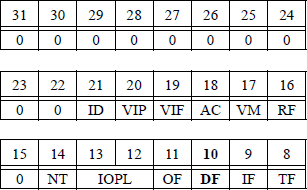
A string is a sequence of bytes, words, or doublewords that are stored in contiguous locations in memory as a one-dimensional array. Strings can be processed from low addresses to high addresses or from high addresses to low addresses, depending on the state of the direction flag (DF). If the direction flag is set (DF = 1), then the direction of processing is from high addresses to low addresses — also referred to as auto-decrement. If the direction flag is reset (DF = 0), then the direction of processing is from low addresses to high addresses — also referred to as auto-increment. The state of the direction flag can be set by the set direction flag (STD) instruction and can reset by the clear direction flag (CLD) instruction. The direction flag is located in bit 10 of the 32-bit EFLAGS register, which is reproduced below in Figure 13.1.

There are several instructions that operate specifically on strings. These include the compare string operands instructions: CMPS, CMPSB, CMPSW, CMPSD, and CMPSQ; the load string instructions: LODS, LODSB, LODSW, LODSD, and LODSQ; the move data from string to string instructions: MOVS, MOVSB, MOVSW, MOVSD, and MOVSQ; the scan string instructions: SCAS, SCASB, SCASW, and SCASD; and the store string instructions: STOS, STOSB, STOSW, STOSD, and STOSQ. All of the above instructions will be described in later sections.
There are additional instructions, flags, and registers that are associated with the string instructions. These include the repeat string operation prefix instructions: REP, REPE, REPZ, REPNE, and REPNZ; the clear direction flag (CLD) instruction and the set direction flag (STD) instruction, both of which were previously described; the general-purpose registers (E)SI and (E)DI, which are the source pointer and the destination pointers for string operations, respectively; the (E)CX register, which is the counter for certain string operations; and the general-purpose registers AL, AX, and EAX.
13.1 Repeat Prefixes
The repeat prefixes are placed before the string instruction and specify the condition for which the instruction is to be executed. The general-purpose registers (E)SI and (E)DI are automatically incremented or decremented after each execution of the string instruction to point to the next byte, word, or double word in the string.
The direction flag (DF) determines whether the registers are incremented (DF = 0) or decremented (DF =1). As mentioned previously, the state of the direction flag is determined by the set direction flag (STD) instruction and the clear direction flag (CLD) instruction. When the string operation is completed, the (E)SI and (E)DI registers point to the first data element after or before the string. The repeat prefix causes successive iterations of the string instruction until the condition stipulated by the prefix is fulfilled. The general-purpose register (E)CX is also used to determine the cessation of the string instruction by specifying a count to indicate the number of iterations of the string instruction. The repeat prefixes apply only to the instruction that they immediately precede.
If a block of instructions is to be executed, then a LOOP instruction can be utilized. A string operation can be delayed by an exception or an interrupt, in which case, the registers are saved so that the operation can continue upon the completion of the exception or interrupt. Thus, the (E)SI and (E)DI registers point to the next string elements; the (E)IP register points to the string instruction; and the (E)CX register contains the count that it held prior to the exception or interrupt.
When operating in 64-bit mode, the source operand address and the destination operand address are stipulated by RSI (or ESI) and by RDI (or EDI), respectively, using an REX prefix. The count is contained in RCX or ECX depending on the address size attribute.
13.1.1 REP Prefix
The REP prefix allows a string instruction to be repeated a specified number of times as indicated by the count in register (E)CX. The REP prefix can be utilized with different versions of the following string instructions: MOVS, LODS, and STOS. The REP prefix can also be used with different versions of the input/output string instructions: input from port to string INS and output string to port OUTS.
The syntax for the REP prefix is shown below for the MOVS instruction, which moves string elements from the data segment source to the extra segment destination. Recall that the brackets stipulate indirect memory addressing. Thus, DS:[(E)SI] indicates a memory address in the data segment with an offset specified by the contents of register ESI or register SI. The memory address ES:[(E)DI] is similarly defined.
REP MOVS m8, m8 (move (E)CX bytes from DS:[(E)SI]
to ES:[(E)DI])REP MOVS m8, m8 (move RCX bytes from [RSI]
to [RDI], 64-bit mode)REP MOVS m16, m16 (move (E)CX words from DS:[(E)SI]
to ES:[(E)DI])REP MOVS m32, m32 (move (E)CX doublewords from
DS:[(E)SI] to ES:[(E)DI])REP MOVS m64, m64 (move RCX quadwords from
[RSI] to [RDI], 64-bit mode)
Another version of the REP instruction is shown below for the LODS instruction, which loads string elements from the data segment to general-purpose registers. The REP prefix is normally not used. The syntax is shown below.
REP LODS AL (load (E)CX bytes from
DS:[(E)SI] to register AL)REP LODS AL (load RCX bytes from [RSI]
to register AL, 64-bit mode)REP LODS AX (load (E)CX words from
DS:[(E)SI] to register AX)REP LODS EAX (load (E)CX doublewords from
DS:[(E)SI] to register EAX)
REP LODS RAX (load RCX quadwords from
[RSI] to register RAX, 64-bit mode)
Another version of the REP instruction is shown below for the STOS instruction, which stores string elements from a general-purpose register to the extra segment destination at ES: [(E)DI]. The syntax is shown below.
REP STOS m8 (store (E)CX bytes from
register AL to ES : [(E)DI])REP STOS m8 (store RCX bytes from
register AL to [RDI], 64-bit mode)REP STOS ml6 (store (E)CX words from
register AX to ES:[(E)DI])REP STOS m32 (store (E)CX doublewords from
register EAX to ES:[(E)DI])REP STOS m64 (store RCX quadwords from
register RAX to [RDI], 64-bit mode)
13.1.2 REPE / REPZ Prefix
Another version of the REP prefix is the repeat while equal (REPE) prefix. The REPE prefix can be used to find nonmatching string elements in memory location DS:[(E)SI] by comparing them with string elements in memory location ES:[(E)DI]. The operation continues as long as the count in register (E)CX is nonzero and the string elements are equal — zero flag (ZF) equals 1. The REPZ prefix is synonymous with the REPE prefix. The REPE / REPZ prefixes and the REPNE / REPNZ prefixes (covered in the next section) are used only with the compare string operands (CMPS) instruction and the scan string (SCAS) instruction. The syntax for the REPE prefix is shown below for the CMPS instruction.
REPE CMPS m8, m8 (compare bytes in DS:[(E)SI]
with bytes in ES:[(E)DI]
to find nonmatching bytes)REPE CMPS m8, m8 (compare bytes in [RSI]
with bytes in [RDI]
to find nonmatching bytes)REPE CMPS ml6, ml6 (compare words in DS:[(E)SI]
with words in ES: [(E) DI]
to find nonmatching words)REPE CMPS m32, m32 (compare doublewords in DS:[(E)SI]
with doublewords in ES:[(E)DI]
to find nonmatching doublewords)REPE CMPS m64, m64 (compare quadwords in [RSI]
with quadwords in [RDI]
to find nonmatching quadwords,
64-bit mode)
Another application of the REPE instruction is shown below for the SCAS instruction, which compares the destination string element in ES: [(E)DI] with the contents of a general-purpose register and sets the status flags in the EFLAGS register based on the result. This REPE prefix, together with the SCAS instruction, is used to find string elements that do not match the contents of a general-purpose register. The syntax is shown below.
REPE SCAS m8 (compare a byte in AL with
a byte in ES : [(E)DI]
to find nonmatching bytes)REPE SCAS m8 (compare a byte in AL with
a byte in [RDI]
to find nonmatching bytes,
64-bit mode)REPE SCAS ml6 (compare a word in AX with
a word in ES : [(E)DI]
to find nonmatching words)
REPE SCAS m32 (compare a doubleword in EAX with
a doubleword in ES:[(E)DI]
to find nonmatching doublewords)REPE SCAS m64 (compare a quadword in RAX with
a quadword in [RDI]
to find nonmatching quadwords,
64-bit mode)
13.1.3 REPNE / REPNZ Prefix
Another version of the REP prefix is the repeat while not equal (REPNE) prefix. The REPNE prefix can be used to find matching string elements in memory location DS:[(E)SI] by comparing them with string elements in memory location ES:[(E)DI]. The operation continues as long as the count in register (E)CX is nonzero and the string elements are not equal — zero flag (ZF) equals 0. The REPNZ prefix is synonymous with the REPNE prefix. The REPE / REPZ prefixes and the REPNE / REPNZ prefixes are used only with the compare string operands (CMPS) instruction and the scan string (SCAS) instruction. The syntax for the REPNE prefix is shown below for the CMPS instruction.
REPNE CMPS m8, m8 (compare bytes in DS:[(E)SI]
with bytes in ES:[(E)DI]
to find matching bytes)REPNE CMPS m8, m8 (compare bytes in [RSI]
with bytes in [RDI]
to find matching bytes,
64-bit mode)REPNE CMPS ml6, ml6 (compare words in DS:[(E)SI]
with words in ES:[(E)DI]
to find matching words)REPNE CMPS m32, m32 (compare doublewords in DS:[(E)SI]
with doublewords in ES:[(E)DI]
to find matching doublewords)REPNE CMPS m64, m64 (compare quadwords in [RSI]
with quadwords in [RDI]
to find matching quadwords,
64-bit mode)
Another application of the REPNE instruction is shown below for the SCAS instruction, which compares the destination string element in ES: [(E)DI] with the contents of a general-purpose register and sets the status flags in the EFLAGS register based on the result. This REPNE prefix, together with the SCAS instruction, is used to find string elements that match the contents of a general-purpose register. The syntax is shown below.
REPNE SCAS m8 (compare a byte in AL with
a byte in ES : [(E)DI]
to find matching bytes)REPNE SCAS m8 (compare a byte in AL with
a byte in [RDI]
to find matching bytes, 64-bit mode)REPNE SCAS ml6 (compare a word
in AX with a word in ES : [(E)DI]
to find matching words)REPNE SCAS m32 (compare a doubleword in EAX with
a doubleword in ES: [(E) Dl]
to find matching doublewords)REPNE SCAS m64 (compare a quadword in RAX with
a quadword in [RDI]
to find matching quadwords,
64-bit mode)
13.2 Move String Instructions
The move string (MOVS) instructions transfer a string element — byte, word, or doubleword — from memory location DS:(E)SI to memory location ES:(E)DI. There are abbreviated mnemonics for the three different string element sizes: move string byte (MOVSB), move string word (MOVSW), and move string doubleword (MOVSD). In 64-bit mode, a quadword can be moved using the instruction move string quadword (MOVSQ).
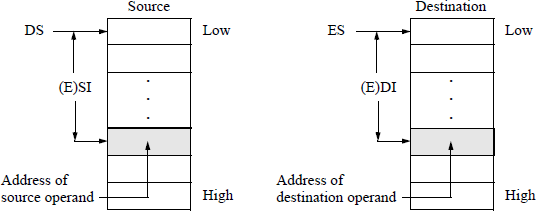
After the transfer is completed, the (E)SI and (E)DI registers are automatically incremented or decremented depending on the state of the direction flag (DF) in the EFLAGS register. Figure 13.2 pictorially illustrates the MOVS instructions in transferring data from the source segment (DS) with offset (E)SI to the destination segment (ES) with offset (E)DI.
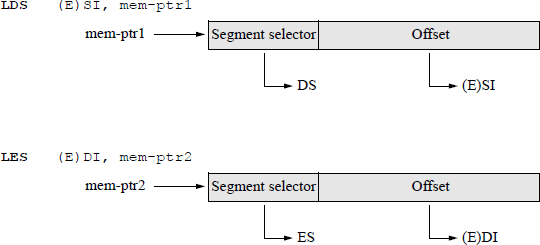
The source and destination operand addresses should be initialized prior to the execution of the string instructions. This can be accomplished by using the load far pointers LDS and LES instructions as shown in Figure 13.3.
The data segment (DS) can be overridden with a segment override prefix. The segment override operator is specified by a colon (:). An example of a segment override prefix to move a word from general-purpose register BX to segment ES with an offset contained in general-purpose register AX is shown below. The extra segment (ES), however, cannot be overridden. Different versions of the move string instructions are described in the next sections.
MOV ES: [AX] , BX
13.2.1 Move Data from String to String (Explicit Operands) Instructions
This section describes the explicit operands form of the move strings instructions. The explicit operands form explicitly specifies the size of the source and destination operands as part of the instruction. The location of the source and destination operands are determined by contents of the DS:(E)SI and ES:(E)DI registers, respectively. There are four move strings instructions that have explicit operands, as shown in the syntax below.
MOVS m8, m8 (transfer a byte from source in DS:(E)SI
to destination in ES:E(DI);
(R/E)SI and (R/E)DI for 64-bit mode)MOVS ml6, ml6 (transfer a word from source in DS:(E)SI
to destination in ES:E(DI);
(R/E)SI and (R/E)DI for 64-bit mode)MOVS m32, m32 (transfer a doubleword from source
in DS:(E)SI to destination in ES:E(DI);
(R/E)SI and (R/E)DI for 64-bit mode)MOVS m64, m64 (transfer a quadword from source in (R/E)SI
to destination in (R/E)DI, 64-bit mode)
13.2.2 Move Data from String to String (No Operands) Instructions
The no-operands form specifies the size of the operands by the mnemonic; for example, the MOVSW instruction specifies a word transfer. Like the explicit operand form, the no-operand form assumes that the location of the source and destination operands are determined by contents of the DS:(E)SI and ES:(E)DI registers, respectively. The syntax is shown below.
MOVSB (transfer a byte from source in DS:(E)SI
to destination in ES:E(DI);
(R/E)SI and (R/E)DI for 64-bit mode)MOVSW (transfer a word from source in DS:(E)SI
to destination in ES:E(DI);
(R/E)SI and (R/E)DI for 64-bit mode)MOVSD (transfer a doubleword from source in DS : (E)SI
to destination in ES:E(DI);
(R/E)SI and (R/E)DI for 64-bit mode)MOVSQ (transfer a quadword from source in (R/E)SI
to destination in (R/E)DI, 64-bit mode)
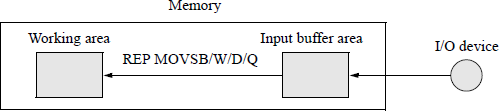
One application of the MOVS instruction is shown in Figure 13.4, which moves string operands from an input buffer to a working area in memory. This allows the system to operate on the relocated string data while the input buffer is being filled with additional string data.
Examples of moving source strings to destination locations in which the strings are overlapping, or are in identical memory locations, or are nonoverlapping, are shown in Figure 13.5. Figure 13.5(a) illustrates overlapping strings, where the higher addresses of the source string overlap the lower addresses of the destination locations. In this case, the direction flag must be set (DF =1) — auto-decrement; otherwise, the source string would overwrite some of the higher addresses of the source string.
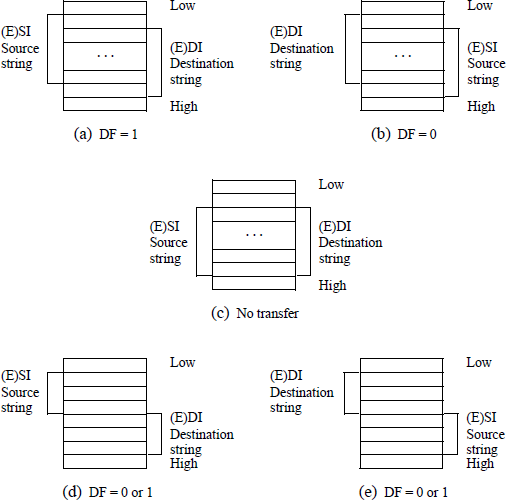
Different string orientations when executing a MOVS operation: (a) and (b) overlapping strings; (c) identical memory locations; and (d) and (e) nonoverlapping strings.
In Figure 13.5(b), the strings are also overlapping, but in a reverse orientation to that of Figure 13.5(a). In this case, the direction flag must be reset (DF = 0) — auto-increment; otherwise, the source string would overwrite some of the lower addresses of the source string. In Figure 13.5(c), the source string and the destination locations are identical; therefore, there is no data transfer. In Figure 13.5(d) and Figure 13.5(e), the strings are nonoverlapping; the direction flag can be set or reset (DF = 1 or DF = 0).
Figure 13.6 shows an assembly language program — not embedded in a C program — that illustrates using the MOVSB instruction with the REP prefix. The data segment (DS as source) and the extra segment (ES as destination) are made identical by the following instructions:
MOV AX, @DATA ;get addr of data seg
MOV DS, AX ;move addr to ds
MOV ES, AX ;move addr to es
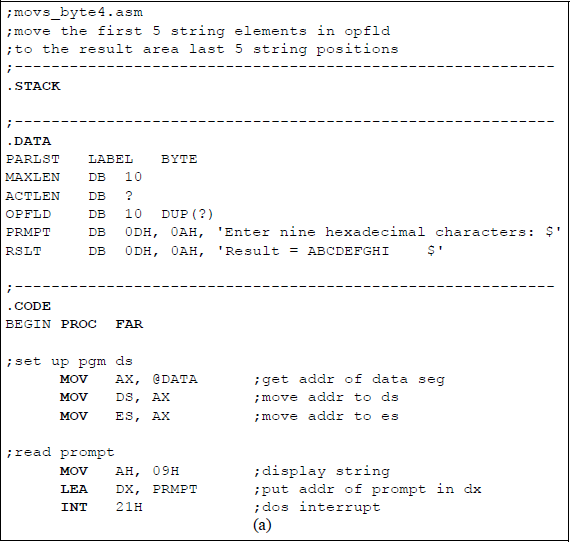
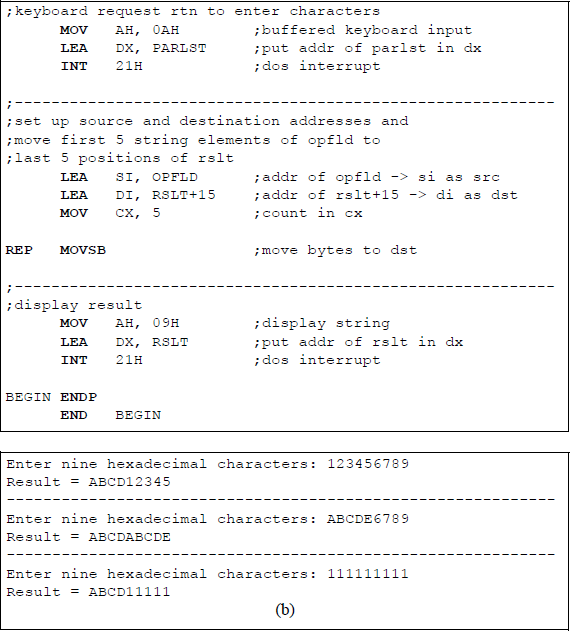
Program to illustrate an application of using the MOVSB byte instruction with the REP prefix: (a) the program and (b) the outputs.
The source index, SI, is assigned the address of OPFLD; the destination index, DI, is assigned the address of RSLT+15, which contains the string ABCDEFGHI. Nine hexadecimal characters are entered from the keyboard and stored in the OPFLD area. The program then moves the first five characters of OPFLD to the last five locations of the result area, effectively overwriting the last five locations. The result area is then displayed.
13.3 Load String Instructions
The load string (LODS) instructions transfer a string element — byte, word, or dou-bleword — from memory location DS:(E)SI to registers AL, AX, or EAX, respectively. There are abbreviated mnemonics for the three different string element sizes: load string byte (LODSB), load string word (LODSW), and load string doubleword (LODSD). In 64-bit mode, a quadword can be loaded using the instruction load string quadword (LODSQ).
After the operand is loaded into register AL, AX, or EAX, the (E)SI register is automatically incremented or decremented depending on the state of the direction flag (DF) in the EFLAGS register. The source operand address should be initialized prior to the execution of the load string instruction. This can be accomplished by using the load effective address (LEA) instruction.
As mentioned in Section 13.2, the data segment (DS) can be overridden with a segment override prefix. The segment override operator is specified by a colon (:). The extra segment (ES), however, cannot be overridden. There is no need to use the REP prefix, because the previous data would be overwritten. The flags are not affected. Different versions of the load string instructions are described in the next sections.
13.3.1 Load String (Explicit Operands) Instructions
This section describes the explicit operands form of the load string instructions. The explicit operands form explicitly specifies the size of the source operand as part of the instruction. The location of the source operand is determined by contents of the DS:(E)SI register. There are four load string instructions that have explicit operands, as shown in the syntax below.
LODS m8 (load a byte from source in DS:(E)SI
into AL, (R)SI for 64-bit mode)LODS m16 (load a word from source in DS:(E)SI
into AX, (R)SI for 64-bit mode)LODS m32 (load a doubleword from source in DS:(E)SI
into EAX, (R)SI for 64-bit mode)LODS m64 (load a quadword from source in (R)SI
into RAX, 64-bit mode)
13.3.2 Load String (No Operands) Instructions
The no-operands form specifies the size of the operands by the mnemonic; for example, the LODSB instruction specifies a load byte into register AL instruction. Like the explicit operand form, the no-operand form assumes that the location of the source operand is determined by contents of the DS:(E)SI register. The syntax is shown below.
LODSB (load a byte from source in DS:(E)SI
into AL, (R)SI for 64-bit mode)LODSW (load a word from source in DS:(E)SI
into AX, (R)SI for 64-bit mode)LODSD (load a doubleword from source in DS:(E)SI
into EAX, (R)SI for 64-bit mode)LODSQ (load a quadword from source in (R)SI
into RAX, 64-bit mode)
Figure 13.7 shows an assembly language program — not embedded in a C program — that illustrates an application using the LODSB (no operands) instruction. The program reverses the order of nine characters that are entered from the keyboard. The source index, SI, is assigned the address of OPFLD, which stores the nine characters; the destination index, DI, is assigned the address of RSLT+19, which contains the resulting reversed string. A count of nine is stored in register CX. Nine hexadecimal characters are entered from the keyboard and stored in the OPFLD area. A loop is used to read the nine characters and reverse their order. The result area is then displayed.
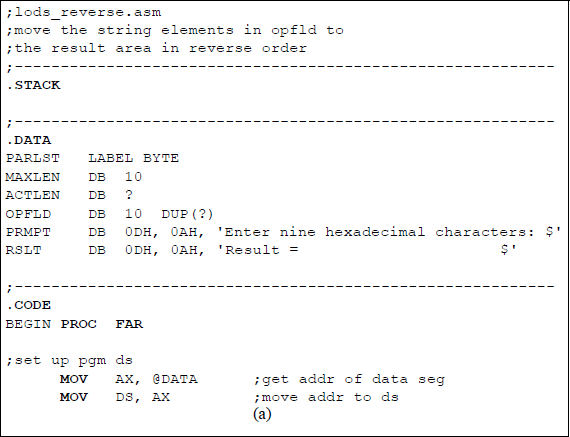
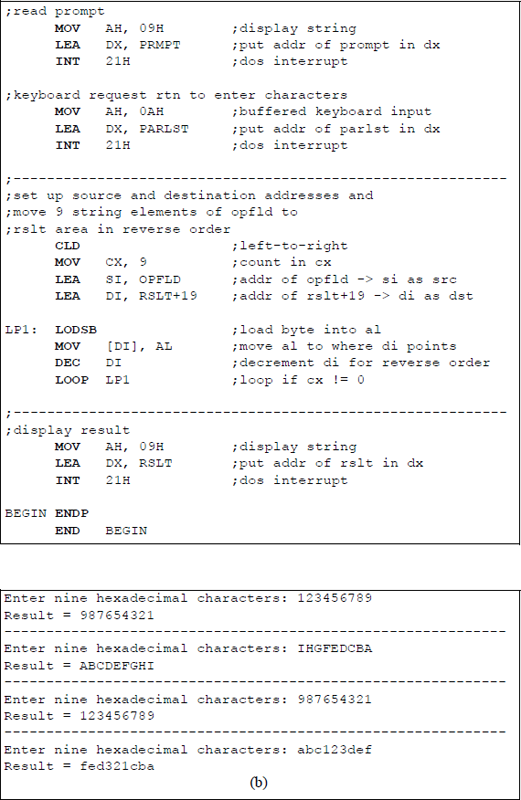
Program to illustrate an application of the LODSB instruction: (a) the program and (b) the outputs.
13.4 Store String Instructions
The store string (STOS) instructions transfer a string element — byte, word, or dou-bleword — from registers AL, AX, or EAX to a destination memory location specified by ES:(E)DI. There are abbreviated mnemonics for the three different string element sizes: store string byte (STOSB), store string word (STOSW), and store string dou-bleword (STOSD). In 64-bit mode, a quadword can be loaded using the instruction store string quadword (STOSQ).
After the operand from register AL, AX, or EAX is stored in memory, the ES:(E)DI register is automatically incremented or decremented depending on the state of the direction flag (DF) in the EFLAGS register. The source operand address should be initialized prior to the execution of the load string instruction. This can be accomplished by using the load effective address (LEA) instruction.
The data segment (DS) can be overridden with a segment override prefix. The segment override operator is specified by a colon (:). The extra segment (ES), however, cannot be overridden. The REP prefix can be used to store a specific value from a general-purpose register into several contiguous areas in memory by setting the number of operands to be transferred into register (E)CX. The flags are not affected. Different versions of the store string instructions are described in the next sections.
13.4.1 Store String (Explicit Operands) Instructions
This section describes the explicit operands form of the store string instructions. The explicit operands form explicitly specifies the size of the destination operand as part of the instruction. The location of the destination operand is determined by contents of the ES:(E)DI register. There are four store string instructions that have explicit operands, as shown in the syntax below.
STOS m8 (store a byte from AL to destination
in ES:(E)DI, RDI or EDI for 64-bit mode)STOS m16 (store a word from AX to destination
in ES:(E)DI, RDI or EDI for 64-bit mode)STOS m32 (store a doubleword from EAX to destination
in ES:(E)DI, RDI or EDI for 64-bit mode)STOS m64 (store a quadword from RAX to destination
in RDI or EDI for 64-bit mode)
13.4.2 Store String (No Operands) Instructions
The no-operands form specifies the size of the operands by the mnemonic; for example, the STOSW instruction specifies a store word from register AX instruction. Like the explicit operand form, the no-operand form assumes that the location of the destination operand is determined by contents of the ES:(E)DI register. The syntax is shown below.
STOSB (store a byte from AL to destination
in ES:(E)DI, RDI or EDI for 64-bit mode)STOSW (store a word from AX to destination
in ES:(E)DI, RDI or EDI for 64-bit mode)STOSD (store a doubleword from EAX to destination
in ES:(E)DI, RDI or EDI for 64-bit mode)STOSQ (store a quadword from RAX to destination
in RDI or EDI for 64-bit mode)
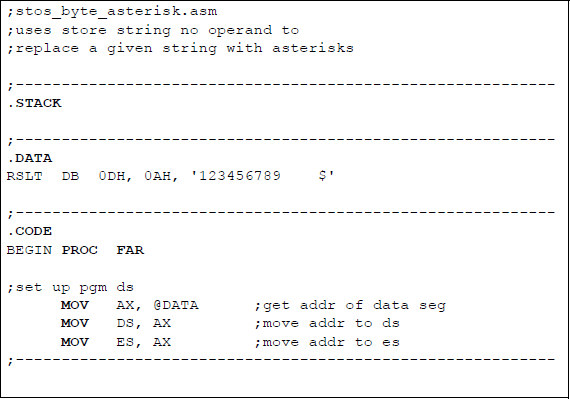
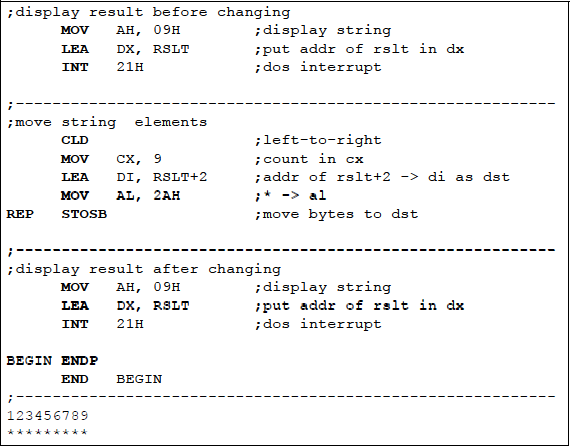
One application of the store string instructions is to replace a string in contiguous locations in memory with a different string. Figure 13.8 shows an assembly language program — not embedded in a C program — that replaces a string of nine characters with asterisks. The program uses the store string (no operands) instruction with the REP prefix. The initial string is displayed before it is changed, then the new string is displayed.
13.5 Compare Strings Instructions
The compare strings (CMPS) instructions contain two source operands — there is no destination operand. The instructions compare a string element — byte, word, dou-bleword, or quadword — in the first source operand with the byte, word, doubleword, or quadword in the second source operand. The comparison is accomplished by subtracting the first source operand from the second source operand. The status flags in the EFLAGS register reflect the result of the comparison. Both source operands are unaffected by the comparison; that is, both operands are unaltered. The DS:(E)SI and ES:(E)DI registers are automatically incremented or decremented depending on the state of the direction flag (DF) in the EFLAGS register.
Both operands reside in memory locations. The memory address of the first source operand is obtained from the contents of registers DS:(E)SI or RSI; the memory address of the second source operand is obtained from the contents of registers ES:(E)DI or RDI. There are abbreviated mnemonics for the different string element sizes: compare strings byte (CMPSB), compare strings word (CMPSW), and compare strings doubleword (CMPSD). In 64-bit mode, quadwords can be compared using the compare strings quadword (CMPSQ) instruction.
Variations of the REP prefix can be utilized with the compare strings instructions. These include: the repeat while equal/zero (REPE/REPZ) prefixes and the repeat while not equal/not zero (REPNE/REPNZ) prefixes. If a CMPS instruction is preceded by REPE or REPZ, then the operation is depicted as compare while strings are equal (ZF = 1) and not end of string . If a CMPS instruction is preceded by REPNE or REPNZ, then the operation is depicted as compare while strings are not equal (ZF = 0) and not end of string . If these prefixes are used, then the compare operation will terminate as soon as the specified condition becomes untrue or E(CX) = 0.
The data segment (DS) can be overridden with a segment override prefix. The segment override operator is specified by a colon (:). The extra segment (ES), however, cannot be overridden. Different versions of the compare strings instructions are described in the next sections.
13.5.1 Compare Strings (Explicit Operands) Instructions
This section describes the explicit operands form of the compare strings instructions. The explicit operands form explicitly specifies the size of the first and second source operands as part of the instruction. There are four compare string instructions that have explicit operands, as shown in the syntax below.
CMPS m8, m8 (compare byte at DS:(E)SI with
byte at ES:(E)DI,
(R/E)SI, (R/E)DI for 64-bit mode)CMPS m16, m16 (compare word at DS:(E)SI with
word at ES:(E)DI,
(R/E)SI, (R/E)DI for 64-bit mode)CMPS m32, m32 (compare doubleword at DS:(E)SI with
doubleword at ES:(E)DI,
(R/E)SI, (R/E)DI for 64-bit mode)CMPS m64, m64 (compare quadword at (R/E)SI with
quadword at (R/E)DI for 64-bit mode)
13.5.2 Compare Strings (No Operands) Instructions
The no-operands form specifies the size of the operands by the mnemonic; for example, the CMPSW instruction specifies a compare strings word instruction. Like the explicit operand form, the no-operand form assumes that the locations of the operands are determined by the DS:(E)SI register for the first source operand and by the ES:(E)DI register for the second source operand. The syntax is shown below.
CMPSB (compare byte at DS:(E)SI with byte at ES:(E)DI,
(R/E)SI, (R/E)DI for 64-bit mode)CMPSW (compare word at DS:(E)SI with word at ES:(E)DI,
(R/E)SI, (R/E)DI for 64-bit mode)CMPSD (compare doubleword at DS:(E)SI with
doubleword at ES:(E)DI,
(R/E)SI, (R/E)DI for 64-bit mode)CMPSQ (compare quadword at (R/E)SI with
quadword at (R/E)DI, for 64-bit mode)
Figure 13.9 shows an assembly language program — not embedded in a C program — that illustrates an application using the CMPSB (no operands) instruction with the REPE prefix. Two strings are entered from the keyboard and stored in the OPFLD area of the parameter list (PARLST). Then the strings are compared and the resulting zero flag (ZF) is displayed. If ZF = 1, then the strings are equal; if ZF = 0, then the strings are not equal.
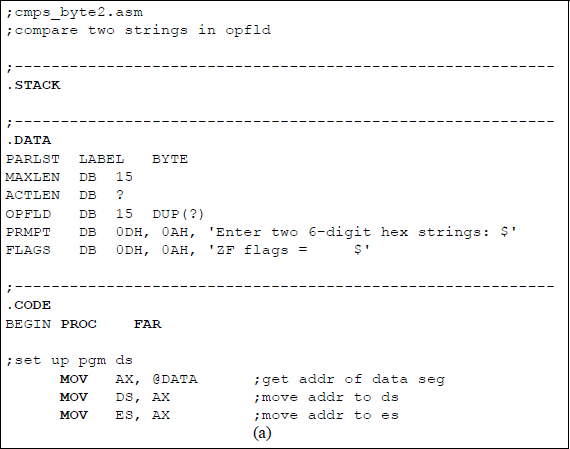
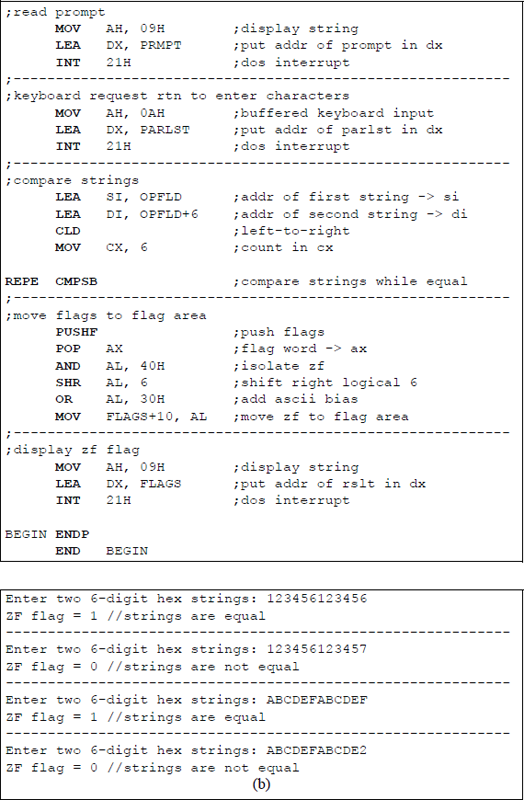
Program to illustrate using the CMPSB instruction with the REPE prefix: (a) the program and (b) the outputs.
13.6 Scan String Instructions
The scan string (SCAS) instructions contain only one operand, which is in a general-purpose register. The instructions compare a string element — byte, word, double-word, or quadword — in register AL, AX, EAX, or RAX, respectively — with the byte, word, doubleword, or quadword in a memory location addressed by ES:E(DI) or RDI. The comparison is accomplished by subtracting the memory operand from the general-purpose register. The status flags in the EFLAGS register reflect the result of the comparison. Both operands are unchanged by the comparison. The (E)DI register is automatically incremented or decremented depending on the state of the direction flag (DF) in the EFLAGS register.
There are abbreviated mnemonics for the different string element sizes: scan string byte (SCASB), scan string word (SCASW), and scan string doubleword (SCASD). In 64-bit mode, quadwords can be compared using the scan string quad-word (SCASQ) instruction.
Variations of the REP prefix can be utilized with the scan string instructions. These include the repeat while equal / zero (REPE / REPZ) prefixes and the repeat while not equal /not zero (REPNE / REPNZ) prefixes. These prefixes can be utilized for block comparisons as specified by the count in the (E)CX register. If these prefixes are used, then the comparison operation (scanning) will terminate as soon as the specified condition becomes untrue or E(CX) = 0.
The data segment (DS) can be overridden with a segment override prefix. The segment override operator is specified by a colon (:). The extra segment (ES), however, cannot be overridden. Different versions of the compare strings instructions are described in the next sections.
13.6.1 Scan String (Explicit Operands) Instructions
This section describes the explicit operands form of the scan string instructions. The explicit operands form explicitly specifies the size of the operands as part of the instruction. There are four scan string instructions that have explicit operands, as shown in the syntax below.
SCAS m8 (compare byte in AL with
byte at ES:(E)DI, RDI for 64-bit mode)SCAS m16 (compare word in AX with
word at ES:(E)DI, RDI for 64-bit mode)SCAS m32 (compare doubleword in EAX with
doubleword at ES:(E)DI, RDI for 64-bit mode)SCAS m64 (compare quadword in RAX with
quadword at EDI or RDI for 64-bit mode)
13.6.2 Scan String (No Operands) Instructions
The no-operands form specifies the size of the operands by the mnemonic; for example, the SCASB instruction specifies a scan string byte instruction. Like the explicit operand form, the no-operand form assumes that the location of the memory operand is determined by the ES : (E)DI register. The register operands are contained in the general-purpose registers. The syntax is shown below.
SCASB (compare byte in AL with
byte at ES:(E)DI, RDI for 64-bit mode)SCASW (compare word in AX with
word at ES:(E)DI, RDI for 64-bit mode)SCASD (compare doubleword in EAX with
doubleword at ES:(E)DI, RDI for 64-bit mode)SCASQ (compare quadword in RAX with
quadword at EDI or RDI for 64-bit mode)
Figure 13.10 shows an assembly language program — not embedded in a C program — that illustrates an application using the SCASB (no operands) instruction with the REPNE prefix. If the scan character (A) in register AL matches a string character, then ZF = 1, otherwise ZF = 0. The count is displayed together with the flags.
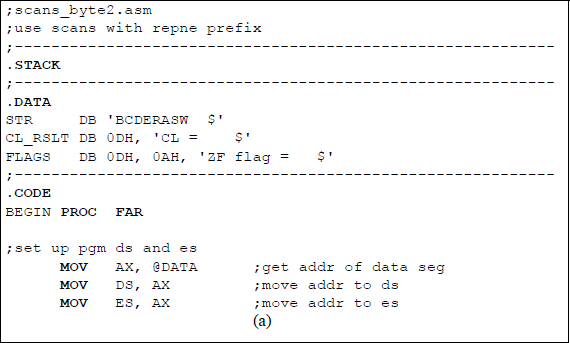
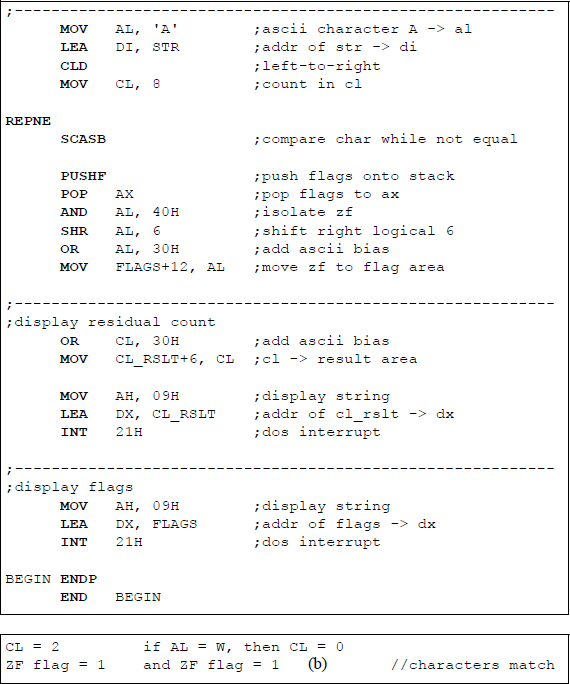
Program to illustrate an application of the SCASB with the REPNE prefix: (a) the program and (b) the outputs.
13.7 Problems
13.1 Write an assembly language program — not embedded in a C program — that receives six hexadecimal characters entered from the keyboard and stores them in the OPFLD area. The program then moves the characters to the result area to be utilized as a second string. Then the first three characters from OPFLD are moved to replace the last three characters in the result area. Display the resulting contents of the result area.
13.2 Determine the contents of RSLT after execution of the following program:
;movs_byte5.asm;-----------------------------------------------------.STACK
;-----------------------------------------------------.DATARSLT DB 0DH, 0AH, '123456789 $'
;-----------------------------------------------------.CODEBEGIN PROC FAR
;set up pgm dsMOV AX, @DATA ;get addr of data segMOV DS, AX ;move addr to dsMOV ES, AX ;move addr to es;-----------------------------------------------------;move string elementsCLDMOV CX, 4 ;count in cxLEA SI, RSLT+2 ;addr of rslt+2 -> si as srcLEA DI, RSLT+4 ;addr of rslt+4 -> di as dst
REP MOVSB ;move bytes to dst
;-----------------------------------------------------;display resultMOV AH, 09H ;display stringLEA DX, RSLT ;put addr of rslt in dxINT 21H ;dos interrupt
BEGIN ENDPEND BEGIN13.3 Determine the contents of RSLT after execution of the following program:
;movs_byte_rev.asm;-----------------------------------------------------.STACK
;-----------------------------------------------------.DATARSLT DB 0DH, 0AH, '123456789 $'
;-----------------------------------------------------.CODEBEGIN PROC FAR
;set up pgm dsMOV AX, @DATA ;get addr of data segMOV DS, AX ;move addr to dsMOV ES, AX ;move addr to es
;-----------------------------------------------------;move string elementsSTD ;right-to-leftMOV CX, 4 ;count in cxLEA SI, RSLT+10 ;addr of rslt+10 -> si as srcLEA DI, RSLT+8 ;addr of rslt+8 -> di as dst
REP MOVSB ;move bytes to dst
;-----------------------------------------------------;display resultMOV AH, 09H ;display stringLEA DX, RSLT ;put addr of rslt in dxINT 21H ;dos interrupt
BEGIN ENDPEND BEGIN13.4 Write an assembly language program — not embedded in a C program — that receives six hexadecimal characters entered from the keyboard and stores them in the OPFLD area. The result area contains a second string of ABC-DEF. Then the first three characters from OPFLD are moved to replace the last three characters in the result area. Display the resulting contents of the result area. This program is similar to Problem 13.1, except that the second string is given; therefore, only one LOOP instruction is required. The REP prefix is not used.
13.5 Although this problem does not use the MOVS instruction, it does move modified characters from a source to a destination. Assume that the following characters are entered from the keyboard:
0FF, 00, 0EE, 22, 0C6, 0F5Then show the result after the program shown below has been executed.
_ //array_xor2.cpp#include "stdafx.h"int main (void){//define variablesunsigned char hex1, hex2, hex3, hex4, hex5, hex6;
printf ("Enter six 2-digit hexadecimal characters:\n");scanf ("%X %X %X %X %X %X", &hex1, &hex2, &hex3,&hex4, &hex5, &hex6);
//switch to assembly_asm{MOV AL, hex1XOR hex3, AL
MOV AL, hex2XOR hex4, AL
MOV AL, hex3XOR hex5, AL
MOV AL, hex4XOR hex6, AL}
printf ("\nhex1 = %X", hex1);printf ("\nhex2 = %X", hex2);printf ("\nhex3 = %X", hex3);printf ("\nhex4 = %X", hex4);printf ("\nhex5 = %X", hex5);printf ("\nhex6 = %X\n\n", hex6);return 0;}13.6 Write an assembly language module embedded in a C program using the LODS instruction with explicit operands that receive byte, word, and double-word operands that are entered from the keyboard. Then display the operands.
13.7 Given the program shown below, obtain the result when the following four-digit hexadecimal characters are entered from the keyboard separately:
1233 9999 2E+F)2<=;lods_stos.asm;illustrates using the load string;and store string no operand instructions;-----------------------------------------------------.STACK;-----------------------------------------------------.DATAPARLST LABEL BYTEMAXLEN DB 10ACTLEN DB ?OPFLD DB 10 (?)PRMPT DB 0DH, 0AH, 'Enter four 1-digit hex chars: $'RSLT DB 0DH, 0AH, 'Result = $';-----------------------------------------------------.CODEBEGIN PROC FAR
;set up pgm dsMOV AX, @DATA ;get addr of data segMOV DS, AX ;move addr to ds
;read promptMOV AH, 09H ;display stringLEA DX, PRMPT ;put addr of prompt in dxINT 21H ;dos interrupt;-----------------------------------------------------;keyboard request rtn to enter charactersMOV AH, 0AH ;buffered keyboard inputLEA DX, PARLST ;put addr of parlst in dxINT 21H ;dos interrupt;-----------------------------------------------------MOV CX, 3 ;# of iterations for loopLEA SI, OPFLD ;addr of opfld -> siLEA DI, OPFLD+1 ;addr of opfld+1 -> diLEA BX, RSLT+11 ;addr of rslt+11 -> bxCLD ;left-to-right transferLP1: LODSBADC AL, [DI] ;add with carrySTOSBMOV [BX], AL ;al -> rslt areaINC BXLOOP LP1 ;if cx != 0, then loop
;-----------------------------------------------------;display resultMOV AH, 09HLEA DX, RSLTINT 21H
BEGIN ENDPEND BEGIN13.8 Given the program segment shown below, determine the contents of the count in register CL and the ZF flag after the program has been executed. Then write an assembly language program — not embedded in a C program — to verify the results.
. . ..DATASTR1 DB 'ABCDEF $'STR2 DB 'AB1234 $'CL_RSLT DB 0DH, 0AH, 'CL = $'FLAGS DB 0DH, 0AH, 'ZF flag = $'
;-----------------------------------------------------.CODEBEGIN PROC FAR
;set up pgm ds and esMOV AX, @DATA ;get addr of data segMOV DS, AX ;move addr to dsMOV ES, AX ;move addr to es
;-----------------------------------------------------LEA SI, STR1 ;addr of str1 -> siLEA DI, STR2 ;addr of str2 -> diCLD ;left-to-rightMOV CL, 6 ;count in cl
REPNECMPSB ;compare strings while not equal. . .13.9 Given the program segment shown below, obtain the count in register CL after the program executes.
. . ..DATASTR DB 'ABCDEFGHI $'CL_RSLT DB 0DH, 'CL = $'FLAGS DB 0DH, 0AH, 'ZF flag = $'
;-----------------------------------------------------.CODEBEGIN PROC FAR
;set up pgm ds and esMOV AX, @DATA ;get addr of data segMOV DS, AX ;move addr to dsMOV ES, AX ;move addr to es
;-----------------------------------------------------MOV AL, 'G'LEA DI, STR ;addr of str2 -> diCLD ;left-to-rightMOV CL, 9 ;count in cl
REPNESCASB ;compare char while ≠. . .13.10 Given the program segment shown below, obtain the count in register CL after the program executes.
. . ..DATASTR DB 'ABCDEFGHI $'CL_RSLT DB 0DH, 'CL = $'FLAGS DB 0DH, 0AH, 'ZF flag = $'
;-----------------------------------------------------.CODEBEGIN PROC FAR
;set up pgm ds and esMOV AX, @DATA ;get addr of data segMOV DS, AX ;move addr to dsMOV ES, AX ;move addr to es
;-----------------------------------------------------MOV AL, 'R'LEA DI, STR ;addr of str2 -> diCLD ;left-to-rightMOV CL, 9 ;count in clREPE SCASB ;compare char while ≠. . .