Table of Contents for
Cryptography and Network Security
 Cryptography and Network Security
Published by
Pearson Education India, 2016
Cryptography and Network Security
Published by
Pearson Education India, 2016
- Cover
- Title Page
- Engineering Chemistry
- Contents
- Foreword - 1
- Foreword - 2
- Preface
- Acknowledgements
- CHAPTER 1 Cryptography
- CHAPTER 2 Mathematics of Modern Cryptography
- CHAPTER 3 Classical Encryption Techniques
- CHAPTER 4 Data Encryption Standard
- Chapter 5 Secure Block Cipher and Stream Cipher Technique
- Chapter 6 Advanced Encryption Standard (AES)187
- Chapter 7 Public Key Cryptosystem
- Chapter 8 Key Management and Key Distribution
- Chapter 9 Elliptic Curve Cryptography
- Chapter 10 Authentication Techniques
- Chapter 11 Digital Signature
- Chapter 12 Authentication Applications
- Chapter 13 Application Layer Security
- Chapter 14 Transport Layer Security
- Chapter 15 IP Security
- Chapter 16 System Security
- Appendix: Frequently Asked University Questions with Solutions
- Basic Mechanical Engineering
Chapter 16
System Security
Computer system security is the field of study about techniques for achieving and maintaining secure state, where only the authorized users are allowed to use the system and its resources, neither misusing nor disturbing the system operation. In this chapter, we shall discuss on different techniques such as password management, program security, Operating System (OS) security, network security and Database (DB) security.
16.1 PASSWORD
A password is a word or string of characters used for user authentication to approve access to a secured resource. Password usages are known to be ancient. Sentries would challenge those who are wishing to enter an area or approaching it to supply a secret word or code word and would only allow a person or group to pass if they knew the secret word or code word. Nowadays, passwords are used for controlling user access to computer OSs or mobile phones for protection. In this section, we will be discussing about how to create, use the passwords to secure the different computer resources.
16.1.1 Password Management
A set of alphabet, numerals and special characters is used in a combination to frame a phrase which can be used to access resource in secured manner. These phrases have restrictions such as case-sensitivity and 8 characters minimum length for enhanced security purpose. Hence, password can be perceived as a word that is used to pass through secured system for accessing resources. For example, Jg4_P+n5 is a password of 8 characters length with lower- and upper-case alphabet, numbers and symbols.
A password has to be short for the purpose of easy typing and remembering. Password policies are specified by many organizations for the use of passwords with constraints such as minimum length, combination of upper- and lower-case alphabet, numbers and special characters and prohibited elements like name of a person, birth date or contact number.
16.1.1.1 Variants in Passwords
Passwords need not be actual words. This desirable feature of the password makes the hacker hard to make a guess and intrude into the secured systems. Passphrase and passcode are the two variants in a password. The term ‘passphrase’ is used when the password consists of multiple words and the term ‘passcode’ is used when the password is purely numeric. Some examples for passphrase are I cake like, ILO veMyco untryIndia, etc., and examples for passcodes are 2453, 213243, 34563212, etc.
16.1.2 Password Usage
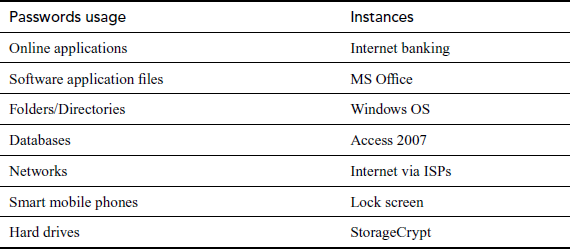
A typical computer user has passwords for many purposes: logging into online applications, accessing applications, DBs, networks and peripheral devices. Table 16.1 shows the different examples for password usage in various circumstances.
Table 16.1 Examples of password usage
16.1.2.1 Logging into Online Applications
For accessing the Internet resources such as E-mail, Internet Banking, E-manuscript, E-news, E-shopping, etc., an online account is required. Such an account has a login screen which is depicted in Figure 16.1. The user has to enter the username and the password in the space provided. Usually, the user name will be a unique name with respect to the application. The password depends on the policy of the organization. The password will not be displayed as it is, instead * will be displayed for each character. The ‘Forgot Password?’ option helps the user to recover the password if the password is forgotten accidentally. Depending on the application, password can be recovered by correctly answering the sequence of questions and thereby the provider will send the new password to the authorized E-mail ID which was specified during the account creation.
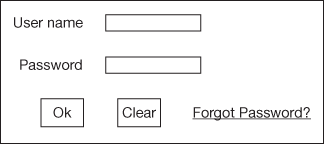
Figure 16.1 Sample login screen
16.1.2.2 Accessing Software Application Files
The user can enhance the protection to his/her files by incorporating password. The ‘password protection’ facilities are provided by many vendors in their software applications such as MS Office, OpenOffice, WinZip, Adobe Reader, Adobe Photoshop, etc. Some of the applications may not have password protection mechanism, and in such cases privacy may be violated. To overcome this, software such as ‘Password Door’ can be used, which will add password to any files in the computer system without altering the actual content.
16.1.2.3 Accessing Folders/Directories
The folder access can be restricted by using the password. For example, in the case of Windows OS, the folder access can be controlled by the following steps:
- To protect a folder with password, right-click it to select the option ‘Properties’.
- Select the checkbox named ‘Encrypt contents to secure data’ in ‘Advanced’ option.
- Apply protection to the folder only or to the subfolders. Choose the option ‘Apply changes to this folder only’ for protecting current folder.
- Finally click ‘Apply’ and ‘Ok’.
In the Linux flavour OS, ‘chmod’ command can be used to enforce read, write and execute options to users, groups and others for any files/folders. The above-mentioned procedure is applicable for file protection also.
16.1.2.4 Accessing Data in Databases
Generally, all the Database Management System (DBMS) softwares like Oracle, MySQL, etc., require username and password to access its DB. Almost, all the leading vendors are providing default username and password for their products. Step-by-step procedure for creation and usage of password for protecting Access 2007 DB is enumerated as follows.
- To protect DB, open it in Exclusive mode.
- On the DB Tools tab (shown in Figure 16.2), in the DB Tools group, click Encrypt with Password.
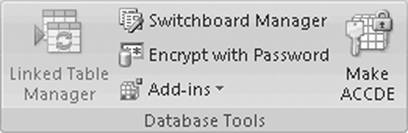
Figure 16.2 Database tools tab
- Type password in Password textbox of Set DB Password dialog box.
- Retype password in Verify box, and then click OK.
16.1.2.5 Access Internet through Secured Network
Many Internet Service Providers (ISPs) give Internet connection using secured login into network system. The type of connection can be dial up or broadband or Point-to-Point Protocol over Ethernet (PPPoE) for Internet communication. But all these connection types require an authenticated user to pass through secured network for accessing Internet communication provided by ISPs.
Wireless Hotspots as well as access points require password from client devices for getting connected to access Internet provided by ISP. These passwords will be protected by security protocols such as Wired Equivalent Privacy (WEP) or Wi-Fi Protected Access (WPA).
16.1.2.6 Secure Access for Smart Mobile Phones
A smartphone can be protected by locking the screen. Only authenticated user of the smartphone can access it by providing fingerprint or drawing secured pattern or typing secret code as credentials to pass through the lock screen in order to access the device.
16.1.2.7 Securing Hard Drives
StorageCrypt software allows us to encrypt and protect hardware drives such as USB drives, flash cards and PCMCIA drives using password. It uses 128-bits AES encryption and does not store the password on the removable device for maximum security.
After encryption, the removable drive cannot be opened on any other computer. StorageCrypt can work on any public partition so that taking it anywhere on the fly without the software installed on each machine is possible.
16.1.3 Password Management System
So far we have read about password and its usage. Now it is essential to manage such critical passwords through a system. A system can be a hardware or software or firmware. A managing system for multiple passwords used for various purposes is termed as ‘Password Management System’. Management includes suggesting passwords, storage of passwords in secured manner, renewing passwords periodically, etc. Password Management System maintains profile for each user so that it can manage many passwords for single user with multiple accounts.
16.1.3.1 Types of Password Management System
Many developmental efforts are taken by software developers for password management software. They are password data storage, securing stored content along with added features such as save and fetch account information. The following are the different types of password management software available as of now.
- Add-on feature within other software: Web browsers, antivirus software and other applications rarely include a password manager as an add-on feature. Some examples are Chrome, Firefox, Internet Explorer browsers and the identity management in Norton 360 comprehensive security suite. It can be used if we are confident with security offered through the product.
- Stand-alone password manager: Devices that are not shared with others use stand-alone password manager. Examples are KeePass and Aurora. Aurora has add-on features like form-filling, password generator and export passwords to readable file.
- Password managers using embedded security hardware: This is a rarely employed approach than other types of password management. It requires hardware embedded on device for storage and encryption of data. An example is Lenovo’s T-series ThinkPad laptops having a chipset mounted on the motherboard called embedded security subsystem. This password management can be used if your computer is at a high risk of physical hacking or theft.
- Web-based password manager: A web application can be used from any Internet-connected device. Some examples are RoboForm and PasswordSafe. These have some features like Aurora with the add-on benefit of web browsers interoperability.
16.2 PROGRAM SECURITY
In this section, we will be discussing different flaws in the software which become a threat to computer security. This section mainly deals with malwares and a case study which demonstrates how malwares can be removed. Malicious software package or malware plays a major role in most computer intrusion and security incidents. Any software package that causes harm to a user, computer or network can be termed as malware.
16.2.1 Malware
Malwares are the computer programs particularly designed to propagate among computers and cause damages or collect knowledge and send back to the hacker. The chief forms of malware are viruses, worms, Trojan Horses, rootkits, scareware and spyware. Virus is a program that invades a computer and embeds itself within the host program, where it replicates, propagates and infects all the computers in the network. Viruses usually spread across infected removable disks, E-mails, etc. Worm is a program that exploits vulnerability associated with the OS and copies itself on other computers over a network. Generally, in computing a Trojan Horse (Trojan) is a non-self-replicating type of malware, when executed causing loss or theft of data which is determined by the nature of the Trojan. As the name implies, Trojan appears themselves as a useful program which makes the victim to install it. Rootkit is a software tool which penetrates into the OS and allows the intruder to get privileged access to the computer system without the knowledge of users. Scareware is a software that generates false alerts under the pretext of security. Spyware software gathers information from the computer system and sends to another system without the consent of the owner.
16.2.2 Malware Propagation
The malware propagation is the process of spreading malware to an information system, device or platform, which it seeks to infect. For example, the malware can spread through PDF files and access the host unless the user disables the JavaScript in PDF reader. The following are the different ways by which malwares are propagated.
- Through wireless networks: An attacker takes the advantage of the weakness in the Bluetooth technology, so that the malwares can spread across the different wireless devices within a short span of time. BlueSnarf, Bluejacking and BlueBug are some of the common attacks through wireless networks. BlueSnarf exploits other Bluetooth connection without their knowledge and paves path to the victims’ data on to a calendar, contact list, E-mails and text messages. The attacker can get a full access including read and write access. Bluejacking occurs by sending a short tricky text message, like vCard which contains message in the name field to another device which is Bluetooth enabled over OBEX (Object Exchange) protocol. Access codes of the tricky message are being used by the users in order to admit the attacker to take control of the device. BlueBug accesses and uses all phone features like incoming and outgoing calls, sending and receiving SMS, but its operational range is limited to 10–15 m.
- Through file sharing: File sharing has become a very common application for peer-to-peer networking, which allows the users to share a vast number of digitally stored information. The weakness in the protection mechanism stands the reason behind the vulnerability of the peer-to-peer file-sharing networks to many security attacks. Often when a ‘cracked’ version of some proprietary software is searched, there is a chance of getting malware instead.
- Through social networking: Online Social Networking (OSN) provides the users with many services such as sharing photos, clips, files, chat, etc. Nowadays, OSN has become a medium of collective force to change the culture and lifestyle. On the same time, regarding security, OSNs can be considered as a perfect platform for malware and security threats. The attacks and threats can be categorized into the following four varied categories:
(a) Privacy Breach Attacks correspond to the breaches from the service providers: for example, Facebook, Twitter and so on. The user or the account owners and the third-party applications are the three primary parties who interact with one another in an OSN.
(b) Viral Marketing refers to the practices to yield growths in brand awareness to achieve other marketing objectives through self-replicating viral processes, analogous to the spread of computer viruses of marketing. In OSNs, viral marketing can be considered as worthy environment for malware, one of the most common examples is the spam, in addition to the process of phishing attacks, which is considered as social engineering technique.
(c) Network Structural Attacks, such as Sybil, assault the system wherein a reputation system is subverted by forging identities so that a node in a network claims multiple identities.
(d) In the malware attacks, one of the supreme attacks is the attack of a worm identified as Koobface worm. Koobface on successful infection, attempts to gather login information for File Transfer Protocol (FTP) sites, Facebook, Skype and other social media platforms, but not any sensitive financial data. It then uses compromised computers to build a peer-to-peer connecting interfaces and infects each other nodes.
- Through E-mail communications: There are so many ways to attack an electronic mail, which affects the sending E-mails, i.e. spam E-mails using viruses or worms. The attackers seize the E-mail which is sent and delete the sender’s address, hence the E-mail gets spammed and the receiving process fails. The sender receives a failing note message and he/she cannot determine the real reason for not delivering the E-mail on the other side. The E-mail spam spread can be analysed by many causes such as the period of time between sending the E-mail and sending back the failing report for the transmitter, and the returned message, which does not hold a real failing reason.
16.2.3 Malware Detection
Malware detection safeguards the computer system by detecting malicious behaviour. Malware detector implements malware detection techniques which needs two input data. First is the data about the malicious behaviour. Second is the program under inspection. Using these data, the detector decides whether the program is malicious or not. Malwares can be detected by analysing the behaviour either statically or dynamically. Static method uses syntax or structural stuffs of the program (static) or Process (dynamic) Under Inspection (PUI) to decide its maliciousness. In general, a static approach tries to detect malware earlier the program under inspection executes. Conversely, a dynamic approach attempts to spot malicious behaviour during program execution or afterwards program execution. The three fundamental malware detection techniques are anomaly-, signature- and behaviour-based detection.
- 1. Anomaly-based detection: This technique uses its knowledge of normal behaviour to decide the maliciousness of a program under scrutiny. An exclusive type of anomaly-based detection is referred to as specification-based detection. This type of technique renders some rule set of the valid behaviour in order to settle it down as maliciousness of a program under examination.
- 2. Signature-based detection: This detection uses its categorization of what is known to be malicious to decide the maliciousness of a program under scrutiny. It is the most common technique that antivirus software uses to detect malware. Signature-based detection is a type of static antivirus scanners which is accomplished by string matching and regular expression. The problem with signature-based detection is that it cannot detect new malwares and variants of existing malwares where each and every day new malwares are created. Though the signature-based approach can effectually contain virus outbreaks in the right environments, virus writers have tried to stay a step ahead of such software by scripting ‘oligomorphic’, ‘polymorphic’ and ‘metamorphic’ viruses, which encode parts of themselves or otherwise alter themselves as a method of disguise, so as to not match virus signatures in the dictionary. Static approach to signature-based detection uses only the structural information to decide the maliciousness. On the other hand, a dynamic approach will leverage runtime evidence of the PUI.
- Behaviour-based detection: However, the appearance of the malware is, it will behave badly in order to infect the computer, so behaviour-based detection will be ultimate for detecting malware. For example, by studying the sequence of a malicious program calling by OS makes, the maliciousness could be detected. Malware detection software can catch the system calls while a program is running and uses heuristics to look for distrustful activity, terminating those with harmful behaviour.
16.2.4 Viruses
Computer viruses are one type of malware. A virus is a computer program that hides inside an alternate program in a computer or on a disk that attempts to propagate itself to different machines, and regularly has some catastrophic capacity. A virus should never be treated as harmless and left on the system.
16.2.4.1 Types of Virus
It is promising to classify computer viruses in numerous ways specifically in terms of infection mechanism of the virus, harm the virus inflicts, trigger mechanism, platform or OS the virus infects, dissemination and hiding mechanisms.
Some of the common viruses are discussed here. Memory resident virus hides in the RAM and get control over system memory. Whenever the OS runs, it gets activated and infects all the files which are open. An overwrite virus deletes the information presented in the infected file, thereby making it useless. It appends its code to the program and modifies the program in such a way that it executes on every occasion when the program runs. A Boot Sector Virus infects the first sector of the hard drive, where the Master Boot Record (MBR) is stored. The MBR stores primary partition table of the disk and bootstrapping instructions which are executed after the computer BIOS passes execution to the machine code. Whenever the computer is turned on, the virus is loaded into the memory and controls the computer. Multipartite virus propagates in many ways and infects the victim depending on the OS installed or availability of certain file. A macro virus embeds itself in a file. A macro virus embeds itself in a file. A macro is a way to automate and simplify a task that is repeatedly performed in MS office suite. These viruses automatically infect the files that contain the macros. It is also referred to as a type of E-mail virus. Stealth viruses are specialized in avoiding detection. These viruses redirect the hard disk head, driving it to read alternative memory sector instead of their own. These viruses are anti-heuristic in nature which makes hard for the humans to find out, but antivirus software is specially designed to track and erase them.
16.2.4.2 Virus Life Cycle
The virus code may store at the beginning of an executable program and is executed whenever the program is launched by the new user. The pseudo code for the sample virus is shown in Figure 16.3. In this pseudo code, the string ‘SigNature’ is a distinctive identification of the virus.
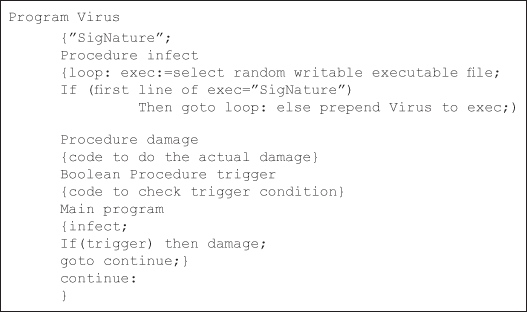
Figure 16.3 Pseudo code for sample virus
The string ‘SigNature’ is the very first thing within the workable program’s file, however it is not executed by itself or written by the virus as a result. Once the virus’s main program starts, it invokes the procedure infect. That procedure arbitrary selects the associated workable program file F (but it is to be written by the present user), verifies that it is not already infected (by checking for the signature), then infects it by prepending its code to F, if it was already infected by virus the loop gets executed until it gets an uncorrupted file F. Procedure damage has the code to corrupt the file. The virus program then executes the trigger to seek out whether or not to unharness its payload (destructive task), and ends by planning to the label continue. This label marks the beginning of the workable program that follows the virus, and this program currently executes. The life cycle of a typical virus consists of three stages, activation, replication and operation. The virus is activated within the host computer; it replicates itself and so performs its main ‘task’ if the triggering condition is happy. The perfect place for an endemic is within the bootstrap loader. However, this loader is created in a factory environment and its content is permanent.
16.2.5 Case Study
Now, consider a case study where a website was infected by malware and the procedures adopted to remove malware from that website.
What transpired was that a particular website got reported as an ‘attack site’ by Google Chrome and Mozilla Firefox but was working well on Internet Explorer.
The reason behind the above act is that the site is concealed with malware and blacklisted by Google and whichever browser (Chrome, Firefox, etc.) uses the Google’s blacklist would report that the particular website as an ‘attack site’.
Make sure that the site works well on the browsers that uses Google’s blacklist. This issue can be solved by undergoing the following steps:
- Shutting down the site
Get the FTP credentials (shared host, so no SSH access), and rename the publicffhtml directory
$ rename publicffhtml publichtmlffsaved
$ mkdir publicffhtml
$ put newindex publicffhtml/index.html
- Changing the passwords
- Analysing the malware
To analyse the malware, download the whole publicffhtml directory and use ncftpget to get the job done.
$ mkdir clientX
$ ncftpget -z -u USER -p PASS -R clientX.com ./clientX /publichtmlffsaved
grep for IFrames, JavaScripts pointing to external php files or very big encoded lines to find the malware.
- Fixing the site
Run the find command passing the files to sed for removing those malware lines.
16.3 OS SECURITY
This section discusses about the fundamentals of the OS and how we can design a trusted OS. Here, we make note of the different security policies and security models. The different attacks on the system are also mentioned in this section.
16.3.1 Operating System
The instructions and data from the peripheral devices are integrated with the application programs by a set of programs that controls the computer systems and are called OS. In the earlier digital computers, there was no OS. Such systems never supported multi programs as they can run only one program at a time, which had a command on all system resources. If any special resources are needed, then it requires some human intervention. In the mid-1950s, the first OS was developed. In the 1960s, the time-sharing facility was introduced in an OS, which helped many users to know the CPU time and terminal.
The main services of OS are given as follows:
- Process management: A program can either be in a static or dynamic state. A running program is called a process. It consists of code, data, certain set of resources allowed to it and one or more flows of execution through the code. The allocation of resources to the process is done by the OS. It also caters system calls to manage these processes.
- Memory management: Memory related to the computer system must be shared between the OS and an application program. The OS allocate memory to processes and control the memory management hardware that determines which memory locations a process may access.
- File management: The data are to be processed and the resultant information is to be transmitted or stored. The data storage and retrieval are controlled by the file system. Without a file system, it is difficult to tell where a piece of information stops and the next begins. To easily identify the boundary of information, the data can be divided into several slices with name. An abstracted organized collection of stored objects are called files. These file system objects were manipulated by the primitives provided by the OS.
- Device management: The information created in the computer system is sent through a computer’s Input and Output (I/O) devices. Processes access these devices using the system call interface. The OS tries to manage I/O devices by efficiently sharing them among all the required processes. A system call is a programming interface used to access the services provided by the OS.
From the above discussions, it is clear that the OS rules the computer system as a whole. It is analogous to the government which runs a state. The OS provides resources to the process which needs the resources and also controls the process if it tries to intrude to other resources.
16.3.2 Trusted OSs
Trust in process means the absence of security defects and unreliable segments. Trust in product means that the product is evaluated and it is an approved product. The trusted software means the module used to enforce security policy. Trusted Computing Base (TCB) is the set of all protection mechanisms within the hardware/software or the firmware that enforce a unified security policy. The system is more secure if the TCB is small. As a whole, a trusted system is the system which is trusted to process-sensitive information. OS is trusted if we have the confidence that it provides the above-mentioned four services in a consistent and an effective way.
Trust is quality that can be quantified. If the system meets the intended security requirement, it can be called trusted one. Based on the degree to which the system meets a specific set of requirement, one can assign the level of trust to that particular system. Trusted BSD (Berkeley Software Distribution) and Trusted Solaris are examples of trusted OS. The trust of a system is assessed or evaluated by the user who uses the system which fully depends upon factors such as implementation of security policy and the adequacy of its measures and mechanisms.
16.3.3 Security Policies
A security policy is a statement of the security we expect a given system to enforce. A system can be characterized to the different level of trust based on the extent to which it satisfies the security policies. Each policy must have four sections.
- Purpose: What is the anticipated outcome for which the policy is created?
- Scope: The state of the environment in which the policy exists.
- Responsibility: The person who is accountable for the proper implementation of the policy.
- Authority: A statement about the individual who issued the policy and how that person has the authority to define and enforce the policy.
The major types of policies that are important to an organization are the following:
- Information policy: Company process and use information having various levels of sensitivity. Much of the information may be freely distributed to the public, but some should not. There are minimum two levels of sensitivity within the category of information which are not freely accessible by the public. Information such as employees contact details may cause some nuisance if released publicly. But information such as details of future business strategy may lead to a loss of competitive edge in the market. As time passes some information turns out to be less sensitive. For example, subsequent to the result of bid, the competitive bid information happens to be not sensitive.
- Security policy: The best way of finding the legitimacy of the computer systems users is by proving user IDs and the passwords and with many more methods.
- Audit policy: This must specify about the events occurred in the computer system to be logged for analysis in the future. One of the common events from logged classes covers the failed login, which can identify attempts to penetrate the system. If there is a systematic method for scrutinizing the event log for a particular event, it becomes more useful. Otherwise, it is an overhead of reading a long list of events as people do not feel comfortable with, so manual log reading is feasible only when an event has been identified by other means.
- Computer use policy: This type of policy involves the agreement of the employee with the company, once he joined the company and start using the company-owned computer. Some of the policy items are as follows:
(a) The computers, hardwares and network resources are owned by the company.
(b) Which are the acceptable ways in which if computers (if any) are not owned by the company is to be used?
(c) All information stored on or used by the company computers is owned by the company except the customer data.
(d) The employee is permitted to use the computer only for the company-related works.
- Military information security policy: The information security policy of the U.S. Department of Defense classifies the information based on the potential of the effects it causes to the national security, if it is disclosed illegally. The security policy of each agency is precisely documented appropriately. Department Of Defense (DOD) policy provides an excellent model for the types of security. The same policy perhaps may not be suitable to commercial companies. The degree of classification of any document or other information is determined only by the seriousness of its causes and effects if it is released illegally. There are mainly four levels of classification: Unclassified, Confidential, Secret and TopSecret. DOD anti-espionage experts give every level of classification an average amount of time before it is open to the outsider.
To establish trustworthiness of any company to access and protect the data, the U.S. government follows security clearances method. The clearances are then given names relevant to the information levels indicating sensitivity which has more priority for a person is authorized to access. For example, a person with a ‘Secret’ clearance is authorized for ‘Secret’ and ‘Confidential’ material, but not for ‘Top Secret’. Based on the persons trustworthiness, the security clearance is determined and granted.
- Company security policy: This section discusses how a company might use the DOD security policy to handle and maintain its own data; the companies using the sensitive data of the government are enforced to follow the policies as per the contract of data access permissions. The first idea is that of a multi-level security because the protection type varies from company to company as the sensitivity of the data differs among them. For many companies, a three-level policy might suffice. Suggested levels of classification include the following:
Three-level: Public Release, Internal Use Only and Proprietary
Four-level: Public Release, Internal Use Only, Proprietary and Company Confidential.
Companies mostly do not have a well-cleared clearance system with some aspects of government system integrated. All the companies performs background verification of all its employees and the authority of granting access to each sensitive project will be assigned to the specific managers based on the company interests. The need-to-know policy must be enforced in such a way that the employee can have access to sensitive information when the project manager ascertains it.
- System administration policy: The system administration policies are about the responsibility of distributing and updating the software which are assigned to the persons those who are experts in that area. Some additional responsibilities like exploring and eliminating the vulnerabilities in the systems are also assigned. Security incidents are also handled using this policy, called Incident Response Policy, which covers the following topics:
(a) Finding the incident.
(b) Finding the way to transfer the necessary response which is the most appropriate.
(c) Finding who may deal the legal actions and meeting the press and the law enforcement activities.
- Password management policy: Since the passwords are vulnerable to imitation, theft and exploitation, the DB security systems that are based on passwords should secure it all times. Oracle DB has DBAs and security officers to control password management policy through user profiles, enabling greater control over DB security.
16.3.4 Features of Trusted OS
The following are the main features of trusted OS:
- User identification and authentication: This feature is a key to computer security. It involves two steps: first is to find who is the service requester and second is to verify the claimed identity.
- Object reuse policy: If an object is erased by a user, some of it may remain in its allocated space. There is a chance that new users can scavenge the space and mine some sensitive information. This approach is called object reuse. OS should prevent this by overwriting all reassigned space.
- Complete mediation and trusted paths: Access to every resource needs to be controlled. For this, each object such as network ports, processes, DMA, etc. separate paths are provided by the modern OS. To establish proper communication, trusted paths are required.
- Audits: Log files related to security information are needed that services audit requests. But the drawback is that log file may be enormously large files. We can avoid this by limit to open/close object actions. Even these can become too large over time. Continuous audits should be performed in the background.
- Intrusion detection: Intrusion detection software establishes patterns of ‘normal usage’. Consequently, it can sound alarm if these patterns change.
16.3.5 The Attacks on the System
There are four levels at which a system can be attacked:
- Physical: One of the best ways to steal data is to trap the backup tapes. Access permissions like privileges are set up while accessing to the root, console like rebooting is done from the root. Even common access to the system accessories paves way for the attacker to tamper the system; Internet is the common way of giving opportunity to the threats for the system.
- Human: Even though humans are allowed to access the system by trustworthy, some breaks the security law. The most attacks reported today are via social engineering by fooling the legitimate people and the attacks by violating the security law.
(a) Phishing is the act in which E-mail users are instructed to provide sensitive personal information using authentic looking message.
(b) Dumpster diving involves exploring the passwords in recycle bin or other locations.
(c) Password cracking in security system involves stealing user’s system passwords, either by watching them when they type their passwords or like guessing by their pet names and other words common to the user.
- Operating system: The OS must protect itself from security threats, such as looping the processes with same or different processes, misleading memory access, violating stack overflow, the launching of programs with excessive privileges and many others.
- Network: It is necessary to protect the network from the attacks and also protecting the desktop systems from threats which are coming from network communication system.
16.3.6 Models of Security
It is usual that when we would like to understand a subject, first the logical model of the subject is created. A model of a system is an abstract machine description of what the system does. The logical model is useful only if it maps the real system. A security policy defines the security requirement for a given system. A security model is the combination of system model and the security policies to that model. Models of security are used for a number of purposes such as:
- Testing the policy for adequate coverage and consistency
- Documenting the policy
- Validating the policy to check whether the policy meets the requirements.
Many security models are there which are useful and majority of them looks on multi-level security. The key fact of multi-level security is that some data may be sensitive when compared with others. Some of the popular security models are discussed below.
16.3.6.1 The Bell–LaPadula Model
The Bell–LaPadula Model (BLM), which is a multi-level security model, was proposed by David Elliott Bell and Leonard J. LaPadula for enforcing access control in government and military applications. The goal of this model is to identify the allowable flows of information in a secure system. Here, the subjects, which are active entities that access or manipulate object and the objects, which can be anything that holds data like memory, directory, queues, are often partitioned into different security levels. For example: Top Secret > Secret > Confidential > Unclassified. A subject can only access objects at certain levels determined by his/her security level.
Some access control rules are used here by having security labels on objects and subject clearances. The classification of security labels is ranged from top secret to the least sensitive secret. For example, a subject S may have read access to an object O only if C(S) > C(O), where C(S) is the person’s clearness security class for subject S and C(O) is the classification of security class for object O. That means the ‘Secret’ parts of a report will be available only to those who are cleared for ‘Secret’ level or higher information.
Confidentiality and controlled access are the models core part to the classified information. The meaning of secure states that every state transitions holds security by changing from one secure state to another state, the security objectives and the state changeover is defined by transition functions.
The model deals only with confidentiality and not with integrity. Another issue of this model is that it does not deal with information flow through covert channels. The information flow in the covert channel is the communication channel which is purely based on how the system resources are utilized which are not meant basically for communication among the system processes.
16.3.6.2 The Biba Integrity Model
The Biba Integrity Model was published at the Mitre Corporation in 1977. The model is proposed by Kenneth J. Biba in 1977 to overcome the shortcoming of the BLM to deal with integrity of data. Trustworthiness of data or resources means integrity.
The model supports both mandatory and discretionary policies. The mandatory policies include Strict Integrity Policy, Low-Watermark Policy for Subjects, Low-Watermark Policy for Objects, Low-Watermark Integrity Audit Policy, Ring Policy and the discretionary policies include Access Control Lists, Object Hierarchy and Ring Policy.
FreeBSD 5.0 uses the Biba model which supports both hierarchical and non-hierarchical labelling of all system objects with integrity data.
The pros of this model is its simple nature, easy to implement and based on the requirement it provides a number of different policies. On the other hand, the model does nothing to enforce confidentiality or does not support the granting and revocation of authorization. To use this model, all computers in the system must support the labelling of integrity for both subjects and objects which make it difficult to use the model in a network environment.
16.3.7 Design of a Trusted OS
Creating a large software system with all stipulated and consistent set of requirements is very hard and complex. To develop an OS that adheres to all of the specified requirements regarding the security constraints requires both the BLM and the Biba Integrity Model.
If the OS is in interrupt-driven mode, then it is hard to insure the security. Imagine an ordinary user program; if this is a deterministic system, then the program does only for the instructions given. The core job of an OS is defining an environment for execution of the programs of the computer and then enters an idle state, just waiting for interrupts. It executes the program by responding to the interrupts based on a fixed priority policy. If the interrupts are set and the programs are associated, then the environment for execution is initialized. A context switch method is followed when an interrupt suspends the ongoing program and initializing a new program, basically loading the new program and creating its environment for execution. There are some overheads in the OS due to the context switch that gives some indeterminacy but consumes time and resources. So, there is a challenge to make use of the context switch in an efficient way. Introducing security code into the context switch slows it down.
The following are the main services of the OS with respect to security:
- User interface: The gateway where the users’ legitimacy is checked and allows the user to access the system.
- Service management: Permits the user to access low level services provided by the OS.
- Resource allocation: This allocates resources for the user like memory.
A kernel is the one that performs low-level functions in the OS. It does things such as handling shared printers, provide E-mail and Internet access, etc. The kernel of an OS is often called the core part of the OS. OS designed has two kernels: the security kernel and the OS kernel. The security kernel helps for the security mechanisms of the OS, which handles most of the functions normally allocated to the OS, as most of these low-level facilities have impact on security. The reference monitor is the first and foremost thing in security kernel. This controls access mechanisms to all objects, files, devices, interprocess communication and memory. The reference monitor must check access to itself and it should be protected from unauthorized modification or access. The resource allocator has a security front-end to increase its security. Each of the resources allocated by this feature should be viewed also as an object–a data structure with software to manage its access. Some of the features of a security-oriented OS are discussed below.
- Mandatory Access Control (MAC) is the way of permitting access with the service of central authority and not by the users. If a user wants to reveal the secret data and there is no secret clearance on the receiver side, then the user does not have permission to grant the secret clearance. MAC must exist in parallel with discretionary access control where the subjects owned by the individual user is only permitted to manage the objects.
- Object reuse protection refers to the elimination of the objects and for reusing purpose the object is handed over to the object pool, for example: Protection of files. The modification of file allocation table in many OS leads to unavailability of object references in placing the data sectors on the free list of reuse. Note that the data sectors are not overwritten, so that the original data remains. In theory, a large file can be declared without writing anything to it, just read what is already there, left over from when its sectors were used by a number of other files and now deleted.
- Audit log management means practicing of logging to all the events having the impact of potential security, from unauthorized access and modification of the log is protected, on determining the periodical log and analysing the irregularities of the procedures that are created. A security log is of no use if nobody looks at it.
- Intrusion detection refers to the creation and use of system software that scans all activity look-up for unusual events. The intrusion detection software always reports that the number of hard drives on the system has changed.
- An important tool of trusted OS is the virtualization. It refers to the OS to collect the sensitive resources of the computer system and the virtualized objects must be supported by real objects. A virtual machine is a cluster of hardware facilities; it may be real or simulated in software. Virtual memory is one of the features where every process access to all of the computer’s memory with the exception of OS allocated memory.
16.4 NETWORK SECURITY
Network security deals with the provision of network-accessible resources based on the policies adopted by a network administrator to regulate and monitor any unauthorized access, modification and denial of a computer network. In this section, we are dealing with the Intrusion Detection System (IDS) and firewall.
16.4.1 Intrusion Detection System
Intrusion is an act which violates the security policies of the computer system. The IDS is a device or an application that monitors the network or the computer system for malicious activities or policy violations and produces reports for further action. It helps the information systems to prepare for intruders and deals with the person/system involving in the intrusion. Intrusion detection provides the following:
- Monitoring and analysing the system and user activities.
- Assessing the computer system configurations and their vulnerabilities.
- Evaluating the integrity of critical computer system and the data files in that system.
- Statistically analysing the activity patterns by comparing them with already known attacks.
- Monitoring and auditing the OS.
- Analysing the abnormal activities of the computer system.
16.4.1.1 Intrusion Detection Techniques
Intrusion detection system is mainly classified into three categories, namely, statistical anomaly-, signature- and stack-based IDS.
- A statistical anomaly-based IDS monitors normal network activities such as protocols used, the interconnecting ports and devices in the network and the different alerts sent to the administrator/user whenever abnormal traffic is detected. The main limitation of this IDS is that it generates several false alarms which compromise the effectiveness of the IDS.
- Signature-based IDS screens packets for preconfigured and predetermined attack patterns which are referred to as signatures. Unfortunately, novel attacks cannot be predicted and IDS have to be programmed when each new pattern is detected. As in the case of statistical anomaly-based IDS, signature-based IDS also suffers from false alarms.
- Stack-based IDS is tightly integrated with the Transmission Control Protocol (TCP)/IP protocol stack and watches the upward traversal of packets in OSI layers. It provides real-time analysis and response to the system.
16.4.1.2 IDS Categories
Based on the observed location of intrusion, the IDS can be categorized as host-, network- and distributed-based IDS.
- In the host-based observation, the system examines information at the local host or OS by examining actual system calls or system log files. With the help of this information, some can prevent the attack or it can generate reports of the attack which had occurred. The major benefit of this system is that the success or failure of an attack can be readily determined and also if the network traffic stream is encrypted, the observation system has access to the traffic in unencrypted form. The shortcoming of this model is that it fails to support multiple OSs.
- The network-based observation system examines the actual network packets that are travelling across the network for known signs of intrusion activity. It has the benefit of watching the attack from the entire network point of view and gives a clear indication of the extent to which the network is being attacked. The encrypted network traffic can make the network-based IDS inefficient.
- In recent years, separate host-based and network-based IDS cannot provide complete security. The distributed-based IDS mainly focuses on scalability and heterogeneity thereby providing complete security. It multiplies the power of a single IDS by coupling an attack correlation engine with the DB of events obtained from a large number of geographically dispersed agents.
16.4.2 Firewall
Firewall is a hardware or software or a combination of both which is used to enforce security policies of an organization. It is located at the boundary between the two networks for controlling all the data traffic passing between the two networks through this. The firewall has a mechanism to implement security policies specified as rules so that it allows some data traffic to pass and the others are blocked. The firewall by itself is immune to illegal penetration. Besides these advantages, it has some limitations as well. A firewall does not protect against internal threats or against attacks that bypass through it. In addition to this, it cannot protect against transfer of virus infected programs or files which are used internally.
Mainly there are four common methods of control in a firewall: user control, direction control, behaviour control and service control. The user control determines all the users who have access to the other side of the firewall. The direction in which a particular service request gets initialized and allowed to flow through firewall is determined by the direction control. Behaviour control decides how particular services are used for an application. Service control finds the types of Internet services that can be accessed, inbound or outbound.
16.4.3 Types of Firewall
Firewall mechanism is usually combined with other technologies, namely, Network Routing Technology, Content Filtering Technology and Intrusion Prevention System (IPS) technology. The following are some of the available firewall types:
- Packet Filtering Firewall: Packet filtering is the most basic feature of a firewall. Modern firewalls consider packet filtering as the heart of firewall mechanism. A network router which utilizes access control lists is a good example for packet filtering device. Figure 16.4 shows a firewall with packet filtering router. Firewalls with packet filters operate at the network layer which provides network access control based on the information available in a packet. The various information that can be included in the packet are the packet’s source IP address, the packet’s destination IP address, the network or transport layer protocol used for communication between source and destination hosts such as TCP, User Datagram Protocol (UDP) or Internet Control Message Protocol (ICMP) characteristics of the transport layer communications sessions, such as session source and destination ports and the interface being traversed by the packet with the direction.
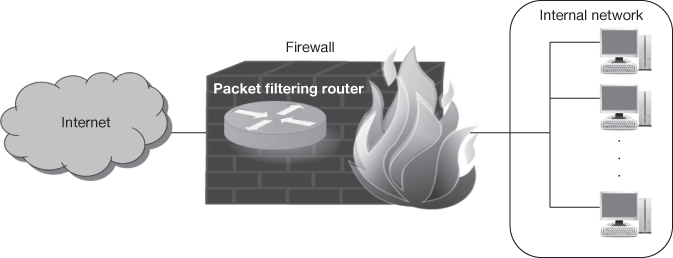
Figure 16.4 Packet filtering firewall
Usually access control functionalities are managed by a set of directives called ruleset. Filtering the inbound traffic is known as ingress filtering. Egress filtering refers to the filtering of outgoing traffic. Organizations implement restrictions on their internal traffic to block the external FTP server access or to prevent Denial of Service (DoS) attacks from insiders.
- Stateful inspection: Stateful inspection tracks the state of connections and blocks the packets that deviate from the expected state to improve the utility of packet filters by utilizing the transport layer features. TCP traffic has three states, namely, connection establishment, usage and termination. For monitoring the states of every connection, stateful inspection explores the TCP headers for particular values. A state table is created for this purpose. Each new packet is compared with the existing values in state table to identify any deviation from its expected state. For example, to pass through a firewall, an attacker generates a packet with a header representing it as an established connection. Stateful inspection in a firewall must first confirm whether the received packet is a part of an established connection with the help of lists already available in the state table.
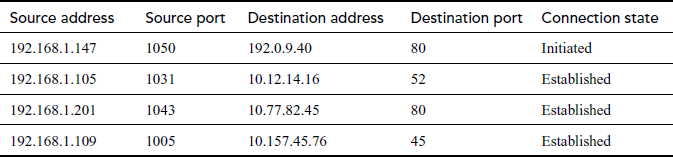
Table 16.2 shows an example of a state table. From the internal network, if a device (e.g. 192.168.1.147) tries to connect to a device (192.0.9.40) outside the firewall, then the connection is first verified with the firewall ruleset to identify whether it is allowable. If the connection is allowed, then an entry is added in the state table indicating that a new session is initiated. If a connection completes the three-way TCP handshake, then the connection state is changed and all the consequent traffic which matches the row entry is permitted to pass through the firewall.
Table 16.2 State table example
- Application firewall: Application firewall identifies the unexpected sequences of commands such as repeated issue of the same command or issuing a command that depends on the preceded unavailable command. These suspicious commands are initiated within application protocols (HTTP, SMTP, FTP) for buffer overflow attacks, DoS attacks, malware and other types of attacks. Figure 16.5 shows an application firewall.
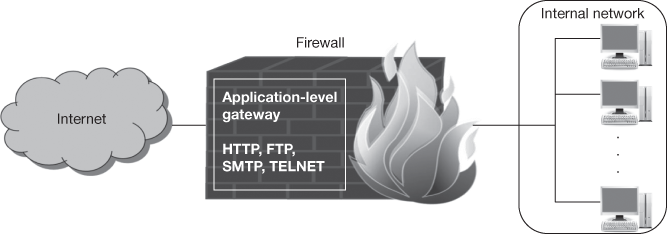
Figure 16.5 Application firewall
Another basic feature is validating the input of individual commands like minimum and maximum lengths of arguments. For example, a username argument with 1000 characters is doubtful. Application firewalls are available for various common protocols that includes HTTP (Hyper Text Transfer Protocol), FTP, DB (such as SQL [Structured Query Language]), E-mail (SMTP [Simple Mail Transfer Protocol], Post Office Protocol [POP], and Internet Message Access Protocol [IMAP]), Voice over IP (VoIP) and Extensible Markup Language (XML).
- Application-proxy gateway firewall: Advanced firewalls have a feature called an application-proxy gateway which combines lower-layer access control with upper-layer functionality and this is shown in Figure 16.6. These firewalls have a proxy agent between two intermediary communicating hosts which does not allow a direct connection between them. Actually for every successful connection, two separate connections were created one between the client and the proxy server and another between the proxy server and the true destination. The proxy remains transparent to both the hosts like with an illusion of a direct connection.
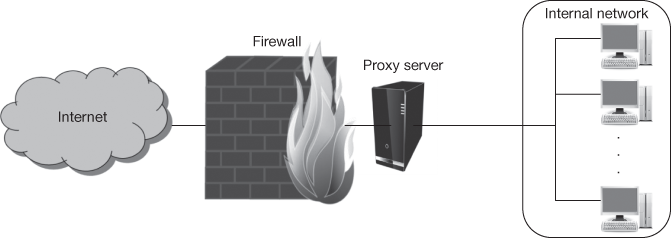
Figure 16.6 Application-proxy gateway firewall
An application-proxy gateway operates at the application layer and inspects the actual traffic content. An application-proxy gateway provides higher level of security by preventing direct connections between the hosts and also inspects traffic content for identifying policy violations. Another advantage is that some application-proxy gateways have the ability of decrypting packets, examining them and re-encrypting them before sending them to the destination host. Firewalls with application-proxy gateways also have a disadvantage that the firewall spends more time to read and interpret every packet.
- Dedicated proxy servers: Firewall capabilities of dedicated proxy servers are limited as compared to application-proxy gateways. Dedicated proxy servers are closely associated with application-proxy gateway firewalls. Many dedicated proxy servers are application-specific. Generally, dedicated proxy servers are used for decreasing the firewalls workload and for conducting specialized filtering and logins that are difficult for the firewall to carry out.
- Virtual private networking: Rather than blocking unwanted traffic, a basic requirement in order to design a firewall is to encrypt and decrypt certain network traffic flows between the protected network and external networks. For this, Virtual Private Networks (VPNs) usually encrypt traffic message and perform user authentication and integrity checks by utilizing more protocols. VPNs are widely used for providing secure network communications across untrusted networks. For example, VPN technology is commonly used to extend the protected network of a multi-site organization across the Internet and also to provide secure remote user access to internal and secure organizational networks via the Internet. Two common options for secure VPNs are IPsec and Secure Socket Layer (SSL)/Transport Layer Security (TLS).
The two most common VPN architectures are gateway-to-gateway and host-to-gateway. Gateway-to-gateway architecture connects multiple fixed sites over public lines with the help of VPN gateways, for example, connecting all branch offices to an organization’s headquarters. A secure connection to the network of distinct users (called remote users) is offered by the host-to-gateway architecture. Additional resources are required to run VPN functionality on a firewall that depends on the amount of traffic flowing across the VPN and the type of encryption being used.
16.5 DATABASE SECURITY
Database is a collection of data which contains relevant information. A DBMS is a general purpose software package that manages the DB for the user. Some of the real-world organizations that use DBs range from academic institutions to enterprise applications. Various commercially available DB systems are Oracle, SQL Server, DB2, MySQL, PostgreSQL, etc. This section discusses about the DB, its attack and the countermeasures to avoid those attacks.
16.5.1 DB Security Requirements
A DB system allows the user to manage the structure for storing the information and provides mechanisms to manipulate the stored information. It is necessary that the DB system must provide security to the information available in the DB. DB security means protecting the DB and its objects from unauthorized access.
Complete security to the DB can be provided if it satisfies the three basic security requirements such as confidentiality, integrity and availability. Confidentiality means protecting the data from unauthorized access. In a DB, confidentiality is ensured by applying access control mechanism, authorization and encryption techniques. The term ‘DB’ integrity stands for preventing the DB from unauthorized modification. It can be achieved by combining access control mechanism and integrity constraints (conditions). Availability assures that the data stored in the DB is available to the authorized users by utilizing concurrency control mechanism and recovery subsystem.
16.5.2 DB Vulnerabilities and Attacks
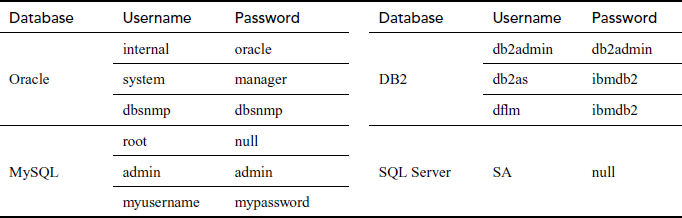
A DB may be vulnerable due to many reasons. Mostly, all the DBs have their own default user accounts and passwords. If the DB administrators are not altering these default DB user credentials, there is an opportunity for the attacker to breach the security. Table 16.3 shows some sample DBs with their default user credentials. Nowadays, many password cracker tools and scripts are extensively used to exploit the weak and default DB user credentials for attacking the DB, so that all authenticated DB users must have strong passwords.
Table 16.3 Databases default user credentials
All DBs are vulnerable to its specific category of DoS attacks and buffer overflows. DoS attacks on DB cause it to crash and result in failure in response to the valid user requests. Buffer overflows in DB make the application to perform unintended actions. While granting permissions to the users, incorrectly assigning the resources privileges allows the users to deliberately misuse their access rights by endangering the DB.
DB attacks can be classified into two categories based on whether the attacker is inside or outside the back-end DB network location. One category of attack is by an insider who can attack the DB by misusing the granted privileges. For example, a privileged user (insider) who is having the privilege only to view the details of all employees but tries to modify the details by abusing the granted privileges. Another attack is through a web application which uses DB as a back-end to store the information. An attacker performs this attack by injecting the SQL query in the input field to be entered by the user and also by exploiting the vulnerabilities of DB buffer overflow. This attack is done mostly by the outsider who use or visits the web application with the intention of stealing the confidential information. This chapter mainly focuses on SQL injection attacks. To understand the SQL injection attack, it is necessary to understand the web application four-tier architecture and SQL queries which are explained in Section 16.5.2.1.
16.5.2.1 Web Application Architecture
Web applications that use any type of DB as back-end are more vulnerable to SQL injection attacks than other types of attacks. Most of the web applications are DB-driven; the best example is an E-commerce application which stores various information in a DB. Some of the E-commerce applications are online shopping, instant messaging, online banking, social networking, newsgroups, etc. Figure 16.7 shows an architecture of a web application where SQL statements are executed in DB server. Generally, a web application has the following four tiers.
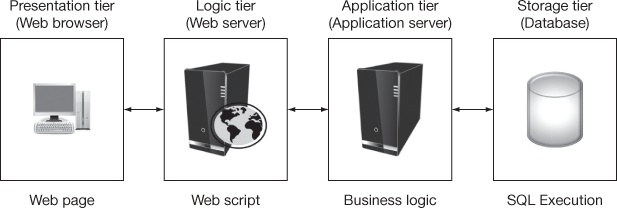
Figure 16.7 Database-driven web application 4-tier architecture
- Presentation tier: In this tier, the results of other tiers are displayed in the web browser as web pages. It includes web browser (Microsoft’s Internet Explorer, Mozilla’s Firefox, Google’s Chrome, etc.) or rendering engine which acts as an interface to the user. Web browser sends request to the web server (logic tier) whenever user performs an action like accessing a website by entering the URL (Uniform Resource Locator), for example, http://www.google.com.
- Logic tier: Web server (Glassfish, Apache, Internet Information Server) resides in this tier which sends HTML web pages to the web browser (presentation tier). It also loads, compiles and executes scripts (C#, ASP, .NET, PHP, JSP, etc.) by calling an Application Programming Interface (API) from the application server (application tier).
- Application tier: The application server (SOAP, Web Services, RMI, EJB, etc.) residing in this tier connects to the DB server (storage tier) to execute the SQL statements. It applies the application and business logics to the result of the DB server and returns the outcome to the web server (logic tier).
- Storage tier: This tier contains the DB server (Oracle, SQL Server, MySQL, etc.) which stores the actual information and makes the data independent from application and business logic. It executes the SQL statements to store and manipulate the data that are sent by the application server (application tier) and sends the results back to the application server (application tier).
16.5.2.2 Structured Query Language
‘SQL’ stands for ‘structured query language’. SQL statements are used to perform operations on the information stored in the DB. The syntax of SQL statements varies with the DB vendor. To understand the SQL injection, it is essential to know the following SQL statement types.
- Data Manipulation Language (DML) Statements: These statements query or manipulate the information available in the DB. It includes SELECT, INSERT, UPDATE, DELETE, etc.
- Data Definition Language (DDL) Statements: These statements are used to define and alter the structure of the DB objects (tables, views, etc.). CREATE, ALTER, DROP are some of the DDL statements.
- Data Control Language (DCL) Statements: DCL statements (GRANT, REVOKE) are used to grant and revoke the privileges on the DB objects to/from the user.
SELECT Statement
SELECT statement is the most commonly used SQL statement (query) which fetches the data from the DB objects. In this book, all the SQL statements use SQL syntax of Oracle DB. The following is the structure of basic SQL SELECT statement.

List of column names whose values to be fetched, is used in SELECT clause with the table name specified in FROM clause. WHERE clause is used to specify condition on the selection data. For example, the following SQL SELECT query displays the list of employees with their name and their job whose salary is greater than 30,000.

INSERT Statement
INSERT statement is used to insert data into the DB objects. The basic structure of INSERT statement is

The values to be inserted to the columns of a table are specified in the data_list. For example, to insert an employee record with name, job and salary, the INSERT statement can be as follows:

UPDATE Statement
To modify any existing values in the table, the UPDATE statement is used. The general structure of the UPDATE statement is

The column whose values have to be changed is to be specified with the new value in the SET clause. WHERE clause is optional which is used for data selection. For example, the UPDATE statement to increment all employees’ salary by 1000 is as follows:

DELETE Statement
DELETE statement is used to remove one or more rows/records from the DB objects. The simple structure of DELETE statement is

DELETE statement without WHERE clause will delete all rows from the table. To delete particular rows from the table, WHERE clause can be used. For example, the DELETE statement to remove all the employees whose salary is less than 10,000 is as follows:

16.5.3 SQL Injection
Malicious SQL statements are included with the input of an application usually a web application is termed as SQL injection. SQL injection attack is a type of code-injection attack, where user’s input data to be used in SQL query is considered as SQL code and the attack is accomplished by placing malicious SQL statements in the user input for execution. SQL code injection technique is widely used to attack data-driven applications.
16.5.3.1 SQL Injection Methods
SQL injection attack is mainly used for gaining unauthorized access to a DB and for retrieving information directly from the DB. Because of its ability to obtain/insert information from/to DB, it is a strong threat to the servers which are used in military or banking systems. SQL manipulation, code injection, function call injection and buffer overflows are the four main types of SQL injection attacks that can be attempted against any type of DBs.
SQL Manipulation
SQL manipulation is the most widely used SQL injection attack. An attacker tries to add elements to the WHERE clause of the SQL statement or expands the SQL statement using set operators like UNION, INTERSECT or MINUS. The typical SQL manipulation is performed during login process. For example, a web application executes the following query to verify the user’s login authentication.

An attacker attempts to manipulate the SQL statement by adding OR condition statement whose value is always true like 1 = 1, ‘a’ = ‘a’, 0 < 1 to the WHERE clause and it can be executed. The attacker can penetrate into the DB using an invalid username and/or password since the WHERE clause will be true for all rows because of operator priority.

In SQL injection attacks, UNION (the set operator) is the most commonly used operator. The main objective is to manipulate a SQL statement to return rows from other tables. A web form may execute the following SQL query that returns a list of available products:

The attacker exploits the SQL statement to get DB users list from the DB by executing the SQL query as follows:

The list displayed in the web application is returned by the SQL query which contains all the selected products with all the DB users’ username and password in the application. Thus with this SQL manipulation, the attacker is able to get the users confidential authentication details. This attack is more harmful to the web application and to the DB.
Code Injection
Code injection attack is commonly used to perform on SQL Server DB since it contains EXECUTE statement. In Oracle DB, this attack is rarely attempted because there is no statement similar to SQL Server’s EXECUTE. Oracle does not support multiple SQL statement requests from both PL/SQL and Java. Therefore in Oracle, the following code injection SQL statement using PL/SQL with Java application will result in error.

But there are some programming languages or APIs which allow multiple SQL statements execution. PL/SQL and Java applications are vulnerable to code injection when they dynamically execute anonymous PL/SQL blocks. For example, a web application can execute the following PL/SQL block:

This example executes an application-stored procedure that encrypts and saves the user’s password. An attacker can modify this PL/SQL block by injecting new SQL code to modify the tables.

Function Call Injection
In function call injection, DB functions or custom functions are injected into a vulnerable SQL statement. These function calls are utilized to manipulate the data in the DB or to perform OS calls.
For example, the following function call illustrates how simple SQL statement is vulnerable and is exploited by an attacker. TRANSLATE DB function has no equivalent function in Java. So, application developers can use DB functions instead of native code (e.g. Java) for executing certain tasks.

This SQL can be easily modified to perform a function injection attack. The attacker modifies the SQL statement by injecting a function call and executes. The modified SQL statement with an injected function call requests a page from a web server. Thus, the attacker can modify the string and URL to inject other functions to retrieve useful confidential information from the DB server and send it to the web server in the URL.

Buffer Overflows
Standard functions of many DBs cause buffer overflows which are considered as vulnerable and can be exploited for SQL injection attack specifically by function injection method. For example, some standard Oracle DB functions which cause buffer overflows are tz_offset, to_timestamp_tz and bfilename.
The loss of a DB connection because of buffer overflow is not properly managed by most of the application and web servers which hangs the web process until the connection to the client is terminated. This vulnerability can be exploited for DoS attack by the attacker.
16.5.4 SQL Injection Countermeasures
To prevent SQL injection attacks, it is important to follow some methods of using SQL statements in native code (e.g. Java). The simplest way of preventing the SQL injection is by validating the input values by its data type, size, range, content, etc. The following are some of the countermeasures that can be followed to protect the DB from the SQL injection attacks.
- User input validation: This is the simplest way of preventing the SQL injection by validating the input values by its data type, size, range, content, etc. For example, username should be of data type alphanumeric with length 5 and the range values as alphabet, numbers, symbols like _, - , etc. If any of the validation (e.g. length >5) fails, then the query should not be sent to the DB for execution.
- Parameterized statements: In scripts or APIs, instead of building SQL string, dynamically existing feature like placeholders can be used. This method of generating dynamic SQL statement is called parameterized statement.
The following example shows the dynamic SQL building without placeholder. In this JDBC (Java Database connectivity) code, it is assumed that the application is connected to the DB, so those codes are omitted and only the SQL part is explained.

Here, the values for the variables username_var and password_var are entered by the user and these are not validated but directly sent to the DB server for execution. So, the attacker can place malicious code/SQL statements in these values of the variables. To prevent the DB server, the following example uses available placeholder feature. In the query, ? (question mark symbol) is used as a placeholder and later it is replaced with the values of the variables specified by the user.

- Web framework: It is a software framework which is used to detect and remove any combination of the four special characters ‘, ’’, /, NULL in the user-specified values. It prevents SQL injection by simply adding a ‘\’ to those four special characters. For example, programming languages such as PERL (Practical Extraction and Reporting Language) and Ruby have a feature called ‘taint’ which checks for security risks in the user input values to secure websites from SQL injection attacks.
Key Terms
Audit policy
Bell–LaPadula model (BLM)
Biba integrity model
Bluejacking
BlueSnarf
Data manipulation language (DML)
Firewall
Intrusion detection system (IDS)
Koobface worm
Malware
Passphrase
Password
Phishing
SQL Injection
Trusted OS
Virtual Private Network (VPN)
Virus
Web framework
Summary
- This chapter focused on how to protect a computer system from different attacks. An overview of password management, program security, OS security, network security and DB security is presented and suggested to achieve a secured computer system.
- Password is a word used to pass through secured computer system for accessing resources. Creation of secure passwords and the different variants of passwords such as passcodes and passphrases were briefly described in the password management section. It also deals with password usage and password manager which is used to create, store and protect passwords.
- Malware propagation and detection were briefly covered in the program security section. Types of viruses and the life cycle of virus were also explained in the section. A real-time case study was mentioned which helps the readers to understand better and how to remove malwares if a site is affected.
- OS security section begins with different services which are offered by the OS and then describes the different security policies with which an OS can be characterized as trusted OS to the extent it satisfies the security policies. This section also covers the different features of the trusted OS and the different levels at which the system can be attacked. For multi-level security, some of the popular security models such as the BLM and the Biba Integrity Model were described. This section concludes with the design of trusted OS.
- The network security section discusses mainly about the IDS and firewalls. The different intrusion detection techniques, the IDS categories and the types of firewall were discussed in this section.
- Protecting the DB from unauthorized access of users is called DB security. This section introduces the DB security requirements and the different attacks that may occur on DB. To have better understanding on SQL injection attack, basic information about web application four-tier architecture and SQL queries are given. SQL injection methods and the countermeasures are also discussed with examples.
Review Questions
- What do you mean by a password/secret code?
- List out the features and usage of a good password.
- What are the things to be avoided in password creation?
- Write a short note on the password types.
- Write about StorageCrypt.
- What is a security pattern in mobile lock screen?
- Discuss about the different types of viruses.
- Explain the life cycle of virus.
- Briefly explain on malwares.
- Discuss on malware propagation.
- Write a short note on the main services of an operating system.
- Justify the statement ‘Security is not a quality that can be easily quantified’ with respect to OS security.
- List down the different types of OS security policies.
- Explain the features of trusted OS.
- 16.Compare and contrast the Bell–LaPadula model and the Biba integrity model.
- What are the things to be taken care of while designing a trusted OS?
- Point out the features of an intrusion detection system.
- Write down the pros and cons of statistical anomaly-, signature- and stack-based IDS.
- What are the different categories of IDS based on the location of observation of intrusion?
- Define firewall and explain the different types of firewall.
- List the mechanisms used to assure database security requirements.
- State the database server functions in web application architecture and where it resides.
- What is SQL? Give its basic structure.
- Explain SQL injection attack and its types.
- Assume when an attacker tries to modify the database content by inserting an UPDATE statement. Identify this SQL injection attack method and justify.
- Detail the methods used to prevent SQL injection attack.