Table of Contents for
Cryptography and Network Security
 Cryptography and Network Security
Published by
Pearson Education India, 2016
Cryptography and Network Security
Published by
Pearson Education India, 2016
- Cover
- Title Page
- Engineering Chemistry
- Contents
- Foreword - 1
- Foreword - 2
- Preface
- Acknowledgements
- CHAPTER 1 Cryptography
- CHAPTER 2 Mathematics of Modern Cryptography
- CHAPTER 3 Classical Encryption Techniques
- CHAPTER 4 Data Encryption Standard
- Chapter 5 Secure Block Cipher and Stream Cipher Technique
- Chapter 6 Advanced Encryption Standard (AES)187
- Chapter 7 Public Key Cryptosystem
- Chapter 8 Key Management and Key Distribution
- Chapter 9 Elliptic Curve Cryptography
- Chapter 10 Authentication Techniques
- Chapter 11 Digital Signature
- Chapter 12 Authentication Applications
- Chapter 13 Application Layer Security
- Chapter 14 Transport Layer Security
- Chapter 15 IP Security
- Chapter 16 System Security
- Appendix: Frequently Asked University Questions with Solutions
- Basic Mechanical Engineering
Chapter 15
IP Security
The network layer sets up logical connection for transmitting data from node to node using switching and routing technologies. It also manages error handling, congestion control and packet sequencing. Internet Protocol (IP) is the most popular protocol associated with the network layer, which allows host to host communication. The network layer security ensures that data carried by all IP datagram were encrypted before it is launched into the network and is totally transparent to the underlying application.
15.1 IP SECURITY
IP was formulated in the late 1970s as part of Defense Advanced Research Projects Agency (DARPA) Internet project, in which the network was not large became and all the users were familiar and hence the security was not an issue. As years passed by the Internet becomes global and hence the user’s security concerns also increased. By implementing security at the IP level, an organization can guarantee secure networking for various applications.
Internet Protocol security (IPsec or IP security) is a set of protocols that provides unwavering security for IP with the use of cryptographic techniques. By means of additional headers, it can be incorporated to internet protocol (IPv4 or IPv6). Support for IPsec is optional in IPv4 but mandatory in IPv6. IPsec may be implemented by integrating it with the native IP stack or by implementing an existing implementation of an IP protocol stack or by using a dedicated, inline security protocol processor.
15.1.1 IP Security Overview
The security protection put forth by IPsec is built on the conditions proposed and maintained by a user or system administrator defined in the Security Policy Database (SPD). Based on the SPD rules, any packet moving through the network is either PROTECTed using IPsec security services, DISCARDed or allowed to BYPASS IPsec protection.
IP security covers the functional areas such as authentication, integrity, confidentiality, replay protection and key management. The authentication mechanism ensures that the source mentioned in the received packet header and the original transmitted source are the same. The integrity mechanism guarantees that in the journey of the packet, it has not been modified. Confidentiality permits communicating nodes to encrypt messages and thereby preventing eavesdrop. The replay protection ensures that a third party cannot seize a datagram and play it back sometime later. The key management facility is concerned with the exchange of keys, used for encrypting/decrypting messages, in a secure manner. In short, secure communications over LAN, private and public WANs and the Internet can be achieved with the help of IPsec.
15.2 IP SECURITY ARCHITECTURE
Regarding the IPsec specification, lot of documents have been published by the IP Security Protocol Working Group set up by the Internet Engineering Task Force (IETF). The most important of these are as follows:
- RFC 4301: Security architecture for the IP
- RFC 4302: IP Authentication Header (AH)
- RFC 4303: IP Encapsulating Security Payload (ESP)
- RFC 4308: Cryptographic suites for IPsec
- RFC 4835: Cryptographic algorithm implementation requirements for ESP and AH
To enhance the security, two protocols such as AH which guarantees the integrity of datagram and ESP, a combination of encryption/authentication protocol are used. Both AH and ESP hold up to two modes of use, namely transport and tunnel mode when used between end-stations and between gateways, respectively.
In the transport mode, ESP encrypts and optionally authenticates the payload of the IP packet but AH authenticates the IP payload and selected portions of the IP header. It offers end-to-end security and having lower overhead than tunnel mode, but needs IPsec to be implemented on the IP storage entities.
In the tunnel mode, the whole IP packet is encrypted and/or authenticated. The IP packet with a new IP header, it is encapsulated into a new IP packet. It is more compatible with existing Virtual Private Network (VPN) gateways and need not have to implement IPsec on the IP storage entity, but has smaller Maximum Transmission Unit (MTU) and more overhead.
15.2.1 IP Security Policy
An IPsec policy is applied to each IP packet that traverses between the source and the destination, which is decided by the interaction of two databases, namely, the Security Association Database (SAD) and the SPD.
Whether it is using AH or ESP protocol, the sender and the receiver must agree on a key for authentication or encryption algorithm. This set of agreement between the hosts constitutes the Security Association (SA). Security associations are selected on the basis of the security policy. The SA separates the key management and the security mechanisms from each other. An association is a one-way connection, and so for a peer-to-peer communication two SAs are used, one for each direction.
The SA is identified by the following parameters:
- Security Parameters Index (SPI): An arbitrary 32-bit value having only logical significance is transmitted with an AH or ESP packet to enable the receiving system to select the SA under which a received packet will be processed.
- IP destination address: A 128-bit IPv6 or IPv4 address value of the destination end-point of the SA.
- Security Protocol Identifier: This field indicates whether the association is an AH or ESP SA.
15.3 IP DATAGRAM
The IPsec protocols AH and ESP can be applied to two different versions of IP such as IPv4 and IPv6. Figures 15.1 and 15.2 show the IPv4 and IPv6 datagram format, respectively. IPv4 datagram contains IPv4 Header (6 bits) to specify the transport layer protocol that interprets the data section and IP data which contains TCP fragment.

Figure 15.1 IPv4 datagram format
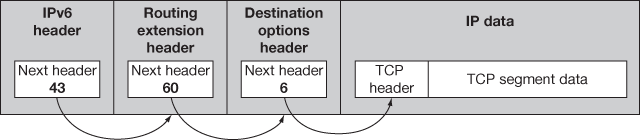
Figure 15.2 IPv6 datagram format
IPv6 datagram consists of IPv6 header (43 bits), routing extension header (60 bits), destination options header (6 bits) and the IP data. IPv6 header denotes the transport layer protocol. The routing extension header indicates the type of the upper-layer protocol header, namely, AH or ESP, destination options header contains destination information, and IP data which contains TCP fragment.
15.4 IPsec AUTHENTICATION HEADER
Authentication Header (AH) protocol which protects all the parts of the IP packet or the datagram with the help of additionally calculated added header which gives authentication mechanism. Header placements and the parts of the datagram for calculation depend upon the IP version and types of modes.
The AH protocol works very simple and does a lot for the network security and it works similar to error detection algorithms like checksum and CRC. The sender uses those algorithms and calculates the checksum of the messages and the result is sent with the contents of the message to the receiver over the network. The receiver computes the checksum and finds if there is any mismatch between the sender and receiver checksums, and will simply discard the message if found. To avoid the use of this well-known common algorithm, some special hashing algorithms and the keys are used by both the parties which are not transparent to the others and a SA is established between these two in calculating and computing the results. A special header is attached for this purpose and the computed result called Integrity Check Value (ICV) is put up and is transmitted in network communication. The receiver on receiving the packet re-computes the ICV and checks for the data integrity and provides authentication but privacy is not guaranteed.
15.4.1 AH Format
The authentication data field is dynamic to hold varying length of the datagram with the hashing algorithms and the length is a multiple of 32 bits and the header is 32 bits for IPv4 and 64 bits for IPv6. The padding field is included in the authentication data field if necessary. The IPsec AH format contains the following fields and illustrated in Figure 15.3:
- Next header: It is used to link the headers and contain a header number.
- Payload length: This field mentions the length of the AH in 32-bit units with 2 subtracted for consistency.
- Reserved: It is not in use, so it is set as zero by default.
- SPI: Security Parameter Index is a 32-bit value which identifies the SAs used for the datagram.
- Sequence number: This number uniquely identifies each datagram.
- Authentication data: This field contains ICV.
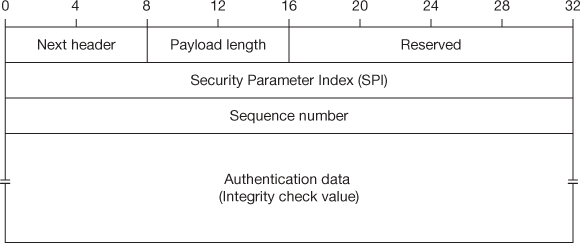
Figure 15.3 IPsec authentication header (AH) format
15.4.2 AH Datagram Placement and Linking
Calculating the AH is same for both IPv4 and IPv6, but differs only in the linking and placing mechanisms of the header.
In IPv6, the AH is added inside the IP datagram and is linked with the next header by placing the header field in the subsequent datagram. This process is performed till the linking transport layer is reached. While in the transport mode, AH is kept inside main IP header preceded to the destination options header and if the ESP header is there it will be placed preceded to that. In the tunnel mode, inside the new IP datagram the AH header appears to be an extended header and does encapsulating the real one to be tunnelled. Figures 15.4 and 15.5 show the AH datagram placement and linking for IPv6 on transport and tunnel mode, respectively.
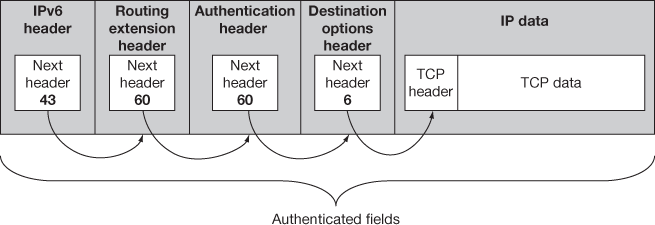
Figure 15.4 IPv6 AH datagram format – IPsec transport mode
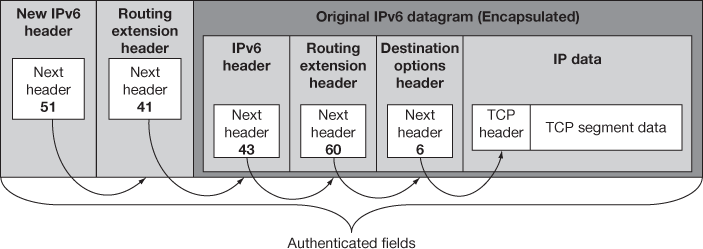
Figure 15.5 IPv6 AH datagram format – IPsec tunnel mode
The same linking technique is followed in IPv4. The datagram carries the protocol field where in the higher layer protocol like TCP/UDP identity is shown by the protocol field and this is the front part of the IP payload and points to the next field. AH places the value into its next header field, places the protocol value inside the IP field and the IP header points to the AH. In transport mode, with the main IP header of the original datagram the AH is added and for the tunnel mode it is added next to the new IP header and it encapsulates the original datagram. The AH datagram placement and linking for IPv4 on transport and tunnel mode is shown in Figures 15.6 and 15.7, respectively.
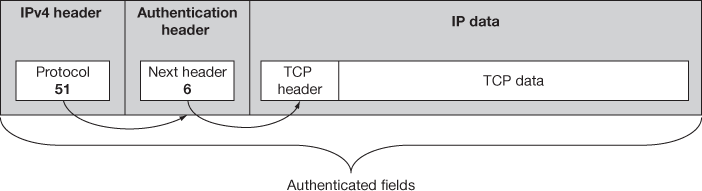
Figure 15.6 IPv4 AH datagram format – IPsec transport mode
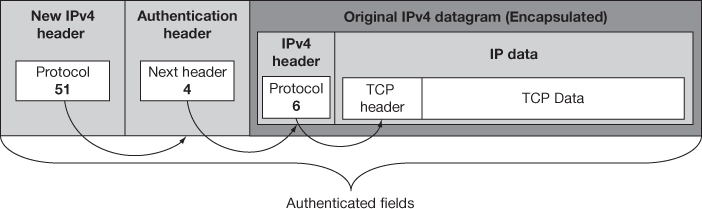
Figure 15.7 IPv4 AH datagram format – IPsec tunnel mode
15.5 IPsec ENCAPSULATING SECURITY PAYLOAD
Authentication header has functional limitations during communication as it protects only the intermediate devices and not the message communication. Therefore, the use of ESP protocol is a boon to the integrity check system. ESP protocol encrypts the IP datagram contents with a key, using an encryption algorithm to maintain integrity and security of the IP datagram and data. The encrypted form of the IP datagram is now repacked and transmitted to the receiver over the network. The receiver will decrypt, to get the data using the same key.
15.5.1 ESP Format
ESP has various fields which are divided into the following three components:
- ESP header: The placement of ESP Header is based on the types of modes it uses and works as in the AH Header. In front of the encrypted data, ESP header has two fields, one is the SPI and other is the sequence number.
- ESP trailer: This contains padding and pad length field for the alignment of the encrypted data that is placed after the encrypted data and it has the next header field for ESP.
- ESP authentication data: The ICV is calculated and placed as it is in the AH protocol.
The sequence of these fields indicates a consecutive working mechanism because one field may be the prerequisite for the following fields. This is the main reason of placing ESP header field initially. In the encryption phase, ESP holds the encrypted data and the padding field is used to authenticate the encrypted data. The following are the fields that are included in ESP and it is depicted in Figure 15.8:
- SPI: This field is a 32-bit value and when combined with the destination address and security protocol type, it determines the SA of this datagram.
- Sequence number: This sequence number is used to give protection against replay attacks.
- Payload data: It has higher layer message or encapsulated IP datagram.
- Padding: This extra padding field is used for encryption alignment.
- Pad length: It denotes the size of the preceding padding field.
- 6. Next header: It is used to link the headers and contains a header number.
- ESP authentication data: This field contains ICVs.
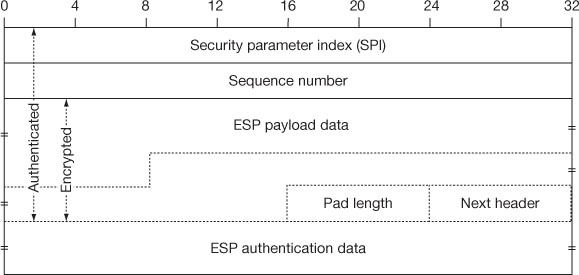
Figure 15.8 IPsec Encapsulating Security Payload (ESP) format
15.5.2 ESP Field Calculation and Placement
The various ESP field calculations and placement are described in the following list:
- ESP header: In IPv6, ESP header will be the extension header of the IP datagram using the extension header linking rule. In the transport mode, the ESP header is placed before the destination options header which has information about the reachabilities of dead destination. In the tunnel mode before tunnelling, the IP datagrams extension header encapsulates the original data. In IPv4, the ESP header is placed after the IPv4 Header as in AH and it looks like the original IP header in the transport mode and it encapsulates the original in the tunnel mode.
- ESP trailer: Before ESP performs encryption, the encrypted data and the ESP trailer are added to the data. Here, the ESP trailer and the payload together are encrypted but the ESP header is not encrypted. Generally IP header is also encrypted and placed between the payload and the ESP header. Additionally in IPv6 a destination options extension header is also added. The next header field would be used to link the ESP header to the header though next header field in ESP appears in the trailer and not the header makes the linking complicated in ESP which works same like AH works and also like IPv6 where the header and the protocol fields tie everything together. After the encrypted data, the next header field placed and points to the destination options extension header if it is present and in the transport mode it points a TCP/UDP header or in tunnel mode it may point to IPv6 or IPv4 header.
- ESP authentication data: The ICV is calculated and placed as it is in AH protocol.
Figures 15.9 and 15.10 show the placement of ESP fields like ESP header, ESP trailer and ESP authentication data for IPv6 in transport mode and tunnel mode, respectively. The placement of ESP header, ESP trailer and ESP authentication data for IPv4 in transport mode and tunnel mode is shown in Figures 15.11 and 15.12, respectively.
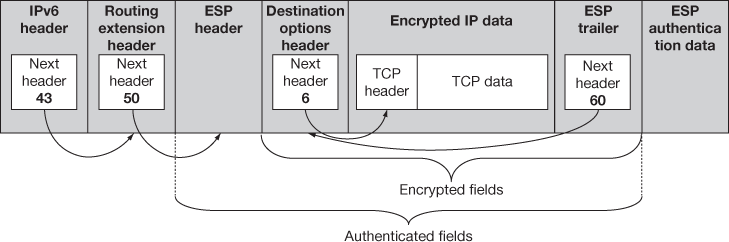
Figure 15.9 IPv6 ESP datagram format – IPsec transport mode
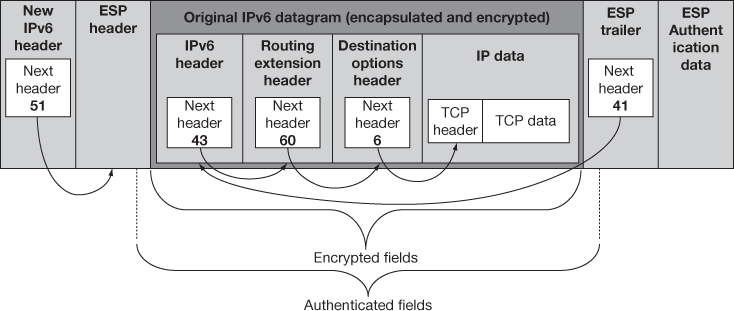
Figure 15.10 IPv6 ESP datagram format – IPsec tunnel mode
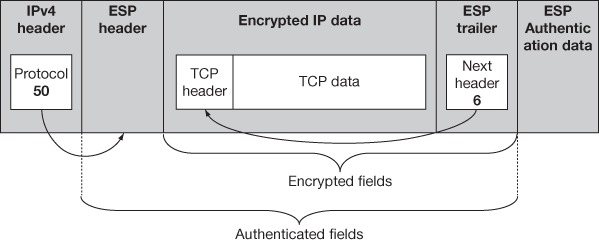
Figure 15.11 IPv4 ESP datagram format – IPsec transport mode
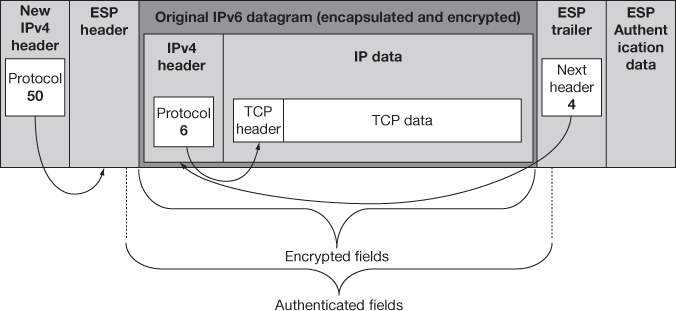
Figure 15.12 IPv4 ESP datagram format – IPsec tunnel mode
15.6 APPLICATIONS OF IPsec
The application of IPsec varie in the capability of providing a secure communication across a LAN to the Internet.
- Secure connection between different branch offices of the same company: A VPN can be erected by a company to have a secure connection between the branch offices over the Internet, which in turn helps the company to cut down cost for private network and can depend on the Internet.
- Secure remote access to a distant Intranet over an insecure medium: With the help of a system which is outfitted with IP security protocols, an employee can make a local call to an Internet Service Provider (ISP) and gain secure access to a company’s intranet.
- Set up secure connection between peers: IPsec can be used to establish secure communication within and outside network connectivity with associates of other institutions.
- Ensuring security for E-commerce applications: IPsec ensures that all communication selected by the network administrator is both encrypted and authenticated, adding an extra layer of security.
15.7 SECURITY ISSUES WITH IPsec
All types of network are vulnerable to unauthorized access. Security in intranet is an issue due to internal attacks and there are more risks from outside networks as all are interconnected with Internet. So, the password-based access solely cannot protect the data transmitted over the network. The common types of attacks in the computer network which bring forth the need of IPsec are as follows:
- Eavesdropping: Commonly the data communication happens in plain text format which gives place for the attackers to tamper, watch and modify the data by gaining unauthorized access in several network paths and routes. Eavesdropping means sniffing or snooping which is the most challenging security issue. Therefore, the data needs strong encryption techniques; otherwise, the data traversing across the network is unsecure.
- Data modification: Once the data is read by an attacker, the contents may be modified without the knowledge of the data originator or the receiver. The data which is not confidential lacks the value.
- Identity spoofing (IP address spoofing): Every system is identified in the network by the valid IP addresses and in some cases the IP addresses are falsely generated by some organizations intranet using special algorithms which are pretended to be valid and get the identity in the network. This is called IP spoofing. Using this IP addresses, the attackers gain access to the network and modifies the data and the routing paths and makes the system exhausted to inconvenience.
- Password-based attack: Generally in network and operating systems, security is provided by password-based access control where the access control is determined by user name and password. The login account is not commonly protected by the operating systems and it sends the identity data in plain text format across the network communication to validate it. In the meantime, the attackers hack such identity information and gain unauthorized access to the network. After gaining access to a network with a valid account, an attacker can get all user accounts and domain names or change the network parameters like configuration file type access permissions and routing information or even modify the data.
- Denial-of-service attack: This attack will exhaust the total bandwidth of the system and make the entire service unavailable to its intended users. After gaining access to a network, an attacker may attack the applications and make the functions abnormal or send a flood of sync messages and exhaust the available bandwidth or block the access gain and network resources for the genuine users.
- Man-in-the-middle attack: This shows how an intruder enters, listens, tampers and controls the communication between two parties exchanging sensitive information which is unknown by other parties.
- Sniffer attack: The sniffer tool is available to monitor the packet exchanges between the users. It shows the data encapsulated in a packet and can be opened and read if the packets are not provided with security mechanisms. Using a sniffer, an attacker may determine the access permissions and the related information and corrupt the network or read private data.
Key Terms
Authentication header
Eavesdropping
Encapsulating security payload
ESP header
ESP Trailer
Identity spoofing
IP datagram
IPsec
Routing extension header
Security parameters index (SPI)
Security protocol identifier
Sniffer attack
Transport mode
Tunnel mode
Summary
- This chapter focused on IPsec or IP security. Maintaining IPsec is optional in IPv4 but mandatory in IPv6 with the help of SAD and SPD. Two protocols such as AH and ESP are used either in transport mode or in tunnel mode to enhance security. AH protocol protects all the parts of the IP packet. ESP protocol encrypts the IP datagram contents to maintain integrity and security of the IP datagram and data. This chapter explained about AH datagram format and ESP datagram format when used in IPv4 and IPv6. The chapter concluded with the applications of IPsec and the security issues of IPsec.
Review Questions
- What do you mean by IP Security policy?
- Distinguish between IPv4 and IPv6 datagram.
- Compare between transport mode and tunnel mode.
- Write short notes on SAD and SPD.
- Briefly explain IPsec AH.
- Write a short note on AH format.
- Discuss on AH datagram placement and linking.
- Discus about IPsec ESP.
- With the help of a neat diagram, explain the ESP format.
- Write about ESP field calculation and placement.
- Write down the applications of IPsec.
- List down the security issues of IPsec.