In ASCII, each character turns into one byte:
- A is 65 in base 10, and in binary, it is 0b01000001. Here, you have 0 in the most significant bit because there's no 128, then you have 1 in the next bit for 64 and 1 in the end, so you have 64 + 1=65.
- The next is B with base 66 and C with base 67. The binary for B is 0b01000010, and for C, it is 0b01000011.
The three-letter string ABC can be interpreted as a 24-bit string that looks like this:

We've added these blue lines just to show where the bytes are broken out. To interpret that as base64, you need to break it into groups of 6 bits. 6 bits have a total of 64 combinations, so you need 64 characters to encode it.
The characters used are as follows:
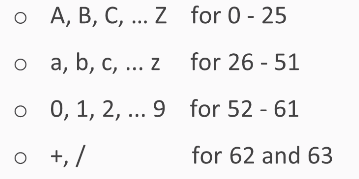
We use the capital letters for the first 26, lowercase letters for another 26, the digits for another 10, which gets you up to 62 characters. In the most common form of base64, you use + and / for the last two characters:
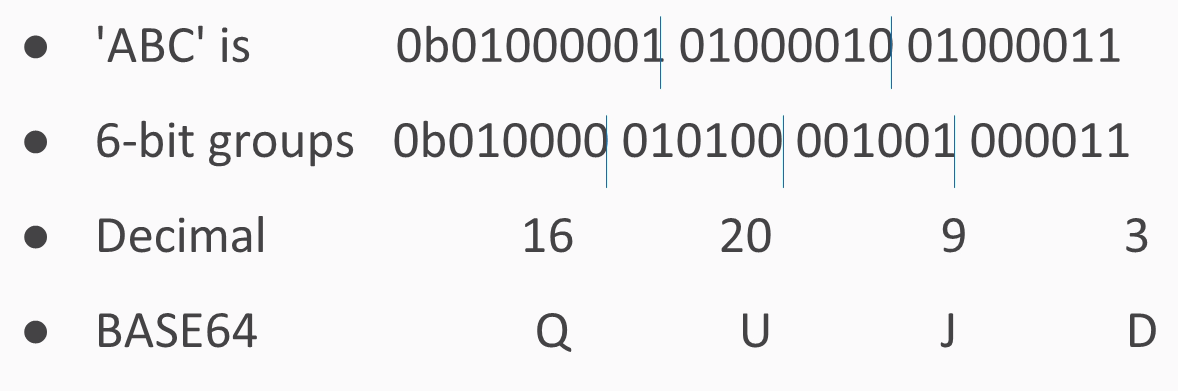
If you have an ASCII string of three characters, it turns into 24 bits interpreted as 3 groups of 8. If you just break them up into 4 groups of 6, you have 4 numbers between 0 and 63, and in this case, they turn into Q, U, J, and D. In Python, you just have a string followed by the command:
>>> "ABC".encode("base64")
'QUJD\n'
This will do the encoding. Then add an extra carriage return at the end, which neither matters nor affects the decoding.
What if you have something other than a group of 3 bytes?
If you have four bytes for the input, then the base64 encoding ends with two equals signs, just to indicate that it had to add two characters of padding. If you have five bytes, you have one equals sign, and if you have six bytes, then there's no equals signs, indicating that the input fit neatly into base64 with no need for padding. The padding is null.
You take ABCD and encode it and then you take ABCD with explicit byte of zero. x00 means a single character with eight bits of zero, and you get the same result with just an extra A and one equals, and if you fill it out all the way with two bytes of zero, you get capital A all the way. Remember: a capital A is the very first character in base64. It stands for six bits of zero.
Let's take a look at base64 encoding in Python:
- We will start python up and make a string. If you just make a string with quotes and press Enter, it will print it in immediate mode:
>>> "ABC"
'ABC'
- Python will print the result of each calculation automatically. If we encode that with base64, we will get this:
>>> "ABC".encode(""base64")
'QUJD\n'
- It turns into QUJD with an extra courage return at the end and if we make it longer:
>>> "ABCD".encode("base64")
'QUJDRA==\n'
- This has two equals signs because we started with four bytes, and it had to add two more to make it a multiple of three:
>>> "ABCDE".encode("base64")
'QUJDREU=\n'
>>> "ABCDEF".encode("base64")
'QUJDREVG\n'
- With a five-byte input, we have one equals sign; and with six bytes of input, we have no more equal signs, instead, we have a total of eight characters with base64.
- Let's go back to ABCD with the two equals signs:
>>>"ABCD".encode("base64")
'QUJDRA==\n'
- You can see how the padding was done by putting it in explicitly here:
>>> "ABCD\x00\x00".encode("base64")
'QUJDRAA=\n'
There's a first byte of zero, and now we get another single equals sign.
- Let's put in a second byte of zero:
>>> "ABCD\x00\x00".encode("base64")
'QUJDRAAA\n'
We have no padding here, and we see that the last characters are all A, indicating that there's been a filling of binary zeros.