Let's go ahead and open the Terminal and follow these steps to implement Caesar cipher in Python:
- We will use Python in interactive mode first and then make a string that just has some letters in order to test this method:
>>> str = "ABCDE"
>>> str.find("A")
0
>>> str.find("B")
1
>>> exit()
- Because we understand how the string methods work, we'll exit and go into the nano text editor to look at the first version of our script:
$ nano caesar1.py
- When you run the command, you will get the following code:
alpha = "ABCDEFGHIJKLMNOPQRSTUVWXYZ"
str_in = raw_input("Enter message, like HELLO: ")

n = len(str_in)
str_out = ""

for i in range(n):
   c = str_in[i]
   loc = alpha.find(c)
   print i, c, loc,
   newloc = loc + 3
   str_out += alpha[newloc]
   print newloc, str_out

print "Obfuscated version:", str_out
You can see the alphabet and the input from the user in the script. You calculate the length of the string, and for each character, C is going to be the one character on processing, loc will be the numerical location of that character, newloc will be loc plus 3, and we can then add that character to string out. Let's see this.
- Leave using Ctrl+X and then enter the following command:
$ python caesar1.py
- When you run this command, you will get the following output:
Enter message, like HELLO:
- If we enter HELLO, it prints out the correct answer of KHOOR:
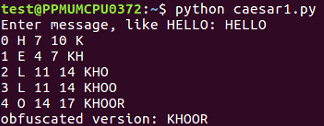
When we run this script, it takes the input of HELLO and it breaks it up character by character so that it processes each character on a separate line. H is found to be the 7th character, so adding 3 gives me 10, which results in K. It shows us character by character how it works. So, the first version of the script is a success.
To clean the code further, we will remove the unnecessary print statements and switch to a shift variable. We will create a variable shift variable. Which also comes from raw inputs, but we have to convert it to an integer because raw input is interpreted as text as you can't add text to an integer. This is the only change in the script that follows. If you give it a shift value of 3, you get KHOOR; if you give it a shift value of 10, you get ROVVY; but if you put in a shift value of 14, it crashes, saying string index out of range. Here, the problem is, we've added multiple times to the loc variable, and eventually, we move past Z, and the variable is no longer valid. In order to improve that, after adding something to the variable, we'll check to see whether it's greater than or equal to 26, and whether 26 can be subtracted from it. Once you run this, you can use a shift of 14, which will work. We can use a shift of 24, and it works too. However, if we use a shift of 44, it's out of range again. This is because just subtracting 26 once when it's over 26 is not really enough, and the right solution here is modular arithmetic. If we put % 26, it will calculate the number modulus 26, which will prevent it from ever leaving the range of 0 through 25. It will divide it by 26 and keep only the remainder, as expected in this case. We're going to see the modular function many more times as we move forward in cryptography. You can put in any shift value of your choice, such as 300, and it will never crash, but will turn that into a number between 0 and 25.
Let's see how the script works with other shift values:
- Take a look at the script Caesar:
$ nano caesar2.py
- When you run it, you will get the following:
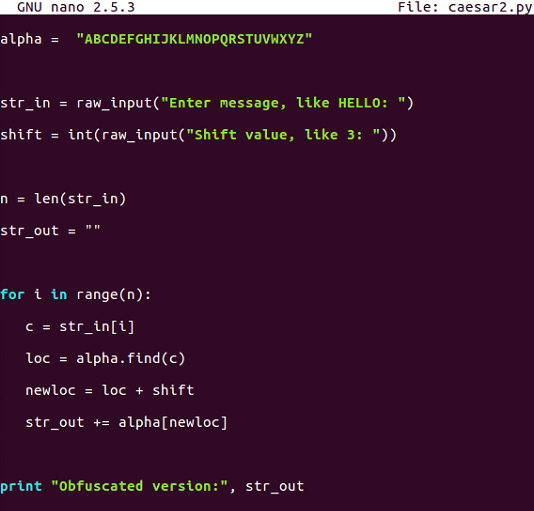
- This is the script that allows us to vary the shift value but does not handle anything about the shift value getting too large. Let's run the following command:
$ python caesar2.py
- If you enter HELLO and give it a shift of 3, it's fine, but if we run it again and give it a shift of 20, it crashes:
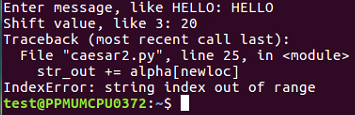
So, as expected, there are some limitations in this one.
- Let's move on to caesar3:
$ nano caesar3.py
- After running it, we get the following output:
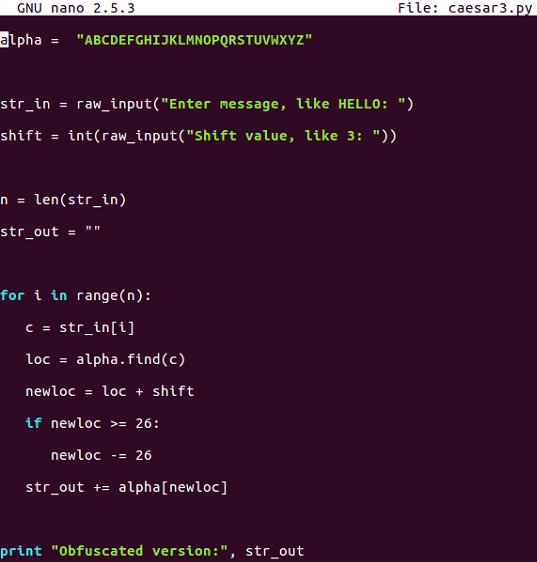
Caesar3 attempts to solve that problem by catching it if we know that the addition causes it to be greater than or equal to 26 and subtracting 26 from it.
- Let's run the following command:
$ python caesar3.py
- We will give it shift characters and a shift of 20, and it will be fine:

- If we give it a shift of 40, it does not work:
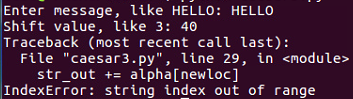
There is some improvement, but we are still not able to handle any value of shift.
- Let's go up to caesar4:
$ nano caesar4.py
- When you run the command, you will get this:
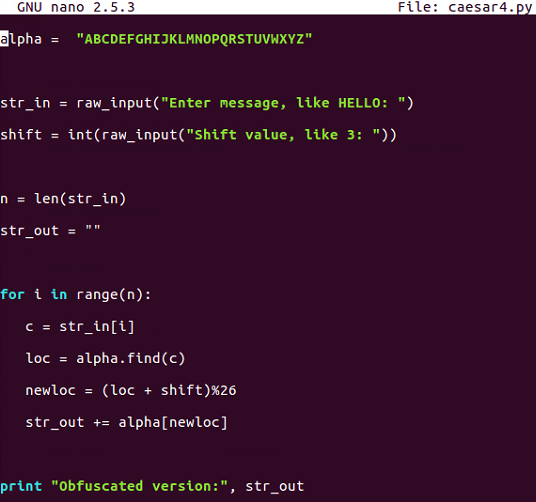
This is the one that uses modular arithmetic with the percent sign, and that's not going to fail.
- Let's run the following command:
$ python caesar4.py
- When you run the command, you will get this:
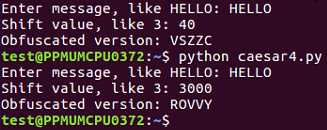
This is the script that handles all the values of the Caesar shift.