The next issue is handling binary data. Executable files are binary and not ASCII. Also, images, movies, and many other files have binary data. ASCII data always starts with a zero as the first bit, but base64 works fine with binary data. Here is a common executable file, a forensic utility; it starts with MZê and has unprintable ASCII characters:
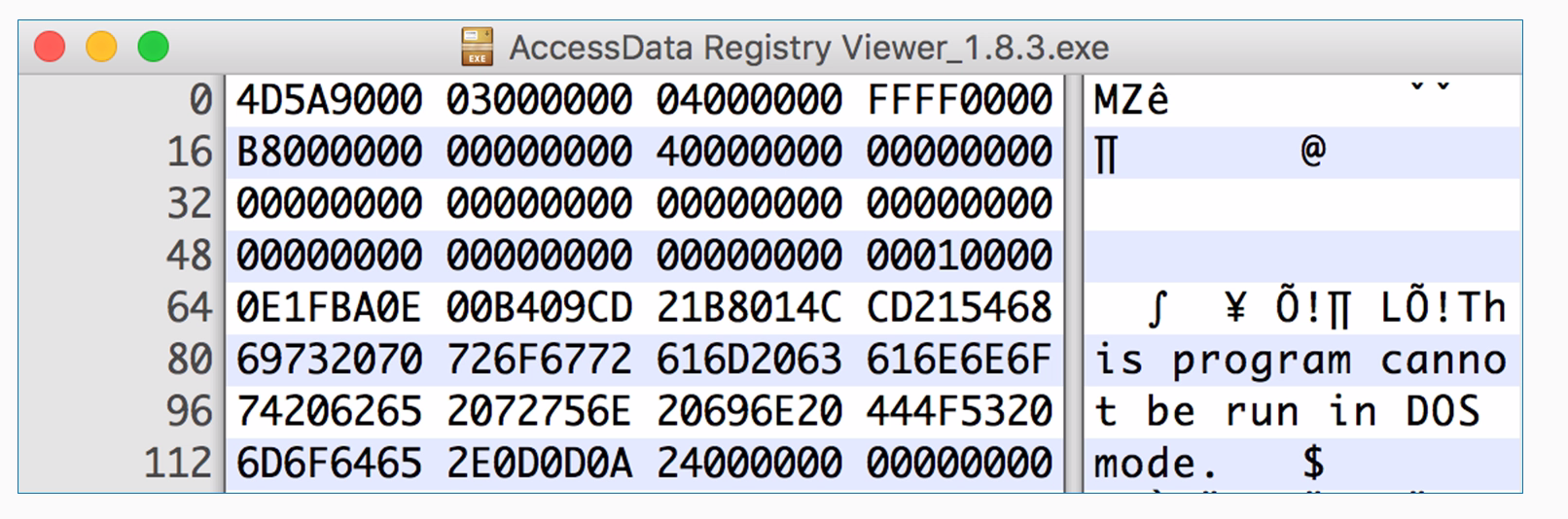
As this is a hex viewer, you see the raw data in hexadecimal, and on the right, it attempts to print it as ASCII. Windows programs have this string at the start, and this program cannot be run in DOS mode, but they have a lot of unprintable characters, such as FF and 0, which really doesn't matter for Python at all. An easy way to encode data like that is to read it directly from the file. You can use the with command. It will just open a file with filename and mode read binary with the handle f and then you can read it. The with command is here just to tell Python to open the file, and that if it cannot be opened due to some error, then just to close the handle and then decode it exactly the same way. To decode data you've encoded in this fashion, you just take the output string and you put .decode instead of .encode.
Now let's take a look at how to handle binary data:
- We will first exit Python so that we can see the filesystem, and then we'll look for the Ac file using the command shown here:
>>> exit()
$ ls Ac*
AccessData Registry Viewer_1.8.3.exe
There's the filename. Since that's kind of a long block, we are just going to copy and paste it.
- Now we start Python and clear the screen using the following command:
$ clear
- We will start python again:
$ python
- Alright, so, now we use the following command:
>>> with open("AccessData Registry Viewer_1.8.3.exe", "rb") as f:
... data = f.read()
... print data.encode("base64")
Here we enter the filename first and then the mode, which is read binary. We will give it filename handle of f. We will take all the data and put it in a single variable data. We could just encode the data in base64, and it would automatically print it. If you have an intended block in Python, you have to press Enter twice so it knows the block is done, and then base64 encodes it.
- You get a long block of base64 that is not very readable, but this is a handy way to handle data like that; say, if you want to email it or put it in some other text format. So, to do the decoding, let's encode something simpler so that we can easily see the result:
>>> "ABC".encode("base64")
'QUJD\n'
- If we want to play with it, put that in a c variable using the following command:
>>> c = "ABC".encode("base64")
>>> print c
QUJD
- Now we can print c to make sure that we have got what we expected. We have QUJD, which is what we expected. So, now we can decode it using the following command:
>>> c.decode("base64")
'ABC'
base64 is not encrypting. It is not hiding anything, but it is just another way to represent it. In the next section, we'll cover XOR.