As mentioned earlier, one point of using hashes is to put a fingerprint on a file. You can take all the bytes in the file and combine them together with a hash algorithm, and this creates a fixed-links hash value. If you change any part of the file and recalculate the hash, you get a completely different value. So, the idea is that if you have two files that are supposed to be identical, you can calculate the hash of each file, and if the hash of both files match, then the files are identical.
A very common hash is MD5; it's been around for a couple of decades. It's 128 bits long, which is rather short for a hash function, and it's reliable enough for most purposes. People use it to put a fingerprint on downloads, and malware samples, and all sorts of things, and they are also sometimes used to obscure passwords. It's not a perfect hash function: there are some collisions known, and there are some algorithms that, at the expense of some computer time, can create collisions, which are pairs of files that hash to the same value. So, if you do find two files with MD5s that match, you do not know with complete certainty that they are identical files, but they usually are.
It's very easy to calculate them in Python. You just import the hash library and then proceed with the calculation. You call the hash library to create a new object. The first parameter is the algorithm used, which is MD5. The second parameter is the contents of the data to be hashed.
Here, we will use HELLO as an example, and then you need to use the hex-digest at the end or it will just print an address to the data structure instead of showing you the actual value. We will use the hash of HELLO, MD5, and a hexadecimal and it is 128 bits long. So, that's 128 over 4, or 32, hexadecimal characters, and if you add another character to the HELLO, like an exclamation point the hash changes completely; there's no resemblance between the hash of one value and the hash of the next.
The Secure Hash Algorithm (SHA) was designed to be an improvement on MD5, and SHA-1 had no collisions until about a year ago, when some researchers at Google Inc. found out how to make collisions in SHA-1, so careful people are switching to SHA-2. There is another algorithm approved by the National Institute of Standards, called SHA-3, which almost nobody is using because as far as anyone expects, SHA-2 will remain secure for a very long time to coms. But, if something were to happen to compromise SHA-2, SHA-3 will be available for us to use. Both SHA-2 and SHA-3 have various lengths, but the most common lengths are 256 and 512 bits.
You can calculate SHA-1 and SHA-2 hashes easily in Python, but SHA-3 is not commonly used and it's not part of this hash library yet. So, if you use SHA-1 for the algorithm, you get a SHA-1 hash. It looks like an MD5 hash, but it's longer. Then there are SHA-256 and SHA-512, which are both SHA-2 hashes. You can see that, although they're more secure, they are much longer and somewhat less convenient:

So, let's take a look.
Open the Terminal and execute the python command to start the Python Terminal:

You can then run the following commands:

You have to import hashlib. Then, you can add hashlib.new. The first parameter is the algorithm, which is md5, in this case. The next parameter is the data to hash, which is HELLO, and then hexdigest is added to see the hexadecimal value. So, there's the hash of HELLO, and if we put another character at the end such that it reads HELLOa, then we get a completely different answer:

If we want to use a different algorithm, we can just put in SHA-1:

Now we get a long hash, and, if we add sha256 as character, we get an even longer hash:

These are enough hashes for almost any purpose.
If you have the hash value of something and you want to calculate the data it came from, in principle, there is not a unique solution. In practice, though, for short objects like passwords, there is. So, if someone uses an MD5 function to obscure a password, which is done by some old web applications, then you can reverse it by guessing passwords until you find a match. There is no mathematical way to undo a hash function, so you just have to make a library. In the example of the MD5 hash of HELLO, if you just made a series of guesses, you'd get the right answer. That's how hash cracking works; it's not a complicated idea, it's just kind of inconvenient.
We can take the MD5 hash of HELLO and keep guessing:
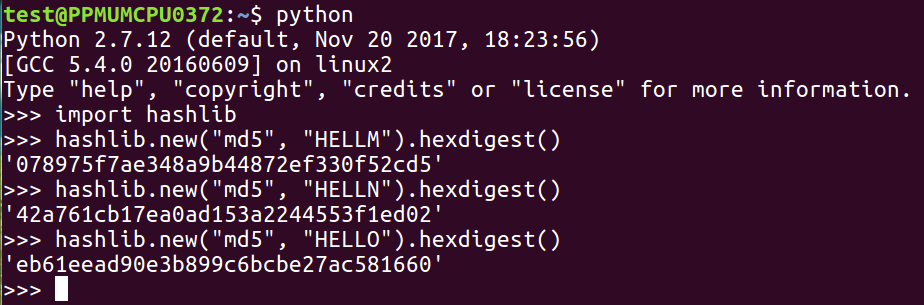
If we were guessing words, we might have to guess millions of words to get down to the value shown, but if we are able to guess the right value, we'll know it's right when the hash matches. The only thing that determines the difficulty of this is how many hashes you can calculate per second, and MD5 and the SHA family are designed to calculate very fast, so you could actually try millions of passwords per second with them. In the next section, we'll talk about Windows password hashes.