Table of Contents for
Hands-On Cryptography with Python

Version ebook / Retour

Cover image for bash Cookbook, 2nd Edition Hands-On Cryptography with Python by Samuel Bowne Published by Packt Publishing, 2018
  1. Hands-On Cryptography with Python
  2. Title Page
  3. Copyright and Credits
  4. Hands-On Cryptography with Python
  5. Packt Upsell
  6. Why subscribe?
  7. PacktPub.com
  8. Contributor
  9. About the author
  10. Packt is searching for authors like you
  11. Table of Contents
  12. Preface
  13. Who this book is for
  14. What this book covers
  15. To get the most out of this book
  16. Download the example code files
  17. Download the color images
  18. Conventions used
  19. Get in touch
  20. Reviews
  21. Obfuscation
  22. About cryptography
  23. Installing and setting up Python
  24. Using Python on Mac or Linux
  25. Installing Python on Windows
  26. Caesar cipher and ROT13
  27. Implementing the Caesar cipher in Python
  28. ROT13
  29. base64 encoding
  30. ASCII data
  31. Binary data
  32. XOR
  33. Challenge 1 – the Caesar cipher
  34. Challenge 2 – base64
  35. Challenge 3 – XOR
  36. Summary
  37. Hashing
  38. MD5 and SHA hashes
  39. What are hashes?
  40. Windows password hashes
  41. Getting hashes with Cain
  42. MD4 and Unicode
  43. Cracking hashes with Google
  44. Cracking hashes with wordlists
  45. Linux password hashes
  46. Challenge 1 – cracking Windows hashes
  47. Challenge 2 – cracking many-round hashes
  48. Challenge 3 – cracking Linux hashes
  49. Summary
  50. Strong Encryption
  51. Strong encryption with AES
  52. ECB and CBC modes
  53. ECB
  54. CBC
  55. Padding oracle attack
  56. Strong encryption with RSA
  57. Public key encryption
  58. RSA algorithm
  59. Implementation in Python
  60. Challenge – cracking RSA with similar factors
  61. Large integers in Python
  62. What's next?
  63. Cryptography within IoT
  64. ZigBee cryptographic keys
  65. Complexity of ZigBee key management
  66. Bluetooth – LE
  67. Summary
  68. Other Books You May Enjoy
  69. Leave a review - let other readers know what you think

Challenge 3 – XOR

In this section, we will review how XOR works and then give you an example, and then present you with two challenges.

So, here is one of the XOR programs we discussed before:
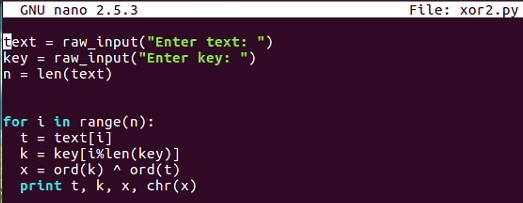
You input arbitrary texts and an arbitrary key, and then go through the bytes one by one, picking out one byte of text and one byte of key before combining them with XOR and printing out the results. So, if you put in HELLO and qrs, you'll get encrypted stuff, encrypted with XOR.

Here's an example:
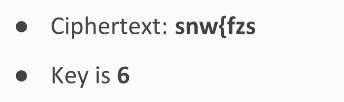
It will scramble into EXAMPLE. So, this undoes encryption; remember that XOR undoes itself.

If you want to break into one of these, one simple procedure is just to try every key and print out the results for each one, and then read the key is readable.

So, we try all single-digit keys from 0 to 9.

The result is that you feed in the ciphertext, encrypt it with each of these, and when you hit the correct key value, it will turn into readable text.

Let's take a look at that:
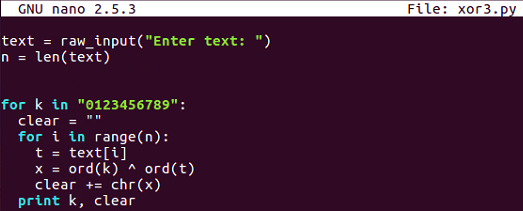
Here's the decryption routine, which simply inputs texts from the user and then tries every key in this string, 0 through 9. For each one of those it combines, think the XORed text into a variable named clear, so it can print one line for each key and then the clear result. So, if we run that one and put in my ciphertext, it gives us 10 lines.:
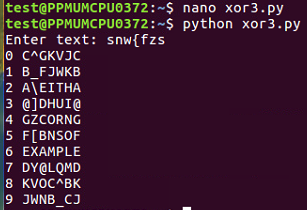
We just scanned through these lines and saw which one becomes readable, and you can see the correct key and the correct plaintext at 6. The first challenge is here:
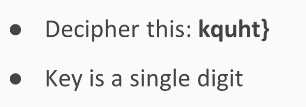
This is similar to the one we saw earlier. The key is a single digit, and it will decrypt into something readable. Here's a longer example that is in a hexadecimal format:

The key is two digits of ASCII, so you'll have to try 100 choices to find a way to turn this into a readable string.