Table of Contents for
Learning Linux Shell Scripting
 Learning Linux Shell Scripting
Published by
Packt Publishing, 2015
Learning Linux Shell Scripting
Published by
Packt Publishing, 2015
- Cover
- Table of Contents
- Learning Linux Shell Scripting
- Learning Linux Shell Scripting
- Credits
- About the Author
- Acknowledgments
- About the Reviewers
- www.PacktPub.com
- Preface
- What you need for this book
- Who this book is for
- Conventions
- Reader feedback
- Customer support
- 1. Getting Started and Working with Shell Scripting
- Tasks done by shell
- Working in shell
- Learning basic Linux commands
- Our first script – Hello World
- Compiler and interpreter – difference in process
- When not to use scripts
- Various directories
- Working more effectively with shell – basic commands
- Working with permissions
- Summary
- 2. Drilling Deep into Process Management, Job Control, and Automation
- Monitoring processes using ps
- Process management
- Process monitoring tools – top, iostat, and vmstat
- Understanding "at"
- Understanding "crontab"
- Summary
- 3. Using Text Processing and Filters in Your Scripts
- IO redirection
- Pattern matching with the vi editor
- Pattern searching using grep
- Summary
- 4. Working with Commands
- Command substitution
- Command separators
- Logical operators
- Pipes
- Summary
- 5. Exploring Expressions and Variables
- Working with environment variables
- Working with read-only variables
- Working with command line arguments (special variables, set and shift, getopt)
- Understanding getopts
- Understanding default parameters
- Working with arrays
- Summary
- 6. Neat Tricks with Shell Scripting
- The here document and the << operator
- The here string and the <<< operator
- File handling
- Debugging
- Summary
- 7. Performing Arithmetic Operations in Shell Scripts
- Using the let command for arithmetic
- Using the expr command for arithmetic
- Binary, octal, and hex arithmetic operations
- A floating-point arithmetic
- Summary
- 8. Automating Decision Making in Scripts
- Understanding the test command
- Conditional constructs – if else
- Switching case
- Implementing simple menus with select
- Looping with the for command
- Exiting from the current loop iteration with the continue command
- Exiting from a loop with a break
- Working with the do while loop
- Using until
- Piping the output of a loop to a Linux command
- Running loops in the background
- The IFS and loops
- Summary
- 9. Working with Functions
- Passing arguments or parameters to functions
- Sharing the data by many functions
- Declaring local variables in functions
- Returning information from functions
- Running functions in the background
- Creating a library of functions
- Summary
- 10. Using Advanced Functionality in Scripts
- Using the trap command
- Ignoring signals
- Using traps in function
- Running scripts or processes even if the user logs out
- Creating dialog boxes with the dialog utility
- Summary
- 11. System Startup and Customizing a Linux System
- User initialization scripts
- Summary
- 12. Pattern Matching and Regular Expressions with sed and awk
- sed – noninteractive stream editor
- Using awk
- Summary
- Index
Apart from simple branches with if, it is also possible to process multiple decision-making operations using the case command. In a case statement, the expression contained in a variable is compared with a number of expressions, and for each expression matched, a command is executed.
It is possible to have multiple branching using the if/elif/else commands. But if more than two or three elif commands are used, then code becomes very complex. When all the different conditions are depending on a single variable, in such cases, the esac statement is used. The interpreter checks the value of the case variable against value1, value2, value3, and so on, till the match is found. If the value is matched then all the statements after that case value are executed till the double semicolon is reached. If nothing is matched then statements after esac are executed. Wildcard characters and pipe (vertical bar for ORing two values) are allowed in the case statement.
A case statement has the following structure:
case variable in
  value1)
    command(s)
    ;;
  value2)
    command(s)
    ;;
  *)
    command(s)
          ;;
esac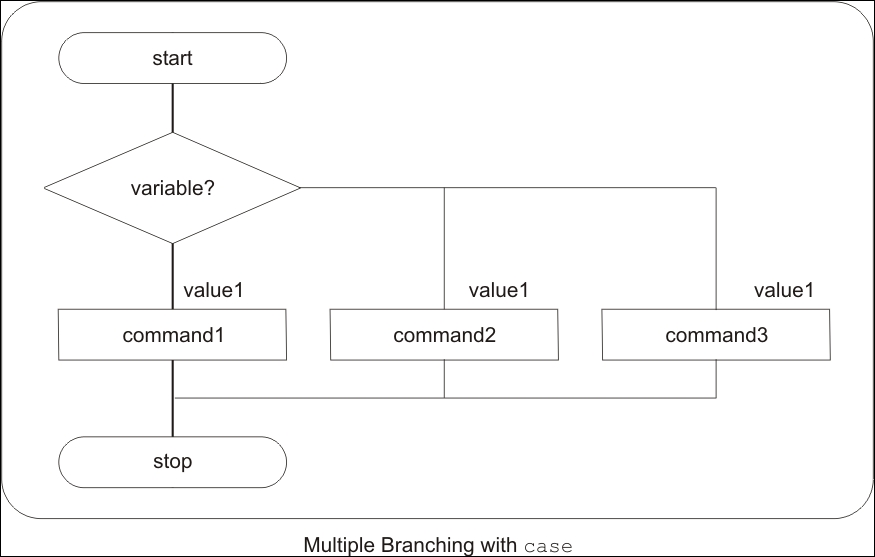
For illustrating the switch case scripting example, we will write the case_01.sh script as follows. We will ask the user to enter any number from the range 1–9. We will check the entered number with the case command. If a user enters any other number, then we will display the error by displaying the Invalid key message:
#!/bin/bash

echo "Please enter any number from 1 to 9"
read number

case $number in
  1) echo "ONE"
    ;;
  2) echo "TWO"
    ;;
  3) echo "Three"
    ;;
  4) echo "FOUR"
      ;;
  5) echo "FIVE"
    ;;
  6) echo "SIX"
    ;;
  7) echo "SEVEN"
    ;;
  8) echo "EIGHT"
    ;;
  9) echo "NINE"
    ;;
  *) echo "SOME ANOTHER NUMBER"
    ;;
esac
Let's test the program:
$ chmod +x case_01.sh
$ ./case_01.sh
The following will be the output after executing the preceding commands:
Please enter any number from 1 to 9
5
FIVE
Sometimes, in the Shell script we may need to ask for an e-mail address from the user. In such situations, we need to verify if the address is correct or not. We can use the case command to validate the correct e-mail address as follows:
#!/bin/bash
case $1  in
*@*.com)   echo "valid email address"
    ;;
*)    echo "invalid string"
    ;;
esac
Let's test the program:
$ chmod +x case_02..sh
$ ./ case_02.sh   abc@gmail.com
The following will be the output after executing the preceding commands, if the e-mail address is correct:
valid email address
$ ./ case_02.sh abc.com
The following will be the output after executing the preceding commands, if the e-mail address is not correct:
invalid string
If inside the script, we need to provide file operations such as copy, move, or delete, then we can use the case command for such scripts. The script case_03.sh for file operations is as follows:
#!/bin/bash
echo "Press 1 for copy or 2 for move or 3 for removing the file"
read num
case $num in
1)  echo "We are going to do copy operation"
echo " Enter Source file name"
read source
echo " Enter destination file name"
read destination
cp $source $destination
;;
2)   echo "We are going to do move operation"
echo " Enter Source file name"
read source
echo "Enter destination file name"
read destination
mv $source $destination   ;;
3)   echo "We are going to remove the file"
echo " Enter the name of file to remove"
read source
rm $source   ;;
*) echo "invalid key"
esac
Let's test the program:
$ chmod +x case_03.sh
$ ./case_03.sh
The following will be the output after executing the preceding commands:
Press 1 for copy or 2 for move or 3 for removing the file
1
We are going to do copy operation
 Enter Source file name
File1
 Enter destination file name
File4
In this Shell script case_04.sh, we will ask the user to enter the day of the week. Inside the script, we will detect the text entered and print a detailed description of the day such as First Day is Monday and similar on the screen. Note that we are able to perform pattern matching for the upper case and lower case in the case statement:
#!/bin/bash
echo "Enter Day Of The Week"
read day

case $day in
  [mM][oO][nN][dD][aA][yY])
        echo "First Day is Monday"
        ;;
  [tT][uU][eE][sS][dD][aA][yY])
        echo "Second Day Tuesday"
        ;;
  [wW][eE][dD][nN][eE][sS][dD][aA][yY])
        echo "Third Day Wednesday"
        ;;
  [tT][hH][uU][rR][sS][dD][aA][yY])
        echo " Fourth Day Thursday"
        ;;
  [fF][rR][iI][dD][aA][yY])
        echo "Fifth Day Friday"
        ;;
  [sS][aA][tT][uU][rR][dD][aA][yY])
        echo "Sixth Day Saturday"
        ;;
  [sS][uU][nN][dD][aA][yY])
        echo "Seventh Day Sunday"
        ;;
  *)
    echo "Invalid Day of Week"
    ;;
esac$ chmod +x case_04.sh $ ./case_04.sh
The following will be the output after executing the preceding commands:
$ ./ case_04.sh
Enter Day Of The Week
Monday
First Day is Monday

$ ./ case_04.sh
Enter Day Of The Week
Thursday
Fourth Day Thursday
We write the script case_05.sh for printing days in the current month. We will use the date command in the script for finding the current month:
#!/bin/bash
mth=$(date +%m)

case $mth in
02)
  echo "February usually has 28 days."
  echo "If it is a leap year, it has 29 days."
  ;;

04|06|09|11)
  echo "The current month has 30 days."
  ;;

*)
  echo "The current month has 31 days."
  ;;
 esac
Let's test the program:
$ chmod +x case_05.sh
$ ./case_05.sh
The following will be the output after executing the preceding commands:
The current month has 30 days.