Table of Contents for
Using SQLite
 Using SQLite
Published by
O'Reilly Media, Inc., 2010
Using SQLite
Published by
O'Reilly Media, Inc., 2010
- Cover
- Using SQLite
- O'Reilly Strata Conference
- Using SQLite
- Dedication
- A Note Regarding Supplemental Files
- Preface
- SQLite Versions
- Email Lists
- Example Code Download
- How We Got Here
- Conventions Used in This Book
- Using Code Examples
- Safari® Books Online
- How to Contact Us
- 1. What Is SQLite?
- Self-Contained, No Server Required
- Single File Database
- Zero Configuration
- Embedded Device Support
- Unique Features
- Compatible License
- Highly Reliable
- 2. Uses of SQLite
- Database Junior
- Application Files
- Application Cache
- Archives and Data Stores
- Client/Server Stand-in
- Teaching Tool
- Generic SQL Engine
- Not the Best Choice
- Big Name Users
- 3. Building and Installing SQLite
- SQLite Products
- Precompiled Distributions
- Documentation Distribution
- Source Distributions
- Building
- Build and Installation Options
- An sqlite3 Primer
- Summary
- 4. The SQL Language
- Learning SQL
- Brief Background
- General Syntax
- SQL Data Languages
- Data Definition Language
- Data Manipulation Language
- Transaction Control Language
- System Catalogs
- Wrap-up
- 5. The SELECT Command
- SQL Tables
- The SELECT Pipeline
- Advanced Techniques
- SELECT Examples
- What’s Next
- 6. Database Design
- Tables and Keys
- Common Structures and Relationships
- Normal Form
- Indexes
- Transferring Design Experience
- Closing
- 7. C Programming Interface
- API Overview
- Library Initialization
- Database Connections
- Prepared Statements
- Bound Parameters
- Convenience Functions
- Result Codes and Error Codes
- Utility Functions
- Summary
- 8. Additional Features and APIs
- Date and Time Features
- ICU Internationalization Extension
- Full-Text Search Module
- R*Trees and Spatial Indexing Module
- Scripting Languages and Other Interfaces
- Mobile and Embedded Development
- Additional Extensions
- 9. SQL Functions and Extensions
- Scalar Functions
- Aggregate Functions
- Collation Functions
- SQLite Extensions
- 10. Virtual Tables and Modules
- Introduction to Modules
- Module API
- Simple Example: dblist Module
- Advanced Example: weblog Module
- Best Index and Filter
- Wrap-Up
- A. SQLite Build Options
- Shell Directives
- ENABLE_READLINE
- Default Values
- SQLITE_DEFAULT_AUTOVACUUM
- SQLITE_DEFAULT_CACHE_SIZE
- SQLITE_DEFAULT_FILE_FORMAT
- SQLITE_DEFAULT_JOURNAL_SIZE_LIMIT
- SQLITE_DEFAULT_MEMSTATUS
- SQLITE_DEFAULT_PAGE_SIZE
- SQLITE_DEFAULT_TEMP_CACHE_SIZE
- YYSTACKDEPTH
- Sizes and Limits
- SQLITE_MAX_ATTACHED
- SQLITE_MAX_COLUMN
- SQLITE_MAX_COMPOUND_SELECT
- SQLITE_MAX_DEFAULT_PAGE_SIZE
- SQLITE_MAX_EXPR_DEPTH
- SQLITE_MAX_FUNCTION_ARG
- SQLITE_MAX_LENGTH
- SQLITE_MAX_LIKE_PATTERN_LENGTH
- SQLITE_MAX_PAGE_COUNT
- SQLITE_MAX_PAGE_SIZE
- SQLITE_MAX_SQL_LENGTH
- SQLITE_MAX_TRIGGER_DEPTH
- SQLITE_MAX_VARIABLE_NUMBER
- Operation and Behavior
- SQLITE_CASE_SENSITIVE_LIKE
- SQLITE_HAVE_ISNAN
- SQLITE_OS_OTHER
- SQLITE_SECURE_DELETE
- SQLITE_THREADSAFE
- SQLITE_TEMP_STORE
- Debug Settings
- SQLITE_DEBUG
- SQLITE_MEMDEBUG
- Enable Extensions
- SQLITE_ENABLE_ATOMIC_WRITE
- SQLITE_ENABLE_COLUMN_METADATA
- SQLITE_ENABLE_FTS3
- SQLITE_ENABLE_FTS3_PARENTHESIS
- SQLITE_ENABLE_ICU
- SQLITE_ENABLE_IOTRACE
- SQLITE_ENABLE_LOCKING_STYLE
- SQLITE_ENABLE_MEMORY_MANAGEMENT
- SQLITE_ENABLE_MEMSYS3
- SQLITE_ENABLE_MEMSYS5
- SQLITE_ENABLE_RTREE
- SQLITE_ENABLE_STAT2
- SQLITE_ENABLE_UPDATE_DELETE_LIMIT
- SQLITE_ENABLE_UNLOCK_NOTIFY
- YYTRACKMAXSTACKDEPTH
- Limit Features
- SQLITE_DISABLE_LFS
- SQLITE_DISABLE_DIRSYNC
- SQLITE_ZERO_MALLOC
- Omit Core Features
- B. sqlite3 Command Reference
- Command-Line Options
- Interactive Dot-Commands
- .backup
- .bail
- .databases
- .dump
- .echo
- .exit
- .explain
- .headers
- .help
- .import
- .indices
- .iotrace
- .load
- .log
- .mode
- .nullvalue
- .output
- .prompt
- .quit
- .read
- .restore
- .schema
- .separator
- .show
- .tables
- .timeout
- .timer
- .width
- C. SQLite SQL Command Reference
- SQLite SQL Commands
- ALTER TABLE
- ANALYZE
- ATTACH DATABASE
- BEGIN TRANSACTION
- COMMIT TRANSACTION
- CREATE INDEX
- CREATE TABLE
- CREATE TRIGGER
- CREATE VIEW
- CREATE VIRTUAL TABLE
- DELETE
- DETACH DATABASE
- DROP INDEX
- DROP TABLE
- DROP TRIGGER
- DROP VIEW
- END TRANSACTION
- EXPLAIN
- INSERT
- PRAGMA
- REINDEX
- RELEASE SAVEPOINT
- REPLACE
- ROLLBACK TRANSACTION
- SAVEPOINT
- SELECT
- UPDATE
- VACUUM
- D. SQLite SQL Expression Reference
- Literal Expressions
- Logic Representations
- Unary Expressions
- Binary Expressions
- Function Calls
- Column Names
- General Expressions
- AND
- BETWEEN
- CASE
- CAST
- COLLATE
- EXISTS
- GLOB
- IN
- IS
- ISNULL
- LIKE
- MATCH
- NOTNULL
- OR
- RAISE
- REGEXP
- SELECT
- E. SQLite SQL Function Reference
- Scalar Functions
- abs()
- changes()
- coalesce()
- date()
- datetime()
- glob()
- ifnull()
- hex()
- julianday()
- last_insert_rowid()
- length()
- like()
- load_extension()
- lower()
- ltrim()
- match()
- max()
- min()
- nullif()
- quote()
- random()
- randomblob()
- regex()
- replace()
- round()
- rtrim()
- sqlite_compileoption_get()
- sqlite_compileoption_used()
- sqlite_source_id()
- sqlite_version()
- strftime()
- substr()
- time()
- total_changes()
- trim()
- typeof()
- upper()
- zeroblob()
- Aggregate Functions
- avg()
- count()
- group_concat()
- max()
- min()
- sum()
- total()
- F. SQLite SQL PRAGMA Reference
- SQLite PRAGMAs
- auto_vacuum
- cache_size
- case_sensitive_like
- collation_list
- count_changes
- database_list
- default_cache_size
- encoding
- foreign_keys
- foreign_key_list
- freelist_count
- full_column_names
- fullfsync
- ignore_check_constraints
- incremental_vacuum
- index_info
- index_list
- integrity_check
- journal_mode
- journal_size_limit
- legacy_file_format
- locking_mode
- lock_proxy_file
- lock_status
- max_page_count
- omit_readlock
- page_count
- page_size
- parser_trace
- quick_check
- read_uncommitted
- recursive_triggers
- reverse_unordered_selects
- schema_version
- secure_delete
- short_column_names
- sql_trace
- synchronous
- table_info
- temp_store
- temp_store_directory
- user_version
- vdbe_trace
- vdbe_listing
- writable_schema
- G. SQLite C API Reference
- API Datatypes
- sqlite3
- sqlite3_backup
- sqlite3_blob
- sqlite3_context
- sqlite3_int64, sqlite3_uint64, sqlite_int64, sqlite_uint64
- sqlite3_module
- sqlite3_mutex
- sqlite3_stmt
- sqlite3_value
- sqlite3_vfs
- API Functions
- sqlite3_aggregate_context()
- sqlite3_auto_extension()
- sqlite3_backup_finish()
- sqlite3_backup_init()
- sqlite3_backup_pagecount()
- sqlite3_backup_remaining()
- sqlite3_backup_step()
- sqlite3_bind_xxx()
- sqlite3_bind_parameter_count()
- sqlite3_bind_parameter_index()
- sqlite3_bind_parameter_name()
- sqlite3_blob_bytes()
- sqlite3_blob_close()
- sqlite3_blob_open()
- sqlite3_blob_read()
- sqlite3_blob_write()
- sqlite3_busy_handler()
- sqlite3_busy_timeout()
- sqlite3_changes()
- sqlite3_clear_bindings()
- sqlite3_close()
- sqlite3_collation_needed()
- sqlite3_column_xxx()
- sqlite3_column_bytes()
- sqlite3_column_count()
- sqlite3_column_database_name()
- sqlite3_column_decltype()
- sqlite3_column_name()
- sqlite3_column_origin_name()
- sqlite3_column_table_name()
- sqlite3_column_type()
- sqlite3_commit_hook()
- sqlite3_compileoption_get()
- sqlite3_compileoption_used()
- sqlite3_complete()
- sqlite3_config()
- sqlite3_context_db_handle()
- sqlite3_create_collation()
- sqlite3_create_function()
- sqlite3_create_module()
- sqlite3_data_count()
- sqlite3_db_config()
- sqlite3_db_handle()
- sqlite3_db_mutex()
- sqlite3_db_status()
- sqlite3_declare_vtab()
- sqlite3_enable_load_extension()
- sqlite3_enable_shared_cache()
- sqlite3_errcode()
- sqlite3_errmsg()
- sqlite3_exec()
- sqlite3_extended_errcode()
- sqlite3_extended_result_codes()
- sqlite3_file_control()
- sqlite3_finalize()
- sqlite3_free()
- sqlite3_free_table()
- sqlite3_get_autocommit()
- sqlite3_get_auxdata()
- sqlite3_get_table()
- sqlite3_initialize()
- sqlite3_interrupt()
- sqlite3_last_insert_rowid()
- sqlite3_libversion()
- sqlite3_libversion_number()
- sqlite3_limit()
- sqlite3_load_extension()
- sqlite3_log()
- sqlite3_malloc()
- sqlite3_memory_highwater()
- sqlite3_memory_used()
- sqlite3_mprintf()
- sqlite3_mutex_alloc()
- sqlite3_mutex_enter()
- sqlite3_mutex_free()
- sqlite3_mutex_held()
- sqlite3_mutex_leave()
- sqlite3_mutex_notheld()
- sqlite3_mutex_try()
- sqlite3_next_stmt()
- sqlite3_open()
- sqlite3_open_v2()
- sqlite3_overload_function()
- sqlite3_prepare_xxx()
- sqlite3_profile()
- sqlite3_progress_handler()
- sqlite3_randomness()
- sqlite3_realloc()
- sqlite3_release_memory()
- sqlite3_reset()
- sqlite3_reset_auto_extension()
- sqlite3_result_xxx()
- sqlite3_result_error_xxx()
- sqlite3_rollback_hook()
- sqlite3_set_authorizer()
- sqlite3_set_auxdata()
- sqlite3_shutdown()
- sqlite3_sleep()
- sqlite3_snprintf()
- sqlite3_soft_heap_limit()
- sqlite3_sourceid()
- sqlite3_sql()
- sqlite3_status()
- sqlite3_step()
- sqlite3_stmt_status()
- sqlite3_strnicmp()
- sqlite3_table_column_metadata()
- sqlite3_threadsafe()
- sqlite3_total_changes()
- sqlite3_trace()
- sqlite3_unlock_notify()
- sqlite3_update_hook()
- sqlite3_user_data()
- sqlite3_value_xxx()
- sqlite3_value_bytes()
- sqlite3_value_numeric_type()
- sqlite3_value_type()
- sqlite3_version[]
- sqlite3_vfs_find()
- sqlite3_vfs_register()
- sqlite3_vfs_unregister()
- sqlite3_vmprintf()
- Index
- About the Author
- Colophon
- Copyright
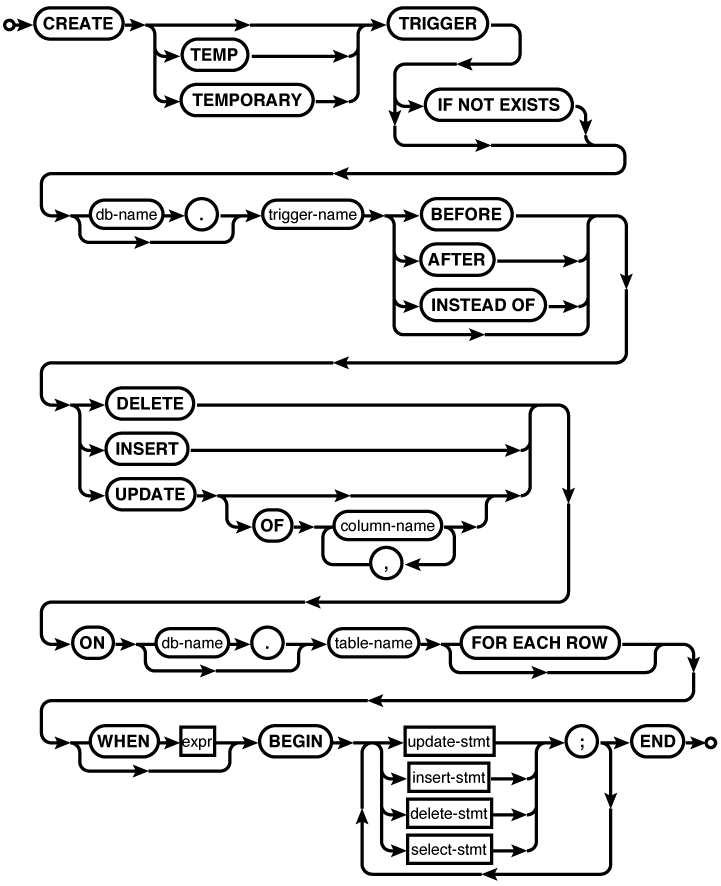
Common Usage
CREATE TRIGGERdatabase_name.trigger_nameBEFORE INSERT ONtable_nameFOR EACH ROW BEGINstmt1;stmt2; END; CREATE TRIGGER access_audit BEFORE UPDATE ON access FOR EACH ROW BEGIN INSERT INTO audit_trail VALUES ( OLD.level, NEW.level, CURRENT_TIMESTAMP ); END;
Description
The CREATE
TRIGGER command creates a trigger and binds it
to a table or view. When the conditions defined by the trigger
are met, the trigger will “fire,” automatically executing
statements found in the trigger body (the part between BEGIN and END). A table or view may have
any number of triggers associated with it, including multiple
triggers of the same type.
If the optional TEMP or TEMPORARY keyword is present, a trigger will be
created in the temp database.
A trigger can also be made temporary by qualifying the trigger
name with the database name temp. If the trigger name is qualified with a
database name, specifying TEMP or TEMPORARY will result in an error, even if the
given database name is temp.
Temporary triggers can be attached to either temporary or standard (nontemporary) tables. A specific table instance can be chosen by qualifying the table name with a database name. In all other cases, the trigger and the table should be in the same database. Either the trigger name or the table name can be qualified with a database name (or both, if they match).
Triggers associated with tables may
be BEFORE or AFTER triggers. If no time is
specified, BEFORE is used.
The timing indicates if the trigger fires before or after the
defined trigger action. In both cases, the action is verified
before the trigger is fired. For example, a BEFORE INSERT trigger will not
fire if the insert will cause a constraint violation.
The trigger action can be either a
DELETE, INSERT, or UPDATE statement that gets run
against the trigger’s table. In the case of UPDATE, the trigger can fire
when any column is updated, or only when one or more columns
from the specified list is updated.
Triggers associated with views must
be INSTEAD OF triggers. The
default timing for views is still BEFORE, so the INSTEAD
OF must be specified. As the name indicates,
INSTEAD OF triggers
fire in the place of the defined action. Although views are
read-only in SQLite, defining one or more INSTEAD OF DELETE, INSERT, or UPDATE trigger will allow those
commands to be run against the view. Very often, views will have
a whole series of INSTEAD OF
triggers to deal with different combinations of column
updates.
The SQL standard defines both
FOR EACH ROW as well as
FOR EACH
                                          STATEMENT
triggers. SQLite only supports FOR EACH
ROW triggers, which fire once for each row
affected by the specified condition. This makes the FOR EACH ROW clause optional in
SQLite. Some popular databases that support both types of
triggers will default to FOR EACH
STATEMENT triggers, however, so explicit use of
the FOR EACH ROW clause is
recommended.
Triggers also have an optional WHEN clause that is used to control whether the
trigger actually fires or not. Don’t underestimate the WHEN clause. In many cases, the
logic in the WHEN clause is
more complex than the trigger body.
The trigger body itself consists of
one or more INSERT, UPDATE, DELETE, or SELECT statements. The first three commands can
be used in the normal way. A SELECT statement can be used to call
user-defined functions. Any results returned by a standalone
SELECT statement will
be ignored. Table identifiers within the trigger body cannot be
qualified with a database name. All table identifiers must be
from the same database as the trigger table.
Both the WHEN clause and the trigger body have access to
some additional column qualifiers. Columns associated with the
trigger table (or view) may be qualified with the
pseudo-identifier NEW (in the
case of INSERT and UPDATE triggers) or OLD (in the case of UPDATE and DELETE triggers). These
represent the before and after values of the row in question and
are only valid for the current row that caused the trigger to
fire.
Commands found in a trigger body
can also use the RAISE
expression to raise an exception. This can be used to ignore,
roll back, abort, or fail the current row in an error situation.
For more information, see RAISE and UPDATE.
There are some additional limits on
trigger bodies. Within a trigger body, UPDATE and DELETE commands cannot use index overrides
(INDEXED BY, NOT INDEXED), nor is the
ORDER BY...LIMIT syntax
supported (even if support has been properly enabled). The
INSERT...DEFAULT VALUES
syntax is also unsupported. If a trigger is fired as the result
of a command with an explicit ON
CONFLICT clause, the higher-level conflict
resolution will override any ON
CONFLICT clause found in a trigger body.
If a trigger modifies rows from the
same table it is attached to, the use of AFTER triggers is strongly
recommended. If a BEFORE
trigger modifies the rows that are part of the original
statement (the one that caused the trigger to fire) the results
can be undefined. Also, the NEW.ROWID value is not available to BEFORE INSERT triggers unless an
explicit value has been provided.
If a table is dropped, all of its
triggers are automatically dropped. Similarly, if a table is
renamed (via ALTER TABLE),
any associated triggers will be updated. However, dropping or
altering a table will not cause references found in a trigger
body to be updated. If a table is dropped or renamed, make sure
any triggers that reference it are updated as well. Failing to
do so will cause an error when the trigger is fired.
Creating a trigger that already
exists will normally generate an error. If the optional IF NOT EXISTS clause is
provided, this error is silently ignored. This leaves the
original definition (and data) in place.
One final note. Some of the syntax
and many of the functional limitations of CREATE TRIGGER are checked at
execution, not at creation. Just because the CREATE TRIGGER command returned
without error doesn’t mean the trigger description is valid. It
is strongly suggested that all triggers are verified and tested.
If a trigger encounters an error, that error will be bubbled up
to the statement that caused the trigger to fire. This can cause
perplexing results, such as commands producing errors about
tables or columns that are not part of the original statement.
If a command is producing an unexplained or odd error, check to
make sure there are no faulty triggers associated with any of
the tables referenced by the command.