Table of Contents for
Using SQLite
 Using SQLite
Published by
O'Reilly Media, Inc., 2010
Using SQLite
Published by
O'Reilly Media, Inc., 2010
- Cover
- Using SQLite
- O'Reilly Strata Conference
- Using SQLite
- Dedication
- A Note Regarding Supplemental Files
- Preface
- SQLite Versions
- Email Lists
- Example Code Download
- How We Got Here
- Conventions Used in This Book
- Using Code Examples
- Safari® Books Online
- How to Contact Us
- 1. What Is SQLite?
- Self-Contained, No Server Required
- Single File Database
- Zero Configuration
- Embedded Device Support
- Unique Features
- Compatible License
- Highly Reliable
- 2. Uses of SQLite
- Database Junior
- Application Files
- Application Cache
- Archives and Data Stores
- Client/Server Stand-in
- Teaching Tool
- Generic SQL Engine
- Not the Best Choice
- Big Name Users
- 3. Building and Installing SQLite
- SQLite Products
- Precompiled Distributions
- Documentation Distribution
- Source Distributions
- Building
- Build and Installation Options
- An sqlite3 Primer
- Summary
- 4. The SQL Language
- Learning SQL
- Brief Background
- General Syntax
- SQL Data Languages
- Data Definition Language
- Data Manipulation Language
- Transaction Control Language
- System Catalogs
- Wrap-up
- 5. The SELECT Command
- SQL Tables
- The SELECT Pipeline
- Advanced Techniques
- SELECT Examples
- What’s Next
- 6. Database Design
- Tables and Keys
- Common Structures and Relationships
- Normal Form
- Indexes
- Transferring Design Experience
- Closing
- 7. C Programming Interface
- API Overview
- Library Initialization
- Database Connections
- Prepared Statements
- Bound Parameters
- Convenience Functions
- Result Codes and Error Codes
- Utility Functions
- Summary
- 8. Additional Features and APIs
- Date and Time Features
- ICU Internationalization Extension
- Full-Text Search Module
- R*Trees and Spatial Indexing Module
- Scripting Languages and Other Interfaces
- Mobile and Embedded Development
- Additional Extensions
- 9. SQL Functions and Extensions
- Scalar Functions
- Aggregate Functions
- Collation Functions
- SQLite Extensions
- 10. Virtual Tables and Modules
- Introduction to Modules
- Module API
- Simple Example: dblist Module
- Advanced Example: weblog Module
- Best Index and Filter
- Wrap-Up
- A. SQLite Build Options
- Shell Directives
- ENABLE_READLINE
- Default Values
- SQLITE_DEFAULT_AUTOVACUUM
- SQLITE_DEFAULT_CACHE_SIZE
- SQLITE_DEFAULT_FILE_FORMAT
- SQLITE_DEFAULT_JOURNAL_SIZE_LIMIT
- SQLITE_DEFAULT_MEMSTATUS
- SQLITE_DEFAULT_PAGE_SIZE
- SQLITE_DEFAULT_TEMP_CACHE_SIZE
- YYSTACKDEPTH
- Sizes and Limits
- SQLITE_MAX_ATTACHED
- SQLITE_MAX_COLUMN
- SQLITE_MAX_COMPOUND_SELECT
- SQLITE_MAX_DEFAULT_PAGE_SIZE
- SQLITE_MAX_EXPR_DEPTH
- SQLITE_MAX_FUNCTION_ARG
- SQLITE_MAX_LENGTH
- SQLITE_MAX_LIKE_PATTERN_LENGTH
- SQLITE_MAX_PAGE_COUNT
- SQLITE_MAX_PAGE_SIZE
- SQLITE_MAX_SQL_LENGTH
- SQLITE_MAX_TRIGGER_DEPTH
- SQLITE_MAX_VARIABLE_NUMBER
- Operation and Behavior
- SQLITE_CASE_SENSITIVE_LIKE
- SQLITE_HAVE_ISNAN
- SQLITE_OS_OTHER
- SQLITE_SECURE_DELETE
- SQLITE_THREADSAFE
- SQLITE_TEMP_STORE
- Debug Settings
- SQLITE_DEBUG
- SQLITE_MEMDEBUG
- Enable Extensions
- SQLITE_ENABLE_ATOMIC_WRITE
- SQLITE_ENABLE_COLUMN_METADATA
- SQLITE_ENABLE_FTS3
- SQLITE_ENABLE_FTS3_PARENTHESIS
- SQLITE_ENABLE_ICU
- SQLITE_ENABLE_IOTRACE
- SQLITE_ENABLE_LOCKING_STYLE
- SQLITE_ENABLE_MEMORY_MANAGEMENT
- SQLITE_ENABLE_MEMSYS3
- SQLITE_ENABLE_MEMSYS5
- SQLITE_ENABLE_RTREE
- SQLITE_ENABLE_STAT2
- SQLITE_ENABLE_UPDATE_DELETE_LIMIT
- SQLITE_ENABLE_UNLOCK_NOTIFY
- YYTRACKMAXSTACKDEPTH
- Limit Features
- SQLITE_DISABLE_LFS
- SQLITE_DISABLE_DIRSYNC
- SQLITE_ZERO_MALLOC
- Omit Core Features
- B. sqlite3 Command Reference
- Command-Line Options
- Interactive Dot-Commands
- .backup
- .bail
- .databases
- .dump
- .echo
- .exit
- .explain
- .headers
- .help
- .import
- .indices
- .iotrace
- .load
- .log
- .mode
- .nullvalue
- .output
- .prompt
- .quit
- .read
- .restore
- .schema
- .separator
- .show
- .tables
- .timeout
- .timer
- .width
- C. SQLite SQL Command Reference
- SQLite SQL Commands
- ALTER TABLE
- ANALYZE
- ATTACH DATABASE
- BEGIN TRANSACTION
- COMMIT TRANSACTION
- CREATE INDEX
- CREATE TABLE
- CREATE TRIGGER
- CREATE VIEW
- CREATE VIRTUAL TABLE
- DELETE
- DETACH DATABASE
- DROP INDEX
- DROP TABLE
- DROP TRIGGER
- DROP VIEW
- END TRANSACTION
- EXPLAIN
- INSERT
- PRAGMA
- REINDEX
- RELEASE SAVEPOINT
- REPLACE
- ROLLBACK TRANSACTION
- SAVEPOINT
- SELECT
- UPDATE
- VACUUM
- D. SQLite SQL Expression Reference
- Literal Expressions
- Logic Representations
- Unary Expressions
- Binary Expressions
- Function Calls
- Column Names
- General Expressions
- AND
- BETWEEN
- CASE
- CAST
- COLLATE
- EXISTS
- GLOB
- IN
- IS
- ISNULL
- LIKE
- MATCH
- NOTNULL
- OR
- RAISE
- REGEXP
- SELECT
- E. SQLite SQL Function Reference
- Scalar Functions
- abs()
- changes()
- coalesce()
- date()
- datetime()
- glob()
- ifnull()
- hex()
- julianday()
- last_insert_rowid()
- length()
- like()
- load_extension()
- lower()
- ltrim()
- match()
- max()
- min()
- nullif()
- quote()
- random()
- randomblob()
- regex()
- replace()
- round()
- rtrim()
- sqlite_compileoption_get()
- sqlite_compileoption_used()
- sqlite_source_id()
- sqlite_version()
- strftime()
- substr()
- time()
- total_changes()
- trim()
- typeof()
- upper()
- zeroblob()
- Aggregate Functions
- avg()
- count()
- group_concat()
- max()
- min()
- sum()
- total()
- F. SQLite SQL PRAGMA Reference
- SQLite PRAGMAs
- auto_vacuum
- cache_size
- case_sensitive_like
- collation_list
- count_changes
- database_list
- default_cache_size
- encoding
- foreign_keys
- foreign_key_list
- freelist_count
- full_column_names
- fullfsync
- ignore_check_constraints
- incremental_vacuum
- index_info
- index_list
- integrity_check
- journal_mode
- journal_size_limit
- legacy_file_format
- locking_mode
- lock_proxy_file
- lock_status
- max_page_count
- omit_readlock
- page_count
- page_size
- parser_trace
- quick_check
- read_uncommitted
- recursive_triggers
- reverse_unordered_selects
- schema_version
- secure_delete
- short_column_names
- sql_trace
- synchronous
- table_info
- temp_store
- temp_store_directory
- user_version
- vdbe_trace
- vdbe_listing
- writable_schema
- G. SQLite C API Reference
- API Datatypes
- sqlite3
- sqlite3_backup
- sqlite3_blob
- sqlite3_context
- sqlite3_int64, sqlite3_uint64, sqlite_int64, sqlite_uint64
- sqlite3_module
- sqlite3_mutex
- sqlite3_stmt
- sqlite3_value
- sqlite3_vfs
- API Functions
- sqlite3_aggregate_context()
- sqlite3_auto_extension()
- sqlite3_backup_finish()
- sqlite3_backup_init()
- sqlite3_backup_pagecount()
- sqlite3_backup_remaining()
- sqlite3_backup_step()
- sqlite3_bind_xxx()
- sqlite3_bind_parameter_count()
- sqlite3_bind_parameter_index()
- sqlite3_bind_parameter_name()
- sqlite3_blob_bytes()
- sqlite3_blob_close()
- sqlite3_blob_open()
- sqlite3_blob_read()
- sqlite3_blob_write()
- sqlite3_busy_handler()
- sqlite3_busy_timeout()
- sqlite3_changes()
- sqlite3_clear_bindings()
- sqlite3_close()
- sqlite3_collation_needed()
- sqlite3_column_xxx()
- sqlite3_column_bytes()
- sqlite3_column_count()
- sqlite3_column_database_name()
- sqlite3_column_decltype()
- sqlite3_column_name()
- sqlite3_column_origin_name()
- sqlite3_column_table_name()
- sqlite3_column_type()
- sqlite3_commit_hook()
- sqlite3_compileoption_get()
- sqlite3_compileoption_used()
- sqlite3_complete()
- sqlite3_config()
- sqlite3_context_db_handle()
- sqlite3_create_collation()
- sqlite3_create_function()
- sqlite3_create_module()
- sqlite3_data_count()
- sqlite3_db_config()
- sqlite3_db_handle()
- sqlite3_db_mutex()
- sqlite3_db_status()
- sqlite3_declare_vtab()
- sqlite3_enable_load_extension()
- sqlite3_enable_shared_cache()
- sqlite3_errcode()
- sqlite3_errmsg()
- sqlite3_exec()
- sqlite3_extended_errcode()
- sqlite3_extended_result_codes()
- sqlite3_file_control()
- sqlite3_finalize()
- sqlite3_free()
- sqlite3_free_table()
- sqlite3_get_autocommit()
- sqlite3_get_auxdata()
- sqlite3_get_table()
- sqlite3_initialize()
- sqlite3_interrupt()
- sqlite3_last_insert_rowid()
- sqlite3_libversion()
- sqlite3_libversion_number()
- sqlite3_limit()
- sqlite3_load_extension()
- sqlite3_log()
- sqlite3_malloc()
- sqlite3_memory_highwater()
- sqlite3_memory_used()
- sqlite3_mprintf()
- sqlite3_mutex_alloc()
- sqlite3_mutex_enter()
- sqlite3_mutex_free()
- sqlite3_mutex_held()
- sqlite3_mutex_leave()
- sqlite3_mutex_notheld()
- sqlite3_mutex_try()
- sqlite3_next_stmt()
- sqlite3_open()
- sqlite3_open_v2()
- sqlite3_overload_function()
- sqlite3_prepare_xxx()
- sqlite3_profile()
- sqlite3_progress_handler()
- sqlite3_randomness()
- sqlite3_realloc()
- sqlite3_release_memory()
- sqlite3_reset()
- sqlite3_reset_auto_extension()
- sqlite3_result_xxx()
- sqlite3_result_error_xxx()
- sqlite3_rollback_hook()
- sqlite3_set_authorizer()
- sqlite3_set_auxdata()
- sqlite3_shutdown()
- sqlite3_sleep()
- sqlite3_snprintf()
- sqlite3_soft_heap_limit()
- sqlite3_sourceid()
- sqlite3_sql()
- sqlite3_status()
- sqlite3_step()
- sqlite3_stmt_status()
- sqlite3_strnicmp()
- sqlite3_table_column_metadata()
- sqlite3_threadsafe()
- sqlite3_total_changes()
- sqlite3_trace()
- sqlite3_unlock_notify()
- sqlite3_update_hook()
- sqlite3_user_data()
- sqlite3_value_xxx()
- sqlite3_value_bytes()
- sqlite3_value_numeric_type()
- sqlite3_value_type()
- sqlite3_version[]
- sqlite3_vfs_find()
- sqlite3_vfs_register()
- sqlite3_vfs_unregister()
- sqlite3_vmprintf()
- Index
- About the Author
- Colophon
- Copyright
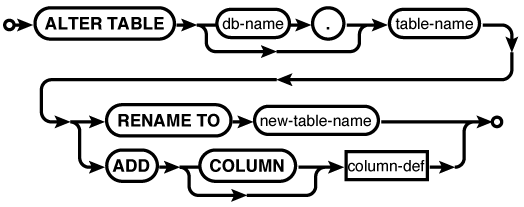
Common Usage
ALTER TABLEdatabase_name.table_nameRENAME TOnew_table_name; ALTER TABLEdatabase_name.table_nameADD COLUMNcolumn_def...;
Description
The ALTER
TABLE command modifies an existing table without
performing a full dump and reload of the data. The SQLite
version of ALTER TABLE
supports two basic operations. The RENAME variant is used to change the name of a
table, while ADD COLUMN is
used to add a new column to an existing table. Both versions of
the ALTER TABLE command will
retain any existing data in the table.
RENAME
The RENAME variant is used to “move” or rename an existing table. An
ALTER
                                                TABLE...RENAME
command can only modify a
table in place, it cannot be used to move a table to
another database. A database name can be provided when
specifying the original table name, but only the table
name should be given when specifying the new table
name.
Indexes and triggers associated with the table will remain with the table under the new name. If foreign key support is enabled, any foreign keys that reference this table will also be updated.
View definitions and trigger statements that reference the table by name will not be modified. These statements must be dropped and recreated, or a replacement table must be created.
ADD COLUMN
The ADD COLUMN variant is used to add a new column to the end of a table
definition. New columns must always go at the end of the
table definition. The existing table rows are not actually
modified, meaning that the added columns are implied until
a row is modified. This means the ALTER TABLE...ADD COLUMN command is quite
fast, even for large tables, but it also means there are
some limitations on the columns that can be added.
If foreign key constraints
are enabled and the added column is defined as a foreign
key (it has a REFERENCES clause), the new column must
have a default of NULL.
Additionally, if the new
column has a CHECK
constraint, that constraint will only be applied to new
values. This can lead to data that is inconsistent with
the CHECK.