Table of Contents for
Using SQLite
 Using SQLite
Published by
O'Reilly Media, Inc., 2010
Using SQLite
Published by
O'Reilly Media, Inc., 2010
- Cover
- Using SQLite
- O'Reilly Strata Conference
- Using SQLite
- Dedication
- A Note Regarding Supplemental Files
- Preface
- SQLite Versions
- Email Lists
- Example Code Download
- How We Got Here
- Conventions Used in This Book
- Using Code Examples
- Safari® Books Online
- How to Contact Us
- 1. What Is SQLite?
- Self-Contained, No Server Required
- Single File Database
- Zero Configuration
- Embedded Device Support
- Unique Features
- Compatible License
- Highly Reliable
- 2. Uses of SQLite
- Database Junior
- Application Files
- Application Cache
- Archives and Data Stores
- Client/Server Stand-in
- Teaching Tool
- Generic SQL Engine
- Not the Best Choice
- Big Name Users
- 3. Building and Installing SQLite
- SQLite Products
- Precompiled Distributions
- Documentation Distribution
- Source Distributions
- Building
- Build and Installation Options
- An sqlite3 Primer
- Summary
- 4. The SQL Language
- Learning SQL
- Brief Background
- General Syntax
- SQL Data Languages
- Data Definition Language
- Data Manipulation Language
- Transaction Control Language
- System Catalogs
- Wrap-up
- 5. The SELECT Command
- SQL Tables
- The SELECT Pipeline
- Advanced Techniques
- SELECT Examples
- What’s Next
- 6. Database Design
- Tables and Keys
- Common Structures and Relationships
- Normal Form
- Indexes
- Transferring Design Experience
- Closing
- 7. C Programming Interface
- API Overview
- Library Initialization
- Database Connections
- Prepared Statements
- Bound Parameters
- Convenience Functions
- Result Codes and Error Codes
- Utility Functions
- Summary
- 8. Additional Features and APIs
- Date and Time Features
- ICU Internationalization Extension
- Full-Text Search Module
- R*Trees and Spatial Indexing Module
- Scripting Languages and Other Interfaces
- Mobile and Embedded Development
- Additional Extensions
- 9. SQL Functions and Extensions
- Scalar Functions
- Aggregate Functions
- Collation Functions
- SQLite Extensions
- 10. Virtual Tables and Modules
- Introduction to Modules
- Module API
- Simple Example: dblist Module
- Advanced Example: weblog Module
- Best Index and Filter
- Wrap-Up
- A. SQLite Build Options
- Shell Directives
- ENABLE_READLINE
- Default Values
- SQLITE_DEFAULT_AUTOVACUUM
- SQLITE_DEFAULT_CACHE_SIZE
- SQLITE_DEFAULT_FILE_FORMAT
- SQLITE_DEFAULT_JOURNAL_SIZE_LIMIT
- SQLITE_DEFAULT_MEMSTATUS
- SQLITE_DEFAULT_PAGE_SIZE
- SQLITE_DEFAULT_TEMP_CACHE_SIZE
- YYSTACKDEPTH
- Sizes and Limits
- SQLITE_MAX_ATTACHED
- SQLITE_MAX_COLUMN
- SQLITE_MAX_COMPOUND_SELECT
- SQLITE_MAX_DEFAULT_PAGE_SIZE
- SQLITE_MAX_EXPR_DEPTH
- SQLITE_MAX_FUNCTION_ARG
- SQLITE_MAX_LENGTH
- SQLITE_MAX_LIKE_PATTERN_LENGTH
- SQLITE_MAX_PAGE_COUNT
- SQLITE_MAX_PAGE_SIZE
- SQLITE_MAX_SQL_LENGTH
- SQLITE_MAX_TRIGGER_DEPTH
- SQLITE_MAX_VARIABLE_NUMBER
- Operation and Behavior
- SQLITE_CASE_SENSITIVE_LIKE
- SQLITE_HAVE_ISNAN
- SQLITE_OS_OTHER
- SQLITE_SECURE_DELETE
- SQLITE_THREADSAFE
- SQLITE_TEMP_STORE
- Debug Settings
- SQLITE_DEBUG
- SQLITE_MEMDEBUG
- Enable Extensions
- SQLITE_ENABLE_ATOMIC_WRITE
- SQLITE_ENABLE_COLUMN_METADATA
- SQLITE_ENABLE_FTS3
- SQLITE_ENABLE_FTS3_PARENTHESIS
- SQLITE_ENABLE_ICU
- SQLITE_ENABLE_IOTRACE
- SQLITE_ENABLE_LOCKING_STYLE
- SQLITE_ENABLE_MEMORY_MANAGEMENT
- SQLITE_ENABLE_MEMSYS3
- SQLITE_ENABLE_MEMSYS5
- SQLITE_ENABLE_RTREE
- SQLITE_ENABLE_STAT2
- SQLITE_ENABLE_UPDATE_DELETE_LIMIT
- SQLITE_ENABLE_UNLOCK_NOTIFY
- YYTRACKMAXSTACKDEPTH
- Limit Features
- SQLITE_DISABLE_LFS
- SQLITE_DISABLE_DIRSYNC
- SQLITE_ZERO_MALLOC
- Omit Core Features
- B. sqlite3 Command Reference
- Command-Line Options
- Interactive Dot-Commands
- .backup
- .bail
- .databases
- .dump
- .echo
- .exit
- .explain
- .headers
- .help
- .import
- .indices
- .iotrace
- .load
- .log
- .mode
- .nullvalue
- .output
- .prompt
- .quit
- .read
- .restore
- .schema
- .separator
- .show
- .tables
- .timeout
- .timer
- .width
- C. SQLite SQL Command Reference
- SQLite SQL Commands
- ALTER TABLE
- ANALYZE
- ATTACH DATABASE
- BEGIN TRANSACTION
- COMMIT TRANSACTION
- CREATE INDEX
- CREATE TABLE
- CREATE TRIGGER
- CREATE VIEW
- CREATE VIRTUAL TABLE
- DELETE
- DETACH DATABASE
- DROP INDEX
- DROP TABLE
- DROP TRIGGER
- DROP VIEW
- END TRANSACTION
- EXPLAIN
- INSERT
- PRAGMA
- REINDEX
- RELEASE SAVEPOINT
- REPLACE
- ROLLBACK TRANSACTION
- SAVEPOINT
- SELECT
- UPDATE
- VACUUM
- D. SQLite SQL Expression Reference
- Literal Expressions
- Logic Representations
- Unary Expressions
- Binary Expressions
- Function Calls
- Column Names
- General Expressions
- AND
- BETWEEN
- CASE
- CAST
- COLLATE
- EXISTS
- GLOB
- IN
- IS
- ISNULL
- LIKE
- MATCH
- NOTNULL
- OR
- RAISE
- REGEXP
- SELECT
- E. SQLite SQL Function Reference
- Scalar Functions
- abs()
- changes()
- coalesce()
- date()
- datetime()
- glob()
- ifnull()
- hex()
- julianday()
- last_insert_rowid()
- length()
- like()
- load_extension()
- lower()
- ltrim()
- match()
- max()
- min()
- nullif()
- quote()
- random()
- randomblob()
- regex()
- replace()
- round()
- rtrim()
- sqlite_compileoption_get()
- sqlite_compileoption_used()
- sqlite_source_id()
- sqlite_version()
- strftime()
- substr()
- time()
- total_changes()
- trim()
- typeof()
- upper()
- zeroblob()
- Aggregate Functions
- avg()
- count()
- group_concat()
- max()
- min()
- sum()
- total()
- F. SQLite SQL PRAGMA Reference
- SQLite PRAGMAs
- auto_vacuum
- cache_size
- case_sensitive_like
- collation_list
- count_changes
- database_list
- default_cache_size
- encoding
- foreign_keys
- foreign_key_list
- freelist_count
- full_column_names
- fullfsync
- ignore_check_constraints
- incremental_vacuum
- index_info
- index_list
- integrity_check
- journal_mode
- journal_size_limit
- legacy_file_format
- locking_mode
- lock_proxy_file
- lock_status
- max_page_count
- omit_readlock
- page_count
- page_size
- parser_trace
- quick_check
- read_uncommitted
- recursive_triggers
- reverse_unordered_selects
- schema_version
- secure_delete
- short_column_names
- sql_trace
- synchronous
- table_info
- temp_store
- temp_store_directory
- user_version
- vdbe_trace
- vdbe_listing
- writable_schema
- G. SQLite C API Reference
- API Datatypes
- sqlite3
- sqlite3_backup
- sqlite3_blob
- sqlite3_context
- sqlite3_int64, sqlite3_uint64, sqlite_int64, sqlite_uint64
- sqlite3_module
- sqlite3_mutex
- sqlite3_stmt
- sqlite3_value
- sqlite3_vfs
- API Functions
- sqlite3_aggregate_context()
- sqlite3_auto_extension()
- sqlite3_backup_finish()
- sqlite3_backup_init()
- sqlite3_backup_pagecount()
- sqlite3_backup_remaining()
- sqlite3_backup_step()
- sqlite3_bind_xxx()
- sqlite3_bind_parameter_count()
- sqlite3_bind_parameter_index()
- sqlite3_bind_parameter_name()
- sqlite3_blob_bytes()
- sqlite3_blob_close()
- sqlite3_blob_open()
- sqlite3_blob_read()
- sqlite3_blob_write()
- sqlite3_busy_handler()
- sqlite3_busy_timeout()
- sqlite3_changes()
- sqlite3_clear_bindings()
- sqlite3_close()
- sqlite3_collation_needed()
- sqlite3_column_xxx()
- sqlite3_column_bytes()
- sqlite3_column_count()
- sqlite3_column_database_name()
- sqlite3_column_decltype()
- sqlite3_column_name()
- sqlite3_column_origin_name()
- sqlite3_column_table_name()
- sqlite3_column_type()
- sqlite3_commit_hook()
- sqlite3_compileoption_get()
- sqlite3_compileoption_used()
- sqlite3_complete()
- sqlite3_config()
- sqlite3_context_db_handle()
- sqlite3_create_collation()
- sqlite3_create_function()
- sqlite3_create_module()
- sqlite3_data_count()
- sqlite3_db_config()
- sqlite3_db_handle()
- sqlite3_db_mutex()
- sqlite3_db_status()
- sqlite3_declare_vtab()
- sqlite3_enable_load_extension()
- sqlite3_enable_shared_cache()
- sqlite3_errcode()
- sqlite3_errmsg()
- sqlite3_exec()
- sqlite3_extended_errcode()
- sqlite3_extended_result_codes()
- sqlite3_file_control()
- sqlite3_finalize()
- sqlite3_free()
- sqlite3_free_table()
- sqlite3_get_autocommit()
- sqlite3_get_auxdata()
- sqlite3_get_table()
- sqlite3_initialize()
- sqlite3_interrupt()
- sqlite3_last_insert_rowid()
- sqlite3_libversion()
- sqlite3_libversion_number()
- sqlite3_limit()
- sqlite3_load_extension()
- sqlite3_log()
- sqlite3_malloc()
- sqlite3_memory_highwater()
- sqlite3_memory_used()
- sqlite3_mprintf()
- sqlite3_mutex_alloc()
- sqlite3_mutex_enter()
- sqlite3_mutex_free()
- sqlite3_mutex_held()
- sqlite3_mutex_leave()
- sqlite3_mutex_notheld()
- sqlite3_mutex_try()
- sqlite3_next_stmt()
- sqlite3_open()
- sqlite3_open_v2()
- sqlite3_overload_function()
- sqlite3_prepare_xxx()
- sqlite3_profile()
- sqlite3_progress_handler()
- sqlite3_randomness()
- sqlite3_realloc()
- sqlite3_release_memory()
- sqlite3_reset()
- sqlite3_reset_auto_extension()
- sqlite3_result_xxx()
- sqlite3_result_error_xxx()
- sqlite3_rollback_hook()
- sqlite3_set_authorizer()
- sqlite3_set_auxdata()
- sqlite3_shutdown()
- sqlite3_sleep()
- sqlite3_snprintf()
- sqlite3_soft_heap_limit()
- sqlite3_sourceid()
- sqlite3_sql()
- sqlite3_status()
- sqlite3_step()
- sqlite3_stmt_status()
- sqlite3_strnicmp()
- sqlite3_table_column_metadata()
- sqlite3_threadsafe()
- sqlite3_total_changes()
- sqlite3_trace()
- sqlite3_unlock_notify()
- sqlite3_update_hook()
- sqlite3_user_data()
- sqlite3_value_xxx()
- sqlite3_value_bytes()
- sqlite3_value_numeric_type()
- sqlite3_value_type()
- sqlite3_version[]
- sqlite3_vfs_find()
- sqlite3_vfs_register()
- sqlite3_vfs_unregister()
- sqlite3_vmprintf()
- Index
- About the Author
- Colophon
- Copyright
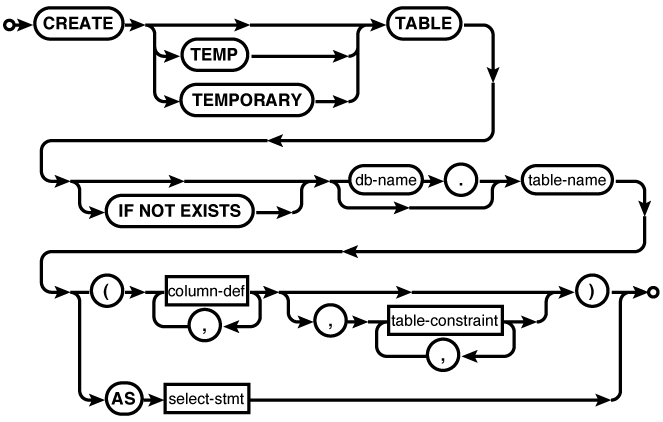


Common Usage
CREATE TABLEdatabase_name.table_name(c1_name c1_type,c2_name c2_type...); CREATE TABLEdatabase_name.table_nameAS SELECT * FROM... ; CREATE TABLE tbl ( a, b, c ); CREATE TABLE people ( people_id INTEGER PRIMARY KEY, name TEXT ); CREATE TABLE employee ( employee_id INTEGER PRIMARY KEY NOT NULL, name TEXT NOT NULL, start_date TEXT NOT NULL DEFAULT CURRENT_DATE, parking_spot INTEGER UNIQUE );
Description
The CREATE
TABLE command is used to define a new table. It
is one of the most complex SQL commands understood by SQLite,
though nearly all of the syntax is optional.
A new table can be created in a
specific database by qualifying the table name with an explicit
database name. If one of the optional keywords TEMP or TEMPORARY is present, any database name given
as part of the table name will be ignored, and the new table
will be created in the temp
database.
Creating a table that already
exists will normally generate an error. If the optional IF NOT EXISTS clause is
provided, this error is silently ignored. This leaves the
original definition (and data) in place.
There are two variations of
CREATE TABLE. The
difference is in how the columns are defined. The least common
variation uses a simple AS
SELECT subquery to define the structure and
initial contents of the table. The number of columns and the
column names will be taken from the result set of the subquery.
The rows of the result set will be loaded into the table as part
of the table creation process. Because this variation provides
no way to define column affinities (typical datatypes), keys, or
constraints, it is typically limited to defining “quick and
dirty” temporary tables. To quickly create and load structured
data, it is often better to create a table using the standard
notation and then use an INSERT...SELECT command to load the table. The
standard notation explicitly defines a list of columns and table
constraints.
Basic format
The most common way to define a table structure is to provide a list of column definitions. Column definitions consist of a name and a type, plus zero or more column-level constraint definitions.
The list of column definitions is followed by a list of table-level constraints. For the most part, column-level constraints and table-level constraints are very similar. The main difference is that column constraints apply to the values found in a single column, while table constraints can deal with one or more columns. It is possible to define most column constraints as table-level constraints that only reference a single column. For example, a multicolumn primary key must be defined as a table constraint, but a single-column primary key can be defined as either a table constraint or a column constraint.
The column name is a standard
identifier. If nonstandard characters (such as a space or
a hyphen) are used, the identifier must be quoted in the
CREATE TABLE
statement as well as any other reference.
The column name is followed by a type indicator. In SQLite, the type is optional, since nearly any column can hold any datatype. SQLite columns do not technically have types, but rather have type affinities. An affinity describes the most favored type for the column and allows SQLite to do implicit conversions in some cases. An affinity does not limit a column to a specific type, however. The use of affinities also accounts for the fact that the type format is extremely flexible, allowing type names from nearly any dialect of SQL. For more specifics on how type affinities are determined and used, see Column types.
If you want to make sure a
specific affinity is used, the most straightforward type
names are INT, REAL, TEXT, or BLOB. SQLite does not use
precision or size limits internally. All integer values
are signed 64-bit values, all floating-point values are
64-bit values, and all text and BLOB values are variable
length.
All tables have an implied
root column, known as ROWID, that is used internally by the
database to index and store the database table structure.
This column is not normally displayed or returned in
queries, but can be accessed directly using the name
ROWID, _ROWID_, or OID. The alternate names
are provided for compatibility with other database
engines. Generally, ROWID values should never be used or
manipulated directly, nor should the ROWID column be directly
used as a table key. To use a ROWID as a key value, it should be
aliased to a user-defined column. See PRIMARY KEY constraint.
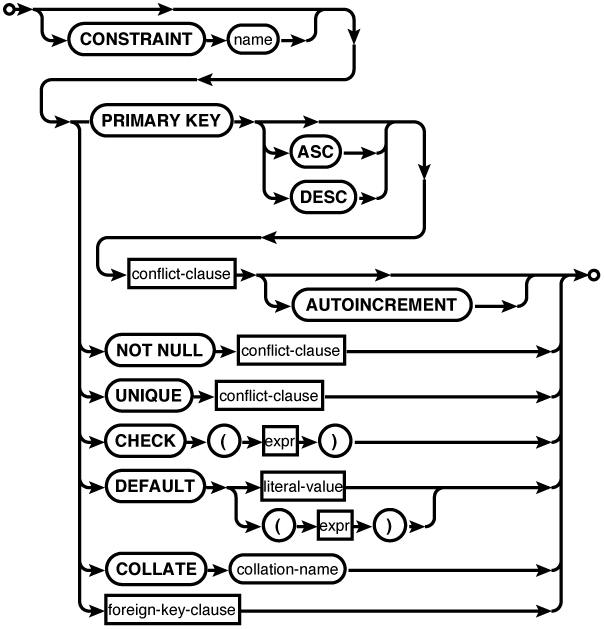
Column constraints
Each column definition can include zero or more column constraints. Column constraints follow the column type indicator; there is no comma or other delimiter between basic column definitions and the column constraints. The constraints can be given in any order.
Most of the column
constraints are easy to understand. The PRIMARY KEY constraint is
a bit unique, however, and is discussed below, in its own
section.
The NOT NULL constraint prohibits the column
from containing NULL entries. The UNIQUE constraint requires all the values
of the column to be unique. An automatic unique index will
be created on the column to enforce this constraint. Be
aware that UNIQUE does
not imply NOT NULL, and
unique columns are allowed to have more than one NULL
entry. This means there is a tendency for columns with a
UNIQUE constraint
to also have a NOT NULL
constraint.
The CHECK constraint provides an arbitrary
user-defined expression that must remain true. The
expression can safely access any column in the row. The
CHECK constraint
is very useful to enforce specific data formats, ranges or
values, or even specific datatypes. For example, if you
want to be absolutely sure nothing but integer values are
entered into a column, you can add a constraint such
as:
CHECK ( typeof( column_name ) == 'integer' )The DEFAULT constraint defines a default
value for the column. This value is used when an INSERT statement does not
include a specific value for this column. A DEFAULT can either be a
literal value or, if enclosed in parentheses, an
expression. Any expression must evaluate to a constant value. You can also
use the special values CURRENT_TIME, CURRENT_DATE, or CURRENT_TIMESTAMP. These will insert an
appropriate text value indicating the time the row was
first created. If no DEFAULT constraint is given, the default
value will be NULL.
The COLLATION constraint is used to assign a
specific collation to a column. This not only defines the
sort order for the column, it also defines how values are
tested for equality (which is important for things such as
UNIQUE
constraints). SQLite includes three built-in collations:
BINARY (the
default), NOCASE, and
RTRIM. BINARY treats all values
as binary data that must match exactly. NOCASE is similar to
binary, only it is case-insensitive for ASCII text values
(in specific, character codes < 128). Also included
is RTRIM (right-trim),
which is like BINARY,
but will trim any trailing whitespace from TEXT values before doing
comparisons.
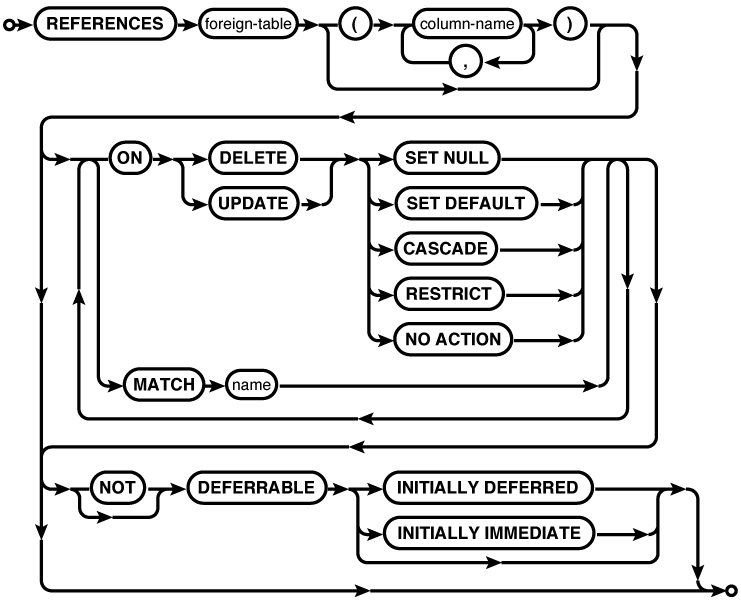
Finally, columns can contain
a REFERENCES foreign
key constraint. If given as a column constraint, the
foreign table reference can contain no more than one
foreign column name. If no column references are given,
the foreign table must have a single-column primary key.
For more information on foreign keys, see the section
Foreign Keys. Note that a
column-level foreign key constraint does not actually
contain the words FOREIGN
KEY. That syntax is for table-level
foreign key constraints.
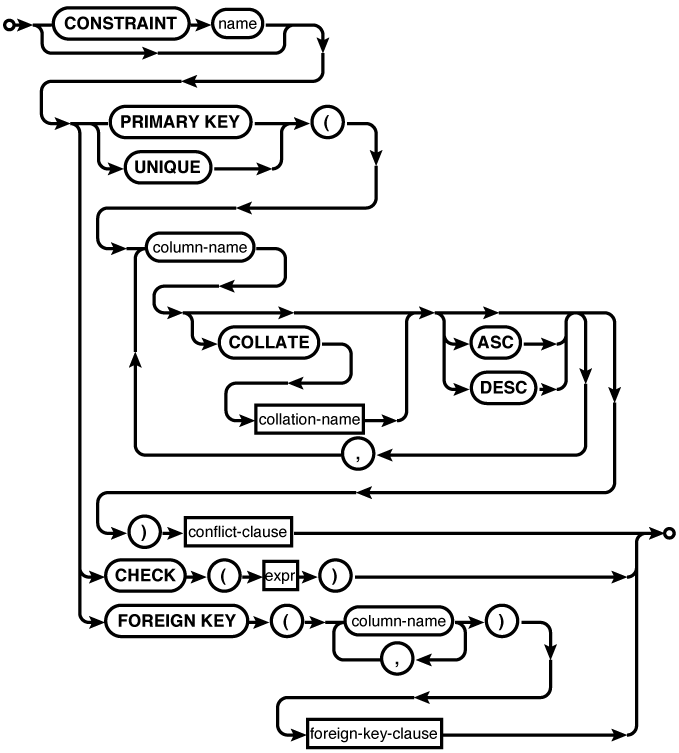
Table constraints
Generally, the table-level constraints are the same as the column-level constraints, except that they operate across more than one column. In most cases, table-level constraints have similar syntax to their column-level counterparts, with the addition of a list of columns that are applied to the constraint.
The UNIQUE table constraint requires that
each group of column values must be UNIQUE from all the other
groups within the table. In the case of a multicolumn
UNIQUE
constraint, any individual column is allowed to have
duplicate values, it is only the group of column values,
taken as a whole, that must remain unique. Both UNIQUE and PRIMARY KEY multicolumn
constraints can define individual column collations and
orderings that are different from the individual column
collations.
The table-level CHECK constraint is
identical to the column-level CHECK constraint. Both forms are allowed
to use an arbitrary expression that references any column
in the row.
Finally, multicolumn foreign
keys are defined with the FOREIGN
KEY constraint. The list of local table
columns must be the same size, and in the same order, as
the foreign column list provided by the REFERENCES clause. For
more information on foreign keys, see Foreign Keys.
PRIMARY KEY constraint
The PRIMARY KEY constraint is used to define the primary key (or PK) for the
table. From a database design and theory standpoint, it is
desirable for every table to have a primary key. The
primary key defines the core purpose of the table by
defining the specific data points that make each row a
unique and complete record.
From a practical standpoint, SQL does not require a table to have a PK. In fact, SQL does not require that rows within a table be unique. Nonetheless, there are some advantages to defining a primary key, especially when using foreign keys. In most cases a foreign key in one table will refer to the primary key of another table, and explicitly defining a primary key can make it easier to establish this relationship. SQLite also provides some additional features for single-column primary keys.
There can be only one
PRIMARY KEY
constraint per table. It can be defined at either the
column level or the table level, but each table can have
only one. A PRIMARY KEY
constraint implies a UNIQUE constraint. As with a standalone
UNIQUE
constraint, this will cause the creation of an automatic
unique index (with one exception). In most database
systems, PRIMARY KEY
also implies NOT NULL,
but due to a long-standing bug, SQLite allows the use of
NULL entries in a primary key column. For proper behavior,
be sure to define at least one column of the primary key
to be NOT NULL.
If a column has the type
identifier INTEGER (it
can be upper- or lowercase, but must be the exact word
“integer”), an ascending collation (the default), and has
a single-column PRIMARY
KEY constraint, then that column will
become an alias for the ROWID column. Behind the scenes, this
makes an INTEGER PRIMARY
KEY column the root column, used
internally to index and store the database table. Using a
ROWID alias
allows for very fast row access without requiring a
secondary index. Additionally, SQLite will automatically
assign an unused ROWID
value to any row that is inserted without an explicit
column value.
Columns defined as INTEGER PRIMARY KEY can
really truly hold only integer values. Additionally,
unlike other primary key columns, they have an inherent
NOT NULL
constraint. Default values are assigned using the standard
ROWID allocation
algorithm. This algorithm will automatically assign a
value that is one larger than the largest currently used
ROWID value. If
the maximum value is met, a random (unused) ROWID value will be
chosen. As rows are added and removed from a table, this
allows ROWID values to
be recycled.
While recycling values is not
a problem for internal ROWID values, it can cause problems for
reference values that might be lurking elsewhere in the
database. To avoid problems, the keyword AUTOINCREMENT can be used
with an INTEGER PRIMARY
KEY to indicate that automatically
generated values should not be recycled. Default values
assigned by AUTOINCREMENT will be one larger than the
largest ROWID value
that was ever used, but don’t depend on each and every
value being used. If the maximum value is reached, an
error is returned.
When using a ROWID alias to
automatically generate keys, it is a common practice to
insert a new row and call the SQL function last_insert_rowid(), or
the C function sqlite3_last_insert_rowid(), to retrieve
the ROWID value that
was just assigned. This value can be used to insert or
update rows that reference the newly inserted row. It is
also always possible to insert a row with a specific
ROWID (or
ROWID alias)
value.
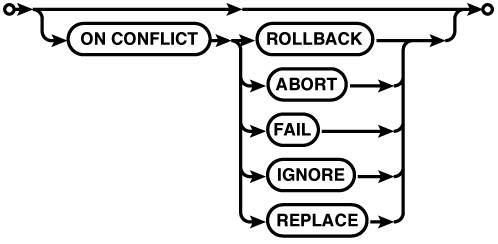
Conflict clause
Nearly every column constraint and table constraint can have an optional conflict resolution clause. This clause can be used to specify what action SQLite takes if a command attempts to violate that particular constraint. Constraint violations most commonly happen when attempting to insert or update invalid row values.
The default action is
ON CONFLICT
                                          ABORT
, which will attempt to back-out any
changes made by the command that caused the constraint
violation, but will otherwise attempt to leave any current
transaction in place and valid. For more information on
the other conflict resolution choices, see UPDATE. Note that the conflict
resolution clause in UPDATE and INSERT applies to the actions taken by
the UPDATE and INSERT commands
themselves. Any conflict resolution clause found in a
CREATE TABLE
statement is applied to any command operating on the
table.