Table of Contents for
Using SQLite
 Using SQLite
Published by
O'Reilly Media, Inc., 2010
Using SQLite
Published by
O'Reilly Media, Inc., 2010
- Cover
- Using SQLite
- O'Reilly Strata Conference
- Using SQLite
- Dedication
- A Note Regarding Supplemental Files
- Preface
- SQLite Versions
- Email Lists
- Example Code Download
- How We Got Here
- Conventions Used in This Book
- Using Code Examples
- Safari® Books Online
- How to Contact Us
- 1. What Is SQLite?
- Self-Contained, No Server Required
- Single File Database
- Zero Configuration
- Embedded Device Support
- Unique Features
- Compatible License
- Highly Reliable
- 2. Uses of SQLite
- Database Junior
- Application Files
- Application Cache
- Archives and Data Stores
- Client/Server Stand-in
- Teaching Tool
- Generic SQL Engine
- Not the Best Choice
- Big Name Users
- 3. Building and Installing SQLite
- SQLite Products
- Precompiled Distributions
- Documentation Distribution
- Source Distributions
- Building
- Build and Installation Options
- An sqlite3 Primer
- Summary
- 4. The SQL Language
- Learning SQL
- Brief Background
- General Syntax
- SQL Data Languages
- Data Definition Language
- Data Manipulation Language
- Transaction Control Language
- System Catalogs
- Wrap-up
- 5. The SELECT Command
- SQL Tables
- The SELECT Pipeline
- Advanced Techniques
- SELECT Examples
- What’s Next
- 6. Database Design
- Tables and Keys
- Common Structures and Relationships
- Normal Form
- Indexes
- Transferring Design Experience
- Closing
- 7. C Programming Interface
- API Overview
- Library Initialization
- Database Connections
- Prepared Statements
- Bound Parameters
- Convenience Functions
- Result Codes and Error Codes
- Utility Functions
- Summary
- 8. Additional Features and APIs
- Date and Time Features
- ICU Internationalization Extension
- Full-Text Search Module
- R*Trees and Spatial Indexing Module
- Scripting Languages and Other Interfaces
- Mobile and Embedded Development
- Additional Extensions
- 9. SQL Functions and Extensions
- Scalar Functions
- Aggregate Functions
- Collation Functions
- SQLite Extensions
- 10. Virtual Tables and Modules
- Introduction to Modules
- Module API
- Simple Example: dblist Module
- Advanced Example: weblog Module
- Best Index and Filter
- Wrap-Up
- A. SQLite Build Options
- Shell Directives
- ENABLE_READLINE
- Default Values
- SQLITE_DEFAULT_AUTOVACUUM
- SQLITE_DEFAULT_CACHE_SIZE
- SQLITE_DEFAULT_FILE_FORMAT
- SQLITE_DEFAULT_JOURNAL_SIZE_LIMIT
- SQLITE_DEFAULT_MEMSTATUS
- SQLITE_DEFAULT_PAGE_SIZE
- SQLITE_DEFAULT_TEMP_CACHE_SIZE
- YYSTACKDEPTH
- Sizes and Limits
- SQLITE_MAX_ATTACHED
- SQLITE_MAX_COLUMN
- SQLITE_MAX_COMPOUND_SELECT
- SQLITE_MAX_DEFAULT_PAGE_SIZE
- SQLITE_MAX_EXPR_DEPTH
- SQLITE_MAX_FUNCTION_ARG
- SQLITE_MAX_LENGTH
- SQLITE_MAX_LIKE_PATTERN_LENGTH
- SQLITE_MAX_PAGE_COUNT
- SQLITE_MAX_PAGE_SIZE
- SQLITE_MAX_SQL_LENGTH
- SQLITE_MAX_TRIGGER_DEPTH
- SQLITE_MAX_VARIABLE_NUMBER
- Operation and Behavior
- SQLITE_CASE_SENSITIVE_LIKE
- SQLITE_HAVE_ISNAN
- SQLITE_OS_OTHER
- SQLITE_SECURE_DELETE
- SQLITE_THREADSAFE
- SQLITE_TEMP_STORE
- Debug Settings
- SQLITE_DEBUG
- SQLITE_MEMDEBUG
- Enable Extensions
- SQLITE_ENABLE_ATOMIC_WRITE
- SQLITE_ENABLE_COLUMN_METADATA
- SQLITE_ENABLE_FTS3
- SQLITE_ENABLE_FTS3_PARENTHESIS
- SQLITE_ENABLE_ICU
- SQLITE_ENABLE_IOTRACE
- SQLITE_ENABLE_LOCKING_STYLE
- SQLITE_ENABLE_MEMORY_MANAGEMENT
- SQLITE_ENABLE_MEMSYS3
- SQLITE_ENABLE_MEMSYS5
- SQLITE_ENABLE_RTREE
- SQLITE_ENABLE_STAT2
- SQLITE_ENABLE_UPDATE_DELETE_LIMIT
- SQLITE_ENABLE_UNLOCK_NOTIFY
- YYTRACKMAXSTACKDEPTH
- Limit Features
- SQLITE_DISABLE_LFS
- SQLITE_DISABLE_DIRSYNC
- SQLITE_ZERO_MALLOC
- Omit Core Features
- B. sqlite3 Command Reference
- Command-Line Options
- Interactive Dot-Commands
- .backup
- .bail
- .databases
- .dump
- .echo
- .exit
- .explain
- .headers
- .help
- .import
- .indices
- .iotrace
- .load
- .log
- .mode
- .nullvalue
- .output
- .prompt
- .quit
- .read
- .restore
- .schema
- .separator
- .show
- .tables
- .timeout
- .timer
- .width
- C. SQLite SQL Command Reference
- SQLite SQL Commands
- ALTER TABLE
- ANALYZE
- ATTACH DATABASE
- BEGIN TRANSACTION
- COMMIT TRANSACTION
- CREATE INDEX
- CREATE TABLE
- CREATE TRIGGER
- CREATE VIEW
- CREATE VIRTUAL TABLE
- DELETE
- DETACH DATABASE
- DROP INDEX
- DROP TABLE
- DROP TRIGGER
- DROP VIEW
- END TRANSACTION
- EXPLAIN
- INSERT
- PRAGMA
- REINDEX
- RELEASE SAVEPOINT
- REPLACE
- ROLLBACK TRANSACTION
- SAVEPOINT
- SELECT
- UPDATE
- VACUUM
- D. SQLite SQL Expression Reference
- Literal Expressions
- Logic Representations
- Unary Expressions
- Binary Expressions
- Function Calls
- Column Names
- General Expressions
- AND
- BETWEEN
- CASE
- CAST
- COLLATE
- EXISTS
- GLOB
- IN
- IS
- ISNULL
- LIKE
- MATCH
- NOTNULL
- OR
- RAISE
- REGEXP
- SELECT
- E. SQLite SQL Function Reference
- Scalar Functions
- abs()
- changes()
- coalesce()
- date()
- datetime()
- glob()
- ifnull()
- hex()
- julianday()
- last_insert_rowid()
- length()
- like()
- load_extension()
- lower()
- ltrim()
- match()
- max()
- min()
- nullif()
- quote()
- random()
- randomblob()
- regex()
- replace()
- round()
- rtrim()
- sqlite_compileoption_get()
- sqlite_compileoption_used()
- sqlite_source_id()
- sqlite_version()
- strftime()
- substr()
- time()
- total_changes()
- trim()
- typeof()
- upper()
- zeroblob()
- Aggregate Functions
- avg()
- count()
- group_concat()
- max()
- min()
- sum()
- total()
- F. SQLite SQL PRAGMA Reference
- SQLite PRAGMAs
- auto_vacuum
- cache_size
- case_sensitive_like
- collation_list
- count_changes
- database_list
- default_cache_size
- encoding
- foreign_keys
- foreign_key_list
- freelist_count
- full_column_names
- fullfsync
- ignore_check_constraints
- incremental_vacuum
- index_info
- index_list
- integrity_check
- journal_mode
- journal_size_limit
- legacy_file_format
- locking_mode
- lock_proxy_file
- lock_status
- max_page_count
- omit_readlock
- page_count
- page_size
- parser_trace
- quick_check
- read_uncommitted
- recursive_triggers
- reverse_unordered_selects
- schema_version
- secure_delete
- short_column_names
- sql_trace
- synchronous
- table_info
- temp_store
- temp_store_directory
- user_version
- vdbe_trace
- vdbe_listing
- writable_schema
- G. SQLite C API Reference
- API Datatypes
- sqlite3
- sqlite3_backup
- sqlite3_blob
- sqlite3_context
- sqlite3_int64, sqlite3_uint64, sqlite_int64, sqlite_uint64
- sqlite3_module
- sqlite3_mutex
- sqlite3_stmt
- sqlite3_value
- sqlite3_vfs
- API Functions
- sqlite3_aggregate_context()
- sqlite3_auto_extension()
- sqlite3_backup_finish()
- sqlite3_backup_init()
- sqlite3_backup_pagecount()
- sqlite3_backup_remaining()
- sqlite3_backup_step()
- sqlite3_bind_xxx()
- sqlite3_bind_parameter_count()
- sqlite3_bind_parameter_index()
- sqlite3_bind_parameter_name()
- sqlite3_blob_bytes()
- sqlite3_blob_close()
- sqlite3_blob_open()
- sqlite3_blob_read()
- sqlite3_blob_write()
- sqlite3_busy_handler()
- sqlite3_busy_timeout()
- sqlite3_changes()
- sqlite3_clear_bindings()
- sqlite3_close()
- sqlite3_collation_needed()
- sqlite3_column_xxx()
- sqlite3_column_bytes()
- sqlite3_column_count()
- sqlite3_column_database_name()
- sqlite3_column_decltype()
- sqlite3_column_name()
- sqlite3_column_origin_name()
- sqlite3_column_table_name()
- sqlite3_column_type()
- sqlite3_commit_hook()
- sqlite3_compileoption_get()
- sqlite3_compileoption_used()
- sqlite3_complete()
- sqlite3_config()
- sqlite3_context_db_handle()
- sqlite3_create_collation()
- sqlite3_create_function()
- sqlite3_create_module()
- sqlite3_data_count()
- sqlite3_db_config()
- sqlite3_db_handle()
- sqlite3_db_mutex()
- sqlite3_db_status()
- sqlite3_declare_vtab()
- sqlite3_enable_load_extension()
- sqlite3_enable_shared_cache()
- sqlite3_errcode()
- sqlite3_errmsg()
- sqlite3_exec()
- sqlite3_extended_errcode()
- sqlite3_extended_result_codes()
- sqlite3_file_control()
- sqlite3_finalize()
- sqlite3_free()
- sqlite3_free_table()
- sqlite3_get_autocommit()
- sqlite3_get_auxdata()
- sqlite3_get_table()
- sqlite3_initialize()
- sqlite3_interrupt()
- sqlite3_last_insert_rowid()
- sqlite3_libversion()
- sqlite3_libversion_number()
- sqlite3_limit()
- sqlite3_load_extension()
- sqlite3_log()
- sqlite3_malloc()
- sqlite3_memory_highwater()
- sqlite3_memory_used()
- sqlite3_mprintf()
- sqlite3_mutex_alloc()
- sqlite3_mutex_enter()
- sqlite3_mutex_free()
- sqlite3_mutex_held()
- sqlite3_mutex_leave()
- sqlite3_mutex_notheld()
- sqlite3_mutex_try()
- sqlite3_next_stmt()
- sqlite3_open()
- sqlite3_open_v2()
- sqlite3_overload_function()
- sqlite3_prepare_xxx()
- sqlite3_profile()
- sqlite3_progress_handler()
- sqlite3_randomness()
- sqlite3_realloc()
- sqlite3_release_memory()
- sqlite3_reset()
- sqlite3_reset_auto_extension()
- sqlite3_result_xxx()
- sqlite3_result_error_xxx()
- sqlite3_rollback_hook()
- sqlite3_set_authorizer()
- sqlite3_set_auxdata()
- sqlite3_shutdown()
- sqlite3_sleep()
- sqlite3_snprintf()
- sqlite3_soft_heap_limit()
- sqlite3_sourceid()
- sqlite3_sql()
- sqlite3_status()
- sqlite3_step()
- sqlite3_stmt_status()
- sqlite3_strnicmp()
- sqlite3_table_column_metadata()
- sqlite3_threadsafe()
- sqlite3_total_changes()
- sqlite3_trace()
- sqlite3_unlock_notify()
- sqlite3_update_hook()
- sqlite3_user_data()
- sqlite3_value_xxx()
- sqlite3_value_bytes()
- sqlite3_value_numeric_type()
- sqlite3_value_type()
- sqlite3_version[]
- sqlite3_vfs_find()
- sqlite3_vfs_register()
- sqlite3_vfs_unregister()
- sqlite3_vmprintf()
- Index
- About the Author
- Colophon
- Copyright
Tables and Keys
Tables may look like simple two-dimensional grids of simple values, but a well-defined table has a fair amount of structure. Different columns can play different roles. Some columns act as unique identifiers that define the intent and purpose of each row. Other columns hold supporting data. Still other columns act as external references that link rows in one table to rows in another table. When designing a table, it is important to understand why each column is there, and what role each column is playing.
Keys Define the Table
When designing a table, you usually start by specifying the primary key. The primary key consists of one or more columns that uniquely identify each row of a table. In a sense, the primary key values represent the fundamental identity of each row in the table. The primary key columns identify what the table is all about. All the other columns should provide supporting data that is directly relevant to the primary key.
Sometimes the primary key is an actual unique data value, such as a room number or a hostname. Very often the primary key is simply an arbitrary identification number, such as an employee or student ID number. The important point is that primary keys must be unique over every possible entry in the table, not just the rows that happen to be in there right now. This is why names are normally not used as primary keys—in a large group of people, it is too easy to end up with duplicate (or very similar) names.
While there is nothing particularly special about the columns that make up a primary key, the keys themselves play a very important role in the design and use of a database. Their role as a unique identifier for each row makes them analogous to the key of a hash table, or the key to a dictionary class of data structure. They are essentially “lookup” values for the rows of a table.
A primary key can be identified in the
CREATE TABLE command. Explicitly
identifying the primary key will cause the database system to
automatically create a UNIQUE index
across all of the primary key columns. Declaring the primary key also
allows for some syntax shortcuts when establishing relationships
between tables.
For example, this table definition defines the
employee_id field to be a
primary key:
CREATE TABLE employee (
    employee_id   INTEGER   PRIMARY KEY   NOT NULL,
    name          TEXT   NOT NULL
    /* ...etc... */
);
For more information on the syntax used to define a primary key, see the section Primary keys.
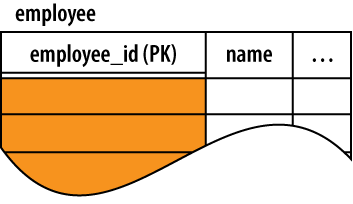
In schema documentation, primary keys are often indicated with the abbreviation “PK.” It is also common to double underline primary keys when drawing out tables, as shown in Figure 6-1.
Many database queries use a table’s primary key as either the input or output. The database might be asked to return the row with a given key, such as, “return the record for employee #953.” It is also common to ask for collections of keys, such as, “gather the ID values for all employees hired more than two years ago.” This set of keys might then be joined to another table as part of a report.
Foreign Keys
In addition to identifying each row in a table, primary keys are also central to joining tables together. Since the primary key acts as a unique row identifier, you can create a reference to a specific row by recording the row’s primary key. This is known as a foreign key. A foreign key is a copy or recording of a primary key, and is used as a reference or pointer to a different (or “foreign”) row, most often in a different table.
Like the primary key, columns that make up a
foreign key can be identified within the
CREATE TABLE command. In this
example, we define the format of a task assignment. Each task gets
assigned to a specific employee by referencing the employee_id field from the employee table:
CREATE TABLE task_assignment (
    task_assign_id   INTEGER   PRIMARY KEY,
    task_name        TEXT      NOT NULL,
    employee_id      INTEGER   NOT NULL   REFERENCES employee( employee_id )
    /* ...etc... */
);
The REFERENCES
constraint indicates that this column is a foreign key. The constraint indicates which table is
referenced and, optionally, which column. If no column is indicated,
the foreign key will reference the primary key (meaning the column
reference used in the prior example is not required, since employee_id is the primary key of the
employee table). The vast
majority of foreign keys will reference a primary key, but if a column
other than the primary key is used, that column must have a UNIQUE constraint, or it must have a
single-column UNIQUE index.
A foreign key can also be defined as a table constraint. In that case,
there may be multiple local columns that refer to multiple columns in
the referenced table. The referenced columns must be a multicolumn
primary key, or they must otherwise have a multicolumn UNIQUE index. A foreign key definition
can include several other optional parts. For the full syntax, see
CREATE TABLE in Appendix C.
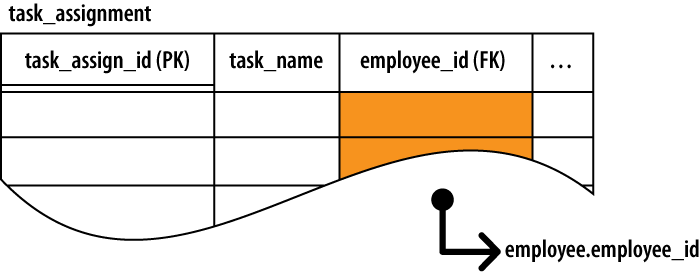
Unlike a table’s own primary key, foreign keys are not required to be unique. This is because multiple foreign key values (multiple rows) in one table may refer to the same row in another table. This is known as a one-to-many relationship. Please see the section One-to-Many Relationships. Foreign keys are often marked with the abbreviation “FK,” as shown in Figure 6-2.
Foreign Key Constraints
Declaring foreign keys in the table definition allows the database to
enforce foreign key constraints. Foreign key
constraints are used to keep foreign key references
in sync. Among other things, foreign key constraints can prevent
“dangling references” by requiring that all foreign key values
correctly match a row value from the columns of the referenced table.
Foreign keys can also be set to NULL. A NULL clearly marks the foreign
key as unassigned, which is a bit different than having an invalid
value. In many cases, unassigned foreign keys don’t fit the design of
the database. In that case, the foreign key columns should be declared
with a NOT NULL constraint.
Using our previous example, foreign key
constraints would require that every task_assignment.employee_id element needs to contain
the value of a valid employee.employee_id. By default, a NULL foreign key
would also be allowed, but we’ve defined the task_assignment.employee_id column with a NOT NULL constraint. This demands that
every task reference a valid employee.
Native foreign key support was added in SQLite
3.6.19, but is turned off by default. You must use the PRAGMA foreign_keys
command to turn on foreign key constraints. This was done
to avoid problems with existing applications and database files. A
future version of SQLite may have foreign key constraints enabled by
default. If your application is dependent on this setting, it should
explicitly turn it on or off.
Modifications to either the foreign key table or
the referenced table can potentially cause violations of the foreign
key constraint. For example, if a statement attempted to update a
task_assignment.employee_id
value to an invalid employee_id,
the foreign key constraint would be violated. Similarly, if an
employee row was assigned a
new employee_id value, any existing
task_assignment references
that point to the old value would become invalid. This would also
violate the foreign key constraint.
If the database detects a change that would cause a foreign key violation, there are several actions that can be taken. The default action is to prohibit the change. For example, if you attempted to delete an employee that still had tasks assigned to them, the delete would fail. You would need to delete the tasks or transfer them to a different employee before you could delete the original employee.
Other conflict resolutions are also available. For
example, using an ON DELETE
CASCADE
foreign key definition, deleting an employee would cause the database
to automatically delete any
tasks assigned to that employee. For more information on conflict
resolutions and other advanced foreign key options, please see the
SQLite website. Up-to-date documentation on SQLite’s support for
foreign keys can be found at http://www.sqlite.org/foreignkeys.html.
Correctly defining foreign keys is one of the most critical aspects of data integrity and security. Once defined, foreign key constraints make sure that data relationships remain valid and consistent.
Generic ID Keys
If you look at most database designs, you’ll notice that a large number of the tables have a generic ID column that is used as the primary key. The ID is typically an arbitrary integer value that is automatically assigned as new rows are inserted. The number may be incrementally assigned, or it might be assigned from a sequence mechanism that is guaranteed to never assign the same ID number twice.
When an SQLite column is defined as an INTEGER PRIMARY KEY, that column will
replace the hidden ROWID column
that acts as the root column of every table. Using an INTEGER PRIMARY KEY allows for some
significant performance enhancements. It also allows SQLite to
automatically assign sequenced ID values. For more details, see Primary keys.
At first, a generic ID field might seem like a design cheat. If each table should have a specific and well-defined role, then the primary key should reflect what makes any given row unique—reflecting, in part, the essential definition of the items in a table. Using a generic and arbitrary ID to define that uniqueness seems to be missing the point.
From a theoretical standpoint, that may be correct, but this is one of those areas where theory bumps into reality, and reality usually wins.
Practically speaking, many datasets don’t have a truly unique representation. For example, the names of people are not sufficiently unique to be used as database keys. Names are reasonably unique, and they do a fair job at identifying individuals in person, but they lack the inherent and complete uniqueness that good database design demands. Names also change from time to time, such as when people get married.
The more you dig around, the more you’ll find that the world is full of data like this. Data that is sufficiently unique and stable for casual use, but not truly, absolutely unique or fixed enough to use as a smart database key. In these situations, the best solution is to simply use an arbitrary ID that the database designer has total control over, even if it is meaningless outside of the database. This type of key is known as a surrogate key.
There are also situations when the primary key consists of three or four (or more!) columns. This is somewhat rare, but there are situations when it does come up. If you’ve got a large multicolumn primary key in the middle of a complex set of relationships, it can be a big pain to create and match all those multicolumn foreign keys. To simplify such situations, it is often easier to simply create an arbitrary ID and use that as the primary key.
Using an arbitrary ID is also useful if the customary primary key is physically large. Because each foreign key is a full copy of the primary key, it is unwise to use a lengthy text value or BLOB as the primary key. Rather, it would be better to use an arbitrary identifier and simply reference to the identifier.
One final comment on key names. There is often a
temptation to name a generic ID field something simple, such as
id. After all, if you’ve got
an employee table, it might seem
somewhat redundant to name the primary key employee_id; you end up with a lot of column
references that read employee.employee_id, when it seems that employee.id is clear enough.
Well, by itself, it is clear enough, but primary
keys tend to show up in other tables as foreign keys. While employee.employee_id might be slightly redundant, the
name task_assignment.employee_id is
not. That name also gives you significant clues about the column’s
function (a foreign key) and what table and column it references (the
employee_id column, which is
the PK column of the employee
table). Using the same name for primary keys and foreign keys makes
the inherent meaning and linkage a lot more obvious. It also allows
shortcuts, such as the NATURAL JOIN
or JOIN...USING( ) syntax. Both of
these forms require that matching columns have the exact same
name.
Using a more explicit name also avoids the problem
of having multiple tables, each with a column named id. Such a common name can make things
somewhat confusing if you join together three or four tables. While I
wouldn’t necessarily prefix every column name, keeping primary key
names unique within a database (and using the exact same name for
foreign keys) can make the intent of the database design a lot more
clear.
Keep It Specific
The biggest stumbling block for beginning database developers is that they don’t create enough tables. Less experienced developers tend to view tables as large and monumental structures. There tends to be a feeling that tables are important, and that each table needs a fair number of columns containing significant amounts of data to justify its existence. If a design change calls for a new column or set of data points, there tends to be a strong desire to lump everything together into large centralized tables rather than breaking things apart into logical groups.
The “tables must be big” mentality will quickly lead to poor designs. While you will have a few large, significant tables at the core of most designs, a typical design will also have a fair number of smaller auxiliary tables that may only hold two or three columns of data. In fact, in some cases you may find yourself building tables that consist of nothing but external references to other tables. Creating a new table is the only means you have to define a new data structure or data container, so any time you find yourself needing a new container, that’s going to indicate a new table.
Every table should have a well-defined and clear role, but that doesn’t always mean it will be big or stuffed with data.