Table of Contents for
Using SQLite
 Using SQLite
Published by
O'Reilly Media, Inc., 2010
Using SQLite
Published by
O'Reilly Media, Inc., 2010
- Cover
- Using SQLite
- O'Reilly Strata Conference
- Using SQLite
- Dedication
- A Note Regarding Supplemental Files
- Preface
- SQLite Versions
- Email Lists
- Example Code Download
- How We Got Here
- Conventions Used in This Book
- Using Code Examples
- Safari® Books Online
- How to Contact Us
- 1. What Is SQLite?
- Self-Contained, No Server Required
- Single File Database
- Zero Configuration
- Embedded Device Support
- Unique Features
- Compatible License
- Highly Reliable
- 2. Uses of SQLite
- Database Junior
- Application Files
- Application Cache
- Archives and Data Stores
- Client/Server Stand-in
- Teaching Tool
- Generic SQL Engine
- Not the Best Choice
- Big Name Users
- 3. Building and Installing SQLite
- SQLite Products
- Precompiled Distributions
- Documentation Distribution
- Source Distributions
- Building
- Build and Installation Options
- An sqlite3 Primer
- Summary
- 4. The SQL Language
- Learning SQL
- Brief Background
- General Syntax
- SQL Data Languages
- Data Definition Language
- Data Manipulation Language
- Transaction Control Language
- System Catalogs
- Wrap-up
- 5. The SELECT Command
- SQL Tables
- The SELECT Pipeline
- Advanced Techniques
- SELECT Examples
- What’s Next
- 6. Database Design
- Tables and Keys
- Common Structures and Relationships
- Normal Form
- Indexes
- Transferring Design Experience
- Closing
- 7. C Programming Interface
- API Overview
- Library Initialization
- Database Connections
- Prepared Statements
- Bound Parameters
- Convenience Functions
- Result Codes and Error Codes
- Utility Functions
- Summary
- 8. Additional Features and APIs
- Date and Time Features
- ICU Internationalization Extension
- Full-Text Search Module
- R*Trees and Spatial Indexing Module
- Scripting Languages and Other Interfaces
- Mobile and Embedded Development
- Additional Extensions
- 9. SQL Functions and Extensions
- Scalar Functions
- Aggregate Functions
- Collation Functions
- SQLite Extensions
- 10. Virtual Tables and Modules
- Introduction to Modules
- Module API
- Simple Example: dblist Module
- Advanced Example: weblog Module
- Best Index and Filter
- Wrap-Up
- A. SQLite Build Options
- Shell Directives
- ENABLE_READLINE
- Default Values
- SQLITE_DEFAULT_AUTOVACUUM
- SQLITE_DEFAULT_CACHE_SIZE
- SQLITE_DEFAULT_FILE_FORMAT
- SQLITE_DEFAULT_JOURNAL_SIZE_LIMIT
- SQLITE_DEFAULT_MEMSTATUS
- SQLITE_DEFAULT_PAGE_SIZE
- SQLITE_DEFAULT_TEMP_CACHE_SIZE
- YYSTACKDEPTH
- Sizes and Limits
- SQLITE_MAX_ATTACHED
- SQLITE_MAX_COLUMN
- SQLITE_MAX_COMPOUND_SELECT
- SQLITE_MAX_DEFAULT_PAGE_SIZE
- SQLITE_MAX_EXPR_DEPTH
- SQLITE_MAX_FUNCTION_ARG
- SQLITE_MAX_LENGTH
- SQLITE_MAX_LIKE_PATTERN_LENGTH
- SQLITE_MAX_PAGE_COUNT
- SQLITE_MAX_PAGE_SIZE
- SQLITE_MAX_SQL_LENGTH
- SQLITE_MAX_TRIGGER_DEPTH
- SQLITE_MAX_VARIABLE_NUMBER
- Operation and Behavior
- SQLITE_CASE_SENSITIVE_LIKE
- SQLITE_HAVE_ISNAN
- SQLITE_OS_OTHER
- SQLITE_SECURE_DELETE
- SQLITE_THREADSAFE
- SQLITE_TEMP_STORE
- Debug Settings
- SQLITE_DEBUG
- SQLITE_MEMDEBUG
- Enable Extensions
- SQLITE_ENABLE_ATOMIC_WRITE
- SQLITE_ENABLE_COLUMN_METADATA
- SQLITE_ENABLE_FTS3
- SQLITE_ENABLE_FTS3_PARENTHESIS
- SQLITE_ENABLE_ICU
- SQLITE_ENABLE_IOTRACE
- SQLITE_ENABLE_LOCKING_STYLE
- SQLITE_ENABLE_MEMORY_MANAGEMENT
- SQLITE_ENABLE_MEMSYS3
- SQLITE_ENABLE_MEMSYS5
- SQLITE_ENABLE_RTREE
- SQLITE_ENABLE_STAT2
- SQLITE_ENABLE_UPDATE_DELETE_LIMIT
- SQLITE_ENABLE_UNLOCK_NOTIFY
- YYTRACKMAXSTACKDEPTH
- Limit Features
- SQLITE_DISABLE_LFS
- SQLITE_DISABLE_DIRSYNC
- SQLITE_ZERO_MALLOC
- Omit Core Features
- B. sqlite3 Command Reference
- Command-Line Options
- Interactive Dot-Commands
- .backup
- .bail
- .databases
- .dump
- .echo
- .exit
- .explain
- .headers
- .help
- .import
- .indices
- .iotrace
- .load
- .log
- .mode
- .nullvalue
- .output
- .prompt
- .quit
- .read
- .restore
- .schema
- .separator
- .show
- .tables
- .timeout
- .timer
- .width
- C. SQLite SQL Command Reference
- SQLite SQL Commands
- ALTER TABLE
- ANALYZE
- ATTACH DATABASE
- BEGIN TRANSACTION
- COMMIT TRANSACTION
- CREATE INDEX
- CREATE TABLE
- CREATE TRIGGER
- CREATE VIEW
- CREATE VIRTUAL TABLE
- DELETE
- DETACH DATABASE
- DROP INDEX
- DROP TABLE
- DROP TRIGGER
- DROP VIEW
- END TRANSACTION
- EXPLAIN
- INSERT
- PRAGMA
- REINDEX
- RELEASE SAVEPOINT
- REPLACE
- ROLLBACK TRANSACTION
- SAVEPOINT
- SELECT
- UPDATE
- VACUUM
- D. SQLite SQL Expression Reference
- Literal Expressions
- Logic Representations
- Unary Expressions
- Binary Expressions
- Function Calls
- Column Names
- General Expressions
- AND
- BETWEEN
- CASE
- CAST
- COLLATE
- EXISTS
- GLOB
- IN
- IS
- ISNULL
- LIKE
- MATCH
- NOTNULL
- OR
- RAISE
- REGEXP
- SELECT
- E. SQLite SQL Function Reference
- Scalar Functions
- abs()
- changes()
- coalesce()
- date()
- datetime()
- glob()
- ifnull()
- hex()
- julianday()
- last_insert_rowid()
- length()
- like()
- load_extension()
- lower()
- ltrim()
- match()
- max()
- min()
- nullif()
- quote()
- random()
- randomblob()
- regex()
- replace()
- round()
- rtrim()
- sqlite_compileoption_get()
- sqlite_compileoption_used()
- sqlite_source_id()
- sqlite_version()
- strftime()
- substr()
- time()
- total_changes()
- trim()
- typeof()
- upper()
- zeroblob()
- Aggregate Functions
- avg()
- count()
- group_concat()
- max()
- min()
- sum()
- total()
- F. SQLite SQL PRAGMA Reference
- SQLite PRAGMAs
- auto_vacuum
- cache_size
- case_sensitive_like
- collation_list
- count_changes
- database_list
- default_cache_size
- encoding
- foreign_keys
- foreign_key_list
- freelist_count
- full_column_names
- fullfsync
- ignore_check_constraints
- incremental_vacuum
- index_info
- index_list
- integrity_check
- journal_mode
- journal_size_limit
- legacy_file_format
- locking_mode
- lock_proxy_file
- lock_status
- max_page_count
- omit_readlock
- page_count
- page_size
- parser_trace
- quick_check
- read_uncommitted
- recursive_triggers
- reverse_unordered_selects
- schema_version
- secure_delete
- short_column_names
- sql_trace
- synchronous
- table_info
- temp_store
- temp_store_directory
- user_version
- vdbe_trace
- vdbe_listing
- writable_schema
- G. SQLite C API Reference
- API Datatypes
- sqlite3
- sqlite3_backup
- sqlite3_blob
- sqlite3_context
- sqlite3_int64, sqlite3_uint64, sqlite_int64, sqlite_uint64
- sqlite3_module
- sqlite3_mutex
- sqlite3_stmt
- sqlite3_value
- sqlite3_vfs
- API Functions
- sqlite3_aggregate_context()
- sqlite3_auto_extension()
- sqlite3_backup_finish()
- sqlite3_backup_init()
- sqlite3_backup_pagecount()
- sqlite3_backup_remaining()
- sqlite3_backup_step()
- sqlite3_bind_xxx()
- sqlite3_bind_parameter_count()
- sqlite3_bind_parameter_index()
- sqlite3_bind_parameter_name()
- sqlite3_blob_bytes()
- sqlite3_blob_close()
- sqlite3_blob_open()
- sqlite3_blob_read()
- sqlite3_blob_write()
- sqlite3_busy_handler()
- sqlite3_busy_timeout()
- sqlite3_changes()
- sqlite3_clear_bindings()
- sqlite3_close()
- sqlite3_collation_needed()
- sqlite3_column_xxx()
- sqlite3_column_bytes()
- sqlite3_column_count()
- sqlite3_column_database_name()
- sqlite3_column_decltype()
- sqlite3_column_name()
- sqlite3_column_origin_name()
- sqlite3_column_table_name()
- sqlite3_column_type()
- sqlite3_commit_hook()
- sqlite3_compileoption_get()
- sqlite3_compileoption_used()
- sqlite3_complete()
- sqlite3_config()
- sqlite3_context_db_handle()
- sqlite3_create_collation()
- sqlite3_create_function()
- sqlite3_create_module()
- sqlite3_data_count()
- sqlite3_db_config()
- sqlite3_db_handle()
- sqlite3_db_mutex()
- sqlite3_db_status()
- sqlite3_declare_vtab()
- sqlite3_enable_load_extension()
- sqlite3_enable_shared_cache()
- sqlite3_errcode()
- sqlite3_errmsg()
- sqlite3_exec()
- sqlite3_extended_errcode()
- sqlite3_extended_result_codes()
- sqlite3_file_control()
- sqlite3_finalize()
- sqlite3_free()
- sqlite3_free_table()
- sqlite3_get_autocommit()
- sqlite3_get_auxdata()
- sqlite3_get_table()
- sqlite3_initialize()
- sqlite3_interrupt()
- sqlite3_last_insert_rowid()
- sqlite3_libversion()
- sqlite3_libversion_number()
- sqlite3_limit()
- sqlite3_load_extension()
- sqlite3_log()
- sqlite3_malloc()
- sqlite3_memory_highwater()
- sqlite3_memory_used()
- sqlite3_mprintf()
- sqlite3_mutex_alloc()
- sqlite3_mutex_enter()
- sqlite3_mutex_free()
- sqlite3_mutex_held()
- sqlite3_mutex_leave()
- sqlite3_mutex_notheld()
- sqlite3_mutex_try()
- sqlite3_next_stmt()
- sqlite3_open()
- sqlite3_open_v2()
- sqlite3_overload_function()
- sqlite3_prepare_xxx()
- sqlite3_profile()
- sqlite3_progress_handler()
- sqlite3_randomness()
- sqlite3_realloc()
- sqlite3_release_memory()
- sqlite3_reset()
- sqlite3_reset_auto_extension()
- sqlite3_result_xxx()
- sqlite3_result_error_xxx()
- sqlite3_rollback_hook()
- sqlite3_set_authorizer()
- sqlite3_set_auxdata()
- sqlite3_shutdown()
- sqlite3_sleep()
- sqlite3_snprintf()
- sqlite3_soft_heap_limit()
- sqlite3_sourceid()
- sqlite3_sql()
- sqlite3_status()
- sqlite3_step()
- sqlite3_stmt_status()
- sqlite3_strnicmp()
- sqlite3_table_column_metadata()
- sqlite3_threadsafe()
- sqlite3_total_changes()
- sqlite3_trace()
- sqlite3_unlock_notify()
- sqlite3_update_hook()
- sqlite3_user_data()
- sqlite3_value_xxx()
- sqlite3_value_bytes()
- sqlite3_value_numeric_type()
- sqlite3_value_type()
- sqlite3_version[]
- sqlite3_vfs_find()
- sqlite3_vfs_register()
- sqlite3_vfs_unregister()
- sqlite3_vmprintf()
- Index
- About the Author
- Colophon
- Copyright
Description
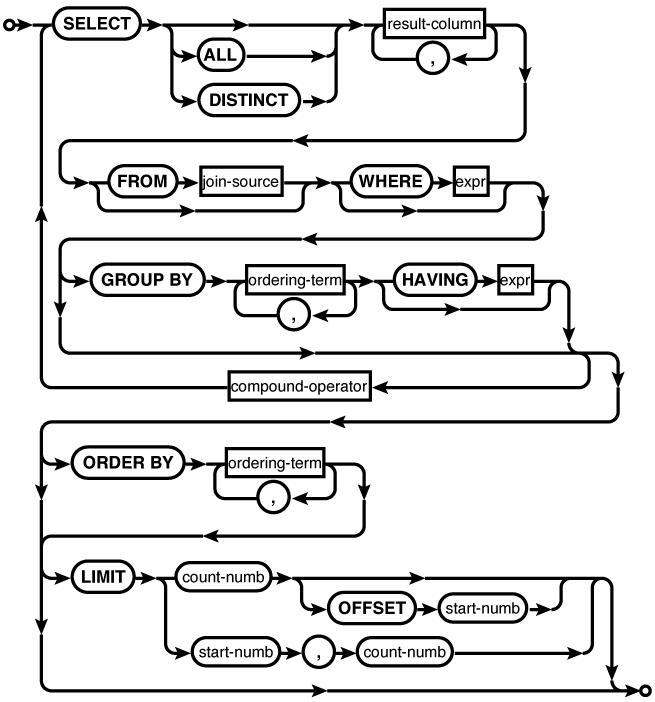
The SELECT command is used to query the database
and return a result. The SELECT command is the only SQL command capable
of returning a user-generated result, be it a table query or a
simple expression. Most consider SELECT to be the most complex SQL command.
Although the basic format is fairly easy to understand, it does
take some experience to understand its full power.
All of Chapter 5 is devoted to the SELECT command.
Basic format
The core SELECT command follows a simple pattern that can be roughly
described as SELECT
. The
output section describes the data that makes up the result
set, the input section describes what tables, views,
subqueries, etc., will act as data sources, and the filter
section sets up conditions on which rows are part of the
result set and which rows are filtered out.output FROM
input WHERE
filter
A SELECT can either be SELECT ALL (default) or
SELECT DISTINCT.
The ALL keyword returns
all rows in the result set, regardless of their
composition. The DISTINCT keyword will force the select
statement to eliminate duplicate results in the result
set. There is usually a considerable performance penalty
for calculating larger DISTINCT results.
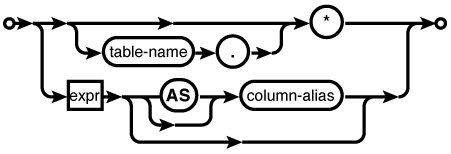
The result set columns are
defined by a series of comma-separated expressions. Every
SELECT statement
must have at least one result expression. These
expressions often consist of only a source column name,
although they can be any general expression. The character
* means “return
all columns,” and will include all standard table columns
from all of the source tables. All the standard columns of
a specific source table can be returned with the format
table_name.*ROWID column will not be included,
although ROWID alias
columns will be included. Virtual tables can also mark
some columns as hidden. Like the ROWID column, hidden columns will not be
returned by default, but can be explicitly named as a
result column.
Result columns can be given
explicit names with an optional AS clause (the actual AS keyword is optional as
well). Unless an AS
clause is given, the name of the output column is at the
discretion of the database engine. If an application
depends on matching the names of specific output columns,
the columns should be given explicit names with an
AS clause.
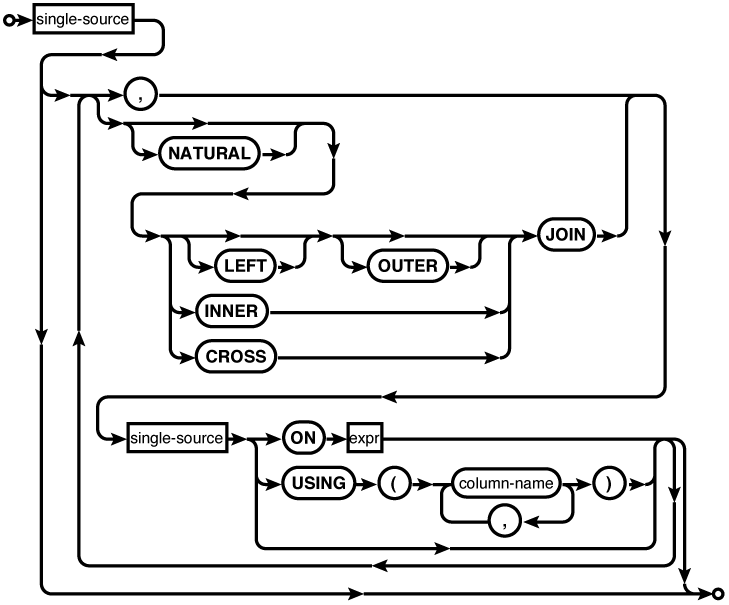
The FROM clause defines where the data comes
from and how it is shuffled together. If no FROM clause is given, the
SELECT statement
will return only one row. Each source is joined together
with a comma or a JOIN
operation. The comma acts as an unconditional CROSS JOIN. Different
sources, including tables, subqueries, or other JOIN statements, can be
grouped together into a large transitory table, which is
fed through the rest of the SELECT statement, and ultimately used to
produce the result set. For more information on the
specific JOIN
operators, see FROM Clause.
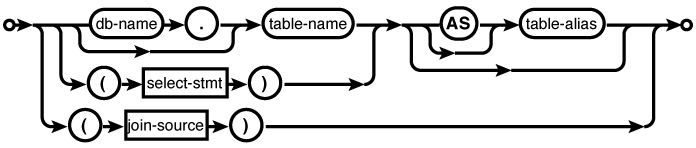
Each data source, be it a
named table or a subquery, can be given an optional
AS clause.
Similar to result set columns, the actual AS keyword is optional.
The AS clause allows an
alias to be assigned to a given source. This is important
to disambiguate table instances (for example, in a
self-join).
The WHERE clause is used to filter rows. Conceptually, the
FROM clause,
complete with joins, is used to define a large table that
consists of every possible row combination. The WHERE clause is evaluated
against each of those rows, passing only those rows that
evaluate to true. The WHERE clause can also be used to define
join conditions, by effectively having the FROM clause produce the
Cartesian product of the two tables, and use the WHERE clause to filter out
only those rows that meet the join condition.
Additional clauses
Beyond SELECT, FROM, and WHERE, the SELECT statement can do
additional processing with GROUP
BY, HAVING, ORDER
BY, and LIMIT.
The GROUP BY clause allows sets of rows in the result set to be
collapsed into single rows. Groups of rows that share
equivalent values in all of the expressions listed in the
GROUP BY clause
will be condensed to a single row. Normally, every source
column reference in the result set expressions should be a
column or expression included in the GROUP BY clause, or the
column should appear as a parameter of an aggregate
function. The value of any other source column is the
value of the last row in the group to be processed,
effectively making the result undefined. If a GROUP BY expression is a
literal integer, it is assumed to be a column index to the
result set. For example, the clause GROUP BY 2 would group the
result set using the values in the second result
column.
A HAVING clause can only be used in
conjunction with a GROUP
BY clause. Like the WHERE clause, a HAVING expression is used
as a row filter. The key difference is that the HAVING expression is
applied after any GROUP
BY manipulation. This sequence allows the
HAVING expression
to filter aggregate outputs. Be aware that the WHERE clause is usually
more efficient, since it can eliminate rows earlier in the
SELECT pipeline.
If possible, filtering should be done in the WHERE clause, saving the
HAVING clause to
filter aggregate results.
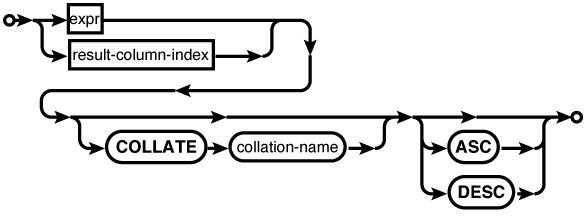
The ORDER BY clause sorts the result set into
a specific order. Typically, the output ordering is not
defined. Rows are returned as they become available, and
no attempt is made to return the results in any specific
order. The ORDER BY
clause can be used to enforce a specific output ordering.
Output is sorted by each expression in the clause, in
turn, from most specific to least specific. The fact that
the output of a SELECT
can be ordered is one of the key differences between an
SQL table and a result set. As with GROUP BY, if one of the
ORDER
                                                BY
expressions is a literal integer, it is assumed to be a
column index to the result set.
Finally, the LIMIT clause can be used
to control how many rows are returned, starting at a
specific offset. If no offset is provided, the LIMIT will start from the
beginning of the result set. Note that the two syntax
variations (comma or OFFSET) provide the parameters in the
opposite order.
Since the row order of a
result is undefined, a LIMIT is most frequently used in
conjunction with an ORDER
BY clause. Although it is not strictly
required, including an ORDER
BY brings some meaning to the limit and
offset values. There are very few cases when it makes
sense to use a LIMIT
without some type of imposed ordering.
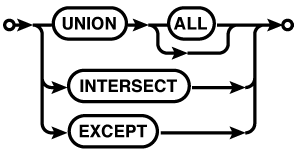
Compound statements
Compound statements
allow one or more SELECT...FROM...WHERE...GROUP BY...HAVING
substatements to be brought together using set operations.
SQLite supports the UNION, UNION
ALL, INTERSECT, and EXCEPT compound operators. Each SELECT statement in a
compound SELECT must
return the same number of columns. The names of the result
set columns will be taken from the first SELECT statement.
The UNION operator returns the union of the
SELECT
statements. By default, the UNION operator is a proper set operator
and will only return distinct rows (including those from a
single table) . UNION
ALL, by contrast, will return the full set
of rows returned by each SELECT. The
UNION ALL operator is significantly less
expensive than the UNION operator, so the use of UNION ALL is encouraged,
when possible.
The INTERSECT command will return the set of
rows that appear in both SELECT statements. Like UNION, the INTERSECT operator is a
proper set operation and will only return one instance of
each unique row, no matter how many times that row appears
in both result sets of the individual SELECT statements.
The EXCEPT compound operator acts as a
set-wise subtraction operator. All unique rows in the
first SELECT that do
not appear in the second SELECT will be returned.