Table of Contents for
Implementing SSL/TLS Using Cryptography and PKI
 Implementing SSL/TLS Using Cryptography and PKI
Published by
John Wiley & Sons, 2011
Implementing SSL/TLS Using Cryptography and PKI
Published by
John Wiley & Sons, 2011
- Cover Page
- Title Page
- Copyright
- Dedication
- About the Author
- About the Technical Editor
- Credits
- Acknowledgments
- Contents at a Glance
- Contents
- Introduction
- CHAPTER 1: Understanding Internet Security
- CHAPTER 2: Protecting Against Eavesdroppers with Symmetric Cryptography
- CHAPTER 3: Secure Key Exchange over an Insecure Medium with Public Key Cryptography
- CHAPTER 4: Authenticating Communications Using Digital Signatures
- CHAPTER 5: Creating a Network of Trust Using X.509 Certificates
- CHAPTER 6: A Usable, Secure Communications Protocol: Client-Side TLS
- CHAPTER 7: Adding Server-Side TLS 1.0 Support
- CHAPTER 8: Advanced SSL Topics
- CHAPTER 9: Adding TLS 1.2 Support to Your TLS Library
- CHAPTER 10: Other Applications of SSL
- APPENDIX A: Binary Representation of Integers: A Primer
- APPENDIX B: Installing TCPDump and OpenSSL
- APPENDIX C: Understanding the Pitfalls of SSLv2
- Index
CHAPTER 1
Understanding Internet Security
How secure is the data that you transmit on the Internet? How vulnerable is your personal data to hackers? Even computer-literate, experienced programmers find it's hard to answer these questions with certainty. You probably know that standard encryption algorithms are used to protect data — you've likely heard of public-key algorithms such as RSA and DSA — and you may know that the U.S. government's Data Encryption Standard has been replaced by an Advanced Encryption Standard. Everybody knows about the lock icon in their browsers that indicates that the session is protected by HTTPS. You've most likely heard of PGP for e-mail security (even if you gave up on it after failing to convince your friends to use it).
In all likelihood, though, you've also heard of man in the middle attacks, timing attacks, side-channel attacks, and various other attacks that aim to compromise privacy and security. Anybody with a web browser has been presented with the ominous warning message that "This site's security cannot be trusted — either the certificate has expired, or it was issued by a certificate authority you have chosen not to trust." Every week, you can read about some new zero-day exploit uncovered by security researchers that requires a round of frantic patching. As a professional programmer, you may feel you ought to know exactly what that means — yet trying to decipher these messages and determine whether you should really be worried or not takes you down the rabbit hole of IETF, PKCS, FIPS, NIST, ITU, and ASN. You may have tried to go straight to the source and read RFC 2246, which describes TLS, but you may have discovered, to your chagrin, that RFC 2246 presumes a background in symmetric cryptography, public-key cryptography, digital signature algorithms, and X.509 certificates. It's unclear where to even begin. Although there are a handful of books that describe SSL and "Internet Security," none are targeted at the technically inclined reader who wants, or needs, to know the details.
A mantra among security professionals is that the average programmer doesn't understand security and should not be trusted with it until he verses himself in it. This is good, but ultimately unhelpful, advice. Where does one begin? What the security professionals are really trying to tell you is that, as a practitioner rather than a casual user, it's not enough to treat security as a black box or a binary property; you need to know what the security is doing and how it's doing it so that you know what you are and aren't protected against. This book was written for you — the professional programmer who understands the basics of security but wants to uncover the details without reading thousands of pages of dry technical specifications (only some of which are relevant).
This book begins by examining sockets and socket programming in brief. Afterward, it moves on to a detailed examination of cryptographic concepts and finally applies them to SSL/TLS, the current standard for Internet security. You examine what SSL/TLS does, what it doesn't do, and how it does it. After completing this book, you'll know exactly how and where SSL fits into an overall security strategy and you'll know what steps yet need to be taken, if any, to achieve additional security.
What Are Secure Sockets?
The Internet is a packet-switching network. This means that, for two hosts to communicate, they must packetize their data and submit it to a router with the destination address prepended to each packet. The router then analyzes the destination address and routes the packet either to the target host, or to a router that it believes is closer to the target host. The Internet Protocol (IP), outlined in RFC 971, describes the standard for how this packetization is performed and how addresses are attached to packets in headers.
A packet can and probably will pass through many routers between the sender and the receiver. If the contents of the data in that packet are sensitive — a password, a credit card, a tax identification number — the sender would probably like to ensure that only the receiver can read the packet, rather than the packet being readable by any router along the way. Even if the sender trusts the routers and their operators, routers can be compromised by malicious individuals, called attackers in security terminology, and tricked into forwarding traffic that's meant for one destination to another, as shown in http://www.securesphere.net/download/papers/dnsspoof.htm. If you'd like to get an idea just how many different hosts a packet passes through between you and a server, you can use the traceroute facility that comes with every Internet-capable computer to print a list of the hops between you and any server on the Internet.
An example of a traceroute output is shown below:
[jdavies@localhost]:~$ traceroute www.travelocity.com
traceroute to www.travelocity.com (151.193.224.81), 30 hops max, 40 byte packets
 1 192.168.0.1 (192.168.0.1) 0.174 ms 0.159 ms 0.123 ms
 2 * * *
 3 172.216.125.53 (172.216.125.53) 8.052 ms 7.978 ms 9.699 ms
 4 10.208.164.65 (10.208.164.65) 10.731 ms 9.895 ms 9.489 ms
 5 gig8-2.dllatxarl-t-rtr1.tx.rr.com (70.125.217.92) 12.593 ms 10.952 ms
13.003 ms
 6 gig0-1-0.dllatxl3-rtr1.texas.rr.com (72.179.205.72) 69.604 ms 37.540 ms
14.015 ms
 7 ae-4-0.cr0.dfw10.tbone.rr.com (66.109.6.88) 13.434 ms 13.696 ms 15.259 ms
 8 ae-1-0.pr0.dfw10.tbone.rr.com (66.109.6.179) 15.498 ms 15.948 ms 15.555 ms
 9 xe-7-0-0.edge4.Dallas3.Level3.net (4.59.32.17) 18.653 ms 22.451 ms 16.034
ms
10 ae-11-60.car1.Dallas1.Level3.net (4.69.145.3) 19.759 ms
ae-21-70.car1.Dallas1.Level3.net (4.69.145.67) 17.455 ms
ae-41-90.car1.Dallas1.Level3.net (4.69.145.195) 16.469 ms
11 EDS.car1.Dallas1.Level3.net (4.59.113.86) 28.853 ms 25.672 ms 26.337 ms
12 151.193.129.61 (151.193.129.61) 24.763 ms 26.032 ms 25.481 ms
13 151.193.129.99 (151.193.129.99) 28.727 ms 25.441 ms 26.507 ms
14 151.193.129.173 (151.193.129.173) 26.642 ms 23.995 ms 28.462 ms
15 * * *
Here, I've submitted a traceroute to www.travelocity.com. Each router along the way is supposed to respond with a special packet called an ICMP timeout packet, as described in RFC 793, with its own address. The routers that cannot or will not do so are represented with * * * in the preceding code. Typically the routers don't respond because they're behind a firewall that's configured not to forward ICMP diagnostic packets. As you can see, there are quite a few hops between my home router and Travelocity's main web server.
In network programming parlance, the tenuous connection between a sender and a receiver is referred to as a socket. When one host — the client—is ready to establish a connection with another — the server— it sends a synchronize (SYN) packet to the server. If the server is willing to accept the connection, it responds with a SYN and acknowledge packet. Finally, the client acknowledges the acknowledgment and both sides have agreed on a connection. This three-packet exchange is referred to as the TCP handshake and is illustrated in Figure 1-1. The connection is associated with a pair of numbers: the source port and the destination port, which are attached to each subsequent packet in the communication. Because the server is sitting around, always listening for connections, it must advertise its destination port ahead of time. How this is done is protocol-specific; some protocols are lucky enough to have "magic numbers" associated with them that are well-known (in other words, you, the programmer are supposed to know them). This is the Transport Control Protocol (TCP); RFC 793 describes exactly how this works and how both sides agree on a source and destination port and how they sequence these and subsequent packets.
Figure 1-1: TCP three-way handshake
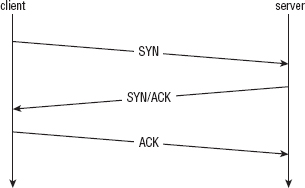
TCP and IP are usually implemented together and called TCP/IP. A socket refers to an established TCP connection; both sides, client and server, have a socket after the three-way handshake described above has been completed. If either side transmits data over this socket, TCP guarantees, to the best of its ability, that the other side sees this data in the order it was sent. As is required by IP, however, any intermediate router along the way also sees this data.
SSL stands for Secure Sockets Layer and was originally developed by Netscape as a way to allow the then-new browser technology to be used for e-commerce. The original specification proposal can be found in http://www.mozilla.org/projects/security/pki/nss/ssl/draft02.html. Although it has since been standardized and renamed Transport Layer Security (TLS), the name SSL is much more recognizable and in some ways describes better what it does and what it's for. After a socket has been established between the client and the server, SSL defines a second handshake that can be performed to establish a secure channel over the inherently insecure TCP layer.
"Insecure" Communications: Understanding the HTTP Protocol
HTTP, or Hypertext Transport Protocol, which is officially described in RFC 2616, is the standard protocol for web communication. Web clients, typically referred to as browsers, establish sockets with web servers. HTTP has a well-known destination port of 80. After the socket has been established, the web browser begins following the rules set forth by the HTTP protocol to request documents. HTTP started out as a fairly simple protocol in which the client issued a GET command and a description of what it would like to get, to which the server responded with either what the client requested in document form or an error indicating why it could not or did not give the client that document. Either way, the socket would be closed after this. If the client wanted another document, it would create another socket and request another document. Over the years, HTTP has been refined quite a bit and optimized for bandwidth, speed, and security features.
HTTP was also the primary motivator for SSL. Originally, SSL didn't stand on its own; it was designed as an add-on to HTTP, called HTTPS. Although SSL was subsequently decoupled from HTTP, some of its features were optimized for HTTP, leaving it to be a bit of a square peg in a round hole in some other contexts. Because HTTP and SSL go so well together, in this book I motivate SSL by developing an HTTP client and adding security features to it incrementally, finally arriving at a working HTTP/SSL implementation.
Implementing an HTTP Client
Web browsers are complex because they need to parse and render HTML — and, in most cases, render images, run Javascript, Flash, Java Applets and leave room for new, as-yet-uninvented add-ons. However, a web client that only retrieves a document from a server, such as the wget utility that comes standard with most Unix distributions, is actually pretty simple. Most of the complexity is in the socket handling itself — establishing the socket and sending and receiving data over it.
Start with all of the includes that go along with socket communication — as you can see, there are quite a few, shown in Listing 1-1.
Listing 1-1: "http.c" header includes
/**
 * This test utility does simple (non-encrypted) HTTP.
 */

#include <stdio.h>
#include <stdlib.h>
#include <errno.h>
#include <string.h>
#include <sys/types.h>
#ifdef WIN32
#include <winsock2.h>
#include <windows.h>
#else
#include <netdb.h>
#include <sys/socket.h>
#include <netinet/in.h>
#include <unistd.h>
#endif
The main routine is invoked with a URL of the form http://www.server.com/path/to/document.html. You need to separate the host and the path using a utility routine parse_url, shown in Listing 1-2.
Listing 1-2: "http.c" parse_url
/**
 * Accept a well-formed URL (e.g. http://www.company.com/index.html) and return
 * pointers to the host part and the path part. Note that this function
 * modifies the uri itself as well. It returns 0 on success, −1 if the URL is
 * found to be malformed in any way.
 */
int parse_url( char *uri, char **host, char **path )
{
  char *pos;

  pos = strstr( uri, "//" );

  if ( !pos )
  {
    return −1;
  }

  *host = pos + 2;

  pos = strchr( *host, '/' );

  if ( !pos )
  {
    *path = NULL;
  }
  else
  {
    *pos = '\0';
    *path = pos + 1;
  }

  return 0;
}
You scan through the URL, looking for the delimiters // and / and replace them with null-terminators so that the caller can treat them as C strings. Notice that the calling function passes in two pointers to pointers; these should be null when the function starts and will be modified to point into the uri string, which came from argv.
The main routine that coordinates all of this is shown in Listing 1-3.
*/
int main( int argc, char *argv[ ] )
{
  int client_connection;
  char *host, *path;
  struct hostent *host_name;
  struct sockaddr_in host_address;
#ifdef WIN32
  WSADATA wsaData;
#endif

  if ( argc < 2 )
  {
    fprintf( stderr, "Usage: %s: <URL>\n", argv[ 0 ] );
    return 1;
  }

  if ( parse_url( argv[ 1 ], &host, &path ) == −1 )
  {
    fprintf( stderr, "Error - malformed URL '%s'.\n", argv[ 1 ] );
    return 1;
  }

  printf( "Connecting to host '%s'\n", host );
After the URL has been parsed and the host is known, you must establish a socket to it. In order to do this, convert it from a human-readable host name, such as www.server.com, to a dotted-decimal IP address, such as 100.218.64.2. You call the standard gethostbyname library function to do this, and connect to the server. This is shown in Listing 1-4.
Listing 1-4: "http.c" main (continued)
// Step 1: open a socket connection on http port with the destination host.
#ifdef WIN32
 if ( WSAStartup( MAKEWORD( 2, 2 ), &wsaData ) != NO_ERROR )
 {
   fprintf( stderr, "Error, unable to initialize winsock.\n" );
   return 2;
 }
#endif

 client_connection = socket( PF_INET, SOCK_STREAM, 0 );

 if ( !client_connection )
 {
   perror( "Unable to create local socket" );
   return 2;
 }

 host_name = gethostbyname( host );

 if ( !host_name )
{
   perror( "Error in name resolution" );
   return 3;
 }

 host_address.sin_family = AF_INET;
 host_address.sin_port = htons( HTTP_PORT );
 memcpy( &host_address.sin_addr, host_name->h_addr_list[ 0 ],
         sizeof( struct in_addr ) );

 if ( connect( client_connection, ( struct sockaddr * ) &host_address,
      sizeof( host_address ) ) == −1 )
 {
   perror( "Unable to connect to host" );
   return 4;
 }

 printf( "Retrieving document: '%s'\n", path );
Assuming nothing went wrong — the socket structure could be created, the hostname could be resolved to an IP address, the IP address was reachable, and the server accepted your connection on the well-known port 80 — you now have a usable (cleartext) socket with which to exchange data with the web server. Issue a GET command, display the result, and close the socket, as shown in Listing 1-5.
Listing 1-5: "http.c" main (continued)
http_get( client_connection, path, host );

 display_result( client_connection );

 printf( "Shutting down.\n" );

#ifdef WIN32
 if ( closesocket( client_connection ) == −1 )
#else
 if ( close( client_connection ) == −1 )
#endif
 {
   perror( "Error closing client connection" );
   return 5;
 }

#ifdef WIN32
 WSACleanup();
#endif

 return 0;
}
An HTTP GET command is a simple, plaintext command. It starts with the three ASCII-encoded letters GET, all in uppercase (HTTP is case sensitive), a space, the path to the document to be retrieved, another space, and the token HTTP/1.0 or HTTP/1.1 depending on which version of the HTTP protocol the client understands.
NOTE At the time of this writing, there are only two versions of HTTP; the differences are immaterial to this book.
The GET command itself is followed by a carriage-return/line-feed pair (0x0A 0x0D) and a colon-separated, CRLF-delimited list of headers that describe how the client wants the response to be returned. Only one header is required — the Host header, which is required to support virtual hosting, the situation where several hosts share one IP address or vice-versa. The Connection header is not required, but in general you should send it to indicate to the client whether you want it to Keep-Alive the connection — if you plan on requesting more documents on this same socket — or Close it. If you omit the Connection: Close header line, the server keeps the socket open until the client closes it. If you're just sending a single request and getting back a single response, it's easier to let the server just close the connection when it's done sending. The header list is terminated by an empty CRLF pair.
A minimal HTTP GET command looks like this:
GET /index.html HTTP/1.1
Host: www.server.com
Connection: close
The code to format and submit a GET command over an established socket is shown in Listing 1-6. Note that the input is the socket itself — the connection argument — the path of the document being requested, and the host (to build the host header).
Listing 1-6: "http.c" http_get
#define MAX_GET_COMMAND 255
/**
 * Format and send an HTTP get command. The return value will be 0
 * on success, −1 on failure, with errno set appropriately. The caller
 * must then retrieve the response.
 */
int http_get( int connection, const char *path, const char *host )
{
 static char get_command[ MAX_GET_COMMAND ];

 sprintf( get_command, "GET /%s HTTP/1.1\r\n", path );
 if ( send( connection, get_command, strlen( get_command ), 0 ) == −1 )
 {
   return −1;
 }

 sprintf( get_command, "Host: %s\r\n", host );
 if ( send( connection, get_command, strlen( get_command ), 0 ) == −1 )
 {
return −1;
 }

 sprintf( get_command, "Connection: close\r\n\r\n" );
 if ( send( connection, get_command, strlen( get_command ), 0 ) == −1 )
 {
   return −1;
 }

 return 0;
}
Finally, output the response from the server. To keep things simple, just dump the contents of the response on stdout. An HTTP response has a standard format, just like an HTTP request. The response is the token HTTP/1.0 or HTTP/1.1 depending on which version the server understands (which does not necessarily have to match the client's version), followed by a space, followed by a numeric code indicating the status of the request — errored, rejected, processed, and so on — followed by a space, followed by a textual, human-readable, description of the meaning of the status code.
Some of the more common status codes are shown in Table 1-1.
Table 1-1: Common status codes
| STATUS | MEANING |
| 200 | Everything was OK, requested document follows. |
| 302 | Requested document exists, but has been moved — new location follows. |
| 403 | Forbidden: Requested document exists, but you are not authorized to view it. |
| 404 | Requested document not found. |
| 500 | Internal Server Error. |
There are quite a few more status codes, as described in RFC 2616. The response status line is followed, again, by a CRLF, and a series of colon-separated, CRLF-delimited headers, a standalone CRLF/blank line end-of-headers marker, and the document itself. Here's an example HTTP response:
HTTP/1.1 200 OK
Date: Tue, 13 Oct 2009 19:34:51 GMT
Server: Apache
Last-Modified: Fri, 27 Oct 2006 01:53:57 GMT
ETag: "1876a-ff-316f5740"
Accept-Ranges: bytes
Content-Length: 255
Vary: Accept-Encoding
Connection: close
Content-Type: text/html; charset=ISO-8859-1

<html>
<head>
<TITLE>Welcome to the server</TITLE>
</head>
<BODY BGCOLOR=ffffff>
This is the server's homepage
</BODY>
</html>
Here's an example of a 404 "not found" error:
HTTP/1.1 404 Not Found
Date: Tue, 13 Oct 2009 19:40:53 GMT
Server: Apache
Last-Modified: Fri, 27 Oct 2006 01:53:58 GMT
ETag: "1875d-c5-317e9980"
Accept-Ranges: bytes
Content-Length: 197
Vary: Accept-Encoding
Connection: close
Content-Type: text/html; charset=ISO-8859-1

<!DOCTYPE HTML PUBLIC "-//IETF//DTD HTML 2.0//EN">
<html><head>
<title>404 Not Found</title>
</head><body>
<h1>Not Found</h1>
<p>The requested URL was not found on this server.</p>
</body></html>
Even though the document requested was not found, a document was returned, which can be displayed in a browser to remind the user that something has gone wrong.
For testing purposes, you don't care about the response itself, as long as you get one. Therefore, don't make any efforts to parse these responses — just dump their contents, verbatim, on stdout as shown in Listing 1-7.
Listing 1-7: "http.c" display_result
#define BUFFER_SIZE 255

/**
 * Receive all data available on a connection and dump it to stdout
 */
void display_result( int connection )
{
 int received = 0;
static char recv_buf[ BUFFER_SIZE + 1 ];

 while ( ( received = recv( connection, recv_buf, BUFFER_SIZE, 0 ) ) > 0 )
 {
   recv_buf[ received ] = '\0';
   printf( "%s", recv_buf );
 }
 printf( "\n" );
}
This is all that's required to implement a bare-bones web client. Note, however, that because the socket created was a cleartext socket, everything that's transmitted between the client and the server is observable, in plaintext, to every host in between. In general, if you want to protect the transmission from eavesdroppers, you establish an SSL context — that is, secure the line — prior to sending the GET command.
Adding Support for HTTP Proxies
One important topic related to HTTP is the HTTP proxy. Proxies are a bit tricky for SSL. Notice in Listing 1-4 that a socket had to be created from the client to the server before a document could be requested. This means that the client had to be able to construct a SYN packet, hand that off to a router, which hands it off to another router, and so on until it's received by the server. The server then constructs its own SYN/ACK packet, hands it off, and so on until it's received by the client. However, in corporate intranet environments, packets from outside the corporate domain are not allowed in and vice versa. In effect, there is no route from the client to the server with which it wants to connect.
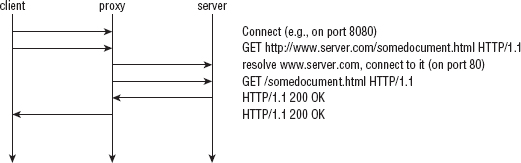
In this scenario, it's typical to set up a proxy server that can connect to the outside world, and have the client funnel its requests through the proxy. This changes the dynamics a bit; the client establishes a socket connection with the proxy server first, and issues a GET request to it as shown in Figure 1-2. After the proxy receives the GET request, the proxy examines the request to determine the host name, resolves the IP address, connects to that IP address on behalf of the client, re-issues the GET request, and forwards the response back to the client. This subtly changes the dynamics of HTTP. What's important to notice is that the client establishes a socket with the proxy server, and the GET request now includes the full URL.
Because you may well be reading this behind such a firewalled environment, and because proxies present some unique challenges for SSL, go ahead and add proxy support to the minimal HTTP client developed in the preceding section.
First of all, you need to modify the main routine to accept an optional proxy specification parameter. A proxy specification includes, of course, the hostname of the proxy server itself, but it also typically allows a username and password to be passed in, as most HTTP proxies are, or at least can be, authenticating. The standard format for a proxy specification is
http://[username:password@]hostname[:port]/
where hostname is the only part that's required. Modify your main routine as shown in Listing 1-8 to accept an optional proxy parameter, preceded by -p.
Listing 1-8: "http.c" main (with proxy support)
int main( int argc, char *argv[ ] )

{
 int client_connection;
 char *proxy_host, *proxy_user, *proxy_password;
 int proxy_port;
 char *host, *path;
 struct hostent *host_name;
 struct sockaddr_in host_address;
 int ind;
#ifdef WIN32
 WSADATA wsaData;
#endif

 if ( argc < 2 )
 {
   fprintf( stderr,
     "Usage: %s: [-p http://[username:password@]proxy-host:proxy-port]\
<URL>\n",
     argv[ 0 ] );
  return 1;
 }
 proxy_host = proxy_user = proxy_password = host = path = NULL;
 ind = 1;
 if ( !strcmp( "-p", argv[ ind ] ) )
 {
   if ( !parse_proxy_param( argv[ ++ind ], &proxy_host, &proxy_port,
&proxy_user, &proxy_password ) )
   {
     fprintf( stderr, "Error - malformed proxy parameter '%s'.\n",
       argv[ 2 ] );
     return 2;
   }
   ind++;
 }
 if ( parse_url( argv[ ind ], &host, &path ) == −1 )
If the first argument is -p, take the second argument to be a proxy specification in the canonical form and parse it. Either way, the last argument is still a URL.
If parse_proxy_param succeeds, proxy_host is a non-null pointer to the hostname of the proxy server. You need to make a few changes to your connection logic to support this correctly, as shown in Listing 1-9. First you need to establish a socket connection to the proxy host rather than the actual target HTTP host.
Listing 1-9: "http.c" main (with proxy support) (continued)
if ( proxy_host )
 {
   printf( "Connecting to host '%s'\n", proxy_host );
   host_name = gethostbyname( proxy_host );
 }
 else
 {
   printf( "Connecting to host '%s'\n", host );
   host_name = gethostbyname( host );
 }
 host_address.sin_family = AF_INET;
 host_address.sin_port = htons( proxy_host ? proxy_port : HTTP_PORT );
 memcpy( &host_address.sin_addr, host_name->h_addr_list[ 0 ],
         sizeof( struct in_addr ) );
...
 http_get( client_connection, path, host, proxy_host,
           proxy_user, proxy_password );
Finally, pass the proxy host, user, and password to http_get. The new parse_proxy_param function works similarly to the parse_url function in Listing 1-2: pass in a pointer to the argv string, insert nulls at strategic places, and set char * pointers to the appropriate places within the argv string to represent the individual pieces, as shown in Listing 1-10.
Listing 1-10: "http.c" parse_proxy_param
int parse_proxy_param( char *proxy_spec,
           char **proxy_host,
           int *proxy_port,
           char **proxy_user,
           char **proxy_password )
{
char *login_sep, *colon_sep, *trailer_sep;
 // Technically, the user should start the proxy spec with
 // "http://". But, be forgiving if he didn't.
 if ( !strncmp( "http://", proxy_spec, 7 ) )
 {
  proxy_spec += 7;
 }
In Listing 1-11, check to see if an authentication string has been supplied. If the @ symbol appears in the proxy_spec, it must be preceded by a "username:password" pair. If it is, parse those out; if it isn't, there's no error because the username and password are not strictly required.
Listing 1-11: "http.c" parse_proxy_param (continued)
login_sep = strchr( proxy_spec, '@' );

 if ( login_sep )
 {
   colon_sep = strchr( proxy_spec, ':' );
   if ( !colon_sep || ( colon_sep > login_sep ) )
   {
     // Error - if username supplied, password must be supplied.
     fprintf( stderr, "Expected password in '%s'\n", proxy_spec );
     return 0;
   }
   *colon_sep = '\0';
   *proxy_user = proxy_spec;
   *login_sep = '\0';
   *proxy_password = colon_sep + 1;
   proxy_spec = login_sep + 1;
 }
Notice that, if a username and password are supplied, you modify the proxy_spec parameter to point to the character after the @. This way, proxy_spec now points to the proxy host whether an authentication string was supplied or not.
Listing 1-12 shows the rest of the proxy parameter parsing — the user can supply a port number if the proxy is listening on a non-standard port.
Listing 1-12: "http.c" parse_proxy_param (continued)
// If the user added a "/" on the end (as they sometimes do),
 // just ignore it.
 trailer_sep = strchr( proxy_spec, '/' );
 if ( trailer_sep )
 {
   *trailer_sep = '\0';
 }

 colon_sep = strchr( proxy_spec, ':' );
 if ( colon_sep )
{
   // non-standard proxy port
   *colon_sep = '\0';
   *proxy_host = proxy_spec;
   *proxy_port = atoi( colon_sep + 1 );
   if ( *proxy_port == 0 )
   {
    // 0 is not a valid port; this is an error, whether
    // it was mistyped or specified as 0.
    return 0;
   }
 }
 else
 {
   *proxy_port = HTTP_PORT;
   *proxy_host = proxy_spec;
 }
 return 1;
}
The port number is also optional. If there's a : character before the end of the proxy specification, it denotes a port; otherwise, assume the standard HTTP port 80.
At this point, you have all the pieces you need for HTTP proxy support except for the changes to the actual http_get routine. Remember that, in ordinary, "proxy-less" HTTP, you start by establishing a connection to the target HTTP host and then send in a GET /path HTTP/1.0 request line. However, when connecting to a proxy, you need to send a whole hostname because the socket itself has just been established between the client and the proxy. The request line becomes GET http://host/path HTTP/1.0. Change http_get as shown in Listing 1-13 to recognize this case and send a proxy-friendly GET command if a proxy host parameter was supplied.
Listing 1-13: http_get (modified for proxy support)
int http_get( int connection,
      const char *path,
      const char *host,
      const char *proxy_host,
      const char *proxy_user,
      const char *proxy_password )
{
 static char get_command[ MAX_GET_COMMAND ];
 if ( proxy_host )
 {
   sprintf( get_command, "GET http://%s/%s HTTP/1.1\r\n", host, path );
 }
 else
 {
If the proxy is non-authenticating, this is all you need to do. If the proxy is an authenticating proxy, as most are, you need to supply an additional HTTP header line including the proxy authorization string.
Proxy-Authorization: [METHOD] [connection string]
[METHOD], according to RFC 2617, is one of BASIC or DIGEST. It's also common to see the non-standard NTLM in Microsoft environments. BASIC is, clearly, the simplest of the three, and the only one you'll support — hopefully, if you're behind a proxy, your proxy does, too. The format of connection string varies depending on the METHOD. For BASIC, it's base64_encode('username:password').
Reliable Transmission of Binary Data with Base64 Encoding
You may be somewhat familiar with Base 64 encoding, or at least be familiar with the term. In early modem-based communication systems, such as e-mail relay or UUCP systems, an unexpected byte value outside of the printable ASCII range 32–126 could cause all sorts of problems. Early modems interpreted byte code 6 as an acknowledgment, for example, wherever it occurred in the stream. This created problems when trying to transmit binary data such as compressed images or executable files. Various (incompatible) encoding methods were developed to map binary data into the range of printable ASCII characters; one of the most popular was Base64.
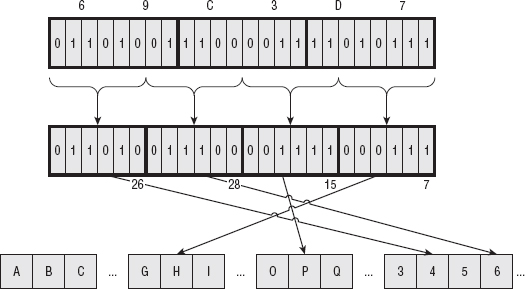
Base64 divides the input into 6-bit chunks — hence the name Base64 because 26=64 — and maps each 6-bit input into one of the printable ASCII characters. The first 52 combinations map to the upper- and lowercase alphabetic characters A–Z and a–z; the next 10 map to the numerals 0–9. That leaves two combinations left over to map. There's been some historical contention on exactly what these characters should be, but compatible implementations map them, arbitrarily, to the characters + and /. An example of a Base64 encoding is shown in Figure 1-3.
Because the input stream is, obviously, a multiple of 8 bits, dividing it into 6-bit chunks creates a minor problem. Because 24 is the least-common-multiple of 6 and 8, the input must be padded to a multiple of 24 bits (three bytes). Although Base64 could just mandate that the encoding routine add padding bytes to ensure alignment, that would complicate the decoding process. Instead the encoder adds two = characters if the last chunk is one byte long, one = character if the last chunk is two bytes long, and no = characters if the input is an even multiple of three bytes. This 6:8 ratio also means that the output is one third bigger than the input.
As you see in Listing 1-14, Base64 encoding is pretty simple to implement after you understand it; most of the complexity deals with non-aligned input:
Listing 1-14: "base64.c" base64_encode
static char *base64 =
"ABCDEFGHIJKLMNOPQRSTUVWXYZabcdefghijklmnopqrstuvwxyz0123456789+/";
void base64_encode( const unsigned char *input, int len, unsigned char *output )
{
 do
 {
   *output++ = base64[ ( input[ 0 ] & 0xFC ) >> 2 ];

   if ( len == 1 )
   {
     *output++ = base64[ ( ( input[ 0 ] & 0x03 ) << 4 ) ];
     *output++ = '=';
     *output++ = '=';
     break;
   }

   *output++ = base64[
      ( ( input[ 0 ] & 0x03 ) << 4 ) | ( ( input[ 1 ] & 0xF0 ) >> 4 ) ];

   if ( len == 2 )
   {
     *output++ = base64[ ( ( input[ 1 ] & 0x0F ) << 2 ) ];
     *output++ = '=';
     break;
   }

   *output++ = base64[
( ( input[ 1 ] & 0x0F ) << 2 ) | ( ( input[ 2 ] & 0xC0 ) >> 6 ) ];
   *output++ = base64[ ( input[ 2 ] & 0x3F ) ];
   input += 3;
 }
 while ( len -= 3 );

 *output = '\0';
}
Here, the output array is already assumed to have been allocated as 4/3 * len. The input masks select 6 bits of the input at a time and process the input in 3-byte chunks.
Base64 decoding is just as easy. Almost. Each input byte corresponds back to six possible output bits. This mapping is the exact inverse of the encoding mapping. However, when decoding, you have to be aware of the possibility that you can receive invalid data. Remember that the input is given in 8-bit bytes, but not every possible 8-bit combination is a legitimate Base64 character — this is, in fact, the point of Base64. You must also reject non-aligned input here; if the input is not a multiple of four, it didn't come from a conformant Base64 encoding routine. For these reasons, there's a bit more error-checking that you need to build into a Base64 decoding routine; when encoding, you can safely accept anything, but when decoding, you must ensure that the input actually came from a real Base64 encoder. Such a Base64 decoder is shown in Listing 1-15.
Listing 1-15: "base64.c" base64_decode
static int unbase64[] =
{
 −1, −1, −1, −1, −1, −1, −1, −1, −1, −1, −1, −1, −1, −1, −1, −1, −1,
 −1, −1, −1, −1, −1, −1, −1, −1, −1, −1, −1, −1, −1, −1, −1, −1,
 −1, −1, −1, −1, −1, −1, −1, −1, −1, −1, 62, −1, −1, −1, 63, 52,
 53, 54, 55, 56, 57, 58, 59, 60, 61, −1, −1, −1, 0, −1, −1, −1,
 0, 1, 2, 3, 4, 5, 6, 7, 8, 9, 10, 11, 12, 13, 14, 15,
 16, 17, 18, 19, 20, 21, 22, 23, 24, 25, −1, −1, −1, −1, −1, −1,
 26, 27, 28, 29, 30, 31, 32, 33, 34, 35, 36, 37, 38, 39, 40, 41,
 42, 43, 44, 45, 46, 47, 48, 49, 50, 51, −1, −1, −1, −1, −1, −1
};

int base64_decode( const unsigned char *input, int len, unsigned char *output )
{
 int out_len = 0, i;

 assert( !( len & 0x03 ) ); // Is an even multiple of 4

 do
 {
   for ( i = 0; i <= 3; i++ )
   {
     // Check for illegal base64 characters
     if ( input[ i ] > 128 || unbase64[ input[ i ] ] == −1 )
{
       fprintf( stderr, "invalid character for base64 encoding: %c\n",
            input[ i ] );
       return −1;
     }
   }
   *output++ = unbase64[ input[ 0 ] ] << 2 |
          ( unbase64[ input[ 1 ] ] & 0x30 ) >> 4;
   out_len++;
   if ( input[ 2 ] != '=' )
   {
     *output++ = ( unbase64[ input[ 1 ] ] & 0x0F ) << 4 |
           ( unbase64[ input[ 2 ] ] & 0x3C ) >> 2;
     out_len++;
   }

   if ( input[ 3 ] != '=' )
   {
     *output++ = ( unbase64[ input[ 2 ] ] & 0x03 ) << 6 |
           unbase64[ input[ 3 ] ];
     out_len++;
   }

   input += 4;
 }
 while ( len -= 4 );

 return out_len;
}
Notice that unbase64 was declared as a static array. Technically you could have computed this from base64, but because this never changes, it makes sense to compute this once and hardcode it into the source. The –1 entries are non-base64 characters. If you encounter one in the decoding input, halt.
What does all of this Base64 stuff have to do with proxy authorization? Well, BASIC authorization has the client pass a username and a password to the proxy to identify itself. In a minor nod to security, HTTP requires that this username and password be Base64 encoded before being transmitted. This provides some safeguard (but not much) against accidental password leakage. Of course, even a lazy attacker with access to a packet sniffer could easily Base64 decode the proxy authorization line. In fact, the open-source Wireshark packet sniffer decodes it for you! Still, it's required by the specification, so you have to support it.
To support proxy authorization, add the following to http_get as shown in Listing 1-16.
Listing 1-16: "http.c" http_get (with proxy support) (continued)
sprintf( get_command, "Host: %s\r\n", host );
 if ( send( connection, get_command, strlen( get_command ), 0 ) == −1 )
 {
return −1;
 }

 if ( proxy_user )
 {
   int credentials_len = strlen( proxy_user ) + strlen( proxy_password ) + 1;
   char *proxy_credentials = malloc( credentials_len );
   char *auth_string = malloc( ( ( credentials_len * 4 ) / 3 ) + 1 );
   sprintf( proxy_credentials, "%s:%s", proxy_user, proxy_password );
   base64_encode( proxy_credentials, credentials_len, auth_string );
   sprintf( get_command, "Proxy-Authorization: BASIC %s\r\n", auth_string );
   if ( send( connection, get_command, strlen( get_command ), 0 ) == −1 )
   {
     free( proxy_credentials );
     free( auth_string );
     return −1;
   }
   free( proxy_credentials );
   free( auth_string );
 }
 sprintf( get_command, "Connection: close\r\n\r\n" );
Now, if you invoke your http main routine with just a URL, it tries to connect directly to the target host; if you invoke it with parameters:
./http -p http://user:password@proxy-host:80/ http://some.server.com/path
You connect through an authenticating proxy and request the same page.
Implementing an HTTP Server
Because you probably also want to examine server-side SSL, develop a server-side HTTP application — what is usually referred to as a web server — and add SSL support to it, as well. The operation of a web server is pretty straightforward. It starts by establishing a socket on which to listen for new requests. By default, it listens on port 80, the standard HTTP port. When a new request is received, it reads an HTTP request, as described earlier, from the client, forms an HTTP response that either satisfies the request or describes an error condition, and either closes the connection (in the case of HTTP 1.0) or looks for another request (in the case of HTTP 1.1+).
The main routine in Listing 1-17 illustrates the outer shell of an HTTP server — or any other internet protocol server, for that matter.
int listen_sock;
 int connect_sock;
 int on = 1;
 struct sockaddr_in local_addr;
 struct sockaddr_in client_addr;
 int client_addr_len = sizeof( client_addr );
#ifdef WIN32
 WSADATA wsaData;

 if ( WSAStartup( MAKEWORD( 2, 2 ), &wsaData ) != NO_ERROR )
 {
    perror( "Unable to initialize winsock" );
    exit( 0 );
 }
#endif

 if ( ( listen_sock = socket( PF_INET, SOCK_STREAM, 0 ) ) == −1 )
 {
   perror( "Unable to create listening socket" );
   exit( 0 );
 }

 if ( setsockopt( listen_sock,
          SOL_SOCKET,
          SO_REUSEADDR,
          &on, sizeof( on ) ) == −1 )
 {
   perror( "Setting socket option" );
   exit( 0 );
 }

 local_addr.sin_family = AF_INET;
 local_addr.sin_port = htons( HTTP_PORT );
 local_addr.sin_addr.s_addr = htonl( INADDR_LOOPBACK );
 //local_addr.sin_addr.s_addr = htonl( INADDR_ANY );

 if ( bind( listen_sock,
       ( struct sockaddr * ) &local_addr,
       sizeof( local_addr ) ) == −1 )
 {
   perror( "Unable to bind to local address" );
   exit( 0 );
 }

 if ( listen( listen_sock, 5 ) == −1 )
 {
   perror( "Unable to set socket backlog" );
   exit( 0 );
 }

 while ( ( connect_sock = accept( listen_sock,
( struct sockaddr * ) &client_addr,
                  &client_addr_len ) ) != −1 )
 {
   // TODO: ideally, this would spawn a new thread.
   process_http_request( connect_sock );
 }

 if ( connect_sock == −1 )
 {
   perror( "Unable to accept socket" );
 }

 return 0;
}
This code is standard sockets fare. It issues the four required system calls that are required for a process to act as a TCP protocol server: socket, bind, listen, and accept. The accept call will block — that is, not return — until a client somewhere on the Internet calls connect with its IP and port number. The inside of this while loop handles the request. Note that there's nothing HTTP specific about this loop yet; this could just as easily be an e-mail server, an ftp server, an IRC server, and so on. If anything goes wrong, these calls return –1, perror prints out a description of what happened, and the process terminates.
There are two points to note about this routine:
- The call to setsockopt( listen_socket, SOL_SOCKET, SO_REUSEADDR, &on, sizeof( on ) ). This enables the same process to be restarted if it terminates abnormally. Ordinarily, when a server process terminates abnormally, the socket is left open for a period of time referred to as the TIME_WAIT period. The socket is in TIME_WAIT state if you run netstat. This enables any pending client FIN packets to be received and processed correctly. Until this TIME_WAIT period has ended, no process can listen on the same port. SO_REUSEADDR enables a process to take up ownership of a socket that is in the TIME_WAIT state, so that on abnormal termination, the process can be immediately restarted. This is probably what you always want, but you have to ask for it explicitly.
- Notice the arguments to bind. The bind system call tells the OS which port you want to listen on and is, of course, required. However, bind accepts a port as well as an interface name/IP address. By supplying an IP address here, you can specify that you're only interested in connections coming into a certain interface. You can take advantage of that and bind this socket with the loopback address (127.0.0.1) to ensure that only connections from this machine are accepted (see Listing 1-18).
Listing 1-18: "webserver.c" remote connection exclusion code
local_addr.sin_family = AF_INET;
local_addr.sin_port = htons( HTTP_PORT );
local_addr.sin_addr.s_addr = htonl( INADDR_LOOPBACK );
//local_addr.sin_addr.s_addr = htonl( INADDR_ANY );

if ( bind( listen_sock, ( struct sockaddr * ) &local_addr,
           sizeof( local_addr ) ) == −1 )
If you uncomment the line below (INADDR_ANY), or just omit the setting of local_addr.sin_addr.s_addr entirely, you accept connections from any available interface, including the one connected to the public Internet. In this case, as a minor security precaution, disable this and only listen on the loopback interface. If you have local firewall software running, this is unnecessary, but just in case you don't, you should be aware of the security implications.
Now for the HTTP-specific parts of this server. Call process_http_request for each received connection. Technically, you ought to spawn a new thread here so that the main thread can cycle back around and accept new connections; however, for the current purpose, this bare-bones single-threaded server is good enough.
Processing an HTTP request involves first reading the request line that should be of the format
GET <path> HTTP/1.x
Of course, HTTP supports additional commands such as POST, HEAD, PUT, DELETE, and OPTIONS, but you won't bother with any of those — GET is good enough. If a client asks for any other functionality, return an error code 501: Not Implemented. Otherwise, ignore the path requested and return a canned HTML response as shown in Listing 1-19.
Listing 1-19: "webserver.c" process_http_request
static void process_http_request( int connection )
{
 char *request_line;
 request_line = read_line( connection );
 if ( strncmp( request_line, "GET", 3 ) )
 {
  // Only supports "GET" requests
   build_error_response( connection, 501 );
 }
 else
 {
  // Skip over all header lines, don't care
   while ( strcmp( read_line( connection ), "" ) );

   build_success_response( connection );
 }

#ifdef WIN32
if ( closesocket( connection ) == −1 )
#else
 if ( close( connection ) == −1 )
#endif
 {
   perror( "Unable to close connection" );
 }
}
Because HTTP is line-oriented — that is, clients are expected to pass in multiple CRLF-delimited lines that describe a request — you need a way to read a line from the connection. fgets is a standard way to read a line of text from a file descriptor, including a socket, but it requires that you specify a maximum line-length up front. Instead, develop a simple (and simplistic) routine that autoincrements an internal buffer until it's read the entire line and returns it as shown in Listing 1-20.
Listing 1-20: "webserver.c" read_line
#define DEFAULT_LINE_LEN 255

char *read_line( int connection )
{
 static int line_len = DEFAULT_LINE_LEN;
 static char *line = NULL;
 int size;
 char c;    // must be c, not int
 int pos = 0;

 if ( !line )
 {
   line = malloc( line_len );
 }

 while ( ( size = recv( connection, &c, 1, 0 ) ) > 0 )
 {
   if ( ( c == '\n' ) && ( line[ pos - 1 ] == '\r' ) )
   {
     line[ pos - 1 ] = '\0';
     break;
   }
   line[ pos++ ] = c;

   if ( pos > line_len )
   {
     line_len *= 2;
     line = realloc( line, line_len );
   }
 }

 return line;
}
There are three problems with this function:
- It keeps reallocating its internal buffer essentially forever. A rogue client could take advantage of this, send a malformed request with no CRLF's and crash the server.
- It reads one byte at a time from the socket. Each call to recv actually invokes a system call, which slows things down quite a bit. For optimal efficiency, you should read a buffer of text, extract a line from it, and store the remainder for the next invocation.
- Its use of static variables makes it non-thread-safe.
You can ignore these shortcomings, though. This implementation is good enough for your requirements, which is to have a server to which you can add SSL support.
To wrap up the web server, implement the functions build_success_response and build_error_response shown in Listing 1-21.
Listing 1-21: "webserver.c" build responses
static void build_success_response( int connection )
{
 char buf[ 255 ];
 sprintf( buf, "HTTP/1.1 200 Success\r\nConnection: Close\r\n\
Content-Type:text/html\r\n\
\r\n<html><head><title>Test Page</title></head><body>Nothing here</body></html>\
\r\n" );

 // Technically, this should account for short writes.
 if ( send( connection, buf, strlen( buf ), 0 ) < strlen( buf ) )
 {
   perror( "Trying to respond" );
 }
}

static void build_error_response( int connection, int error_code )
{
 char buf[ 255 ];
 sprintf( buf, "HTTP/1.1 %d Error Occurred\r\n\r\n", error_code );

 // Technically, this should account for short writes.
 if ( send( connection, buf, strlen( buf ), 0 ) < strlen( buf ) )
 {
   perror( "Trying to respond" );
 }
}
Again, these don't add up to a fantastic customer experience, but work well enough to demonstrate server-side SSL.
You can run this and either connect to it with the sample HTTP client developed in the section "Implementing an HTTP client" or connect with any standard web browser. This implements RFC-standard HTTP, albeit a microscopically small subset of it.
Roadmap for the Rest of This Book
SSL was originally specified by Netscape, when it became clear that e-commerce required secure communication capability. The first release of SSL was SSLv2 (v1 was never released). After its release, SSLv2 was found to have significant flaws, which will be examined in greater detail in Chapter 6. Netscape later released and then turned over SSLv3 to the IETF, which promptly renamed it TLS 1.0 and published the first official specification in RFC 2246. In 2006, TLS 1.1 was specified in RFC 4346 and in 2008, TLS 1.2 was released and is specified in RFC 5246.
The rest of this book is dedicated to describing every aspect of what SSL does and how it does it. In short, SSL encrypts the traffic that the higher-level protocol generates so that it can't be intercepted by an eavesdropper. It also authenticates the connection so that, in theory, both sides can be assured that they are indeed communicating with who they think they're communicating with.
SSL support is now standard in every web browser and web server, open-or closed-source. Although SSL was originally invented for secure HTTP, it's been retrofitted, to varying degrees of success, to work with other protocols. In theory, SSL is completely specified at the network layer, and any protocol can just layer invisibly on top of it. However, things aren't always so nice and neat, and there are some drawbacks to using SSL with protocols other than HTTP. Indeed, there are drawbacks even to using it with HTTP. I guess you can say that nothing is perfect. You come back to the details of HTTPS, and how it differs from HTTP, in Chapter 6 after you've examined the underlying SSL protocol.
Additionally, there are several open-source implementations of the SSL protocol itself. By far the most popular is Eric A. Young's openssl. The ubiquitous Apache server, for example, relies on the openssl library to provide SSL support. A more recent implementation is GnuTLS. Whereas openssl 0.9.8e (the most recent version as of this writing) implements SSLv2, SSLv3 and TLS 1.0, GnuTLS implements TLS 1.0, 1.1 and 1.2. Therefore it's called TLS rather than SSL because it doesn't technically implement SSL at all. Also, Sun's Java environment has SSL support built in. Because Sun's JDK has been open-sourced, you can also see the details of how Sun built in SSL. This is interesting, as OpenSSL and GnuTLS are written in C but most of Sun's SSL implementation is written in Java. Throughout the book, you examine how these three different implementations work. Of course, because this book walks through yet another C-based implementation, you are able to compare and contrast these popular implementations with the approach given here.