Table of Contents for
Professional WordPress® Plugin Development
 Professional WordPress® Plugin Development
Published by
Wrox, 2011
Professional WordPress® Plugin Development
Published by
Wrox, 2011
- Copyright
- CREDITS
- ABOUT THE AUTHORS
- ACKNOWLEDGMENTS
- FOREWORD
- INTRODUCTION
- 1. An Introduction to Plugins
- 2. Plugin Foundation
- 3. Hooks
- 4. Integrating in WordPress
- 5. Internationalization
- 6. Plugin Security
- 7. Plugin Settings
- 8. Users
- 9. HTTP API
- 10. The Shortcode API
- 11. Extending Posts: Metadata, Custom Post Types, and Taxonomies
- 12. JavaScript and Ajax in WordPress
- 13. Cron
- 14. The Rewrite API
- 15. Multisite
- 16. Debugging and Optimizing
- 17. Marketing Your Plugin
- 18. The Developer Toolbox
WHAT'S IN THIS CHAPTER?
Choosing a license for your plugin
Submitting your plugin to the plugin repository
Promoting your plugins
Getting involved in the WordPress community
Some of the most popular WordPress plugins aren't necessarily the best-coded or most useful plugins. Sometimes they're simply more popular because the developer has a knack for great marketing. You may have the most solidly coded, optimized, and useful plugin in the world, but without a little marketing or some luck, no one will know your plugin exists. Having others recognize your work and put it to use is the ultimate goal.
Developers aren't known for their marketing skills. They're known for their ability to code useful things for sites, if they're known at all. Because the average user doesn't know the difference between a PHP variable and function, you're not going to wow them with how great your code is. Unfortunately, it's not that easy to promote a plugin. If it were, all great coders would be marketing experts.
As a plugin developer in the WordPress community, you need to play the role of developer and marketer. Don't worry. You don't need a marketing or communications degree to promote your plugin. Sure, it'll take some work, but the goal is to get people to use your plugins. The methods discussed in this chapter are simple things anyone passionate about their work can do.
Whatever your motivation for developing plugins is, whether it be money, popularity, or a desire to share something useful with others, this chapter can help put you on the path to making your plugins visible to the larger WordPress community.
WordPress isn't without its own licensing issues and debates. It's rare that a week goes by without a heated argument about licensing cropping up. The biggest issue has been about how plugins and themes should be licensed. Some clear lines have been drawn, and some not-so-clear lines, and developers are always looking for loopholes and workarounds to the license WordPress is under. You won't be presented with too much ideology here, though. This section is about choosing a license that benefits your plugin from a marketing angle.
WordPress is licensed under the GNU General Public License (GPL), which is an open source software license. This license is preserved and protected by the Free Software Foundation (FSF). WordPress is licensed under the GPL because its predecessor, b2/cafelog, was licensed under the GPL. WordPress is a fork of this software and must retain the software's original license.
The GPL is a license that protects users' freedoms. It grants users the power to copy, modify, and share the software so long as they pass along the same freedoms they've been granted by including the GPL in copies that they share with others. This is essentially the basis for any open source software. The idea is to protect the users' freedoms to take these actions.
Most plugins will be licensed under the GPL. It's the easiest licensing choice and offers no conflicts with WordPress because WordPress is licensed under the GPL.
Although the GPL is the license generally used by most developers in the community, alternative options are available to you that do not conflict with the GPL or the ideals of open source software. These licenses are GPL-compatible licenses. If you choose to do so, you may license your plugin under one of these licenses.
The GNU site keeps a list of GPL-compatible licenses that you may use for your plugins: http://www.gnu.org/licenses/license-list.html. Some of the more popular licenses include:
LGPL
Apache
MIT (X11)
BSD
Although these are popular open-source licenses, you won't find many WordPress plugins licensed under them. Most will be licensed under a version of the GPL. However, you do have alternatives available to you that are non-GPL but compatible. You should also choose a license that best represents your plugin.
Plugins may also be dual- or split-licensed.
Dual — Releasing the plugin under two licenses. Each of these licenses must be compatible and all the code in the plugin would fall under both licenses.
Split — Separating different parts of the plugin under different licenses. Certain parts may be licensed differently than other parts. This is sometimes an option when including JavaScript, CSS, or image files that don't require WordPress to be used. The FSF has stated that these files don't always require a GPL-compatible license.
All plugins submitted to the WordPress.org plugin repository (described later in this chapter) must be licensed completely under a GPL-compatible license. You cannot use any license that is not compatible with the GPL, even if it's legal to do so. This is simply the WordPress.org site's policy on plugin submission.
WordPress has always been a piece of software that's representative of user freedom. WordPress wouldn't exist if the original software weren't licensed under the GPL, which enabled it to be forked into the software that it is today. The goal is to not restrict what users can do with the software when they receive it. It's about granting users freedom. They should be able to modify, copy, and share the software with others without restriction.
If you plan to create a plugin for WordPress and want to place additional restrictions on how your plugin or its code can be used, WordPress is likely not the best platform to develop on top of. The GPL license WordPress is placed under is meant to remove restrictions on how the user can use the software.
None of the authors of this book are legal professionals, so the purpose of this book is not to give you legal advice about licensing your plugin. However, if you decide to use a GPL-incompatible license, you may be setting yourself up for legal issues.
Aside from any legal implications, licensing your work under a GPL-incompatible license is one of the worst things you can do for good publicity for your work in the WordPress community. At best, your plugin won't be allowed within official channels. At worst, you and your work might be looked upon as outcasts within the community. Neither of these things is desirable when trying to market your plugin.
The biggest benefits of licensing your plugins under the GPL or a GPL-compatible license follow:
Protect users' freedoms — Enables your users to edit, copy, and share changes with others without restrictions other than passing along those same freedoms.
Help developers learn — Other developers can learn from your code if you allow it to be open, which allows them to improve upon and release more plugins to the community.
Improvement — Keeping your code open means that others may use it for other purposes, which may allow them to find bugs or distribute improvements under the same license. You can then use this code to improve your own work.
Use others' code — You're free to take, modify, and distribute other GPL-licensed code within your work. This enables you to build upon the work of others rather than coding everything from scratch.
Avoid legal issues — Because WordPress is licensed under the GPL, you won't have any issues with the copyright holders.
Community acceptance — GPL-licensed plugins enable your work to be accepted into the community.
Perhaps most important for marketing is the last point. To get your plugin work out there, it's best to be accepted by the community. If you want your work to be known, arguing licensing issues with the people who work on and improve WordPress every day is probably not the best route to take.
Even if you don't agree with the opinions of others, the WordPress philosophy, or the license, you should respect it. It's important that you not alienate yourself by not respecting the people who have contributed code to WordPress (the copyright holders).
WordPress and any work licensed under a GPL-compatible license are referred to as free software. The term "free" here refers to user free dom. It does not mean that your plugins cannot cost money. You can charge a fee for transferring the plugin to others or charge money for client work. You can even build an entire business around open source, free, code if you choose to go that route with your plugin work. You are not restricted from building a business on top of WordPress. Many developers have extremely successful businesses that align perfectly with the GPL license.
The license WordPress uses is about the distribution of code. One of the largest misconceptions about the GPL is that it's not good for client or private work. Many potential clients and businesses don't understand that this is not an issue. Because the license comes into effect only at the moment of distribution, the license of the work isn't relevant because you're not distributing it. You're not required to release work you do for clients under a GPL-compatible license. You can assure your clients that any work you do for them won't be released elsewhere.
Warning
If you decide to publish your work under a GPL-incompatible license, it is your responsibility to seek professional legal advice rather than relying on the opinions of others or this book.
WordPress.org is the central Web site for the WordPress software. This site hosts a plugin repository where thousands of plugins are available for download by millions of WordPress users. This is the place where most users download plugins, so having plugins on this repository opens up numerous possibilities for getting your work known by others.
All WordPress plugins on the repository are hosted at http://wordpress.org/extend/plugins as shown in Figure 17-1. This repository page lets WordPress users search for plugins; check out featured plugins; and browse through lists of the most popular, newest, and recently updated plugins.
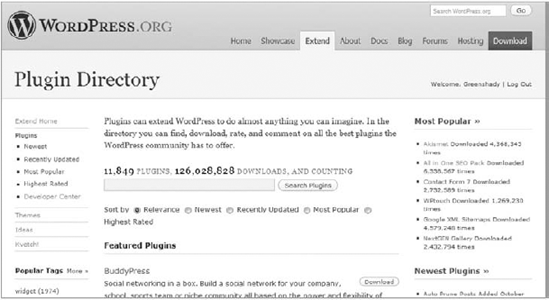
The plugin repository handles many of the things you'd have to develop and maintain if you weren't using the plugin repository. If you're developing a publicly available plugin, there aren't many reasons to not use the official plugin repository.
Some of the benefits of hosting your plugin on the WordPress.org plugin repository include the following:
User trust — Your work is on the "official" repository, so there's a level of trust from users that you'll earn just by hosting the plugin there. This is something that's harder to build by hosting your plugin on your own site or elsewhere.
Easy updates — You don't have to build an update script within your plugins or force your users to manually update them. Users can update plugins with a few clicks from their admin panel.
Version control — Plugins are placed in a Subversion repository, which makes updating your plugin easy. The plugin repository is updated every 15 minutes, so plugin updates go live quickly.
Stats — You can view the number of times your plugin has been downloaded throughout its history and the percentage of users currently using each version.
Compatibility — The repository enables users to click a Works/Doesn't Work button to let you know if each version of the plugin works with specific versions of WordPress.
Ratings — Users can rate your plugins on a star-based rating system, which enables you to get a feel for how well your plugin is received by users.
Plugin information — You can share all relevant information about your plugin for users directly on its page in the repository, which makes including instructions easy.
Forum integration — All plugins on the repository are integrated with the support forums, so you can keep track of and answer support questions directly on the WordPress site.
Donation link — You can provide a link so that users can donate money to you if they want.
Imagine having to handle all those things yourself. It would be a lot of extra work just to publish a plugin. Of course, you don't have to use the official repository to host your plugins. It's simply a great tool for plugin developers to get their work out to the public easily.
Your goals may not include releasing plugins for public use. Perhaps you're more interested in developing plugins for clients. You may be thinking that submitting work to the WordPress.org repository doesn't apply to you. To a degree, this is true. However, you should look at this as an opportunity to promote yourself or your company. One of the easiest ways to let others see the level of work you'll provide professionally is to release some work back to the public for free. It gets some examples of your work out there, which lets you start a portfolio and may result in future client work.
Anyone with a user account at WordPress.org can submit plugins and use many other features of the Web site. Even if not hosting your plugins on the site, you'll want to have an account there. This can provide you with many useful tools.
Registering a new account is easy and takes only a few simple steps. After you set up a new account, you can submit plugins to the official repository.
Visit
http://wordpress.org/support/register.php.Enter your information into the required fields.
Check your email inbox for a confirmation email and password.
Follow any additional instructions provided in the email.
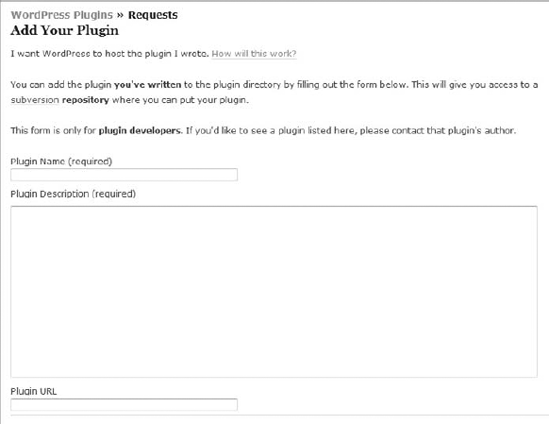
Before being allowed to host your plugin on the plugin repository, you must submit your plugin idea for approval. This process is painless, and plugins are typically approved within a few days, sometimes even within a few hours of submission.
As shown in Figure 17-2, you must submit a plugin name, description, and URL (optional) to http://wordpress.org/extend/plugins/add.
After you submit your plugin, your plugin gets a new page specifically for it on the repository at http://wordpress.org/extend/plugins/plugin-name where plugin-name is the plugin's folder name. This is the permanent link to your plugin on the repository, which is where users can read about and download the plugin.
All plugins on the WordPress plugin repository are hosted on a Subversion repository, which is a version control system. You need to learn how to use Subversion to add and update your plugin files on the plugin repository.
You can find a brief introduction to using Subversion on the site at http://wordpress.org/extend/plugins/about/svn, which should give you enough of an understanding of using Subversion for the repository. However, it's all done via the command line. Most plugin developers use a Subversion client to check out (get plugin files) or commit (add or update plugin files). Subversion clients provide easy-to-use interfaces for using Subversion.
Numerous Subversion clients are available for different operating systems. Two of the most popular Subversion clients for Windows and Mac are listed here, but you can experiment with other clients and find the tool that suits you best.
The purpose of this section isn't to teach you how to use Subversion. There's a freely available Subversion book available online for learning how to use it at http://svnbook.red-bean.com/nightly/en/index.html. Learning at least the basics of Subversion is something you need to do to host your plugin on the repository.
All plugins on the repository are given a unique Subversion URL: http://plugins.svn.wordpress.org/plugin-name, where plugin-name is the name of the plugin folder. You will have access to that specific directory in the repository. To add and update files and folders with your preferred Subversion client, you need to use your WordPress.org username and password for authentication.
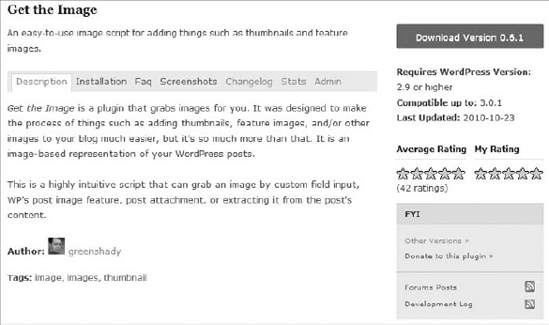
Plugins on the WordPress plugin repository are required to have a readme.txt file included in the plugin's top-level directory. The repository loads information from this file to build the plugin's page in the repository. This is the information provided to the public, so you want it to be informative and useful for potential users.
The readme.txt file creates the sections for the plugin, as shown in Figure 17-3.
Your plugin's readme.txt file needs to be submitted using Markdown syntax. Markdown is a tool for converting text to HTML on the Web and uses specific markup. You can learn how to use the syntax on the Markdown project page at http://daringfireball.net/projects/markdown/syntax.
Following is an example readme.txt file for plugins, which you can modify for your plugins.
=== Example Plugin Name ===
Contributors: username
Donate link: http://example.com
Tags: example, example-2, example-3
Requires at least: 3.0
Tested up to: 3.1
Stable tag: 1.0
Write a short plugin description no longer than 150 characters.
== Description ==
Write a long description of the plugin. Shown on the main plugin page.
== Installation ==
Provide installation instructions for the plugin.
== Frequently Asked Questions ==
= Example question? =
An answer to the example question.
== Screenshots ==
1. Screenshot caption for screenshot-1.png.
2. Screenshot caption for screenshot-2.png.
== Changelog ==
= Version 1.0 =
* Change since previous version.
* Another change since previous version.
* One more change since previous version.
== Extra ==
Provide an extra section(s) if needed for your plugin.
Code snippet readme.txt
The most important section of the readme.txt file is the first section of the file, which is where you add your plugin information.
=== Example Plugin Name ===
Contributors: username
Donate link: http://example.com
Tags: example, example-2, example-3
Requires at least: 3.0
Tested up to: 3.1
Stable tag: 1.0
The first line should be your plugin's name. Each of the following lines have specific meanings that you need to make sure are correct.
Contributors — Comma-separated list of WordPress.org usernames that should have access to update the plugin. If you're the only developer, only add your username. If you're working with others, each person needs a WordPress.org account to add their username.
Donate link — A custom link you can provide for users to send you donations for your hard work on the plugin.
Tags — Comma-separated list of tags that cover the functionality of your plugin. You can find a list of popular tags at
http://wordpress.org/extend/plugins/tags.Requires at least — The minimum version of WordPress a user must have installed to use the plugin.
Tested up to — The latest version of WordPress your plugin has been tested against.
Stable tag — The version number for the most up-to-date and stable version of your plugin.
Other sections of the
readme.txtfile are less important than the first section but are vital to creating a great page for your plugin on the repository and getting users to download and use your plugin. These sections are also much more open to what you'd like to write and aren't as specific as the first section.Description — Perhaps the most useful section of the
readme.txtfile, the description section represents what's shown on the main page for your plugin. This is the section that you should use to grab a user's attention by describing your plugin, listing its features, and including any vital notes that a user must see.Installation — This section enables you to provide detailed installation instructions. Most users know how to install plugins, but documentation on any extra steps about setup (or even upgrading) can be provided here.
Frequently Asked Questions — Whenever you start noticing the same questions asked about using the plugin, you can begin documenting those questions and the answers to them here. This can help cut back on potential support issues.
Screenshots — Not all plugins have screenshots. However, if possible, it's always nice to give users something to look at to garner their interest. Screenshots must be included in the top-level directory of the plugin and numbered like this:
screenshot-1.png, screenshot-2.png, and so on. (You can usepng, jpg, jpeg, orgifimages.)Changelog — This is a section to document what changes have been made to the plugin from version to version. Providing this information gives you and your users a clear history of version changes.
Extra — You may also optionally include extra, arbitrary sections to your
readme.txtfile if your plugin requires any additional information.
The difference between good developers and great developers sometimes comes down to one thing: passion. If you develop plugins or do work that you're not passionate about, that lack of passion will show through with your work and the promotion of your work. It's easy to be involved in the community and market your work if you're passionate about that work.
Sometimes passion isn't quite enough when starting. You can do certain things to promote your work. By reading through this section of the chapter, you can gain a base set of tools and methods for getting your plugins renowned. But, you need to want to promote your work.
You won't find quick fixes, tricks, or false promises in this section of the chapter. Everything presented here are methods and techniques that great plugin developers focus on almost every day — the things anyone can do by simply putting in the time.
Naming your plugin can be one of the toughest parts of the process to create a plugin. There are no definite rules to naming a plugin, but you can follow some general guidelines to choose a name.
A great plugin name can help your plugin in many ways when you start with developing plugins. If you, your company, or your work is not widely known, use this opportunity to create a great name to help put your work on the map.
You should be mindful of four things when creating a solid plugin name. Your plugin name should be the following:
Relevant — Be sure your plugin name is actually descriptive of what your plugin does.
Catchy — Having a unique plugin name might catch users' eyes simply because it's unusual. Be careful when being catchy, though; relevancy is more important.
Simple — Keep your plugin name short, simple, and easy to pronounce. You want your work to be shared. Don't make it too tough to spell.
Memorable — The plugin name should be easy to remember. Don't put complicated words or phrases in the title.
The most important thing you can do is have a descriptive name. If you name your plugin something that's completely unrelated to the functionality of the plugin, users might not give it a second look, even if they're searching for the exact functionality your plugin provides.
Suppose you've built a plugin that integrates Twitter features into the comments field on a blog. Which of the following plugin names will more likely catch a user's attention and describe your plugin?
Comment Form Tools
Twitter Comments
Awesome, Super-Cool Twitter Comments
Believe it or not, each of these plugin names has merit. It's up to you to decide which best fits your plugin and how you want to market it.
Comment Form Tools — If you plan to extend the plugin in the future to include non-Twitter features, you might consider a more general name for the plugin.
Twitter Comments — This name is short and descriptive. It's most likely the best choice of the three. You cannot go wrong with this choice.
Awesome, Super-Cool Twitter Comments — This breaks the rule of keeping the name short, but it's catchy. Users might download this plugin for its unusual name alone.
One of the worst things you can do when naming your plugin is to confuse potential users. Tons of WordPress plugins are out there, so you don't want your plugin's name to be too similar to another plugin's name. Before releasing your plugin, you should research similar plugins to make sure there are no potential naming conflicts.
You shouldn't use some words in your plugin name:
WordPress — It's already a WordPress plugin, so there's no need to use "WordPress" in the name. You should probably avoid using "WP" as well.
Plugin — There's no need to repeat that your plugin is a plugin, so this isn't helpful at all when naming a plugin.
Version — You shouldn't add the plugin version information to the name. WordPress has a place for version numbers as described in Chapter 2, "Plugin Foundation."
Offensive Words — This should seem like a no-brainer, but it's worth noting here. Don't alienate users by using potentially offensive words in your plugin name.
What words not to use in a plugin name usually just comes down to using a little forethought. Don't include things the user will already know or anything that might offend a user.
Generally, you wouldn't add your name or company name within the plugin title. As described in Chapter 2, there are relevant places to add this information to your plugin. However, it can be a useful branding technique that enables users to easily identify plugins made by you or your company. You can never underestimate the power of branding your plugins in this way. If your work is good (and it should be because you're reading this book), your company name can add an extra "gold label" to the plugin that's recognizable as quality work.
Suppose your company's name is Radioactive. A good way to brand your plugins is to prefix your plugin name with your company name. Following is a list of fictional plugin names that could be used to your advantage in terms of marketing.
Radioactive Twitter Comments
Radioactive Related Posts
Radioactive Music Collection
Radioactive Profile Widget
This technique also removes the possibility of user confusion when browsing plugins with similar names. It's doubtful that other developers will use "Radioactive" in their plugin names.
If you do not have a personal blog or Web site, you're missing out on one the easiest promotional methods available. Your site should also be running on WordPress. Yes, there are sites that provide WordPress work while running a different content management system. Running your site on something other than WordPress does little to help the legitimacy of your work. You can't expect users to trust that you're creating quality WordPress plugins if you're not using WordPress for your own site.
With your own site, you can create a page that showcases all your plugins. You'll be in control of how they're presented to the world from one central location. Some things you can do to present plugins on your plugins page include the following:
Listing plugin names and descriptions with links to their individual plugin pages.
Showing thumbnail images or screenshots from your plugins.
Creating a catchy welcome/intro message on why using one of your plugins would be beneficial.
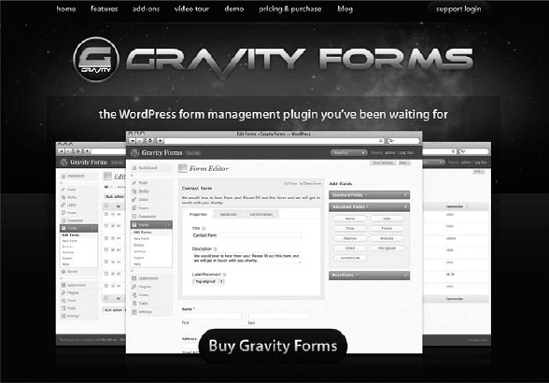
You can also set up an entire site dedicated to a single plugin or all your plugins. One of the best Web site examples you'll see dedicated to a plugin is the Gravity Forms site (http://www.gravityforms.com) as shown in Figure 17-4. The front page features eye-catching screenshots while providing useful information to the visitor.
Unfortunately, not all developers are great designers, but design plays an important role in marketing. You don't need to have a flashy design or the most creative design on the Web. Sometimes a simple design with relevant information can be better than anything flashy. Great designs never get in the way and enable the site's content to stand on its own.
If you don't have a single design bone in your body, you may consider hiring a professional designer to design your Web site and plugin pages. You may trade some development work for design work. Hiring a designer within the WordPress community may even earn you a friend within the community who can help promote your work. You should always look for ways to form relationships with others within the community.
You don't need to build a site just for promoting your plugins. A great way to make your work more popular is by blogging about WordPress. There's no doubt that you'll come up with nifty code snippets and ideas while developing plugins. Sharing these things on your blog can help grow your user base. If you produce quality work on your blog, people will notice. This makes getting a foothold in the plugin world much easier. You're indirectly promoting your work by being helpful to others.
Even if you just want a break from code, you can run a WordPress-specific blog that doesn't share code tutorials. You can blog about current WordPress events and news, and hold thought-provoking discussions. The purpose of blogging about WordPress is to be involved in the community by sharing your ideas and knowledge. The WordPress community loves reading great blogs about WordPress. Creating your own WordPress blog can help promote your work.
You've covered how to set up a page for your plugin on the WordPress.org plugin repository. This is something useful for promoting your work. However, you're competing with thousands of other plugins on the repository. Your plugin can quickly become hidden in the sheer mass of available options, which can make it tough for users to find your plugin.
A dedicated page on your Web site for individual plugins can work wonders for your plugin marketing. The most important thing you can do when building a page on your Web site for a plugin is to keep the information presented relevant and descriptive of what functionality your plugin provides. This information needs to be easily accessible.
Provide an accessible download link for your plugin. You'd be surprised how many developers create great plugin pages but forget the most important thing.
Write a clear description of what your plugin does.
Offer documentation and tutorials.
Link to related WordPress documentation if helpful.
Keep a dedicated changelog of the history of your plugin.
Display screenshots of the plugin in action if possible.
Link to the plugin's page on the WordPress.org plugin repository if your plugin is hosted there.
Announcing your plugin is also one of the most important things you can do to let others know that you've built a new WordPress plugin. If you don't have a blog or Web site, you should. This should be the first place you announce your plugin. The people most likely to freely promote your work are your blog readers. Some of them will have their own blogs and will write a post to announce it. Others will post links to your plugin on social networking sites.
The first step to promoting a new plugin should always be announcing it on your blog. When announcing your plugin, you should stick to writing about the plugin. Throwing it in as an afterthought to a blog post about other things won't get it much attention. The post should be entirely dedicated to the plugin. This provides an opportunity for you to give readers a great description of what the plugin does and why they should use it.
Some other things you can do when announcing a plugin include the following:
Get other WordPress blog writers to perform a review of the plugin.
Announce its release on social networking sites, such as Twitter.
Post its release on WordPress-specific forums and message boards.
Note
Announcing a new plugin on your blog is also a bit of an unspoken tradition in the WordPress community. Developers just do it because everyone else does, so it's an expectation for new plugins.
Ideally, if your plugin is well coded and easy to use, you won't have to offer much support. However, there will always be users who can't quite get it to work, don't understand specific instructions, or want to customize something. Offering support for your plugins creates an opportunity for you to become more popular among users.
If you're building plugins professionally, you need to consider creating a dedicated support channel on your Web site. This can be a ticket system, support forums, or some other type of support system. You may even opt to offer commercial support. Email may work as a support system when you're just starting out, but after your work becomes more popular, emails can quickly become tough to manage.
If you're just releasing plugins for fun or noncommercially, running support from your own site may seem like overkill. All plugins added to the WordPress.org repository (described earlier in this chapter) are tied into the WordPress support forums (http://wordpress.org/support). You can use these forums to offer support for your plugins and not worry about running support from your site.
Following are several benefits to offering support for your plugins:
Build a relationship with your users. These users might tell their friends or blog about your plugin.
Find bugs with your plugins. No plugin will ever be perfect. Investigating user issues can help you find bugs.
If building your own support system, you have control over the rules and can run support in a manner that fits best with how you want to run things.
Feedback from users and other developers is essential to creating great plugins. You're the developer of the plugin, so you probably know the code inside out and can use the plugin with no problems. Not everyone is looking at the plugin from your point of view, though. Feedback is a great way to see how others use your plugin.
Many support questions you encounter come down to a user not understanding how something works rather than a code issue. Listening to user feedback enables you to fix user experience issues that aren't easily seen by plugin developers.
Feedback is a large component in making WordPress a better platform. Following is a list of avenues users may take to give feedback to WordPress, which serve as great examples of how to handle feedback.
Ideas (
http://wordpress.org/extend/ideas) — A forum to present, discuss, and rate ideas for the core WordPress code.Kvetch! (
http://wordpress.org/extend/kvetch) — Anonymous feedback system for users to praise or complain about WordPress.Requests and Feedback (
http://wordpress.org/support/forum/requests-and-feedback) — A forum dedicated to asking for feature requests and offering feedback.Polls — Public surveys and polls are sometimes published to enable users to vote on new ideas or features.
WordPress has a multimillion user base, so having an organized way to get feedback is crucial. Individual plugins don't generally have that many users, but a popular plugin can easily have thousands of users. If you build plugins on your own, feedback can become overwhelming without a dedicated system for keeping track of it.
You can receive feedback on your plugins in many ways.
Email — Set up a contact form on your Web site so that users can directly email you with feedback.
Blog comments — Allow users to post comments on your plugin announcement posts.
Ideas forum — If you run your own support forums, create an extra forum just for new ideas and feedback.
Polls — Periodically publish polls or surveys to gain user feedback. PollDaddy is a great service for setting up polls and tracking results:
http://polldaddy.com.Support — As described in the section "Supporting Your Plugins," supporting your plugins can be beneficial. You should consider all support questions as feedback on how to improve your plugins.
Getting feedback is only part of the process. To improve your plugin and grow your user base, you need to act upon that feedback. Not all feedback and feature requests from users will be great ideas. You're still the developer and need to make that decision. Even if you don't use an idea presented by a user, you should still treat the idea and the user seriously. If necessary, explain why you decided not to go with a certain idea.
The biggest benefit of listening to and using feedback outside of improving your plugins is building a community. Building relationships with your users can benefit your work because your users are the people who will be promoting your plugins.
Developers are stereotyped as guys living and working from their parents' basement or garage. Of course, you know not all code-savvy people are recluses. On the Web, shying away into the basement won't help getting your plugin renowned. Fortunately, the Web offers opportunities for anyone to be a social butterfly.
To be great at marketing your plugins, yourself, and your company, you need to be socially active in the WordPress community. This means getting involved in the development of WordPress, introducing yourself to other developers, chatting in community forums, commenting on other people's blogs, and just being active in any way you can find.
One of the worst things you can do is leave comments on other blogs such as, "Hey, check out my new plugin!!! It's the best plugin ever!!!" That's seen as the equivalent of spamming. Let your work be known by allowing people to get to know you and keeping your comments relevant. Most blogs have a comment form field where you can leave a link back to your Web site. Many blog owners will visit the sites of people who leave useful and relevant comments. This opens an opportunity for someone new to recognize your work and possibly even promote it.
Being socially active isn't just about self-promotion. You should enjoy being involved in the community. Find those sites and blogs that you feel comfortable being a part of. If you're not enjoying yourself, it won't take long for you to give up on the process.
As you can probably see at this point, promoting your work is less about promoting specific plugins and more about promoting yourself or your company. If you're creating a company, you need to focus on building that brand's image within the WordPress community. If you're a solo act, you are the brand, so your focus should be on letting other people get to know you.
Following is a list of additional routes you may take to promote your work.
Write for other blogs about WordPress. If you're not well known within the community, ask WordPress-related sites if you can write some guest articles. Usually, these sites have an About the Author section at the end of the post with a link back to your site.
Get involved with others via social networking sites such as Twitter and Facebook. Because you're likely to be a member of a social networking site anyway, don't let this opportunity go to waste. Befriend others within the WordPress community on these sites.
Post on WordPress-related forums and message boards. Get to know other members at these places. A great message board for developers is WP Tavern:
http://wptavern.com/forum. Spend some time offering your services for free to new WordPress users via the WordPress support forums:http://wordpress.org/support. This can enable you to take on new issues and gain some appreciation from users who are having trouble.Write patches and submit tickets for the core WordPress code at
http://core.trac.wordpress.org. You'll become a better developer, and others will notice your work if it's good.Go to a WordCamp. WordCamps are one- or two-day local events held all over the world where people simply talk about WordPress, eat great food, and listen to presentations. You can find WordCamps on the WordCamp Web site:
http://wordcamp.org.
Everything on that list is something simple you can do to make yourself both a better developer and enable you to get more involved in the community. These are things you'll likely do not just as a marketing tactic but as something you enjoy doing.
You don't have to do everything on the list. However, the more ways you can get yourself involved, the more opportunities you have for promoting your plugins.
Although it would be nice if you could hire a marketing expert to help market your work, it's unnecessary. You don't need to be an expert in the field to promote your work. If you enjoy the work you're doing and think others might find the work useful, it's easy to promote it.
The most important thing you should learn from this chapter is that you need to be socially active within the WordPress community to promote your plugins. The WordPress community is a large and diverse group of people, so you have a massive audience to promote your plugins to. Remember that you shouldn't be involved only to promote your plugins. You should be involved because you enjoy being a part of the community. By doing this, your work can promote itself.