
One limitation of building a project using a tree of add_subdirectory calls is that CMake does not allow us to use target_link_libraries with targets that are defined outside of the current directory scope. This was not a problem for the example shown in this recipe. In the next recipe, we will demonstrate an alternative approach where we assemble the different CMakeLists.txt files not using add_subdirectory, but using module includes, which allows us to link to targets defined outside the current directory.
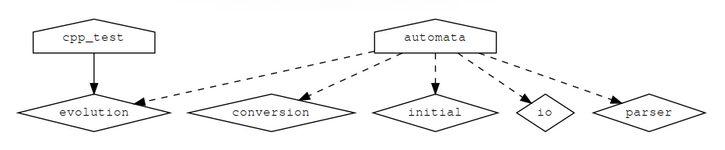
CMake can use the Graphviz graph visualization software (http://www.graphviz.org) to generate the dependency graph of a project:
$ cd build
$ cmake --graphviz=example.dot ..
$ dot -T png example.dot -o example.png
The generated diagram will show dependencies between targets in different directories:
Throughout the book, we have been building the code out-of-source to keep the source tree and build tree separate. This is the recommended practice to allow us to configure different builds (sequential or parallel, Debug or Release) with the same source code, without duplicating the source code and without spilling generated and object files across the source tree. With the following snippet, you can protect your project against in-source builds:
if(${PROJECT_SOURCE_DIR} STREQUAL ${PROJECT_BINARY_DIR})
    message(FATAL_ERROR "In-source builds not allowed. Please make a new directory (called a build directory) and run CMake from there.")
endif()
It is useful to recognize that the structure of the build tree mimics the structure of the source tree. In our example here, it is rather instructive to insert the following message printout into src/CMakeLists.txt:
message("current binary dir is ${CMAKE_CURRENT_BINARY_DIR}")
When configuring the project to build, we will see that the printout refers to build/src.