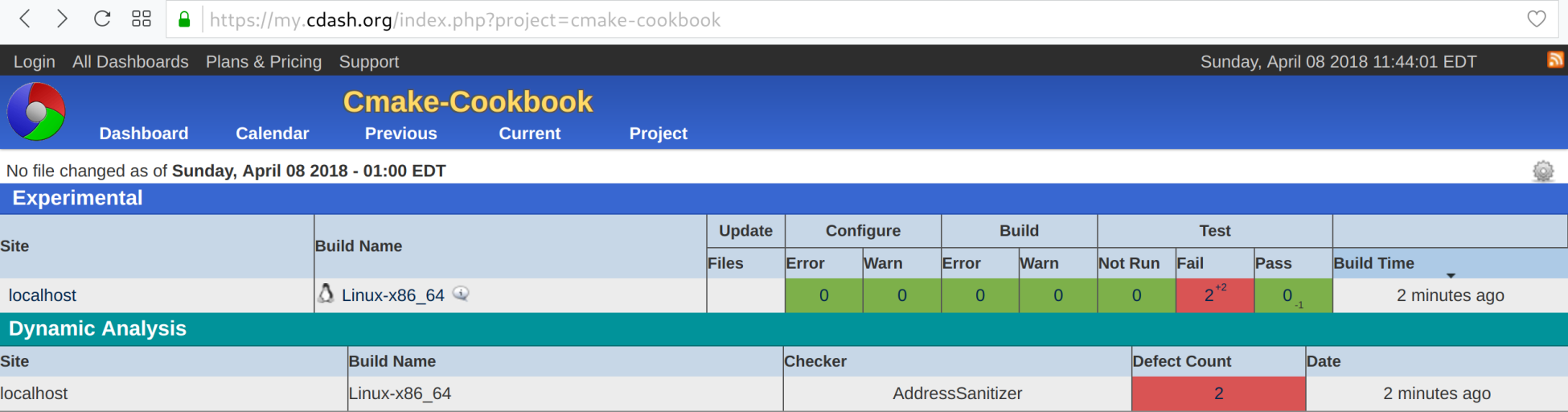
We need to compile our code with particular flags to take advantage of ASan. Then, we will run tests and submit them to the dashboard. Let us take a look at how to do this:
- The buggy library is defined in src/CMakeLists.txt:
add_library(buggy "")

target_sources(buggy
  PRIVATE
    buggy.cpp
  PUBLIC
    ${CMAKE_CURRENT_LIST_DIR}/buggy.hpp
  )

target_include_directories(buggy
  PUBLIC
    ${CMAKE_CURRENT_LIST_DIR}
  )
- To the file src/CMakeLists.txt, we will add an option and code to sanitize using ASan:
option(ENABLE_ASAN "Enable AddressSanitizer" OFF)

if(ENABLE_ASAN)
  if(CMAKE_CXX_COMPILER_ID MATCHES GNU)
    message(STATUS "AddressSanitizer enabled")
    target_compile_options(buggy
      PUBLIC
        -g -O1 -fsanitize=address -fno-omit-frame-pointer
      )
    target_link_libraries(buggy
      PUBLIC
        asan
      )
  else()
    message(WARNING "AddressSanitizer not supported for this compiler")
  endif()
endif()
- The two tests are defined in tests/CMakeLists.txt compactly, using a foreach loop:
foreach(_test IN ITEMS leaky use_after_free)
  add_executable(${_test} ${_test}.cpp)
  target_link_libraries(${_test} buggy)

  add_test(
    NAME
      ${_test}
    COMMAND
      $<TARGET_FILE:${_test}>
    )
endforeach()
- The top-level CMakeLists.txt is essentially unchanged with respect to the previous recipes:
# set minimum cmake version
cmake_minimum_required(VERSION 3.5 FATAL_ERROR)

# project name and language
project(recipe-03 LANGUAGES CXX)

# require C++11
set(CMAKE_CXX_STANDARD 11)
set(CMAKE_CXX_EXTENSIONS OFF)
set(CMAKE_CXX_STANDARD_REQUIRED ON)

# process src/CMakeLists.txt
add_subdirectory(src)

enable_testing()

# allow to report to a cdash dashboard
include(CTest)

# process tests/CMakeLists.txt
add_subdirectory(tests)
- Also, the CTestConfig.cmake file is unchanged:
set(CTEST_DROP_METHOD "http")
set(CTEST_DROP_SITE "my.cdash.org")
set(CTEST_DROP_LOCATION "/submit.php?project=cmake-cookbook")
set(CTEST_DROP_SITE_CDASH TRUE)
- In this recipe, we will report to CDash using a CTest script; for this, we will create a file, dashboard.cmake (in the same directory as the main CMakeLists.txt and CTestConfig.cmake), containing the following:
set(CTEST_PROJECT_NAME "example")
cmake_host_system_information(RESULT _site QUERY HOSTNAME)
set(CTEST_SITE ${_site})
set(CTEST_BUILD_NAME "${CMAKE_SYSTEM_NAME}-${CMAKE_HOST_SYSTEM_PROCESSOR}")

set(CTEST_SOURCE_DIRECTORY "${CTEST_SCRIPT_DIRECTORY}")
set(CTEST_BINARY_DIRECTORY "${CTEST_SCRIPT_DIRECTORY}/build")

include(ProcessorCount)
ProcessorCount(N)
if(NOT N EQUAL 0)
  set(CTEST_BUILD_FLAGS -j${N})
  set(ctest_test_args ${ctest_test_args} PARALLEL_LEVEL ${N})
endif()

ctest_start(Experimental)

ctest_configure(
  OPTIONS
    -DENABLE_ASAN:BOOL=ON
  )

ctest_build()
ctest_test()

set(CTEST_MEMORYCHECK_TYPE "AddressSanitizer")
ctest_memcheck()

ctest_submit()
- We will execute the dashboard.cmake script directly. Note how we pass the generator to use with the CTEST_CMAKE_GENERATOR option, as follows:
$ ctest -S dashboard.cmake -D CTEST_CMAKE_GENERATOR="Unix Makefiles"

   Each . represents 1024 bytes of output
    . Size of output: 0K
   Each symbol represents 1024 bytes of output.
   '!' represents an error and '*' a warning.
    . Size of output: 1K
- The result will appear on the CDash site, as shown in the following screenshot: