Table of Contents for
Network Security Assessment, 3rd Edition
 Network Security Assessment, 3rd Edition
Published by
O'Reilly Media, Inc., 2016
Network Security Assessment, 3rd Edition
Published by
O'Reilly Media, Inc., 2016
- nav
- Cover
- Network Security Assessment
- Network Security Assessment
- section
- Preface
- 1. Introduction to Network Security Assessment
- 2. Assessment Workflow and Tools
- 3. Vulnerabilities and Adversaries
- 4. Internet Network Discovery
- 5. Local Network Discovery
- 6. IP Network Scanning
- 7. Assessing Common Network Services
- 8. Assessing Microsoft Services
- 9. Assessing Mail Services
- 10. Assessing VPN Services
- 11. Assessing TLS Services
- 12. Web Application Architecture
- 13. Assessing Web Servers
- 14. Assessing Web Application Frameworks
- 15. Assessing Data Stores
- A. Common Ports and Message Types
- B. Sources of Vulnerability Information
- C. Unsafe TLS Cipher Suites
- Glossary of Terms
- Index
- About the Author
- Colophon
Chapter 13. Assessing Web Servers
Web servers demand a high degree of assurance because they are often exposed to untrusted networks. I discuss tactics and tools used to test these servers and their enabled subsystems in this chapter. Assessment of application frameworks (e.g., Microsoft ASP.NET and Rails) is covered in Chapter 14.
Assessment and hardening of web servers, frameworks, and applications fill entire books. Here I present a concise methodology for fingerprinting, investigating, and qualifying vulnerabilities within available HTTP services, involving the following steps:
-
Identification of proxy mechanisms
-
Enumeration of virtual hosts and accessible websites
-
For each site identified:
-
Profiling the server software and available subsystems
-
Active scanning and crawling to identify useful content and functionality
-
Attacking exposed authentication mechanisms
-
Qualifying vulnerabilities in server software
-
Web applications are often presented through load balancers, and so the first two steps are important. Consider Figure 13-1, in which a client connection is made over TLS to a load balancer that is then directed to an application server internally (via HTTP) based on the Host value provided.
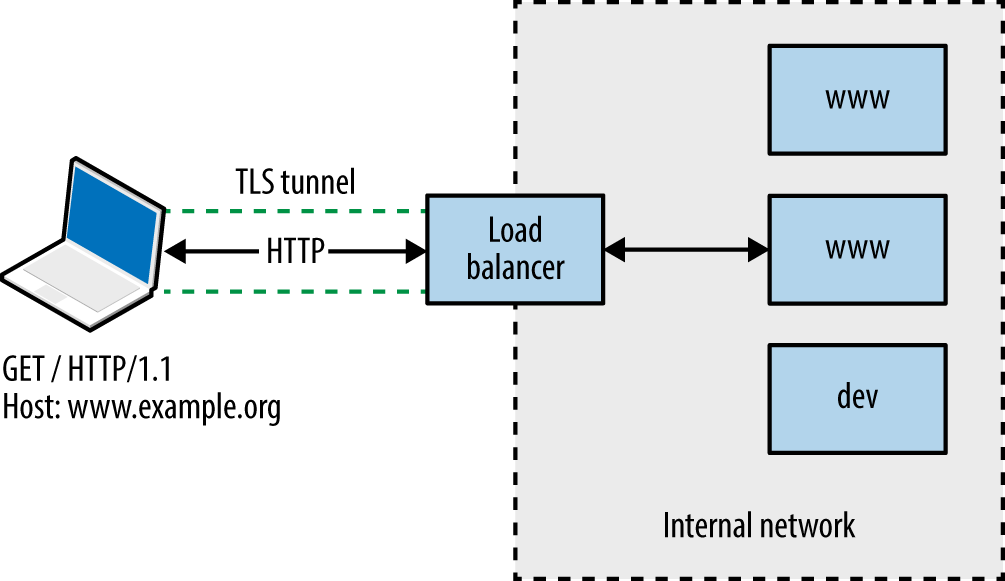
Figure 13-1. Connecting to a virtual host via HTTP 1.1 and TLS
You will encounter one of three scenarios during testing:
-
Directly accessing a single server hosting a single site
-
Directly accessing a single server hosting multiple sites (virtual hosts)
-
Indirectly accessing multiple application servers through a proxy
Through active testing and passive analysis of materials received from each server endpoint, you can map and test the available web application components.
Identifying Proxy Mechanisms
Load balancers and reverse proxies are commonplace in large environments; they are used to distribute and direct requests across multiple backend application servers. Systems usually support HTTP 1.1 methods (GET, POST, and HEAD in particular).
A straightforward way of identifying a server forwarding connections elsewhere is to provide a HEAD request with no Host field, and another with a valid field, as shown in Example 13-1 using Akamai’s infrastructure.
Example 13-1. Identifying the presence of a proxy or load balancer
root@kali:~# telnet www.akamai.com 80
Trying 69.192.141.233...
Connected to e8921.dscx.akamaiedge.net.
Escape character is '^]'.
HEAD / HTTP/1.0

HTTP/1.0 400 Bad Request
Server: AkamaiGHost
Mime-Version: 1.0
Content-Type: text/html
Content-Length: 193
Expires: Tue, 12 Aug 2014 03:30:17 GMT
Date: Tue, 12 Aug 2014 03:30:17 GMT
Connection: close

Connection closed by foreign host.

root@kali:~# telnet www.akamai.com 80
Trying 69.192.141.233...
Connected to e8921.dscx.akamaiedge.net.
Escape character is '^]'.
HEAD / HTTP/1.1
Host: www.akamai.com

HTTP/1.1 200 OK
Last-Modified: Wed, 23 Jul 2014 20:10:01 GMT
ETag: "a8030-31b9-4fee1ecd01840"
Content-Type: text/html; charset=utf-8
X-EdgeConnect-Cache-Status: 1
Date: Tue, 12 Aug 2014 03:30:27 GMT
Connection: keep-alive
Set-Cookie: cm_sessionid=7e9dfea542730000538ae95328f4080043090500; path=/
It is possible to abuse misconfigured proxies and connect to arbitrary hosts by modifying the Host field within requests. By providing an internal IP address, or a valid internal hostname, you might be able to direct a connection through the accessible HTTP server to a nonpublic resource, as shown in Figure 13-2.
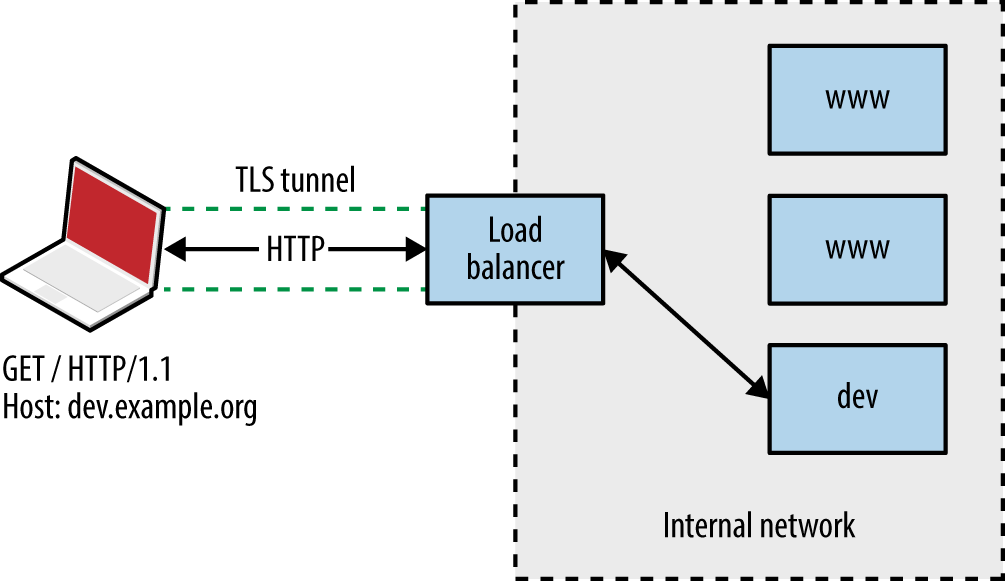
Figure 13-2. Abusing a misconfigured proxy
Enumerating Valid Hosts
Most web servers and reverse proxies parse HTTP 1.1 Host values and direct requests accordingly. There exist three basic means of obtaining valid hostnames:
-
The client provides a list of names used in their environment
-
Open source querying through Netcraft, Google, DNS, and other channels
-
Active testing of exposed web servers and applications
Active testing techniques include the following:
-
Website crawling and HTML parsing to identify hostnames
-
X.509 certificate analysis to retrieve server hostname values via TLS
-
Analysis of server responses to obtain hostname and IP address details
-
Brute-force grinding of valid hostnames
Figure 13-3 shows Wikto used to identify hostnames associated with the barclays.com domain through active crawling. Active brute-force grinding of hostnames using the Metasploit vhost_scanner module is also effective, as demonstrated by Example 13-2. A larger dictionary1 will likely yield results during testing.
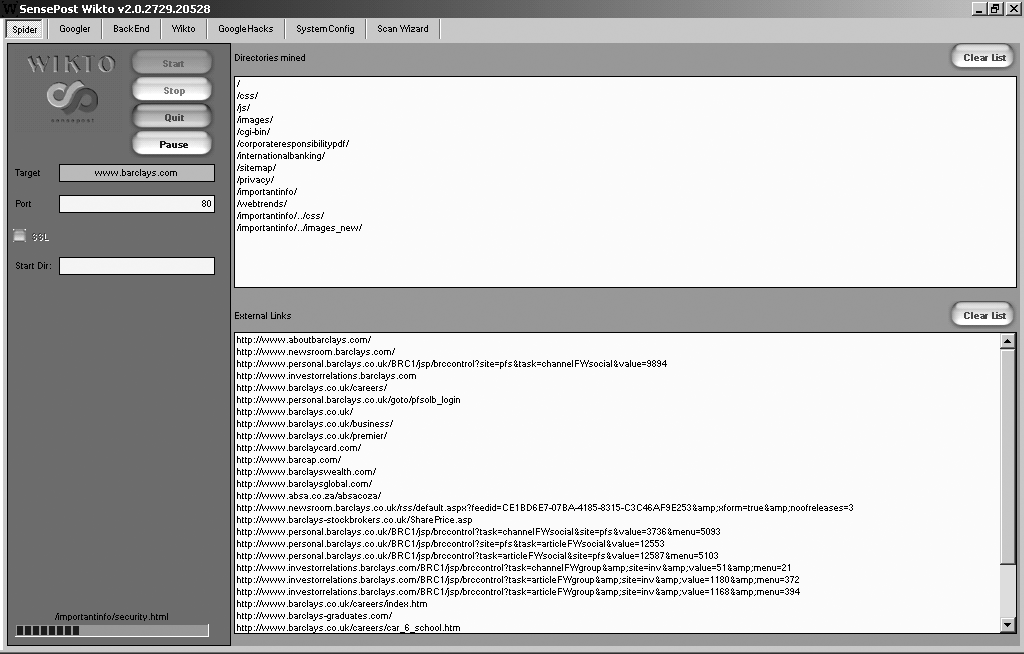
Figure 13-3. Enumerating valid hostnames by using Wikto
Example 13-2. Grinding virtual hostnames by using Metasploit
msf > use auxiliary/scanner/http/vhost_scanner
msf auxiliary(vhost_scanner) > set SUBDOM_LIST /usr/share/metasploit-framework/data/wordlists/
namelist.txt
msf auxiliary(vhost_scanner) > set DOMAIN paypal.com
msf auxiliary(vhost_scanner) > set RHOSTS 23.202.162.141
msf auxiliary(vhost_scanner) > run

[*] [23.202.162.141] Sending request with random domain tcsrZ.paypal.com
[*] [23.202.162.141] Sending request with random domain ZJTdm.paypal.com
[*] [23.202.162.141] Vhost found  ad.paypal.com
[*] [23.202.162.141] Vhost found  investor.paypal.com
[*] [23.202.162.141] Vhost found  pics.paypal.com
Web Server Profiling
Armed with a list of valid websites (i.e., IP address, protocol, and host combinations) within an environment, you can adopt both manual and automated tactics to test the configuration of each available server.
Implementations including Apache HTTP Server and Microsoft IIS support many modules and subsystems (e.g., authentication mechanisms, WebDAV, and TLS). Some are shipped with the server software (e.g., mod_cgi within Apache and Microsoft ASP.NET support within IIS), although many require installation and configuration.
You can infer the configuration of a web server via the following:
-
Analysis of responses to HTTP requests
-
Review of server HTTP headers returned upon requesting content
-
Crawling each site and analyzing the directory structure, filenames, and content
I describe these tactics in the subsequent sections.
Analyzing Server Responses
You can use the HEAD method to retrieve a status code and headers from a web server for a given HTTP resource (essentially performing a ping operation). Within the headers returned, you will often find details of the server software and low-level configuration. Example 13-3 demonstrates a HEAD request issued against the Apache Software Foundation’s web server.
Example 13-3. Issuing a HEAD request to www.apache.org
root@kali:~# telnet www.apache.org 80
Trying 140.211.11.131...
Connected to www.apache.org.
Escape character is '^]'.
HEAD / HTTP/1.1
Host: www.apache.org

HTTP/1.1 200 OK
Date: Mon, 11 Aug 2014 21:34:16 GMT
Server: Apache/2.4.10 (Unix) mod_wsgi/3.5 Python/2.7.5 OpenSSL/1.0.1i
Last-Modified: Mon, 11 Aug 2014 21:10:43 GMT
ETag: "9e28-50060fce7b9a5"
Accept-Ranges: bytes
Content-Length: 40488
Vary: Accept-Encoding
Cache-Control: max-age=3600
Expires: Mon, 11 Aug 2014 22:34:16 GMT
Connection: close
Content-Type: text/html; charset=utf-8
We learn the server is running Apache 2.4.10 on a Unix-based system, with Python support through mod_wsgi, and TLS support via OpenSSL. Through browsing the project pages for each of these subsystems and searching NVD, you can investigate known security flaws.
Example 13-4 demonstrates a Microsoft IIS 8.5 server response. The site is load-balanced via Akamai and a valid Host field is presented to elicit a response. If a server does not support the HEAD method, a GET request should reveal header values along with the requested content.
Example 13-4. Issuing a HEAD request to www.microsoft.com
root@kali:~# telnet www.microsoft.com 80
Trying 134.170.188.84...
Connected to lb1.www.ms.akadns.net.
Escape character is '^]'.
HEAD / HTTP/1.1
Host: www.microsoft.com

HTTP/1.1 200 OK
Cache-Control: no-cache
Content-Length: 1020
Content-Type: text/html
Last-Modified: Mon, 16 Mar 2009 20:35:26 GMT
Accept-Ranges: bytes
ETag: "67991fbd76a6c91:0"
Server: Microsoft-IIS/8.5
X-Powered-By: ASP.NET
Date: Mon, 11 Aug 2014 21:47:49 GMT
Note
If the Server header returned by the web server is modified, you can easily differentiate between Apache, Microsoft IIS, and other web servers through differences in the formatting of fields when responding to HEAD and OPTIONS requests.
An OPTIONS request should return the permitted HTTP request methods for a given resource. Example 13-5 shows that the Apache Software Foundation web server accepts GET, HEAD, POST, OPTIONS, and TRACE requests for the root directory (/).
Example 13-5. Issuing an OPTIONS request to www.apache.org
root@kali:~# telnet www.apache.org 80
Trying 192.87.106.229...
Connected to www.apache.org.
Escape character is '^]'.
OPTIONS / HTTP/1.1
Host: www.apache.org

HTTP/1.1 200 OK
Date: Mon, 11 Aug 2014 23:18:15 GMT
Server: Apache/2.4.10 (Unix) OpenSSL/1.0.1i
Allow: GET,HEAD,POST,OPTIONS,TRACE
Cache-Control: max-age=3600
Expires: Tue, 12 Aug 2014 00:18:15 GMT
Content-Length: 0
Content-Type: text/html; charset=utf-8
Certain methods support server-side file upload and content modification. For example, upon issuing an OPTIONS request for a resource, you might find support for useful methods including PUT and PROPPATCH (used to upload content and alter file properties, respectively).
HTTP Header Review
Requests for resources often return responses containing useful HTTP headers, as listed in Table 13-1. Example 13-6 shows how, many years ago, eBay’s web servers leaked internal IP address information, along with details of the NetApp caching hardware used within the environment.
| Header | Notes |
|---|---|
| ETag | Can be used to fingerprint device firmware |
| Content-Location | Can leak hostname or internal IP address details |
| Location | Used during redirect, can refer to an internal IP or hostname |
| Set-Cookie | May leak details of load balancers and other systems |
| Server | Provides details of the web server software and subsystems |
| Via | Leaks proxy or load balancer details |
| WWW-Authenticate | Often provides IP and hostname details through the realm field |
| X-Powered-By | Details the application framework (e.g., Microsoft ASP.NET) |
Example 13-6. Obtaining useful details via HTTP headers
$ telnet www.ebay.com 80
Trying 66.135.208.88...
Connected to www.ebay.com.
Escape character is '^]'.
HEAD / HTTP/1.0

HTTP/1.0 200 OK
Age: 44
Accept-Ranges: bytes
Date: Mon, 26 May 2003 16:10:00 GMT
Content-Length: 47851
Content-Type: text/html
Server: Microsoft-IIS/4.0
Content-Location: http://10.8.35.99/index.html
Last-Modified: Mon, 26 May 2003 16:01:40 GMT
ETag: "04af217a023c31:12517"
Via: 1.1 cache16 (NetCache NetApp/5.2.1R3)
Cookie analysis
Example 13-7 shows how various cookies are set when connecting to the eBay site. If the Server field is obfuscated, the format of session tokens can indicate the underlying web application framework. Table 13-2 contains a list of session variables set as cookies by popular frameworks.
| Session variable name | Framework |
|---|---|
ASPSESSIONID |
Microsoft ASP |
ASP.NET_SessionId |
Microsoft ASP.NET |
CFID CFGLOBALS CFTOKEN |
Adobe ColdFusion |
JROUTE gx_session_id_ |
Sun Java System Application Server |
JSERVSESSION JServSessionIdRoot |
Apache JServ |
JSESSIONID |
Various J2EE application servers, including Apache Tomcat, IBM WebSphere Application Server, and Jetty |
NSES40SESSION |
Netscape Enterprise Server |
PHPSESSID |
PHP |
sesessionid |
IBM WebSphere Application Server |
Ltpatoken |
IBM WebSphere Application Server (5.1 and earlier) |
Ltpatoken2 |
IBM WebSphere Application Server (5.1.1 and later) |
SESSION_ID |
IBM Net.Commerce |
_sn |
Oracle Siebel CRM |
WebLogicSession |
Oracle WebLogic Server |
Further analysis of JSESSIONID values is required to infer a particular J2EE application server. Three samples of each format are presented in Table 13-3, along with the respective server. Example 13-8 demonstrates a Coucho Resin 4.0 application server found running behind an Nginx web server, identified through the cookie set.
| Sample | Application server |
|---|---|
BE61490F5D872A14112A01364D085D0C 3DADE32A11C791AE27821007F0442911 5419969B4AE1B24A0EBC84C932FB32FF |
Apache Tomcat 4 and later |
hb0u8p5y01 1239865610 bx7tef6nn1 |
Apache Tomcat 3 and earlier |
aaa-CsnK1zTer5x7ezDXu aaaor0TMu6wk3hFswQAfv aaa3F_Xsxl4hEh4aR4W9u |
Coucho Resin 4.0 |
abcwdP5VYNf9H760bVLlr abc_o1VoG-WsWcQJoQXgr abclAxVmElh0keOEXZAfv |
Coucho Resin 3.0.21 to 3.1.13 |
a8_9DJBlfsEf bDjukMDZY_Ie azMi6mQWmipa |
Coucho Resin 3.0.20 and earlier |
0000gcK8-ZwJtCu81XdUCi-a1dM:10ikrbhip 0000I87fbjjRbC2Ya5GrxQ2DmOC:-1 0001IWuUT_zhR-gFYB-pOAk75Q5:v544d031 |
IBM WebSphere Application Server |
8025e3c8e2fb506d7879460aaac2 b851ffa62f7da5027b609871373e 6ad8360e0d1af303293f26d98e2a |
Oracle GlassFish Server Sun Java System Application Server |
Example 13-8. Identifying a Resin 4.0 application server
root@kali:~# telnet 203.195.151.53 80
Trying 203.195.151.53...
Connected to 203.195.151.53.
Escape character is '^]'.
GET / HTTP/1.0

HTTP/1.1 200 OK
Server: nginx
Date: Tue, 01 Dec 2015 00:46:41 GMT
Content-Type: text/html; charset=GB18030
Connection: close
Vary: Accept-Encoding
Cache-Control: no-cache
Expires: Thu, 01 Dec 1994 16:00:00 GMT
Set-Cookie: JSESSIONID=aaaMhMcnF0zaIakDxaBfv; path=/; HttpOnly
Crawling and Investigation of Content
Example 13-9 demonstrates how you might use wget to scrape a target site. The process creates a mirror of the content on the local disk. You can use the tree utility to show the directory structure, as demonstrated by Example 13-10.
Example 13-9. Scraping a website by using GNU Wget
root@kali:~# wget -r -m -nv http://www.example.org/
02:27:54 URL:http://www.example.org/ [3558] ->
"www.example.org/index.html" [1]
02:27:54 URL:http://www.example.org/index.jsp?page=falls.shtml [1124] ->
"www.example.org/index.jsp?page=falls.shtml" [1]
02:27:54 URL:http://www.example.org/images/falls.jpg [81279/81279] ->
"www.example.org/images/falls.jpg" [1]
02:27:54 URL:http://www.example.org/images/yf_thumb.jpg [4312/4312] ->
"www.example.org/images/yf_thumb.jpg" [1]
02:27:54 URL:http://www.example.org/index.jsp?page=tahoe1.shtml [1183] ->
"www.example.org/index.jsp?page=tahoe1.shtml" [1]
02:27:54 URL:http://www.example.org/images/tahoe1.jpg [36580/36580] ->
"www.example.org/images/tahoe1.jpg" [1]
02:27:54 URL:http://www.example.org/images/th_thumb.jpg [6912/6912] ->
"www.example.org/images/th_thumb.jpg" [1]
02:27:54 URL:http://www.example.org/index.jsp?page=montrey.shtml [1160] ->
"www.example.org/index.jsp?page=montrey.shtml" [1]
02:27:54 URL:http://www.example.org/images/montrey.jpg [81178/81178] ->
"www.example.org/images/montrey.jpg" [1]
02:27:54 URL:http://www.example.org/images/mn_thumb.jpg [7891/7891] ->
"www.example.org/images/mn_thumb.jpg" [1]
02:27:54 URL:http://www.example.org/index.jsp?page=flower.shtml [1159] ->
"www.example.org/index.jsp?page=flower.shtml" [1]
02:27:55 URL:http://www.example.org/images/flower.jpg [86436/86436] ->
"www.example.org/images/flower.jpg" [1]
02:27:55 URL:http://www.example.org/images/fl_thumb.jpg [8468/8468] ->
"www.example.org/images/fl_thumb.jpg" [1]
02:27:55 URL:http://www.example.org/catalog/ [1031] ->
"www.example.org/catalog/index.html" [1]
02:27:55 URL:http://www.example.org/catalog/catalog.jsp?id=0 [1282] ->
"www.example.org/catalog/catalog.jsp?id=0" [1]
02:27:55 URL:http://www.example.org/guestbook/guestbook.html [1343] ->
"www.example.org/guestbook/guestbook.html" [1]
02:27:55 URL:http://www.example.org/guestbook/addguest.html [1302] ->
"www.example.org/guestbook/addguest.html" [1]
02:28:00 URL:http://www.example.org/catalog/print.jsp [446] ->
"www.example.org/catalog/print.jsp" [1]
02:28:00 URL:http://www.example.org/catalog/catalog.jsp?id=1 [1274] ->
"www.example.org/catalog/catalog.jsp?id=1" [1]
02:28:00 URL:http://www.example.org/catalog/catalog.jsp?id=2 [1281] ->
"www.example.org/catalog/catalog.jsp?id=2" [1]
02:28:00 URL:http://www.example.org/catalog/catalog.jsp?id=3 [1282] ->
"www.example.org/catalog/catalog.jsp?id=3" [1]
Note
To force wget to use a particular IP address for the hostname you are providing (e.g., using a specific proxy address or a name that doesn’t resolve), edit the /etc/hosts file within Kali Linux to point the name to a given address.
Example 13-10. Using tree to review the scraped content
root@kali:~# tree
.
`-- www.example.org
    |-- catalog
    |   |-- catalog.jsp?id=0
    |   |-- catalog.jsp?id=1
    |   |-- catalog.jsp?id=2
    |   |-- catalog.jsp?id=3
    |   |-- index.html
    |   `-- print.jsp
    |-- guestbook
    |   |-- addguest.html
    |   `-- guestbook.html
    |-- images
    |   |-- falls.jpg
    |   |-- fl_thumb.jpg
    |   |-- flower.jpg
    |   |-- mn_thumb.jpg
    |   |-- montrey.jpg
    |   |-- tahoe1.jpg
    |   |-- th_thumb.jpg
    |   `-- yf_thumb.jpg
    |-- index.jsp?page=falls.shtml
    |-- index.jsp?page=flower.shtml
    |-- index.jsp?page=montrey.shtml
    |-- index.jsp?page=tahoe1.shtml
    `-- index.html
Upon manually browsing a site or scraping it via wget, you can identify server-side technologies through the file extensions used. Table 13-4 lists certain file extensions with the relative application server components.
| Extension(s) | Technology | Server platform(s) |
|---|---|---|
| ACTION | Java | Apache Struts 2.x |
| ASA, ASP, INC, ASAX, ASHX, ASPX, CONFIG | Microsoft ASP/ASP.NET | Microsoft IIS |
| CFM, CFML | Adobe ColdFusion | Commonly associated with Microsoft IIS but can run on other platforms |
| DLL | Microsoft | Microsoft IIS and other Windows-based web servers |
| DO | Java | Apache Struts 1.x IBM WebSphere Application Server |
| JSP | Java Server Pages (JSP) | J2EE application servers (e.g., Apache Tomcat, IBM WebSphere Application Server, and Jetty) |
| NSF, NTF | IBM Lotus Domino | IBM Lotus Domino |
| PHP, PHP3, PHP4, PHP5 | PHP | Often Apache HTTP Server, but interpreters can run on a variety of Unix-based and Windows platforms |
| PL, PHTML | Perl | |
| PY, PYC, PYO | Python | Multiple platforms |
| RB | Ruby | |
| WOA | Apple WebObjects | Apple OS X Server |
Parsing HTML
You can manually review content to identify useful data. Example 13-11 shows how to use grep to identify hidden fields within the HTML and uncover useful files (i.e., cart.ini). Table 13-5 lists other useful search patterns that you can adopt.
| HTML element | Pattern | Syntax |
|---|---|---|
| JavaScript | <SCRIPT |
grep –r –i '<script' * |
| Email addresses | @ |
grep –r '@' * |
| Hidden form fields | TYPE=HIDDEN |
grep –r –i 'type=hidden' * |
| HTML comments | <!-- --> |
grep –r '<!--' * |
| Hyperlinks | HREF, ACTION |
grep –r –i 'href=|action=' * |
| Metadata | <META |
grep –r –i '<meta' * |
Active Scanning
Upon performing manual investigation, you should have compiled a list of valid HTTP and HTTPS endpoints, associated virtual hosts, and details of applications and URL paths of interest. You should then undertake active scanning to do the following:
-
Identify web application firewall (WAF) mechanisms
-
Fingerprint web server and application framework software
-
Expose potentially useful content and functionality
You can use utilities within Kali Linux to undertake these tasks, as described here.
WAF Detection
WAF systems are used to parse HTTP traffic and block both ingress queries and egress responses that match known signatures (e.g., SQL injection and XSS strings). You can build a WAF into a web server (e.g., the Apache mod_security module), run it as a dedicated appliance, or operate it as a cloud service.
Within Kali Linux, you can use the wafw00f2 utility and Nmap3 to fingerprint WAF mechanisms, as demonstrated by Example 13-12. The presence of a WAF, in turn, requires obfuscation of attack traffic (e.g., command injection) to evade blocking.
Example 13-12. WAF detection and fingerprinting
root@kali:~# wafw00f http://www.paypal.com

                                 ^     ^
        _   __  _   ____ _   __  _    _   ____
       ///7/ /.' \ / __////7/ /,' \ ,' \ / __/
      | V V // o // _/ | V V // 0 // 0 // _/
      |_n_,'/_n_//_/   |_n_,' \_,' \_,'/_/
                                <
                                 ...'

    WAFW00F - Web Application Firewall Detection Tool

    By Sandro Gauci && Wendel G. Henrique

Checking http://www.paypal.com
The site http://www.paypal.com is behind an Imperva
Number of requests: 10

root@kali:~# nmap -p80 --script http-waf-fingerprint www.imperva.com

Starting Nmap 6.49BETA4 (https://nmap.org) at 2016-05-01 19:21 EDT
Nmap scan report for www.imperva.com (199.83.132.252)
PORT   STATE SERVICE
80/tcp open  http
| http-waf-fingerprint:
|   Detected WAF
|_    Incapsula WAF
Note
An effective WAF avoidance tactic is to route HTTP requests around the security mechanism. Iteratively modify your local /etc/hosts file and evaluate each HTTP/S endpoint to identify routes that bypass the WAF.
Server and Application Framework Fingerprinting
Example 13-13 demonstrates WhatWeb4 run against www.microsoft.com, identifying Microsoft IIS 8.5, Microsoft ASP.NET, and supported HTTP methods for the /en-gb/default.aspx page (GET, POST, PUT, DELETE, and OPTIONS) upon following an HTTP 302 redirect.
When testing large environments, you will often find that URL paths provide access to different server components. Within Example 13-13, the root directory (/) request returns ASP.NET 2.0.50727, and the /en-gb/default.aspx request returns ASP.NET 4.0.30319.
Example 13-13. Fingerprinting a web server using WhatWeb
root@kali:~# whatweb -a=4 http://www.microsoft.com
http://www.microsoft.com [302] ASP_NET[2.0.50727], Cookies[mslocale], HTTPServer[Microsoft-IIS/
8.5], IP[104.69.114.127], Microsoft-IIS[8.5], RedirectLocation[/en-gb/default.aspx],
Title[Object moved], UncommonHeaders[vtag,x-ccc,x-cid,x-dg-taggedas], X-Powered-By[ASP.NET,
ARR/2.5, ASP.NET]
http://www.microsoft.com/en-gb/default.aspx [200] ASP_NET[4.0.30319], Access-Control-Allow-
Methods[GET, POST, PUT, DELETE, OPTIONS],Cookies[MS-CV], HTTPServer[Microsoft-IIS/8.5],
IP[104.69.114.127], JQuery, Microsoft-IIS[8.5], Script[javascript,text/javascript],
Title[Microsoft %E2%80%93 Official HomePage], UncommonHeaders[correlationvector,access-control-
allow-headers, access-control-allow-methods, access-control-allow-credentials, cteonnt-length,
x-ccc,x-cid,x-dg-taggedas], X-Powered-By[ASP.NET, ARR/2.5, ASP.NET], X-UA-Compatible[IE=edge]
Identifying Exposed Content
You can run Nikto5 to identify exposed files, as shown in Example 13-14.
Example 13-14. Running Nikto
root@kali:~# nikto -h www.apache.org
- Nikto v2.1.6
---------------------------------------------------------------------------
+ Target IP:          104.130.219.184
+ Target Hostname:    www.apache.org
+ Target Port:        80
+ Start Time:         2015-05-14 03:25:22 (GMT-7)
---------------------------------------------------------------------------
+ Server: Apache/2.4.7 (Ubuntu)
+ Server leaks inodes via ETags, header found with file /, fields: 0xb515 0x516677d070438
+ The anti-clickjacking X-Frame-Options header is not present.
+ No CGI Directories found (use '-C all' to force check all possible dirs)
+ Dir '/websrc/' in robots.txt returned a non-forbidden or redirect HTTP code (301)
+ "robots.txt" contains 1 entry which should be manually viewed.
+ Apache mod_negotiation is enabled with MultiViews, which allows attackers to easily brute
  force file names. See http://www.wisec.it/sectou.php?id=4698ebdc59d15. The following
  alternatives for 'index' were found: index.html
+ Allowed HTTP Methods: POST, OPTIONS, GET, HEAD, TRACE
+ OSVDB-561: /server-status: This reveals Apache information. Comment out appropriate line in
  httpd.conf or restrict access to allowed hosts.
+ OSVDB-3092: /dev/: This might be interesting...
+ OSVDB-3268: /img/: Directory indexing found.
+ OSVDB-3092: /img/: This might be interesting...
+ OSVDB-3268: /info/: Directory indexing found.
+ OSVDB-3092: /info/: This might be interesting...
+ OSVDB-3268: /icons/: Directory indexing found.
+ OSVDB-3268: /images/: Directory indexing found.
+ OSVDB-3233: /icons/README: Apache default file found.
+ 6594 requests: 0 error(s) and 15 item(s) reported on remote host
Wikto is a Windows-based web server assessment tool incorporating Nikto functionality. In addition to Nikto tests, Wikto also performs:
-
Basic web server crawling and spidering
-
Google data mining of directories and links
-
Brute-force grinding to identify accessible directories and files
-
Google Hacks querying to identify poorly protected content
Figure 13-4 demonstrates Wikto performing HTTP scanning of a web server, identifying a number of accessible directories (including /cgi-bin/, /stats/, and Microsoft FrontPage directories), and files of interest. Other tools that you can use to uncover content are the OWASP DirBuster6 and ZAP utilities.7
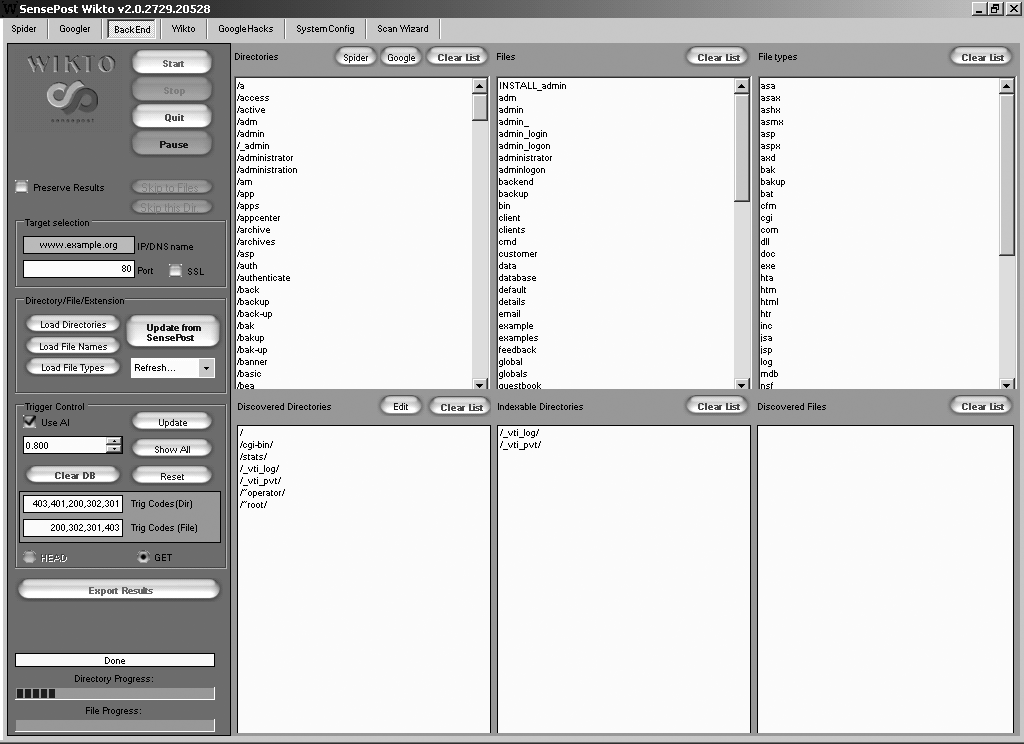
Figure 13-4. Wikto scanning for default folders and files
Note
Daniel Miessler harvested the Alexa 100K list of top websites to catalog the most common names of sensitive directories from robots.txt entries. The RobotsDisallowed project8 provides dictionaries that you can use during testing to reveal content.
Qualifying Web Server Vulnerabilities
Investigate potential flaws upon fingerprinting the operating system, web server, and identifying useful content, as described in the following sections.
Reviewing Exposed Content
Active scanning often reveals useful data and URL paths that you can use (e.g., robots.txt, phpinfo.php, and /server-status/). Exposed content may contain the following:
-
Usernames, session tokens, and credentials
-
Details of software packages (e.g., version information and settings)
-
Details of local files and directory structures (e.g., absolute paths)
For example, .DS_Store and /.svn/entries structures reveal filenames and directory structures, as demonstrated by both Figure 13-5 and Example 13-15. Log files can also contain useful data (e.g., base64-encoded credentials), as shown in Example 13-16.
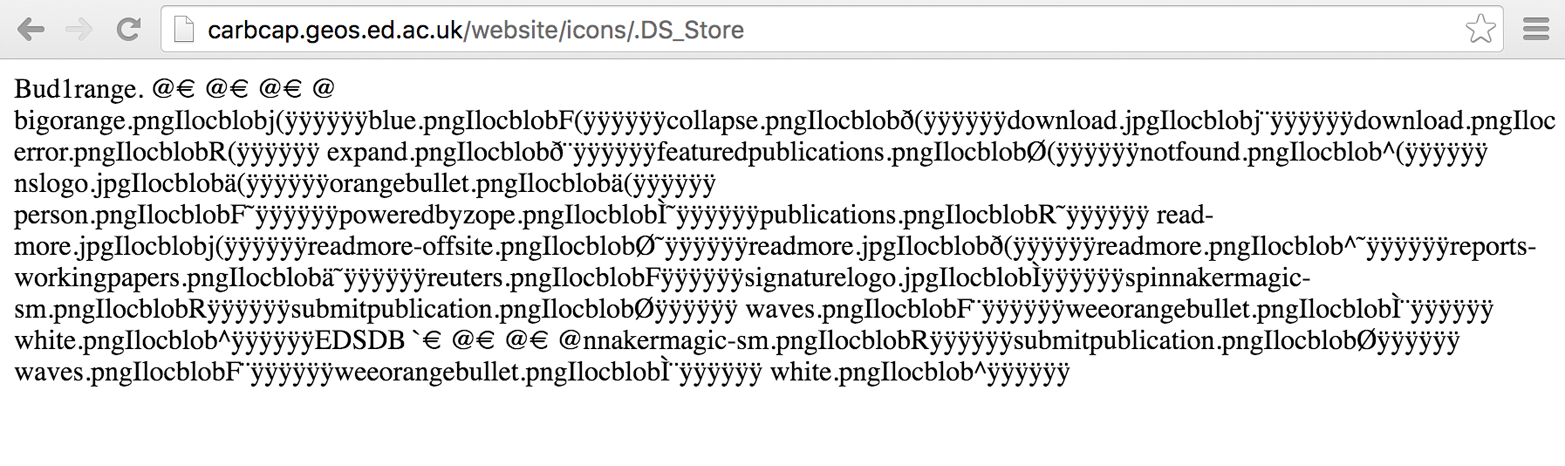
Figure 13-5. Apple .DS_Store files reveal directory contents
Example 13-15. Username and directory details revealed via /.svn/entries
root@kali:~# wget http://cms.example.org/.svn/entries
root@kali:~# strings entries | head -24
https://svn.example.org/test/trunk/devsite
https://svn.example.org/devsite
2012-05-31T17:37:17.691030Z
mwalker
has-props
00cfcd8e-3c59-496e-9b95-ae89d8021240
web.config
file
2012-05-30T20:02:43.459126Z
adac0226856abf247bf49db5c2daa1c2
2012-05-22T13:57:26.581218Z
mwalker
googlesitemaps
googleanalytics
themes
project
robots.txt
file
2012-05-30T20:02:43.459126Z
7407024421899c4fe166cb302c175412
2012-05-22T13:57:26.581218Z
mwalker
phpunit.xml.dist
file
Note
Use Metasploit9 and pillage-svn10 to download source code upon identifying accessible /.svn/entries (Subversion 1.6 and prior) or /.svn/wc.db files (Subversion 1.7 and later). If you identify an exposed Git repository (via /.git/index), use gitpillage.sh, which you can find within the DVCS Pillage Toolkit.11 Repositories often contain useful secrets including tokens and API keys.
Example 13-16. Application logs can include tokens and credentials
root@kali:~# wget https://jira.example.org/secure/client.log
root@kali:~# head -15 client.log
Resolving host name "localhost" ...
Connecting ( localhost:8092 => ip: 127.0.0.1, port: 8092 )
Connected (127.0.0.1:8092)
<<< PROPFIND /repository/repo1/ HTTP/1.1
<<< Host: localhost:8092
<<< User-Agent: BitKinex/2.8
<<< Accept: */*
<<< Pragma: no-cache
<<< Cache-Control: no-cache
<<< Cookie: JSESSIONID=a3ta7gugsoug0
<<< Depth: 1
<<< Content-Length: 201
<<< Content-Type: text/xml
<<< Authorization: Basic YWRtaW46MTIzcXdl
>>> HTTP/1.1 207 Multi Status
root@kali:~# openssl enc -base64 -d <<< YWRtaW46MTIzcXdl
admin:123qwe
Brute-Force Password Grinding
During testing, Nikto and Skipfish12 provide details of URL paths requiring authorization. Example 13-17 demonstrates a request made to a Microsoft IIS server running Frontpage authoring utilities (/_vti_bin/_vti_aut/author.dll). The server response indicates that we must authenticate using Negotiate, NTLM, or Basic methods.
Example 13-18 demonstrates Hydra launched to grind credentials using this URL and the namelist.txt and burnett_top_500.txt dictionaries within Kali Linux.
Example 13-18. Brute-forcing the Basic authentication for author.dll
root@kali:~# hydra -L namelist.txt -P burnett_top_500.txt www.example.org \
http-head /_vti_bin/_vti_aut/author.dll
Hydra v7.6 (c)2013 by van Hauser/THC & David Maciejak - for legal purposes only.
Hydra (http://www.thc.org) starting at 2014-07-04 18:15:17
[DATA] 16 tasks, 1 servers, 1638 login tries (l:2/p:819), ~102 tries per task
[DATA] attacking service http-head on port 80
[STATUS] 792.00 tries/min, 792 tries in 00:01h, 846 todo in 00:02h
[80][www] host: 192.168.0.15  login: administrator   password: cricket
Investigating Supported HTTP Methods
It is uncommon for regular HTTP 1.1 methods to be vulnerable to attack (e.g., to proxy connections to arbitrary hosts, or access sensitive content). Useful methods that you might come across during testing include the following:
-
TRACE -
PUTandDELETE -
WebDAV methods
In the subsequent sections, I discuss how to evaluate these during testing.
TRACE
If the TRACE method is supported and a web server is running an application that is vulnerable to XSS, a cross-site tracing (XST)13 attack can be launched to obtain user session information. This vector is particularly useful because it can reveal cookies protected by the HttpOnly flag.
By contrast, if a server is running only a static website that does not process user-supplied input, the practical security impact of TRACE support is negligible.
PUT and DELETE
You can use the PUT and DELETE methods to upload and remove server-side content (either in conjunction with valid credentials or upon identifying a writable directory). Examples 13-19 and 13-20 demonstrate manual assessment of the / and /scripts directories on www.example.org via HTTP PUT. The first request fails, but the second is successful.
Example 13-19. An HTTP PUT request failure
root@kali:~# telnet www.example.org 80
Trying 192.168.0.15...
Connected to www.example.org.
Escape character is '^]'.
PUT /test.txt HTTP/1.1
Host: www.example.org
Content-Length: 16

HTTP/1.1 403 Access Forbidden
Server: Microsoft-IIS/5.0
Date: Mon, 28 Jul 2014 12:04:53 GMT
Connection: close
Content-Length: 495
Content-Type: text/html
Example 13-20. An HTTP PUT request success
root@kali:~# telnet www.example.org 80
Trying 192.168.0.15...
Connected to www.example.org.
Escape character is '^]'.
PUT /scripts/test.txt HTTP/1.1
Host: www.example.org
Content-Length: 16

HTTP/1.1 100 Continue
Server: Microsoft-IIS/5.0
Date: Mon, 28 Jul 2014 12:18:32 GMT
ABCDEFGHIJKLMNOP

HTTP/1.1 201 Created
Server: Microsoft-IIS/5.0
Date: Mon, 28 Jul 2014 12:18:35 GMT
Location: http://www.example.org/scripts/test.txt
Content-Length: 0
Allow: OPTIONS, TRACE, GET, HEAD, DELETE, PUT, COPY, MOVE, PROPFIND, PROPPATCH, SEARCH, LOCK,
UNLOCK
The DELETE method works in a similar manner, although successful execution removes the content. You can use Metasploit,14, 15 and the davtest16 utility within Kali Linux to automate testing.
WebDAV methods
Individual WebDAV methods supported by Subversion, Apache HTTP Server, and Microsoft products are listed in Chapter 12. If the PROPFIND method is supported, use Metasploit17, 18 to reveal system information.
Armed with valid credentials, you can use the cadaver utility19 to upload, download, search, and manipulate server-side content. Without sufficient privileges, you are reliant on writable directories to upload data.
Use davtest to identify world-writable directories, as shown in Example 13-21.
Example 13-21. Running davtest within Kali Linux
root@kali:~# davtest -url http://10.0.0.5
********************************************************
Testing DAV connection
OPEN        SUCCEED:        http://10.0.0.5
********************************************************
NOTE    Random string for this session: xEuttkBpz
********************************************************
Creating directory
MKCOL       SUCCEED:        Created http://10.0.0.5/DavTestDir_xEuttkBpz
********************************************************
Sending test files
PUT asp FAIL
PUT cgi FAIL
PUT txt SUCCEED:   http://10.0.0.5/DavTestDir_xEuttkBpz/davtest_xEuttkBpz.txt
PUT pl  SUCCEED:   http://10.0.0.5/DavTestDir_xEuttkBpz/davtest_xEuttkBpz.pl
PUT jsp SUCCEED:   http://10.0.0.5/DavTestDir_xEuttkBpz/davtest_xEuttkBpz.jsp
PUT cfm SUCCEED:   http://10.0.0.5/DavTestDir_xEuttkBpz/davtest_xEuttkBpz.cfm
PUT aspx FAIL
PUT jhtml SUCCEED: http://10.0.0.5/DavTestDir_xEuttkBpz/davtest_xEuttkBpz.jhtml
PUT php SUCCEED:   http://10.0.0.5/DavTestDir_xEuttkBpz/davtest_xEuttkBpz.php
PUT html SUCCEED:  http://10.0.0.5/DavTestDir_xEuttkBpz/davtest_xEuttkBpz.html
PUT shtml FAIL
********************************************************
Checking for test file execution
EXEC txt SUCCEED: http://10.0.0.5/DavTestDir_xEuttkBpz/davtest_xEuttkBpz.txt
EXEC pl  FAIL
EXEC jsp FAIL
EXEC cfm FAIL
EXEC jhtml FAIL
EXEC php FAIL
EXEC html SUCCEED: http://10.0.0.5/DavTestDir_xEuttkBpz/davtest_xEuttkBpz.html
Known Microsoft IIS Vulnerabilities
Table 13-6 lists remotely exploitable issues within Microsoft IIS. Included in this list are flaws within the underlying Windows operating system and components (e.g., http.sys and Active Directory Federation Services) that can be triggered via IIS. Exploitation of some defects also requires particular ISAPI extensions and subsystems to be enabled.
| CVE reference | Impacted software | Notes |
|---|---|---|
| CVE-2015-1635 | IIS 8.5 and prior | Remote code execution via http.sys within Windows 2012 R2 and priora |
| CVE-2014-4078 | IIS 8.0 and 8.5 | IP and domain access restriction bypass |
| CVE-2010-2730 | IIS 7.5 | FastCGI remote code execution bug |
| CVE-2010-1256 | IIS 6.0, 7.0, and 7.5 | Authenticated users can execute arbitrary code upon triggering memory corruption within token checking code |
| CVE-2009-4444 | IIS 5.0, 5.1, and 6.0 | ASA, ASP, CER file access restriction bypass |
| CVE-2009-2509 | ADFS within Windows 2003 SP2 and 2008 SP2 does not validate headers in HTTP requests, resulting in remote code execution via IIS | |
| CVE-2009-1535 | IIS 5.1 and 6.0 | WebDAV flaws resulting in information leak and arbitrary file creation |
| CVE-2009-1122 | IIS 5.0 | |
Note
Flaws within the Microsoft ASP.NET framework are described in Chapter 14. They often require a web application to be running or file system access to exploit vulnerable conditions.
Windows authentication information leak
Microsoft IIS 6.0 and prior support Windows NTLM and Negotiate authentication mechanisms (which are disabled by default within IIS 7.0 and later). By issuing a crafted request, you can obtain details of the authentication provider, the local hostname, and domain. Example 13-22 demonstrates a base64-encoded response from an IIS web server.
Example 13-22. Triggering a Windows authentication information leak
root@kali:~# telnet 192.168.0.10 80
Trying 192.168.0.10...
Connected to 192.168.0.10.
Escape character is '^]'.
GET / HTTP/1.1
Host: iis-server
Authorization: Negotiate TlRMTVNTUAABAAAAB4IAoAAAAAAAAAAAAAAAAAAAAAA

HTTP/1.1 401 Access Denied
Server: Microsoft-IIS/5.0
Date: Mon, 09 Jul 2007 19:03:51 GMT
WWW-Authenticate: Negotiate TlRMTVNTUAACAAAADgAOADAAAAAFgoGg9IrB7KA92AQAAAAAAAAAAGAAYAA+AAAAVwBJ
AEQARwBFAFQAUwACAA4AVwBJAEQARwBFAFQAUwABAAgATQBBAFIAUwAEABYAdwBpAGQAZwBlAHQAcwAuAGMAbwBtAAMAIABt
AGEAcgBzAC4AdwBpAGQAZwBlAHQAcwAuAGMAbwBtAAAAAAA=
Content-Length: 4033
Content-Type: text/html
Upon decoding the data, the following strings are revealed:
NTLMSSP0
WIDGETS
MARS
widgets.com
mars.widgets.com
Known Apache HTTP Server Flaws
Apache is a common web server supporting a number of features via modules. Remotely exploitable flaws within the Apache HTTP Server core are listed in Table 13-7. Apache modules also have known exploitable defects, as listed in Table 13-8.
| CVE reference | Affected release | Notes |
|---|---|---|
| CVE-2012-0053 | Apache 2.2.0 to 2.2.21 | Information leak via Bad Request (code 400) documents, allowing remote attackers to obtain cookie values |
| CVE reference | Affected module(s) | Notes |
|---|---|---|
| CVE-2014-6278 | mod_cgi and mod_cgid | Vectors for the GNU bash shellshock vulnerability, resulting in code execution if a valid CGI script is exposeda |
| CVE-2014-0226 | mod_status in Apache HTTP Server before 2.4.10 | Heap overflow resulting in possible information leak and code execution |
| CVE-2013-5697 | mod_accounting 0.5 | SQL injection via the Host HTTP header |
| CVE-2013-4365 | mod_fcgid 2.3.8 | Remote heap overflow with unspecified impact and vectors |
| CVE-2013-2249 | mod_session_dbd in Apache HTTP Server before 2.4.5 | Unspecified attack vector and impact |
| CVE-2013-1862 | mod_rewrite in Apache HTTP Server 2.2 before 2.2.25 | The module doesn’t sanitize nonprintable characters when logging, making it possible for attackers to inject malicious content into log files (executed upon parsing) |
| CVE-2012-4528 | mod_security2 2.6.9 | Filtering bypass, making it possible for attackers to POST malicious data to PHP applications |
| CVE-2012-4001 | mod_pagespeed 0.10.22.5 | Multiple open proxy issues that provide attackers with a way to connect to arbitrary hosts |
| CVE-2011-4317 CVE-2011-3368 |
mod_proxy in Apache HTTP Server 2.2 before 2.2.21, and other releases | |
| CVE-2011-2688 | mod_authnz_external 3.2.5 | SQL injection via the user field |
| CVE-2010-3872 | mod_fcgid 2.3.5 | Bytewise pointer arithmetic problem resulting in unspecified impact related to FastCGI applications |
| CVE-2010-1151 | mod_auth_shadow | Authentication bypass, information leak, and data modification problems |
| CVE-2010-0425 | mod_isapi in Apache HTTP Server before 2.3.6 running on Windows | Remote code execution via a crafted request, reset packet, and use of orphaned callback pointers |
| CVE-2010-0010 | mod_proxy in Apache HTTP Server before 1.3.42 running on 64-bit platforms | Heap overflow resulting in potential code execution |
Known Apache Coyote Weaknesses
Apache Coyote is the HTTP/1.1 connector (web server) that brokers inbound connections between users and application servers including JBoss Application Server, Apache Struts, and Catalina. Coyote itself is part of the larger Apache Tomcat package (bundled with the Catalina servlet container and other items); it is commonly identified via the Server HTTP header field, as shown:
HTTP/1.1 200 OK
Server: Apache-Coyote/1.1
X-Powered-By: Servlet 2.5; JBoss-5.0/JBossWeb-2.1
Accept-Ranges: bytes
ETag: W/"100-1353333077000"
Last-Modified: Mon, 19 Nov 2012 13:51:17 GMT
Content-Type: text/html
Content-Length: 100
Date: Sat, 11 Jul 2015 14:18:13 GMT
By inspecting other headers (e.g., X-Powered-By and struts-time), set cookies, directory structures, and content presented (e.g., HTML and JavaScript), you can infer the underlying application server made available through the Coyote HTTP connector.
Servers running outdated versions of the Apache Tomcat package are vulnerable to attack. NVD lists a number of denial of service conditions affecting Coyote. Remotely exploitable flaws affecting the server are listed in Table 13-9.
| CVE reference(s) | Affects Tomcat | Notes |
|---|---|---|
CVE-2011-1419 CVE-2011-1183 CVE-2011-1088 |
7.0.0 to 7.0.11 | Multiple vulnerabilities relating to web.xml settings, resulting in bypass of access restrictions |
| CVE-2010-2227 | 7.0.0 beta 6.0.0 to 6.0.27 5.5.0 to 5.5.29 |
Buffer recycling resulting in information leak and denial of servicea via an invalid Transfer-Encoding header |
Known Nginx Defects
Nginx is a lightweight web server that is used to proxy inbound connections to backend application servers (similar to Apache Coyote). Older Nginx releases are vulnerable to remote attack, as described in Table 13-10.
| CVE reference | Affects Nginx | Notes |
|---|---|---|
| CVE-2014-0088 | 1.5.11 and prior | The SPDY implementation in Nginx makes it possible for remote attackers to execute arbitrary code via a heap overflow |
| CVE-2013-4547 | 1.5.6 and prior | Nginx allows attackers to bypass intended access restrictions via un-escaped space characters |
| CVE-2013-2028 | 1.3.9 and 1.4.0 | Remote stack overflow via chunked Transfer-Encoding requestsa |
| CVE-2011-4963 | 1.2.0 and 1.3.0 | Nginx on Windows makes it possible for attackers to bypass intended access restrictions |
| CVE-2012-1180 | 1.1.16 and prior | Use-after-free flaw leaks Nginx process memory via a crafted backend response in conjunction with a client request |
| CVE-2010-2263 | 0.8.39 and prior | Nginx on Windows reveals the content of files by appending ::$DATA to the URI |
| CVE-2009-2629 | 0.8.14 and prior | Heap overflow makes it possible for remote attackers to execute arbitrary codeb |
a Metasploit nginx_chunked_size module. b See “Nginx 0.6.38 - Heap Corruption” in Offensive Security’s Exploit Database archive. | ||
Web Server Hardening
You should consider the following countermeasures when hardening web servers:
-
Ensure that server software, libraries, and dependencies are patched up to date. Proper maintenance mitigates most severe flaws.
-
Reduce attack surface by removing unnecessary modules and disabling redundant subsystems (e.g., mod_cgi, mod_perl, and PHP within Apache HTTP Server, and components such as WebDAV and ISAPI extensions within Microsoft IIS). Also consider disabling authentication subsystems to negate the risk of brute-force.
-
Disable support for unnecessary HTTP methods within your environment (such as
PUT,DELETE,TRACE, and WebDAV methods). -
Within Apache HTTP Server, use the Header always unset20 and ServerSignature off21 directives in httpd.conf to remove HTTP headers that reveal useful web and application server details to attackers (e.g., Server, X-Powered-By, and X-Runtime).
-
Prevent indexing of directories if no index files are present (e.g., default.asp, index.htm, and index.html) to prevent web crawlers and opportunistic attackers from identifying sensitive information.
-
Don’t expose debugging information to the public if an application exception (crash) occurs within your environment. Return a generic 404 or 500 error page containing no sensitive material.
1 For example, internet_hosts.txt within wordlists.zip.
2 See wafw00f on GitHub.
3 Nmap http-waf-fingerprint script.
4 See WhatWeb on MorningStar Security.
5 See Nikto2 on CIRT.net.
6 See DirBuster on OWASP.org.
7 See ZAP on OWASP.org.
8 See RobotsDisallowed on GitHub.
9 Metasploit svn_wcdb_scanner module.
10 See pillage-svn on GitHub.
11 See DVCS-pillage on GitHub.
12 See Skipfish in the Google Code Archive.
13 Jeremiah Grossman, “Cross-Site Tracing (XST)”, white paper for WhiteHat Security, January 20, 2003, and Amit Klein, “XST Strikes Back”, SecuriTeam, January 25, 2006.
14 Metasploit http_put module.
15 Metasploit iis_webdav_upload module.
16 Chris Sullo, “DAVTest: Quickly Test & Exploit WebDAV Servers”, Sunera Information Security Blog, April 27, 2010.
17 Metasploit webdav_website_content module.
18 Metasploit webdav_internal_ip module.
19 See cadaver on WebDav.org.
20 Shanison, “Unset/Remove Apache Response Header – Protect Your Server Information”, July 5, 2012.
21 Tarunika Shrivastava, “13 Apache Web Server Security and Hardening Tips”, TecMint, January 7, 2015.