Table of Contents for
Network Security Assessment, 3rd Edition
 Network Security Assessment, 3rd Edition
Published by
O'Reilly Media, Inc., 2016
Network Security Assessment, 3rd Edition
Published by
O'Reilly Media, Inc., 2016
- nav
- Cover
- Network Security Assessment
- Network Security Assessment
- section
- Preface
- 1. Introduction to Network Security Assessment
- 2. Assessment Workflow and Tools
- 3. Vulnerabilities and Adversaries
- 4. Internet Network Discovery
- 5. Local Network Discovery
- 6. IP Network Scanning
- 7. Assessing Common Network Services
- 8. Assessing Microsoft Services
- 9. Assessing Mail Services
- 10. Assessing VPN Services
- 11. Assessing TLS Services
- 12. Web Application Architecture
- 13. Assessing Web Servers
- 14. Assessing Web Application Frameworks
- 15. Assessing Data Stores
- A. Common Ports and Message Types
- B. Sources of Vulnerability Information
- C. Unsafe TLS Cipher Suites
- Glossary of Terms
- Index
- About the Author
- Colophon
Chapter 6. IP Network Scanning
Upon identifying IP address blocks of interest, active scanning is undertaken to map the network, catalog accessible hosts, and identify exposed services. The following tactics are covered in this chapter:
-
Use of Nmap to perform initial network scanning
-
Low-level assessment to understand the network configuration
-
Use of Nmap and Metasploit to perform light vulnerability scanning
-
Bulk vulnerability scanning (using Nessus, Qualys, and others)
-
Evasion of intrusion detection and prevention mechanisms
Manual testing is then undertaken to investigate vulnerabilities, exploit known flaws, and launch brute-force password grinding attacks. For reference, Figure 6-1 demonstrates the relationship between IP protocols covered in this chapter.
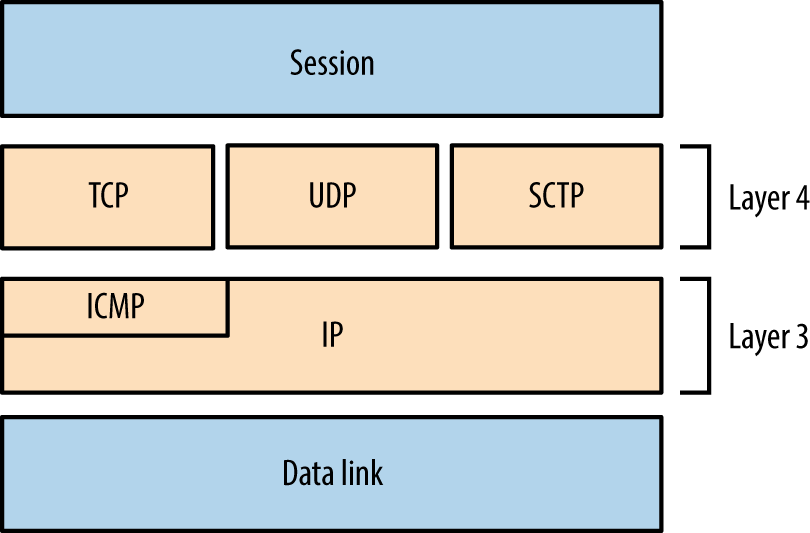
Figure 6-1. Network protocols and respective OSI layers
Initial Network Scanning with Nmap
Available for platforms including Apple OS X, Microsoft Windows, and Linux, Nmap supports IPv4 and IPv6 network scanning via ICMP, TCP, UDP, and SCTP. Now let’s see how to use Nmap to scan an environment.
ICMP
Nmap supports ICMP scanning over both IPv4 and IPv6 to map subnets within larger IP blocks and elicit responses from hosts (depending on configuration). Here are two particularly useful ICMPv4 message types:
- Type 8 (echo request)
- Used by ping and other utilities to identify accessible hosts.
- Type 13 (timestamp request)
- Provides the system time information from the target in decimal format.
IANA maintains comprehensive lists of ICMPv4 and ICMPv6 message types.1 Many useful ICMPv4 types have been deprecated in recent years, including 17 (address mask request) and 37 (domain name request). Within legacy networks these can yield useful information.
ICMPv4 Sweeping with Nmap
Within Nmap, use the -PEPM flag to perform host discovery using ICMPv4 echo, timestamp, and subnet mask requests, as shown in Example 6-1.
Example 6-1. IPv4 network discovery by using Nmap
root@kali:~# nmap -PEPM -sP –vvv -n 10.12.5.0/24

Starting Nmap 6.49BETA4 (https://nmap.org) at 2015-09-07 18:22 EDT
Initiating Ping Scan at 18:22
Scanning 256 hosts [3 ports/host]
Completed Ping Scan at 18:23, 7.24s elapsed (256 total hosts)
Nmap scan report for 10.12.5.0 [host down, received no-response]
Nmap scan report for 10.12.5.1
Host is up, received echo-reply ttl 128 (0.012s latency).
Nmap scan report for 10.12.5.16
Host is up, received echo-reply ttl 128 (0.023s latency).
Nmap scan report for 10.12.5.17
Host is up, received echo-reply ttl 128 (0.027s latency).
Nmap scan report for 10.12.5.18
Host is up, received echo-reply ttl 128 (0.031s latency).
Nmap scan report for 10.12.5.20
Host is up, received echo-reply ttl 128 (0.039s latency).
Nmap scan report for 10.12.5.21
Host is up, received echo-reply ttl 128 (0.043s latency).
Nmap scan report for 10.12.5.22
Host is up, received echo-reply ttl 128 (0.047s latency).
Older versions of Nmap report multiple responses for subnet and broadcast addresses, letting you map subnet allocations and sizes. Unfortunately, version 6.49 does not, and so you must use ping to manually investigate network behavior.
Using broadcast addresses
Within an IP network, the last address octet is reserved as the broadcast address (e.g., 10.10.5.255 within 10.10.5.0/24), which is used to send traffic to all of the hosts within a subnet. Example 6-2 demonstrates the ping command used to send ICMP echo requests to an IPv4 broadcast address, and Example 6-3 shows how an additional subnet (10.12.0.0/24) is revealed via the 255.255.255.255 broadcast address.
Example 6-2. Using ping to identify hosts within a subnet
root@kali:~# ping -b 10.10.5.255
WARNING: pinging broadcast address
PING 10.10.5.255 (10.10.5.255) 56(84) bytes of data.
64 bytes from 10.10.5.79: icmp_seq=1 ttl=64 time=1.01 ms
64 bytes from 10.10.5.10: icmp_seq=1 ttl=64 time=1.79 ms (DUP!)
64 bytes from 10.10.5.13: icmp_seq=1 ttl=64 time=3.67 ms (DUP!)
64 bytes from 10.10.5.11: icmp_seq=1 ttl=64 time=3.67 ms (DUP!)
64 bytes from 10.10.5.12: icmp_seq=1 ttl=64 time=3.67 ms (DUP!)
64 bytes from 10.10.5.99: icmp_seq=1 ttl=64 time=3.67 ms (DUP!)
64 bytes from 10.10.5.14: icmp_seq=1 ttl=64 time=3.67 ms (DUP!)
Example 6-3. Identifying other subnets via ICMP echo broadcast
root@kali:~# ping -b 255.255.255.255
WARNING: pinging broadcast address
PING 255.255.255.255 (255.255.255.255) 56(84) bytes of data.
64 bytes from 10.10.5.79: icmp_seq=1 ttl=64 time=1.28 ms
64 bytes from 10.12.5.251: icmp_seq=1 ttl=63 time=1.28 ms (DUP!)
64 bytes from 10.12.5.239: icmp_seq=1 ttl=63 time=1.28 ms (DUP!)
64 bytes from 10.12.5.240: icmp_seq=1 ttl=63 time=1.28 ms (DUP!)
64 bytes from 10.12.5.201: icmp_seq=1 ttl=63 time=1.28 ms (DUP!)
64 bytes from 10.12.5.248: icmp_seq=1 ttl=63 time=1.84 ms (DUP!)
64 bytes from 10.10.5.10: icmp_seq=1 ttl=64 time=1.85 ms (DUP!)
64 bytes from 10.12.5.242: icmp_seq=1 ttl=63 time=1.85 ms (DUP!)
64 bytes from 10.12.5.235: icmp_seq=1 ttl=63 time=4.73 ms (DUP!)
64 bytes from 10.12.5.246: icmp_seq=1 ttl=63 time=6.02 ms (DUP!)
64 bytes from 10.12.5.244: icmp_seq=1 ttl=63 time=8.19 ms (DUP!)
TCP
Nmap supports many TCP scanning modes, which are particularly useful when performing stealth scans and understanding low-level network configuration. For the purpose of identifying accessible services, the basic TCP SYN (-sS) mode should be used, as demonstrated by Example 6-4.
Example 6-4. Performing an IPv4 TCP SYN scan by using Nmap
root@kali:~# nmap -sS 10.10.5.10

Starting Nmap 6.49BETA4 (https://nmap.org) at 2015-09-07 18:45 EDT
Nmap scan report for 10.10.5.10
Not shown: 933 filtered ports, 60 closed ports
PORT      STATE SERVICE
80/tcp    open  http
135/tcp   open  msrpc
445/tcp   open  microsoft-ds
3389/tcp  open  ms-wbt-server
49152/tcp open  unknown
49153/tcp open  unknown
49154/tcp open  unknown
By default, Nmap will perform host discovery and identify accessible hosts to scan.2 When testing hardened environments, you should use the -Pn flag to force scanning of each address. A slower timing policy (such as -T2) is also useful because an aggressive policy might trigger SYN flood protection and cause packets to be dropped.
Nmap returns a state (open, closed, or filtered) for each port. Figures 6-2 through 6-5 demonstrate SYN probes eliciting four response variants: a SYN/ACK packet (indicating an open port); RST/ACK (denoting closed); no response; or an ICMP type 3 message (implying a filter).
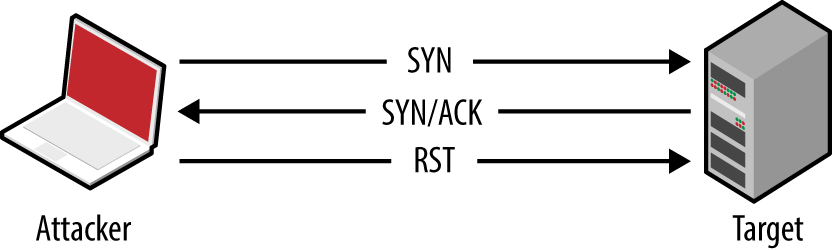
Figure 6-2. Open port behavior
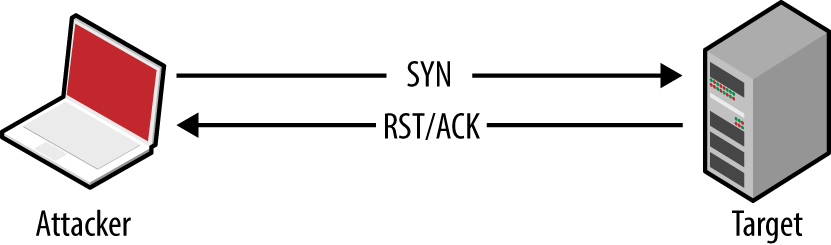
Figure 6-3. Closed port behavior
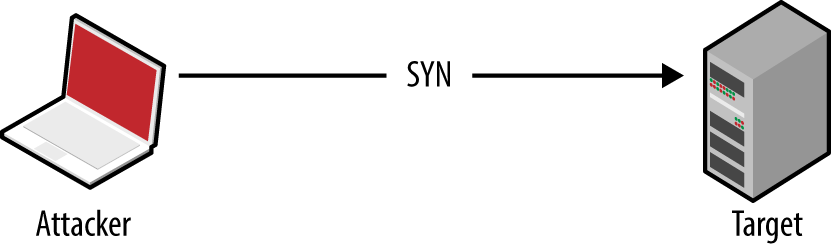
Figure 6-4. Filtered port behavior (no response)
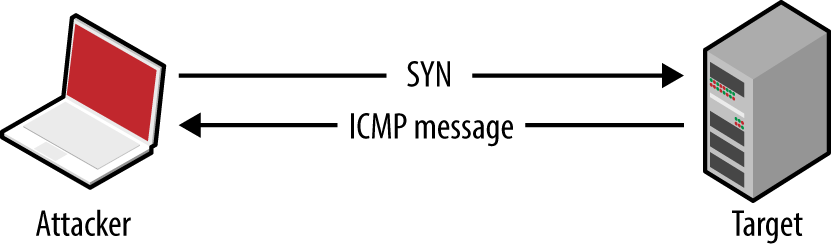
Figure 6-5. Filtered port behavior (ICMP response)
Note
During testing you should scan every TCP port, from 0 to 65,535. For speed reasons, Nmap uses an internal list of common ports by default, introducing a blind spot.
IPv4 firewalls and routers often generate ICMP type 3 (destination unreachable) responses, which provide insight into network configuration. Table 6-1 lists common ICMP type 3 message codes.3
| Code | Description |
|---|---|
| 0 | Network unreachable |
| 1 | Host unreachable |
| 2 | Protocol unreachable |
| 3 | Port unreachable |
| 6 | Destination network unknown |
| 7 | Destination host unknown |
| 9 | Communication administratively prohibited (network) |
| 10 | Communication administratively prohibited (host) |
| 13 | Communication administratively prohibited (general) |
UDP
The connectionless nature of UDP means that services are identified either through negative scanning (inferring open ports based on ICMP unreachable responses of those which are closed), or through use of correctly formatted datagrams to elicit a response from a service (e.g., DNS, DHCP, TFTP, and others, as listed in nmap-payloads4), known as payload scanning.
ICMP is an unreliable indicator because security-conscious organizations tend to filter messages, and most operating systems rate-limit ICMP responses by default.
Nmap uses a combination of both negative and payload scanning (versus just a single mode) via the -sU flag. This often clouds output, as demonstrated by Example 6-5, in which both open and open|filtered states are returned.
Example 6-5. Performing a UDP scan using Nmap
root@kali:~# nmap -Pn -sU -open -F -vvv -n 10.3.0.1

Starting Nmap 6.46 (http://nmap.org) at 2014-10-27 02:37 UTC
Initiating UDP Scan at 02:37
Scanning 10.3.0.1 [100 ports]
Discovered open port 137/udp on 10.3.0.1
Discovered open port 123/udp on 10.3.0.1
Completed UDP Scan at 02:38, 13.25s elapsed (100 total ports)
Nmap scan report for 10.3.0.1
Scanned at 2014-10-27 02:37:49 UTC for 13s
PORT      STATE         SERVICE
7/udp     open|filtered echo
9/udp     open|filtered discard
17/udp    open|filtered qotd
19/udp    open|filtered chargen
49/udp    open|filtered tacacs
53/udp    open|filtered domain
67/udp    open|filtered dhcps
68/udp    open|filtered dhcpc
69/udp    open|filtered tftp
80/udp    open|filtered http
88/udp    open|filtered kerberos-sec
111/udp   open|filtered rpcbind
120/udp   open|filtered cfdptkt
123/udp   open          ntp
135/udp   open|filtered msrpc
136/udp   open|filtered profile
137/udp   open          netbios-ns
138/udp   open|filtered netbios-dgm
139/udp   open|filtered netbios-ssn
158/udp   open|filtered pcmail-srv
161/udp   open|filtered snmp
The verbose output shows that ports 123 (NTP) and 137 (the NetBIOS name service) are open based on responses to crafted payloads. The other ports are listed based on unreliable ICMP feedback.
Using the -sUV flag, you can actively probe each UDP port and see which respond. Running Nmap in this fashion is, however, very slow against ambiguous open|filtered ports, and impractical when testing large networks.
Example 6-6 demonstrates using Nmap to scan five UDP ports of a single host, taking 114 seconds to complete. Deeper testing reveals that port 53 is indeed listening.
Example 6-6. Further probing of five UDP ports
root@kali:~# nmap -Pn -sUV -open -p53,123,135,137,161 -vvv -n 10.3.0.1

Starting Nmap 6.46 (http://nmap.org) at 2014-10-27 02:53 UTC
NSE: Loaded 29 scripts for scanning.
Initiating UDP Scan at 02:53
Scanning 10.3.0.1 [5 ports]
Discovered open port 123/udp on 10.3.0.1
Discovered open port 137/udp on 10.3.0.1
Stats: 0:00:09 elapsed; 0 hosts completed (1 up), 1 undergoing UDP Scan
UDP Scan Timing: About 99.99% done; ETC: 02:53 (0:00:00 remaining)
Completed UDP Scan at 02:53, 9.08s elapsed (5 total ports)
Initiating Service scan at 02:53
Scanning 5 services on 10.3.0.1
Discovered open port 53/udp on 10.3.0.1
Discovered open|filtered port 53/udp on 10.3.0.1 is actually open
Completed Service scan at 02:55, 75.06s elapsed (5 services on 1 host)
NSE: Script scanning 10.3.0.1.
NSE: Starting runlevel 1 (of 1) scan.
Initiating NSE at 02:55
Completed NSE at 02:55, 30.02s elapsed
Nmap scan report for 10.3.0.1
Scanned at 2014-10-27 02:53:40 UTC for 114s
PORT    STATE         SERVICE    VERSION
53/udp  open          domain     dnsmasq 2.50
123/udp open          ntp        NTP v4
135/udp open|filtered msrpc
137/udp open          netbios-ns Samba nmbd (workgroup: UCOPIA)
161/udp open|filtered snmp
Service Info: Host: CONTROLLER
An alternative tool that you can use to perform UDP payload scanning is Unicornscan.5 Against the 10.3.0.1 candidate, results are returned almost instantly:
root@kali:~# unicornscan -mU 10.3.0.1
UDP open          domain[   53] from 10.3.0.1  ttl 128
UDP open      netbios-ns[  137] from 10.3.0.1  ttl 128
UDP scanning results vary by tool selection and network conditions. Nmap provides a comprehensive option with -sUV, but testing of a single host using the -F option (scanning 100 ports) can take more than 10 minutes to complete.
SCTP
SCTP sits alongside TCP and UDP, as shown in Figure 6-1. Intended to provide transport of telephony data over IP, the protocol duplicates many of the reliability features of Signaling System 7 (SS7), and underpins a larger protocol family known as SIGTRAN. SCTP is supported by operating systems including IBM AIX, Oracle Solaris, HP-UX, Linux, Cisco IOS, and VxWorks.
Packet format
Each SCTP packet contains a header and associated chunks, as demonstrated by Figure 6-6. Source and destination port values are 16-bit (running from 0 to 65,535), and 8-bit chunk type values are listed in Table 6-2. Depending on the type, the chunk value field varies.
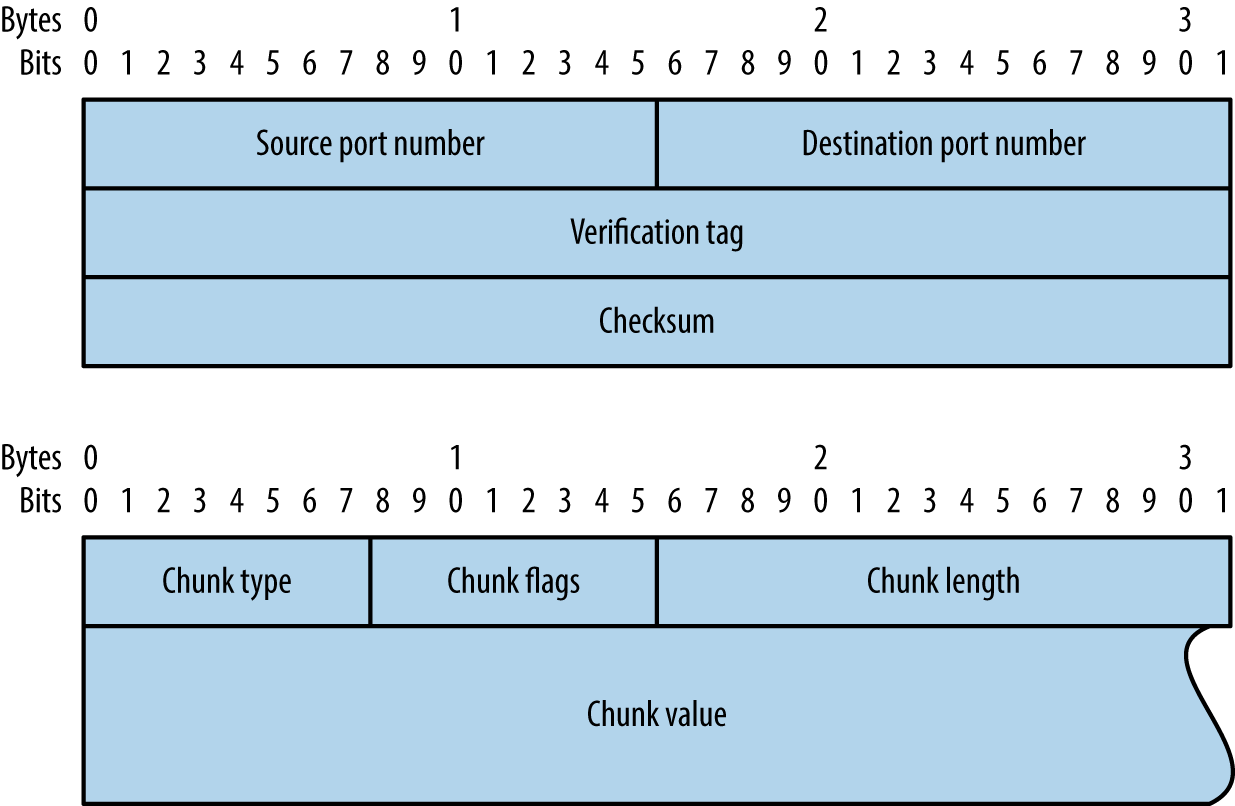
Figure 6-6. SCTP packet format
| ID | Value | Description |
|---|---|---|
| 0 | DATA | Payload data |
| 1 | INIT | Initiation request |
| 2 | INIT ACK | Initiation acknowledgment |
| 3 | SACK | Selective acknowledgment |
| 4 | HEARTBEAT | Heartbeat request |
| 5 | HEARTBEAT ACK | Heartbeat acknowledgment |
| 6 | ABORT | Abort request |
| 7 | SHUTDOWN | Shutdown request |
| 8 | SHUTDOWN ACK | Shutdown acknowledgment |
| 9 | ERROR | Operation error |
| 10 | COOKIE ECHO | State cookie echo |
| 11 | COOKIE ACK | Cookie acknowledgment |
| 12 | ECNE | Explicit congestion notification echo |
| 13 | CWR | Congestion window reduced |
| 14 | SHUTDOWN COMPLETE | Shutdown complete |
Nmap support
You can find accessible SCTP services by scanning with two packet types:
- INIT
- Similar to TCP SYN scanning, Nmap (using the
-sYflag) sends SCTP INIT chunks to each port. An INIT ACK response indicates the port is open, whereas an ABORT chunk indicates it is closed. - COOKIE ECHO
- Implementations should drop packets containing COOKIE ECHO chunks sent to open ports, and send an ABORT chunk if the port is closed. This scan type is stealthy but cannot differentiate between open and filtered ports (showing only those that are closed). Nmap supports the scanning tactic using the
-sZflag.
Example 6-7 demonstrates an Nmap SCTP scan over IPv6. Table 6-3 lists common SCTP services. Upon identifying valid services, use sctpscan6 to manually investigate (using the -t flag to bridge a TCP socket to a particular SCTP service).
Example 6-7. Performing an Nmap SCTP INIT scan over IPv6
root@kali:~# nmap -6 -Pn -sY –n -open fe80::217:f2ff:fe0f:5d19

Starting Nmap 6.49BETA4 (https://nmap.org) at 2015-08-27 09:56 EDT
Nmap scan report for fe80::217:f2ff:fe0f:5d19
PORT       STATE SERVICE
2427/sctp  open  mgcp-gateway
2944/sctp  open  megago-h248
2945/sctp  open  h248-binary
| Port | Name | Description | RFC |
|---|---|---|---|
| 1167 | cisco-ipsla | Cisco IP SLA control protocol | 6812 |
| 1812 | radius | RADIUS authentication protocol | 2865 |
| 1813 | radacct | RADIUS accounting protocol | 2866 |
| 2225 | rcip-itu | Resource connection initiation protocol | – |
| 2427 | mgcp-gateway | Media gateway control protocol | 3435 |
| 2904 | m2ua | SS7 MTP level 2 user adaptation | 3331 |
| 2905 | m3ua | SS7 MTP level 3 user adaptation | 4666 |
| 2944 | megaco-h248 | Gateway control protocol (text) | 3525 |
| 2945 | h248-binary | Gateway control protocol (binary) | |
| 3097 | itu-bicc-stc | ITU-T Q.1902.1 and Q.2150.3 | – |
| 3565 | m2pa | SS7 MTP level 2 peer-to-peer adaptation | 4165 |
| 3863 | asap-sctp | Aggregate server access protocol | 5352 |
| 3864 | asap-sctp-tls | Aggregate server access protocol (TLS) | |
| 3868 | diameter | Diameter AAA protocol | 6733 |
| 4739 | ipfix | IP flow information export | 3917 |
| 4740 | ipfixs | IP flow information export (DTLS) | 5153 |
| 5060 | sip | Session initiation protocol | 3261 |
| 5061 | sip-tls | Session initiation protocol (TLS) | |
| 5090 | card | Candidate access router discovery protocol | 4066 |
| 5091 | cxtp | Context transfer protocol | 4067 |
| 5672 | amqp | Advanced message queuing protocola | – |
| 5675 | v5ua | V5.2 user adaptation | 3807 |
| 6704 | frc-hp | ForCES high-priority channel | 5811 |
| 6705 | frc-mp | ForCES medium-priority channel | |
| 6706 | frc-lp | ForCES low-priority channel | |
| 7626 | simco | Simple middlebox configuration | 4540 |
| 8471 | pim-port | PIM over reliable transport | 6559 |
| 9082 | lcs-ap | 3GPP LCS application protocolb | – |
| 9084 | aurora | IBM AURORA performance visualizer | |
| 9900 | iua | ISDN Q.921 user adaptation | 4233 |
| 9901 | enrp-sctp | ENRP server channel | 5353 |
| 9902 | enrp-sctp-tls | ENRP server channel (TLS) | |
| 14001 | sua | SCCP user adaptation | 3868 |
| 20049 | nfsrdma | NFS over RDMA | 5667 |
| 29118 | sgsap | 3GPP SGsAPc | – |
| 29168 | sbcap | 3GPP SBcAPd | |
| 29169 | iuhsctpassoc | UTRAN Iuh interface RANAP user adaptione | |
| 36412 | s1-control | 3GPP S1 control plane | |
| 36422 | x2-control | 3GPP X2 control plane | |
a See http://bit.ly/2aCGi7z. b See http://bit.ly/2aCGsfc. c See http://bit.ly/2aCGtzY. d See http://bit.ly/2aCG948. e See http://bit.ly/2aCHyHG. | |||
A number of these protocols do not correspond to IETF RFC documents, but are described by International Telecommunication Union (ITU) and 3rd Generation Partnership Project (3GPP) standards. For example, ITU-T Q.1902.17 defines the Bearer Independent Call Control (BICC) protocol used by SCTP port 3097 in Table 6-3.
Bringing Everything Together
Detailed assessment involves scanning all 65,536 TCP and SCTP ports for each IP address within scope, along with testing of common UDP ports (to save time). I have yet to find a UDP service running on a nonstandard port during testing, and so running a UDP scan with Nmap’s default services list is sufficient.
IPv4 scanning
For IPv4, my preferred approach is to first run three Nmap scans to identify accessible hosts. You can load a list of target networks into Nmap from a file by using the -iL flag.
nmap –T4 –Pn –n –sS –F –oG tcp.gnmap 192.168.0.0/24
nmap –T4 –Pn –n –sY –F –oG sctp.gnmap 192.168.0.0/24
nmap –T4 –Pn –n –sU –p53,69,111,123,137,161,500,514,520 -oG  udp.gnmap 192.168.0.0/24
These scans generate output with gnmap file extensions. It is important to pay particular attention to the UDP results because they might contain false positives. If the UDP dataset looks noisy (i.e., all the hosts are reporting to have open ports), simply disregard it. When you’re happy with the contents of these files, use grep and awk to generate a refined list of targets, as follows:
grep open *.gnmap | awk '{print $2}' | sort | uniq > targets.txt
You should then feed this list into four subsequent scans:
-
A fast TCP scan of common services
nmap -T4 -Pn -open -sS -A -oA tcp_fast -iL targets.txt
-
A TCP scan of all ports (plus fingerprinting and testing via default NSE scripts)
nmap -T4 -Pn -open -sSVC -A –p0-65535 -oA tcp_full -iL targets.txt
-
An SCTP scan of all ports
nmap -T4 -Pn -open -sY –p0-65535 -oA sctp -iL targets.txt
-
A UDP scan of common services
nmap -T3 -Pn -open –sU -oA udp -iL targets.txt
The -oA flag will generate multiple output files for each scan type, including a gnmap file that you can easily parse, and a full text file that is human-readable.
Note
When running large concurrent scans using Nmap, it is advisable to use a sensible timing policy to avoid saturating your Internet connection. You can also use the screen utility,8 which is found within Kali Linux, Apple OS X, and other platforms, to move the various scanning sessions to the background. This way, they will continue to run if you are disconnected from the server.
These scanning modes do not perform deep analysis of the exposed network services. Vulnerability scanning and in-depth testing is covered later in this chapter, along with use of commercially supported tools.
IPv6 scanning
Chapters 4 and 5 describe IPv6 addresses enumeration. Upon gathering a list of IPv6 network prefixes, identify hosts and services using the same phased approach described for IPv4 (i.e., sweeping for hosts running common network services, and full scanning of that subset). When TCP sweeping large IPv6 networks, I recommend reducing the port list to increase speed, from -F (100 common ports) to -p22,25,53,80,111,139,443.
Upon preparing a list of targets (e.g., targets.txt), run the same scans as before, this time using the -6 flag to scan over IPv6:
nmap -6 -T4 -Pn -open -sS -A -oA ipv6_tcp_fast -iL targets.txt
nmap -6 -T4 -Pn -open -sSVC -A –p0-65535 -oA ipv6_tcp_full -iL targets.txt
nmap -6 -T4 -Pn -open -sY –p0-65535 -oA ipv6_sctp -iL targets.txt
nmap -6 -T3 -Pn -open -sU -oA ipv6_udp -iL targets.txt
Low-Level IP Assessment
By crafting probe packets and reviewing the responses, you can do the following:
-
Fingerprint the operating system of a target host or network device
-
Identify hosts with IP stack implementation flaws
-
Enumerate filtering devices and reverse engineer their policy
-
Reveal the internal IP addresses of misconfigured systems
You can manipulate IP and TCP header values by using Hping3,9 Scapy, Nmap, and Firewalk.10 Individual values set within IP and TCP packet headers are shown in Figures 6-7 and 6-8. By manipulating these fields and sampling responses to particular probes, you can reverse engineer the underlying network configuration.
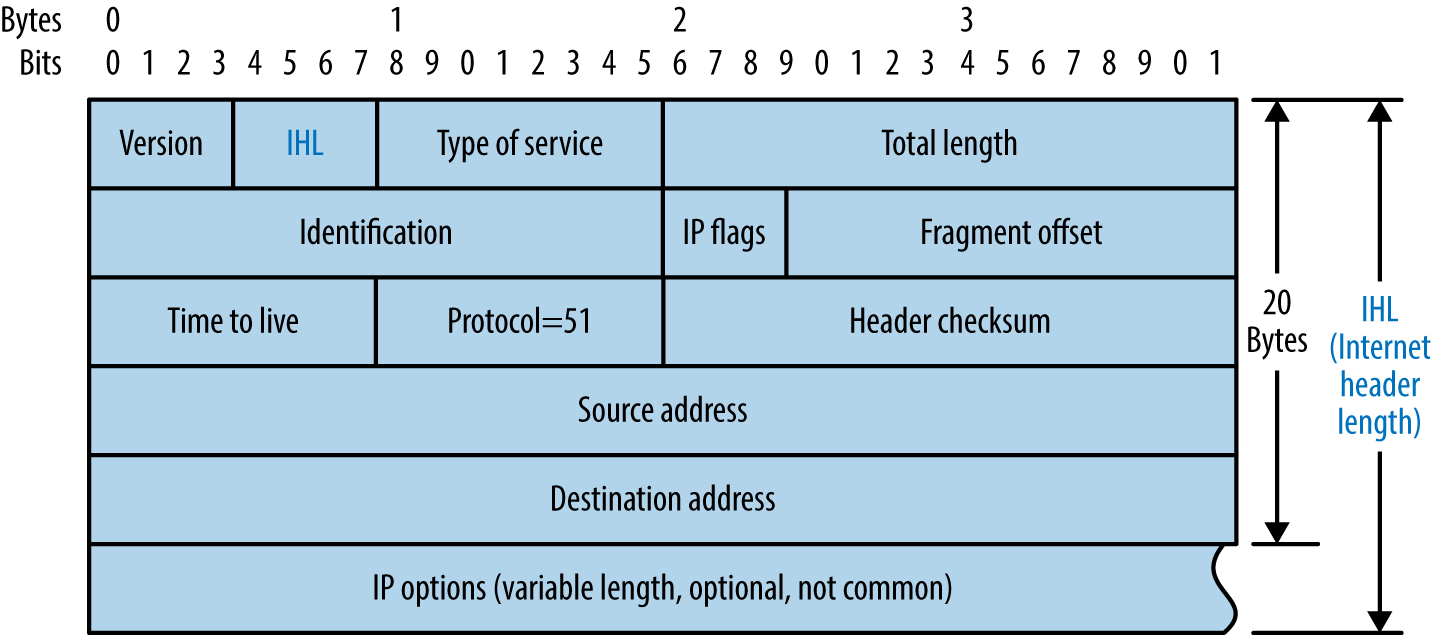
Figure 6-7. IPv4 header format
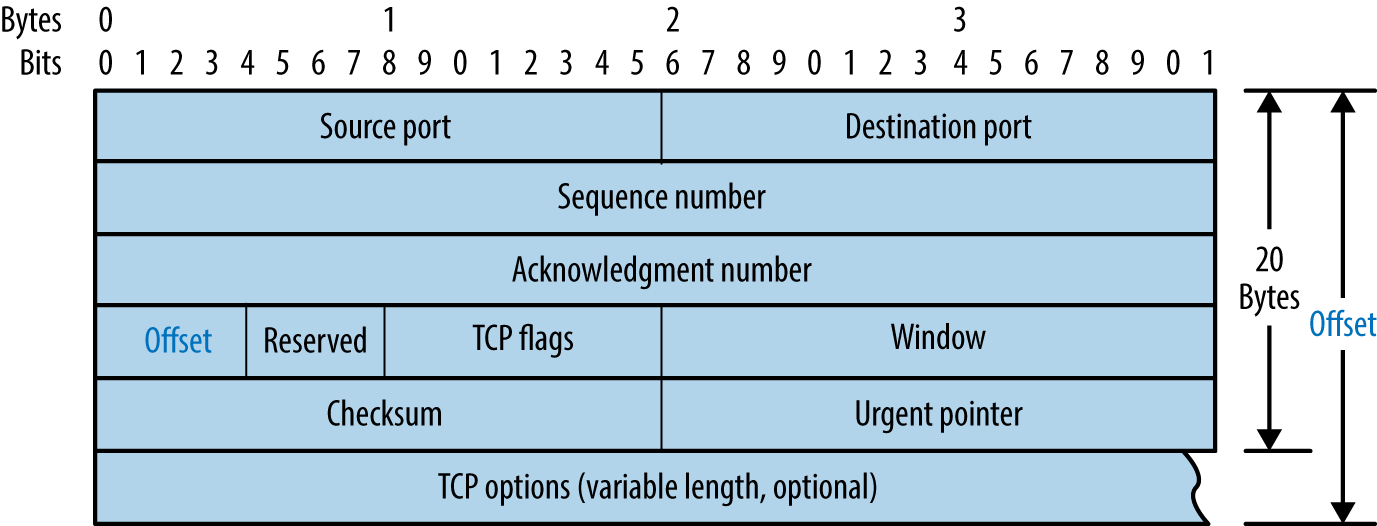
Figure 6-8. TCP header format
Crafting Arbitrary Packets
Table 6-4 lists common Hping3 arguments used to craft TCP packets from the command line. The utility also supports raw IP, UDP, and scanning modes. Power users should consider Scapy because it offers increased flexibility.11
| Argument | Description |
|---|---|
-c <number> |
Send a particular number of packets |
-t <hops> |
The packet TTL (default is 64) |
-s <port> |
Source TCP port (random by default) |
-d <port> |
Destination TCP port |
-S |
Set the TCP SYN flag |
-F |
Set the TCP FIN flag |
-A |
Set the TCP ACK flag |
Example 6-8 demonstrates Hping3 used to perform a TCP SYN port scan of common ports. For full details of the modes supported, review the documentation.12
Example 6-8. Performing a TCP SYN scan by using Hping3
root@kali:~# hping3 --scan known -S 192.185.5.1
Scanning 192.185.5.1 (192.185.5.1), port known
337 ports to scan, use -V to see all the replies
+----+-----------+---------+---+-----+-----+-----+
|port| serv name |  flags  |ttl| id  | win | len |
+----+-----------+---------+---+-----+-----+-----+
   21 ftp        : .S..A... 128  3987  8192    46
   25 smtp       : .S..A... 128  4755  8192    46
   53 domain     : .S..A... 128  6291  8192    46
   80 http       : .S..A... 128  8595  8192    46
  110 pop3       : .S..A... 128 10643  8192    46
  443 https      : .S..A... 128 17299  8192    46
  143 imap2      : .S..A... 128 30867  8192    46
  465 ssmtp      : .S..A... 128 33427  8192    46
  587 submission : .S..A... 128 39315  8192    46
  995 pop3s      : .S..A... 128 45715  8192    46
Hping3 TCP ACK (-A) and FIN (-F) probes used in conjunction with scanning mode can reveal quirks in IP stack implementations. By running a scan with the verbose flag (-V) and reviewing the responses to ACK and FIN probes, you can sometimes see variance in TTL and WINDOW values, indicating open ports. Uriel Maimon first described this behavior in Phrack magazine.13
Hping3 examples
To send three TCP SYN probes to port 80 of 10.3.0.1, use the following:
root@kali:~# hping3 -c 3 -S -p 80 10.3.0.1
HPING 10.3.0.1 (eth0 10.3.0.1): S set, 40 headers + 0 data bytes
ip=10.3.0.1 ttl=128 id=18871 sport=80 flags=SA seq=0 win=64240 rtt=3.6 ms
ip=10.3.0.1 ttl=128 id=18872 sport=80 flags=SA seq=1 win=64240 rtt=3.6 ms
ip=10.3.0.1 ttl=128 id=18873 sport=80 flags=SA seq=2 win=64240 rtt=3.6 ms
The IP ID values returned are sequential, and the flags received are SYN/ACK, meaning the port is open. A closed port sends packets with RA flags (RST/ACK) set, as follows:
root@kali:~# hping3 -c 3 -S -p 81 10.3.0.1
HPING 10.3.0.1 (eth0 10.3.0.1): S set, 40 headers + 0 data bytes
ip=10.3.0.1 ttl=128 id=19822 sport=81 flags=RA seq=0 win=64240 rtt=3.9 ms
ip=10.3.0.1 ttl=128 id=19823 sport=81 flags=RA seq=1 win=64240 rtt=1.8 ms
ip=10.3.0.1 ttl=128 id=19824 sport=81 flags=RA seq=2 win=64240 rtt=1.9 ms
Next, we find that TCP port 23 is blocked by an ACL:
root@kali:~# hping3 -c 3 -S -p 23 10.3.0.1
HPING 10.3.0.1 (eth0 10.3.0.1): S set, 40 headers + 0 data bytes
ICMP unreachable type 13 from 192.168.0.254
ICMP unreachable type 13 from 192.168.0.254
ICMP unreachable type 13 from 192.168.0.254
And probes to TCP port 3306 are dropped in transit:
root@kali:~# hping3 -c 3 -S -p 3306 10.3.0.1
HPING 10.3.0.1 (eth0 10.3.0.1): S set, 40 headers + 0 data bytes
TCP/IP Stack Fingerprinting
Operating systems prepare packets using different IP TTL and WINDOW values, as summarized by Table 6-5. The TTL of a packet decreases with each hop, and so this value will decrease during testing, based on your distance from the target host.
| Operating system | IP TTL (initial) | TCP WINDOW |
|---|---|---|
| Linux | 64 | 5840 |
| FreeBSD | 64 | 65535 |
| Windows XP | 128 | 65535 |
| Windows 7 and later | 128 | 8192 |
| Cisco IOS | 255 | 4128 |
IP ID Analysis
Many TCP/IP implementations set incremental IP ID values in outbound packets. You can take advantage of this behavior to identify individual hosts behind firewalls and measure network activity. If the IP ID value of each packet received from a host is incremental, it can also be used as an unwitting third party (known as a zombie) to facilitate stealth port scanning using Nmap.
IP ID sampling with Scapy
Scapy can sample and plot IP ID values. Example 6-9 demonstrates setup (involving installation of python-gnuplot and gnuplot-x11 packages) and use of the utility to sample values from www.yahoo.fr. Figure 6-9 shows the resulting graph, by which we identify individual hosts behind a load balancer. Philippe Biondi and Arnaud Ebalard’s presentation “Scapy and IPv6 networking”14 describes other useful sampling strategies (see slide 45 onward).
Example 6-9. Configuring gnuplot and running Scapy
root@kali:~# apt-get install python-gnuplot gnuplot-x11
root@kali:~# scapy
Welcome to Scapy (2.2.0)
>>> a,b=sr(IP(dst="www.yahoo.fr")/TCP(sport=[RandShort()]*1000))
Begin emission:
Finished to send 100 packets.
Received 100 packets, got 100 answers, remaining 0 packets
>>> a.plot(lambda(s,r):r.id)
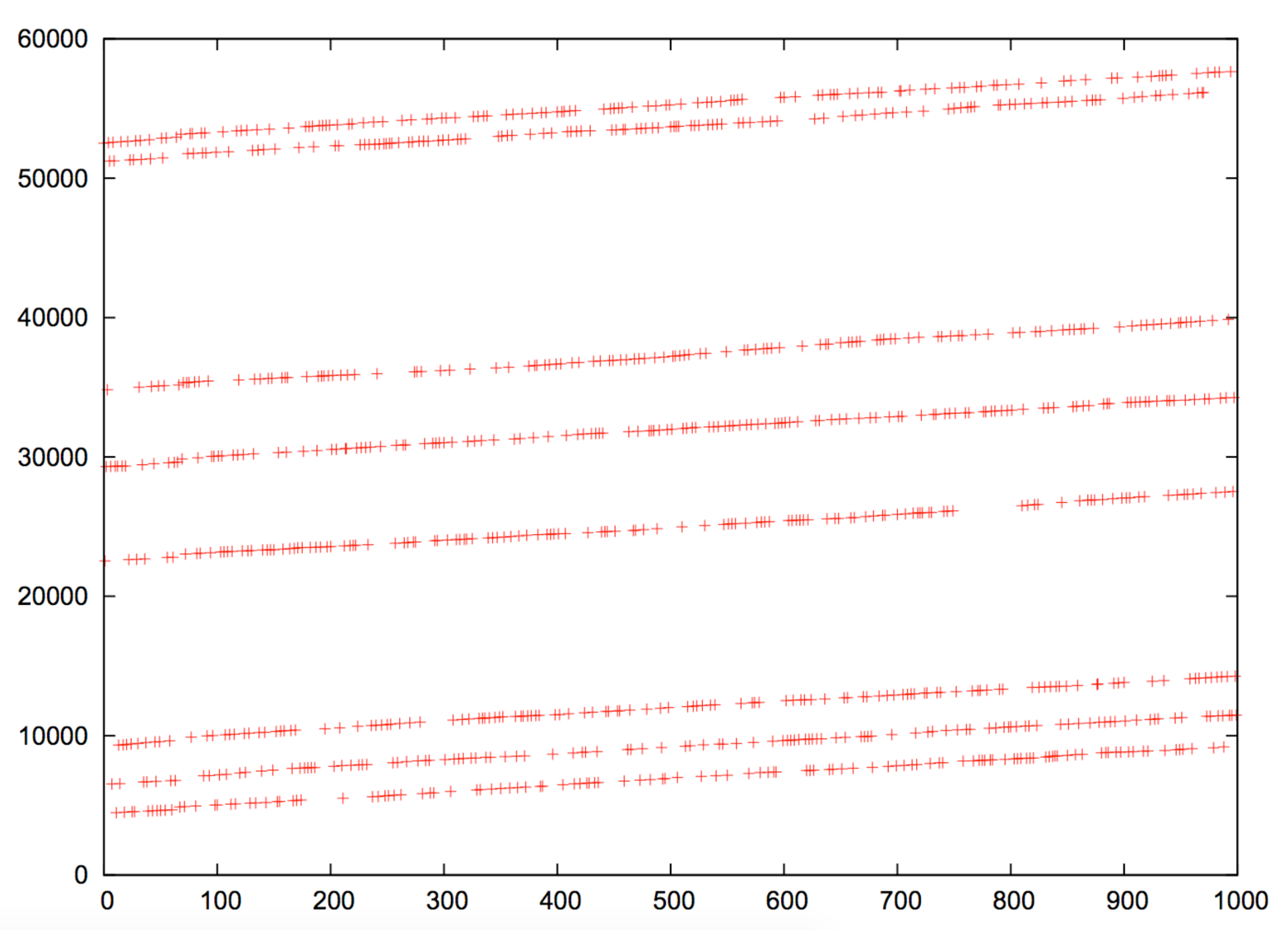
Figure 6-9. IP ID value plot for www.yahoo.fr
IP ID sampling with Nmap
Example 6-10 demonstrates Nmap used with the -O flag to test both TCP sequence number and IP ID generation. Within this mode, the TCP timestamp option15 is used to calculate host uptime,16 which is particularly useful in identifying distinct systems.
Example 6-10. Nmap TCP and IP ID sequence generation testing
root@kali:~# nmap -F -sS -O -open -v -n 10.3.0.1

Starting Nmap 6.46 (http://nmap.org) at 2014-10-27 04:36 UTC
Initiating Ping Scan at 04:36
Scanning 10.3.0.1 [4 ports]
Completed Ping Scan at 04:36, 0.00s elapsed (1 total hosts)
Initiating SYN Stealth Scan at 04:36
Scanning 10.3.0.1 [100 ports]
Discovered open port 80/tcp on 10.3.0.1
Discovered open port 443/tcp on 10.3.0.1
Discovered open port 8081/tcp on 10.3.0.1
Completed SYN Stealth Scan at 04:36, 1.83s elapsed (100 total ports)
Initiating OS detection (try #1) against 10.3.0.1
Nmap scan report for 10.3.0.1
Not shown: 96 filtered ports, 1 closed port
PORT     STATE SERVICE
80/tcp   open  http
443/tcp  open  https
8081/tcp open  blackice-icecap
Device type: general purpose
Running: Linux 2.4.X|3.X
OS CPE: cpe:/o:linux:linux_kernel:2.4 cpe:/o:linux:linux_kernel:3
OS details: DD-WRT v24-sp2 (Linux 2.4.37), Linux 3.2
Uptime guess: 3.014 days (since Fri Oct 24 04:01:34 2014)
TCP Sequence Prediction: Difficulty=259 (Good luck!)
IP ID Sequence Generation: Incremental
Stealth IP ID scanning with Nmap
Upon identifying suitable zombie candidates returning incremental IP ID values, you can undertake IP ID header scanning via Nmap. The process uses the zombie host as an indicator, as shown in Figure 6-10. One benefit of this scanning mode is that you can map ACLs from a certain perspective (e.g., identifying routers at branch offices that produce sequential IP ID values, and using them as zombies).
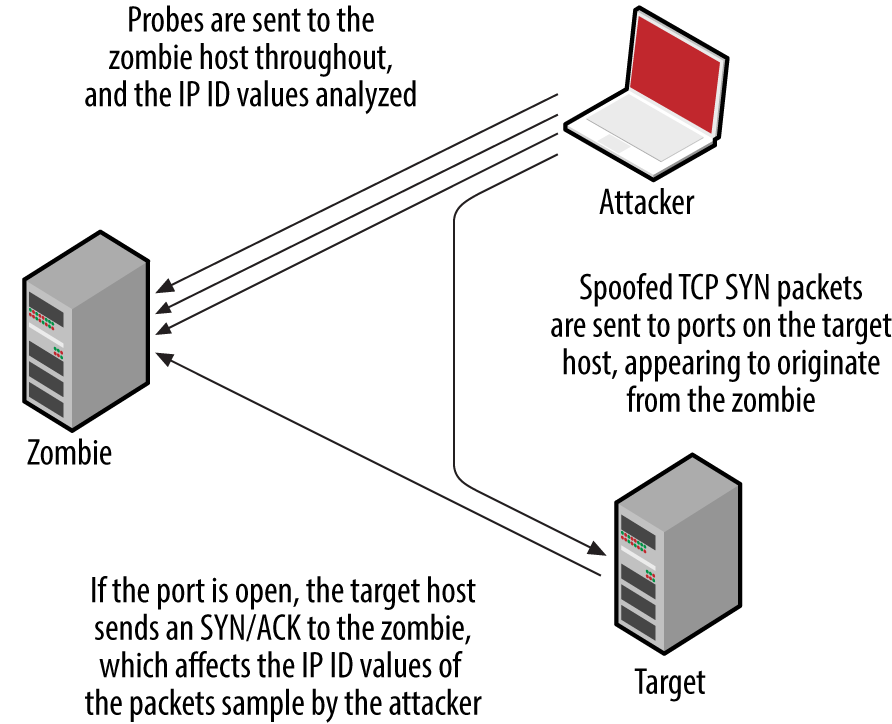
Figure 6-10. IP ID header scanning parties
Nmap supports IP ID header scanning via the following option:
-sI <zombie host[:probe port]>
By default, Nmap will send heartbeat packets to TCP port 80 of the zombie host. It is particularly important to use the -Pn flag to suppress probing, so that all packets are sent from the address of the zombie to the target.
Manipulating TTL to Reverse Engineer ACLs
Nmap identifies filters based on network responses or lack thereof. Deeper assessment is undertaken with Firewalk, which manipulates the TTL field of packets to scan a target from a certain distance (i.e., one hop beyond a given gateway).
Example 6-11 demonstrates Firewalk testing six TCP ports through a specific gateway (gw.test.org) to a destination of www.test.org. The functionality has also been ported to Nmap, via the firewalk NSE script.
Example 6-11. Running Firewalk
$ firewalk -n -S21,22,23,25,53,80 -pTCP gw.test.org www.test.org
Firewalk 5.0 [gateway ACL scanner]
Firewalk state initialization completed successfully.
TCP-based scan.
Ramping phase source port: 53, destination port: 33434
Hotfoot through 217.41.132.201 using 217.41.132.161 as a metric.
Ramping Phase:
 1 (TTL  1): expired [192.168.102.254]
 2 (TTL  2): expired [212.38.177.41]
 3 (TTL  3): expired [217.41.132.201]
Binding host reached.
Scan bound at 4 hops.
Scanning Phase:
port  21: A! open (port listen) [217.41.132.161]
port  22: A! open (port not listen) [217.41.132.161]
port  23: A! open (port listen) [217.41.132.161]
port  25: A! open (port not listen) [217.41.132.161]
port  53: A! open (port not listen) [217.41.132.161]
port  80: A! open (port not listen) [217.41.132.161]
Firewalk calculates the distance to the gateway and sends packets destined for the target with a TTL that is one hop beyond. Based on the responses, the tool is able to map the filtering policy of the gateway. For example:
-
If an ICMP type 11, code 0 (TTL exceeded in transit) message is received, the packet passed through and a response was later generated.
-
If the packet is dropped without comment, it was probably done at the gateway.
-
If an ICMP type 3, code 13 (communication administratively prohibited) message is received, a filter such as a router ACL is being used.
If the packet is dropped without comment, this doesn’t necessarily mean that traffic to the target host and port is filtered. Some firewalls know that the packet is due to expire and will send an expired message whether the policy allows the packet or not.
Firewalk works in true IP-routed environments, as opposed to those using network address translation (NAT). Dave Goldsmith and Mike Schiffman’s paper describes the testing approach in detail.17
Revealing Internal IP Addresses
Misconfigured routers, firewalls, and network devices sometimes respond to network probes using nonpublic source addresses. Example 6-12 demonstrates tcpdump used to identify packets received from private addresses during testing. In this case, the eth2 interface in Kali Linux is addressable from the public Internet.
Example 6-12. Passively identifying nonpublic addresses
root@kali:~# tcpdump –nt -i eth2 src net 10 or 172.16/12 or 192.168/16
tcpdump: verbose output suppressed, use -v or -vv for full protocol decode
listening on eth2, link-type EN10MB (Ethernet), capture size 65535 bytes
IP 10.10.0.1 > 185.22.224.18: ICMP echo reply, id 25804, seq 1582, length 64
IP 10.10.0.2 > 185.22.224.18: ICMP echo reply, id 25804, seq 1586, length 64
Warning
Whenever possible, avoid scanning from a network using NAT because behavior of the gateway can skew results. For the best results online, perform scanning from a host that is able to route IP traffic directly to and from the Internet (i.e., not behind a firewall or router performing address translation).
Vulnerability Scanning with NSE
Within Nmap, NSE provides support for a number of tests against particular services. Table 6-6 lists the different NSE script categories.
| Category | Notes |
|---|---|
auth |
These scripts perform authentication bypass and anonymous querying of services; brute-force password grinding scripts aren’t included in this category |
broadcast |
Use LAN broadcasting to identify hosts |
brute |
Brute-force password grinding scripts run against exposed network services supporting authentication |
default |
Default NSE scripts; run using the -sC or -A flags; this category includes intrusive scripts and so should be run only with permission |
discovery |
Active discovery of information from the target environment, through querying open sources and performing information gathering tests against exposed network services |
dos |
Denial of service scripts that might impact availability |
exploit |
Scripts that exploit particular vulnerabilities |
external |
Scripts that send data to a third-party API or resource (i.e., WHOIS) |
fuzzer |
Scripts that send randomized data to services |
intrusive |
These scripts can induce a crash, affect availability, or create content |
malware |
Identify malware using network indicators |
safe |
Scripts that aren’t designed to crash services or impact performance |
vuln |
Scripts that flag particular vulnerabilities |
Example 6-13 demonstrates default NSE scripts executed (via -sSC) against particular services running on 192.168.10.10.
Example 6-13. Running default NSE scripts within Nmap
root@kali:~# nmap -Pn -sSC -p53,143,3306 192.168.10.10

Starting Nmap 6.46 (http://nmap.org) at 2014-10-27 04:52 UTC
Nmap scan report for 192.168.10.10
PORT     STATE SERVICE
53/tcp   open  domain
| dns-nsid:
|_  bind.version: 9.8.2rc1-RedHat-9.8.2-0.23.rc1.el6_5.1
143/tcp  open  imap
|_imap-capabilities: LOGIN-REFERRALS capabilities ENABLE post-login STARTTLS Pre-login LITERAL+
|                    IMAP4rev1 NAMESPACE OK ID AUTH=PLAIN SASL-IR listed IDLE have more
|                    AUTH=LOGINA0001
3306/tcp open  mysql
| mysql-info:
|   Protocol: 53
|   Version: .5.40-36.1
|   Thread ID: 12772034
|   Capabilities flags: 65535
|   Some Capabilities: Speaks41ProtocolNew, ODBCClient, Support41Auth, LongPassword, Speaks41
|                       ProtocolOld, LongColumnFlag, SupportsTransactions, InteractiveClient,
|                       SupportsLoadDataLocal, IgnoreSpaceBeforeParenthesis, FoundRows, Ignore
|                       Sigpipes, SwitchToSSLAfterHandshake, ConnectWithDatabase, DontAllow
|                       DatabaseTableColumn, SupportsCompression
|   Status: Autocommit
|_  Salt: d{]@e[zu\LJk^sJUOjIn
Many useful scripts are not included in the default category and won’t fire unless explicitly invoked. Particular scripts are executed by using --script (along with arguments passed via --script-args). Using the --script-help argument, you can review individual scripts, as demonstrated in Example 6-14 (showing AFP scripts within the discovery category).
Example 6-14. Listing NSE scripts from the command line
root@kali:~# nmap --script-help "*afp* and discovery"

Starting Nmap 6.46 (http://nmap.org) at 2014-10-27 05:00 UTC

afp-ls
Categories: discovery safe
http://nmap.org/nsedoc/scripts/afp-ls.html
  Attempts to get useful information about files from AFP volumes.
  The output is intended to resemble the output of <code>ls</code>.

afp-serverinfo
Categories: default discovery safe
http://nmap.org/nsedoc/scripts/afp-serverinfo.html
  Shows AFP server information. This information includes the server's
  hostname, IPv4 and IPv6 addresses, and hardware type (for example
  <code>Macmini</code> or <code>MacBookPro</code>).

afp-showmount
Categories: discovery safe
http://nmap.org/nsedoc/scripts/afp-showmount.html
  Shows AFP shares and ACLs.
Bulk Vulnerability Scanning
NSE functionality is somewhat limited when testing large heterogeneous environments. Security professionals often rely on feature-rich commercially supported tools to perform deep automated assessment of IP networks. Four popular scanning utilities are as follows:
These tools perform host discovery, port scanning, and exposed service assessment over both IPv4 and IPv6. OpenVAS is free to use and included within Kali Linux, and tutorials online detail the setup and use of the scanner.18
Operation of bulk scanning utilities introduces two challenges:
-
Default host discovery and scanning policies introduce gaps in coverage
-
Output often contains false positives and data that has no practical bearing
For the best coverage, I recommend using both Nmap (used to perform initial network scanning, and bulk testing via NSE) and scanning utilities running in a comprehensive mode (scanning 65,536 ports, common UDP services, and so on). Most importantly, comparing output from the two processes will let you identify any gaps arising from the scanning configuration and host discovery settings.
With regard to the signal-to-noise ratio in bulk scanning output, I recommend exporting the material in CSV or XML format and parsing it. For example, Qualys and other tools provide CVSS19 scores for each reported issue; this makes it possible for you to disregard findings that have low impact.
IDS and IPS Evasion
Security-conscious organizations use IDS and IPS technologies to passively monitor and actively block suspicious network traffic. You can adopt three particular tactics at Layers 3 and 4 to interfere with, or bypass detection:
-
Inserting data that is seen by a sensor but disregarded by the destination host
-
Fragmenting packets so that a sensor disregards them (but are later reassembled)
-
Modifying packet data (e.g., appending data and setting particular flags)
The SniffJoke utility20 found within Kali Linux supports the first two approaches via plug-ins that define how egress traffic is manipulated. Depending on network configuration and the OS of the destination host, you can adopt different tactics. Nmap’s evasion features21 include fragmentation and modification of packet data, applied to mask port scanning (a favorite being --data-length, which appends data to each packet, fooling signature-based detection systems). A third tool worth consideration is Stonesoft Evader,22 which can bypass detection by Palo Alto Networks appliances by fragmenting and modifying egress packets.
TTL Manipulation
Consider Figure 6-11. The target host is six hops away from the source, and an IDS sensor is deployed between hops three and four. By sending packets with a TTL that expires before the destination, an adversary can insert data into the network flow (from the perspective of the sensor). A second technique is to send material to the destination that is disregarded, but parsed by the sensor (or vice versa)—achieved through fragmentation and segment overlapping. The underlying problem is that the sensor does not have enough context to correctly perform network flow reassembly.
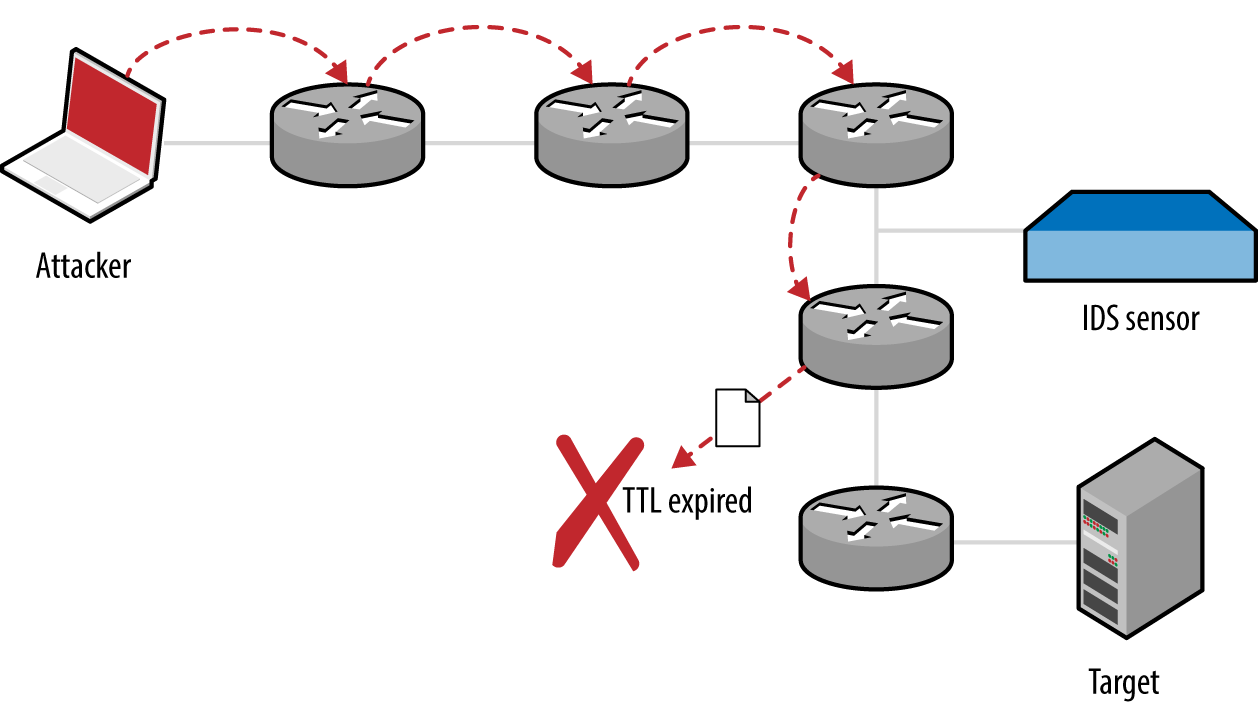
Figure 6-11. An attacker, IDS sensor, and target host
Data Insertion and Scrambling with SniffJoke
Within SniffJoke, data manipulation and insertion attacks are known as hacks and scrambles, which are implemented as plug-ins, as described by the project documentation.23
Examples of hacks include inserting a fake payload (causing the sensor to parse session data that is not processed by the destination), providing false sequencing information (causing the sensor to lose state and parse erroneous data), and injection of fake signaling information (via insertion of FIN, RST, or SYN packets that are disregarded by the destination, but cause the sensor to believe the session has ended or a new one established).
Packets can be malformed and fragmented in a number of ways—the trick is to adopt an approach where packets are processed by the sensor and disregarded by the destination host, or vice versa. Many of these approaches depend on the IP stack implementation of the sensor and destination host (through identifying a mismatch and abusing it for gain). Scrambling tactics adopted by SniffJoke focus on generating packets that are disregarded by the destination host, as follows:
- Setting bad checksums of packets
- Sensors in high-throughput environments often do not calculate packet checksums for performance reasons. If this is the case, malicious content is parsed by the sensor but disregarded upon receipt by the destination host.
- Use of uncommon IP and TCP options
- A sensor might disregard packets with certain flags and options set within IP and TCP headers, whereas the destination host accepts the packet upon receipt.
One important topic that is not highlighted within the SniffJoke documentation is that of packet fragmentation and segment overlapping. Attackers can use these tactics to evade and bypass IDS and IPS mechanisms because fragmented packets might be reassembled differently by the sensor than by the destination host.24
Configuring and Running SniffJoke
If you are able to place a crafted PHP script onto a web server protected by a given IDS or IDP mechanism, you can use sniffjoke-autotest to identify effective evasion techniques and create a series of local configuration files.
The PHP script is as follows, as found on the sniffjoke-autotest GitHub page:25
<?php
  if(isset($_POST['sparedata'])) {
    for($x = 0; $x < strlen($_POST['sparedata']); $x++)
    {
      if( is_numeric($_POST['sparedata'][$x]) )
        continue;
      echo "bad value in $x offset";
      exit;
    }
    echo $_POST['sparedata'];
  }
?>
Upon placing the script on a web server, run sniffjoke-autotest:
root@kali:~# sniffjoke-autotest -l home -d /usr/var/sniffjoke/ -s \
http://www.example.org/test.php -a 192.168.0.10
The utility will create a configuration (known as a location, using the label home in this case) upon sending requests to http://www.example.org/test.php (with an IP of 192.168.0.10). After it is executed, the SniffJoke home directory (/usr/var/sniffjoke/home/ in Kali Linux) will contain a number of configuration files, as listed in Table 6-7.
| Filename | Description |
|---|---|
| ipblacklist.conf | Contains destination IP addresses to be ignored |
| iptcp-options.conf | Contains the working IP and TCP option combinations |
| ipwhitelist.conf | Lists the destination IP addresses to be covered by SniffJoke |
| plugins-enabled.conf | Lists the working plug-ins and scrambling combinations |
| port-aggressivity.conf | Defines how often packets are injected into particular streams |
| sniffjoke-service.conf | Configuration file for the SniffJoke service |
Edit the configuration files to define the IP addresses and network services within scope for evasion. When you are satisfied with the configuration, run SniffJoke using the particular location label (home in this case):
root@kali:~# sniffjoke --location home
The program runs in the background and updates the default gateway so that all packets are routed through it for manipulation. Once executed, the sniffjokectl utility is used to interact with the service interface, as follows:
Usage: sniffjokectl [OPTIONS] [COMMANDS]
 --address <ip>[:port]  specify administration IP address
 [default: 127.0.0.1:8844]
 --version        show sniffjoke version
 --timeout        set milliseconds timeout when contacting SniffJoke service [default: 500]
 --help            show this help

when sniffjoke is running, you should send commands with a command line argument:
 start      start sniffjoke hijacking/injection
 stop       pause sniffjoke
 quit       quit sniffjoke
 saveconf   dump configuration file
 stat       get statistics about sniffjoke configuration and network
 info       get statistics about sniffjoke active sessions
 ttlmap     show the mapped hop count for destination
 showport   show the running port-aggressivity configuration
 debug      [0-5] change the log debug level
Network Scanning Recap
Automated and manual testing methods are used to map the target environment and identify exposed network services. Here is a list of effective network testing techniques:
- Initial network scanning
- Nmap is used to identify accessible hosts and then perform comprehensive scanning of all TCP and SCTP ports, and common UDP ports. Use the
-Aflag to perform OS and network service fingerprinting. - Low-level IP assessment
- Sample TCP sequence, IP ID, and TCP timestamp values using Nmap with the
-Oflag. You can investigate low-level configuration by using Firewalk, Hping3, and Scapy to craft packets with particular flags. - Vulnerability scanning with Nmap
- NSE supports the testing of specific services (including DNS, HTTP, MongoDB, Microsoft SQL Server, Oracle, and SNMP). Although these tests are by no means exhaustive, they often provide useful information.
- Bulk vulnerability scanning
- Tools including Nessus, OpenVAS, Qualys, and Rapid7 Nexpose perform broad assessment in line with PCI DSS and other requirements. Vulnerability scanners often produce large datasets and false positives. As such, you should crosscheck output with Nmap results to validate proper coverage.
- IDS and IPS evasion
- Through fragmenting and injecting packets using SniffJoke and Nmap, it is possible to evade network security mechanisms including IDS and IPS.
Network Scanning Countermeasures
What follows is a checklist of countermeasures to use when considering hardening of network devices and servers to reduce the effectiveness of unauthorized network scanning:
-
Filter inbound ICMP messages at your network edge to prevent ping sweeping.
-
Filter outbound ICMP unreachable (type 3) messages at border routers and firewalls to prevent port scanning and reverse engineering of your ACLs.
-
Ensure that software running on critical network devices (core switches, edge routers, and firewalls) is patched up to date. This is important when mitigating denial of service and availability issues.
-
Review logging and auditing configuration of your network devices to ensure that automated vulnerability scans and large volumes of malicious data do not result in denial of service through logging infrastructure being overwhelmed.
-
Assess the way that your network devices handle fragmented and malformed packets by using Nmap and SniffJoke when performing scanning and probing exercises. Large volumes of bad data can exhaust security mechanisms, causing them to fail-open.
-
Be aware of your own network configuration and publicly accessible services by launching network scans against your IP address space. It is surprising how few organizations undertake simple port scanning exercises and are caught off-guard by opportunistic attackers.
1 See IANA.org’s “Internet Control Message Protocol version 6 (ICMPv6) Parameters” and “Internet Control Message Protocol (ICMP) Parameters”, respectively.
2 See Gordon “Fyodor” Lyon, “Host Discovery” in Nmap Network Scanning (Sunnyvale, CA: Insecure.com LLC, 2009).
3 RFCs 792 and 1812 provide an exhaustive list.
4 See the Nmap Payload Database.
5 For more information on Unicornscan, see Robert E. Lee and Jack C. Louis, “Introducing Unicornscan”, presented at the Defcon 13 Hacking Conference, Las Vegas, NV, July 29–31, 2005.
6 Philippe Langlois, “SCTPscan and SIGTRAN Research Paper”, presented at Black Hat Europe 2007, Amsterdam, Netherlands, March 27–30, 2007.
7 See “Q.1902.1: Bearer Independent Call Control protocol (Capability Set 2): Functional description” at ITU.int.
8 See “Linux and Unix screen Command” at Computer Hope.
9 See the Hping3 documentation.
10 See the Firewalk documentation.
11 Sudhanshu Chauhan,“Scapy: All-in-One Networking Tool”, Infosec Institute, October 2, 2012.
12 See the Hping3 documentation.
13 Uriel Maimon, “Port Scanning Without the SYN Flag”, Phrack magazine, vol. 7, no. 49.
14 Philippe Biondi and Arnaud Ebalard, “Scapy and IPv6 Networking”, presented at the Hack in the Box Security Conference, Kuala Lumpur, Malaysia, September 18–21, 2006.
16 Gordon “Fyodor” Lyon, “TCP/IP Fingerprinting Methods Supported by Nmap”, in Nmap Network Scanning (Sunnyvale, CA: Insecure.com LLC, 2009).
17 Dave Goldsmith and Mike Schiffman, “Firewalking”, white paper for Cambridge Technology Partners, October 1998.
18 Specifically, see Alexandre Borges’s tutorial “Fast Configuration of OpenVAS on Kali Linux 1.5” and watch NetSecNow, “Setting up OpenVAS on Kali Linux + Config and Scanning Howto + Free Startup Script”, YouTube video, posted May 28, 2013.
19 See the Common Vulnerability Scoring System (CVSS).
20 See Not in My Name, “SniffJoke 0.4”, SlideShare.net, May 30, 2011.
21 Gordon “Fyodor” Lyon, “Firewall/IDS Evasion and Spoofing”, in Nmap Network Scanning (Sunnyvale, CA: Insecure.com LLC, 2009).
22 For more information, see Dameon D. Welch-Abernathy, “Who’ll Stop the Evaders?” PhoneBoy Blog, March 5, 2016.
23 See tcp-hacks-and-scrambling.txt on GitHub.